
struts2框架学习笔记1:搭建测试
Servlet是线程不安全的,Struts1是基于Servlet的框架
而Struts2是基于Filter的框架,解决了线程安全问题
因此Struts1和Struts2基本没有关系,只是创造者取名问题
接下来搭建并测试
下载Struts2:https://struts.apache.org/
解压后目录如下:
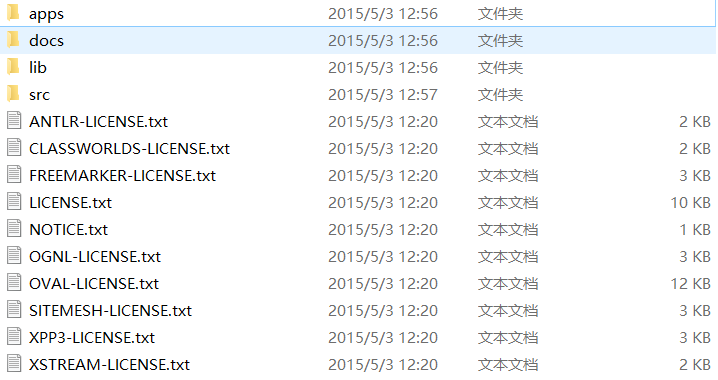
apps中的是示例、docs是文档、lib是类库、src是源码
导包不需要导入lib中全部的包,导入这些即可
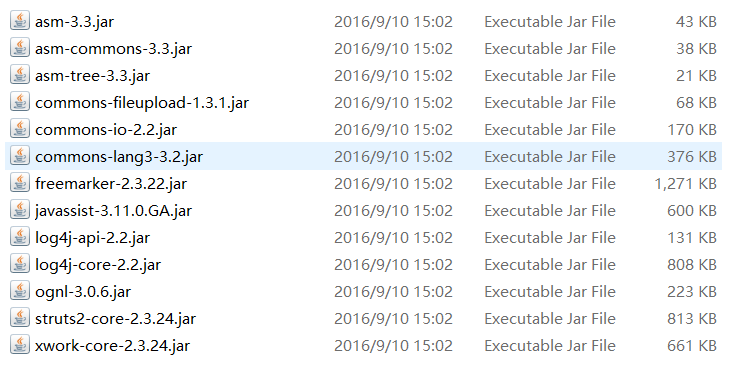
简单写一个Action类:
package hello;

public class HelloAction {

    public String hello(){

        System.out.println("hello world!");

        return "success";

    }

}
导入dtd约束,这里可以省略,只是在编写配置文件的时候没有提示,全凭手打易出错
配置文件:struts.xml(为什么这样写先不做说明,这里只是搭建测试)
<?xml version="1.0" encoding="UTF-8"?>

<!DOCTYPE struts PUBLIC

    "-//Apache Software Foundation//DTD Struts Configuration 2.3//EN"

    "http://struts.apache.org/dtds/struts-2.3.dtd">

<struts>

    <package name="hello" namespace="/hello" extends="struts-default" >

        <action name="HelloAction" class="hello.HelloAction" method="hello" >

            <result name="success">/hello.jsp</result>

        </action>

    </package>

</struts>
下一步至关重要,配置web.xml:
由于Struts2是基于Filter的框架,所以必须配置web.xml:
  <!-- struts2核心过滤器 -->

  <filter>

      <filter-name>struts2</filter-name>

      <filter-class>org.apache.struts2.dispatcher.ng.filter.StrutsPrepareAndExecuteFilter</filter-class>

  </filter>

  <filter-mapping>

      <filter-name>struts2</filter-name>

      <url-pattern>/*</url-pattern>

  </filter-mapping>
一个jsp文件hello.jsp:
<%@ page language="java" contentType="text/html; charset=UTF-8"

    pageEncoding="UTF-8"%>

<!DOCTYPE html PUBLIC "-//W3C//DTD HTML 4.01 Transitional//EN" "http://www.w3.org/TR/html4/loose.dtd">

<html>

<head>

<meta http-equiv="Content-Type" content="text/html; charset=UTF-8">

<title>Insert title here</title>

</head>

<body>

<h1>hello world!</h1>

</body>

</html>
到这里框架搭建完成!
部署到Tomcat服务器,本地测试:
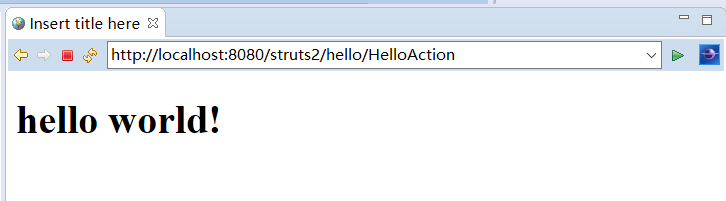
并且在控制台打印hello world!
测试成功!!
流程分析:
1.浏览器中访问....../hello/HelloAction
2.请求交到web.xml的Struts2过滤器,匹配hello和HelloAction
3.过滤器去寻找核心配置文件,/hello匹配namespace属性成功,于是寻找HelloAction类
4.找到HelloAction类,创建出Action对象,调用类的hello方法,打印hello world,返回"success"
5.返回值找到result标签的name属性,匹配成功,转发到hello.jsp
6.最终前端页面显示如图
struts2框架学习笔记1:搭建测试的更多相关文章
- j2ee开发之struts2框架学习笔记
Struts2框架技术重点笔记 1.Struts2 是在webwork基础上发展而来. 2.Struts2 不依赖struts API和 servlet API 3.Struts2提供了拦截器,表现层 ...
- Struts2框架学习笔记--strtus2初识
struts2概述: 1.struts2框架应用于javaEE三层结构中的Web层框架 2.struts2框架是在struts1和webwork基础之上发展的全新框架(脱胎换骨 ,用法完全不一样)ps ...
- Struts2框架学习笔记1
1,框架概述 1.1,什么是框架(了解) 将一些重复性的代码进行封装,简化程序员的编程操作,可以使得程序员在编码中把更多的精力放到业务需求的分析和理解上面,相当于一个半成品软件. 1.2,三大框架(掌 ...
- struts2框架学习笔记2:配置详解
核心配置文件: <?xml version="1.0" encoding="UTF-8"?> <!DOCTYPE struts PUBLIC ...
- struts2框架学习笔记7:struts2标签
三大标签: 1.JSP:脚本,为了替代servlet,已过时 2.JSTL:标准标签库(core.format.sql.xml),还未淘汰的只有core库 3.Struts2标签库:由Struts2开 ...
- struts2框架学习笔记6:拦截器
拦截器是Struts2实现功能的核心部分 拦截器的创建: 第一种: package interceptor; import com.opensymphony.xwork2.ActionInvocati ...
- struts2框架学习笔记5:OGNL表达式
OGNL取值范围分两部分,root.Context两部分 可以放置任何对象作为ROOT,CONTEXT中必须是Map键值对 示例: 准备工作: public void fun1() throws Ex ...
- struts2框架学习笔记4:获取参数
第一种参数获取方式: 编写一个前端页面,提交表单,做示例: <form action="${pageContext.request.contextPath}/Demo1Action&q ...
- struts2框架学习笔记3:获取servletAPI
Struts2存在一个对象ActionContext(本质是Map),可以获得原生的request,response,ServletContext 还可以获得四大域对象(Map),以及param参数( ...
随机推荐
- Junit介绍以及使用
在介绍junit之前,把一些知识点提前了解一下 单元测试是一个对单一实体(类或方法)的测试. 测试用例(Test Case)是为某个特殊目标而编制的一组测试输入.执行条件以及预期结果,以便测试某个程序 ...
- java.io.Flushable 接口
package java.io; import java.io.IOException; /** * 在什么情况下用呢? 缓冲输出到一个流中的情况下,这个流要刷新. */ public interfa ...
- html迪士尼网页实现代码
html body> <div> <!-- 导航设置 --> <header> <nav ...
- mysql 按出现次数排序
SELECT * FROM table a LEFT JOIN (SELECT key,count(*) as c FROM table GROUP BY key ) b on a.key=b.k ...
- EasyChat简易聊天室实现
我是个技术新人,刚刚毕业,平时遇到问题都是在网上查找资料解决,而很多经验都来自园子,于是我也想有自己的园子,把自己的编程快乐与大家分享. 在学校学习的期间,老师带我们做winform,那时候我什么都不 ...
- python--第十四天总结(js)
选择器允许您对元素组或单个元素进行操作. jQuery 选择器 在前面的章节中,我们展示了一些有关如何选取 HTML 元素的实例. 关键点是学习 jQuery 选择器是如何准确地选取您希望应用效果的元 ...
- mysql修改删除You can't specify target table for update in FROM clause的问题
表中出现重复数据,需要删除重复数据,只保留一条 DELETE FROM crm_participant WHERE id IN ( SELECT c.id cid FROM crm_participa ...
- 2015-2016 ACM-ICPC Nordic Collegiate Programming Contest (NCPC 2015)
题目链接 : http://codeforces.com/gym/100781/attachments A-Adjoin the Network 题意大概是有多棵树(也可能是一颗),现在要把它们合并 ...
- NET Core小细节杂记
1.中文编码问题: 01.在net core中,使用中文的编码,要先进行注册: //CodePagesEncodingProvider在包System.Text.Encoding.CodePages中 ...
- 过滤器(Filter)与拦截器(Interceptor)区别
过滤器(Filter)与拦截器(Interceptor)区别 过滤器(Filter) Servlet中的过滤器Filter是实现了javax.servlet.Filter接口的服务器端程序,主要的用途 ...