
Hadoop生态圈-HUE环境部署
Hadoop生态圈-HUE环境部署
作者:尹正杰
版权声明:原创作品,谢绝转载!否则将追究法律责任。
一.HUE简介
1>.HUE的由来
HUE全称是HadoopUser Experience,看这名字就知道怎么回事了吧。没错,直白来说就是Hadoop用户体验,是一个开源的Apache Hadoop UI系统,由Cloudera Desktop演化而来,最后Cloudera公司将其贡献给Apache基金会的Hadoop社区,它是基于Python Web框架Django实现的。通过使用HUE我们可以在浏览器端的Web控制台上与Hadoop集群进行交互来分析处理数据。
2>.官网地址
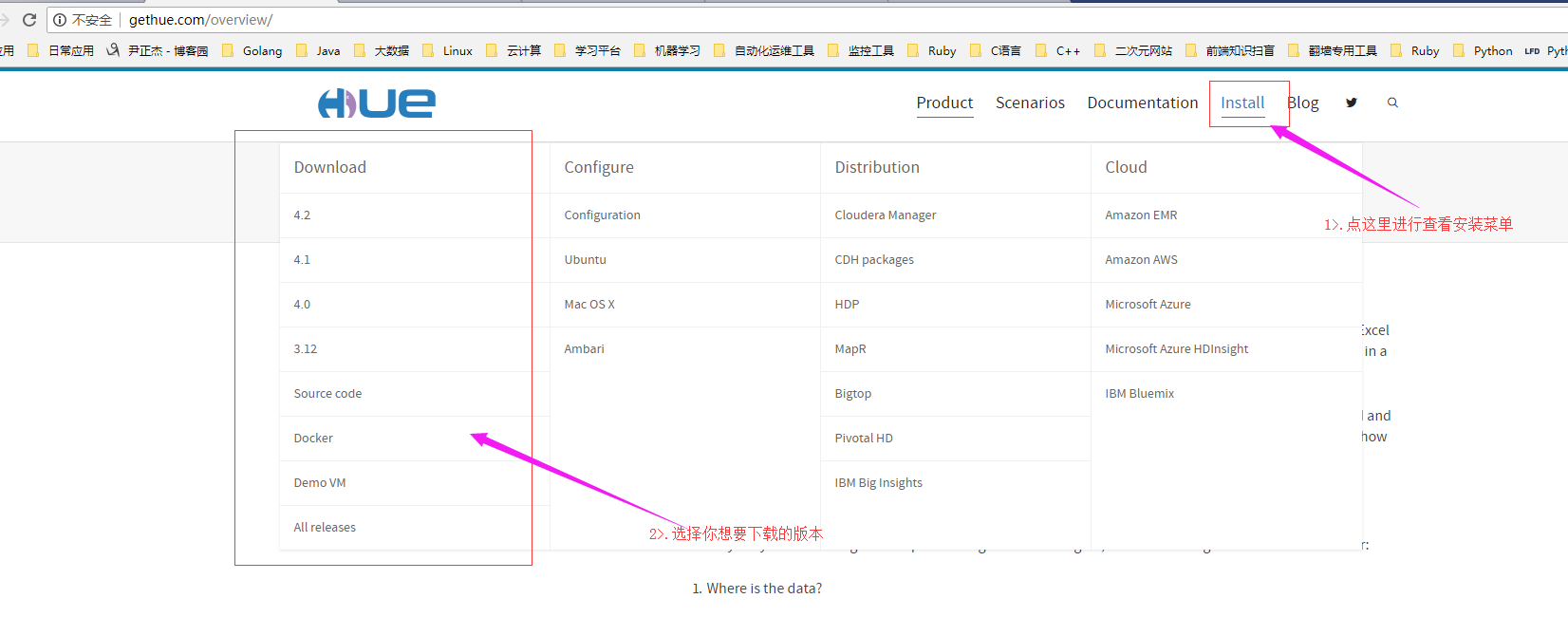
HUE官网地址可参考:http://gethue.com/overview/。
二.HUE安装
1>.部署环境介绍(我使用的是CentOS 7.2的操作系统)
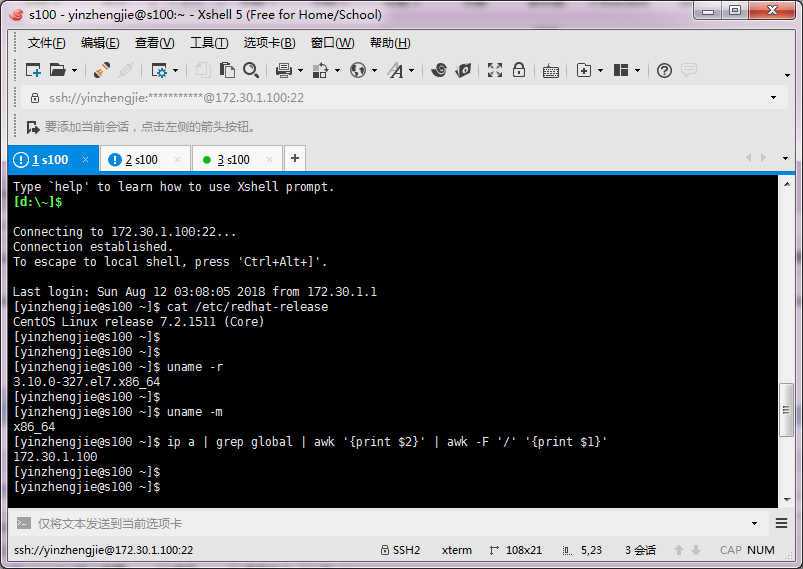
2>.安装开发JDK版本
现在你生成环境用的Java开发版本,关于Java的下载地址可参考官网:http://www.oracle.com/technetwork/java/javase/downloads,下载后通过上传工具(如winscp等工具,或者你也可以使用linux自带的rz命令进行上传)
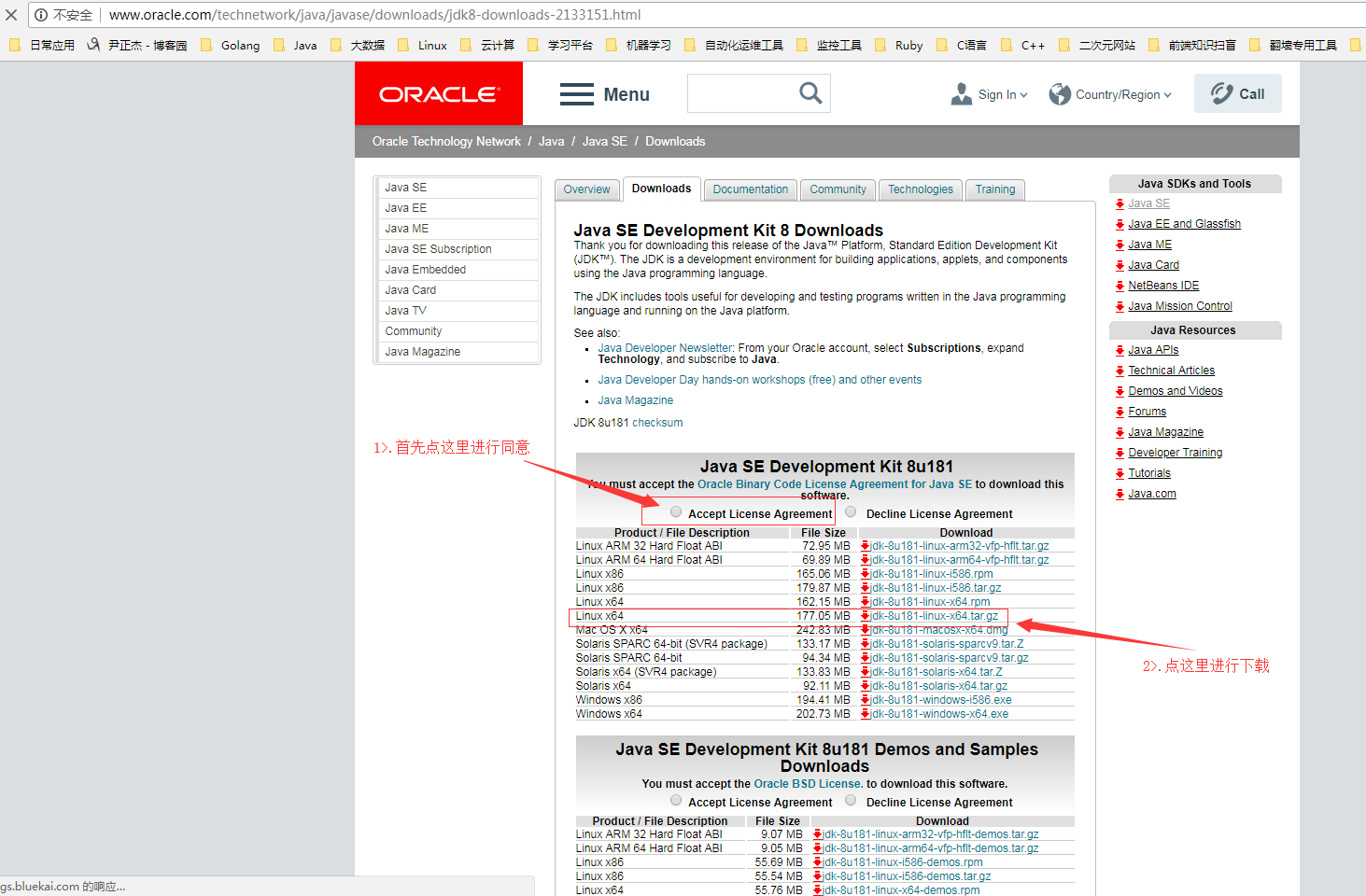
[yinzhengjie@s100 ~]$ sudo yum -y install lrzsz

[sudo] password for yinzhengjie:

Loaded plugins: fastestmirror

Loading mirror speeds from cached hostfile

 * base: mirrors.huaweicloud.com

 * extras: mirrors.huaweicloud.com

 * updates: mirrors.aliyun.com

Resolving Dependencies

--> Running transaction check

---> Package lrzsz.x86_64 :0.12.-.el7 will be installed

--> Finished Dependency Resolution

Dependencies Resolved

============================================================================================================

 Package                Arch                    Version                         Repository             Size

============================================================================================================

Installing:

 lrzsz                  x86_64                  0.12.-.el7                  base                    k

Transaction Summary

============================================================================================================

Install   Package

Total download size:  k

Installed size:  k

Downloading packages:

lrzsz-0.12.-.el7.x86_64.rpm                                                      |   kB  ::

Running transaction check

Running transaction test

Transaction test succeeded

Running transaction

  Installing : lrzsz-0.12.-.el7.x86_64                                                              /

  Verifying  : lrzsz-0.12.-.el7.x86_64                                                              /

Installed:

  lrzsz.x86_64 :0.12.-.el7

Complete!

[yinzhengjie@s100 ~]$
安装linux自带的上传工具命令([yinzhengjie@s100 ~]$ sudo yum -y install lrzsz)
[yinzhengjie@s100 ~]$ ll

total

[yinzhengjie@s100 ~]$ rz                                    #会弹出对话框,选择你要上传的文件即可

[yinzhengjie@s100 ~]$ ll

total

-rw-r--r--.  yinzhengjie yinzhengjie  Aug  : jdk-8u181-linux-x64.tar.gz

[yinzhengjie@s100 ~]$

[yinzhengjie@s100 ~]$ sudo mkdir /soft

[yinzhengjie@s100 ~]$ sudo chown yinzhengjie:yinzhengjie /soft/

[yinzhengjie@s100 ~]$ tar zxf jdk-8u181-linux-x64.tar.gz -C /soft/

[yinzhengjie@s100 ~]$ ln -s /soft/jdk1..0_181/ /soft/jdk

[yinzhengjie@s100 ~]$ ll /soft/

total

lrwxrwxrwx.  yinzhengjie yinzhengjie    Aug  : jdk -> /soft/jdk1..0_181/

drwxr-xr-x.  yinzhengjie yinzhengjie  Jul   : jdk1..0_181

[yinzhengjie@s100 ~]$

[yinzhengjie@s100 ~]$ sudo vi /etc/profile

[yinzhengjie@s100 ~]$ more /etc/profile | tail -                #添加java的环境变量

#ADD JAVA_PATH

JAVA_HOME=/soft/jdk

PATH=$PATH:$JAVA_HOME/bin

[yinzhengjie@s100 ~]$

[yinzhengjie@s100 ~]$ source /etc/profile                        #重新加载系统配置文件,使得配置文件在当前shell下生效

[yinzhengjie@s100 ~]$

[yinzhengjie@s100 ~]$ java -version                                #查看java版本

openjdk version "1.8.0_181"

OpenJDK Runtime Environment (build 1.8.0_181-b13)

OpenJDK -Bit Server VM (build 25.181-b13, mixed mode)

[yinzhengjie@s100 ~]$
3>.准备环境依赖
查看官网安装文档(http://archive.cloudera.com/cdh5/cdh/5/hue-3.7.0-cdh5.3.0/manual.html),我们就可以看到相关的依赖环境如下:(CentOS具体依赖包参考:http://cloudera.github.io/hue/latest/admin-manual/manual.html#installation)
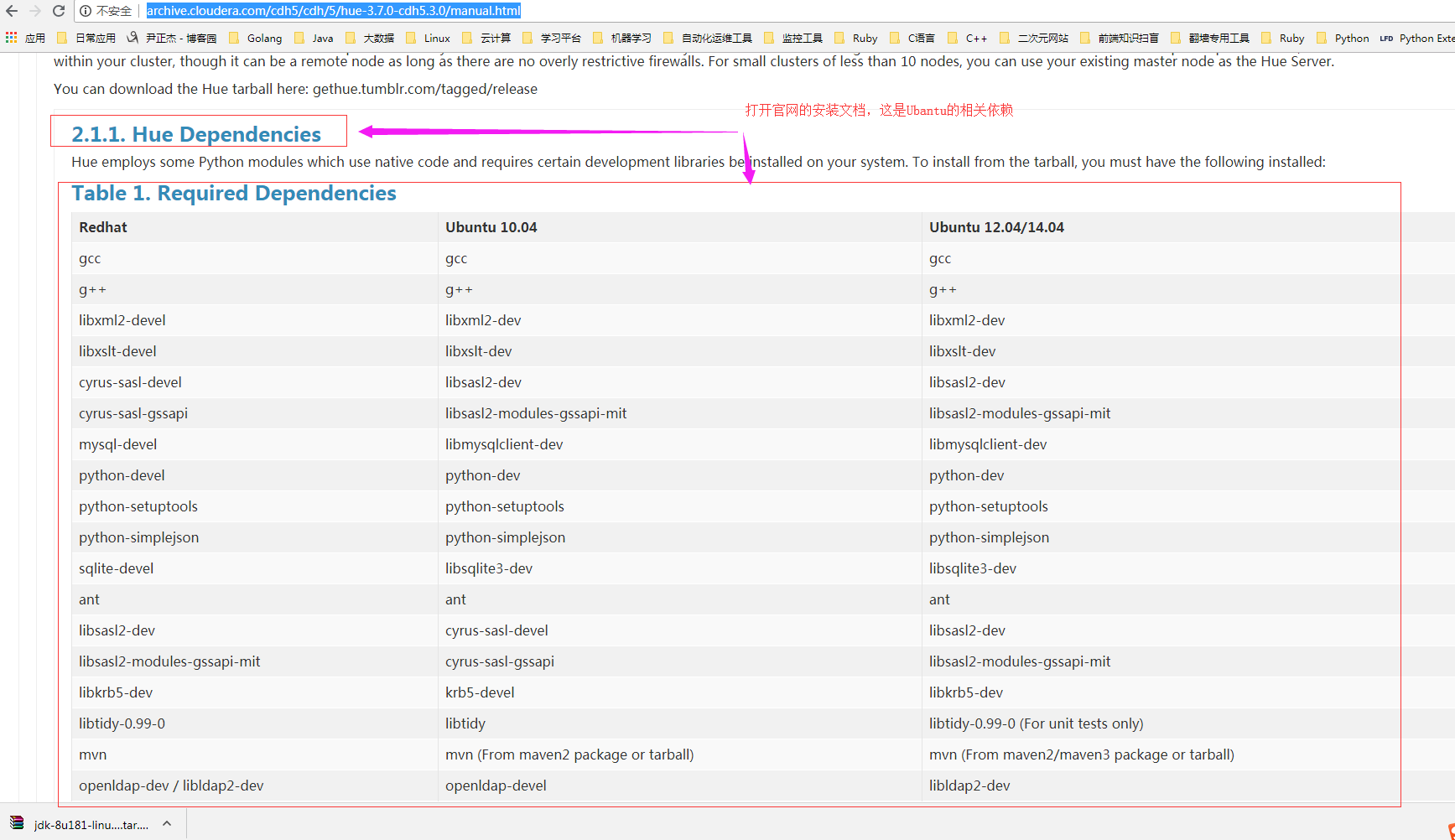
Centos安装操作系统环境如下:
[yinzhengjie@s100 ~]$sudo yum -y install apache-maven ant asciidoc cyrus-sasl-devel cyrus-sasl-gssapi gcc gcc-c++ krb5-devel libxml2-devel libxslt-devel make mysql mysql-devel openldap-devel python-devel sqlite-devel gmp-devel

[sudo] password for yinzhengjie:

Loaded plugins: fastestmirror

Loading mirror speeds from cached hostfile

 * base: mirrors.huaweicloud.com

 * extras: mirrors.huaweicloud.com

 * updates: mirrors.aliyun.com

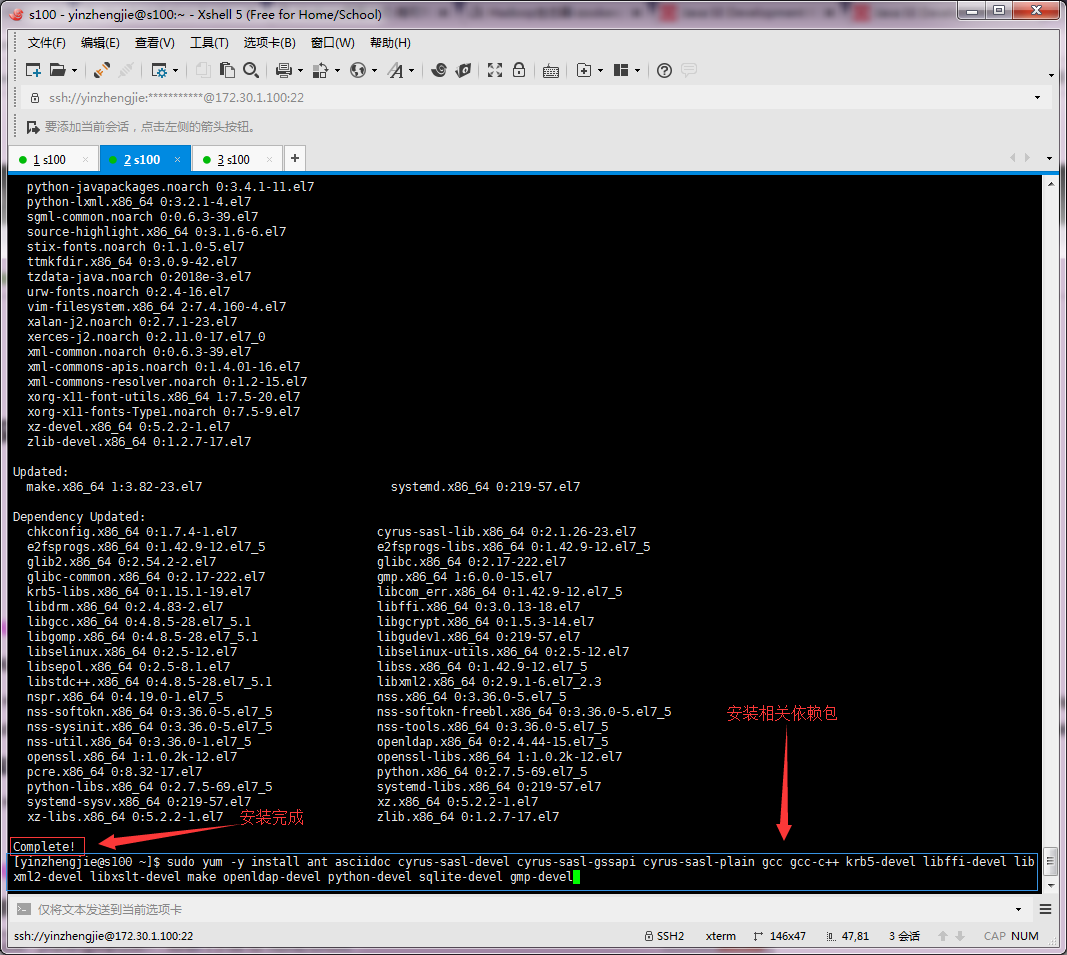
..........      接下来的信息我就省略了,安装过程以及成功后会有以下输出:(见下图)
安装过程如下:
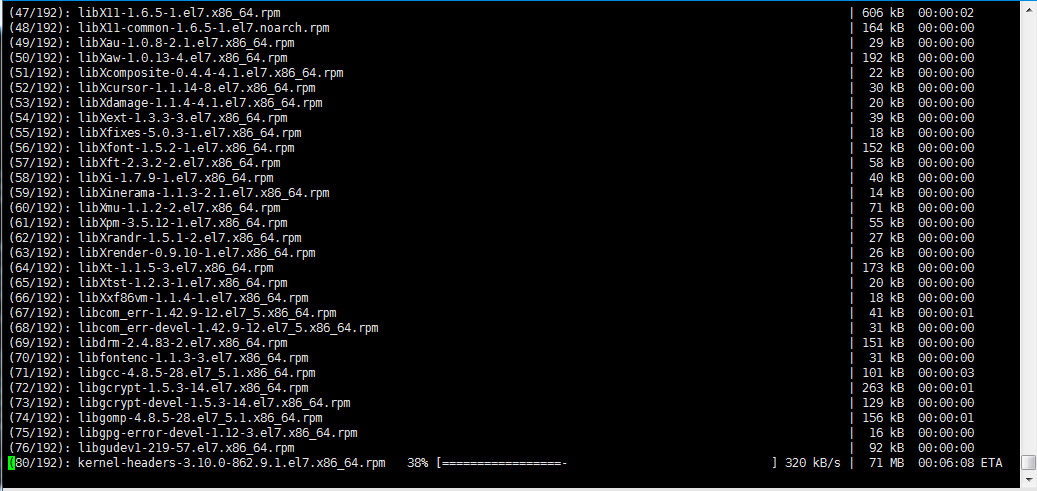
安装成功如下:
4>.下载HUE安装包
[yinzhengjie@s100 ~]$ sudo yum -y install wget

[sudo] password for yinzhengjie:

Loaded plugins: fastestmirror

Loading mirror speeds from cached hostfile

 * base: mirrors.huaweicloud.com

 * extras: mirrors.huaweicloud.com

 * updates: mirrors.aliyun.com

Resolving Dependencies

--> Running transaction check

---> Package wget.x86_64 :1.14-.el7_4. will be installed

--> Finished Dependency Resolution

Dependencies Resolved

============================================================================================================

 Package               Arch                    Version                          Repository             Size

============================================================================================================

Installing:

 wget                  x86_64                  1.14-.el7_4.                  base                   k

Transaction Summary

============================================================================================================

Install   Package

Total download size:  k

Installed size: 2.0 M

Downloading packages:

wget-1.14-.el7_4..x86_64.rpm                                                      |  kB  ::

Running transaction check

Running transaction test

Transaction test succeeded

Running transaction

  Installing : wget-1.14-.el7_4..x86_64                                                              /

  Verifying  : wget-1.14-.el7_4..x86_64                                                              /

Installed:

  wget.x86_64 :1.14-.el7_4.

Complete!

[yinzhengjie@s100 ~]$
安装下载命令wget([yinzhengjie@s100 ~]$ sudo yum -y install wget)
5>.删除安装后的openJDK
温馨提示:使用yum安装这些包的同时,也会自动安装openJDK的依赖,所以,请自行删除安装后的openJDK

[yinzhengjie@s100 ~]$ rpm -qa | grep java

javapackages-tools-3.4.-.el7.noarch

java-1.8.-openjdk-headless-1.8.0.181-.b13.el7_5.x86_64

python-javapackages-3.4.-.el7.noarch

tzdata-java-2018e-.el7.noarch

java-1.8.-openjdk-1.8.0.181-.b13.el7_5.x86_64

java-1.8.-openjdk-devel-1.8.0.181-.b13.el7_5.x86_64

[yinzhengjie@s100 ~]$

[yinzhengjie@s100 ~]$ sudo rpm -e --nodeps python-javapackages-3.4.-.el7.noarch

[yinzhengjie@s100 ~]$ sudo rpm -e --nodeps javapackages-tools-3.4.-.el7.noarch

[yinzhengjie@s100 ~]$ sudo rpm -e --nodeps java-1.8.-openjdk-1.8.0.181-.b13.el7_5.x86_64

[yinzhengjie@s100 ~]$ sudo rpm -e --nodeps java-1.8.-openjdk-devel-1.8.0.181-.b13.el7_5.x86_64

[yinzhengjie@s100 ~]$ sudo rpm -e --nodeps java-1.8.-openjdk-headless-1.8.0.181-.b13.el7_5.x86_64

[yinzhengjie@s100 ~]$ rpm -qa | grep java

tzdata-java-2018e-.el7.noarch

[yinzhengjie@s100 ~]$
6>.解压HUE安装包
[yinzhengjie@s100 ~]$ ll

total

-rw-r--r--.  yinzhengjie yinzhengjie   Sep    hue-3.7.-cdh5.3.6.tar.gz

-rw-r--r--.  yinzhengjie yinzhengjie  Aug  : jdk-8u181-linux-x64.tar.gz

[yinzhengjie@s100 ~]$

[yinzhengjie@s100 ~]$ tar -zxf hue-3.7.-cdh5.3.6.tar.gz -C /soft/

[yinzhengjie@s100 ~]$ ll /soft/

total

drwxr-xr-x.  yinzhengjie yinzhengjie  Jul    hue-3.7.-cdh5.3.6

lrwxrwxrwx.  yinzhengjie yinzhengjie    Aug  : jdk -> /soft/jdk1..0_181/

drwxr-xr-x.  yinzhengjie yinzhengjie  Jul   : jdk1..0_181

[yinzhengjie@s100 ~]$
7>.编译HUE
[yinzhengjie@s100 ~]$ ll /soft/

total

drwxr-xr-x.  yinzhengjie yinzhengjie  Jul    hue-3.7.-cdh5.3.6

lrwxrwxrwx.  yinzhengjie yinzhengjie    Aug  : jdk -> /soft/jdk1..0_181/

drwxr-xr-x.  yinzhengjie yinzhengjie  Jul   : jdk1..0_181

[yinzhengjie@s100 ~]$ cd /soft/hue-3.7.-cdh5.3.6/

[yinzhengjie@s100 hue-3.7.-cdh5.3.6]$ ll

total

drwxr-xr-x.  yinzhengjie yinzhengjie   Jul    apps

drwxr-xr-x.   yinzhengjie yinzhengjie   Jul    cloudera

drwxr-xr-x.   yinzhengjie yinzhengjie     Jul    desktop

drwxr-xr-x.   yinzhengjie yinzhengjie   Jul    docs

drwxr-xr-x.   yinzhengjie yinzhengjie     Jul    ext

-rw-r--r--.   yinzhengjie yinzhengjie  Jul    LICENSE.txt

-rw-r--r--.   yinzhengjie yinzhengjie   Jul    Makefile

-rw-r--r--.   yinzhengjie yinzhengjie   Jul    Makefile.sdk

-rw-r--r--.   yinzhengjie yinzhengjie   Jul    Makefile.vars

-rw-r--r--.   yinzhengjie yinzhengjie   Jul    Makefile.vars.priv

drwxr-xr-x.   yinzhengjie yinzhengjie     Jul    maven

-rw-r--r--.   yinzhengjie yinzhengjie    Jul    NOTICE.txt

-rw-r--r--.   yinzhengjie yinzhengjie   Jul    README

drwxr-xr-x.   yinzhengjie yinzhengjie     Jul    tools

-rw-r--r--.   yinzhengjie yinzhengjie    Jul    VERSION

[yinzhengjie@s100 hue-3.7.-cdh5.3.6]$ make apps            #开始编译HUE

--- Creating virtual environment at /soft/hue-3.7.-cdh5.3.6/build/env

python2. /soft/hue-3.7.-cdh5.3.6/tools/virtual-bootstrap/virtual-bootstrap.py \

    -qq --no-site-packages /soft/hue-3.7.-cdh5.3.6/build/env

--- /soft/hue-3.7.-cdh5.3.6/build/env ready

make[]: Entering directory `/soft/hue-3.7.-cdh5.3.6/desktop'

make -C core env-install

make[]: Entering directory `/soft/hue-3.7.-cdh5.3.6/desktop/core'

--- Building egg for markdown

running bdist_egg

running egg_info

.........   #编译时会出现下图的报错信息

解决方案:
解决方案:

[yinzhengjie@s100 hue-3.7.-cdh5.3.6]$ sudo vi /usr/include/openssl/x509.h

[sudo] password for yinzhengjie:             #删除以下两行:

     X509_REVOKED *X509_REVOKED_dup(X509_REVOKED *rev);

   X509_REQ *X509_REQ_dup(X509_REQ *req);

[yinzhengjie@s100 hue-3.7.-cdh5.3.6]$
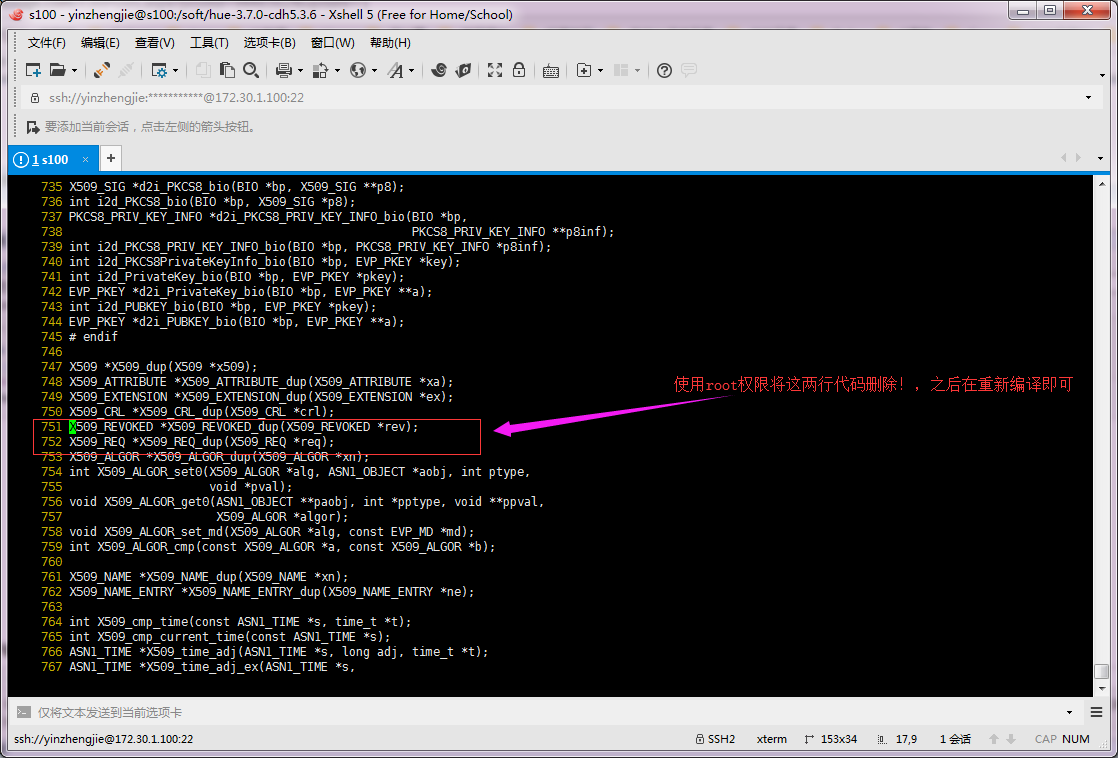
使用root权限删除图中的751和752行代码,然后在重新编译即可。编译成功截图如下:

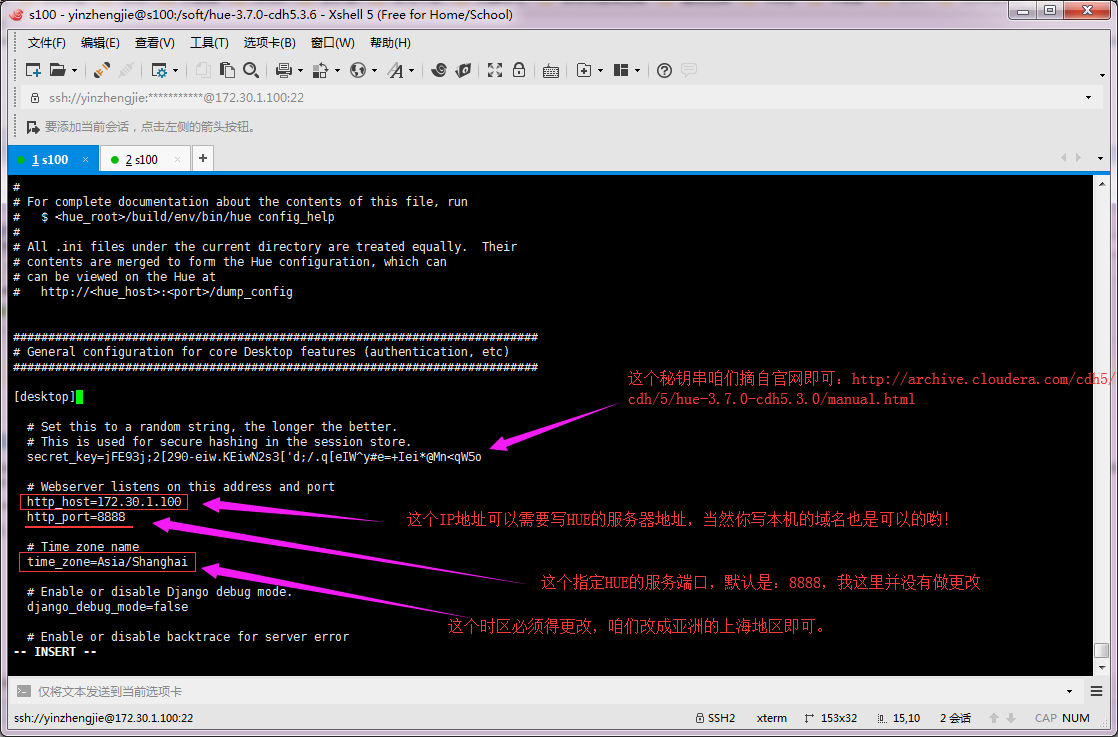
8>.配置HUE
[yinzhengjie@s100 hue-3.7.-cdh5.3.6]$ vi desktop/conf/hue.ini

[yinzhengjie@s100 hue-3.7.-cdh5.3.6]$ grep secret_key= desktop/conf/hue.ini

  secret_key=jFE93j;[-eiw.KEiwN2s3['d;/.q[eIW^y#e=+Iei*@Mn<qW5o

[yinzhengjie@s100 hue-3.7.-cdh5.3.6]$

[yinzhengjie@s100 hue-3.7.-cdh5.3.6]$ grep http_host= desktop/conf/hue.ini

  http_host=172.30.1.100

[yinzhengjie@s100 hue-3.7.-cdh5.3.6]$ grep http_port= desktop/conf/hue.ini

  http_port=

[yinzhengjie@s100 hue-3.7.-cdh5.3.6]$ grep time_zone= desktop/conf/hue.ini

  time_zone=Asia/Shanghai

[yinzhengjie@s100 hue-3.7.-cdh5.3.6]$
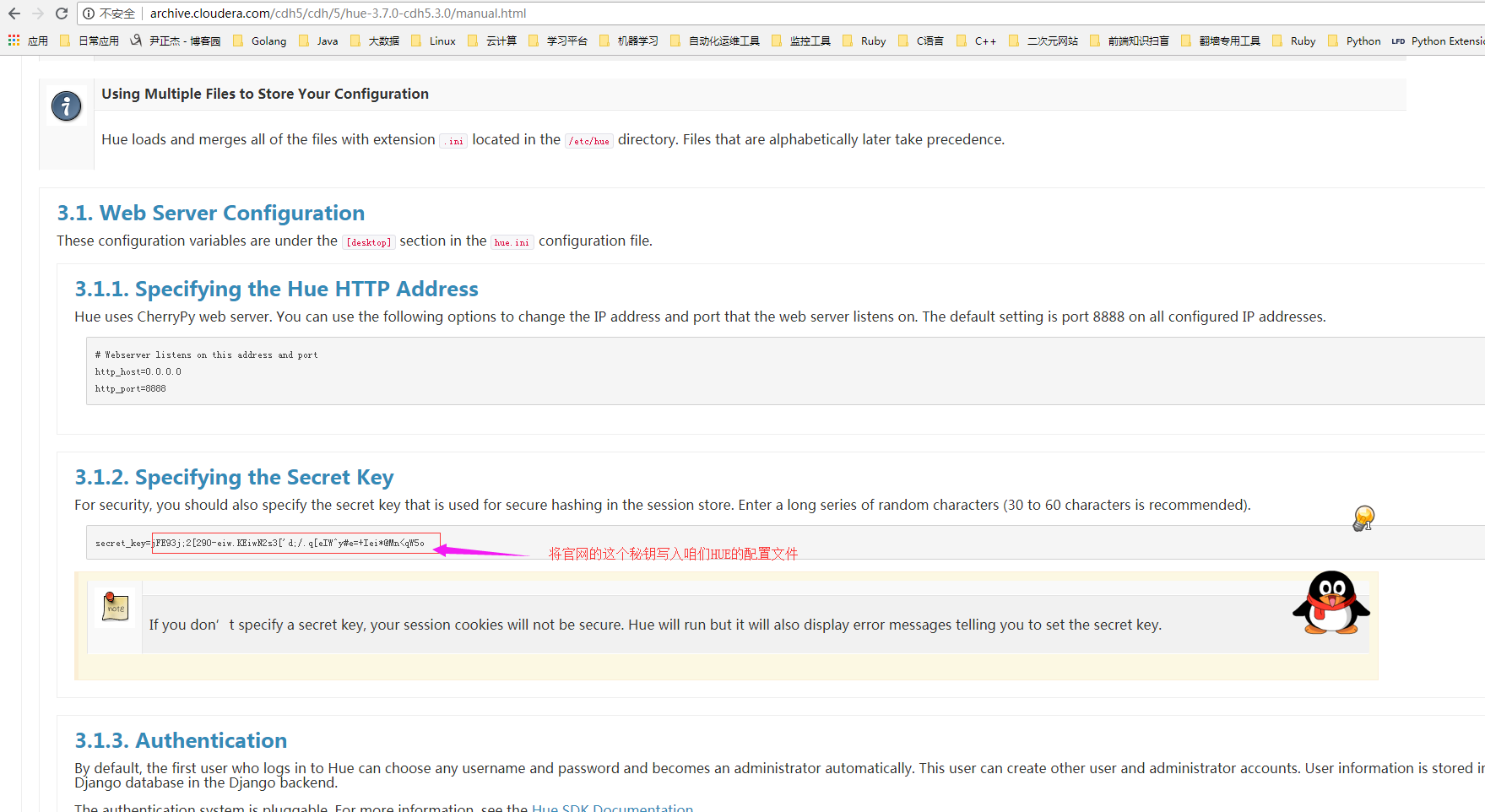
具体配置如下:
9>.启动HUE

10>.关闭服务器防火墙以及selinux服务。
[yinzhengjie@s100 ~]$ systemctl stop firewalld                    #临时关闭防火墙

[yinzhengjie@s100 ~]$ systemctl disable firewalld                #禁用防火墙的服务开机自启

[yinzhengjie@s100 ~]$

[yinzhengjie@s100 ~]$ su root

Password:

[root@s100 yinzhengjie]# cat /etc/selinux/config

# This file controls the state of SELinux on the system.

# SELINUX= can take one of these three values:

#     enforcing - SELinux security policy is enforced.

#     permissive - SELinux prints warnings instead of enforcing.

#     disabled - No SELinux policy is loaded.

SELINUX=enforcing

# SELINUXTYPE= can take one of three two values:

#     targeted - Targeted processes are protected,

#     minimum - Modification of targeted policy. Only selected processes are protected.

#     mls - Multi Level Security protection.

SELINUXTYPE=targeted

[root@s100 yinzhengjie]#

[root@s100 yinzhengjie]# getenforce

Enforcing

[root@s100 yinzhengjie]#

[root@s100 yinzhengjie]# sed -i 's#SELINUX=enforcing#SELINUX=disabled#' /etc/selinux/config

[root@s100 yinzhengjie]#

[root@s100 yinzhengjie]# cat /etc/selinux/config  | grep SELINUX= | grep -v ^#

SELINUX=disabled

[root@s100 yinzhengjie]#
11>.访问HUE的webUI并设置管理员账号
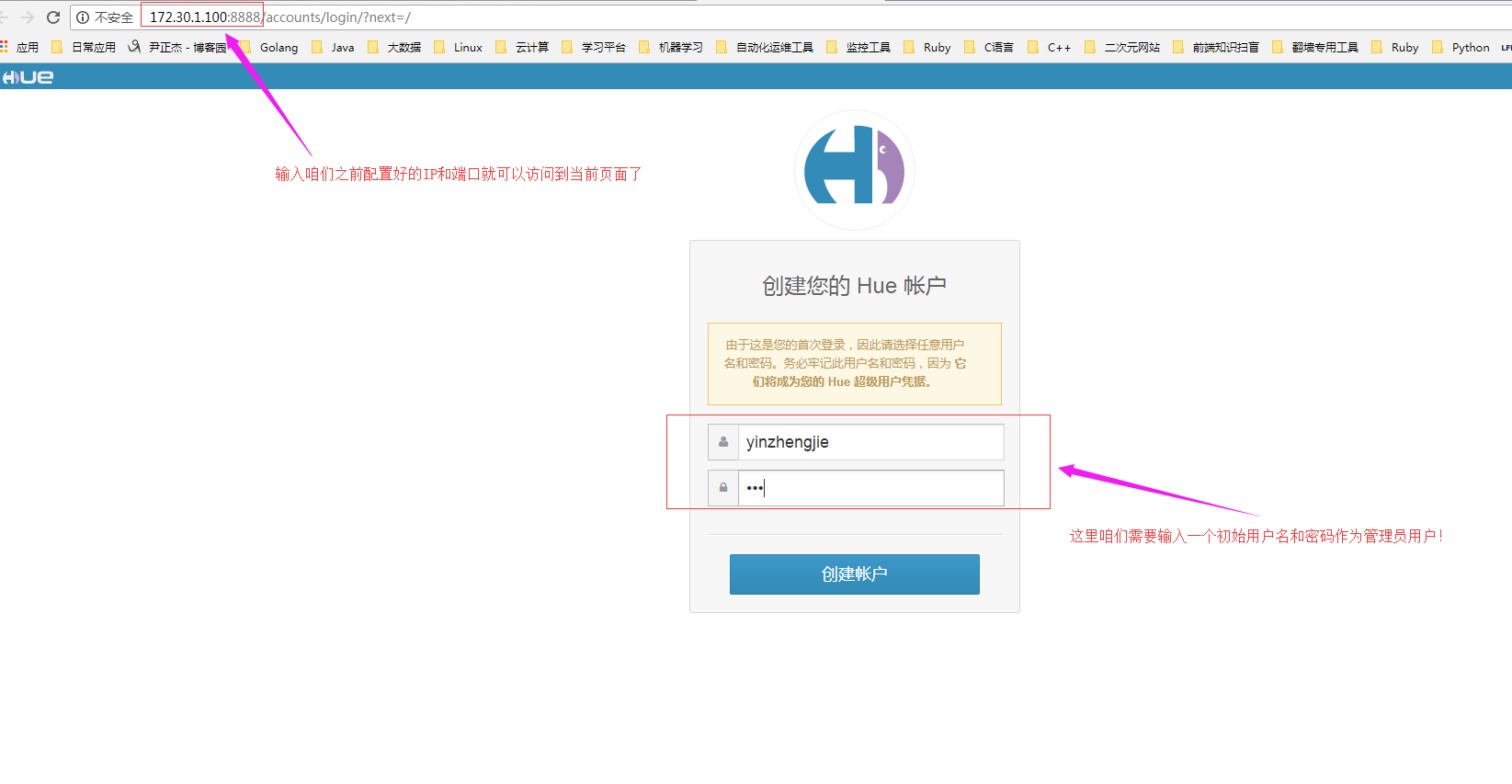
Duang~如果你出现以下界面说明你HUE启动成功啦!

三.通过git方式安装HUE
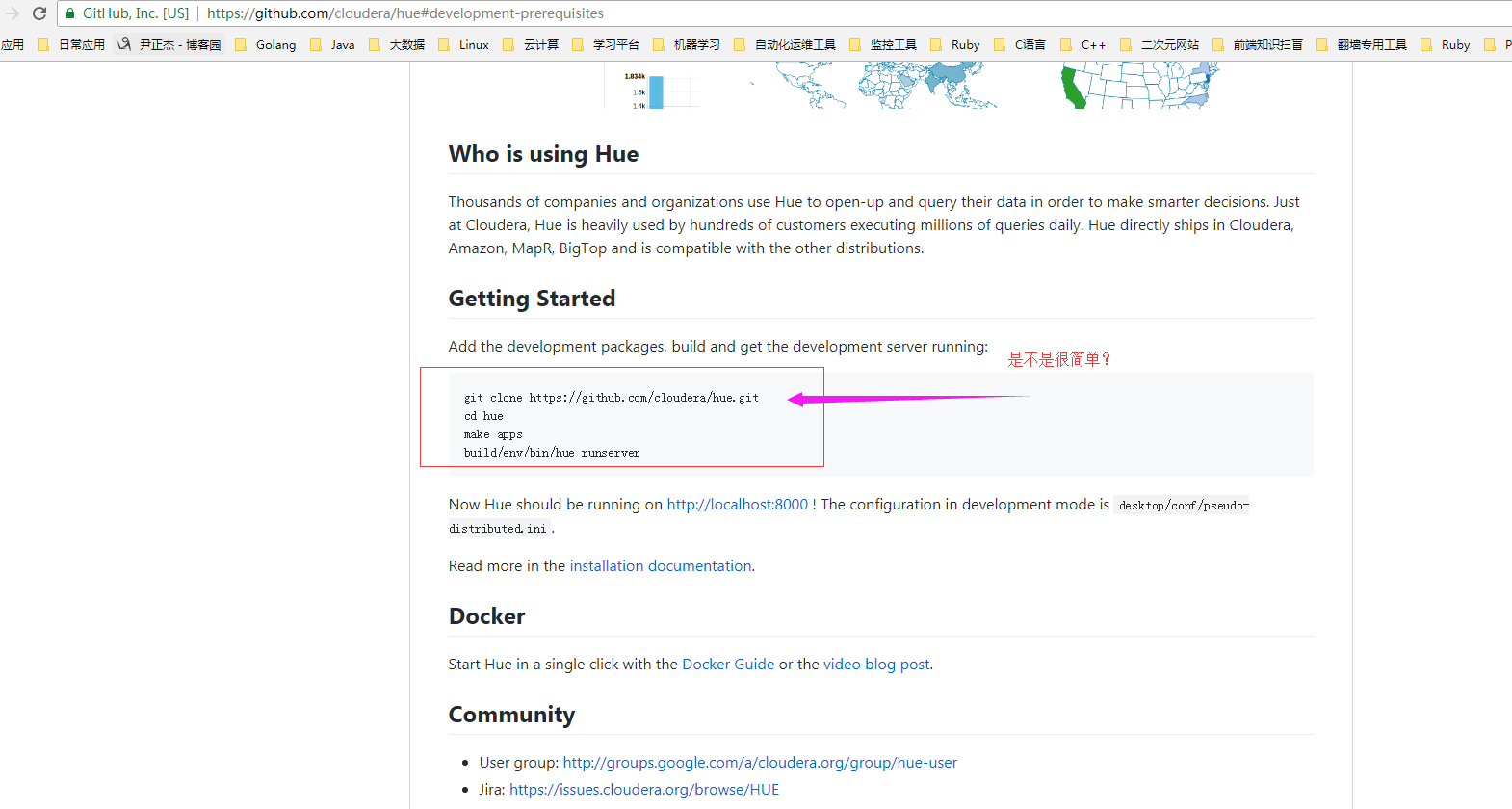
经查阅资料,发现github上也有教程教你如何安装HUE,需要你本地服务器安装git命令,详情请参考:https://github.com/cloudera/hue#development-prerequisites
[yinzhengjie@s100 ~]$ sudo yum -y install git

[sudo] password for yinzhengjie:

Loaded plugins: fastestmirror

Loading mirror speeds from cached hostfile

 * base: mirrors.huaweicloud.com

 * extras: mirrors.huaweicloud.com

 * updates: mirrors.aliyun.com

Resolving Dependencies

--> Running transaction check

---> Package git.x86_64 :1.8.3.1-.el7_5 will be installed

--> Processing Dependency: perl-Git = 1.8.3.1-.el7_5 for package: git-1.8.3.1-.el7_5.x86_64

--> Processing Dependency: rsync for package: git-1.8.3.1-.el7_5.x86_64

--> Processing Dependency: perl(Term::ReadKey) for package: git-1.8.3.1-.el7_5.x86_64

--> Processing Dependency: perl(Git) for package: git-1.8.3.1-.el7_5.x86_64

--> Processing Dependency: perl(Error) for package: git-1.8.3.1-.el7_5.x86_64

--> Processing Dependency: libgnome-keyring.so.()(64bit) for package: git-1.8.3.1-.el7_5.x86_64

--> Running transaction check

---> Package libgnome-keyring.x86_64 :3.12.-.el7 will be installed

---> Package perl-Error.noarch :0.17020-.el7 will be installed

---> Package perl-Git.noarch :1.8.3.1-.el7_5 will be installed

---> Package perl-TermReadKey.x86_64 :2.30-.el7 will be installed

---> Package rsync.x86_64 :3.1.-.el7 will be installed

--> Finished Dependency Resolution

Dependencies Resolved

==========================================================================================================================================================

 Package                                  Arch                           Version                                    Repository                       Size

==========================================================================================================================================================

Installing:

 git                                      x86_64                         1.8.3.1-.el7_5                           updates                         4.4 M

Installing for dependencies:

 libgnome-keyring                         x86_64                         3.12.-.el7                               base                             k

 perl-Error                               noarch                         :0.17020-.el7                            base                              k

 perl-Git                                 noarch                         1.8.3.1-.el7_5                           updates                           k

 perl-TermReadKey                         x86_64                         2.30-.el7                                base                              k

 rsync                                    x86_64                         3.1.-.el7                                base                             k

Transaction Summary

==========================================================================================================================================================

Install   Package (+ Dependent packages)

Total download size: 5.0 M

Installed size:  M

Downloading packages:

(/): perl-TermReadKey-2.30-.el7.x86_64.rpm                                                                                     |   kB  ::

(/): libgnome-keyring-3.12.-.el7.x86_64.rpm                                                                                    |  kB  ::

(/): perl-Error-0.17020-.el7.noarch.rpm                                                                                         |   kB  ::

(/): perl-Git-1.8.3.1-.el7_5.noarch.rpm                                                                                        |   kB  ::

(/): rsync-3.1.-.el7.x86_64.rpm                                                                                                |  kB  ::

(/): git-1.8.3.1-.el7_5.x86_64.rpm                                                                                             | 4.4 MB  ::

----------------------------------------------------------------------------------------------------------------------------------------------------------

Total                                                                                                                     1.7 MB/s | 5.0 MB  ::

Running transaction check

Running transaction test

Transaction test succeeded

Running transaction

Warning: RPMDB altered outside of yum.

** Found  pre-existing rpmdb problem(s), 'yum check' output follows:

ant-1.9.-.el7.noarch has missing requires of java-devel >= ('', '1.5.0', None)

ant-1.9.-.el7.noarch has missing requires of jpackage-utils

ant-1.9.-.el7.noarch has missing requires of jpackage-utils >= ('', '1.7.5', None)

xalan-j2-2.7.-.el7.noarch has missing requires of jpackage-utils

xerces-j2-2.11.-.el7_0.noarch has missing requires of java

xerces-j2-2.11.-.el7_0.noarch has missing requires of jpackage-utils

xerces-j2-2.11.-.el7_0.noarch has missing requires of jpackage-utils

xml-commons-apis-1.4.-.el7.noarch has missing requires of java

xml-commons-apis-1.4.-.el7.noarch has missing requires of jpackage-utils

xml-commons-apis-1.4.-.el7.noarch has missing requires of jpackage-utils

xml-commons-resolver-1.2-.el7.noarch has missing requires of jpackage-utils

xml-commons-resolver-1.2-.el7.noarch has missing requires of jpackage-utils

  Installing : :perl-Error-0.17020-.el7.noarch                                                                                                      /

  Installing : rsync-3.1.-.el7.x86_64                                                                                                               /

  Installing : perl-TermReadKey-2.30-.el7.x86_64                                                                                                    /

  Installing : libgnome-keyring-3.12.-.el7.x86_64                                                                                                   /

  Installing : perl-Git-1.8.3.1-.el7_5.noarch                                                                                                       /

  Installing : git-1.8.3.1-.el7_5.x86_64                                                                                                            /

  Verifying  : git-1.8.3.1-.el7_5.x86_64                                                                                                            /

  Verifying  : libgnome-keyring-3.12.-.el7.x86_64                                                                                                   /

  Verifying  : perl-TermReadKey-2.30-.el7.x86_64                                                                                                    /

  Verifying  : :perl-Error-0.17020-.el7.noarch                                                                                                      /

  Verifying  : rsync-3.1.-.el7.x86_64                                                                                                               /

  Verifying  : perl-Git-1.8.3.1-.el7_5.noarch                                                                                                       /

Installed:

  git.x86_64 :1.8.3.1-.el7_5

Dependency Installed:

  libgnome-keyring.x86_64 :3.12.-.el7  perl-Error.noarch :0.17020-.el7  perl-Git.noarch :1.8.3.1-.el7_5  perl-TermReadKey.x86_64 :2.30-.el7

  rsync.x86_64 :3.1.-.el7

Complete!

[yinzhengjie@s100 ~]$
安装git([yinzhengjie@s100 ~]$ sudo yum -y install git)
安装完git后按照GitHub的介绍,安装相应的软件。
Hadoop生态圈-HUE环境部署的更多相关文章
- Hadoop生态圈-离线方式部署Cloudera Manager5.15.1
Hadoop生态圈-离线方式部署Cloudera Manager5.15.1 作者:尹正杰 版权声明:原创作品,谢绝转载!否则将追究法律责任. 到目前位置,Cloudera Manager和CDH最新 ...
- Hadoop生态圈-zookeeper完全分布式部署
Hadoop生态圈-zookeeper完全分布式部署 作者:尹正杰 版权声明:原创作品,谢绝转载!否则将追究法律责任. 本篇博客部署是建立在Hadoop高可用基础之上的,关于Hadoop高可用部署请参 ...
- Hadoop生态圈-通过CDH5.15.1部署spark1.6与spark2.3.0的版本兼容运行
Hadoop生态圈-通过CDH5.15.1部署spark1.6与spark2.3.0的版本兼容运行 作者:尹正杰 版权声明:原创作品,谢绝转载!否则将追究法律责任. 在我的CDH5.15.1集群中,默 ...
- Hadoop生态圈-CentOs7.5单机部署ClickHouse
Hadoop生态圈-CentOs7.5单机部署ClickHouse 作者:尹正杰 版权声明:原创作品,谢绝转载!否则将追究法律责任. 到了新的公司,认识了新的同事,生产环境也得你去适应新的集群环境,我 ...
- Hadoop生态圈-基于yum源的方式部署Cloudera Manager5.15.1
Hadoop生态圈-基于yum源的方式部署Cloudera Manager5.15.1 作者:尹正杰 版权声明:原创作品,谢绝转载!否则将追究法律责任. 我之前分享过关于离线方式部署Cloudera ...
- Hadoop生态圈-Oozie部署实战
Hadoop生态圈-Oozie部署实战 作者:尹正杰 版权声明:原创作品,谢绝转载!否则将追究法律责任. 一.Oozie简介 1>.什么是Oozie Oozie英文翻译为:驯象人.一个基于工作流 ...
- Hadoop生态圈-Kafka的完全分布式部署
Hadoop生态圈-Kafka的完全分布式部署 作者:尹正杰 版权声明:原创作品,谢绝转载!否则将追究法律责任. 本篇博客主要内容就是搭建Kafka完全分布式,它是在kafka本地模式(https:/ ...
- Hadoop生态圈-Kafka的本地模式部署
Hadoop生态圈-Kafka的本地模式部署 作者:尹正杰 版权声明:原创作品,谢绝转载!否则将追究法律责任. 一.Kafka简介 1>.什么是JMS 答:在Java中有一个角消息系统的东西,我 ...
- Hadoop生态圈-flume日志收集工具完全分布式部署
Hadoop生态圈-flume日志收集工具完全分布式部署 作者:尹正杰 版权声明:原创作品,谢绝转载!否则将追究法律责任. 目前为止,Hadoop的一个主流应用就是对于大规模web日志的分析和处理 ...
随机推荐
- Linux内核分析第八周总结
第八章 进程的切换和系统的一般执行过程 进程调度与进程调度的时机分析 第一种分类: I/O密集型(I/O-bound):频繁的进行I/O,通常会花费很多时间等待I/O操作的完成 CPU密集型(CPU- ...
- poj 1723 SOLDIERS 带权中位数
题目 http://poj.org/problem?id=1723 题解 带权中位数类型的题目~ 可以先考虑降维,最后集合的y坐标,明显是y坐标的中位数的位置,容易求出y方向的贡献res_y.比较麻烦 ...
- “数学口袋精灵”App的第三个Sprint计划----开发日记
一.现状 上一阶段基本完成一个小游戏,游戏具有:随机产生算式,判断对错功能.通过轻快的背景音乐,音效,给玩家提供一个良好的氛围. 二.任务认领 完成界面,基本功能后的后续任务: 冯美欣:设计&qu ...
- SpringMVC一例 是否需要重定向
在ASP.NET MVC下: return view("List") 和 return RedirectToAction("List") 百度知道的最佳答案: ...
- No input file specified ci
1. php.ini(/etc/php5/cgi/php.ini)的配置中这两项cgi.fix_pathinfo=1 (这个是自己添加的)
- 安装rlwrap 的简单方法
1. 下载安装 epel包 rpm -Uvh https://dl.fedoraproject.org/pub/epel/epel-release-latest-7.noarch.rpm 2. 安装r ...
- CSS 居中(拿来主义自用)
居中是我们使用css来布局时常遇到的情况.使用css来进行居中时,有时一个属性就能搞定,有时则需要一定的技巧才能兼容到所有浏览器,本文就居中的一些常用方法做个简单的介绍. 注:本文所讲方法除了特别说明 ...
- hdu 4685(强连通分量+二分图)
题目链接:http://acm.hdu.edu.cn/showproblem.php?pid=4685 题意:n个王子和m个公主,王子只能和他喜欢的公主结婚,公主可以和所有的王子结婚,输出所有王子可能 ...
- rabbitmq代码配置
package com.qukoucai.test; import com.rabbitmq.client.AMQP;import com.rabbitmq.client.AMQP.BasicProp ...
- caffe中的lr_policy
// The learning rate decay policy. The currently implemented learning rate // policies are as follow ...