
s32 kickstart 批量自动安装系统
1. 自动安装操作系统
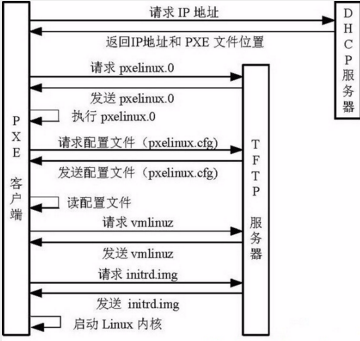
2.kickstart自动安装操作系统的原理
3.kickstart的架构
4.安装kickstart
4.0 环境
[root@m01 ~]# cat /etc/redhat-release

CentOS release 6.9 (Final)

[root@m01 ~]# uname -r

2.6.-.el6.x86_64

[root@m01 ~]# getenforce

Disabled

[root@m01 ~]# /etc/init.d/iptables status

iptables: Firewall is not running.

[root@m01 ~]# hostname -I

10.0.0.21 172.16.1.21
4.1 安装DHCP
yum -y install dhcp

cat >>/etc/dhcp/dhcpd.conf<<EOF

subnet 172.16.1.0 netmask 255.255.255.0 {

range 172.16.1.100 172.16.1.200;

option subnet-mask 255.255.255.0;

default-lease-time ;

max-lease-time ;

next-server 172.16.1.21;

filename "/pxelinux.0";

}

EOF

100个IP同时安装50台  --> 初始化了两次网络 【第一次dhcp,第五次应答文件】

range 172.16.1.100 172.16.1.200;      # 可分配的起始IP-结束IP

option subnet-mask 255.255.255.0;      # 设定netmask

default-lease-time ;              # 设置默认的IP租用期限

max-lease-time ;                   # 设置最大的IP租用期限

next-server 172.16.1.21;               # 告知客户端TFTP服务器的ip

filename "/pxelinux.0";              # 告知客户端从TFTP根目录下载pxelinux.0文件

一千台机器装系统    一次装23台【24口交换机性价比最高】  一台安装服务器
- tailf /var/log/messages
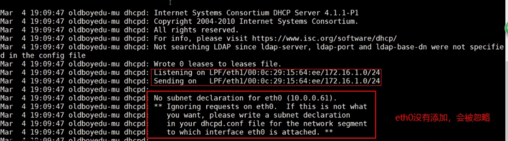
- /etc/init.d/dhcpd start
4.2 安装TFTP
yum -y install tftp-server

# 配置

sed -i.ori '14s#yes#no#' /etc/xinetd.d/tftp

# 启动

/etc/init.d/xinetd start

# 寻找pxelinux.0启动文件

yum -y install syslinux

cp /usr/share/syslinux/pxelinux. /var/lib/tftpboot/

# 找配置文件

mkdir -p /var/www/html/CentOS6.

mount /dev/cdrom /var/www/html/CentOS6.

cp -a /var/www/html/CentOS6./isolinux/* /var/lib/tftpboot/

mkdir -p /var/lib/tftpboot/pxelinux.cfg

# 配置文件default

\cp /var/www/html/CentOS6.9/isolinux/isolinux.cfg /var/lib/tftpboot/pxelinux.cfg/default
4.3 安装HTTP
yum -y install httpd

/etc/init.d/httpd start


----

curl http://172.16.1.21/CentOS6.9/

http://172.16.1.21/CentOS6.9/
4.4 配置自动化安装的default
cat>/var/lib/tftpboot/pxelinux.cfg/default<<EOF

default ks

prompt

label ks

  kernel vmlinuz

  append initrd=initrd.img ks=http://172.16.1.21/ks_config/CentOS-6.9-ks.cfg ksdevice=eth1

EOF
4.5 自动应答文件
./root/anaconda-ks.cfg 这是安装程序自动生成的,

  作用1:告诉我们系统安装的信息;

  作用2:可以直接用(模仿)这个文件再次装系统

.Centos提供了一个图形化的kickstart配置工具。

.根据ks文件语法编辑一个ks文件

    ks文件分为3段

    命令段

    包组段

    脚本段
# Kickstart Configurator for CentOS 6.7 by lewen
install
url --url="http://172.16.1.21/CentOS6.9/"
text
lang en_US.UTF-
keyboard us
zerombr
bootloader --location=mbr --driveorder=sda --append="crashkernel=auto rhgb quiet"
network --bootproto=dhcp --device=eth1 --onboot=yes --noipv6 --hostname=lewen-kick
network --bootproto=dhcp --device=eth0 --onboot=yes --noipv6
timezone --utc Asia/Shanghai
authconfig --enableshadow --passalgo=sha512
rootpw --iscrypted $$X20eRtuZhkHznTb4$dK0BJByOSAWSDD8jccLVFz0CscijS9ldMWwpoCw/ZEjYw2BTQYGWlgKsn945fFTjRC658UXjuocwJbAjVI5D6/
clearpart --all --initlabel
part /boot --fstype=ext4 --asprimary --size=
part swap --size=
part / --fstype=ext4 --grow --asprimary --size=
firstboot --disable
selinux --disabled
firewall --disabled
logging --level=info
reboot
%packages
@base
@compat-libraries
@debugging
@development
tree
nmap
sysstat
lrzsz
dos2unix
telnet
%post
wget -O /tmp/optimization.sh http://172.16.1.21/ks_config/optimization.sh &>/dev/null
/bin/sh /tmp/optimization.sh
%end
vim /var/www/html/ks_config/optimization.sh
#!/bin/bash
. /etc/init.d/functions
Ip=172.16.1.21
Port=
ConfigDir=ks_config
# Judge Http server is ok?
PortNum=`nmap $Ip -p $Port >/dev/null|grep open|wc -l`
[ $PortNum -lt ] && {
echo "Http server is bad!"
exit
}
# Defined result function
function Msg(){
if [ $? -eq ];then
action "$1" /bin/true
else
action "$1" /bin/false
fi
}
# Defined IP function
function ConfigIP(){
Suffix=`ifconfig eth0|awk -F "[ .]+" 'NR==2 {print $6}'`
cat >/etc/sysconfig/network-scripts/ifcfg-eth0 <<-END
DEVICE=eth0
TYPE=Ethernet
ONBOOT=yes
NM_CONTROLLED=yes
BOOTPROTO=none
IPADDR=10.0..$Suffix
PREFIX=
GATEWAY=10.0.0.254
DNS1=8.8.8.8
DEFROUTE=yes
IPV4_FAILURE_FATAL=yes
IPV6INIT=no
NAME="System eth0"
END
Msg "config eth0"
}
# Defined Yum source Functions
function yum(){
YumDir=/etc/yum.repos.d
[ -f "$YumDir/CentOS-Base.repo" ] && cp $YumDir/CentOS-Base.repo{,.ori}
wget -O $YumDir/CentOS-Base.repo http://$Ip:$Port/$ConfigDir/CentOS-Base.repo &>/dev/null &&\
wget -O $YumDir/epel.repo http://$Ip:$Port/$ConfigDir/epel.repo &>/dev/null &&\
Msg "YUM source"
}
# Defined Hide the system version number Functions
function HideVersion(){
[ -f "/etc/issue" ] && >/etc/issue
Msg "Hide issue"
[ -f "/etc/issue.net" ] && > /etc/issue.net
Msg "Hide issue.net"
}
# Defined OPEN FILES Functions
function openfiles(){
[ -f "/etc/security/limits.conf" ] && {
echo '* - nofile 65535' >> /etc/security/limits.conf
Msg "open files"
}
}
# Defined Kernel parameters Functions
function kernel(){
KernelDir=/etc
[ -f "$KernelDir/sysctl.conf" ] && /bin/mv $KernelDir/sysctl.conf{,.ori}
wget -O $KernelDir/sysctl.conf http://$Ip:$Port/$ConfigDir/sysctl.conf &>/dev/null
Msg "Kernel config"
}
# Defined System Startup Services Functions
function boot(){
for oldboy in `chkconfig --list|grep "3:on"|awk '{print $1}'|grep -vE "crond|network|rsyslog|sshd|sysstat"`
do
chkconfig $oldboy off
done
Msg "BOOT config"
}
# Defined Time Synchronization Functions
function Time(){
echo "#time sync by zhangyao at $(date +%F)" >>/var/spool/cron/root
echo '*/5 * * * * /usr/sbin/ntpdate time.nist.gov &>/dev/null' >>/var/spool/cron/root
Msg "Time Synchronization"
}
# Defined main Functions
function main(){
ConfigIP
yum
HideVersion
openfiles
kernel
boot
Time
}
main
# rz上传CentOS-Base.repo、epel.repo、sysctl.conf
optimization.sh 非必须
centos 7 安装完的ks文件模板
[root@cs7-model tmp]# cat anaconda-ks.cfg
#version=DEVEL
# System authorization information
auth --enableshadow --passalgo=sha512
# Use CDROM installation media
cdrom
# Use graphical install
graphical
# Run the Setup Agent on first boot
firstboot --enable
ignoredisk --only-use=sda
# Keyboard layouts
keyboard --vckeymap=us --xlayouts='us'
# System language
lang en_US.UTF-
# Network information
network --bootproto=static --device=eth0 --gateway=10.0.0.254 --ip=10.0.0.210 --nameserver=223.5.5.5 --netmask=255.255.255.0 --ipv6=auto --activate
network --bootproto=static --device=eth1 --gateway=10.0.0.254 --ip=172.16.1.210 --netmask=255.255.255.0 --onboot=off --ipv6=auto --activate
network --hostname=cs7-model
# Root password
rootpw --iscrypted $$fA8sNPkIWX1UZJfA$XuUxCvwPDHeTGKGBrE3Si5udHCEz/zaHctEd9ggRV4TtkJM.Vja4K.JyE5nylfhYZ0OC2BP8e9BxXoJKf5AAY1
# System services
services --disabled="chronyd"
# System timezone
timezone Asia/Shanghai --isUtc --nontp
# System bootloader configuration
bootloader --location=mbr --boot-drive=sda
autopart --type=lvm
# Partition clearing information
clearpart --none --initlabel
%packages
@^minimal
@compat-libraries
@core
@debugging
@development
%end
%addon com_redhat_kdump --disable --reserve-mb='auto'
%end
%anaconda
pwpolicy root --minlen= --minquality= --notstrict --nochanges --notempty
pwpolicy user --minlen= --minquality= --notstrict --nochanges --emptyok
pwpolicy luks --minlen= --minquality= --notstrict --nochanges --notempty
%end
centos 7 ks 安装完模板

s32 kickstart 批量自动安装系统的更多相关文章
- Linux部署之批量自动安装系统之Kickstart篇
1. 安装 2. 在桌面环境下啊配置 3. Kickstart之基本配置 4. Kickstart之安装方法 5. ...
- kvm使用kickstart文件自动安装系统
假定kvm已经准备好 1.创建磁盘 qemu-img create -f qcow2 /kvm/os/vm-01.qcow2 16G 2.上传或下载安装镜像 mkdir -p /kvm/iso cd ...
- Linux部署之批量自动安装系统之测试篇
1. 客户端从网络启动如下 2. 复制vesamenu.c32文件可解决上面的问题 3. 客户端再次启动 4. 选择第一个进 ...
- Linux部署之批量自动安装系统之TFTP篇
1. 安装:yum install tftp-server –y 2. 配置tftp文件开启tftp功能 3. 开启依赖服务xinetd 4 ...
- Linux部署之批量自动安装系统之DHCP篇
1. 安装:yum install dhcp 2. Ip配置信息 3. Dhcp配置文件如下 4. 配置完后检查语法是否错误 ...
- Linux部署之批量自动安装系统之NFS篇
1. 编辑配置文件让远端设备可访问vim /etc/exports 2. 启动服务
- kickstart一键自动安装Linux系统
kickstart,无人值守,自动安装系统.本文介绍kickstart的用法. #安装系统的信息——可以参考 [root@larrywen pdf]# vim ~/anaconda-ks.cfg 第一 ...
- CentOS 6.9 CentOS 7.4 自动安装系统 kickstart
通过ks文件 实现 CentOS 6.9 & 7.4 自动安装系统 环境: VMware 14.0 Pro版 光盘镜像: CentOS-6.9-x86_64-minimal.iso ks文件生 ...
- Centos 7 自动安装系统-pxe
一.简介 PXE(Pre-boot Execution Environment,预启动执行环境)是由Intel公司开发的最新技术,工作于Client/Server的网络模式,支持工作站通过网络从远端服 ...
随机推荐
- MII、GMII、RMII、SGMII、XGMII 接口区别
MII即媒体独立接口,也叫介质无关接口.它是IEEE-802.3定义的以太网行业标准.它包括一个数据接口,以及一个MAC和PHY之间的管理接口(图1). 数据接口包括分别用于发送器和接收器的两条独立信 ...
- 1、根"/"目录结构
1.目录结构 FSH [root@localhost /]# tree -L . ├── bin -> usr/bin #普通用户使用的命令 ├── boot #存放系统启动相关文件,例如ker ...
- mysql数据库支持 emoji表情
关键点: 1. 修改mysql数据库表ALTER table <tablename> modify <clolum> char(100) character set utf ...
- 【FZSZ2017暑假提高组Day1】确定小组
[问题描述] 有n个人坐成一排,这n个人都在某一个小组中,同一个小组的所有人所坐的位置一定是连续的. 有一个记者在现场进行采访,他每次采访都会询问一个人其所在的小组有多少人,被询问的每个人都给出了正确 ...
- js:捕获冒泡和事件委托
一.事件流(捕获,冒泡) 事件流:指从页面中接收事件的顺序,有冒泡流和捕获流. 当页面中发生某种事件(比如鼠标点击,鼠标滑过等)时,毫无疑问子元素和父元素都会接收到该事件,可具体顺序是怎样的呢?冒 ...
- ReactiveX 学习笔记(23)RxCpp
RxCpp RxCpp 是 ReactiveX 的 C++ 语言实现. 下载 RxCpp $ git clone --recursive https://github.com/ReactiveX/Rx ...
- python学习Day4 流程控制(if分支,while循环,for循环)
复习 1.变量名命名规范 -- 1.只能由数字.字母 及 _ 组成 -- 2.不能以数字开头 -- 3.不能与系统关键字重名 -- 4._开头有特殊含义 -- 5.__开头__结尾的变量,魔法变量 - ...
- 记账本,C,Github,service
package service; import java.util.Collections; import java.util.List; import dao.CategoryDAO; import ...
- 《Network Security A Decision and Game Theoretic Approach》阅读笔记
网络安全问题的背景 网络安全研究的内容包括很多方面,作者形象比喻为盲人摸象,不同领域的网络安全专家对网络安全的认识是不同的. For researchers in the field of crypt ...
- JS 操作样式 style
1. 任何支持 style 特性的 HTML 元素在 JavaScript 中都对应着有一个 style 属性,指向一个 CSSStyleDeclaration 的一个实例对象,包含该元素的内嵌sty ...