
部署kubernetes1.8.4+contiv高可用集群
原理和架构图参考上一篇,这里只记录操作步骤。由于东西较多,篇幅也会较长。
etcd version: 3.2.11
kube version: 1.8.4
contiv version: 1.1.7
docker version: 17.03.2-ce
OS version: debian stretch
三个ETCD节点(contiv插件也要使用etcd,这里每个节点复用跑2个etcd实例)
192.168.5.84    etcd0,contiv0

192.168.5.85    etcd1,contiv1

192.168.2.77    etcd2,contiv2
两个lvs节点,这里lvs代理了三个服务,分别是apiserver、contiv的netmaster、以及由于contiv不支持配置多个etcd所以代理三个etcd实例提供一个vip出来给contiv服务
192.168.2.56     master

192.168.2.57     backup
4个k8s节点(3个master,1个node)
192.168.5.62     master01

192.168.5.63     master02

192.168.5.107    master03

192.168.5.68     node
1、部署ETCD,由于这几个节点系统版本较低,所以没有使用systemd
a、部署k8s使用的etcd集群,直接使用etcd二进制文件启动即可,启动脚本如下:
# cat etcd-start.sh

#获取IP

localip=`ifconfig em2|grep -w inet| awk '{print $2}'|awk -F: '{print $2}'`

pubip=0.0.0.0

#启动服务

etcd --name etcd0 -data-dir /var/lib/etcd \

  --initial-advertise-peer-urls http://${localip}:2380 \

  --listen-peer-urls http://${localip}:2380 \

  --listen-client-urls http://${pubip}:2379 \

  --advertise-client-urls http://${pubip}:2379 \

  --initial-cluster-token my-etcd-token \

  --initial-cluster etcd0=http://192.168.5.84:2380,etcd1=http://192.168.5.85:2380,etcd2=http://192.168.2.77:2380 \

  --initial-cluster-state new >> /var/log/etcd.log 2>&1 &
# cat etcd-start.sh

#获取IP

localip=`ifconfig em2|grep -w inet| awk '{print $2}'|awk -F: '{print $2}'`

pubip=0.0.0.0

#启动服务

etcd --name etcd1 -data-dir /var/lib/etcd \

  --initial-advertise-peer-urls http://${localip}:2380 \

  --listen-peer-urls http://${localip}:2380 \

  --listen-client-urls http://${pubip}:2379 \

  --advertise-client-urls http://${pubip}:2379 \

  --initial-cluster-token my-etcd-token \

  --initial-cluster etcd0=http://192.168.5.84:2380,etcd1=http://192.168.5.85:2380,etcd2=http://192.168.2.77:2380 \

  --initial-cluster-state new >> /var/log/etcd.log 2>&1 &
# cat etcd-start.sh

#获取IP

localip=`ifconfig bond0|grep -w inet| awk '{print $2}'|awk -F: '{print $2}'`

pubip=0.0.0.0

#启动服务

etcd --name etcd2 -data-dir /var/lib/etcd \

  --initial-advertise-peer-urls http://${localip}:2380 \

  --listen-peer-urls http://${localip}:2380 \

  --listen-client-urls http://${pubip}:2379 \

  --advertise-client-urls http://${pubip}:2379 \

  --initial-cluster-token my-etcd-token \

  --initial-cluster etcd0=http://192.168.5.84:2380,etcd1=http://192.168.5.85:2380,etcd2=http://192.168.2.77:2380 \

  --initial-cluster-state new >> /var/log/etcd.log 2>&1 &
b、部署contiv使用的etcd:
# cat etcd-2-start.sh

#!/bin/bash

#获取IP

localip=`ifconfig em2|grep -w inet| awk '{print $2}'|awk -F: '{print $2}'`

pubip=0.0.0.0

#启动服务

etcd --name contiv0 -data-dir /var/etcd/contiv-data \

  --initial-advertise-peer-urls http://${localip}:6667 \

  --listen-peer-urls http://${localip}:6667 \

  --listen-client-urls http://${pubip}:6666 \

  --advertise-client-urls http://${pubip}:6666 \

  --initial-cluster-token contiv-etcd-token \

  --initial-cluster contiv0=http://192.168.5.84:6667,contiv1=http://192.168.5.85:6667,contiv2=http://192.168.2.77:6667 \

  --initial-cluster-state new >> /var/log/etcd-contiv.log 2>&1 &
# cat etcd-2-start.sh

#获取IP

localip=`ifconfig em2|grep -w inet| awk '{print $2}'|awk -F: '{print $2}'`

pubip='0.0.0.0'

#启动服务

etcd --name contiv1 -data-dir /var/etcd/contiv-data \

  --initial-advertise-peer-urls http://${localip}:6667 \

  --listen-peer-urls http://${localip}:6667 \

  --listen-client-urls http://${pubip}:6666 \

  --advertise-client-urls http://${pubip}:6666 \

  --initial-cluster-token contiv-etcd-token \

  --initial-cluster contiv0=http://192.168.5.84:6667,contiv1=http://192.168.5.85:6667,contiv2=http://192.168.2.77:6667 \

  --initial-cluster-state new >> /var/log/etcd-contiv.log 2>&1 &
# cat etcd-2-start.sh

#获取IP

localip=`ifconfig bond0|grep -w inet| awk '{print $2}'|awk -F: '{print $2}'`

pubip=0.0.0.0

#启动服务

etcd --name contiv2 -data-dir /var/etcd/contiv-data \

  --initial-advertise-peer-urls http://${localip}:6667 \

  --listen-peer-urls http://${localip}:6667 \

  --listen-client-urls http://${pubip}:6666 \

  --advertise-client-urls http://${pubip}:6666 \

  --initial-cluster-token contiv-etcd-token \

  --initial-cluster contiv0=http://192.168.5.84:6667,contiv1=http://192.168.5.85:6667,contiv2=http://192.168.2.77:6667 \

  --initial-cluster-state new >> /var/log/etcd-contiv.log 2>&1 &
c、启动服务,直接执行脚本即可。
# bash etcd-start.sh

# bash etcd-2-start.sh
d、验证集群状态
# etcdctl member list

4e2d8913b0f6d79d, started, etcd2, http://192.168.2.77:2380, http://0.0.0.0:2379

7b72fa2df0544e1b, started, etcd0, http://192.168.5.84:2380, http://0.0.0.0:2379

930f118a7f33cf1c, started, etcd1, http://192.168.5.85:2380, http://0.0.0.0:2379
# etcdctl --endpoints=http://192.168.6.17:6666 member list

21868a2f15be0a01, started, contiv0, http://192.168.5.84:6667, http://0.0.0.0:6666

63df25ae8bd96b52, started, contiv1, http://192.168.5.85:6667, http://0.0.0.0:6666

cf59e48c1866f41d, started, contiv2, http://192.168.2.77:6667, http://0.0.0.0:6666
e、配置lvs代理contiv的etcd,vip为192.168.6.17。这里顺便把其他两个服务的代理配置全部贴上来,实际上仅仅是多了两段配置而已,apiserver的vip为192.168.6.16
# vim vi_bgp_VI1_yizhuang.inc

vrrp_instance VII_1 {

    virtual_router_id 102

    interface eth0

    include /etc/keepalived/state_VI1.conf

    preempt_delay 120

    garp_master_delay 0

    garp_master_refresh 5

    lvs_sync_daemon_interface eth0

    authentication {

        auth_type PASS

        auth_pass opsdk

    }

    virtual_ipaddress {

        #k8s-apiserver

        192.168.6.16

        #etcd

        192.168.6.17

    }

}
这里单独使用了一个state.conf配置文件来区分主备角色,也就是master和backup节点的配置仅有这一部分不同,其他配置可以直接复制过去。
# vim /etc/keepalived/state_VI1.conf

#uy-s-07

     state MASTER

     priority 150

#uy-s-45

#    state BACKUP

#    priority 100
# vim /etc/keepalived/k8s.conf

virtual_server 192.168.6.16 6443 {

    lb_algo rr

    lb_kind DR

    persistence_timeout 0

    delay_loop 20

    protocol TCP

    real_server 192.168.5.62 6443 {

        weight 10

        TCP_CHECK {

            connect_timeout 10

        }

    }

    real_server 192.168.5.63 6443 {

        weight 10

        TCP_CHECK {

            connect_timeout 10

        }

    }

    real_server 192.168.5.107 6443 {

        weight 10

        TCP_CHECK {

            connect_timeout 10

        }

    }

}

virtual_server 192.168.6.17 6666 {

    lb_algo rr

    lb_kind DR

    persistence_timeout 0

    delay_loop 20

    protocol TCP

    real_server 192.168.5.84 6666 {

        weight 10

        TCP_CHECK {

            connect_timeout 10

        }

    }

    real_server 192.168.5.85 6666 {

        weight 10

        TCP_CHECK {

            connect_timeout 10

        }

    }

    real_server 192.168.2.77 6666 {

        weight 10

        TCP_CHECK {

            connect_timeout 10

        }

    }

}

virtual_server 192.168.6.16 9999 {

    lb_algo rr

    lb_kind DR

    persistence_timeout 0

    delay_loop 20

    protocol TCP

    real_server 192.168.5.62 9999 {

        weight 10

        TCP_CHECK {

            connect_timeout 10

        }

    }

    real_server 192.168.5.63 9999 {

        weight 10

        TCP_CHECK {

            connect_timeout 10

        }

    }

    real_server 192.168.5.107 9999 {

        weight 10

        TCP_CHECK {

            connect_timeout 10

        }

    }

}
为etcd的各real-server设置vip:
# vim /etc/network/interfaces

auto lo:17

iface lo:17 inet static

address 192.168.6.17

netmask 255.255.255.255

# ifconfig lo:17 192.168.6.17 netmask 255.255.255.255 up
为apiserver的各real-server设置vip:
# vim /etc/network/interfaces

auto lo:16

iface lo:16 inet static

address 192.168.6.16

netmask 255.255.255.255

# ifconfig lo:16 192.168.6.16 netmask 255.255.255.255 up
为所有real-server设置内核参数:
# vim /etc/sysctl.conf

net.ipv4.conf.lo.arp_ignore = 1

net.ipv4.conf.lo.arp_announce = 2

net.ipv4.conf.all.arp_ignore = 1

net.ipv4.conf.all.arp_announce = 2

net.ipv4.ip_forward = 1

net.netfilter.nf_conntrack_max = 2048000
启动服务,查看服务状态:
# /etc/init.d/keepalived start

# ipvsadm -ln

IP Virtual Server version 1.2.1 (size=1048576)

Prot LocalAddress:Port Scheduler Flags

  -> RemoteAddress:Port           Forward Weight ActiveConn InActConn

TCP  192.168.6.16:6443 rr

  -> 192.168.5.62:6443            Route   10     1          0

  -> 192.168.5.63:6443            Route   10     0          0

  -> 192.168.5.107:6443           Route   10     4          0

TCP  192.168.6.16:9999 rr

  -> 192.168.5.62:9999            Route   10     0          0

  -> 192.168.5.63:9999            Route   10     0          0

  -> 192.168.5.107:9999           Route   10     0          0

TCP  192.168.6.17:6666 rr

  -> 192.168.2.77:6666            Route   10     24         14

  -> 192.168.5.84:6666            Route   10     22         13

  -> 192.168.5.85:6666            Route   10     18         14
2、部署k8s,由于上篇已经说了详细步骤,这里会略过一些内容
a、安装kubeadm,kubectl,kubelet,由于目前仓库已经更新到最新版本1.9了,所以这里如果要安装低版本需要手动指定版本号
# aptitude install -y kubeadm=1.8.4-00 kubectl=1.8.4-00 kubelet=1.8.4-00
b、使用kubeadm初始化第一个master节点。由于使用的是contiv插件,所以这里可以不设置网络参数podSubnet。因为contiv没有使用controller-manager的subnet-allocating特性,另外,weave也没有使用这个特性。
# cat kubeadm-config.yml

apiVersion: kubeadm.k8s.io/v1alpha1

kind: MasterConfiguration

api:

  advertiseAddress: "192.168.5.62"

etcd:

  endpoints:

  - "http://192.168.5.84:2379"

  - "http://192.168.5.85:2379"

  - "http://192.168.2.77:2379"

kubernetesVersion: "v1.8.4"

apiServerCertSANs:

- uy06-04

- uy06-05

- uy08-10

- uy08-11

- 192.168.6.16

- 192.168.6.17

- 127.0.0.1

- 192.168.5.62

- 192.168.5.63

- 192.168.5.107

- 192.168.5.108

- 30.0.0.1

- 10.244.0.1

- 10.96.0.1

- kubernetes

- kubernetes.default

- kubernetes.default.svc

- kubernetes.default.svc.cluster

- kubernetes.default.svc.cluster.local

tokenTTL: 0s

networking:

  podSubnet: 30.0.0.0/10
执行初始化:
# kubeadm init --config=kubeadm-config.yml

[kubeadm] WARNING: kubeadm is in beta, please do not use it for production clusters.

[init] Using Kubernetes version: v1.8.4

[init] Using Authorization modes: [Node RBAC]

[preflight] Running pre-flight checks

[preflight] WARNING: kubelet service is not enabled, please run 'systemctl enable kubelet.service'

[preflight] Starting the kubelet service

[kubeadm] WARNING: starting in 1.8, tokens expire after 24 hours by default (if you require a non-expiring token use --token-ttl 0)

[certificates] Generated ca certificate and key.

[certificates] Generated apiserver certificate and key.

[certificates] apiserver serving cert is signed for DNS names [uy06-04 kubernetes kubernetes.default kubernetes.default.svc kubernetes.default.svc.cluster.local uy06-04 uy06-05 uy08-10 uy08-11 kubernetes kubernetes.default kubernetes.default.svc kubernetes.default.svc.cluster kubernetes.default.svc.cluster.local] and IPs [10.96.0.1 192.168.5.62 192.168.6.16 192.168.6.17 127.0.0.1 192.168.5.62 192.168.5.63 192.168.5.107 192.168.5.108 30.0.0.1 10.244.0.1 10.96.0.1]

[certificates] Generated apiserver-kubelet-client certificate and key.

[certificates] Generated sa key and public key.

[certificates] Generated front-proxy-ca certificate and key.

[certificates] Generated front-proxy-client certificate and key.

[certificates] Valid certificates and keys now exist in "/etc/kubernetes/pki"

[kubeconfig] Wrote KubeConfig file to disk: "admin.conf"

[kubeconfig] Wrote KubeConfig file to disk: "kubelet.conf"

[kubeconfig] Wrote KubeConfig file to disk: "controller-manager.conf"

[kubeconfig] Wrote KubeConfig file to disk: "scheduler.conf"

[controlplane] Wrote Static Pod manifest for component kube-apiserver to "/etc/kubernetes/manifests/kube-apiserver.yaml"

[controlplane] Wrote Static Pod manifest for component kube-controller-manager to "/etc/kubernetes/manifests/kube-controller-manager.yaml"

[controlplane] Wrote Static Pod manifest for component kube-scheduler to "/etc/kubernetes/manifests/kube-scheduler.yaml"

[init] Waiting for the kubelet to boot up the control plane as Static Pods from directory "/etc/kubernetes/manifests"

[init] This often takes around a minute; or longer if the control plane images have to be pulled.

[apiclient] All control plane components are healthy after 28.502953 seconds

[uploadconfig] Storing the configuration used in ConfigMap "kubeadm-config" in the "kube-system" Namespace

[markmaster] Will mark node uy06-04 as master by adding a label and a taint

[markmaster] Master uy06-04 tainted and labelled with key/value: node-role.kubernetes.io/master=""

[bootstraptoken] Using token: 0c8921.578cf94fe0721e01

[bootstraptoken] Configured RBAC rules to allow Node Bootstrap tokens to post CSRs in order for nodes to get long term certificate credentials

[bootstraptoken] Configured RBAC rules to allow the csrapprover controller automatically approve CSRs from a Node Bootstrap Token

[bootstraptoken] Configured RBAC rules to allow certificate rotation for all node client certificates in the cluster

[bootstraptoken] Creating the "cluster-info" ConfigMap in the "kube-public" namespace

[addons] Applied essential addon: kube-dns

[addons] Applied essential addon: kube-proxy

Your Kubernetes master has initialized successfully!

To start using your cluster, you need to run (as a regular user):

  mkdir -p $HOME/.kube

  sudo cp -i /etc/kubernetes/admin.conf $HOME/.kube/config

  sudo chown $(id -u):$(id -g) $HOME/.kube/config

You should now deploy a pod network to the cluster.

Run "kubectl apply -f [podnetwork].yaml" with one of the options listed at:

  http://kubernetes.io/docs/admin/addons/

You can now join any number of machines by running the following on each node

as root:

  kubeadm join --token 0c8921.578cf94fe0721e01 192.168.5.62:6443 --discovery-token-ca-cert-hash sha256:58cf1826d49e44fb6ff1590ddb077dd4e530fe58e13c1502ec07ce41ba6cc39e
c、验证通过证书是否能访问到API(这里每个节点都务必验证一下,证书问题会导致各种其它问题)
# cd /etc/kubernetes/pki/

# curl --cacert ca.crt --cert apiserver-kubelet-client.crt --key apiserver-kubelet-client.key https://192.168.5.62:6443
d、让master节点参与调度
# kubectl taint nodes --all node-role.kubernetes.io/master-
e、安装contiv
下载安装包并解压
# curl -L -O https://github.com/contiv/install/releases/download/1.1.7/contiv-1.1.7.tgz

# tar xvf contiv-1.1.7.tgz
修改yaml文件
# cd contiv-1.1.7/

# vim install/k8s/k8s1.6/contiv.yaml

1、修改ca路径,并将k8s的ca复制到该路径下

    "K8S_CA": "/var/contiv/ca.crt"

2、修改netmaster的部署类型,把ReplicaSet改为DaemonSet(实现netmaster的高可用),这里使用了nodeSeletor,需要把三个master都打上master标签

    nodeSelector:

        node-role.kubernetes.io/master: ""

3、注释掉replicas指令
另外需要注意的是:
- 将/var/contiv/目录下证书文件复制到三个master节点,netmaster pod需要挂载使用这些证书文件
- 除了第一个节点外,需要为其他每个节点创建/var/run/contiv/目录,netplugin会生成两个socket文件,如果不手动创建目录,则无法生成socket
Contiv提供了一个安装脚本,执行脚本安装:
# ./install/k8s/install.sh -n 192.168.6.16 -w routing -s etcd://192.168.6.17:6666

Installing Contiv for Kubernetes

secret "aci.key" created

Generating local certs for Contiv Proxy

Setting installation parameters

Applying contiv installation

To customize the installation press Ctrl+C and edit ./.contiv.yaml.

Extracting netctl from netplugin container

dafec6d9f0036d4743bf4b8a51797ddd19f4402eb6c966c417acf08922ad59bb

clusterrolebinding "contiv-netplugin" created

clusterrole "contiv-netplugin" created

serviceaccount "contiv-netplugin" created

clusterrolebinding "contiv-netmaster" created

clusterrole "contiv-netmaster" created

serviceaccount "contiv-netmaster" created

configmap "contiv-config" created

daemonset "contiv-netplugin" created

daemonset "contiv-netmaster" created

Creating network default:contivh1

daemonset "contiv-netplugin" deleted

clusterrolebinding "contiv-netplugin" configured

clusterrole "contiv-netplugin" configured

serviceaccount "contiv-netplugin" unchanged

clusterrolebinding "contiv-netmaster" configured

clusterrole "contiv-netmaster" configured

serviceaccount "contiv-netmaster" unchanged

configmap "contiv-config" unchanged

daemonset "contiv-netplugin" created

daemonset "contiv-netmaster" configured

Installation is complete

=========================================================

Contiv UI is available at https://192.168.6.16:10000

Please use the first run wizard or configure the setup as follows:

 Configure forwarding mode (optional, default is routing).

 netctl global set --fwd-mode routing

 Configure ACI mode (optional)

 netctl global set --fabric-mode aci --vlan-range <start>-<end>

 Create a default network

 netctl net create -t default --subnet=<CIDR> default-net

 For example, netctl net create -t default --subnet=20.1.1.0/24 -g 20.1.1.1 default-net

=========================================================
这里使用了三个参数:
-n 表示netmaster的地址。为了实现高可用,这里我起了三个netmaster,然后用lvs代理三个节点提供vip

-w 表示转发模式

-s 表示外部etcd地址,如果指定了外部etcd则不会创建etcd容器,而且无需手动处理。
另外,contiv是自带UI的,监听10000端口,上面安装完成后有提示,可以通过UI来管理网络。默认账号和密码是admin/admin。
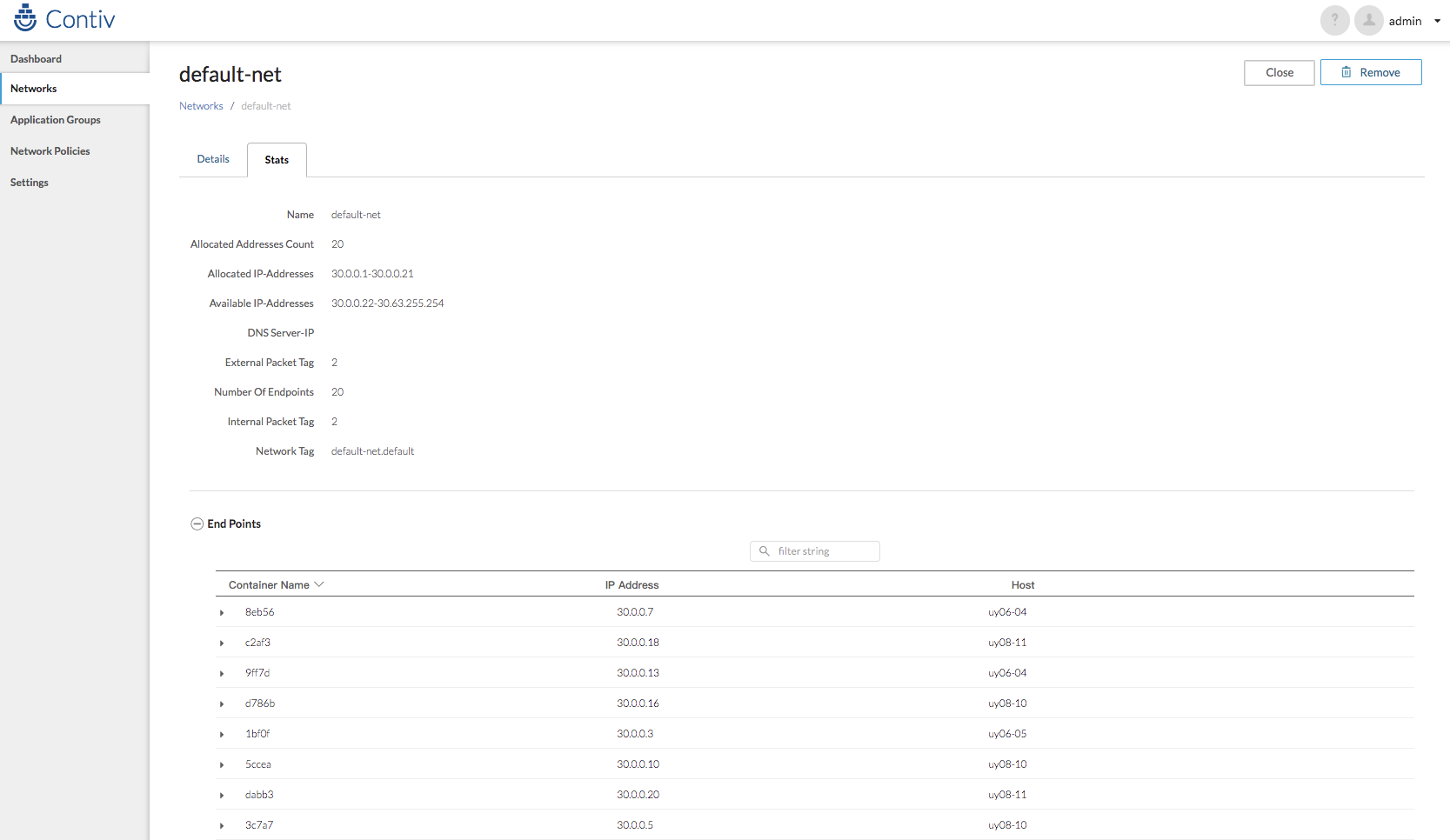
不过,如果你知道要做什么的话,用命令会更方便快捷。
创建一个subnet:
# netctl net create -t default --subnet=30.0.0.0/10 -g 30.0.0.1 default-net

# netctl network ls

Tenant   Network      Nw Type  Encap type  Packet tag  Subnet        Gateway    IPv6Subnet  IPv6Gateway  Cfgd Tag

------   -------      -------  ----------  ----------  -------       ------     ----------  -----------  ---------

default  contivh1     infra    vxlan       0           132.1.1.0/24  132.1.1.1

default  default-net  data     vxlan       0           30.0.0.0/10   30.0.0.1
创建好网络之后,这时kube-dns pod就能拿到IP地址并运行起来了。
f、部署另外两个master节点
将第一个节点的配置文件和证书全部复制过来:
# scp -r 192.168.5.62:/etc/kubernetes/* /etc/kubernetes/
为新的master节点生成新的证书:
# cat uy06-05.sh

#!/bin/bash

#apiserver-kubelet-client

openssl genrsa -out apiserver-kubelet-client.key 2048

openssl req -new -key apiserver-kubelet-client.key -out apiserver-kubelet-client.csr -subj "/O=system:masters/CN=kube-apiserver-kubelet-client"

openssl x509 -req -set_serial $(date +%s%N) -in apiserver-kubelet-client.csr -CA ca.crt -CAkey ca.key -out apiserver-kubelet-client.crt -days 365 -extensions v3_req -extfile apiserver-kubelet-client-openssl.cnf

#controller-manager

openssl genrsa -out controller-manager.key 2048

openssl req -new -key controller-manager.key -out controller-manager.csr -subj "/CN=system:kube-controller-manager"

openssl x509 -req -set_serial $(date +%s%N) -in controller-manager.csr -CA ca.crt -CAkey ca.key -out controller-manager.crt -days 365 -extensions v3_req -extfile controller-manager-openssl.cnf

#scheduler

openssl genrsa -out scheduler.key 2048

openssl req -new -key scheduler.key -out scheduler.csr -subj "/CN=system:kube-scheduler"

openssl x509 -req -set_serial $(date +%s%N) -in scheduler.csr -CA ca.crt -CAkey ca.key -out scheduler.crt -days 365 -extensions v3_req -extfile scheduler-openssl.cnf

#admin

openssl genrsa -out admin.key 2048

openssl req -new -key admin.key -out admin.csr -subj "/O=system:masters/CN=kubernetes-admin"

openssl x509 -req -set_serial $(date +%s%N) -in admin.csr -CA ca.crt -CAkey ca.key -out admin.crt -days 365 -extensions v3_req -extfile admin-openssl.cnf

#node

openssl genrsa -out $(hostname).key 2048

openssl req -new -key $(hostname).key -out $(hostname).csr -subj "/O=system:nodes/CN=system:node:$(hostname)" -config kubelet-openssl.cnf

openssl x509 -req -set_serial $(date +%s%N) -in $(hostname).csr -CA ca.crt -CAkey ca.key -out $(hostname).crt -days 365 -extensions v3_req -extfile kubelet-openssl.cnf
这里生成了四套证书,使用的openssl配置文件其实是相同的:
[ v3_req ]

# Extensions to add to a certificate request

keyUsage = critical, digitalSignature, keyEncipherment

extendedKeyUsage = clientAuth
用新的证书替换旧证书,这几套证书只有apiserver-kubelet-client的证书是路径引用的,其他的都是直接引用的证书加密过的内容:
#!/bin/bash

VIP=192.168.5.62

APISERVER_PORT=6443

HOSTNAME=$(hostname)

CA_CRT=$(cat ca.crt |base64 -w0)

CA_KEY=$(cat ca.key |base64 -w0)

ADMIN_CRT=$(cat admin.crt |base64 -w0)

ADMIN_KEY=$(cat admin.key |base64 -w0)

CONTROLLER_CRT=$(cat controller-manager.crt |base64 -w0)

CONTROLLER_KEY=$(cat controller-manager.key |base64 -w0)

KUBELET_CRT=$(cat $(hostname).crt |base64 -w0)

KUBELET_KEY=$(cat $(hostname).key |base64 -w0)

SCHEDULER_CRT=$(cat scheduler.crt |base64 -w0)

SCHEDULER_KEY=$(cat scheduler.key |base64 -w0)

#admin

sed -e "s/VIP/$VIP/g" -e "s/APISERVER_PORT/$APISERVER_PORT/g" -e "s/CA_CRT/$CA_CRT/g" -e "s/ADMIN_CRT/$ADMIN_CRT/g" -e "s/ADMIN_KEY/$ADMIN_KEY/g" admin.temp > admin.conf

cp -a admin.conf /etc/kubernetes/admin.conf

#kubelet

sed -e "s/VIP/$VIP/g" -e "s/APISERVER_PORT/$APISERVER_PORT/g" -e "s/HOSTNAME/$HOSTNAME/g" -e "s/CA_CRT/$CA_CRT/g" -e "s/CA_KEY/$CA_KEY/g" -e "s/KUBELET_CRT/$KUBELET_CRT/g" -e "s/KUBELET_KEY/$KUBELET_KEY/g" kubelet.temp > kubelet.conf

cp -a kubelet.conf /etc/kubernetes/kubelet.conf

#controller-manager

sed -e "s/VIP/$VIP/g" -e "s/APISERVER_PORT/$APISERVER_PORT/g" -e "s/CA_CRT/$CA_CRT/g" -e "s/CONTROLLER_CRT/$CONTROLLER_CRT/g" -e "s/CONTROLLER_KEY/$CONTROLLER_KEY/g" controller-manager.temp > controller-manager.conf

cp -a controller-manager.conf /etc/kubernetes/controller-manager.conf

#scheduler

sed -e "s/VIP/$VIP/g" -e "s/APISERVER_PORT/$APISERVER_PORT/g" -e "s/CA_CRT/$CA_CRT/g" -e "s/SCHEDULER_CRT/$SCHEDULER_CRT/g" -e "s/SCHEDULER_KEY/$SCHEDULER_KEY/g" scheduler.temp > scheduler.conf

cp -a scheduler.conf /etc/kubernetes/scheduler.conf

#manifest kube-apiserver-client

cp -a apiserver-kubelet-client.key /etc/kubernetes/pki/

cp -a apiserver-kubelet-client.crt /etc/kubernetes/pki/
另外,由于contiv的netmaster使用了nodeSelector,这里记得要把这两个新部署master节点也打上master角色标签。默认情况下,新加入集群的节点是没有角色标签的。
# kubectl label node uy06-05 node-role.kubernetes.io/master=

# kubectl label node uy08-10 node-role.kubernetes.io/master=
替换证书之后,还要将集群中所有需要访问apiserver的地方修改为vip,以及修改advertise-address为本机地址,修改本地配置之后记得重启kubelet服务。
# sed -i "s@192.168.5.62@192.168.6.16@g" admin.conf

# sed -i "s@192.168.5.62@192.168.6.16@g" controller-manager.conf

# sed -i "s@192.168.5.62@192.168.6.16@g" kubelet.conf

# sed -i "s@192.168.5.62@192.168.6.16@g" scheduler.conf
# kubectl edit cm cluster-info -n kube-public

# kubectl edit cm kube-proxy -n kube-system
# vim manifests/kube-apiserver.yaml

--advertise-address=192.168.5.63
# systemctl restart kubelet
g、验证,尝试通过vip请求apiserver将node节点加入到集群中。
# kubeadm join --token 0c8921.578cf94fe0721e01 192.168.6.16:6443 --discovery-token-ca-cert-hash sha256:58cf1826d49e44fb6ff1590ddb077dd4e530fe58e13c1502ec07ce41ba6cc39e

[kubeadm] WARNING: kubeadm is in beta, please do not use it for production clusters.

[preflight] Running pre-flight checks

[preflight] WARNING: kubelet service is not enabled, please run 'systemctl enable kubelet.service'

[discovery] Trying to connect to API Server "192.168.6.16:6443"

[discovery] Created cluster-info discovery client, requesting info from "https://192.168.6.16:6443"

[discovery] Requesting info from "https://192.168.6.16:6443" again to validate TLS against the pinned public key

[discovery] Cluster info signature and contents are valid and TLS certificate validates against pinned roots, will use API Server "192.168.6.16:6443"

[discovery] Successfully established connection with API Server "192.168.6.16:6443"

[bootstrap] Detected server version: v1.8.4

[bootstrap] The server supports the Certificates API (certificates.k8s.io/v1beta1)

Node join complete:

* Certificate signing request sent to master and response

  received.

* Kubelet informed of new secure connection details.

Run 'kubectl get nodes' on the master to see this machine join.
h、至此,整个kubernetes集群搭建完成。
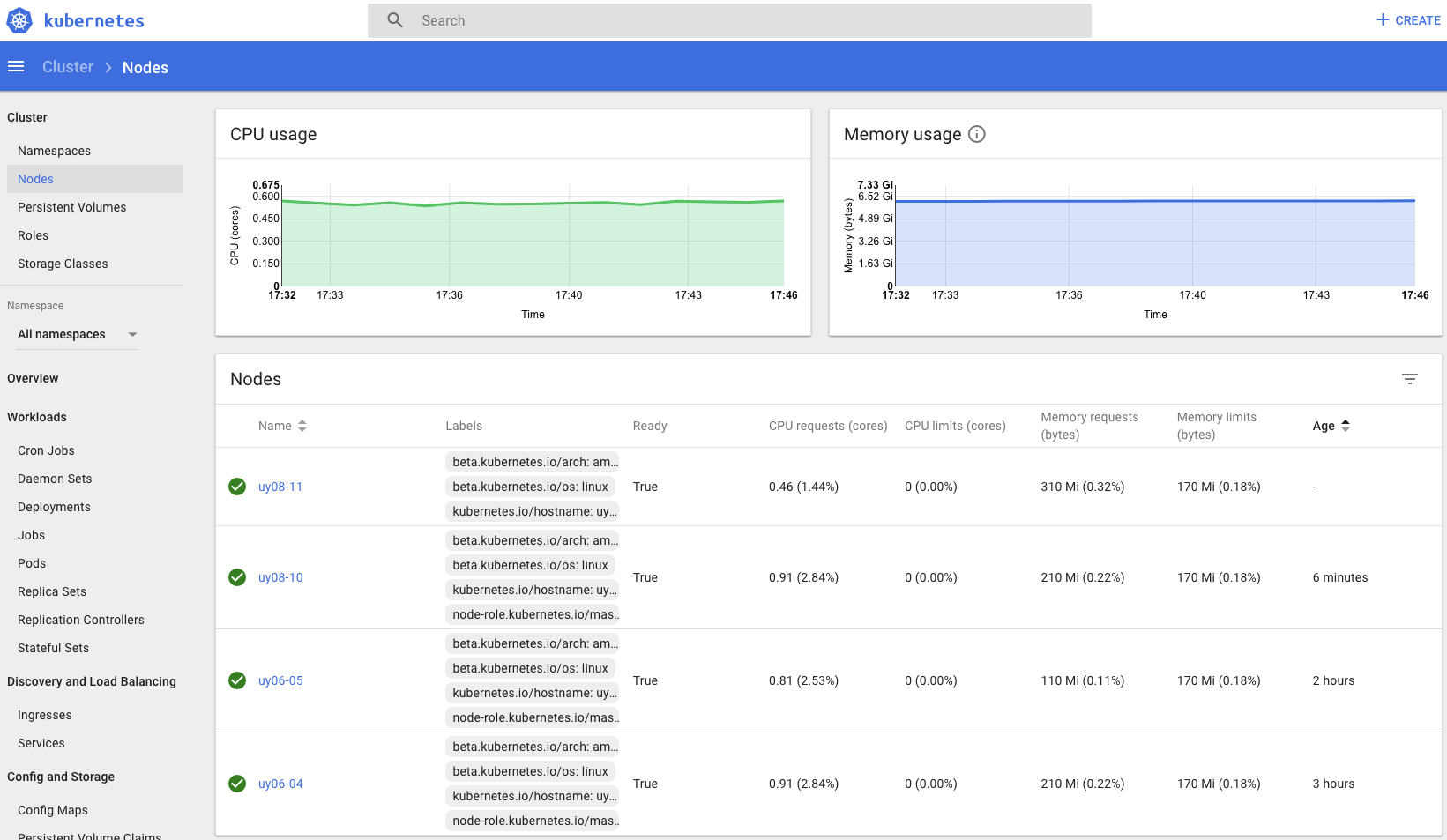
# kubectl get no

NAME      STATUS    ROLES     AGE       VERSION

uy06-04   Ready     master    1d        v1.8.4

uy06-05   Ready     master    1d        v1.8.4

uy08-10   Ready     master    1d        v1.8.4

uy08-11   Ready     <none>    1d        v1.8.4
# kubectl get po --all-namespaces

NAMESPACE     NAME                                    READY     STATUS    RESTARTS   AGE

development   snowflake-f88456558-55jk8               1/1       Running   0          3h

development   snowflake-f88456558-5lkjr               1/1       Running   0          3h

development   snowflake-f88456558-mm7hc               1/1       Running   0          3h

development   snowflake-f88456558-tpbhw               1/1       Running   0          3h

kube-system   contiv-netmaster-6ctqj                  3/3       Running   0          6h

kube-system   contiv-netmaster-w4tx9                  3/3       Running   0          3h

kube-system   contiv-netmaster-wrlgc                  3/3       Running   0          3h

kube-system   contiv-netplugin-nbhkm                  2/2       Running   0          6h

kube-system   contiv-netplugin-rf569                  2/2       Running   0          3h

kube-system   contiv-netplugin-sczzk                  2/2       Running   0          3h

kube-system   contiv-netplugin-tlf77                  2/2       Running   0          5h

kube-system   heapster-59ff54b574-jq52w               1/1       Running   0          3h

kube-system   heapster-59ff54b574-nhl56               1/1       Running   0          3h

kube-system   heapster-59ff54b574-wchcr               1/1       Running   0          3h

kube-system   kube-apiserver-uy06-04                  1/1       Running   0          7h

kube-system   kube-apiserver-uy06-05                  1/1       Running   0          5h

kube-system   kube-apiserver-uy08-10                  1/1       Running   0          3h

kube-system   kube-controller-manager-uy06-04         1/1       Running   0          7h

kube-system   kube-controller-manager-uy06-05         1/1       Running   0          5h

kube-system   kube-controller-manager-uy08-10         1/1       Running   0          3h

kube-system   kube-dns-545bc4bfd4-fcr9q               3/3       Running   0          7h

kube-system   kube-dns-545bc4bfd4-ml52t               3/3       Running   0          3h

kube-system   kube-dns-545bc4bfd4-p6d7r               3/3       Running   0          3h

kube-system   kube-dns-545bc4bfd4-t8ttx               3/3       Running   0          3h

kube-system   kube-proxy-bpdr9                        1/1       Running   0          3h

kube-system   kube-proxy-cjnt5                        1/1       Running   0          5h

kube-system   kube-proxy-l4w49                        1/1       Running   0          7h

kube-system   kube-proxy-wmqgg                        1/1       Running   0          3h

kube-system   kube-scheduler-uy06-04                  1/1       Running   0          7h

kube-system   kube-scheduler-uy06-05                  1/1       Running   0          5h

kube-system   kube-scheduler-uy08-10                  1/1       Running   0          3h

kube-system   kubernetes-dashboard-5c54687f9c-ssklk   1/1       Running   0          3h

production    frontend-987698689-7pc56                1/1       Running   0          3h

production    redis-master-5f68fbf97c-jft59           1/1       Running   0          3h

production    redis-slave-74855dfc5-2bfwj             1/1       Running   0          3h

production    redis-slave-74855dfc5-rcrkm             1/1       Running   0          3h

staging       cattle-5f67c7948b-2j8jf                 1/1       Running   0          2h

staging       cattle-5f67c7948b-4zcft                 1/1       Running   0          2h

staging       cattle-5f67c7948b-gk87r                 1/1       Running   0          2h

staging       cattle-5f67c7948b-gzhc5                 1/1       Running   0          2h
# kubectl get cs

NAME                 STATUS    MESSAGE              ERROR

scheduler            Healthy   ok

controller-manager   Healthy   ok

etcd-2               Healthy   {"health": "true"}

etcd-0               Healthy   {"health": "true"}

etcd-1               Healthy   {"health": "true"}
# kubectl cluster-info

Kubernetes master is running at https://192.168.6.16:6443

Heapster is running at https://192.168.6.16:6443/api/v1/namespaces/kube-system/services/heapster/proxy

KubeDNS is running at https://192.168.6.16:6443/api/v1/namespaces/kube-system/services/kube-dns/proxy
补充:
默认情况下,kubectl没有权限查看pod的日志,授权方法:
# vim kubelet.rbac.yaml

# This role allows full access to the kubelet API

apiVersion: rbac.authorization.k8s.io/v1

kind: ClusterRole

metadata:

  name: kubelet-api-admin

  labels:

    kubernetes.io/cluster-service: "true"

    addonmanager.kubernetes.io/mode: Reconcile

rules:

- apiGroups:

  - ""

  resources:

  - nodes/proxy

  - nodes/log

  - nodes/stats

  - nodes/metrics

  - nodes/spec

  verbs:

  - "*"

---

apiVersion: rbac.authorization.k8s.io/v1

kind: ClusterRoleBinding

metadata:

  name: my-apiserver-kubelet-binding

roleRef:

  apiGroup: rbac.authorization.k8s.io

  kind: ClusterRole

  name: kubelet-api-admin

subjects:

- apiGroup: rbac.authorization.k8s.io

  kind: User

  name: kube-apiserver-kubelet-client
# kubectl apply -f kubelet.rbac.yaml
部署kubernetes1.8.4+contiv高可用集群的更多相关文章
- lvs+keepalived部署k8s v1.16.4高可用集群
一.部署环境 1.1 主机列表 主机名 Centos版本 ip docker version flannel version Keepalived version 主机配置 备注 lvs-keepal ...
- Centos7.6部署k8s v1.16.4高可用集群(主备模式)
一.部署环境 主机列表: 主机名 Centos版本 ip docker version flannel version Keepalived version 主机配置 备注 master01 7.6. ...
- 使用睿云智合开源 Breeze 工具部署 Kubernetes v1.12.3 高可用集群
一.Breeze简介 Breeze 项目是深圳睿云智合所开源的Kubernetes 图形化部署工具,大大简化了Kubernetes 部署的步骤,其最大亮点在于支持全离线环境的部署,且不需要FQ获取 G ...
- 使用开源Breeze工具部署Kubernetes 1.12.1高可用集群
Breeze项目是深圳睿云智合所开源的Kubernetes图形化部署工具,大大简化了Kubernetes部署的步骤,其最大亮点在于支持全离线环境的部署,且不需要FQ获取Google的相应资源包,尤其适 ...
- kubeadm使用外部etcd部署kubernetes v1.17.3 高可用集群
文章转载自:https://mp.weixin.qq.com/s?__biz=MzI1MDgwNzQ1MQ==&mid=2247483891&idx=1&sn=17dcd7cd ...
- kubeadm 使用 Calico CNI 以及外部 etcd 部署 kubernetes v1.23.1 高可用集群
文章转载自:https://mp.weixin.qq.com/s/2sWHt6SeCf7GGam0LJEkkA 一.环境准备 使用服务器 Centos 8.4 镜像,默认操作系统版本 4.18.0-3 ...
- K8S学习笔记之二进制部署Kubernetes v1.13.4 高可用集群
0x00 概述 本次采用二进制文件方式部署,本文过程写成了更详细更多可选方案的ansible部署方案 https://github.com/zhangguanzhang/Kubernetes-ansi ...
- kubernetes之手动部署k8s 1.14.1高可用集群
1. 架构信息 系统版本:CentOS 7.6 内核:3.10.0-957.el7.x86_64 Kubernetes: v1.14.1 Docker-ce: 18.09.5 推荐硬件配置:4核8G ...
- Breeze 部署 Kubernetes 1.12.1高可用集群
今天看文章介绍了一个开源部署 K8S 的工具,有空研究下~ Github 地址: https://github.com/wise2c-devops/breeze
随机推荐
- 基于uFUN开发板的心率计(二)动态阈值算法获取心率值
前言 上一篇文章:基于uFUN开发板的心率计(一)DMA方式获取传感器数据,介绍了如何获取PulseSensor心率传感器的电压值,并对硬件电路进行了计算分析.心率计,重要的是要获取到心率值,本篇文章 ...
- SqlServer 案例:已有汽车每日行驶里程数据,计算其每日增量
需求说明 某公司某项业务,需要获得用户每日行车里程数.已知能获得该车每日提交的总里程数,如何通过 T-SQL 来获得其每日增量里程? 解决方案 首选需要对数据进行编号,利用开窗函数 OVER() 实现 ...
- js中的栈、堆、队列、内存空间
栈(stack) .堆(heap). 队列(queue)是js的三种数据结构. 栈(stack) 栈的特点是"LIFO,即后进先出(Last in, first out)".数据存 ...
- Redis数据"丢失"讨论及规避和解决的几点总结
Redis大部分应用场景是纯缓存服务,请求后端有Primary Storage的组件,如MySQL,HBase;请求Redis的键未命中,会从primary Storage中获取数据返回,同时更新Re ...
- 《Linux内核设计与实现》第三章读书笔记
一.进程(任务)描述 1.进程是处于执行期的程序:除了可执行程序代码,还包括打开的文件.挂起的信号.内核内部数据.一个或者多个执行线程等多种资源 线程是在进程活动中的对象:内核调度的对象是线程而不是进 ...
- Linux内核分析——第七章 链接
第七章——链接 1.链接是将各种代码和数据部分收集起来并组合成为一个单一文件的过程,这个文件可被加载到存储器并执行. 2.链接可以执行于编译时,加载时,运行时. 7.1编译器驱动程序 1.大多数编译系 ...
- 转发:C#操作SQL Server数据库
转发自:http://www.cnblogs.com/rainman/archive/2012/03/13/2393975.html 1.概述 2.连接字符串的写法 3.SqlConnection对象 ...
- 实验1--用C语言编程四则运算
#include<stdio.h>#include<stdlib.h>#include <time.h>#define N 30main(){int a,b,k,i ...
- Effective C++(第三版)笔记 ---- 第一部分让自己习惯C++
内容从侯捷译版的<Effective C++>(第三版)摘录 条款一 C++作为一个多种范式融合的语言,可以看成是语言的联邦,它包含了一下四种主要的次语言: C.C++以C为基础,很多时候 ...
- 彻底弄懂jsonp原理及实现方法
一. 同源策略 所有支持Javascript的浏览器都会使用同源策略这个安全策略.看看百度的解释: 同源策略,它是由Netscape提出的一个著名的安全策略. 现在所有支持JavaScript 的浏览 ...