
ios原生项目内嵌u3d工程
本文一反常态,目标是把u3d工程以framewWork形式 内嵌原生IOS项目
1、xcode中新建Cocoa Touch FrameWork。取名u3dFrameWork
2、把u3d导出的xcode中,Class、Library 拷贝到u3dFrameWork 中 采用
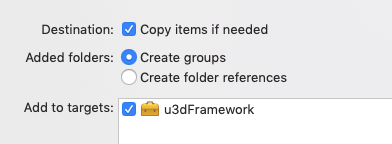 方式引入
方式引入
从library中移除掉libil2cpp
3 以下头文件移动到public
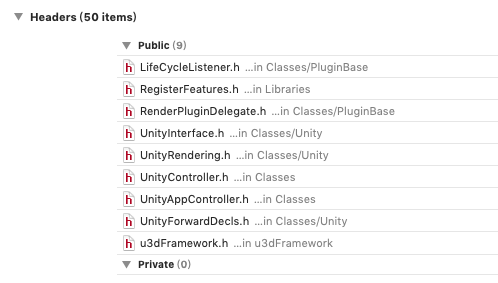
4、Build Phases 下头文件引用中 移除RegisterMonoModules.h compile sources 中移除main.mm 和RegisterMonoModules.cpp
5、配置修改
- Build Settings -> Header Search Paths:
$(inherited) "$(SRCROOT)/Classes" "$(SRCROOT)" $(SRCROOT)/Classes/Native $(SRCROOT)/Libraries/bdwgc/include $(SRCROOT)/Libraries/libil2cpp/include - Build Settings -> Library Search Paths:
$(inherited) "$(SRCROOT)" "$(SRCROOT)/Libraries" - Build Settings -> Prefix Header:
Classes/Prefix.pch - Build Settings -> Mismatched Return Type:
Yes - Build Settings -> Enable C++ Exceptions:
Yes - Build Settings -> Other Linker Flags:
$(inherited) -weak_framework CoreMotion -weak-lSystem - Build Settings -> Mach-O Type:
Static Library - Build Settings ->Other C Flags -> $(inherited) -DINIT_SCRIPTING_BACKEND=1 -fno-strict-overflow -DRUNTIME_IL2CPP=1
- Build Settings -> Build Avtive Achitecture Only:
No
6 u3dFramework.h添加文件引用
#import <u3dFramework/UnityAppController.h>
#import <u3dFramework/UnityController.h>
#import <u3dFramework/RenderPluginDelegate.h>
#import <u3dFramework/UnityInterface.h>
#import <u3dFramework/UnityRendering.h>
#import <u3dFramework/RegisterFeatures.h>
#import <u3dFramework/UnityForwardDecls.h>
#import <u3dFramework/LifeCycleListener.h>
7、
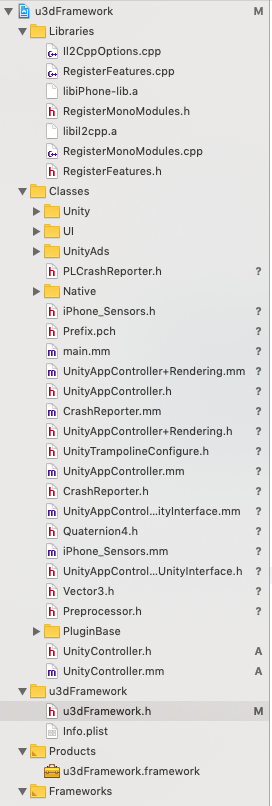
新建UnityController.h****************************
#import <Foundation/Foundation.h>
#import "UnityAppController.h"
@interface UnityController:UnityAppController
@property (nonatomic, readonly, weak) UIView *playView; /* 展示Unity的view */
+ (instancetype)instance;
- (void)initUnity;
- (void)pauseUnity;
- (void)startUnity;
- (BOOL)isPaused;
@end
新建UnityController.mm************************
#import "UnityController.h"
#import "UnityAppController.h"
#import "DisplayManager.h"
#import "UnityView.h"
#import "UnityAppController+ViewHandling.h"
#import "UnityAppController+Rendering.h"
@interface UnityController()
@property (nonatomic, assign) BOOL isInitUnity;
@end
@implementation UnityController
+ (instancetype)instance {
return (UnityController *)[[UIApplication sharedApplication] valueForKeyPath:@"delegate.unityController"];
}
- (instancetype)init
{
self = [super init];
if (self) {
self.isInitUnity = NO;
// 注册Unity的事件
[[NSNotificationCenter defaultCenter] addObserver:self selector:@selector(appDidBecomeActive:) name:UIApplicationDidBecomeActiveNotification object:nil];
[[NSNotificationCenter defaultCenter] addObserver:self selector:@selector(appWillEnterForeground:) name:UIApplicationWillEnterForegroundNotification object:nil];
[[NSNotificationCenter defaultCenter] addObserver:self selector:@selector(appWillResignActive:) name:UIApplicationWillResignActiveNotification object:nil];
[[NSNotificationCenter defaultCenter] addObserver:self selector:@selector(appWillTerminate:) name:UIApplicationWillTerminateNotification object:nil];
[[NSNotificationCenter defaultCenter] addObserver:self selector:@selector(appDidReceiveMemoryWarning:) name:UIApplicationDidReceiveMemoryWarningNotification object:nil];
}
return self;
}
- (UIView *)playView {
return self.unityView;
}
static const int constsection = 0;
- (void)initUnity {
if (!self.isInitUnity) {
if ([UIDevice currentDevice].generatesDeviceOrientationNotifications == NO)
[[UIDevice currentDevice] beginGeneratingDeviceOrientationNotifications];
UnityInitApplicationNoGraphics([[[NSBundle mainBundle] bundlePath] UTF8String]);
[self selectRenderingAPI];
[UnityRenderingView InitializeForAPI: self.renderingAPI];
_window = nil;
_unityView = [self createUnityView];
[DisplayManager Initialize];
_mainDisplay = [DisplayManager Instance].mainDisplay;
[_mainDisplay createWithWindow: _window andView: _unityView];
[super applicationDidBecomeActive:[UIApplication sharedApplication]];
self.isInitUnity = YES;
}
}
- (void)pauseUnity {
//[self applicationWillResignActive:[UIApplication sharedApplication]];
UnityPause(1);
}
- (void)startUnity {
//[self applicationDidBecomeActive:[UIApplication sharedApplication]];
UnityPause(0);
}
- (BOOL)isPaused {
if (UnityIsPaused() == 1) {
return YES;
}
else {
return NO;
}
}
- (void)appWillEnterForeground:(NSNotification *)notification {
[self applicationWillEnterForeground:[UIApplication sharedApplication]];
}
- (void)appDidBecomeActive:(NSNotification *)notification {
if (nil == self.unityView) {
return;
}
[self applicationDidBecomeActive:[UIApplication sharedApplication]];
}
- (void)appWillResignActive:(NSNotification *)notification {
[self applicationWillResignActive:[UIApplication sharedApplication]];
}
- (void)appWillTerminate:(NSNotification *)notification {
[self applicationWillTerminate:[UIApplication sharedApplication]];
}
- (void)appDidReceiveMemoryWarning:(NSNotification *)notification {
[self applicationDidReceiveMemoryWarning:[UIApplication sharedApplication]];
}
@end
UnityAppController.h做如下修改******************************
inline UnityAppController* GetAppController()
{
return (UnityAppController *)[[UIApplication sharedApplication] valueForKeyPath:@"delegate.unityController"];
}
二 新建ios原生工程
新建sdk文件夹。将上歩FrameWork和Libraries放入sdk中。Libraries中保留libiPhone-lib.a libil2cpp.a libil2cpp 引入sdk文件夹
拷贝u3d工程中Data文件夹 引入工程
Build Settings -> Header Search Paths:$(PROJECT_DIR)/sdk/Libraries/libil2cpp/include
Build Settings -> Library Search Paths: $(inherited) $(PROJECT_DIR)/sdk/Libraries
Build Settings -> Other Linker Flags:-force_load "$(PROJECT_DIR)/sdk/u3dFramework.framework/u3dFramework"
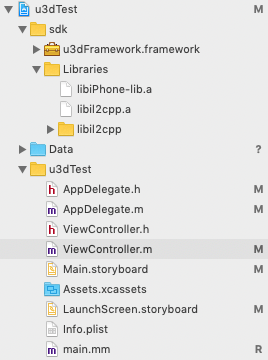
AppDelegate.m做如下修改
#import "AppDelegate.h"
#import <u3dFramework/u3dFramework.h>
@interface AppDelegate ()
@property(strong,nonatomic) UnityController *unityController;
@end
@implementation AppDelegate
- (BOOL)application:(UIApplication *)application didFinishLaunchingWithOptions:(NSDictionary *)launchOptions {
// Override point for customization after application launch.
if (_unityController == nil)
_unityController = [[UnityController alloc] init];
return YES;
}
ViewController.m做如下操作******************************
#import "ViewController.h"
#import <u3dFramework/u3dFramework.h>
@interface ViewController ()
@end
@implementation ViewController
- (void)viewDidLoad {
[super viewDidLoad];
// Do any additional setup after loading the view, typically from a nib.
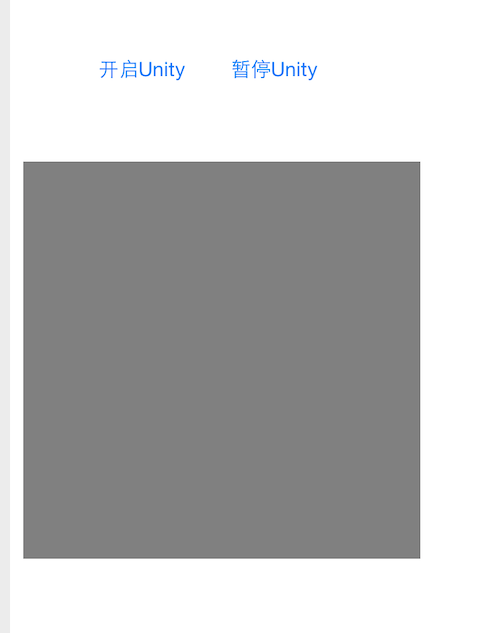
UIButton *button = [UIButton buttonWithType:UIButtonTypeRoundedRect];
button.frame = CGRectMake(60, 60, 80, 40);
[button setTitle:@"开启Unity" forState:UIControlStateNormal];
[self.view addSubview:button];
[button addTarget:self action:@selector(clickHandler:) forControlEvents:UIControlEventTouchUpInside];
UIButton *button1 = [UIButton buttonWithType:UIButtonTypeRoundedRect];
button1.frame = CGRectMake(160, 60, 80, 40);
[button1 setTitle:@"暂停Unity" forState:UIControlStateNormal];
[self.view addSubview:button1];
[button1 addTarget:self action:@selector(clickHandler1:) forControlEvents:UIControlEventTouchUpInside];
// 供Unity显示的View
UIView *view = [[UIView alloc] initWithFrame:CGRectMake(10, 150, 300, 300)];
[view setBackgroundColor:[UIColor grayColor]];
[view setTag:22];
[self.view addSubview:view];
}
- (void)didReceiveMemoryWarning {
[super didReceiveMemoryWarning];
// Dispose of any resources that can be recreated.
}
- (void) clickHandler:(id)sender
{
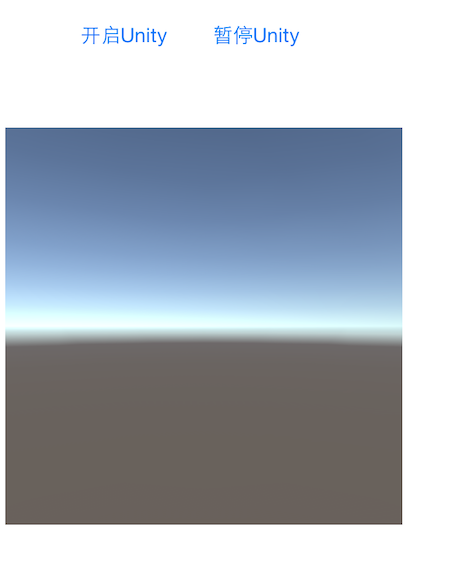
[[UnityController instance] initUnity];
[UnityController instance].playView.frame = [self.view viewWithTag:22].bounds;
[[self.view viewWithTag:22] addSubview:[UnityController instance].playView];
}
- (void) clickHandler1:(id)sender
{
if ([[UnityController instance] isPaused]) {
[[UnityController instance] startUnity];
}
else {
[[UnityController instance] pauseUnity];
}
}
@end
ios原生项目内嵌u3d工程的更多相关文章
- iOS原生项目中集成React Native
1.本文的前提条件是,电脑上已经安装了CocoaPods,React Native相关环境. 2.使用Xcode新建一个工程.EmbedRNMeituan [图1] 3.使用CocoaPods安装Re ...
- iOS原生项目集成React Native模块
今天周末,弄弄Native和React Native之间的交互.首先,先在iOS原生项目中集成React Native模块: 注意事项: 1.因为react native的版本问题,部分细节可能有所不 ...
- iOS 建立项目过滤机制 —— 给工程添加忽略文件.gitignore
目前iOS 项目 主要忽略 临时文件.配置文件.或者生成文件等,在不同开发端这些文件会大有不同,如果 git add .把这些文件都push到远程, 就会造成不同开发端频繁改动和提交的问题. ...
- cocos2d导入iOS原生项目
最近公司最新发下任务让融合一个cocos2dx写的游戏项目融合进现有项目,当看到要求时内心瞬间无数羊驼奔腾.------ 虽说内心是拒绝的,但是任务已经派发就必须要完成啊.所以在网上搜了大量的融入教程 ...
- ios下app内嵌h5页面是video适配问题
ios下做新闻详情用h5页面实现然后打包到app中,其中新闻详情页会有视频,安卓下video的poster可以做到适应video大小,但是ios下会按照poster图片大小将video等比撑大,但是视 ...
- React Native项目集成iOS原生模块
今天学习一下怎么在React Native项目中集成iOS原生模块,道理和在iOS原生项目中集成React Native模块类似.他们的界面跳转靠的都是iOS原生的UINavigationContro ...
- React Native与原生项目连接与发布
前面的各种环境配置按照官方文档一步一步来,挺详细,宝宝在这里就不多说废话了. 其次,前面的配置,我参照的这个博主的文章React Native 集成到iOS原生项目 下面是宝宝掉过的坑(半径15M): ...
- iOS原生混合RN开发最佳实践
iOS原生混合RN开发详解 做过原生iOS开发或者Android开发的同学们肯定也都了解Hybrid,有一些Hybrid的开发经验,目前我们企业开发中运用最广泛的Hybrid App技术就是原生与H5 ...
- 查看和指定SpringBoot内嵌Tomcat的版本
查看当前使用的Tomcat版本号 Maven Repository中查看 比如我们需要查Spring Boot 2.1.4-RELEASE的内嵌Tomcat版本, 可以打开链接: https://mv ...
随机推荐
- Java 装饰模式
在阎宏博士的<JAVA与模式>一书中开头是这样描述装饰(Decorator)模式的: 装饰模式又名包装(Wrapper)模式.装饰模式以对客户端透明的方式扩展对象的功能,是继承关系的一个替 ...
- Word2vec的Skip-Gram 系列1
转自雷锋网的一篇很棒的文章,写的通俗易懂.自己消化学习了.原文地址是 https://www.leiphone.com/news/201706/PamWKpfRFEI42McI.html 这次的分享主 ...
- JAVA自学笔记18
JAVA自学笔记18 1.Map接口: 1)功能: 2) Map<String,String>m=new HashMap<String,String>(); //添加元素,元素 ...
- 2、html补充
今天补充几个html标签 <body>内常用标签 1.<div>和<span> <div></div> : <div>只是一个块 ...
- linux > 和 >> 、< 区别
linux中经常会用到将内容输出到某文件当中,只需要在执行命令后面加上>或者>>号即可进入操作. 大于号:将一条命令执行结果(标准输出,或者错误输出,本来都要打印到屏幕上面的)重定向 ...
- C# GDI+之Graphics类 z
GDI+是GDI的后继者,它是.NET Framework为操作图形提供的应用程序编程接口,主要用在窗体上绘制各种图形图像,可以用于绘制各种数据图像.数学仿真等. Graphics类是GDI+的核心, ...
- 修正mui的上拉加载和下拉刷新的一次未完成就执行下一次的请求
有的用户会在第一次 上拉和下拉 事件未完成的时候,就执行第二次,第三次请求.... 提示文字也加上的位置动态计算,修改了mui的部份源码实现,我们的需求达到了 我们来看一下 腾讯新闻 的效果:
- NoSQL简单介绍
这里介绍一下如今经常使用的NoSQL以及各自的特点. NoSQL是2009年突然发展起来的.如今趋于稳定的状态,市场上也有了一些比較成熟的产品. 传统的关系型数据库为了保证通用性的设计而带来了功能复杂 ...
- iOS:Gif动画功能(显示gif动画、获取gif动画时长、获取gif动画执行次数)
一.简单介绍 gif动画是iOS开发中很常用的一个功能,有的是为了显示加载视频的过程,更多的是为了显示一个结果状态(动画更直观). 那么如何执行gif动画,方法有很多.(这里只写一下方法三,前两种之前 ...
- Windows上的字符转换之CP_ACP和CP_OEMCP
原文地址:http://blog.sina.com.cn/s/blog_53c1950a010158mw.html Windows API函数MultiByteToWideChar用于多字节编码字符串 ...