
python入门22 pymssql模块(python连接sql server查询)
安装
pip install pymssql
连接数据库 pymssql.connect()
# coding:utf-8

import pymssql

server = '192.168.8.1' #服务器ip或名称

user = 'sa' #用户名

password = ''  #密码

database = 'test' #数据库

dbconnect = pymssql.connect(server = server,user = user,password=password,database = database) #连接到数据库
操作数据库 connect.cursor() ,
fetchone() 取一行
fetchall() 取所有结果
dbcursor = dbconnect.cursor() #游标

dbcursor.execute('select top 2 name,major from test_student')
#一行一行的取数

row = dbcursor.fetchone()

print(row)

row = dbcursor.fetchone()

print(row)

row = dbcursor.fetchone() #取完数据,None

print(row)
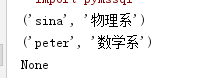
#取出所有查询结果
rows = dbcursor.fetchall()

print(rows) # list
rows = dbcursor.fetchall() #再取空

print(rows) # []

游标加上 as_dict=True。结果显示dict
dbcursor = dbconnect.cursor() #游标

dbcursor.execute('select top 10 name,major from test_student')

print(dbcursor.fetchall())

dbcursor = dbconnect.cursor(as_dict=True) #游标

dbcursor.execute('select top 10 name,major from test_student')

print(dbcursor.fetchall())

最后记得关闭游标和连接
dbcursor.close()

dbconnect.close()
官网: http://pymssql.org/en/stable/
python入门22 pymssql模块(python连接sql server查询)的更多相关文章
- Python基于Pymssql模块实现连接SQL Server数据库的方法
首先,安装pymssql第三方库pip install pymssql 其次,导入pymssql库 最后们就可以连接数据库了 import pymssql server = "10.10.9 ...
- python入门23 pymssql模块(python连接sql server增删改数据 )
增删改数据必须connect.commit()才会生效 回滚函数 connect.rollback() 连接数据库 ''' dinghanhua sql server增删改 ''' import py ...
- python 使用pymssql连接sql server数据库
python 使用pymssql连接sql server数据库 #coding=utf-8 #!/usr/bin/env python#------------------------------ ...
- python 连接sql server
linux 下pymssql模块的安装 所需压缩包:pymssql-2.1.0.tar.bz2freetds-patched.tar.gz 安装: tar -xvf pymssql-2.1.0.tar ...
- python连接sql server数据库实现增删改查
简述 python连接微软的sql server数据库用的第三方模块叫做pymssql(document:http://www.pymssql.org/en/stable/index.html).在官 ...
- python 连接 SQL Server 数据库
#!/usr/bin/python # -*- coding:utf-8 -*- import pymssql import pyodbc host = '127.0.0.1:1433' user = ...
- Python web(Django)连接Sql server
(开开心心每一天~ ---虫瘾师) Python Web(Django) 与SQL SERVRE的连接----Come QQ群:607021567(里面有很多开源代码和资料,并且python的游戏也有 ...
- Python入门之第三方模块安装
Python入门之第三方模块安装 平台:Win10 x64 + Anaconda3-5.3.0 (+Python3.7.0) Issue说明:pip install line_profiler-2.1 ...
- Python 学习 第17篇:从SQL Server数据库读写数据
在Python语言中,从SQL Server数据库读写数据,通常情况下,都是使用sqlalchemy 包和 pymssql 包的组合,这是因为大多数数据处理程序都需要用到DataFrame对象,它内置 ...
随机推荐
- 转 AIX7.2+11.2.0.4RAC实施
参考 https://blog.csdn.net/alangmei/article/details/18310381 https://blog.csdn.net/smasegain/article/d ...
- Python学习 day05
数据类型划分 数据类型可分为:可变数据类型,不可变数据类型 不可变数据类型:bool.int.str.元祖 -- 不可变数据类型又称为可哈希的 可变数据类型:list.dict.se ...
- Gradle发布项目到 maven 之novoda/bintray-release(3)
novoda/bintray-release 使用这个插件上传比较简单,只需要两步就可以 1.在项目根目录下的 build.gradle 添加插件依赖 // Top-level build file ...
- Ubuntu Server 14 配置
语言 在虚拟机中安装了Ubuntu Server. Ubuntu Server只有控制台,没有图形界面.要在控制台下安装中文支持很麻烦.所以直接设置为英文,反正我看得懂. 在安装的时候必须将" ...
- Oracle 基础系列之1.1 oracle的安装
一. 1.以下是安装Oracle的一些硬件上的条件: (1).操作系统最后是windows2000(也就是服务器版的操作系统) (2).内存最好在1G以上,当然越大越好(因为Oracle服务启动就要消 ...
- How to install local .deb packages
如何安装本地的.deb包 usually I do dpkg -i <deb file>, it'll fail saying it needs dependencies. After t ...
- Spring混合配置时,遇到配置文件路径NotFound,使用PathMatchingResourcePatternResolver解决
在将spring的xml配置改为java配置的过程中,遇到了一些问题,block时间比较长的一个问题是资源(.xml, .properties)的路径找不到,最后是使用PathMatchingReso ...
- hibernateAPI详解
1 Configuration package www.test.b_api; import org.hibernate.Session; import org.hibernate.SessionFa ...
- Best HTTP
http://blog.csdn.net/u012322710/article/details/52860747 Best HTTP (Pro) 这是一款很多公司都在用的网页插件,感觉确实不错,分P ...
- OpenLayers3之ol.control.ZoomToExtent
controls: ol.control.defaults().extend([new ol.control.ZoomToExtent({ extent:[Number(box[]), Number( ...