
iOS UIButton文字和图片间距随意调整
前记
在开发中,我们经常会遇到这么一种情况,就是一个按钮上面有图片也有文字,但是往往设计并不是我们想要的那种,比如可能图片在上,文字在下,或者图片在左,文字在右,关键是还有一定的距离,并不是系统默认UIButton中,图片和文字的间距。当然,这调整图片和文字的距离的小事,是难不倒大家的,因为大家都知道,在UIButton中,有这么两个属性titleEdgeInsets和imageEdgeInsets
关于属性
关于titleEdgeInsets和imageEdgeInsets这两个属性,简单介绍下:
titleEdgeInsets是title相对于其上下左右的inset,跟tableView的contentInset是类似的,如果只有title,那它上下左右都是相对于button的,imageEdgeInsets也是一样
如果同时有image和title,那这时候image的上左下是相对于button,右边是相对于title的;title的上右下是相对于button,左边是相对于image的,也就是说image是默认居左的。
通过以上两个属性,可以很轻松的实现文字和图片的位置及距离的调整,如果每次在用的时候,都去重新写一片,难免会很麻烦,鉴于此,之前在谋篇博客中(具体忘了,原博主看到请勿见怪),看到过用category封装的,于是我在项目中,也写了一个category,其中也列举了四种不同的枚举来表现其不同的场景
枚举类型
// 定义一个枚举(包含了四种类型的button)

typedef NS_ENUM(NSUInteger, GLButtonEdgeInsetsStyle) {

    GLButtonEdgeInsetsStyleTop, // image在上,label在下

    GLButtonEdgeInsetsStyleLeft, // image在左,label在右

    GLButtonEdgeInsetsStyleBottom, // image在下,label在上

    GLButtonEdgeInsetsStyleRight // image在右,label在左

};
并且定义了一个简单使用的方法:
/**

 *  设置button的titleLabel和imageView的布局样式,及间距

 *

 *  @param style titleLabel和imageView的布局样式

 *  @param space titleLabel和imageView的间距

 */

- (void)layoutButtonWithEdgeInsetsStyle:(GLButtonEdgeInsetsStyle)style

                        imageTitleSpace:(CGFloat)space;
其中space是指图片和文字之间的间距,style对应上面的枚举,可以针对性的选择
具体实现方法
- (void)layoutButtonWithEdgeInsetsStyle:(GLButtonEdgeInsetsStyle)style

                        imageTitleSpace:(CGFloat)space {

    /**

     *  知识点:titleEdgeInsets是title相对于其上下左右的inset,跟tableView的contentInset是类似的,

     *  如果只有title,那它上下左右都是相对于button的,image也是一样;

     *  如果同时有image和label,那这时候image的上左下是相对于button,右边是相对于label的;title的上右下是相对于button,左边是相对于image的。

     */

    // 1. 得到imageView和titleLabel的宽、高

    CGFloat imageWith = self.imageView.image.size.width;

    CGFloat imageHeight = self.imageView.image.size.height;

    CGFloat labelWidth = 0.0;

    CGFloat labelHeight = 0.0;

    if ([UIDevice currentDevice].systemVersion.floatValue >= 8.0) {

    // 由于iOS8中titleLabel的size为0,用下面的这种设置

        labelWidth = self.titleLabel.intrinsicContentSize.width;

        labelHeight = self.titleLabel.intrinsicContentSize.height;

    } else {

        labelWidth = self.titleLabel.frame.size.width;

        labelHeight = self.titleLabel.frame.size.height;

    }

    // 2. 声明全局的imageEdgeInsets和labelEdgeInsets

    UIEdgeInsets imageEdgeInsets = UIEdgeInsetsZero;

    UIEdgeInsets labelEdgeInsets = UIEdgeInsetsZero;

    // 3. 根据style和space得到imageEdgeInsets和labelEdgeInsets的值

    switch (style) {

        case GLButtonEdgeInsetsStyleTop:

        {

            imageEdgeInsets = UIEdgeInsetsMake(-labelHeight-space/2.0, 0, 0, -labelWidth);

            labelEdgeInsets = UIEdgeInsetsMake(0, -imageWith, -imageHeight-space/2.0, 0);

        }

            break;

        case GLButtonEdgeInsetsStyleLeft:

        {

            imageEdgeInsets = UIEdgeInsetsMake(0, -space/2.0, 0, space/2.0);

            labelEdgeInsets = UIEdgeInsetsMake(0, space/2.0, 0, -space/2.0);

        }

            break;

        case GLButtonEdgeInsetsStyleBottom:

        {

            imageEdgeInsets = UIEdgeInsetsMake(0, 0, -labelHeight-space/2.0, -labelWidth);

            labelEdgeInsets = UIEdgeInsetsMake(-imageHeight-space/2.0, -imageWith, 0, 0);

        }

            break;

        case GLButtonEdgeInsetsStyleRight:

        {

            imageEdgeInsets = UIEdgeInsetsMake(0, labelWidth+space/2.0, 0, -labelWidth-space/2.0);

            labelEdgeInsets = UIEdgeInsetsMake(0, -imageWith-space/2.0, 0, imageWith+space/2.0);

        }

            break;

        default:

            break;

    }

    // 4. 赋值

    self.titleEdgeInsets = labelEdgeInsets;

    self.imageEdgeInsets = imageEdgeInsets;

}
实现效果

其实思路很简单,这里只是简单封装了下。
项目文件截图:
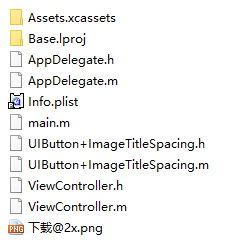 iOS UIButton文字和图片间距随意调整
注:本文著作权归作者,由demo大师代发,拒绝转载,转载需要作者授权
iOS UIButton文字和图片间距随意调整的更多相关文章
- iOS 设置 文字和 图片的位置
1.我最开始实现这个采用的方法:重新自定义一个view,然后有两个属性label和imageView,然后设置位置布局,再添加单击手势,用代理回传点击方法. 2.第二种方法:自定义一个Button继承 ...
- 代码设置UIButton文字、图片位置
假设有按钮rButton的 imageEdgeInsets和contentEdgeInsets可以设置按钮的标题和图片的位置,如下代码,设置标题居右 NSString * rBtnTitle = @& ...
- UIButton的竖排图片和文本
UIButton的竖排图片和文本html, body {overflow-x: initial !important;}.CodeMirror { height: auto; } .CodeMirro ...
- iOS UIButton 图片文字上下垂直布局 解决方案
实现如图所示效果: 这是一个UIButton,需要改变image和title相对位置. 解决如下: //设置文字偏移:向下偏移图片高度+向左偏移图片宽度 (偏移量是根据[图片]大小来的,这点是关键)b ...
- iOS·UIButton如何文字在下图片在上
创建子类继承自UIButton,在layoutSubviews方法中改变文字和图片的位置就可以了,同理,稍作改变,可以写出文字在上图片在下.本文只给出文字在下图片在上的代码 -(void)layout ...
- UIButton 文字图片排列
UIButton缺省值是:图画-文字水平,所以我们并不需要调整. 1.写作-图画 水平显示,以前的文本,图片后再次 [btn setTitleEdgeInsets:UIEdgeInsetsMake(0 ...
- ios UIButton设置单选效果,以及同时设置图片和标题
一,设置单选效果 - (void)selectedBtnPress:(UIButton*)sender { //首先把原来按钮的选中效果消除 for (int i=0;i<num;i++) {/ ...
- IOS下拉放大图片
代码地址如下:http://www.demodashi.com/demo/11623.html 一.实现效果图 现在越来越多的APP中存在下拉放大图片的效果,今天贡献一下我的实现这种方法的原理,和我遇 ...
- IOS UIButton用法详解
这段代码动态的创建了一个UIButton,并且把相关常用的属性都列举了.希望对大家有用. //这里创建一个圆角矩形的按钮UIButton *button1 = [UIButton buttonWi ...
随机推荐
- STL模板整理 vector
一.什么是标准模板库(STL)? 1.C++标准模板库与C++标准库的关系 C++标准模板库其实属于C++标准库的一部分,C++标准模板库主要是定义了标准模板的定义与声明,而这些模板主要都是 类模板, ...
- usaco1.4.3等差数列
为这道苟题鼓掌 题目: 一个等差数列是一个能表示成a, a+b, a+2b,…, a+nb (n=0,1,2,3,…)的数列.在这个问题中a是一个非负的整数,b是正整数.写一个程序来找出在双平方数集合 ...
- 【DFS】Gym - 101142C - CodeCoder vs TopForces
就按照题意建出有向图来(n个点,2n-2条边),然后从按随便一个rating排序,从最后一个开始dfs,用vis数组防止重复访问,因为每次之前的肯定能访问之后的(及之后的能访问的),所以不会有重复.就 ...
- 【置换群】Codeforces Round #393 (Div. 1) A. Pavel and barbecue
就是先看排列p,必须满足其是一个环,才满足题意.就处理出有几个环,然后把它们合起来,答案就是多少. 然后再看序列b,自己稍微画一画就会发现,如果有偶数个1肯定是不行哒,否则,它就会再置换一圈回到它自己 ...
- Problem E: 调用函数,求m-n之间的所有完数
#include<stdio.h> int factorsum(int number)//定义函数 { ; ;i<number;i++) ) s+=i; return s; } in ...
- Problem K: 数字菱形
#include<stdio.h> int main() { int n,i,j,k,t,x,q,p; while(scanf("%d",&n)!=EOF) ; ...
- iOS开发 Swift开发数独游戏(五)显示游戏答案
要点是设置好Tag就好,通过代码找到并初始化即可. 1: // 2: // ShowAnswerController.swift 3: // sudoku-v02 4: // 5: // ...
- JNI之Hello World!
基本流程: 1. 创建一个类(HelloWorld.java)2. 使用 javac 编译该类3. 利用 javah -jni 产生头文件4. 用本地代码实现头文件中定义的方法5. Run 备注:在一 ...
- 移植u-boot-2012.4到Tiny6410_1G_Nandflash
Uboot-2012.4的启动流程: 自从Uboot-2010后的Uboot在文件结构和启动流程方面都有非常大的改变,所以移植Uboot-2012.4的时候还是费了我不少时间, 首先在编译Uboot的 ...
- 开源用户界面和布局的套件XiaoCai.WinformUI(美化用户界面利器)
发布一款开源用户界面和布局的套件,请朋友们多提提宝贵建议! XiaoCai.WinformUI主要是解决用户界面和布局的套件,能够快速进行合理性布局,美化用户界面. 因为之前发布到谷歌里,好多朋友都说 ...