
使用MR求解多个矩阵的乘积之后
首先介绍涉及到的知识点,如下:
1)value的类型是IntArrayWritable,将整型数组值取出的方法有两种。
a.其一,就是使用value的toArray()方法,返回值是一个Object obValue,然后使用Array.get(obValue,index),就可以获得数组中的元素(Object类型),其中index是数组索引,然后再利用Integer.parseInt(Array.get(obValue,index).toString())将其转化为int型即可。
b.第二种方法是使用value的get()方法获得数组,不过是Writable[],但是不能直接使用IntWritable[] intArr=(IntWritable[])value.get(),不能完成Writable[]到IntWritable[]的转化。正确的方式是:
for(Writable val:value.get()){

IntWritable intVal=(IntWritable)val;

}
2)利用InputSplit获得分片的文件名,因为待求解的问题如下所示:
X=(B+u(s+b+d+f))*F
矩阵s、b、d、f与F相乘之前,要扩大u倍,而B矩阵则不需要,通过检测文件名来判断是否先扩大u倍然后再与F相乘。获得文件名的代码如下:
InputSplit inputSplit=context.getInputSplit();

String fileName=((FileSplit)inputSplit).getPath().getName();
如果是要获得文件的上级目录名,可以使用以下代码(http://blog.csdn.net/shallowgrave/article/details/7757914):
String dirName = ((FileSplit) inputSplit).getPath().getParent().getName();
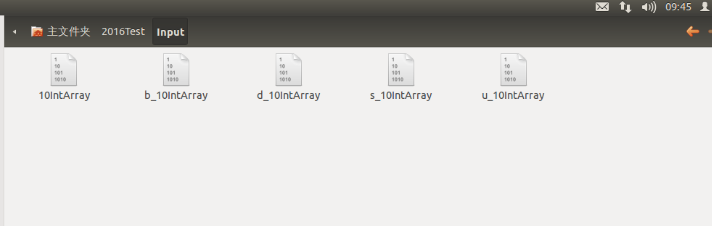
矩阵文件如下所示:
map()中实现矩阵乘法的代码如下:obValue=value.toArray();
InputSplit inputSplit=context.getInputSplit();
String fileName=((FileSplit)inputSplit).getPath().getName(); if (!(fileName.startsWith("10"))) {
for (int i=0;i<rightMatrix[0].length;++i){
sum=0;
for (int j=0;j<rightMatrix.length;++j){
sum+= Integer.parseInt(Array.get(obValue,j).toString())*2*rightMatrix[j][i];
}
arraySum[i]=new IntWritable(sum);
}
map_value.set(arraySum);
}
else{
for (int i=0;i<rightMatrix[0].length;++i){
sum=0;
for (int j=0;j<rightMatrix.length;++j){
sum+= Integer.parseInt(Array.get(obValue,j).toString())*rightMatrix[j][i];
}
arraySum[i]=new IntWritable(sum);
}
map_value.set(arraySum);
}
context.write(key,map_value);
}
3)第三个知识点就是IntArrayWritable中toString()方法的定义中StringBuilder的使用。
   public String toString(){

         StringBuilder sb=new StringBuilder();

         for (Writable val:get()){

             IntWritable intWritable=(IntWritable)val;//使用1)中的第二种方法

             sb.append(intWritable.get());//在sb后追加一个字符

             sb.append(",");//再追加一个','字符

         }

         sb.deleteCharAt(sb.length()-1);//删除最后一个字符,也就是最后一个‘,’

         return sb.toString();//将sb转化为字符串返回
完整代码如下:
 /**

  * Created with IntelliJ IDEA.

  * User: hadoop

  * Date: 16-3-5

  * Time: 上午9:24

  * To change this template use File | Settings | File Templates.

  */

 import org.apache.hadoop.conf.Configuration;

 import org.apache.hadoop.fs.FileSystem;

 import java.io.IOException;

 import java.lang.reflect.Array;

 import java.net.URI;

 import java.util.Arrays;

 import org.apache.hadoop.fs.Path;

 import org.apache.hadoop.io.IntWritable;

 import org.apache.hadoop.io.ArrayWritable;

 import org.apache.hadoop.io.Text;

 import org.apache.hadoop.io.Writable;

 import org.apache.hadoop.mapreduce.InputSplit;

 import org.apache.hadoop.mapreduce.Job;

 import org.apache.hadoop.mapreduce.lib.input.FileInputFormat;

 import org.apache.hadoop.mapreduce.lib.input.FileSplit;

 import org.apache.hadoop.mapreduce.lib.input.SequenceFileInputFormat;

 import org.apache.hadoop.mapreduce.lib.output.TextOutputFormat;

 import org.apache.hadoop.mapreduce.lib.output.FileOutputFormat;

 import org.apache.hadoop.mapreduce.Reducer;

 import org.apache.hadoop.mapreduce.Mapper;

 public class MutiInputMatrixProduct {

     public static class MyMapper extends Mapper<IntWritable,IntArrayWritable,IntWritable,IntArrayWritable>{

         public IntArrayWritable map_value=new IntArrayWritable();

         public static  int[][] rightMatrix=new int[][]{{10,10,10,10,10},{10,10,10,10,10},{10,10,10,10,10},

                 {10,10,10,10,10}};

         public Object obValue=null;

         public IntWritable[] arraySum=new IntWritable[rightMatrix[0].length];

         public int sum=0;

        public void map(IntWritable key,IntArrayWritable value,Context context) throws IOException, InterruptedException {

            obValue=value.toArray();

            InputSplit inputSplit=context.getInputSplit();

            String fileName=((FileSplit)inputSplit).getPath().getName();

            if (!(fileName.equals("10IntArray"))) {

             for (int i=0;i<rightMatrix[0].length;++i){

                 sum=0;

                 for (int j=0;j<rightMatrix.length;++j){

                       sum+= Integer.parseInt(Array.get(obValue,j).toString())*2*rightMatrix[j][i];

                 }

                 arraySum[i]=new IntWritable(sum);

             }

              map_value.set(arraySum);

            }

             else{

                for (int i=0;i<rightMatrix[0].length;++i){

                    sum=0;

                    for (int j=0;j<rightMatrix.length;++j){

                        sum+= Integer.parseInt(Array.get(obValue,j).toString())*rightMatrix[j][i];

                    }

                    arraySum[i]=new IntWritable(sum);

                }

                map_value.set(arraySum);

            }

            context.write(key,map_value);

        }

     }

     public static class MyReducer extends Reducer<IntWritable,IntArrayWritable,IntWritable,Text>{

         public int[] sum=null;

         public Object obValue=null;

         public Text resultText=null;

         public void setup(Context context){

             sum=new int[Integer.parseInt(context.getConfiguration().get("leftMatrixNum"))];

         }

         public void reduce(IntWritable key,Iterable<IntArrayWritable>value,Context context) throws IOException, InterruptedException {

           for(IntArrayWritable intValue:value){

               obValue=intValue.toArray();

               for (int i=0;i<Array.getLength(obValue);++i){

                   sum[i]+=Integer.parseInt(Array.get(obValue,i).toString());

               }

           }

          resultText=new Text(Arrays.toString(sum));

             for (int i=0;i<sum.length;++i){

                 sum[i]=0;

             }

           context.write(key,resultText);

         }

     }

     public static void main(String[]args) throws IOException, ClassNotFoundException, InterruptedException {

         String uri="/home/hadoop/2016Test/Input";

         String outUri="/home/hadoop/2016Test/Output";

         Configuration conf=new Configuration();

         FileSystem fs=FileSystem.get(URI.create(uri),conf);

         fs.delete(new Path(outUri),true);

         conf.set("leftMatrixNum","5");

         Job job=new Job(conf,"MultiMatrix");

         job.setJarByClass(MutiInputMatrixProduct.class);

         job.setInputFormatClass(SequenceFileInputFormat.class);

         job.setOutputFormatClass(TextOutputFormat.class);

         job.setMapperClass(MyMapper.class);

         job.setReducerClass(MyReducer.class);

         job.setMapOutputKeyClass(IntWritable.class);

         job.setMapOutputValueClass(IntArrayWritable.class);

         job.setOutputKeyClass(IntWritable.class);

         job.setOutputValueClass(Text.class);

         FileInputFormat.setInputPaths(job, new Path(uri));

         FileOutputFormat.setOutputPath(job,new Path(outUri));

         System.exit(job.waitForCompletion(true)?0:1);

     }

 }

 class IntArrayWritable extends ArrayWritable {

     public IntArrayWritable(){

         super(IntWritable.class);

     }

     public String toString(){

         StringBuilder sb=new StringBuilder();

         for (Writable val:get()){

             IntWritable intWritable=(IntWritable)val;

             sb.append(intWritable.get());

             sb.append(",");

         }

         sb.deleteCharAt(sb.length()-1);

         return sb.toString();

     }

 }
使用MR求解多个矩阵的乘积之后的更多相关文章
- Codeforces 506E Mr. Kitayuta's Gift (矩阵乘法,动态规划)
描述: 给出一个单词,在单词中插入若干字符使其为回文串,求回文串的个数(|s|<=200,n<=10^9) 这道题超神奇,不可多得的一道好题 首先可以搞出一个dp[l][r][i]表示回文 ...
- Page4:线性系统的运动求解以及脉冲响应矩阵与传递函数的关系[Linear System Theory]
内容包含线性系统的运动求解,系统矩阵特征值和特征向量对运动的影响,脉冲响应矩阵与传递函数之间的关系
- 实现求解线性方程(矩阵、高斯消去法)------c++程序设计原理与实践(进阶篇)
步骤: 其中A是一个n*n的系数方阵 向量x和b分别是未知数和常量向量: 这个系统可能有0个.1个或者无穷多个解,这取决于系数矩阵A和向量b.求解线性系统的方法有很多,这里使用一种经典的方法——高斯消 ...
- C++和MATLAB混合编程求解多项式系数(矩阵相除)
摘要:MATLAB对于矩阵处理是非常高效的,而C++对于矩阵操作是非常麻烦的,因而可以采用C++与MATLAB混合编程求解矩阵问题. 主要思路就是,在MATLAB中编写函数脚本并使用C++编译为dll ...
- hdu 5068 线段树维护矩阵乘积
http://acm.hdu.edu.cn/showproblem.php?pid=5068 题意给的略不清晰 m个询问:从i层去j层的方法数(求连段乘积)或者修改从x层y门和x+1层z门的状态反转( ...
- ZOJ - 2671 Cryptography(线段树+求区间矩阵乘积)
题意:已知n个矩阵(下标从1开始),求下标x~y区间矩阵的乘积.最多m次询问,n ( 1 <= n <= 30,000) and m ( 1 <= m <= 30,000). ...
- matlab 求解线性方程组之LU分解
线性代数中的一个核心思想就是矩阵分解,既将一个复杂的矩阵分解为更简单的矩阵的乘积.常见的有如下分解: LU分解:A=LU,A是m×n矩阵,L是m×m下三角矩阵,U是m×n阶梯形矩阵 QR分解: 秩分解 ...
- fibonacci数列(二)_矩阵快速幂
描述 In the Fibonacci integer sequence, F0 = 0, F1 = 1, and Fn = Fn − 1 + Fn − 2 for n ≥ 2. For exampl ...
- dp方法论——由矩阵相乘问题学习dp解题思路
前篇戳:dp入门——由分杆问题认识动态规划 导语 刷过一些算法题,就会十分珍惜“方法论”这种东西.Leetcode上只有题目.讨论和答案,没有方法论.往往答案看起来十分切中要害,但是从看题目到得到思路 ...
随机推荐
- PHP正则替换preg_replace函数的使用
<?php $str="as2223adfsf0s4df0sdfsdf"; echo preg_replace("/0/","",$s ...
- [Book Content]Python进阶
python进阶 原书内容https://github.com/eastlakeside/interpy-zh 通过记录书本目录和大概内容做一个记录,方便以后回顾检索. Chapter Title B ...
- matlab求矩阵的鞍点
function count = andian(a) v = max(a,[],2); count = 0; for i=1:length(v) [r2,c2] = find(a==v(i)); mi ...
- 转:nginx入门指南,快速搭建静态文件服务器和代理服务器
本文介绍 Nginx 入门基础知识,让你迅速搭建 Nginx 服务器.主要内容包括 Nginx 安装和简单使用.Nginx的简单原理.Nginx 配置文件的结构.如何使用 Nginx 来提供静态文件服 ...
- finally return 执行顺序问题
网上有很多人探讨Java中异常捕获机制try...catch...finally块中的finally语句是不是一定会被执行?很多人都说不是,当然他们的回答是正确的,经过我试验,至少有两种情况下fina ...
- hdu 3003 Pupu
题目链接:http://acm.hdu.edu.cn/showproblem.php?pid=3003 题目大意:一种动物身上有n种不同的皮肤,每种皮肤有透明很不透明两种状态,经过一天的日晒,透明的可 ...
- React 踩坑记录
1.React-router error: super expression must either be null or a function 原因:引入babel后写ES6风格的代码: class ...
- 创建第一个maven项目的那些坑
1.记事本方式: class所在的目录结构: class的代码书写: package com.imooc.maven01.mode1; public class HelloWorld { public ...
- JSOI2016酱油记
高一,第一次参加NOIP. 后悔初中没有报过名...唉,后悔也来不及了. 不知道自己一个暑假干了什么...算法没学多少,脑子倒是越来越不好使了. 过了初赛,数周后一脸茫(meng)然(bi)地去考场. ...
- Ansi,UTF8,Unicode,ASCII编码的区别 ---我看完了 明白了很多
来自:http://blog.csdn.net/xiongxiao/article/details/3741731 ------------------------------------------ ...