
React进阶篇(1) -- react-router4模块化
本篇内容:
- 单一的路由无嵌套
- 多层嵌套路由
- 获取路径中的参数
- 按需加载
单一的路由无嵌套
routers.js
import Home from 'components/Home';

import News from 'components/News';

import User from 'components/User';

import My from 'components/My';

let routes=[

    {

        path:'/',

        component:Home ,

        exact:true

    },

    {

        path:'/news',

        component:News ,

    },

    {

        path:'/user',

        component:User

    },

    {

        path:'/my',

        component:My

    },

]

export default routes;
App.jsx
import React, { Component } from 'react';

import { HashRouter as Router, Switch, Route } from "react-router-dom";

import routes from '../routers/index';

class App extends Component {

  render() {

    return (

        <Router>

            <div>

                <Switch>

                    //主要逻辑在这里

                    {

                        routes.map((item, i) => {

                            if(item.exact){

                                return <Route exact path={item.path} component={item.component}  key={i}/>

                            }else{

                                return <Route path={item.path} component={item.component}  key={i}/>

                            }

                        })

                    }

                </Switch>

            </div>

        </Router>

    );

  }

}
多层嵌套路由
let routes=[

    {

        path:'/hear',

        component:Hear,

        exact:true,

        description:"听",

        subs:[

            {

                path:'/hear/',

                component:HearIndex,

                description:"听-首页"

            },

            {

                path:'/hear/book',

                component:HearBook,

                description:"听-课文"

            },

        ]

    },

    {

        path:'/speak',

        component:Speak,

        exact:true,

        description:"说",

        subs:[

            {

                path:'/speak/',

                component:CN,

                description:"说-汉语"

            },

            {

                path:'/speak/english',

                component:English,

                description:"说-英语"

            },

        ]

    },

    {

        path:'/read',

        component:Read,

        exact:true,

        description:"读",

        subs:[

            {

                path:'/read/',

                component:ReadBook,

                description:"读-课文"

            },

            {

                path:'/read/newspaper',

                component:ReadNews,

                description:"读-报纸"

            },

        ]

    },

    {

        path:'/writ',

        component:Writ,

        exact:true,

        description:"写"

    }

]

export default routes;
App.jsx
{

    routes.map((item, i) => {

        if (item.exact) {

            //官方固定格式

            return <Route exact path={item.path} key={i} render={ props => (<item.component {...props} routes={item.subs}/>) />

        }

        else {

            return <Route path={item.path} key={i} render={ props => (<item.component {...props}  routes={item.subs}/>)} />

        }

    })

}
//step 2,在对应的组件中再次遍历
{

    this.props.routes.map((item, i) => {

        return <Route exact path={item.path}

        component= {item.component}

        key={i}/>

    })

}
跳转
this.props.history.push(`/about/type/${id}`)

this.props.history.replace(...)
注意:
不能在子组件中直接获取,需要从父级传入之后用props获取;
跳转时,如果还有事件未结束,则容易报错!
如:
<LoginCom TIMEID={TIMEID} {...this.props}/>
获取路径参数
获取对应的params
this.props.match.params.id
获取?后面对应的值
const getQueryString = (str,name) => {

    let result = str.match(new RegExp("[\?\&]" + name + "=([^\&]+)", "i"));

    if (result == null || result.length < 1) {

        return "";

    }

    return decodeURI(result[1], "utf-8");

}
如:http://localhost:3000/#/textbook/bishun?val=看
console.log(getQueryString(this.props.location.search,'val'));
按需加载
感觉这种方式最简单:
基于 webpack, babel-plugin-syntax-dynamic-import, 和 react-loadable;
主要是利用了react-loadable这个高级组件,他是专门用来异步加载(也可以预加载)组件的。
cnpm i -S react-loadable @babel/plugin-syntax-dynamic-import
.babelrc
{

   “ presets ”:[ “ @ babel / react ” ],

   “ plugins ”:[ “ @ babel / plugin-syntax-dynamic-import ” ]

}
routers.js变化
import Loadable from 'react-loadable';

import DelayLoading from './DelayLoading';

const Home= Loadable({loader: () => import('../components/Home'), loading : DelayLoading,delay:3000})

const Login= Loadable({loader: () => import('../components/Login'), loading : DelayLoading,delay:3000})
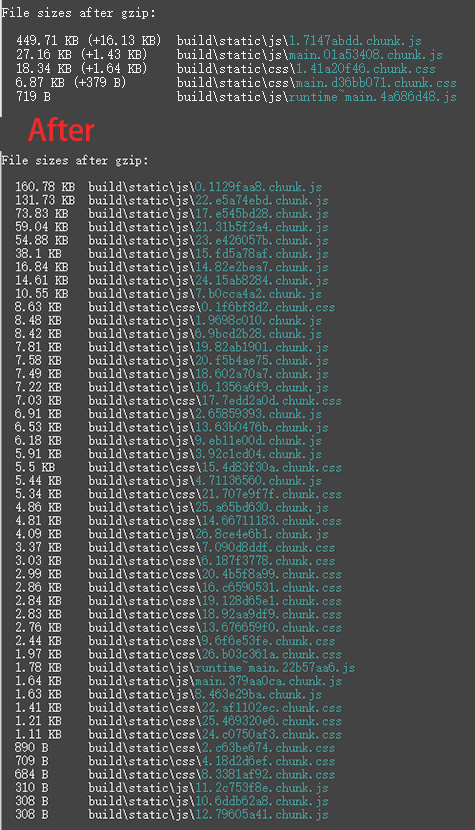
打包文件情况对比:
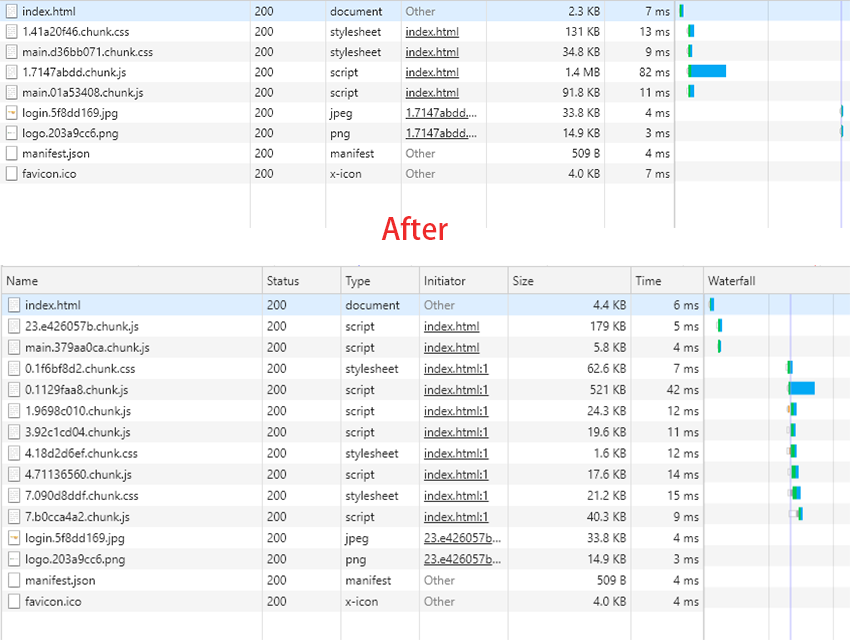
首屏加载情况对比:
参考文档:
https://reacttraining.com/react-router/web/example/route-config
https://github.com/jamiebuilds/react-loadable
可参考其他文章:https://www.cnblogs.com/alan2kat/p/7754846.html
React进阶篇(1) -- react-router4模块化的更多相关文章
- React进阶篇学习
继续上一次基础篇, 分享一些关于React的进阶技术 React 进阶部分 ** context ** ** setState vs forceUpdate ** ** Mixins ** ** HO ...
- React进阶篇(2) -- Redux
前言 如果还不知道为什么要使用Redux,说明你暂时还不需要它. 三大原则 单一数据源 整个应用的 state 被储存在一棵 object tree 中,并且这个 object tree 只存在于唯一 ...
- 当初要是看了这篇,React高阶组件早会了
当初要是看了这篇,React高阶组件早会了. 概况: 什么是高阶组件? 高阶部件是一种用于复用组件逻辑的高级技术,它并不是 React API的一部分,而是从React 演化而来的一种模式. 具体地说 ...
- React进阶之高阶组件
前言 本文代码浅显易懂,思想深入实用.此属于react进阶用法,如果你还不了解react,建议从文档开始看起. 我们都知道高阶函数是什么, 高阶组件其实是差不多的用法,只不过传入的参数变成了react ...
- React进阶之路书籍笔记
React进阶之路: "于复合类型的变量,变量名不指向数据,而是指向数据所在的地址.const命令只是保证变量名指向的地址不变,并不保证该地址的数据不变,所以将一个对象声明为常量必须非常小心 ...
- React基础篇学习
到今天为止, 使用react已经一年了, 现在整理一下入门时的一些重要知识, 帮助想要学习react的同学们理解某些内容. React 元素 React 元素,它是 React 中最小基本单位,我们可 ...
- react基础篇入门组件
讲述一下React: 1.声明式设计-React采用声明范式,可以轻松描述应用 2.高效-React通过DOM模型,最大限度的减少dom的交互 3.灵活-React可以与已知的库或框架很好的配合 4. ...
- react基础篇六
创建 Refs 使用 React.createRef() 创建 refs,通过 ref 属性来获得 React 元素.当构造组件时,refs 通常被赋值给实例的一个属性,这样你可以在组件中任意一处使用 ...
- [转] React 最佳实践——那些 React 没告诉你但很重要的事
前言:对很多 react 新手来说,网上能找到的资源大都是些简单的 tutorial ,它们能教会你如何使用 react ,但并不会告诉你怎么在实际项目中优雅的组织和编写 react 代码.用谷歌搜中 ...
随机推荐
- GitHub in vs2010、vs2013
GitHub在使用上大致和其他源代码管理工具一样,个人源代码管理和分享一大利器,而且vs2010和vs2013配置也没有任何区别,简单做了一下图文配置说明 一.注册github 1.github.co ...
- Ansible之Playbooks的when语句
在使用ansible做自动化运维的时候,大多数情况下都执行某些任务的时候都需要依赖某个变量的值或者是上一个任务的执行结果.如,根据facts信息中的系统版本相关的信息来确定使用哪种包管理器安装软件.A ...
- Dev控件类似于ComBox的DropDownControl用法
dropDownButton1.DropDownControl= CreateDXPopupMenu(); private DXPopupMenu CreateDXPopupMenu() { DXPo ...
- DIV+CSS+JS实现图片<ul><li></li></ul>无缝滚动代码
(含上下左右滚动代码) <!DOCTYPE html PUBLIC "-//W3C//DTD XHTML 1.0 Transitional//EN" "http:/ ...
- 01CSS的引入方式
引入CSS方式(重点掌握) 行内样式 内接样式 外接样式 链接式 导入式 css介绍 现在的互联网前端分三层: HTML:超文本标记语言.从语义的角度描述页面结构. CSS:层叠样式表.从审美的角度负 ...
- python--numpy学习(一)
NumPy 部分功能如下: ndarray,一个具有矢量运算符和复杂广播能力的快速节省空间的多维数组 用于对数组数据进行快速运算的标准数学函数 用于读写磁盘数据的工具以及用于操作内存映射文件的工具 线 ...
- C#使用 SharpAVI进行 屏幕录制
再 nuget 中 搜索 shapAvi 并添加引用 github 地址:https://github.com/baSSiLL/SharpAvi using SharpAvi; using Sharp ...
- Table Tennis Game 2
Description Misha and Vanya have played several table tennis sets. Each set consists of several serv ...
- 常用的软件设计模式的Java实现——让编程从野生到飞起
常用的软件设计模式的Java实现——让编程从野生到飞起_野生技术协会_科技_bilibili_哔哩哔哩 https://www.bilibili.com/video/av7596511/
- 2014年Linux 和开源技术回顾盘点
ZDNet科技观察家StevenJ.Vaughan-Nichols在年终发表了对Linux和开源技术这一年跌宕起伏的总结,细数这一年中的惊喜和不堪. 2014Linux之殇 “心脏出血(Heartbl ...