
SSH的简单入门体验(Struts2.1+Spring3.1+Hibernate4.1)- 查询系统(上)
所谓SSH,指的是struts+spring+hibernate的一个集成框架,它是目前较流行的一种Web应用程序的开源框架。
集成SSH框架的系统从职责上分为四层:表示层、业务逻辑层、数据持久层和域模块层,以帮助开发人员在短期内搭建结构清晰、可复用性好、维护方便的Web应用程序。其中使用Struts作为系统的整体基础架构,负责MVC的分离,在Struts框架的模型部分,控制业务跳转,利用Hibernate框架对持久层提供支持,Spring做管理,管理struts和hibernate。(摘自百度百科)毕业实习布置了一个利用SSH框架做一个查询系统的作业,结果跟驾校科目三的考试冲突了,很悲剧的没有赶上第一次的检查作业,只能等国庆后再去补交了。我从SSH框架的布置到系统的简单实现一共花了三天的时间,里面的概念还不是很明白,只是知道怎么做而已。写下这篇文章也是为了以后重新入门SSH的时候有个入门介绍,防止以后还要从头开始学起(虽然觉得以后如果要写SSH的项目的话肯定要重新系统的学习一遍,无视无视~)
一、准备工具
- MyEclipse2014GA版本
- MySql5.6 和 其驱动包
- Tomcat 8
我这里提供一下MyEclipse的下载链接吧,正好网盘里有(附带破解),其他的工具请大家自行斟酌,因为MyEclipse已经自带数据库和Tomcat了,大家可以使用自带的工具。我这里是使用了上述的工具。
MyEclipse下载链接:百度网盘
MyEclipse破解文件下载链接:百度网盘
二、新建Web项目,导入SSH
- 首先第一步是新建一个web project的项目
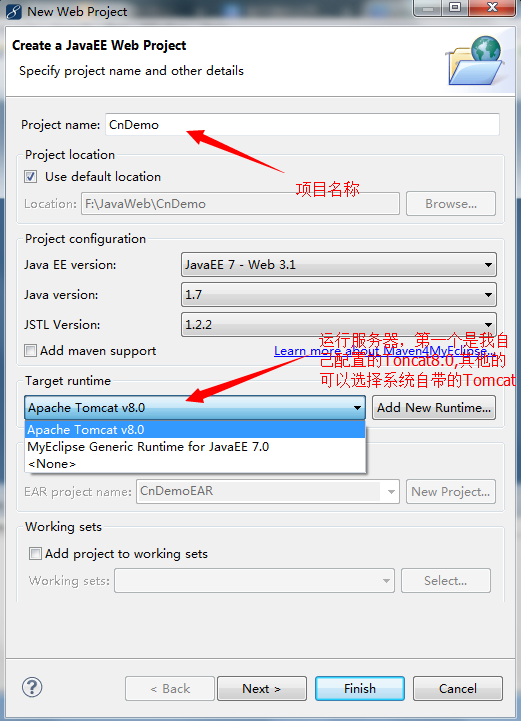
点击next,下一步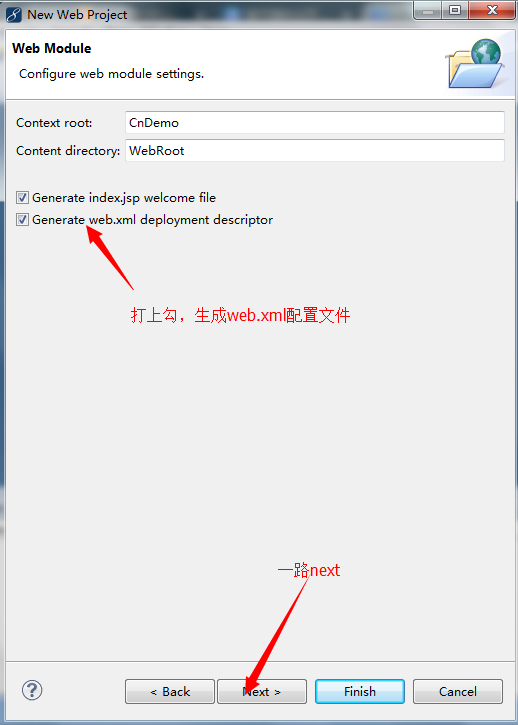
点击finish,完成web project的创建。 - 接下来我们导入SSH框架所需的文件
首先在CnDemo项目根文件夹上右键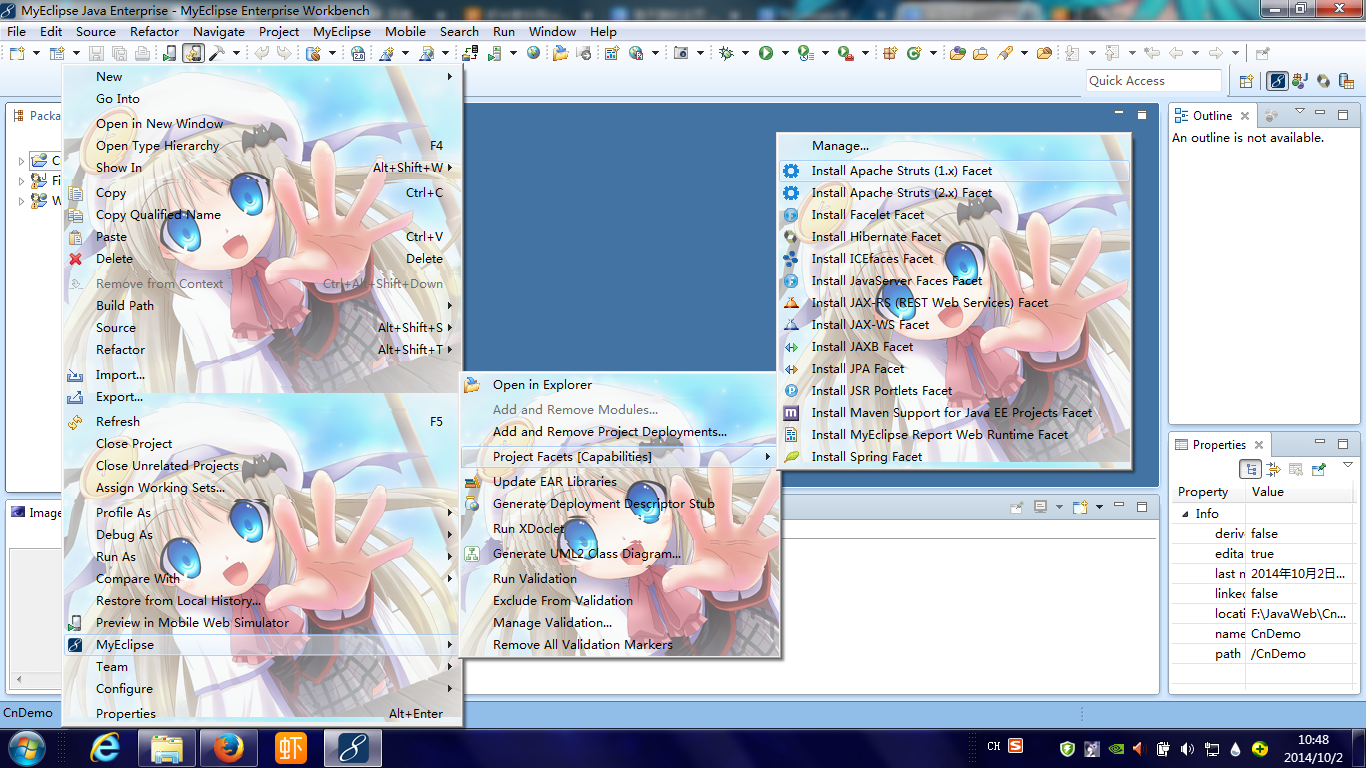
我没记错的话myeclipse早几期的版本菜单是add xxxx的样式,大家对号入座就行了。 - 首先是安装spring框架,选择Install Spring Facet.
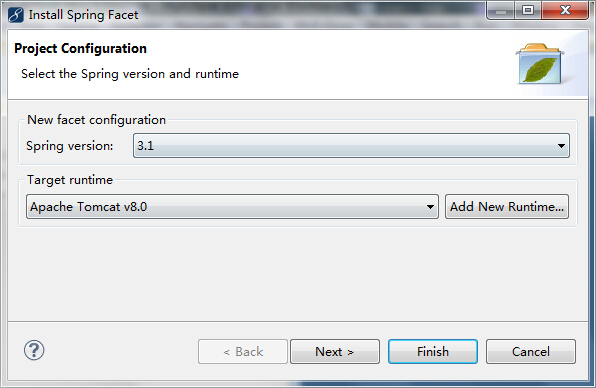

点击finish,这样spring3.1框架就导入进去了。 - 添加Hibernate,不过在此之前你要先建立数据库的链接
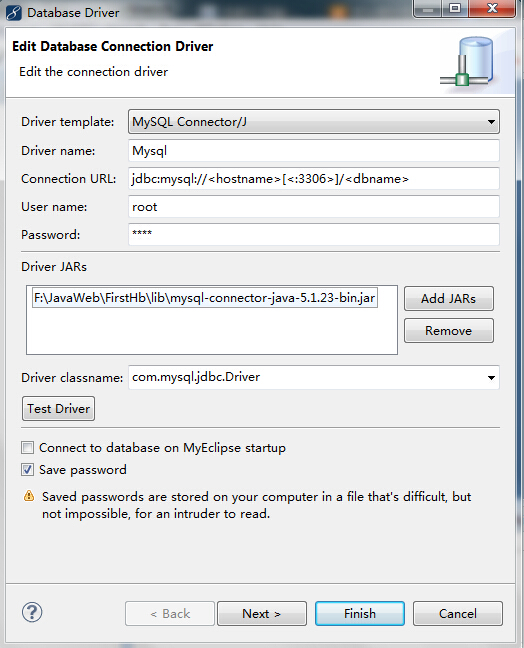
这是我的数据库连接,使用了mysql。在Connection Url这里要填写你要连接的域名和数据库名以及用户名和密码。要导入对应的数据库驱动jar文件才行。最后不要忘记测试一下数据库是否能用。 - 导入Hibernate框架,选择Install Hibernate Facet.
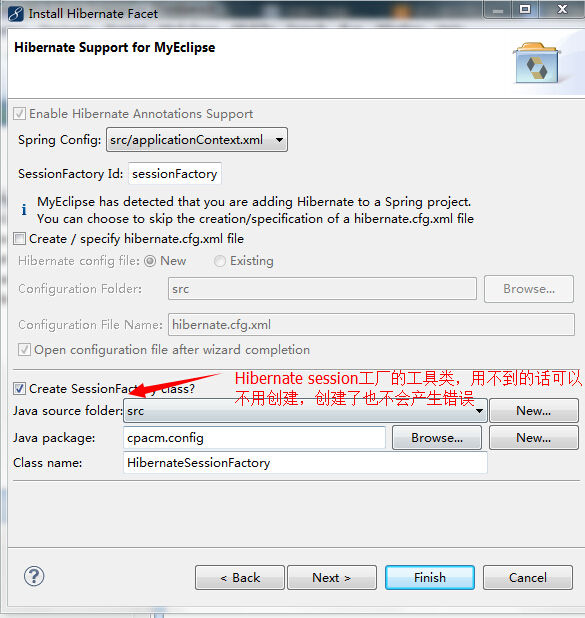
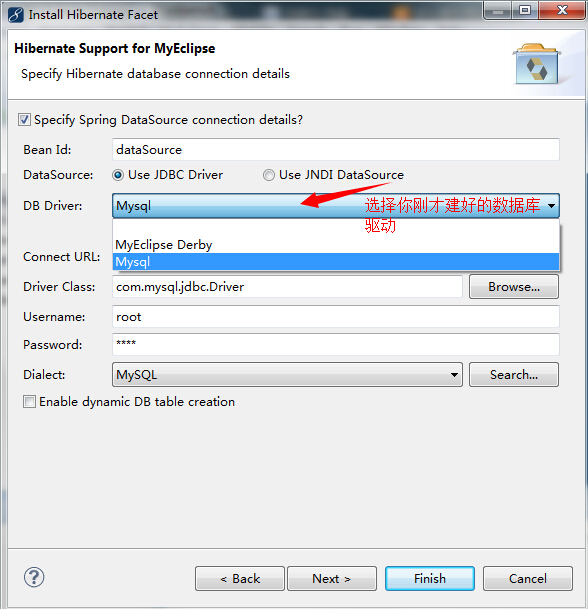
点击完成,创建完毕。 - 最后是导入struts框架,选择Install Apache Struts(2.x) Facet.

点击完成就好了。
以上这样配置,就算基本上把SSH最简单的框架给搭建好了。
三、关于SSH的配置文件
其中最重要的是这两个配置文件
spring配置文件:applicationContext.xml。里面存放实体来控制整个系统。
struts配置文件:struts.xml。里面存放action的映射。
- applicationContext.xml
<?xml version="1.0" encoding="UTF-8"?>

<beans xmlns="http://www.springframework.org/schema/beans"

    xmlns:xsi="http://www.w3.org/2001/XMLSchema-instance" xmlns:p="http://www.springframework.org/schema/p"

    xmlns:aop="http://www.springframework.org/schema/aop"

    xsi:schemaLocation="http://www.springframework.org/schema/beans http://www.springframework.org/schema/beans/spring-beans-3.1.xsd http://www.springframework.org/schema/tx http://www.springframework.org/schema/tx/spring-tx.xsd http://www.springframework.org/schema/aop http://www.springframework.org/schema/aop/spring-aop-3.1.xsd"

    xmlns:tx="http://www.springframework.org/schema/tx">

    <!-- 数据库实体 -->

    <bean id="dataSource" class="org.apache.commons.dbcp.BasicDataSource">

        <property name="driverClassName" value="com.mysql.jdbc.Driver">

        </property>

        <property name="url" value="jdbc:mysql://localhost/querydb"></property>

        <property name="username" value="root"></property>

        <property name="password" value="shen"></property>

    </bean>

    <!-- hibernate实体 -->

    <bean id="sessionFactory"

        class="org.springframework.orm.hibernate4.LocalSessionFactoryBean">

        <property name="dataSource">

            <ref bean="dataSource" />

        </property>

        <property name="hibernateProperties">

            <props>

                <prop key="hibernate.dialect">

                    org.hibernate.dialect.MySQLDialect

                </prop>

                <!-- hibernate 数据的更新方式 -->

                <prop key="hibernate.hbm2ddl.auto">update</prop>

                <!-- 解决no session found -->

                <!--使用getCurrentSession()需要加入如下配置 -->

                <prop key="hibernate.current_session_context_class">thread</prop>

                <!-- hibernate分页出现 ResultSet may only be accessed in a forward direction需要设置hibernate结果集滚动 -->

                <!-- <prop key="jdbc.use_scrollable_resultset">false</prop> -->

            </props>

        </property>

        <!-- 配置实体Hibernate的描述文件 -->

        <property name="mappingResources">

            <list>

                <!-- 实体类列表 -->

                <value>cpacm/pojo/Archive.hbm.xml</value>

            </list>

        </property>

    </bean>

    <!-- 控制层 struts实体(Action实体) -->

    <bean id="ArchiveAction" class="cpacm.action.ArchiveAction" scope="prototype">

        <property name="archiveService" ref="ArchiveService"></property>

    </bean>

    <!-- 逻辑层 service -->

    <bean id="ArchiveService" class="cpacm.service.ArchiveService">

        <property name="archiveDao" ref="ArchiveDao"></property>

    </bean>

    <!-- 数据层,用于数据库的操作 -->

    <bean id="ArchiveDao" class="cpacm.dao.ArchiveDao">

        <property name="sessionFactory" ref="sessionFactory" />

    </bean>

    <!-- spring自带的事物管理 -->

    <bean id="transactionManager"

        class="org.springframework.orm.hibernate4.HibernateTransactionManager">

        <property name="sessionFactory" ref="sessionFactory" />

    </bean>

    <tx:annotation-driven transaction-manager="transactionManager" />

    <bean id="txManager"

        class="org.springframework.jdbc.datasource.DataSourceTransactionManager">

        <property name="dataSource" ref="dataSource" />

    </bean>

    <tx:advice id="txAdvice" transaction-manager="txManager">

        <tx:attributes>

            <tx:method name="save*" propagation="REQUIRED" />

            <tx:method name="add*" propagation="REQUIRED" />

            <tx:method name="create*" propagation="REQUIRED" />

            <tx:method name="insert*" propagation="REQUIRED" />

            <tx:method name="findByQuery*" propagation="REQUIRED" />

            <tx:method name="*" read-only="true" />

        </tx:attributes>

    </tx:advice>

    <aop:config proxy-target-class="true">

        <aop:advisor advice-ref="txAdvice"

            pointcut="execution(* net.noday..service..*.*(..))" />

    </aop:config>

</beans>
其中,bean的注入基本方法为
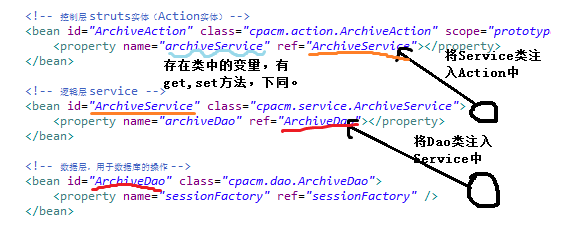
- struts.xml
<?xml version="1.0" encoding="UTF-8" ?>

<!DOCTYPE struts PUBLIC "-//Apache Software Foundation//DTD Struts Configuration 2.1//EN" "http://struts.apache.org/dtds/struts-2.1.dtd">

<struts>

    <!-- action由spring进行实例化 -->

    <constant name="struts.objectFactory" value="spring" />

    <constant name="struts.devMode" value="true"></constant>

    <package name="MySSH" extends="struts-default">

        <!-- <action name="test" class="cpacm.struts2.demoAction" method="execute">

            <result name="success">/Strut2Test.jsp</result> </action> -->

        <!-- 全局的通用的action -->

        <global-results>

            <result name="error">/error.jsp</result>

            <!-- <result name="success">/success.jsp</result> -->

        </global-results>

        <!-- Action列表,其中class=xxx为spring中的id -->

        <action name="query" class="ArchiveAction" method="Query">

            <result name="Query">/frame/ArcDataGrid.jsp</result>

        </action>

        <action name="tag" class="ArchiveAction" method="toUpdate">

            <result name="toUpdate">/frame/ArcUpdate.jsp</result>

        </action>

        <action name="update" class="ArchiveAction" method="Update">

            <result name="success">/frame/ArcDataGrid.jsp</result>

        </action>

        <action name="delete" class="ArchiveAction" method="Delete">

            <result name="success">/frame/ArcDataGrid.jsp</result>

        </action>

        <action name="queryByclassId" class="ArchiveAction" method="QueryByclassID">

            <result name="success">/frame/ArcDataGrid.jsp</result>

        </action>

        <action name="ArcAdd" class="ArchiveAction" method="Add">

            <result name="success">/frame/ArcAddData.jsp</result>

        </action>

    </package>

</struts>
以上基本就是配置的全部过程了,可能很简单,但也是五脏俱全了。篇幅有限,接下来会在下一篇讲述怎么建一个完整的系统。
SSH的简单入门体验(Struts2.1+Spring3.1+Hibernate4.1)- 查询系统(上)的更多相关文章
- SSH的简单入门体验(Struts2.1+Spring3.1+Hibernate4.1)- 查询系统(下)
我们继续吧,SSH最大的优点就是实现的系统的松耦合,能够将后台和前台有机的分离开来. 一.目录结构 一个好的程序要有一个好的开始.我们先来看看整个目录结构吧 主要的是三层架构概念,或者说是mvc的概念 ...
- struts2.3+spring3.2+hibernate4.2例子
有些教程比较老,可是版本更新不等人,基于马士兵老师小例子,自己重新引用了新的包,调试确实有点烦人,但是通过英文文档和google解决问题.官网的更新超快,struts2.3+spring3.2+hib ...
- Struts2.3+Spring3.2+Hibernate4.2框架搭建
一.环境 SSH使用的版本:struts2.3.14.spring3.2.2.hibernate4.2.0 数据库:MYSQL tomcat版本:apache-tomcat-7.0.42 二.所需要导 ...
- 基于Struts2,Spring4,Hibernate4框架的系统架构设计与示例系统实现
笔者在大学中迷迷糊糊地度过了四年的光景,心中有那么一点目标,但总感觉找不到发力的方向. 在四年间,尝试写过代码结构糟糕,没有意义的课程设计,尝试捣鼓过Android开发,尝试探索过软件工程在实际开发中 ...
- Struts2.0+Spring3+Hibernate3(SSH~Demo)
Struts2.0+Spring3+Hibernate3(SSH~Demo) 前言:整理一些集成框架,发现网上都是一些半成品,都是共享一部分出来(确实让人很纠结),这是整理了一份SSH的测试案例,完全 ...
- 【java开发系列】—— spring简单入门示例
1 JDK安装 2 Struts2简单入门示例 前言 作为入门级的记录帖,没有过多的技术含量,简单的搭建配置框架而已.这次讲到spring,这个应该是SSH中的重量级框架,它主要包含两个内容:控制反转 ...
- 一篇文章带你了解服务器操作系统——Linux简单入门
一篇文章带你了解服务器操作系统--Linux简单入门 Linux作为服务器的常用操作系统,身为工作人员自然是要有所了解的 在本篇中我们会简单介绍Linux的特点,安装,相关指令使用以及内部程序的安装等 ...
- Struts2入门2 Struts2深入
Struts2入门2 Struts2深入 链接: http://pan.baidu.com/s/1rdCDh 密码: sm5h 前言: 前面学习那一节,搞得我是在是太痛苦了.因为在Web项目中确实不知 ...
- Struts2入门1 Struts2基础知识
Struts2入门1 Struts2基础知识 20131130 代码下载: 链接: http://pan.baidu.com/s/11mYG1 密码: aua5 前言: 之前学习了Spring和Hib ...
随机推荐
- ajax 异步刷新,需要填写的参数
参数 options 类型:Object 可选.AJAX 请求设置.所有选项都是可选的. ******* async 类型:Boolean 默认值: true.默认设置下,所有请求均为异步请求.如果需 ...
- spring环境搭建(简单实例)
1使用Maven导入需要的依赖(在project标签下) <properties> <spring_version>3.2.2.RELEASE</spring_versi ...
- 完全删除SQL server 2008
一.在控制面板卸载程序 二.点击删除 遇到这种情况则重新启动计算机,之后依次按步骤进行即可. 三.卸载一些相关组件,方法与之类似 四.删除磁盘里的默认文件(一般数据库默认安装在C盘) 路径:" ...
- php在类里如何调用call_user_func_array《细说php2》
- P2124 奶牛美容
题目描述 输入输出格式 输入格式: 输出格式: 输入输出样例 输入样例#1: 6 16 ................ ..XXXX....XXX... ...XXXX....XX... .XXXX ...
- 对C++ templates类模板的几点补充(Traits类模板特化)
前一篇文章<浅谈C++ templates 函数模板.类模板以及非类型模板参数>简单的介绍了什么是函数模板(这个最简单),类模板以及非类型模板参数.本文对类模板再做几点补充. 文章目录1. ...
- BZOJ3533 [Sdoi2014]向量集 【线段树 + 凸包 + 三分】
题目链接 BZOJ3533 题解 我们设询问的向量为\((x_0,y_0)\),参与乘积的向量为\((x,y)\) 则有 \[ \begin{aligned} ans &= x_0x + y_ ...
- HDU.2095(异或运算)
find your present (2) Time Limit: 2000/1000 MS (Java/Others) Memory Limit: 32768/32768 K (Java/Other ...
- Super Moban
HAO BAN ZI 包括求解,判断无解,求自由变元个数以及标记不确定的变元.来源:http://blog.csdn.net/keshuqi/article/details/51921615 #inc ...
- 【NOIP模拟赛】书 数学+期望概率
biubiu~~~ 对于这道傻题.........我考场上退了一个多小时才推出来这个东西是排列...........然后我打的dfs效率n!logInf正好n=9是最后一个能过的数结果前三个点的n全是 ...