
一步步yum安装LNMP,脱坑笔记!!!
更改国内yum源:
1.备份yum源文件,位置在/etc/yum.repos.d/CentOS-Base.repo
mv /etc/yum.repos.d/CentOS-Base.repo /etc/yum.repos.d/CentOS-Base.repo_bak
2.获取阿里的yum源:(centos7为例)
wget -O /etc/yum.repos.d/CentOS-Base.repo http://mirrors.aliyun.com/repo/Centos-7.repo
3.更新cache
yum makecache
4.更新该yum源下所有资源:
yum -y update
安装Nginx
1.更换nginx源为官网源(这步可省略)
To set up the yum repository for RHEL/CentOS, create the file named /etc/yum.repos.d/nginx.repo with the following contents:

[nginx]

name=nginx repo

baseurl=http://nginx.org/packages/OS/OSRELEASE/$basearch/

gpgcheck=0

enabled=1

Replace “OS” with “rhel” or “centos”, depending on the distribution used, and “OSRELEASE” with “6” or “7”, for 6.x or 7.x versions, respectively.
2.安装并启动nginx:
查询nginx源、安装nginx、关闭防火墙、启动nginx
yum search nginx

yum -y install nginx

service iptables stop

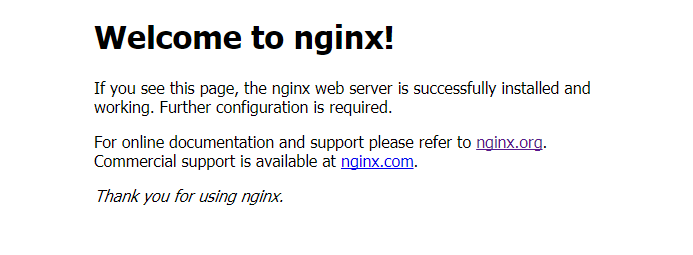
service nginx start
安装PHP
如果打算安装5.X版本,直接yum install php就可以。
我这里安装PHP7.0,所以如下操作:
更新yum源、安装php7.0及许多依赖
rpm -Uvh https://dl.fedoraproject.org/pub/epel/epel-release-latest-7.noarch.rpm

rpm -Uvh https://mirror.webtatic.com/yum/el7/webtatic-release.rpm
yum install php70w-common php70w-fpm php70w-opcache php70w-gd php70w-mysqlnd php70w-mbstring php70w-pecl-redis php70w-pecl-memcached php70w-devel
安装OK后,php -v即可看到 php7的版本信息
那么问题来了,怎么验证nginx可以解析php呢?
在nginx默认启动位置/usr/share/nginx/html下,新建info.php。里面测试代码如下:
<?php

phpinfo();

?>
浏览器里访问http://服务器IP/info.php,发现浏览器直接下载了,还是打不开。怎么弄呢?继续往下看。
在/etc/nginx/conf.d/default.conf中,找到对应代码修改为如下代码:
location ~ \.php$ {

         root           /usr/share/nginx/html;

         fastcgi_pass   127.0.0.1:9000;

         fastcgi_index  index.php;

         fastcgi_param  SCRIPT_FILENAME  $document_root$fastcgi_script_name;

         include        fastcgi_params;

    }
重新启动nginx、php-fpm。然后重新访问上一步路径,效果如下:

这样子,php就安装完成了。继续安装mysql。
安装MySQL
执行以下命令:
yum -y install mysql mysql-server ,mysql-devel
有时候,会出现mysql-server找不到的错误。那么不急,再执行下面这条命令后即可。
rpm -Uvh http://dev.mysql.com/get/mysql-community-release-el7-5.noarch.rpm

yum intsall mysql-server
安装成功后,启动mysql。并且修改密码为123.
service mysqld start

use mysql;

update user set password=password('123') where user='root' and host='localhost';

flush privileges;
最后测试下,php能否连接上呢?
在/usr/share/nginx/html下新建mysql.php
<?php

$conn=mysql_connect('localhost','root','123') ;

if($conn)

  echo "OK";

else

  echo "failed";

?>
结果是链接失败了,php-fpm错误日志显示没有mysql_connect()函数。怎么解决呢?
因为缺少php-mysql模块,所以安装命令为:
yum install php-mysql
最后特别需要说明的一点,PHP7以上版本不支持原来的mysql_connect函数。应该使用如下测试代码,我就陷坑好久!
<?php

    $mysqli = new mysqli("localhost", "root", "password");

    if(!$mysqli)  {

        echo"database error";

    }else{

        echo"php env successful";

    }

    $mysqli->close();

?>
至此,LNMP环境全部配置完成。快去建站吧!
一步步yum安装LNMP,脱坑笔记!!!的更多相关文章
- CentOS7使用yum安装LNMP环境以后无法打开php页面
CentOS7使用yum安装LNMP环境以后无法打开php页面 页面提示为File not found 查看nginx错误日志/var/log/nginx/error.log提示如下 原因分析 ngi ...
- centos7 yum 安装lnmp
centos7 yum 安装lnmp 安装7.2把7.1改成7.2就行 使用第三方扩展epel源安装php7.2 #移除旧版php [root@web02 ~]# yum remove php-m ...
- centos6服务器YUM安装LNMP(LINUX+NGINX+MYSQL+PHP)
之前都用的lamp,这次配置一个lnmp来看看,试试Nginx是不是好用 关闭SELINUXvi /etc/selinux/config#SELINUX=enforcing #注释掉#SELINUXT ...
- centos6.5下yum安装lnmp(适合刚入职的新手的方法)
新入职的员工,开始的时候都是让配环境,本地写代码用的wamp,在lnmp或lamp测试,除非有些土豪公司 用的是(果机). 另外安装时,把整个流程在脑子里先过一篇(记不全也没关系,一回生二回熟),重在 ...
- Centos7下使用yum安装lnmp zabbix3.2
1:配置epel-release mysql zabbix 源 配置epel源 wget http://mirrors.aliyun.com/epel/epel-release-latest-7.no ...
- yum安装lnmp
python其他知识目录 1.安装LNMP之前要安装EPEL,以便安装源以外的软件,如Nginx,phpMyAdmin等. yum install epel-release 提示:EPEL,即Extr ...
- Centos6.8 yum安装LNMP
1.Centos6系统库中默认是没有nginx的rpn包的,所以我们需要先更新下rpm依赖库 (1):使用yum安装nginx,安装nginx库 rpm -Uvh http://nginx.org/p ...
- Centos7 yum安装LNMP
1.Centos7系统库中默认是没有nginx的rpn包的,所以我们需要先更新下rpm依赖库 (1):使用yum安装nginx,安装nginx库 rpm -Uvh http://nginx.org/p ...
- yum安装 lnmp (linux+nginx+php7.1+mysql5.7)
1.第一步先更新yum update 2.yum安装nginx安装nginx最新源:yum localinstall http://nginx.org/packages/centos/7/noarch ...
随机推荐
- MySQL5.7新特性
MySQL5.7介绍 身处 MySQL 这个圈子,能够切身地感受到大家对 MySQL 5.7 的期待和热情,似乎每个人都迫不及待的想要了解.学习和使用 MySQL 5.7.那么,我们不禁要问, MyS ...
- Oracle DATABASE LINK(DBLINK)创建
数据库全局名称可以用以下命令查出: SELECT * FROM GLOBAL_NAME; 修改可以用以下语句来修改参数值: ALTER SYSTEM SET GLOBAL_NAME=TRUE/FALS ...
- tmux颜色高亮跟vim不一致的情况
安装完tmux之后,按照网上大神的配置,稍微配置了下~/.tmux.conf: # 改变快捷键前缀 unbind C-b set -g prefix C-a # 绑定配置加载按键 bind r sou ...
- java基础之JDBC七:C3P0连接池的使用
使用C3P0的前提是需要引入jar包 具体使用如下: /** * c3p0的应用 * 前提:引入c3p0的jar包 */ public class Test { public static void ...
- 在web.Config文件中添加数据库连接配置
新建一个网站,打开web.config文件,在connectionString配置节点添加add节点进行数据库进行数据库连接配置代码如下: <connectionStrings> < ...
- 用Linq取两个数组的差集
两个数组,取其差集,用Linq做比较方便,效率也比较高,具体如下示例 有两个数组list1 和list2 ,如下 List<int> list1 = new List<int> ...
- zigbee--绑定
1.绑定是zigbee一种基本通信方式:具体绑定通信又分为3种模式,在这里只拿一种源绑定来说明. 源绑定: 发送模块 :必须要知道接收模块(被绑定模块)的网络地址或者MAC地址 接收方的接收端点 接收 ...
- Selenium如何定位动态id/class的元素?
今天再给大家分享一个定位不到元素的原因——动态id. 没有打开新页面.没有alert.没有frame.加了等待时间,但是还是定位不到元素?很有可能是你要定位的元素的属性是动态的,即每次打开页面,这个 ...
- MySQL事务隔离级别测试实例
https://www.cnblogs.com/huanongying/p/7021555.html MySQL事务隔离级别 事务隔离级别 脏读 不可重复读 幻读 读未提交(read-uncommit ...
- plsql中查看sql执行计划
想要优化sql语句,可以从sql执行计划入手. 在plsql客户端,提供了一个方便的按钮来查看执行计划 选中需要查看的sql语句,点击此按钮,就可以看到该条语句的执行计划了. 结果集包括描述,用户,对 ...