
使用springboot写一个简单的测试用例
使用springboot写一个简单的测试用例
目录结构
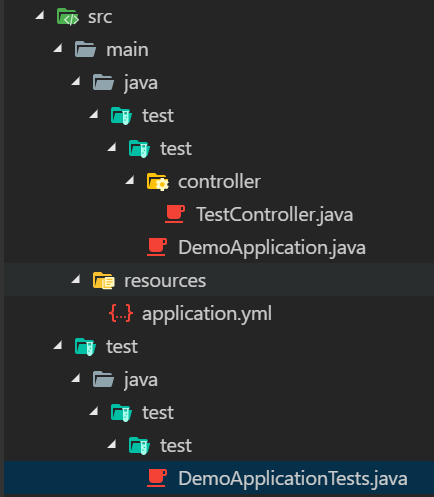
pom
<?xml version="1.0" encoding="UTF-8"?>

<project xmlns="http://maven.apache.org/POM/4.0.0" xmlns:xsi="http://www.w3.org/2001/XMLSchema-instance"

    xsi:schemaLocation="http://maven.apache.org/POM/4.0.0 http://maven.apache.org/xsd/maven-4.0.0.xsd">

    <modelVersion>4.0.0</modelVersion>

    <parent>

        <groupId>org.springframework.boot</groupId>

        <artifactId>spring-boot-starter-parent</artifactId>

        <version>2.0.5.RELEASE</version>

        <relativePath/> <!-- lookup parent from repository -->

    </parent>

    <groupId>test</groupId>

    <artifactId>test</artifactId>

    <version>0.0.1-SNAPSHOT</version>

    <name>demo</name>

    <description>Demo project for Spring Boot</description>

    <properties>

        <project.build.sourceEncoding>UTF-8</project.build.sourceEncoding>

        <project.reporting.outputEncoding>UTF-8</project.reporting.outputEncoding>

        <java.version>1.8</java.version>

    </properties>

    <dependencies>

        <dependency>

            <groupId>org.springframework.boot</groupId>

            <artifactId>spring-boot-starter-web</artifactId>

            <version>2.0.5.RELEASE</version>

        </dependency>

        <dependency>

            <groupId>org.springframework.boot</groupId>

            <artifactId>spring-boot-devtools</artifactId>

            <scope>runtime</scope>

        </dependency>

        <dependency>

            <groupId>org.springframework.boot</groupId>

            <artifactId>spring-boot-starter-test</artifactId>

            <scope>test</scope>

        </dependency>

    </dependencies>

    <build>

        <plugins>

            <plugin>

                <groupId>org.springframework.boot</groupId>

                <artifactId>spring-boot-maven-plugin</artifactId>

            </plugin>

        </plugins>

    </build>

</project>
TestController
package test.test.controller;

import org.springframework.web.bind.annotation.RequestMapping;

import org.springframework.web.bind.annotation.RequestMethod;

import org.springframework.web.bind.annotation.ResponseBody;

import org.springframework.web.bind.annotation.RestController;

@RestController

public class TestController {

    @ResponseBody

    @RequestMapping(value = "/helloword", method = RequestMethod.GET)

    public String home() {

        return "Hello World!!!";

    }

}
DemoApplicationTests
package test.test;

import org.junit.Before;

import org.junit.Test;

import org.junit.runner.RunWith;

import org.springframework.boot.test.context.SpringBootTest;

import org.springframework.http.MediaType;

import org.springframework.test.context.junit4.SpringRunner;

import org.springframework.test.context.web.WebAppConfiguration;

import org.springframework.test.web.servlet.MockMvc;

import org.springframework.test.web.servlet.request.MockMvcRequestBuilders;

import org.springframework.test.web.servlet.setup.MockMvcBuilders;

import static org.springframework.test.web.servlet.result.MockMvcResultMatchers.content;

import static org.springframework.test.web.servlet.result.MockMvcResultMatchers.status;

import static org.hamcrest.Matchers.equalTo;

import test.test.controller.TestController;

@RunWith(SpringRunner.class)

@WebAppConfiguration // 开启web应用配置

@SpringBootTest

public class DemoApplicationTests {

	private MockMvc mvc;

	@Before

	public void setUp() throws Exception {

		mvc = MockMvcBuilders.standaloneSetup(new TestController()).build();

	}

	@Test

	public void hello() throws Exception {

		mvc.perform(

			MockMvcRequestBuilders

			.get("/helloword")

			.accept(MediaType.APPLICATION_JSON_UTF8)

		)

		.andExpect(status().isOk()) // 用于判断返回的期望值

		.andExpect(content().string(equalTo("Hello World!!!")));

	}

}
使用springboot写一个简单的测试用例的更多相关文章
- 利用SpringBoot+Logback手写一个简单的链路追踪
目录 一.实现原理 二.代码实战 三.测试 最近线上排查问题时候,发现请求太多导致日志错综复杂,没办法把用户在一次或多次请求的日志关联在一起,所以就利用SpringBoot+Logback手写了一个简 ...
- springboot搭建一个简单的websocket的实时推送应用
说一下实用springboot搭建一个简单的websocket 的实时推送应用 websocket是什么 WebSocket是一种在单个TCP连接上进行全双工通信的协议 我们以前用的http协议只能单 ...
- 使用springboot实现一个简单的restful crud——01、项目简介以及创建项目
前言 之前一段时间学习了一些springboot的一些基础使用方法和敲了一些例子,是时候写一个简单的crud来将之前学的东西做一个整合了 -- 一个员工列表的增删改查. 使用 restful api ...
- 手写一个简单的starter组件
spring-boot中有很多第三方包,都封装成starter组件,在maven中引用后,启动springBoot项目时会自动装配到spring ioc容器中. 思考: 为什么我们springBoot ...
- 用Python写一个简单的Web框架
一.概述 二.从demo_app开始 三.WSGI中的application 四.区分URL 五.重构 1.正则匹配URL 2.DRY 3.抽象出框架 六.参考 一.概述 在Python中,WSGI( ...
- 如何写一个简单的http服务器
最近几天用C++写了一个简单的HTTP服务器,作为学习网络编程和Linux环境编程的练手项目,这篇文章记录我在写一个HTTP服务器过程中遇到的问题和学习到的知识. 服务器的源代码放在Github. H ...
- 如何写一个简单的shell
如何写一个简单的shell 看完<UNIX环境高级编程>后我就一直想写一个简单的shell来作为练习,因为有事断断续续的写了好几个月,如今写了差不多来总结一下. 源代码放在了Github: ...
- 分享:计算机图形学期末作业!!利用WebGL的第三方库three.js写一个简单的网页版“我的世界小游戏”
这几天一直在忙着期末考试,所以一直没有更新我的博客,今天刚把我的期末作业完成了,心情澎湃,所以晚上不管怎么样,我也要写一篇博客纪念一下我上课都没有听,还是通过强大的度娘完成了我的作业的经历.(当然作业 ...
- 一步一步写一个简单通用的makefile(三)
上一篇一步一步写一个简单通用的makefile(二) 里面的makefile 实现对通用的代码进行编译,这一章我将会对上一次的makefile 进行进一步的优化. 优化后的makefile: #Hel ...
随机推荐
- 关于shortcut icon和icon代码的区别介绍
语句一:<link rel="shortcut icon" href="favicon.ico" /> 语句二:<link rel=" ...
- 【Hive】建表
1.建表 Create [EXTERNAL] TABLE [IF NOT EXISTS] table_name ( [(col_name data_type [COMMENT col_comment] ...
- 010-对象——构造方法__construct析构方法__destruct使用方法 PHP重写与重载
<?php /*抽象方法和抽象类 抽象类必须通过子类继承之后,才能实现实例化. 类中有抽象方法,必须声明抽象类. 如果是抽象类,可以没有抽象方法,但必须通过子类去继承之后,实现实例化 final ...
- SpringMVC中WebDataBinder的应用及原理
Controller方法的参数类型可以是基本类型,也可以是封装后的普通Java类型.若这个普通Java类型没有声明任何注解,则意味着它的每一个属性都需要到Request中去查找对应的请求参数.众所周 ...
- .net学习路线(转)
入门篇1. 学习面向对象(OOP)的编程思想 许多高级语言都是面向对象的编程,.NET也不例外.如果您第一次接触面向对象的编程,就必须理解类.对象.字段.属性.方法和事件.封装.继承和 ...
- 【SQL查询】查询结果翻译成其他值_decode
decode()函数简介: 主要作用:将查询结果翻译成其他值(即以其他形式表现出来,以下举例说明): 使用方法: Select decode(columnname,值1,翻译值1,值2,翻译值2,.. ...
- jsp中的session
浏览器和服务器的异常通话 常用方法 setAttribute(String key,Object value);//设置值 getAttribute(String key); //取值 Invalid ...
- linux常用开发工具命令行
- Java进阶知识点7:不要只会写synchronized - JDK十大并发编程组件总结
一.背景 提到Java中的并发编程,首先想到的便是使用synchronized代码块,保证代码块在并发环境下有序执行,从而避免冲突.如果涉及多线程间通信,可以再在synchronized代码块中使用w ...
- 【转载】获取MAC地址方法大全
From:http://blog.csdn.net/han2814675/article/details/6223617 Windows平台下用C++代码取得机器的MAC地址并不是一件简单直接的事情. ...