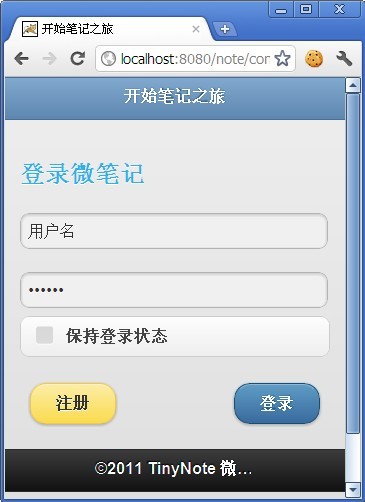
1
2
3
4
5
6
7
8
9
10
11
12
13
14
15
16
17
18
19
20
21
22
23
24
25
26
27
28
29
30
31
32
33
34
35
36
37
38
39
40
41
42
43
44
45
46
47
48
49
50
51
52
53
54
55
56
57
58
59
60
61
62
63
64
65
66
67
68
69
70
71
72
73
74
<script type="text/javascript">
     jQuery(document).ready(function() {
        //输入事件
        $("input[id]").bind("focus",function () {
        if($(this).attr("id")=='username'||$(this).attr("id")=='password')
        $(this).attr("value","");
        });
        //提交
        $("#submit").bind("click", function() {
              if (valid()) {
                $.ajax({
                   type: "POST",
                   url: "http://localhost:8080/note/servlet/Login",
                   data: $("form#loginform").serialize(),
                   success: function(msg){
                     if(msg=='success'){
                        $.mobile.changePage("content/first.html","slidedown", true, true);
                     }else{
                        $.mobile.changePage("content/loginfalse.html","slidedown", true, true);
                     }
                      
                   }
                });
              }
            });
        });
        //输入信息验证
        function valid(){
            if($("#username").attr("value")==''||$("#password").attr("value")=='')
            {
                $.mobile.changePage("content/loginfalse.html","slidedown", true, true);
                return false;          
            }
            return true;
        };
    </script>
     
    <style type="text/css">
    p {
        font-size: 1.5em;
        font-weight: bold;
    }
    #submit{
        float:right; margin:10px;
    }
    #toregist{
        float:left; margin:10px;
    }
    </style>
<body>
 
<!-- begin first page -->
<section id="page1" data-role="page">
  <header data-role="header"  data-theme="b" ><h1>开始笔记之旅</h1></header>
  <div data-role="content" class="content">
    <p style="backg"><font color="#2EB1E8" >登录微笔记</font></p>
        <form method="post" id="loginform">
            <input type="text" name="username" id="username" value="用户名"/><br>
            <input type="password" name="password" id="password" value="密码输入提示"/>
                    <fieldset data-role="controlgroup" >
                        <input type="checkbox" name="checkbox-1" id="checkbox-1" class="custom" />
                        <label for="checkbox-1">保持登录状态</label>
                    </fieldset>
            <a href="content/regist.html" data-role="button" id="toregist" data-theme="e">注册</a>
            <a data-role="button" id="submit" data-theme="b">登录</a>
        </form>
  </div>
  <footer data-role="footer" ><h1>©2011 TinyNote 微笔记社区(movingcomputing.com)</h1></footer>
</section>
<!-- end first page -->


</body>

注册核心代码:

1
2
3
4
5
6
7
8
9
10
11
12
13
14
15
16
17
18
19
20
21
22
23
24
25
26
27
28
29
30
31
32
33
34
35
36
37
38
39
40
41
42
43
44
45
46
47
48
49
50
51
52
53
54
55
56
57
58
59
60
61
62
63
64
65
66
67
68
69
70
71
72
73
74
75
76
77
78
79
80
81
82
83
84
<script type="text/javascript">
     jQuery(document).ready(function() {
        //输入事件
        $("input[id]").bind("focus",function () {
        if($(this).attr("value")=='用户名'||$(this).attr("value")=='密码')
        $(this).attr("value","");
        });
        //提交
        $("#regist").bind("click", function() {
              if (true) {
                $.ajax({
                   type: "POST",
                   url: "http://localhost:8080/note/servlet/Login",
                   data: $("form#loginform").serialize(),
                   success: function(msg){
                     if(msg=='success'){
                        $.mobile.changePage("../content/first.html","slidedown", true, true);
                     }else{
                        $.mobile.changePage("../content/loginfalse.html","slidedown", true, true);
                     }
                      
                   }
                });
              }
            });
        });
    </script>
     
    <style type="text/css">
    p {
        font-size: 1.5em;
        font-weight: bold;
    }
    header div{
        font-size: 1.5em;
    }
    #regist{
        width:150px;
        height:50px;
        margin :5px;
    }
    </style>
     
<body>
 
<!-- begin first page -->
<section data-role="page">
  <header data-role="header"  data-theme="b"  data-type="horizontal">
    <div data-role="controlgroup" >
        <nav data-role="navbar">
            <ul>
                <li><a href="#page1" class="ui-btn-active">注册微笔记</a></li>
                <li><a href="#page2">用手机号注册</a></li>
            </ul>
         </nav>
    </div>
  </header>
  <div data-role="content" class="content">
        <form method="post" id="registform">
        <label for="email">邮 箱</label>
        <input type="text" name="email" id="email"/>
        <label for="password">密 码</label>
        <input type="password" name="password" id="password"/>
        <label for="nicky">昵 称</label>
        <input type="text" name="nicky" id="nicky"/>
        <fieldset data-role="controlgroup">
            <legend>身 份:</legend>
            <input type="radio" name="radio-choice-1" id="radio-choice-1" value="choice-1" checked="checked" />
            <label for="radio-choice-1">上班族</label>
 
            <input type="radio" name="radio-choice-1" id="radio-choice-2" value="choice-2"  />
            <label for="radio-choice-2">大学生</label>
 
            <input type="radio" name="radio-choice-1" id="radio-choice-3" value="choice-3"  />
            <label for="radio-choice-3">其他</label>
        </fieldset>
            <center>
                <a data-role="button" id="regist" data-theme="e">立即注册</a>
            </center>
        </form>
  </div>
</section>
<!-- end first page -->
</body>

登录核心代码:

1
2
3
4
5
6
7
8
9
10
11
12
13
14
15
16
17
18
19
20
21
22
23
24
25
26
27
28
29
30
31
32
33
34
35
36
37
38
39
40
41
42
43
44
45
46
47
48
49
50
51
52
53
54
55
56
57
58
59
60
61
62
63
64
65
66
67
68
69
70
71
72
73
74
<script type="text/javascript">
     jQuery(document).ready(function() {
        //输入事件
        $("input[id]").bind("focus",function () {
        if($(this).attr("id")=='username'||$(this).attr("id")=='password')
        $(this).attr("value","");
        });
        //提交
        $("#submit").bind("click", function() {
              if (valid()) {
                $.ajax({
                   type: "POST",
                   url: "http://localhost:8080/note/servlet/Login",
                   data: $("form#loginform").serialize(),
                   success: function(msg){
                     if(msg=='success'){
                        $.mobile.changePage("content/first.html","slidedown", true, true);
                     }else{
                        $.mobile.changePage("content/loginfalse.html","slidedown", true, true);
                     }
                      
                   }
                });
              }
            });
        });
        //输入信息验证
        function valid(){
            if($("#username").attr("value")==''||$("#password").attr("value")=='')
            {
                $.mobile.changePage("content/loginfalse.html","slidedown", true, true);
                return false;          
            }
            return true;
        };
    </script>
     
    <style type="text/css">
    p {
        font-size: 1.5em;
        font-weight: bold;
    }
    #submit{
        float:right; margin:10px;
    }
    #toregist{
        float:left; margin:10px;
    }
    </style>
<body>
 
<!-- begin first page -->
<section id="page1" data-role="page">
  <header data-role="header"  data-theme="b" ><h1>开始笔记之旅</h1></header>
  <div data-role="content" class="content">
    <p style="backg"><font color="#2EB1E8" >登录微笔记</font></p>
        <form method="post" id="loginform">
            <input type="text" name="username" id="username" value="用户名"/><br>
            <input type="password" name="password" id="password" value="密码输入提示"/>
                    <fieldset data-role="controlgroup" >
                        <input type="checkbox" name="checkbox-1" id="checkbox-1" class="custom" />
                        <label for="checkbox-1">保持登录状态</label>
                    </fieldset>
            <a href="content/regist.html" data-role="button" id="toregist" data-theme="e">注册</a>
            <a data-role="button" id="submit" data-theme="b">登录</a>
        </form>
  </div>
  <footer data-role="footer" ><h1>©2011 TinyNote 微笔记社区(movingcomputing.com)</h1></footer>
</section>
<!-- end first page -->


</body>

注册核心代码:

1
2
3
4
5
6
7
8
9
10
11
12
13
14
15
16
17
18
19
20
21
22
23
24
25
26
27
28
29
30
31
32
33
34
35
36
37
38
39
40
41
42
43
44
45
46
47
48
49
50
51
52
53
54
55
56
57
58
59
60
61
62
63
64
65
66
67
68
69
70
71
72
73
74
75
76
77
78
79
80
81
82
83
84
<script type="text/javascript">
     jQuery(document).ready(function() {
        //输入事件
        $("input[id]").bind("focus",function () {
        if($(this).attr("value")=='用户名'||$(this).attr("value")=='密码')
        $(this).attr("value","");
        });
        //提交
        $("#regist").bind("click", function() {
              if (true) {
                $.ajax({
                   type: "POST",
                   url: "http://localhost:8080/note/servlet/Login",
                   data: $("form#loginform").serialize(),
                   success: function(msg){
                     if(msg=='success'){
                        $.mobile.changePage("../content/first.html","slidedown", true, true);
                     }else{
                        $.mobile.changePage("../content/loginfalse.html","slidedown", true, true);
                     }
                      
                   }
                });
              }
            });
        });
    </script>
     
    <style type="text/css">
    p {
        font-size: 1.5em;
        font-weight: bold;
    }
    header div{
        font-size: 1.5em;
    }
    #regist{
        width:150px;
        height:50px;
        margin :5px;
    }
    </style>
     
<body>
 
<!-- begin first page -->
<section data-role="page">
  <header data-role="header"  data-theme="b"  data-type="horizontal">
    <div data-role="controlgroup" >
        <nav data-role="navbar">
            <ul>
                <li><a href="#page1" class="ui-btn-active">注册微笔记</a></li>
                <li><a href="#page2">用手机号注册</a></li>
            </ul>
         </nav>
    </div>
  </header>
  <div data-role="content" class="content">
        <form method="post" id="registform">
        <label for="email">邮 箱</label>
        <input type="text" name="email" id="email"/>
        <label for="password">密 码</label>
        <input type="password" name="password" id="password"/>
        <label for="nicky">昵 称</label>
        <input type="text" name="nicky" id="nicky"/>
        <fieldset data-role="controlgroup">
            <legend>身 份:</legend>
            <input type="radio" name="radio-choice-1" id="radio-choice-1" value="choice-1" checked="checked" />
            <label for="radio-choice-1">上班族</label>
 
            <input type="radio" name="radio-choice-1" id="radio-choice-2" value="choice-2"  />
            <label for="radio-choice-2">大学生</label>
 
            <input type="radio" name="radio-choice-1" id="radio-choice-3" value="choice-3"  />
            <label for="radio-choice-3">其他</label>
        </fieldset>
            <center>
                <a data-role="button" id="regist" data-theme="e">立即注册</a>
            </center>
        </form>
  </div>
</section>
<!-- end first page -->
</body>

jquery mobile两个页面以及源码(登录与注册) 转的更多相关文章

  1. Python3.x:selenium获取iframe内嵌页面的源码

    Python3.x:selenium获取iframe内嵌页面的源码 前言 在一些网页中经常会看到ifrmae/frame标签,iframe是嵌入式框架一般用来在已有的页面中嵌入另一个页面,当一个元素在 ...

  2. jQuery 2.1.4版本的源码分析

    jQuery 2.1.4版本的源码分析 jquery中获取元素的源码分析 jQuery.each({// 获取当前元素的父级元素 parent: function(elem) { var parent ...

  3. 30、[源码]-AOP原理-注册AnnotationAwareAspectJAutoProxyCreavi

    30.[源码]-AOP原理-注册AnnotationAwareAspectJAutoProxyCreavi

  4. jQuery实现DOM加载方法源码分析

    传统的判断dom加载的方法 使用 dom0级 onload事件来进行触发所有浏览器都支持在最初是很流行的写法 我们都熟悉这种写法: window.onload=function(){ ... }  但 ...

  5. 一个基于jQuery写的弹窗效果(附源码)

    最近项目中频繁遇到需要弹出窗口的功能,一直使用浏览器默认的Alert和Confirm弹窗,感觉视觉效果不是那么好,而从网上下载的话又找不到合适的,找到的话有些也是十分臃肿,有时候感觉学习配置的功夫自己 ...

  6. 基于jQuery左右滑动切换特效 附源码

    分享一款基于脚jQuery左右滑动切换特效.这是一款鼠标点击左右箭头按钮图片滚动切换,鼠标移到图片上显示透明边框特效.   效果图如下:   废话不多说,代码奉上!   html代码: <div ...

  7. 第二十四课:jQuery.event.remove,dispatch的源码解读

    本课还是来讲解一下jQuery是如何实现它的事件系统的.这一课我们先来讲一下jQuery.event.remove的源码解读. remove方法的目的是,根据用户传参,找到事件队列,从里面把匹配的ha ...

  8. 第二十三课:jQuery.event.add的原理以及源码解读

    本课主要来讲解一下jQuery是如何实现它的事件系统的. 我们先来看一个问题: 如果有一个表格有100个tr元素,每个都要绑定mouseover/mouseout事件,改成事件代理的方式,可以节省99 ...

  9. 10款基于jquery的web前端特效及源码下载

    1.jQuery时间轴插件:jQuery Timelinr 这是一款可用于展示历史和计划的时间轴插件,尤其比较适合一些网站展示发展历程.大事件等场景.该插件基于jQuery,可以滑动切换.水平和垂直滚 ...

随机推荐

  1. python3基础:基本语句(2017)

    http://www.cnblogs.com/qq21270/p/4591318.html  字符串.文本文件 http://www.cnblogs.com/qq21270/p/7872824.htm ...

  2. GPUImage中饱和度调整的实现——GPUImageSaturationFilter

    饱和度saturation,是指色彩的鲜艳程度,也称色彩的纯度.饱和度取决于该色中含色成分和消色成分(灰色)的比例.含色成分越大,饱和度越大:消色成分越大,饱和度越小.纯的颜色都是高度饱和的,如鲜红, ...

  3. 应用PLSQL Developer(技巧)

    以下是一些 PLSQL Developer的使用技巧. 转自:PLSQL developer常用技巧,作者:逍遥游xj

  4. USB之HID类Set_Report Request[调试手记1]

    请翻开<Device Class Definition for Human Interface Devices (HID) Version 1.11 >7.2.2 Set_Report R ...

  5. django 使用mysql 数据库

    在 django 创建项目中 默认使用的是  splite3 数据库,不是mysql 数据库,要使用mysql ,要做一些配置: 在 settings.py 中修改如下: DATABASES = { ...

  6. delphi Berlin Could not load SSL library.

    delphi Berlin Could not load SSL library. TIdSSLIOHandlerSocketOpenSSL 解决办法:下载合适的版本文件libssl32.dll Id ...

  7. 机器学习进阶-svm支持向量机

    支持向量机需要解决的问题:找出一条最好的决策边界将两种类型的点进行分开 这个时候我们需要考虑一个问题,在找到一条直线将两种点分开时,是否具有其他的约束条件,这里我们在满足找到一条决策边界时,同时使得距 ...

  8. maven eclipse操作

    目前eclipse默认集成maven插件,但要在eclipse中配置maven的setting才可以. setting可以选用mvn解压包下的目录,也可用仓库下的settings文件. 因我们需要结合 ...

  9. vue 设置背景

    <span :style="{ 'background': 'url(' + aboutImg1 + ') no-repeat center center', 'background- ...

  10. SED命令用法整理

    sed '/Started/'q  匹配到Started字符串则退出sed命令 sed '/Started/{/in/q}'  同时匹配到Started和in两个字符时则退出sed命令 ------- ...