
input的type=file触发的相关事件
与input相关的事件运行的过程。添加了一些相关的方法测试了一下。input的type=file的运行流程。
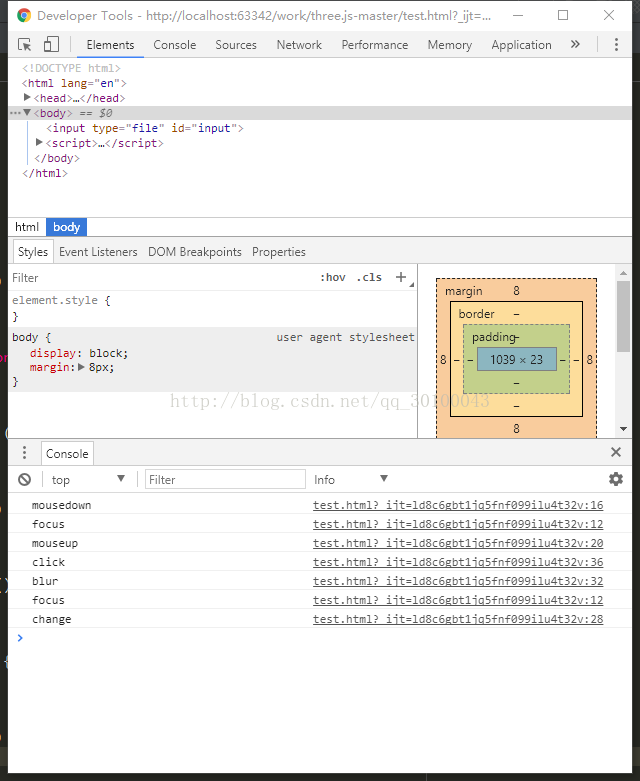
我们书写了mousedown,mouseup,click,input,change,focus,blur绑定到了input上面,模拟点击选择了一个文件,触发事件的流程是下面这样的:
(1)mousedown
(2)focus
(3)mouseup
(4)click
(5)blur
(6)focus
(7)change
首先触发了鼠标按下事件,然后就是焦点到了input上面,然后鼠标抬起,触发click点击事件,失去焦点以后弹出了文件选择框,选中文件以后触发焦点,最后触发的change事件。
如果你没有选择文件的话,直接点击取消的话,就不会触发change事件。
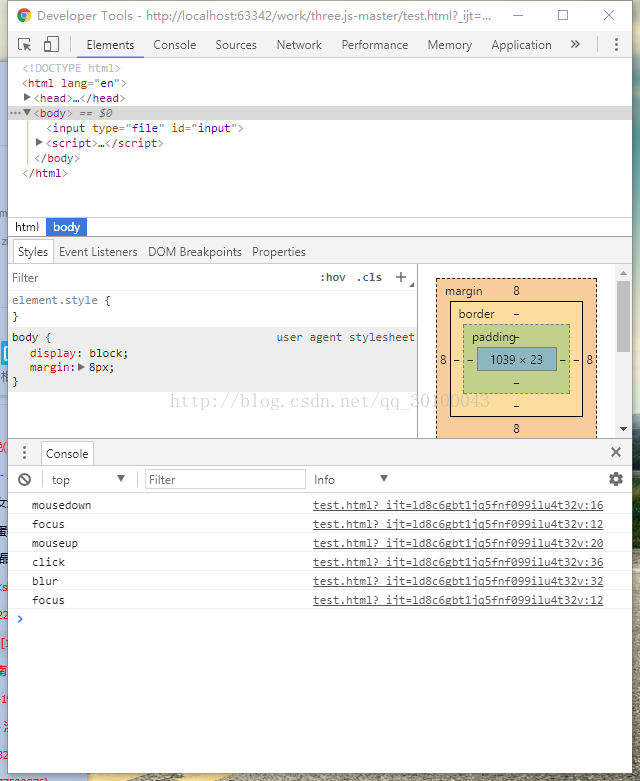
所以说,如果要监听input 的type=file的内容变更事件的话,最好直接用change事件去监听。
附上案例代码:
 <!DOCTYPE html>

 <html lang="en">

 <head>

     <meta charset="UTF-8">

     <title>Title</title>

 </head>

 <body>

 <input type="file" id="input">

 </body>

 <script>

     document.getElementById("input").addEventListener("focus",function () {

         console.log("focus");

     });

     document.getElementById("input").addEventListener("mousedown",function () {

         console.log("mousedown");

     });

     document.getElementById("input").addEventListener("mouseup",function () {

         console.log("mouseup");

     });

     document.getElementById("input").addEventListener("input",function () {

         console.log("input");

     });

     document.getElementById("input").addEventListener("change",function () {

         console.log("change");

     });

     document.getElementById("input").addEventListener("blur",function () {

         console.log("blur");

     });

     document.getElementById("input").addEventListener("click",function () {

         console.log("click");

     });

 </script>

 </html>
input的type=file触发的相关事件的更多相关文章
- 如何获取input框type=file选中的文件对象(FileReader)
$("input[type='file']").change(function() { var file = this.files[0]; if (window.FileReade ...
- 更改input【type=file】样式
<!DOCTYPE html> <html> <head> <meta http-equiv="Content-Type" content ...
- 修改input标签type=file类型的文字
<form name="form" id="form" method="post" enctype="multipart/f ...
- input输入框type=file时accept中可以限制的文件类型(转载)
转载自: input type=file accept中可以限制的文件类型 在上传文件的时候,需要限制指定的文件类型. <input type="file" accept=& ...
- input标签type="file"上传文件的css样式
<!doctype html> <html> <head> <meta charset="utf-8"> <title> ...
- input框type=file设置cursor:pointer的问题
为了让美化上传文件框,设置了cursor:pointer;,然而不起作用,然后百度找到了解决方法,设置font-size:0,这样就可以了.
- 有关图片上传的相关知识input type=file,HTML5的 input:file上传类型控制
遇到项目,要求做一个影像系统,对于前端开发需要了解file的相关属性,以及如何开发.工欲善其事,必先利器嘛.度娘一阵子搜索,找资料.这年头,需要的是你解决问题的能力啊! 参考应用:https://ww ...
- angularjs中使用 <input type="file">标签实现一次最多上传5张图片
前期准备: 1.angular.js 2.bootstrap.css 具体如何实现呢?请看下面代码哈哈哈. 在angular项目中,如果要给<input type="file" ...
- 美化 input type=file控件
大家都知道input的type=file控件默认样式是不能修改的 可以通过一个小技巧处理下 html: <a href="javascript:;" class=" ...
随机推荐
- iOS.Debug.Simulator
1. iOS Simulator Tips & Tricks http://code.tutsplus.com/tutorials/ios-simulator-tips-tricks--mob ...
- 如何为linux系统设置全局的默认网络代理
方法1:更改全局配置文件/etc/profile all_proxy="all_proxy=socks://proxy.xxx.com.cn:80/" ftp_proxy=&quo ...
- HDU 3861.The King’s Problem 强联通分量+最小路径覆盖
The King’s Problem Time Limit: 2000/1000 MS (Java/Others) Memory Limit: 65536/32768 K (Java/Other ...
- JSP概述、API、注释
JSP自带的API包含4个包,可通过Tomcat的官网查看,JSP和EL的API是分开的 javax.servlet.jsp // 包含用于Servlet/JSP容器将JSP页面翻译为Servlet的 ...
- Spring IOC(八)bean 的创建
Spring IOC(八)bean 的创建 Spring 系列目录(https://www.cnblogs.com/binarylei/p/10198698.html) 参考: 每天用心记录一点点.内 ...
- JDK 之 Java Bean 内省机制
JDK 之 Java Bean 内省机制 JDK 规范目录(https://www.cnblogs.com/binarylei/p/10200503.html) JavaBean 是一种特殊的 Jav ...
- Netty 源码 NioEventLoop(三)执行流程
Netty 源码 NioEventLoop(三)执行流程 Netty 系列目录(https://www.cnblogs.com/binarylei/p/10117436.html) 上文提到在启动 N ...
- 【UI测试】--快捷键组合
- IOS初级:观察者
//为一个编辑框myField添加观察者,观察当编辑框文字改变时通知 //方法textChange是通知发生是要做的事情 [[NSNotificationCenter defaultCenter] a ...
- C# WebService创建、发布、调用的简单例子
Web service是一个平台独立的,低耦合的,自包含的.基于可编程的web的应用程序,可使用开放的XML标准来描述.发布.发现.协调和配置这些应用程序,用于开发分布式的互操作的应用程序. Web ...