
在 ASP.NET CORE 中使用 SESSION (转载)
Session 是保存用户和 Web 应用的会话状态的一种方法,ASP.NET Core 提供了一个用于管理会话状态的中间件。在本文中我将会简单介绍一下 ASP.NET Core 中的 Session 的使用方法。
安装配置 Session
nuget 添加引用 Microsoft.AspNetCore.Session
Session 是基于 IDistributedCache 构建的,所以必须引用一种 IDistributedCache 的实现,ASP.NET Core 提供了多种 IDistributedCache 的实现 (Redis、SQL Server、In-memory)
In-memory
services.AddDistributedMemoryCache();

services.AddSession();
SQL Server
nuget 添加引用 Microsoft.Extensions.Caching.SqlServer
SqlServerCache实现允许分布式缓存使用SQL Server数据库作为其后备存储。要创建SQL Server表,您可以使用sql-cache工具,该工具将使用您指定的名称和模式创建一个表。
要使用sql-cache工具,请添加SqlConfig.Tools到.csproj文件的<ItemGroup>元素并运行dotnet恢复。
<ItemGroup>

  <DotNetCliToolReference Include="Microsoft.Extensions.Caching.SqlConfig.Tools" Version="1.0.0-msbuild3-final" />

</ItemGroup>
通过运行以下命令来测试SqlConfig.Tools
C:\DistCacheSample\src\DistCacheSample>dotnet sql-cache create --help
sql-cache工具将显示用法,选项和命令帮助,现在你可以创建表到sql server中,运行“sql-cache create”命令:
C:\DistCacheSample\src\DistCacheSample>dotnet sql-cache create "Data Source=(localdb)\v11.0;Initial Catalog=DistCache;Integrated Security=True;" dbo TestCache

   info: Microsoft.Extensions.Caching.SqlConfig.Tools.Program[0]

       Table and index were created successfully.
创建的表格具有以下架构:
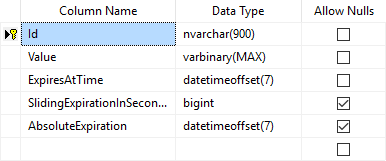
注意的ConnectionString(以及可选地,SchemaName和TableName)通常应该被存储的源控制(如UserSecrets)以外,因为它们可能包含凭证。
像所有的缓存实现一样,你的应用程序应该使用一个实例来获取和设置缓存值IDistributedCache,而不是SqlServerCache。该示例SqlServerCache在Production环境中实现(因此已配置ConfigureProductionServices)。
// Microsoft SQL Server implementation of IDistributedCache.

// Note that this would require setting up the session state database.

services.AddDistributedSqlServerCache(o =>

{

  o.ConnectionString = "Server=.;Database=ASPNET5SessionState;Trusted_Connection=True;";

  o.SchemaName = "dbo";

  o.TableName = "Sessions";

});

services.AddSession();
Redis
nuget 添加引用 Microsoft.Extensions.Caching.Redis
Redis是一款开源的内存数据存储,通常用作分布式缓存。您可以在本地使用它,并且可以为Azure托管的ASP.NET Core应用程序配置Azure Redis缓存。您的ASP.NET Core应用程序使用RedisDistributedCache实例配置缓存实施。
您可以ConfigureServices通过请求一个实例IDistributedCache(参见上面的代码)来配置Redis实现并在您的应用代码中访问它。
在示例代码中,RedisCache当为服务器配置Staging环境时使用实现。因此该ConfigureStagingServices方法配置RedisCache:
services.AddDistributedRedisCache(options => { options.Configuration = "localhost"; options.InstanceName = "SampleInstance"; });
接着在 Startup.cs 的 Config 方法中配置使用 Session 中间件,所有中间件的配置顺序非常重要,必须在 UseSession 调用后才能访问 Session 。
// 必须在 UseMvc 之前调用

app.UseSession();

app.UseMvc(routes =>

{

    routes.MapRoute(

        name: "default",

        template: "{controller=Home}/{action=Index}/{id?}");

});
在 AddSession 和 UseSession 方法中可以传入一个 SessionOptions 参数,通过该参数可以设置 Session 的 Cookie name, Cookie path 等信息。
配置完成后,就可以使用 Session 保存数据了。
具体实现redis实现:.NetCore Session.Redis
使用 Session 存储数据
Session 安装配置好就可以通过 HttpContext.Session 来保存和读取数据了。由于 Session 是基于 IDistributedCache 构建的,因此 Session 只能存储 byte[] 数据,这样使用起来很不方便,好在有很多扩展方法可以用来直接读取和保存 string、int 等类型数据。
一个 Session 使用的简单示例:
public IActionResult Index()

{

    HttpContext.Session.SetString("SessionStartedTime", "Session started time:" + DateTime.Now.ToString());

    return View();

}

public IActionResult About()

{

    ViewData["CurrentTime"] = "Current time:" + DateTime.Now.ToString();

    ViewData["SessionStartedTime"] = HttpContext.Session.GetString("SessionStartedTime");

    return View();

}
或者设置一个扩展类也可以直接将实体类序列化成json存储
public static class SessionExtensions

{

    public static void Set<T>(this ISession session, string key, T value)

    {

        session.SetString(key, JsonConvert.SerializeObject(value));

    }

    public static T Get<T>(this ISession session, string key)

    {

        var value = session.GetString(key);

        return value == null ? default(T) :

                                JsonConvert.DeserializeObject<T>(value);

    }

}
Session的弊端
使用Session会导致Http请求加锁的问题,详情请见:asp.net mvc session锁问题
在 ASP.NET CORE 中使用 SESSION (转载)的更多相关文章
- 在 ASP.NET CORE 中使用 SESSION
Session 是保存用户和 Web 应用的会话状态的一种方法,ASP.NET Core 提供了一个用于管理会话状态的中间件.在本文中我将会简单介绍一下 ASP.NET Core 中的 Session ...
- [转]Asp.net Core中使用Session
本文转自:http://www.cnblogs.com/sword-successful/p/6243841.html 前言 2017年就这么悄无声息的开始了,2017年对我来说又是特别重要的一年. ...
- Asp.net Core中使用Session
前言 2017年就这么悄无声息的开始了,2017年对我来说又是特别重要的一年. 元旦放假在家写了个Asp.net Core验证码登录, 做demo的过程中遇到两个小问题,第一是在Asp.net Cor ...
- 解析Asp.net Core中使用Session的方法
2017年就这么悄无声息的开始了,2017年对我来说又是特别重要的一年. 元旦放假在家写了个Asp.net Core验证码登录, 做demo的过程中遇到两个小问题,第一是在Asp.net Core中引 ...
- 在Asp.Net Core中使用Session
1.在Stratup.cs中配置Session public void ConfigureServices(IServiceCollection services) { services.AddSes ...
- ASP.NET Core 中使用Session会话
添加Session Nuget包 更新Startup.cs文件 在ConfigureServices方法中添加如下代码 services.AddSession(options => { // S ...
- Asp.net Core中使用Redis 来保存Session, 读取配置文件
今天 无意看到Asp.net Core中使用Session ,首先要使用Session就必须添加Microsoft.AspNetCore.Session包,默认Session是只能存去字节,所以如果你 ...
- 你注意到 .Net Framework 和 .Net Core 中使用 Session 的区别了吗?
起因 在测试一个例子时发现的问题,这个示例实现的功能是刷新页面也能保持表格锁定列的状态,先看下页面的完成效果: 测试中发现,几乎相同的代码: 在 FineUIMvc(Net Framework)下没有 ...
- ASP.NET Core中的OWASP Top 10 十大风险-失效的访问控制与Session管理
不定时更新翻译系列,此系列更新毫无时间规律,文笔菜翻译菜求各位看官老爷们轻喷,如觉得我翻译有问题请挪步原博客地址 本博文翻译自: https://dotnetcoretutorials.com/201 ...
随机推荐
- 【webpack】webpack.base.conf.js基础配置
var path = require('path') // node路径模块 var utils = require('./utils') // 对vue-loader对于css预编译一些提取的工具模 ...
- Windows7安装 nginx+php 后访问.php文件出现 “No input file specified.” 的解决办法
在Windows7上安装了Nginx+PHP,参考教程为 https://www.cnblogs.com/anlia/p/5916758.html 启动 nginx 后,在浏览器中输入localhos ...
- Linux 中 awk命令应用
ls -la | awk '{printf ("%8s %8s %8s %8s %8s %8s %8s %8s %8s\n",$1,$2,$3,$4,$5,$6,$7,$8,sub ...
- C#取得控制台应用程序的根目录方法 判断文件夹是否存在,不存在就创建
取得控制台应用程序的根目录方法1:Environment.CurrentDirectory 取得或设置当前工作目录的完整限定路径2:AppDomain.CurrentDomain.BaseDirect ...
- webpack学习笔记—优化缓存、合并、懒加载等
除了前面的webpack基本配置,还可以进一步添加配置,优化合并文件,加快编译速度.下面是生产环境配置文件webpack.production.js,与wenbpack.config.js相比其不需要 ...
- bootstrap使用基础
1.为了适应跨屏浏览,Bootstrap为单元格预定义了4种class ,分别对应于手机.ipad.笔记本电脑.台式机. <div class="row"> <d ...
- 03-01_WebLogic一些概念名词
WebLogic一些概念名词 域(Domain) 管理服务器(Administrative Server) 被管服务器(Managed Server,受管服务器) 集群(Cluster) 机器(Mac ...
- Spring中的destroy-method方法
1. Bean标签的destroy-method方法 配置数据源的时候,会有一个destroy-method方法 <bean id = "dataSource" class ...
- C# 泛型约束 xxx<T> Where T:约束(一)
泛型约束 代码举例 发现我们游戏的代码中,主程写了很多类似这样的代码: public static T CreateObject<T>(out int objectId) where T ...
- Spring Cloud 子项目介绍
Spring Cloud由以下子项目组成. Spring Cloud Config 配置中心——利用git来集中管理程序的配置. 项目地址:https://spring.io/projects/spr ...