
Thinkphp5.0分页和跳页
后台查询商品或者会员量需要用到分页展示列表,当页数比较多的时候为了体高用户体验度,需要添加一个跳页也就是手动输入页码数进行快速跳转指定页面。由于手动编写分页比较麻烦,又想使用TP5自带的分页,但是TP5自带的分页类比较简单,所以可以通过修改Bootstrap类自定义显示分页的页码和数量。
由于Bootstrap类是tp自带的类,所以为了我们尽量不要改动底层自带的类,这里拷贝一下Bootstrap类然后重命名为BootstrapDetailed.php,目录结构如图:
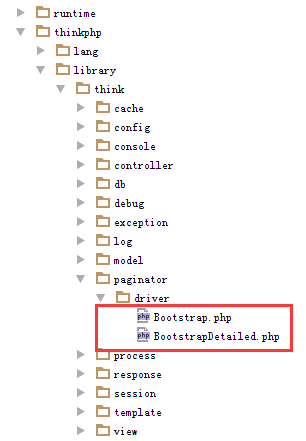
代码如下:
<?php
// +----------------------------------------------------------------------
// | ThinkPHP [ WE CAN DO IT JUST THINK ]
// +----------------------------------------------------------------------
// | Copyright (c) 2006~2017 http://thinkphp.cn All rights reserved.
// +----------------------------------------------------------------------
// | Licensed ( http://www.apache.org/licenses/LICENSE-2.0 )
// +----------------------------------------------------------------------
// | Author: zhangyajun <448901948@qq.com>
// +---------------------------------------------------------------------- namespace think\paginator\driver; use think\Paginator; class BootstrapDetailed extends Paginator
{ /**
* 上一页按钮
* @param string $text
* @return string
*/
protected function getPreviousButton($text = "上一页")
{ if ($this->currentPage() <= 1) {
return $this->getDisabledTextWrapper($text);
} $url = $this->url(
$this->currentPage() - 1
); return $this->getPageLinkWrapper($url, $text);
} //总数标签
protected function totalshow()
{ $totalhtml="<li class=\"disabled\"><span>共".$this->total."条记录  第".$this->currentPage()."页/共".$this->lastPage()."页</span></li>";
return $totalhtml; } //尾页标签 protected function showlastpage($text = '尾页')
{ if($this->currentPage()==$this->lastPage())
{
return $this->getDisabledTextWrapper($text); } $url = $this->url($this->lastPage());
return $this->getPageLinkWrapper($url, $text);
} //首页标签 protected function showfirstpage($text = '首页')
{ if($this->currentPage()==1)
{
return $this->getDisabledTextWrapper($text); } $url = $this->url(1);
return $this->getPageLinkWrapper($url, $text);
}
//后五页
protected function afivepage($text = '后五页')
{ if($this->lastPage()<$this->currentPage()+5)
{
return $this->getDisabledTextWrapper($text); }
$url = $this->url($this->currentPage()+5); return $this->getPageLinkWrapper($url, $text);
} //前五页
protected function bfivepage($text = '前五页')
{ if($this->currentPage()<5)
{
return $this->getDisabledTextWrapper($text); }
$url = $this->url($this->currentPage()-5); return $this->getPageLinkWrapper($url, $text);
} /**
* 下一页按钮
* @param string $text
* @return string
*/
protected function getNextButton($text = '下一页')
{
if (!$this->hasMore) {
return $this->getDisabledTextWrapper($text);
} $url = $this->url($this->currentPage() + 1); return $this->getPageLinkWrapper($url, $text);
} //跳转到哪页
protected function gopage()
{ return $gotohtml="<li><form action='' method='get' ><a style='float:left;margin-left:2px;'><input style='height:33px;' type='text' name='page' placeholder='请选择页数'> <input style='height:33px;' type='submit' value='确定'> </a></form></li>";
// return $totalhtml;; } /**
* 页码按钮
* @return string
*/
protected function getLinks()
{
if ($this->simple)
return ''; $block = [
'first' => null,
'slider' => null,
'last' => null
]; $side = 2;
$window = $side * 2; if ($this->lastPage < $window +1) {
$block['slider'] = $this->getUrlRange(1, $this->lastPage); } elseif ($this->currentPage <= $window-1) { $block['slider'] = $this->getUrlRange(1, $window + 1);
} elseif ($this->currentPage > ($this->lastPage - $window+1)) {
$block['slider'] = $this->getUrlRange($this->lastPage - ($window), $this->lastPage); } else { $block['slider'] = $this->getUrlRange($this->currentPage - $side, $this->currentPage + $side);
} $html = ''; if (is_array($block['first'])) {
$html .= $this->getUrlLinks($block['first']);
} if (is_array($block['slider'])) { $html .= $this->getUrlLinks($block['slider']);
} if (is_array($block['last'])) {
$html .= $this->getUrlLinks($block['last']);
} return $html;
} /**
* 渲染分页html
* @return mixed
*/
public function render()
{
if ($this->hasPages()) {
if ($this->simple) {
return sprintf(
'<ul class="pager">%s %s %s</ul>', $this->getPreviousButton(),
$this->getNextButton()
);
} else {
return sprintf(
'<ul class="pagination"> %s %s %s %s %s %s %s %s </ul>',
//显示数量页码信息
$this->totalshow(),
//第一页
$this->showfirstpage(),
//上一页
$this->getPreviousButton(),
//前五页
$this->bfivepage(),
//页码
$this->getLinks(),
//后五页
//$this->afivepage(),
//下一页
$this->getNextButton(),
//最后一页
$this->showlastpage(),
//最后再加个参数 %s 可以显示跳转到哪页
$this->gopage()
);
}
}
} /**
* 生成一个可点击的按钮
*
* @param string $url
* @param int $page
* @return string
*/
protected function getAvailablePageWrapper($url, $page)
{
return '<li><a href="' . htmlentities($url) . '">' . $page . '</a></li>';
} /**
* 生成一个禁用的按钮
*
* @param string $text
* @return string
*/
protected function getDisabledTextWrapper($text)
{
return '<li class="disabled"><span>' . $text . '</span></li>';
} /**
* 生成一个激活的按钮
*
* @param string $text
* @return string
*/
protected function getActivePageWrapper($text)
{
return '<li class="active"><span>' . $text . '</span></li>';
} /**
* 生成省略号按钮
*
* @return string
*/
protected function getDots($text = '...')
{ //$url = $this->url($this->currentPage() + 1); // return $this->getPageLinkWrapper($url, $text);
return $this->getDisabledTextWrapper('...');
} /**
* 批量生成页码按钮.
*
* @param array $urls
* @return string
*/
protected function getUrlLinks(array $urls)
{
$html = ''; foreach ($urls as $page => $url) {
$html .= $this->getPageLinkWrapper($url, $page);
} return $html;
} /**
* 生成普通页码按钮
*
* @param string $url
* @param int $page
* @return string
*/
protected function getPageLinkWrapper($url, $page)
{
if ($page == $this->currentPage()) {
return $this->getActivePageWrapper($page);
} return $this->getAvailablePageWrapper($url, $page);
}
}
然后再config里面配置一下分页类就可以了。
 //分页配置

    'paginate'               => [

        'type'      => 'BootstrapDetailed',

        'var_page'  => 'page',

        'list_rows' => 15,

    ],
举个例子:
$good_info =Db::table('goods')->paginate(20);
效果如下:

这样就可以了,用户体验度高,方便。很不错的分页。
原文参考文章地址:http://www.zhaisui.com/article/52.html
Thinkphp5.0分页和跳页的更多相关文章
- thinkPHP5.0分页传参
分页函数paginate(),主要参数有:list_rows每页数量.page当前页.path URL路径.query URL额外参数.fragment URL锚点.type分页l类型 public ...
- thinkphp5.0分页
第一种 public function index(){ // 页面和面包屑导航 $ttl[] = $this->title; $ttl[] = '管理员列表'; $this->assig ...
- thinkphp5.0 分页中伪静态的处理
1.修改文件\thinkphp\library\think\Paginator.php(此文件用于分页) isurl是否为伪静态 加入isurl用于判断是否使用伪静态分页 */ protected $ ...
- 用Vue2.0实现简单的分页及跳转
用Vue2.0实现简单的分页及跳转 2018年07月26日 20:29:51 Freya_yyy 阅读数 3369 版权声明:本文为博主原创文章,未经博主允许不得转载. https://blog ...
- ThinkPHP5.0框架开发实现简单的页面跳转
ThinkPHP5.0框架开发实现简单的页面跳转 一.效果 登录界面 登录成功界面 登录失败界面 二.目录结构 三.代码 控制器中的Login.php <?php // 声明命名空间 names ...
- Thinkphp5——实现分页(模型和Db分页,多种方法)
现在很多网站的数据量的很多,如果全部在一页里显示效果不好,数据量太大,那怎么办?这时我们就需要分页,而分页的好处就是分段显示数据,这样页面就不用加载很多数据,需要时才加载,下面我教大家实现ThinkP ...
- thinkphp5.0 微信公众号接入支付宝支付
---恢复内容开始--- 真是无力吐槽这个需求了,想骂客户,好端端的非要在微信公众号接入支付宝,都知道微信公众号是拒绝支付宝的,屏蔽了支付宝,所以在微信公众号接入支付宝的话就必须手动复制链接跳出微信内 ...
- mvc自定义分页(加页数的)(转)
1.引言 在MVC开发中我们经常会对数据进行分页的展示.通过分页我们可以从服务端获取指定的数据来进行展示.这样既节约了数据库查询的时间也节约了网络传输的数据量.在MVC开发中使用的比较多的应该是MVC ...
- Thinkphp5.0支付宝支付扩展库类库大全
Thinkphp5.0支付宝支付扩展库类库大全,包括手机网站支付.电脑网站支付.支付查询.退款.退款查询.对账单等. Thinkphp5.0支付宝调用方法: 电脑网站支付 Pagepay.php 调用 ...
随机推荐
- [bug]不包含“AsNoTracking”的定义
摘要 在使用ef做查询优化的时候我们会用到AsNoTracking方法,但如果不引入命名空间,你就会出现不包含“AsNoTracking”的定义的错误. 解决办法 引入命名空间:System.Data ...
- Java基础——TreeSet
TreeSet是SortedSet接口的实现类,Sorted的英文意思是分类的:选择的. TreeSet可以确保集合元素处于排序状态.与HashSet集合相比,TreeSet还提供了如下几个额外方法: ...
- java图片压缩(Thumbnails)
package com.hzxc.groupactivity.server.util; import java.awt.image.BufferedImage; import java.io.*; i ...
- Mysql添加字段.md
alter table td_user add gender bit DEFAULT 0 COMMENT '性别';
- java锁的简化
java使用单独的锁对象的代码展示 private Lock bankLock = new ReentrantLock(); //因为sufficientFunds是锁创建的条件所以称其为条件对象也叫 ...
- 初识Nosql
ref:http://www.runoob.com/mongodb/nosql.html https://blog.csdn.net/testcs_dn/article/details/512258 ...
- 设计模式(22)--Template Method(模板方法模式)--行为型
作者QQ:1095737364 QQ群:123300273 欢迎加入! 1.模式定义: 模板方法模式是类的行为模式.准备一个抽象类,将部分逻辑以具体方法以及具体构造函数的形式实现,然后声 ...
- js-设计模式学习笔记-策略模式
策略模式的定义是:定义一系列的算法,把它们一个个封装起来,并且使它们可以相互替换(相互替换:表现为它们具有相同的目标和意图). 策略模式的目的是讲算法的使用与算法的实现分离开来. 一个基于策略模式的程 ...
- 【读书笔记】iOS-网络-使用Bonjour实现自组织网络
Bonjour就是这样一种技术:设备可以通过它轻松探测并连接到相同网络中的其他设备,整个过程只需要很少的用户参与或是根本就不需要用户参与.该框架提供了众多适合于移动的使用场景,如基于网络的游戏,设备间 ...
- SD从零开始51-54 信用控制范围, 信用范围数据维护, 自动信用控制, 信用控制-阻止后续功能
[原创] SD从零开始51 信用控制范围 分散的组织结构Decentralized Organization 信用控制范围是一个为客户指定和控制信用限额的组织单元: 依赖于你公司的需求,应收款可以使用 ...