
Entity Framework 6 多对多增改操作指南
问题描述
在很多系统中,存在多对多关系的维护。如下图:

这种多对多结构在数据库中大部分有三个数据表,其中两个主表,还有一个关联表,关联表至少两个字段,即左表主键、右表主键。
如上图,其中的Supplier表和Product是主业务表,ProductSupplier是关联表,在一些复杂的业务系统中,这样的关系实在是太多了。之前在没有使用EF这类ORM框架的时候,可以通过代码来维护这样的关联关系,查询的时候扔过去一个Left Join语句,把数据取出来拼凑一下就可以了。
现在大多使用EF作为ORM工具,处理起来这种问题反而变得麻烦了。原因就是多关联表之间牵牵扯扯的外键关系,一不小心就会出现各种问题。本文将从建模开始演示这种操作,提供一个多对多关系维护的参考。也欢迎大家能提供一些更好的实现方式。
在EF中建模
在EF中建模已知的两种方式:
- 方式一,在数据上下文中添加两个主实体类。使用Fluent Api配置在数据库中生成其关联表,但是在EF中不会体现。
- 方式二,在数据上下文中添加三个实体类,除了两个主实体类外还包含第一个关联表的定义,数据库中存在三张表,EF数据上下文中对应三个实体。
两种不同的建模方式带来完全迥异的增删改查方式,第一种在EF中直接进行多对多的处理。而第二种是把多对多的关系处理间接的修改为了两个一对多关系处理。
在本文中重点介绍第一个多对多的情况,第二个处理方式可以参考Microsoft Identity代码中,关于用户角色的代码。
说了好多废话,下面正文。代码环境为VS 2017 ,MVC5+EF6 ,数据库 SQL Server 2012 r2
方式一 实体定义代码:
public class Product

    {

        public Product()

        {

            this.Suppliers = new List<Supplier>();

        }

        [Display(Name = "Id")]

        public long ProductID { get; set; }

        [Display(Name = "产品名称")]

        public string ProductName { get; set; }

        //navigation property to Supplier

        [Display(Name = "供应商")]

        public virtual ICollection<Supplier> Suppliers { get; set; }

    }

    public class Supplier

    {

        public Supplier()

        {

            this.Products = new List<Product>();

        }

        [Display(Name = "Id")]

        public long SupplierID { get; set; }

        [Display(Name = "供应商名称")]

        public string SupplierName { get; set; }

        [Display(Name = "提供产品")]

        // navigation property to Product

    public virtual ICollection<Product> Products { get; set; }

    }
数据上下文中,多对多关系配置:
public class MyDbContext : DbContext

    {

        public MyDbContext() : base("DefaultConnection")

        {

            Database.SetInitializer<MyDbContext>(null);

        }

        public DbSet<Product> Products { get; set; }

        public DbSet<Supplier> Suppliers { get; set; }

        protected override void OnModelCreating(DbModelBuilder modelBuilder)

        {

            base.OnModelCreating(modelBuilder);

            modelBuilder.Entity<Product>().HasMany(p => p.Suppliers).WithMany(s => s.Products)

                .Map(m =>

                {

                    m.MapLeftKey("ProductId");

                    m.MapRightKey("SupplierId");

                    m.ToTable("ProductSupplier");

                });

        }

    }
只是做一个下操作展示,尽量展示核心代码,不做多余的点缀了
使用VS的MVC脚手架,右键添加Controller,使用包含视图的MVC 5控制器(使用Entity Framework),模型类选择Product,同样操作为Supplier添加Controller。
Insert操作
多对多关系新增分两种情况:
- 左右侧同时新增。使用如下代码覆盖Create 动作的Post方法
[HttpPost]

        [ValidateAntiForgeryToken]

        public ActionResult Create([Bind(Include = "ProductID,ProductName")] Product product)

        {

            //左右侧都为新增

            if (ModelState.IsValid)

            {

                //使用代码模拟新增右侧表

            var supplier = new List<Supplier> {

                    new Supplier { SupplierName = "后台新增供应商"+new Random(Guid.NewGuid().GetHashCode()).Next(1,100) },

                    new Supplier { SupplierName = "后台新增供应商"+new Random(Guid.NewGuid().GetHashCode()).Next(1,100) },

                };

                //左右侧表建立关联关系

                supplier.ForEach(s => product.Suppliers.Add(s));

                //将左侧表添加到数据上下文

                db.Products.Add(product);

                //保存

                db.SaveChanges();

                return RedirectToAction("Index");

            }

            return View(product);

        }
这里直接在后台模拟了新增产品和产品供应商的操作,当数据保存后,会在三个表中分别生成数据,如下:
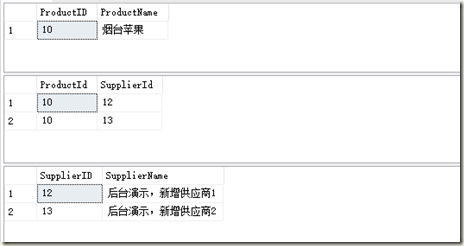
可见这种新增的时候是不需要进行特别的处理
- 左侧新增,关联存在右表数据。常见业务场景如,博客发文选择已有分类时。使用如下代码覆盖Create 的Post方法。
//POST: Products/Create

        //为了防止“过多发布”攻击,请启用要绑定到的特定属性,有关

        //详细信息,请参阅 https://go.microsoft.com/fwlink/?LinkId=317598。

        [HttpPost]

        [ValidateAntiForgeryToken]

        public ActionResult Create1([Bind(Include = "ProductID,ProductName")] Product product)

        {

            //左侧新增数据,右侧为已存在数据

            if (ModelState.IsValid)

            {

                //在数据库中随机取出两个供应商

            var dbSuppliers = db.Suppliers.OrderBy(s => Guid.NewGuid()).Take(2).ToList();

                //为产品添加供应商,建立与供应商之间的关联

                dbSuppliers.ForEach(s =>

                {

            product.Suppliers.Add(s);

                    //    //因为EF有跟踪状态,所以无须添加状态也可以正常保存

                    //    //db.Entry<Supplier>(s).State = System.Data.Entity.EntityState.Unchanged;

                });

                //添加产品记录到数据上下文

                db.Products.Add(product);

                //执行保存

                db.SaveChanges();

                return RedirectToAction("Index");

            }

            return View(product);

        }
我们通过在后台获取第一个和最后一个供应商,然后模拟新增产品选择以有供应商的用户行为。在数据库中会添加一条产品记录,两条产品供应商关联数据。如下:
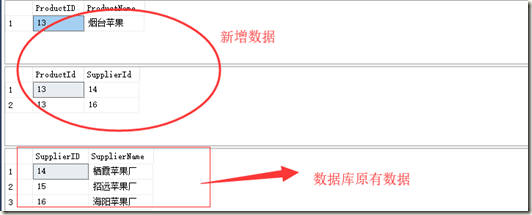
看起来也没什么问题么。so easy 啊。
注意:实际上我们在开发中基本不会像现在这样处理,执行编辑操作时实际流程是
- 进入编辑页面,获取要编辑的数据,在页面上展示
- 在页面上修改表单,建立与右侧表单关联关系(通过下拉框、多选操作、弹窗多选等)
- 提交表单,后台执行修改的保存动作
看似简单,这里还要注意另外一件事情,就是在操作过程中,我们是要进行数据对象的转换的,这个转换过程简单概括就是 Entity→Dto→(View Model→Dto→)Entity,所以我们看看实际情况下会碰到什么问题
使用如下代码替换Create的Post方法
//POST: Products/Create

        //为了防止“过多发布”攻击,请启用要绑定到的特定属性,有关

        //详细信息,请参阅 https://go.microsoft.com/fwlink/?LinkId=317598。

        [HttpPost]

        [ValidateAntiForgeryToken]

        public ActionResult Create2([Bind(Include = "ProductID,ProductName")] Product product)

        {

            //左侧新增数据,右侧为已存在数据

            if (ModelState.IsValid)

            {

                //模拟数据库中取出数据

                var dbSuppliers = db.Suppliers.OrderBy(s => Guid.NewGuid()).Take(2).AsNoTracking().ToList();

                //加载右侧表数据,从中选择两个作为本次修改的关联对象,Entity→Dto(model)转换,转换过程中,Entity丢失了EF的状态跟踪

                var suppliers = dbSuppliers.Select(s => new Supplier { SupplierID = s.SupplierID }).ToList();

                //保存修改后的实体,Dto(model)→Entity转换,通常页面只回传右表的主键Id

                suppliers.ForEach(s =>

                {

                    product.Suppliers.Add(s);

                });

                db.Products.Add(product);

                db.SaveChanges();

                return RedirectToAction("Index");

            }

            return View(product);

        }
这个代码执行后结果如下:
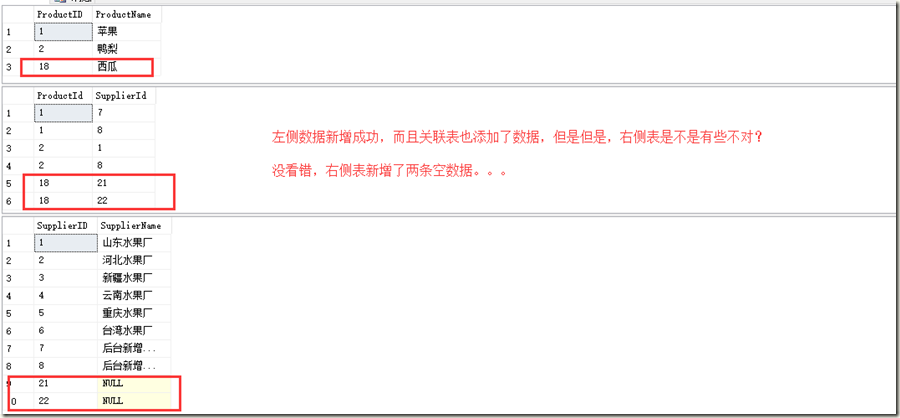
在上面的代码执行完成以后,EF把右侧表也做了新增处理,所以就出现右侧添加了空数据的问题。
修改代码:
//POST: Products/Create

        //为了防止“过多发布”攻击,请启用要绑定到的特定属性,有关

        //详细信息,请参阅 https://go.microsoft.com/fwlink/?LinkId=317598。

        [HttpPost]

        [ValidateAntiForgeryToken]

        public ActionResult Create2([Bind(Include = "ProductID,ProductName")] Product product)

        {

            //左侧新增数据,右侧为已存在数据

            if (ModelState.IsValid)

            {

                //.AsNoTracking() 不添加的时候,保存也报错

                var dbSuppliers = db.Suppliers.OrderBy(s => Guid.NewGuid()).AsNoTracking().Take(2).ToList();

                //加载右侧表数据,从中选择两个作为本次修改的关联对象,Entity→Dto(model)转换,转换过程中,Entity丢失了EF的状态跟踪

                var suppliers = dbSuppliers.Select(s => new Supplier { SupplierID = s.SupplierID }).ToList();

                //保存修改后的实体,Dto(model)→Entity转换,通常页面只回传右表的主键Id

                suppliers.ForEach(s =>

                {

                    product.Suppliers.Add(s);

                    db.Entry<Supplier>(s).State = System.Data.Entity.EntityState.Unchanged;

                });

                db.Products.Add(product);

                db.SaveChanges();

                return RedirectToAction("Index");

            }

            return View(product);

        }
执行新增操作后结果:
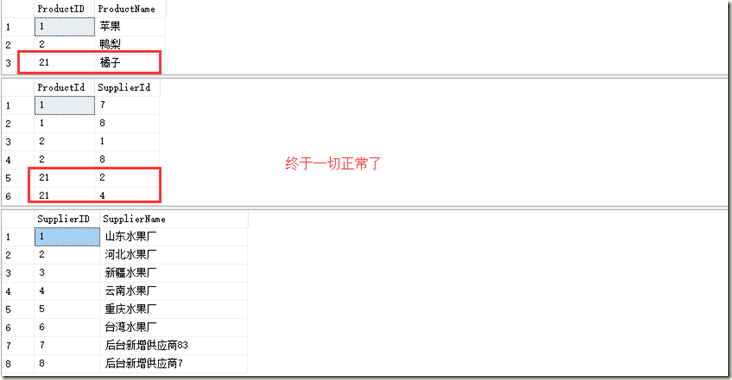
以上终于获取了正常结果。上面两处高亮代码,下方修改状态的是新增的代码。我们做个小实验,把AsNoTracking()去掉看看会怎么样。
没错,直接报错了。
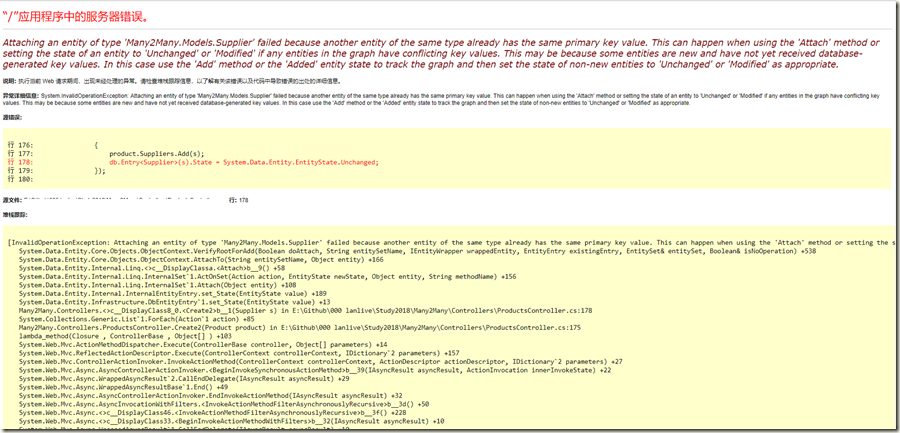
System.InvalidOperationException

  HResult=0x80131509

  Message=Attaching an entity of type 'Many2Many.Models.Supplier' failed because another entity of the same type already has the same primary key value. This can happen when using the 'Attach' method or setting the state of an entity to 'Unchanged' or 'Modified' if any entities in the graph have conflicting key values. This may be because some entities are new and have not yet received database-generated key values. In this case use the 'Add' method or the 'Added' entity state to track the graph and then set the state of non-new entities to 'Unchanged' or 'Modified' as appropriate.

  Source=EntityFramework

  StackTrace:

   在 System.Data.Entity.Core.Objects.ObjectContext.VerifyRootForAdd(Boolean doAttach, String entitySetName, IEntityWrapper wrappedEntity, EntityEntry existingEntry, EntitySet& entitySet, Boolean& isNoOperation)

   在 System.Data.Entity.Core.Objects.ObjectContext.AttachTo(String entitySetName, Object entity)

   在 System.Data.Entity.Internal.Linq.InternalSet`1.<>c__DisplayClassa.<Attach>b__9()

   在 System.Data.Entity.Internal.Linq.InternalSet`1.ActOnSet(Action action, EntityState newState, Object entity, String methodName)

   在 System.Data.Entity.Internal.Linq.InternalSet`1.Attach(Object entity)

   在 System.Data.Entity.Internal.InternalEntityEntry.set_State(EntityState value)

   在 System.Data.Entity.Infrastructure.DbEntityEntry`1.set_State(EntityState value)

   在 Many2Many.Controllers.ProductsController.<>c__DisplayClass8_0.<Create2>b__1(Supplier s) 在 E:\Github\Many2Many\Controllers\ProductsController.cs 中: 第 178 行

   在 System.Collections.Generic.List`1.ForEach(Action`1 action)

   在 Many2Many.Controllers.ProductsController.Create2(Product product) 在 E:\Github\Many2Many\Controllers\ProductsController.cs 中: 第 175 行

   在 System.Web.Mvc.ActionMethodDispatcher.Execute(ControllerBase controller, Object[] parameters)

   在 System.Web.Mvc.ReflectedActionDescriptor.Execute(ControllerContext controllerContext, IDictionary`2 parameters)

   在 System.Web.Mvc.ControllerActionInvoker.InvokeActionMethod(ControllerContext controllerContext, ActionDescriptor actionDescriptor, IDictionary`2 parameters)

   在 System.Web.Mvc.Async.AsyncControllerActionInvoker.<BeginInvokeSynchronousActionMethod>b__39(IAsyncResult asyncResult, ActionInvocation innerInvokeState)

   在 System.Web.Mvc.Async.AsyncResultWrapper.WrappedAsyncResult`2.CallEndDelegate(IAsyncResult asyncResult)

   在 System.Web.Mvc.Async.AsyncResultWrapper.WrappedAsyncResultBase`1.End()

   在 System.Web.Mvc.Async.AsyncControllerActionInvoker.EndInvokeActionMethod(IAsyncResult asyncResult)

   在 System.Web.Mvc.Async.AsyncControllerActionInvoker.AsyncInvocationWithFilters.<InvokeActionMethodFilterAsynchronouslyRecursive>b__3d()

   在 System.Web.Mvc.Async.AsyncControllerActionInvoker.AsyncInvocationWithFilters.<>c__DisplayClass46.<InvokeActionMethodFilterAsynchronouslyRecursive>b__3f()
看错误堆栈信息是不是很熟悉?说出来可能不信,我曾经被这个问题折磨了一天~ 其实就是因为EF有实体跟踪机制,很多时候问题就出在这里,对EF的机制如果不了解的话很容易碰到问题。
同样会产生错误的代码还有如下:
//POST: Products/Create

        //为了防止“过多发布”攻击,请启用要绑定到的特定属性,有关

        //详细信息,请参阅 https://go.microsoft.com/fwlink/?LinkId=317598。

        [HttpPost]

        [ValidateAntiForgeryToken]

        public ActionResult Create2([Bind(Include = "ProductID,ProductName")] Product product)

        {

            //左侧新增数据,右侧为已存在数据

            if (ModelState.IsValid)

            {

                //.AsNoTracking() 不添加的时候,保存也报错

                //var dbSuppliers = db.Suppliers.OrderBy(s => Guid.NewGuid()).AsNoTracking().Take(2).ToList();

                var dbSuppliers = db.Suppliers.OrderBy(s => Guid.NewGuid()).Take(2).ToList();

                //加载右侧表数据,从中选择两个作为本次修改的关联对象,Entity→Dto(model)转换,转换过程中,Entity丢失了EF的状态跟踪

                var suppliers = dbSuppliers.Select(s => new Supplier { SupplierID = s.SupplierID }).ToList();

                //保存修改后的实体,Dto(model)→Entity转换,通常页面只回传右表的主键Id

                suppliers.ForEach(item =>

                {

                    product.Suppliers.Add(item);

                    //把这一行代码踢出去执行,会有奇效

                    //db.Entry<Supplier>(item).State = System.Data.Entity.EntityState.Unchanged;

                });

                db.Products.Add(product);

                //在这里进行状态设置

                foreach (var item in product.Suppliers)

                {

                    db.Entry<Supplier>(item).State = System.Data.Entity.EntityState.Unchanged;

                }

                db.SaveChanges();

                return RedirectToAction("Index");

            }

            return View(product);

        }
-我们只是调整了一下修改右侧表状态的时机,EF非常机智的换了个错误提示方式!
错误信息如下:
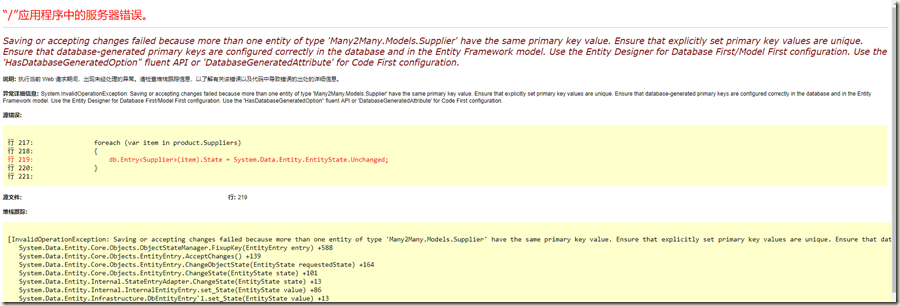
堆栈跟踪信息:
System.InvalidOperationException

  HResult=0x80131509

  Message=Saving or accepting changes failed because more than one entity of type 'Many2Many.Models.Supplier' have the same primary key value. Ensure that explicitly set primary key values are unique. Ensure that database-generated primary keys are configured correctly in the database and in the Entity Framework model. Use the Entity Designer for Database First/Model First configuration. Use the 'HasDatabaseGeneratedOption" fluent API or 'DatabaseGeneratedAttribute' for Code First configuration.

  Source=EntityFramework

  StackTrace:

   在 System.Data.Entity.Core.Objects.ObjectStateManager.FixupKey(EntityEntry entry)

   在 System.Data.Entity.Core.Objects.EntityEntry.AcceptChanges()

   在 System.Data.Entity.Core.Objects.EntityEntry.ChangeObjectState(EntityState requestedState)

   在 System.Data.Entity.Core.Objects.EntityEntry.ChangeState(EntityState state)

   在 System.Data.Entity.Internal.StateEntryAdapter.ChangeState(EntityState state)

   在 System.Data.Entity.Internal.InternalEntityEntry.set_State(EntityState value)

   在 System.Data.Entity.Infrastructure.DbEntityEntry`1.set_State(EntityState value)

   在 Many2Many.Controllers.ProductsController.Create2(Product product) 在 E:\Github\Many2Many\Controllers\ProductsController.cs 中: 第 219 行

   在 System.Web.Mvc.ActionMethodDispatcher.Execute(ControllerBase controller, Object[] parameters)

   在 System.Web.Mvc.ReflectedActionDescriptor.Execute(ControllerContext controllerContext, IDictionary`2 parameters)

   在 System.Web.Mvc.ControllerActionInvoker.InvokeActionMethod(ControllerContext controllerContext, ActionDescriptor actionDescriptor, IDictionary`2 parameters)

   在 System.Web.Mvc.Async.AsyncControllerActionInvoker.<BeginInvokeSynchronousActionMethod>b__39(IAsyncResult asyncResult, ActionInvocation innerInvokeState)

   在 System.Web.Mvc.Async.AsyncResultWrapper.WrappedAsyncResult`2.CallEndDelegate(IAsyncResult asyncResult)

   在 System.Web.Mvc.Async.AsyncResultWrapper.WrappedAsyncResultBase`1.End()

   在 System.Web.Mvc.Async.AsyncControllerActionInvoker.EndInvokeActionMethod(IAsyncResult asyncResult)

   在 System.Web.Mvc.Async.AsyncControllerActionInvoker.AsyncInvocationWithFilters.<InvokeActionMethodFilterAsynchronouslyRecursive>b__3d()

   在 System.Web.Mvc.Async.AsyncControllerActionInvoker.AsyncInvocationWithFilters.<>c__DisplayClass46.<InvokeActionMethodFilterAsynchronouslyRecursive>b__3f()
以上两个错误信息的实际产生原因都是因为EF的实体跟踪机制导致的。如果碰到类似问题,检查你的实体是不是状态不多。
Update操作
使用第一个新增方法在增加一条数据,以区别现有数据,然后修改Edit 的Post方法:
// POST: Products/Edit/5

        // 为了防止“过多发布”攻击,请启用要绑定到的特定属性,有关

        // 详细信息,请参阅 https://go.microsoft.com/fwlink/?LinkId=317598。

        [HttpPost]

        [ValidateAntiForgeryToken]

        public ActionResult Edit([Bind(Include = "ProductID,ProductName,SuppliersId")] Product product)

        {

            if (ModelState.IsValid)

            {

                var entity = db.Entry(product);

                entity.State = EntityState.Modified;

                entity.Collection(s => s.Suppliers).Load();

                //不能像Identity中一样,先clear在add,需要区别对待

                if (product.SuppliersId.Any())

                {

                    var newList = new List<Supplier>();

                    Array.ForEach(product.SuppliersId, s =>

                    {

                        newList.Add(new Supplier { SupplierID = s });

                    });

                    //需要移除的关系

                    var removeRelation = product.Suppliers.Except(newList, new SupplierComparer()).ToList();

                    //新增的关系

                    var addRelation = newList.Except(product.Suppliers, new SupplierComparer()).ToList();

                    removeRelation.ForEach(item => product.Suppliers.Remove(item));

                    addRelation.ForEach(item =>

                    {

                        product.Suppliers.Add(item);

                        db.Entry(item).State = EntityState.Unchanged;

                    });

                }

                db.SaveChanges();

                return RedirectToAction("Index");

            }

            return View(product);

        }
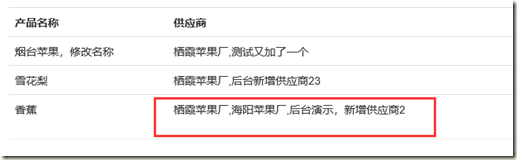
修改前数据如下:
修改后数据如下:
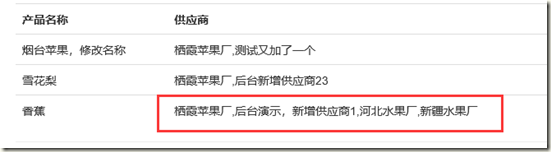
在修改的时候其实是执行了三个操作
- 加载实体的关联关系
- 修改实体
- 移除实体关联关系 (多条sql)
- 添加新的实体关联关系 (多条sql)
Entity Framework算是比较强大的ORM框架了,在使用过程中同样的需求可能有不同的实现方式,简单的CRUD操作实现起来都很简单了。在多对多的关系处理中,通过通用的仓储类基本没法处理,一般要单独实现,上文总结了常用的集中实现方式。
Entity Framework 6 多对多增改操作指南的更多相关文章
- 计划将项目中使用entity framework的要点记录到改栏目下
ef监控sql执行性能日志.http://www.cnblogs.com/CreateMyself/p/5277681.html http://123.122.205.38/cn_sql_server ...
- 【.NET-EF】Entity Framework学习笔记2 - 增删改(没查询)
学习描述:用EF就像是省略了做实体类和DAL类,感觉是很方便,废话不多说,直接写步骤: 1.创建EF的edmx文件 这个其实在笔记1已说过,不过有些细节也要说,所以再说一遍,这里使用的是EF 6.1版 ...
- Entity Framework快速入门笔记—增删改查
第一步:创建一个控制台应用程序,起名为EFDemo 2. 第二步:创建一个实体模型 (1)在EFDemo项目上面右击选择添加—新建项—在已安装的选项中选择数据—ADO.NET实体对象模型,如图所示: ...
- Entity Framework: 主从表的增删改
1.根据主表添加从表数据 var dest = (from d in context.Destinations where d.Name == "Bali" select d).S ...
- EF(Entity Framework)多对多关系下用LINQ实现"NOT IN"查询
这是今天在实际开发中遇到的一个问题,需求是查询未分类的博文列表(未加入任何分类的博文),之前是通过存储过程实现的,今天用EF实现了,在这篇博文中记录一下. 博文的实体类BlogPost是这样定义的: ...
- 【极力分享】[C#/.NET]Entity Framework(EF) Code First 多对多关系的实体增,删,改,查操作全程详细示例【转载自https://segmentfault.com/a/1190000004152660】
[C#/.NET]Entity Framework(EF) Code First 多对多关系的实体增,删,改,查操作全程详细示例 本文我们来学习一下在Entity Framework中使用Cont ...
- [C#/.NET]Entity Framework(EF) Code First 多对多关系的实体增,删,改,查操作全程详细示例
本文我们来学习一下在Entity Framework中使用Context删除多对多关系的实体是如何来实现的.我们将以一个具体的控制台小实例来了解和学习整个实现Entity Framework 多对多关 ...
- Entity Framework 6 学习笔记2 — 增、删、改、显示简单代码示例
前言 通过 “Entity Framework 6 学习笔记1 — 介绍和安装方法”文章我相信大家对EF的安装应该没什么问题了,整体安装还是比较简单的,只需要通过Nuge搜索EF然后安装就可以了,这也 ...
- Working with Data » Getting started with ASP.NET Core and Entity Framework Core using Visual Studio » 增、查、改、删操作
Create, Read, Update, and Delete operations¶ 5 of 5 people found this helpful By Tom Dykstra The Con ...
随机推荐
- RecyclerView错误
1. java.lang.NoClassDefFoundError: android.support.v7.widget.RecyclerView 这个错误真TM见鬼,明明jar包里面就有这个类,工程 ...
- 对团队项目的NABCD的分析
需求(N):我们的软件是面向广大想记录自己所爱动植物成长点滴的人.目前没有很好地软件,只有手机或者电脑上的笔记本和备忘录. 做法(A):我们的软件可以交流可以节约积累知识的时间,将记录从记事本中摘出来 ...
- 分布式版本控制工具:git与Mercurial(zz)
分布式版本控制工具:git与Mercurial [收藏此页] [打印] 作者:cyfdecyf 2007-12-26 内容导航: 第1页 [IT168 技术文档] 说到版本控制工具,很 ...
- Centos上安装phpmyadmin
查看PHP有没有安装:php -v查看apache有没有安装:httpd -v如已经安装则想办法删除. 一.安装Apache(默认安装目录etc/httpd/) 1. 使用yum命令安装Apache ...
- 使用Spring 简化MyBatis
1.导入mybatis所有的jar 和 spring 基本包,spring-jdbc,spring-tx,spring-aop,spring整合mybatis的包等. 2.编写spring配置文件ap ...
- MyBatis中实现多表查询
如果查询的数据量大,推荐使用N+1次查询.数据量少使用联合查询... 一. 1.Mybatis是实现多表查询方式 1.1 业务装配:对两个表编写单表查询语句,在业务(Service)把查询的两表结果 ...
- Codeforces 1093 简要题解
文章目录 A题 B题 C题 D题 E题 F题 G题 传送门 GGG题手速慢了没有在比赛的时候码出来233,FFF题居然没想出来? 五道题滚粗. 先谈谈其他几道题. A题 传送门 不小心看错题 直接看奇 ...
- TCP/IP协议(5):传输层之TCP
一.TCP报文 上图为TCP报文的格式,可以看到TCP头部占20个字节,其中红色圆圈中每一项占一位,表示TCP报文的类型,置1表示该项有效. SYN表示建立连接. FIN表示关闭连接. A ...
- hibernate执行createSQLQuery时字段重名的问题
hibernate执行createSQLQuery时字段重名的问题 不同表关联 ,表字段重名 =>之前若 as 别名 会自动区分 但有一次签移到新服务器 mysql 5.5上: 若字段重名:重 ...
- GreenPlum 初始化配置报错:gpadmin-[ERROR]:-[Errno 12] Cannot allocate memory
报错原因:可能swap太小或者没有交换分区 解决方法: (1)查看swap:swapon -s (2)如果什么都没有显示,说明你没有任何可用的swap,此时你可以添加1GB的swap: dd if=/ ...