
使用Nginx+Lua实现自定义WAF
使用Nginx+Lua实现自定义WAF
版权声明:全部抄自赵班长的GitHub上waf项目
功能列表:
支持IP白名单和黑名单功能,直接将黑名单的IP访问拒绝。

支持URL白名单,将不需要过滤的URL进行定义。

支持User-Agent的过滤,匹配自定义规则中的条目,然后进行处理(返回403)。

支持CC攻击防护,单个URL指定时间的访问次数,超过设定值,直接返回403。

支持Cookie过滤,匹配自定义规则中的条目,然后进行处理(返回403)。

支持URL过滤,匹配自定义规则中的条目,如果用户请求的URL包含这些,返回403。

支持URL参数过滤,原理同上。

支持日志记录,将所有拒绝的操作,记录到日志中去。

日志记录为JSON格式,便于日志分析,例如使用ELKStack进行攻击日志收集、存储、搜索和展示。
Nginx + Lua部署
安装依赖包:
# yum install -y readline-devel pcre-devel openssl-devel

# cd /usr/local/src

下载并编译安装openresty

# wget https://openresty.org/download/ngx_openresty-1.9.3.2.tar.gz

# tar zxf ngx_openresty-1.9.3.2.tar.gz

# cd ngx_openresty-1.9.3.2

# ./configure --prefix=/usr/local/openresty-1.9.3.2 \

--with-luajit --with-http_stub_status_module \

--with-pcre --with-pcre-jit

# gmake && gmake install

# ln -s /usr/local/openresty-1.9.3.2/ /usr/local/openresty
openresty安装
 vim /usr/local/openresty/nginx/conf/nginx.conf

server {

    location /hello {

            default_type text/html;

            content_by_lua_block {

                ngx.say("HelloWorld")

            }

        }

}

# /usr/local/openresty/nginx/sbin/nginx -t

nginx: the configuration file /usr/local/openresty-1.9.3.2/nginx/conf/nginx.conf syntax is ok

nginx: configuration file /usr/local/openresty-1.9.3.2/nginx/conf/nginx.conf test is successful

# /usr/local/openresty/nginx/sbin/nginx
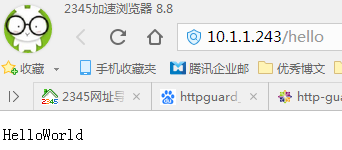
测试:
curl http://192.168.199.33/hello
WAF部署:
git clone https://github.com/unixhot/waf.git

cp -a ./waf/waf /usr/local/openresty/nginx/conf/
修改Nginx的配置文件,加入以下配置。注意路径,同时WAF日志默认存放在/tmp/日期_waf.log
    lua_shared_dict limit 50m;

    lua_package_path "/usr/local/openresty/nginx/conf/waf/?.lua";

    init_by_lua_file "/usr/local/openresty/nginx/conf/waf/init.lua";

    access_by_lua_file "/usr/local/openresty/nginx/conf/waf/access.lua";
重新载入nginx:
/usr/local/openresty/nginx/sbin/nginx –t

/usr/local/openresty/nginx/sbin/nginx -s reload
测试:
访问以sql为后缀的文件

也可以直接跳转到某个页面:
修改conf.lua
config_waf_output = "redirect"    #默认是html

config_waf_redirect_url = "http://www.cnblogs.com/panwenbin-logs/"   #自定义url
测试语法,重新载入nginx
[root@localhost waf]# /usr/local/openresty/nginx/sbin/nginx -t

nginx: the configuration file /usr/local/openresty-1.9.3.2/nginx/conf/nginx.conf syntax is ok

nginx: configuration file /usr/local/openresty-1.9.3.2/nginx/conf/nginx.conf test is successful

[root@localhost waf]# /usr/local/openresty/nginx/sbin/nginx -s reload
在访问看看是否能跳转
具体规则见url.rule文件
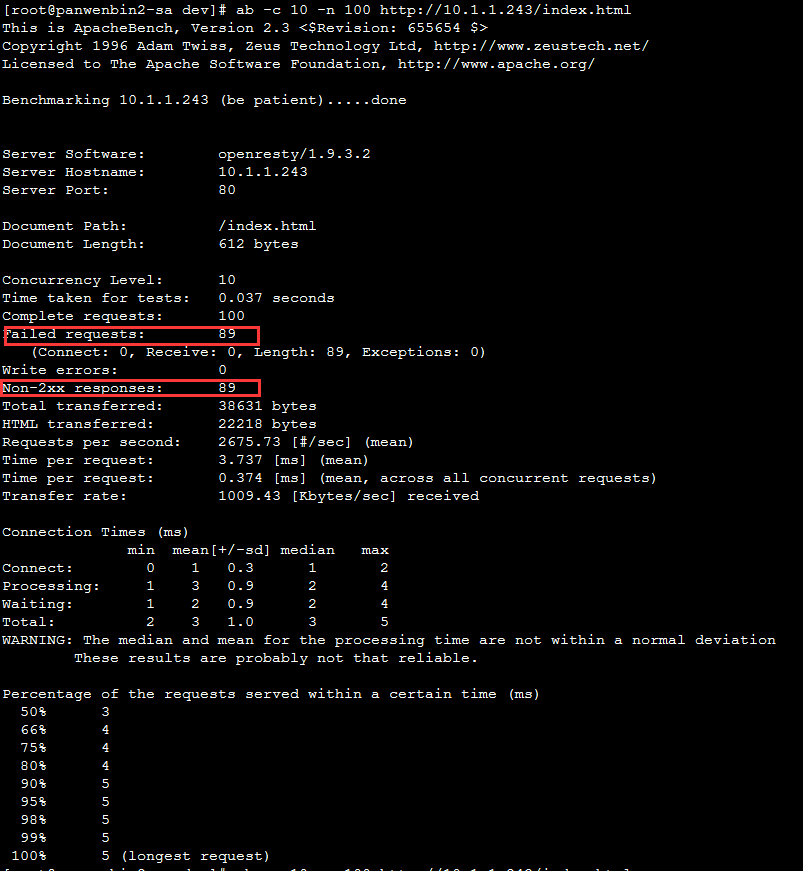
防CC攻击:
以ab命令为例:
再访问一次(一分钟之内):
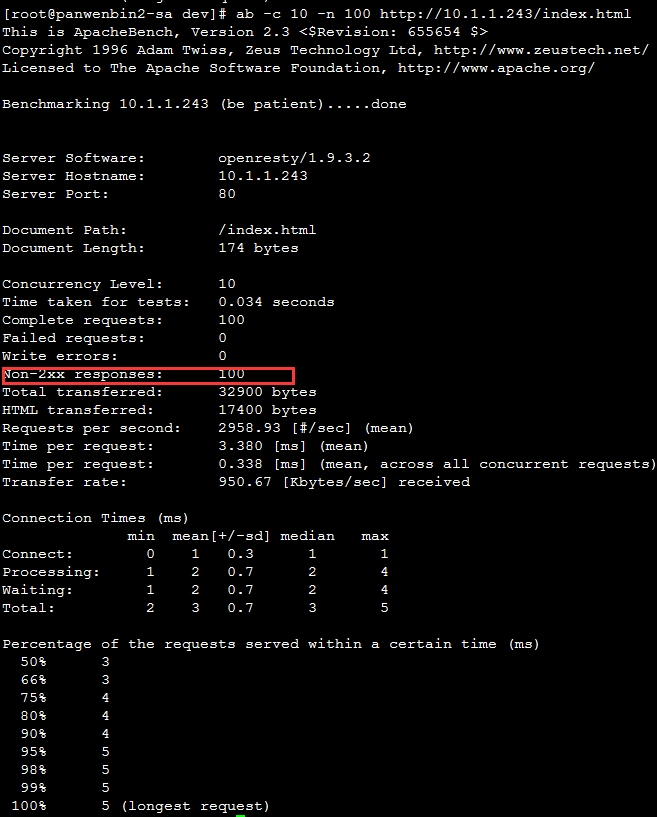
发现第一次非2xx请求为89(成功11个)
第二次非2xx请求为100(成功0个)
whiteip.rule IP白名单(直接写入IP保存,无需重启)
blackip.rule IP黑名单(直接写入IP保存,无需重启)
使用Nginx+Lua实现自定义WAF的更多相关文章
- nginx + Lua 实现自定义WAF
文章摘自:https://github.com/unixhot/waf wget git@github.com:unixhot/waf.git
- Nginx详解二十八:Nginx架构篇Nginx+Lua的安全waf防火墙
Nginx+Lua的安全waf防火墙 看一下别人写好的:https://github.com/loveshell/ngx_lua_waf 先安装git:yum -y install git 在/opt ...
- Nginx + Lua 搭建网站WAF防火墙
前言 对于项目里面只是使用代理等常用功能,在线安装即可,如需制定化模块,则推荐编译安装 PS:本文不仅仅包含Nginx相关的知识点,还包含了逆天学习方法(对待新事物的处理) 官方网站:https:// ...
- nginx+lua构建简单waf网页防火墙
需求背景 类似于论坛型的网站经常会被黑掉,除了增加硬件防护感觉效果还是不太好,还会偶尔被黑,waf的功能正好实现了这个需求. waf的作用: 防止sql注入,本地包含,部分溢出,fuzzing测试,x ...
- 使用NGINX+LUA实现WAF功能 和nginx 防盗链
使用NGINX+LUA实现WAF功能 一.了解WAF 1.1 什么是WAF Web应用防护系统(也称:网站应用级入侵防御系统 .英文:Web Application Firewall,简称: WAF) ...
- 使用Nginx+Lua实现waf
使用Nginx+Lua实现waf 技术内容来自:https://github.com/loveshell/ngx_lua_waf 软件包需求: 1 .Nginx兼容性[最后测试到1.13.6] [ro ...
- Nginx使用Lua模块实现WAF
前言:最近一段时间在写加密数据功能,对安全相关知识还是缺少积累,无意间接触到了WAF相关知识,刚好Nginx可以实现WAF功能,也简单学习了Lua这门语言,分享下 一.WAF产生的背景 过去企业通常会 ...
- nginx+lua实现灰度发布/waf防火墙
nginx+lua 实现灰度发布 waf防火墙 课程链接:[课程]Nginx 与 Lua 实现灰度发布与 WAF 防火墙(完)_哔哩哔哩 (゜-゜)つロ 干杯~-bilibili 参考博客 Nginx ...
- Nginx基础 - Nginx+Lua实现灰度发布与WAF
1.Nginx加载Lua环境默认情况下Nginx不支持Lua模块, 需要安装LuaJIT解释器, 并且需要重新编译Nginx, 建议使用openrestry 1)环境准备 [root@localhos ...
随机推荐
- day5 大纲
01 昨日内容回顾 list: 增: append insert(index,object) extend() 迭代着追加 删: pop(默认删除最后一个)按照索引去删除 有返回值 remove 按照 ...
- es query_string 和 match 的区别
默认使用 空格拆分成 多个 子项,并且 每个子项 都会去分词 查询.可以通过 default_operator 指定 子项之间的关系.默认是 或 . 然后 每个 子项前面可以使用 -+ 指定必须有 ...
- java-plupload上传大文件
参考链接: https://blog.csdn.net/hjf_1291030386/article/details/74784172 https://www.cnblogs.com/tengyunh ...
- Jmeter录制脚本过程及Could not create script recorder报错、您的连接不是私密连接报错
转载自 https://www.cnblogs.com/wwho/p/7173172.html Jmeter录制脚本过程及Could not create script recorder报错.您 ...
- xml.sax 笔记
from xml.sax import saxutils html_str = """<!DOCTYPE html> <html> <hea ...
- mysql二进制日志详解
一.什么是二进制日志 二进制日志主要记录mysql数据库的变化,二进制日志包含所有更新了数据或者潜在更新了数据(如没有匹配到任何行的delete语句),语句以时间的形式保存,描述了数据的更改.二进制日 ...
- Visual Studio: 一键卸载所有组件工具,彻底卸载干净。
第一步.手动卸载VS主体 第二步.下载工具并解压 网盘下载地址:https://pan.baidu.com/s/1eSHRYxW 也可以在Github上下载最新版本:https://github.co ...
- [转载] C# DllImport用法和路径问题
DllImport是System.Runtime.InteropServices命名空间下的一个属性类,其功能是提供从非托管DLL导出的函数的必要调用信息. DllImport属性应用于方法,要求最少 ...
- Spring学习之SpringMVC框架快速搭建实现用户登录功能
引用自:http://blog.csdn.net/qqhjqs/article/details/41683099?utm_source=tuicool&utm_medium=referral ...
- 【java】构造函数
什么时候自定义构造函数:当分析事物时,事物一存在就具备一些特征或者行为,那么就把这么内容定义在构造函数中 作用:对对象进行初始化,对象一建立,就会自动调用与之对应的构造函数 特点: 1.函数名和类名相 ...