
苏浪浪 201771010120 面向对象程序设计(Java)第13周
/实验十三 图形界面事件处理技术
1、实验目的与要求
(1) 掌握事件处理的基本原理,理解其用途;
(2) 掌握AWT事件模型的工作机制;
(3) 掌握事件处理的基本编程模型;
(4) 了解GUI界面组件观感设置方法;
(5) 掌握WindowAdapter类、AbstractAction类的用法;
(6) 掌握GUI程序中鼠标事件处理技术。
2、实验内容和步骤
实验1: 导入第11章示例程序,测试程序并进行代码注释。
测试程序1:
l 在elipse IDE中调试运行教材443页-444页程序11-1,结合程序运行结果理解程序;
l 在事件处理相关代码处添加注释;
l 用lambda表达式简化程序;
l 掌握JButton组件的基本API;
l 掌握Java中事件处理的基本编程模型。
package button;

import java.awt.*;

import java.awt.event.*;

import javax.swing.*;

/**

 * A frame with a button panel

 */

public class ButtonFrame extends JFrame

{

   private JPanel buttonPanel;

   private static final int DEFAULT_WIDTH = 300;//宽300

   private static final int DEFAULT_HEIGHT = 200;//高200

   public ButtonFrame()

   {

      setSize(DEFAULT_WIDTH, DEFAULT_HEIGHT);

      // 创建按钮

      JButton orangeButton = new JButton("Orange");//创建一个带文本的按钮。

      JButton blueButton = new JButton("blue");

      JButton greyButton = new JButton("Grey");

      buttonPanel = new JPanel();

      // 向面板添加按钮

      buttonPanel.add(orangeButton);

      buttonPanel.add(blueButton);

      buttonPanel.add(greyButton);

      // 向框架添加面板

      add(buttonPanel);

      // 创建按钮操作

      ColorAction orangeAction= new ColorAction(Color.ORANGE);

      ColorAction blueAction = new ColorAction(Color.BLUE);

      ColorAction greyAction = new ColorAction(Color.GRAY);

      // 将操作与按钮相关联

      orangeButton.addActionListener(orangeAction);

      blueButton.addActionListener(blueAction);

      greyButton.addActionListener(greyAction);

   }

   /**

    * An action listener that sets the panel's background color.

    */

   private class ColorAction implements ActionListener

   {

      private Color backgroundColor;

      public ColorAction(Color c)

      {

         backgroundColor = c;

      }

      public void actionPerformed(ActionEvent event)

      {

         buttonPanel.setBackground(backgroundColor);

      }

   }

}
package button;

import java.awt.*;

import javax.swing.*;

/**

 * @version 1.34 2015-06-12

 * @author Cay Horstmann

 */

public class ButtonTest

{

   public static void main(String[] args)

   {

      EventQueue.invokeLater(() -> {

         JFrame frame = new ButtonFrame();

         frame.setTitle("ButtonTest");

         frame.setDefaultCloseOperation(JFrame.EXIT_ON_CLOSE);//关闭按钮生效

         frame.setVisible(true);//界面的可见

      });

   }

}
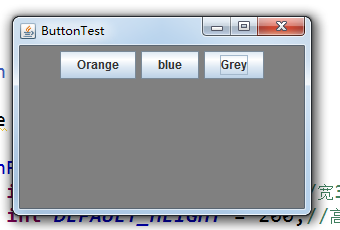
改进后
package button;

import java.awt.*;

import java.awt.event.*;

import javax.swing.*;

/**

 * A frame with a button panel

 */

public class ButtonFrame extends JFrame

{

   private JPanel buttonPanel;

   private static final int DEFAULT_WIDTH = 300;

   private static final int DEFAULT_HEIGHT = 200;

   public ButtonFrame()

   {

      setSize(DEFAULT_WIDTH, DEFAULT_HEIGHT);

      buttonPanel = new JPanel();

      add(buttonPanel);

   makeButton("yellow",Color.YELLOW);

   makeButton("blue",Color.BLUE);

   makeButton("red",Color.RED);

   makeButton("green",Color.GREEN);

   }

   public void makeButton(String name , Color backgroundColor)

   {

   JButton button=new JButton(name);

   buttonPanel.add(button);

   ColorAction action=new ColorAction(backgroundColor);

   button.addActionListener(action);

   }

   /**

    * An action listener that sets the panel's background color.

    */

   private class ColorAction implements ActionListener

   {

      private Color backgroundColor;

      public ColorAction(Color c)

      {

         backgroundColor = c;

      }

      public void actionPerformed(ActionEvent event)

      {

         buttonPanel.setBackground(backgroundColor);

      }

   }

   }
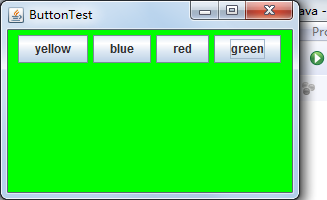
再度改进:(匿名内部类)
package button;

import java.awt.*;

import java.awt.event.*;

import javax.swing.*;

/**

 * A frame with a button panel

 */

public class ButtonFrame extends JFrame

{

   private JPanel buttonPanel;

   private static final int DEFAULT_WIDTH = 300;

   private static final int DEFAULT_HEIGHT = 200;

   public ButtonFrame()

   {

      setSize(DEFAULT_WIDTH, DEFAULT_HEIGHT);

      buttonPanel = new JPanel();

      add(buttonPanel);

   makeButton("yellow",Color.YELLOW);

   makeButton("blue",Color.BLUE);

   makeButton("red",Color.RED);

   makeButton("green",Color.GREEN);

   }

   public void makeButton(String name , Color backgroundColor)

   {

   JButton button=new JButton(name);

   buttonPanel.add(button);

   //ColorAction action=new ColorAction(backgroundColor);

   //button.addActionListener(action);

   button.addActionListener(new ActionListener()

   {

   public void actionPerformed(ActionEvent event)

   {

   buttonPanel.setBackground(backgroundColor);

   }

   });

   }

}
测试程序2:
l 在elipse IDE中调试运行教材449页程序11-2,结合程序运行结果理解程序;
l 在组件观感设置代码处添加注释;
l 了解GUI程序中观感的设置方法。
package plaf;

import javax.swing.JButton;

import javax.swing.JFrame;

import javax.swing.JPanel;

import javax.swing.SwingUtilities;

import javax.swing.UIManager;

/**

 * A frame with a button panel for changing look-and-feel

 */

public class PlafFrame extends JFrame

{

   private JPanel buttonPanel;

   public PlafFrame()

   {

      buttonPanel = new JPanel();

      UIManager.LookAndFeelInfo[] infos = UIManager.getInstalledLookAndFeels();

      //为了配置菜单或为了初始应用程序设置而提供关于已安装的 LookAndFeel 的少量信息

      for (UIManager.LookAndFeelInfo info : infos)

         makeButton(info.getName(), info.getClassName());

      add(buttonPanel);

      pack();

   }

   /**

    * Makes a button to change the pluggable look-and-feel.

    * @param name the button name

    * @param className the name of the look-and-feel class

    */

   private void makeButton(String name, String className)

   {

      // 向面板添加按钮

      JButton button = new JButton(name);

      buttonPanel.add(button);

      //设置按钮操作

      button.addActionListener(event -> {

         // 按钮动作:切换到新的外观

         try

         {

            UIManager.setLookAndFeel(className);

            SwingUtilities.updateComponentTreeUI(this);

            pack();

         }

         catch (Exception e)

         {

            e.printStackTrace();

         }

      });

   }

}
package plaf;

import java.awt.*;

import javax.swing.*;

/**

 * @version 1.32 2015-06-12

 * @author Cay Horstmann

 */

public class PlafTest

{

   public static void main(String[] args)

   {

      EventQueue.invokeLater(() -> {

         JFrame frame = new PlafFrame();

         frame.setTitle("PlafTest");

         frame.setDefaultCloseOperation(JFrame.EXIT_ON_CLOSE);

         frame.setVisible(true);

      });

   }

}

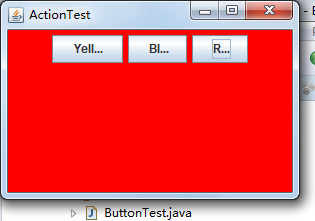
测试程序3:
l 在elipse IDE中调试运行教材457页-458页程序11-3,结合程序运行结果理解程序;
l 掌握AbstractAction类及其动作对象;
l 掌握GUI程序中按钮、键盘动作映射到动作对象的方法。
package action;

import java.awt.*;

import java.awt.event.*;

import javax.swing.*;

/**

 * A frame with a panel that demonstrates color change actions.

 */

public class ActionFrame extends JFrame

{

   private JPanel buttonPanel;

   private static final int DEFAULT_WIDTH = 300;

   private static final int DEFAULT_HEIGHT = 200;

   public ActionFrame()

   {

      setSize(DEFAULT_WIDTH, DEFAULT_HEIGHT);

      buttonPanel = new JPanel();

      // 定义的行为

      Action yellowAction = new ColorAction("Yellow", new ImageIcon("yellow-ball.gif"),

            Color.YELLOW);

      Action blueAction = new ColorAction("Blue", new ImageIcon("blue-ball.gif"), Color.BLUE);

      Action redAction = new ColorAction("Red", new ImageIcon("red-ball.gif"), Color.RED);

      //为这些操作添加按钮

      buttonPanel.add(new JButton(yellowAction));

      buttonPanel.add(new JButton(blueAction));

      buttonPanel.add(new JButton(redAction));

      //  向框架添加面板

      add(buttonPanel);

      //将Y、B和R键与名称关联起来

      InputMap imap = buttonPanel.getInputMap(JComponent.WHEN_ANCESTOR_OF_FOCUSED_COMPONENT);

      imap.put(KeyStroke.getKeyStroke("ctrl Y"), "panel.yellow");

      imap.put(KeyStroke.getKeyStroke("ctrl B"), "panel.blue");

      imap.put(KeyStroke.getKeyStroke("ctrl R"), "panel.red");

      // 将名称与动作关联起来

      ActionMap amap = buttonPanel.getActionMap();

      amap.put("panel.yellow", yellowAction);

      amap.put("panel.blue", blueAction);

      amap.put("panel.red", redAction);

   }

   public class ColorAction extends AbstractAction

   {

      /**

       * Constructs a color action.

       * @param name the name to show on the button

       * @param icon the icon to display on the button

       * @param c the background color

       */

      public ColorAction(String name, Icon icon, Color c)

      {

         putValue(Action.NAME, name);

         putValue(Action.SMALL_ICON, icon);

         putValue(Action.SHORT_DESCRIPTION, "Set panel color to " + name.toLowerCase());

         putValue("color", c);

      }

      public void actionPerformed(ActionEvent event)

      {

         Color c = (Color) getValue("color");

         buttonPanel.setBackground(c);

      }

   }

}
package action;

import java.awt.*;

import javax.swing.*;

/**

 * @version 1.34 2015-06-12

 * @author Cay Horstmann

 */

public class ActionTest

{

   public static void main(String[] args)

   {

      EventQueue.invokeLater(() -> {

         JFrame frame = new ActionFrame();

         frame.setTitle("ActionTest");

         frame.setDefaultCloseOperation(JFrame.EXIT_ON_CLOSE);

         frame.setVisible(true);

      });

   }

}
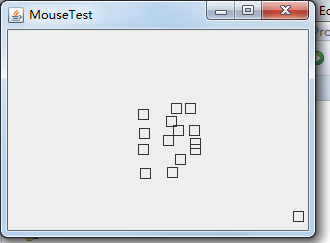
测试程序4:
l 在elipse IDE中调试运行教材462页程序11-4、11-5,结合程序运行结果理解程序;
l 掌握GUI程序中鼠标事件处理技术。
package mouse;

import java.awt.*;

import java.awt.event.*;

import java.awt.geom.*;

import java.util.*;

import javax.swing.*;

/**

 * A component with mouse operations for adding and removing squares.

 */

public class MouseComponent extends JComponent

{

   private static final int DEFAULT_WIDTH = 300;

   private static final int DEFAULT_HEIGHT = 200;

   private static final int SIDELENGTH = 10;

   private ArrayList<Rectangle2D> squares;

   private Rectangle2D current; //包含鼠标光标的正方形

   public MouseComponent()

   {

      squares = new ArrayList<>();

      current = null;

      addMouseListener(new MouseHandler());

      addMouseMotionListener(new MouseMotionHandler());

   }

   public Dimension getPreferredSize() { return new Dimension(DEFAULT_WIDTH, DEFAULT_HEIGHT); }

   public void paintComponent(Graphics g)

   {

      Graphics2D g2 = (Graphics2D) g;

      // 画出所有方块

      for (Rectangle2D r : squares)

         g2.draw(r);

   }

   /**

    * Finds the first square containing a point.

    * @param p a point

    * @return the first square that contains p

    */

   public Rectangle2D find(Point2D p)

   {

      for (Rectangle2D r : squares)

      {

         if (r.contains(p)) return r;

      }

      return null;

   }

   /**

    * Adds a square to the collection.

    * @param p the center of the square

    */

   public void add(Point2D p)

   {

      double x = p.getX();

      double y = p.getY();

      current = new Rectangle2D.Double(x - SIDELENGTH / 2, y - SIDELENGTH / 2, SIDELENGTH,

            SIDELENGTH);

      squares.add(current);

      repaint();

   }

   /**

    * Removes a square from the collection.

    * @param s the square to remove

    */

   public void remove(Rectangle2D s)

   {

      if (s == null) return;

      if (s == current) current = null;

      squares.remove(s);

      repaint();

   }

   private class MouseHandler extends MouseAdapter

   {

      public void mousePressed(MouseEvent event)

      {

         //如果光标不在正方形内,则添加一个新的正方形

         current = find(event.getPoint());

         if (current == null) add(event.getPoint());

      }

      public void mouseClicked(MouseEvent event)

      {

         //如果双击,则删除当前方块

         current = find(event.getPoint());

         if (current != null && event.getClickCount() >= 2) remove(current);

      }

   }

   private class MouseMotionHandler implements MouseMotionListener

   {

      public void mouseMoved(MouseEvent event)

      {

         // 如果鼠标在内部,则将鼠标光标设置为十字线

         // 一个矩形

         if (find(event.getPoint()) == null) setCursor(Cursor.getDefaultCursor());

         else setCursor(Cursor.getPredefinedCursor(Cursor.CROSSHAIR_CURSOR));

      }

      public void mouseDragged(MouseEvent event)

      {

         if (current != null)

         {

            int x = event.getX();

            int y = event.getY();

            //拖动当前矩形,使其居中(x, y)

            current.setFrame(x - SIDELENGTH / 2, y - SIDELENGTH / 2, SIDELENGTH, SIDELENGTH);

            repaint();

         }

      }

   }

}
package mouse;

import javax.swing.*;

/**

 * A frame containing a panel for testing mouse operations

 */

public class MouseFrame extends JFrame

{

   public MouseFrame()

   {

      add(new MouseComponent());

      pack();

   }

}
package mouse;

import java.awt.*;

import javax.swing.*;

/**

 * @version 1.34 2015-06-12

 * @author Cay Horstmann

 */

public class MouseTest

{

   public static void main(String[] args)

   {

      EventQueue.invokeLater(() -> {

         JFrame frame = new MouseFrame();

         frame.setTitle("MouseTest");

         frame.setDefaultCloseOperation(JFrame.EXIT_ON_CLOSE);

         frame.setVisible(true);

      });

   }

}
实验2:结对编程练习
利用班级名单文件、文本框和按钮组件,设计一个有如下界面(图1)的点名器,要求用户点击开始按钮后在文本输入框随机显示2017级网络与信息安全班同学姓名,如图2所示,点击停止按钮后,文本输入框不再变换同学姓名,此同学则是被点到的同学姓名。
图1 点名器启动界面
图2 点名器点名界面
百度程序:
package personal;

import java.awt.Color;

import java.awt.Font;

import java.awt.Rectangle;

import java.awt.event.ActionEvent;

import java.awt.event.ActionListener;

import java.awt.image.BufferedImage;

import java.io.BufferedReader;

import java.io.File;

import java.io.FileInputStream;

import java.io.IOException;

import java.io.InputStreamReader;

import java.util.ArrayList;

import java.util.Random;

import java.util.Scanner;

import javax.imageio.ImageIO;

import javax.swing.ImageIcon;

import javax.swing.JButton;

import javax.swing.JFrame;

import javax.swing.JLabel;

import javax.swing.JPanel;

import javax.swing.JTextArea;

public class StartJFrame extends JFrame{

    private static final long serialVersionUID = 1L;

    JFrame jframe= new JFrame("窗体生成");

    JPanel jpanel=null;

    JPanel imagePanel = null;

    BufferedImage image= null;

    JLabel label3 = new JLabel();

    ImageIcon background = new ImageIcon();

    JTextArea jtext = new JTextArea();

    JButton jbutton1=new JButton("开始");

    JButton jbutton2=new JButton("暂停");

    JButton jbutton3=new JButton("确定");

    String strPath = "";

    public static boolean flag = true;//判断开始按钮是否被点过

    private static Thread t;

    private int count = 0;

    public StartJFrame(){

        //添加文字

        jpanel = (JPanel)this.getContentPane();//每次添加必须要加的语句

        Font font = new Font("",Font.BOLD,30);

        //添加按钮

        jpanel=(JPanel)this.getContentPane();

        jpanel.setLayout(null);

        //(左,上,宽,高)

        jbutton3.setBounds(new Rectangle(330,180,60,20));

        jbutton3.addActionListener(new TextValue(this));

        jpanel.add(jbutton3);

        //添加文本框(左,上,宽,高)

        jtext.setBounds(40, 180, 260, 20);

        jpanel.add(jtext);

    }

    /**

     * 重写构造器

     */

    public StartJFrame(String str){

        //将路径传入开始按钮

        strPath = str;

        //添加提示文字

        jpanel = (JPanel)this.getContentPane();//每次添加必须要加的语句

        JLabel label2 = new JLabel("点名开始啦!!!");

        Font font = new Font("",Font.BOLD,30);

        label2.setFont(font);

        label2.setForeground(Color.black);

        label2.setBounds(100,20,450,100);

        jpanel.add(label2);

        //显示名字信息

        label3.setBounds(150,120,450,100);

        //设置字体颜色

        label3.setForeground(Color.yellow);

        //添加按钮

        jpanel=(JPanel)this.getContentPane();

        jpanel.setLayout(null);

        jbutton1.setBounds(new Rectangle(100,300,75,25));

        jpanel.add(jbutton1);

        jbutton1.addActionListener(new Action(this));

        jbutton2.setBounds(new Rectangle(250,300,75,25));

        jpanel.add(jbutton2);

        jbutton2.addActionListener(new Stop(this));

    }

    /**

     * 从控制台输入路径

     */

    public static String InputPath(){

        String str ="";

        System.out.println("F:\\xll.txt");

        Scanner sc= new Scanner(System.in);

        str = sc.nextLine();

        return str;

    }

    /**

     * 读取文档数据

     * @param filePath

     * @return

     */

    public static String ReadFile(String filePath){

        String str = "";

        try {

        String encoding="GBK";

        File file = new File(filePath);

        if(file.isFile()&&file.exists()){

                InputStreamReader reader =

                    new InputStreamReader(new FileInputStream(file),encoding);

                BufferedReader bufferedReader = new BufferedReader(reader);

                String lineTxt = "";

                    while((lineTxt = bufferedReader.readLine()) != null){

                        str+=lineTxt+";\n";

                    }

                 reader.close();

            }else{

                System.out.println("找不到指定的文件");

            }

        }catch (Exception e) {

            System.out.println("读取文件内容出错");

            e.printStackTrace();

        }

        return str;

    }

    /**

     * 将字符串转换为String数组

     */

    public static String[] ChangeType(String str){

        ArrayList<String> list=new ArrayList<String>();

        String[] string = str.split(";");

        return string;

    }

    /**

     * main方法

     * @param args

     */

    public static void main(String args[]){

        StartJFrame jframe=new StartJFrame();

        jframe.setTitle("点名器");

        jframe.setSize(550,400);

        jframe.setVisible(true);

        jframe.setDefaultCloseOperation(JFrame.EXIT_ON_CLOSE);

        jframe.setResizable(false);

        jframe.setLocationRelativeTo(null);

        System.out.println();

    }

    /**

     * 点击确定按钮后的方法

     */

    public void chooseValue(ActionEvent e){

        String str = "";

        str = jtext.getText();

        if(str != "" || str != null){

        StartJFrame jframe = new StartJFrame(str);

        jframe.setTitle("点名器");

        jframe.setSize(550,500);

        jframe.setVisible(true);

        jframe.setDefaultCloseOperation(JFrame.EXIT_ON_CLOSE);

        jframe.setResizable(false);

        jframe.setLocationRelativeTo(null);

        System.out.println(str);

        }

    }

    /**

     * 点击开始按钮后的方法

     */

    public void actionRun(ActionEvent e){

        if(flag){

        //线程开始

        t = new Thread(new Runnable(){

            public void run(){//

                while(count<=10000){

                    //文件路径

                    String strTest = strPath;

                    //开始读取数据

                    String strRead = ReadFile(strTest);

                    //将读取到的数据变为数组

                    String[] strc = ChangeType(strRead);

                    //获取随机的姓名

                    Random random = new Random();

                    int a = 0;

                    a = random.nextInt(strc.length-1);

                    String str = strc[a];

                    System.out.println("输出名字为:"+str);

                    label3.setFont(new java.awt.Font(str,1,60));

                    //设置名字标签的文字

                    label3.setText(str);

                    try{

                        t.sleep(20);//使线程休眠50毫秒

                    }catch(Exception e){

                    e.printStackTrace();

                    }

                    count+=1;//显示次数

                }

            }

        });

        t.start();

        //设置字体颜色

        jpanel.add(label3);

        flag = false;

        }

        flag = false;

    }

    /**

     * 点击暂停按钮后的方法

     */

    @SuppressWarnings("deprecation")

    public void stopRun(ActionEvent e){

        if(!flag){

        t.stop();

        flag = true;

        }

        flag = true;

    }

}

/**

 *确定按键监控类

 */

class TextValue implements ActionListener {

    private StartJFrame startJFrame;

    TextValue(StartJFrame startJFrame) {

        this.startJFrame = startJFrame;

   }

    public void actionPerformed(ActionEvent e) {

        startJFrame.chooseValue(e);

        startJFrame.setVisible(false);

    }

}

/**

 *开始按键监控类

 */

class Action implements ActionListener {

    private StartJFrame jFrameIng;

    Action(StartJFrame jFrameIng) {

        this.jFrameIng = jFrameIng;

   }

    public void actionPerformed(ActionEvent e) {

        jFrameIng.actionRun(e);

    }

}

/**

 *暂停按键监控类

 */

class Stop implements ActionListener {

    private StartJFrame jFrameIng;

    Stop(StartJFrame jFrameIng) {

        this.jFrameIng = jFrameIng;

   }

    public void actionPerformed(ActionEvent e) {

        jFrameIng.stopRun(e);

    }

}

未完成代码:
package c;

import java.awt.*;

import java.awt.event.*;

import javax.swing.*;

import java.io.*;

import java.util.*;

import java.util.List;

import java.util.Timer;

import java.util.jar.Attributes.Name;

/**

 * A frame with a button panel

 */

public class ButtonFrame extends JFrame {

    private JPanel buttonPanel;

    private static final int DEFAULT_WIDTH = 500;

    private static final int DEFAULT_HEIGHT = 400;

    public  ButtonFrame() {

        try {

            String line = null;

            List<String> list = new ArrayList<String>();

            BufferedReader in = new BufferedReader(new FileReader("F:\\xll.txt"));

            while ((line = in.readLine()) != null) {

                String temp = line.trim();

                if (temp != null && !"".equals(temp))

                    list.add(temp);

                }

            String[] arr = (String[]) list.toArray(new String[list.size()]);

            setSize(DEFAULT_WIDTH, DEFAULT_HEIGHT);

            buttonPanel = new JPanel();

            buttonPanel.setLayout(null);

            JLabel jLabel = new JLabel("   ");

            JButton jButton = new JButton("开始");

            jLabel.setBounds(130, 60, 200, 60);

            jButton.setBounds(110, 110, 60, 30);

            jButton.addActionListener(new ActionListener() {

                public void actionPerformed(ActionEvent e) {

                    Timer timer = new Timer();

                    TimerTask timerTask = new TimerTask() {

                        public void run() {

                            String[] name = arr;

                            jLabel.setText(name[(int) Math.round(Math.random() * 32)]);

                        }

                    };

                    timer.schedule(timerTask, 10, 10);

                }

            });

            buttonPanel.add(jLabel);

            buttonPanel.add(jButton);

            add(buttonPanel);

            } catch (FileNotFoundException e1) {

            // TODO 自动生成的 catch 块

            e1.printStackTrace();

        }catch (IOException e1) {

                // TODO 自动生成的 catch 块

                e1.printStackTrace();

            }

    }

}
package c;

import java.awt.*;

import javax.swing.*;

public class ButtonTest {

    public static void main(String[] args) {

        EventQueue.invokeLater(() -> {

            JFrame frame = new ButtonFrame();

            frame.setTitle("ButtonTest");

            frame.setDefaultCloseOperation(JFrame.EXIT_ON_CLOSE);

            frame.setVisible(true);

        });

    }

}
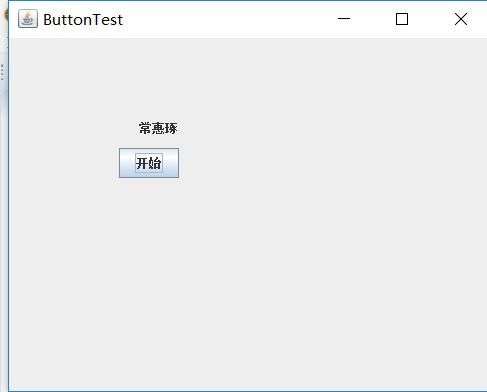
实验总结:
掌握了事件处理的基本原理、 AWT事件模型的工作机制; 掌握了事件处理的基本编程模型;了解了GUI界面组件观感设置方法;学习了WindowAdapter类、AbstractAction类的用法 以及GUI程序中鼠标事件处理技术。
能够触发动作事件的动作,主要包括:
(1) 点击按钮
(2) 双击一个列表中的选项;
(3) 选择菜单项;
(4) 在文本框中输入回车。
通过实验结对编程练习我初步的了解到了一些
苏浪浪 201771010120 面向对象程序设计(Java)第13周的更多相关文章
- 201771010134杨其菊《面向对象程序设计java》第九周学习总结
第九周学习总结 第一部分:理论知识 异常.断言和调试.日志 1.捕获 ...
- 201871010132-张潇潇《面向对象程序设计(java)》第一周学习总结
面向对象程序设计(Java) 博文正文开头 项目 内容 这个作业属于哪个课程 https://www.cnblogs.com/nwnu-daizh/ 这个作业的要求在哪里 https://www.cn ...
- 扎西平措 201571030332《面向对象程序设计 Java 》第一周学习总结
<面向对象程序设计(java)>第一周学习总结 正文开头: 项目 内容 这个作业属于哪个课程 https://www.cnblogs.com/nwnu-daizh/ 这个作业的要求在哪里 ...
- 杨其菊201771010134《面向对象程序设计Java》第二周学习总结
第三章 Java基本程序设计结构 第一部分:(理论知识部分) 本章主要学习:基本内容:数据类型:变量:运算符:类型转换,字符串,输入输出,控制流程,大数值以及数组. 1.基本概念: 1)标识符:由字母 ...
- 201871010124 王生涛《面向对象程序设计JAVA》第一周学习总结
项目 内容 这个作业属于哪个课程 https://www.cnblogs.com/nwnu-daizh/ 这个作业的要求在哪里 https://edu.cnblogs.com/campus/xbsf/ ...
- 201871010115——马北《面向对象程序设计JAVA》第二周学习总结
项目 内容 这个作业属于哪个课程 https://www.cnblogs.com/nwnu-daizh/ 这个作业的要求在哪里 https://www.cnblogs.com/nwnu-daizh/p ...
- 201771010123汪慧和《面向对象程序设计Java》第二周学习总结
一.理论知识部分 1.标识符由字母.下划线.美元符号和数字组成, 且第一个符号不能为数字.标识符可用作: 类名.变量名.方法名.数组名.文件名等.第二部分:理论知识学习部分 2.关键字就是Java语言 ...
- 201777010217-金云馨《面向对象程序设计(Java)》第二周学习总结
项目 内容 这个作业属于哪个课程 https://www.cnblogs.com/nwnu-daizh/ 这个作业的要求在哪里 https://www.cnblogs.com/nwnu-daizh/p ...
- 201871010132——张潇潇《面向对象程序设计JAVA》第二周学习总结
项目 内容 这个作业属于哪个课程 https://www.cnblogs.com/nwnu-daizh/ 这个作业的要求在哪里 https://www.cnblogs.com/nwnu-daizh/p ...
- 面向对象程序设计--Java语言第二周编程题:有秒计时的数字时钟
有秒计时的数字时钟 题目内容: 这一周的编程题是需要你在课程所给的时钟程序的基础上修改而成.但是我们并不直接给你时钟程序的代码,请根据视频自己输入时钟程序的Display和Clock类的代码,然后来做 ...
随机推荐
- Hexo博客插入图片的方法
Hexo博客插入图片的方法 hexo图片blog hexo blog 插入图片的方法总结 hexo 的blog 内容是根据 markdown 文件的内容生成的html文件, 生成的文件全部在 /pub ...
- Spring5参考指南:SpringAOP简介
文章目录 AOP的概念 Spring AOP简介 Spring AOP通知类型 写过程序的都知道OOP即面向对象编程. 从最开始的面向过程编程,到后面的面向对象编程,程序的编写方式发生了重大的变化,面 ...
- PostgreSQL 10.0 preview 性能增强 - 分区表性能增强(plan阶段加速)
标签 PostgreSQL , 10.0 , 分区表 , 子表 , 元信息搜索性能增强 背景 PostgreSQL 10.0 增强了分区表的子表搜索性能,对于涉及分区表包含子表特别多的QUERY,可以 ...
- LightOJ 1287 Where to Run(期望)
题目链接:http://www.lightoj.com/volume_showproblem.php?problem=1287 题意:给定一个n个点的无向图(0到n-1),你开始在0.你开始遍历这个图 ...
- 《Cisco防火墙》一2.4 总结
本节书摘来自异步社区<Cisco防火墙>一书中的第2章,第2.4节,作者 [巴西]Alexandre M.S.P. Moraes,更多章节内容可以访问云栖社区"异步社区" ...
- 图像处理之OpenCV - 缩放/旋转/裁剪/加噪声/高斯模糊
Github地址 @ 缩放 void cv::resize ( InputArray src, OutputArray dst, Size dsize, , , int interpolation = ...
- JDK 配置环境变量
1.配置环境变量 右击 我的电脑 --> 属性 --> 高级系统设置 --> 高级 --> 环境变量 在系统变量里新建 JAVA_HOME 变量,变量值如下 D:\work_s ...
- 2-MyBatisPlus教程(HelloWorld)
1,准备数据 DROP TABLE IF EXISTS user; CREATE TABLE user ( id ) NOT NULL COMMENT '主键ID', name ) NULL DEFA ...
- 模块_os模块
import os print(os.getcwd()) # 获取当前工作目录 print(os.listdir()) # 列表列出当前目录下的目录名和文件名 os.mkdir("tempd ...
- Re模块练习题
import re s = "1 -2*(60+(-40.35/5)-(-4*3))" # 获取所有数字 ret = re.findall(r"\d+", s) ...