
蓝色展开收缩悬浮QQ客服代码
放在我的博客首页上的的预览图:
在文章区的预览图如下: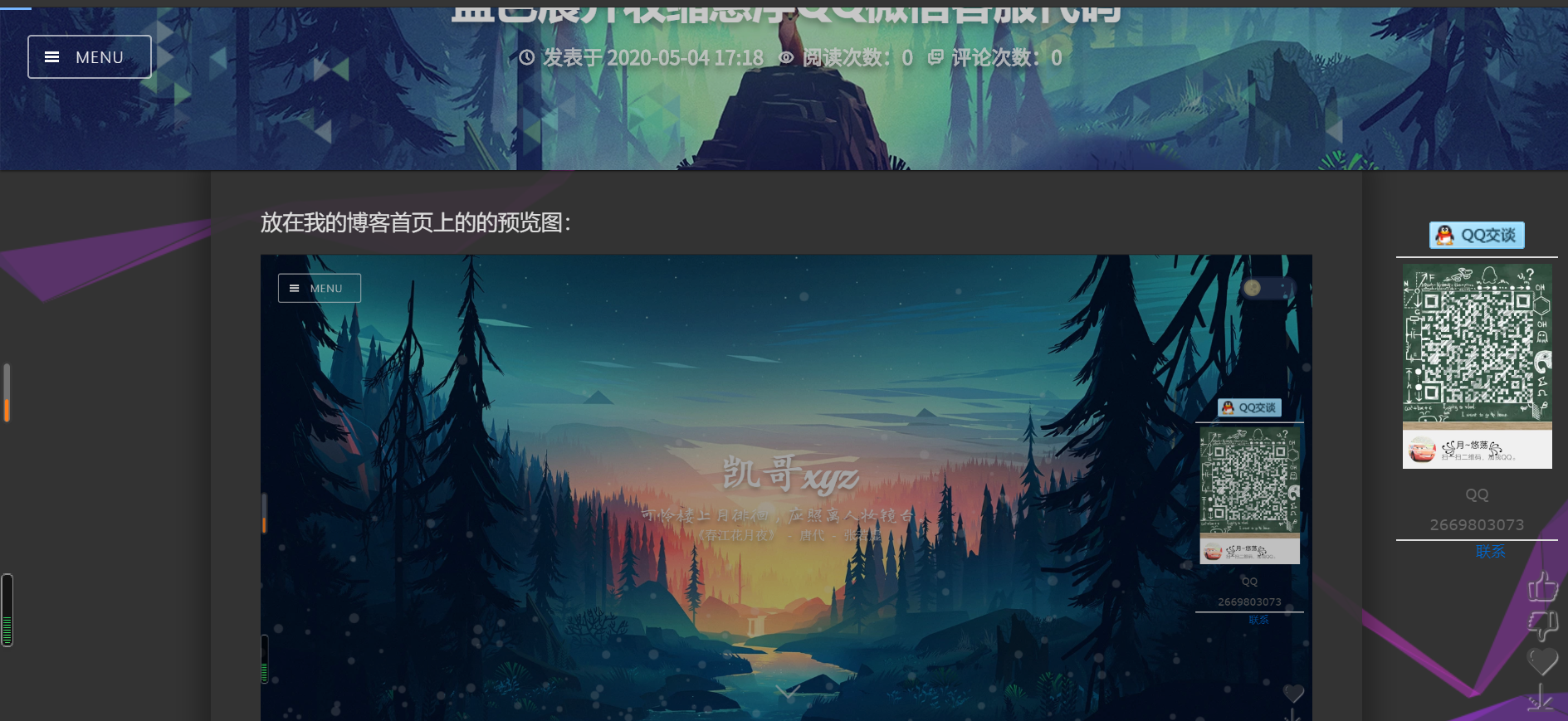
代码如下:
<div class="scrollsidebar" id="scrollsidebar">

  <div class="side_content">

    <div class="side_list">

      <div class="side_title"><a title="隐藏" class="close_btn"><span>关闭</span></a></div>

      <div class="side_center">

        <div class="custom_service">

          <p> <a title="点击这里给我发消息" href="tencent://message/?uin=2669803073&Site=https://www.cnblogs.com/qrk666/&Menu=yes" target="_blank"><img src="http://wpa.qq.com/pa?p=2:8983659:41"></a> </p>

        </div>

        <div class="other">

          <p><img src="https://images.cnblogs.com/cnblogs_com/qrk666/1750660/o_200504090346AD4BE6AC10146679D7FC4C3718A63A37.jpg" width="120"/></p>

          <p>QQ</p>

          <p>2669803073</p>

        </div>

        <div class="msgserver">

          <p><a href="tencent://message/?uin=2669803073&Site=https://www.cnblogs.com/qrk666/&Menu=yes" >联系</a></p>

        </div>

      </div>

      <div class="side_bottom"></div>

    </div>

  </div>

  <div class="show_btn"><span>在线客服</span></div>

</div>

<script type="text/javascript">!(function() {

    var serviceOnline = (function() {

        var sideContent = document.querySelector(".side_content");

        var show_btn = document.querySelector(".show_btn");

        var close_btn = document.querySelector(".close_btn");

        var timer = null;

        //悬浮QQ匀速移动

        var startMove = function(argument) {

            var scrollsidebar = document.getElementById("scrollsidebar");

            clearInterval(timer);

            timer = setInterval(function() {

                var speed = (argument - scrollsidebar.offsetTop) / 4;

                speed = speed > 0 ? Math.ceil(speed) : Math.floor(speed);

                if (argument == scrollsidebar.offsetTop) {

                    clearInterval(timer);

                } else {

                    scrollsidebar.style.top = scrollsidebar.offsetTop + speed + "px";

                }

            }, 20);

        };

        //鼠标移动

        var scrollMove = function() {

            window.onscroll = window.onload = function() {

                var scrollsidebar = document.getElementById("scrollsidebar");

                var scrolltop =

                    document.body.scrollTop || document.documentElement.scrollTop;

                startMove(

                    parseInt(

                        (document.documentElement.clientHeight -

                            scrollsidebar.offsetHeight) /2 +scrolltop

                    )

                );

            };

        };

        //悬浮QQ显示

        var slideShow = function() {

            if (!show_btn) return false;

            show_btn.addEventListener(

                "click",

                function() {

                    show_btn.style.width = 0;

                    sideContent.style.width = "154px";

                },

                false

            );

        };

        //悬浮QQ隐藏

        var slideClose = function() {

            if (!close_btn) return false;

            close_btn.addEventListener(

                "click",

                function() {

                    console.log(this);

                    sideContent.style.width = 0;

                    show_btn.style.width = "25px";

                },

                false

            );

        };

        //返回出来的方法

        return {

            init: function() {

                scrollMove();

                slideClose();

                slideShow();

            }

        };

    })();

    //初始化

    serviceOnline.init();

})();</script>
/*下面是加QQ弹框c's's*/

html {overflow-x:hidden;}

.custom_service p img {display: inline; vertical-align:middle;}

.scrollsidebar{position:absolute; z-index:; top:350px;right:}

.side_content{width:154px; height:auto; overflow:hidden; float:left; }

.side_content .side_list {width:154px;overflow:hidden;}

.show_btn{ width:; height:112px; overflow:hidden; margin-top:50px; float:left; cursor:pointer;}

.show_btn span { display:none;}

.close_btn{width:24px;height:24px;cursor:pointer;}

.side_title,.side_bottom,.close_btn,.show_btn {background:url(../images/sidebar_bg.png) no-repeat;}

.side_title {height:46px;}

.side_bottom { height:8px;}

.side_center {font-family:Verdana, Geneva, sans-serif; padding:5px 12px; font-size:12px;}

.close_btn { float:right; display:block; width:21px; height:16px; margin:16px 10px 0 0; _margin:16px 5px 0 0;}

.close_btn span { display:none;}

.side_center .custom_service p { text-align:center; padding:6px 0; margin:; vertical-align:middle;}

.other  { text-align:center;border-bottom:1px solid #ddd;border-top:1px solid #ddd}

.other p { padding:5px 0; _height:16px; margin:;color: #666666;}

.msgserver { text-align:center; margin-bottom:5px;}

.msgserver a { background:url(../images/sidebar_bg.png) no-repeat -119px -115px; padding-left:22px;}

/* blue skin as the default skin */

.side_title, .side_blue .side_title {background-position:-195px 0;}

.side_center, .side_blue .side_center {background:url(../images/blue_line.png) repeat-y center;}

.side_bottom, .side_blue .side_bottom {background-position:-195px -50px;}

.close_btn, .side_blue .close_btn {background-position:-44px 0;}

.close_btn:hover, .side_blue .close_btn:hover {background-position:-66px 0;}

.show_btn , .side_blue .show_btn {background-position:-119px 0;}

.msgserver a, .side_blue .msgserver a {color:#06C;}

/* green skin  */

.side_green .side_title {background-position:-349px 0;}

.side_green .side_center {background:url(../images/green_line.png) repeat-y center;}

.side_green .side_bottom {background-position:-349px -50px;}

.side_green .close_btn {background-position:-44px -23px;}

.side_green .close_btn:hover {background-position:-66px -23px;}

.side_green .show_btn {background-position:-147px 0;}

.side_green .msgserver a {color:#76a20c;}
注:可以直接使用,两段代码都要用上
蓝色展开收缩悬浮QQ客服代码的更多相关文章
- 基于jquery打造的网页右侧自动收缩浮动在线客服代码
基于jquery打造的网页右侧自动收缩浮动在线QQ客服代码, 当前比较流行的一款QQ在线jquery特效代码, 代码中还带有IE6下PNG图片透明的特效,如果想研究IE6下PNG透明的同学也可以下载研 ...
- jQuery网页右侧固定层显示隐藏在线qq客服代码
CSS代码: @charset "utf-8"; ;;} html,body{font-size:12px;font-family:"微软雅黑";outline ...
- QQ客服代码,支持临时会话
<a target="_blank" href="http://wpa.qq.com/msgrd?v=3&uin=QQ号&site=qq&m ...
- 网页qq客服代码并自定义图片
<script>var online= new Array();</script> <script src="http://webpresence.qq.com ...
- qq客服代码实现过程
引入css,jsimages,将index.html中的qq聊天代码部分和返回顶部-部分放在head.html文件中, 将文中圈中部分删除,否则影响整个页面的样式:
- qq客服代码
http://shang.qq.com/v3/widget.html <a target="_blank" href="http://wpa.qq.com/msgr ...
- PC QQ客服代码
一. <a target="_blank" href="http://wpa.qq.com/msgrd?v=3&uin=QQ号&site=qq&am ...
- 网站QQ客服链接代码
个人QQ客服代码 <a href="tencent://message/?uin=QQ号码">在线咨询</a> 企业QQ客服代码 <a href=&q ...
- QQ,MSN,Skype在线客服代码
QQ,MSN,Skype在线客服代码 在网站建设时,为了更好的实施网站的营销型,会用到QQ,MSN等在线交流,以便客户能够快捷方便的联系我们.在这里,提供QQ,MSN的在线客服代码给大家分享: 1.Q ...
随机推荐
- MySQL学习之路7-索引、事务、函数、存储过程、游标
索引 使用索引快速定位某列中特定值的行,不需要遍历数据表所有行. 创建索引的数据结构:BTREE and HASH. 主键也是一种索引,Primary key. show index from ord ...
- bit/byte/ascii/unicode
bit(位).byte(字节).ASCII.Unicode 和 UTF-8位和字节的关系bit 电脑记忆体中最小的单位,在二进位电脑系统中,每一bit 可以代表0 或 1 的数位讯号byte一个byt ...
- Python zipfile模块学习
转载自https://www.j4ml.com/t/15270 import zipfile import os from zipfile import ZipFile class ZipManage ...
- Python设计模式(10)-模板模式
class DbManager: def insert(self): pass def dele(self): pass class DbManager: def insert(self): pass ...
- tf.train.GradientDescentOptimizer 优化器
tf.train.GradientDescentOptimizer(learning_rate, use_locking=False,name='GradientDescent') 参数: learn ...
- 自己总结 :并发队列ConcurrentLinkedQueue、阻塞队列AraayBlockingQueue、阻塞队列LinkedBlockingQueue 区别 和 使用场景总结
并发队列ConcurrentLinkedQueue.阻塞队列AraayBlockingQueue.阻塞队列LinkedBlockingQueue 区别 和 使用场景总结 分类: Java2013-0 ...
- 06-移动web之flex布局
一.基本概念 flex布局又叫伸缩布局 .弹性布局 .伸缩盒布局 .弹性盒布局 Flex 是 Flexible Box 的缩写,意为"弹性布局",用来为盒状模型提供最大的灵活性. ...
- ios 中使用 animation-play-state: paused 属性失效的问题
前言 因为要做一个播放器的播放图片旋转动画,像这样子 当音乐播放就转动,停止就暂停. 开始于是很自然地想到了使用Css3的 animation 动画属性CSS3 animation(动画) 属性 an ...
- ADO.NET 事务控制
在ADO.NET 中,可以使用Connection 和Transaction 对象来控制事务.若要执行事务,请执行下列操作: 1.调用Connection 对象的BeginTransaction 方法 ...
- icepdf和pdfbox转pdf文档为图片
icepdf转pdf文档为图片 首先导入icepdf jar包或maven pdfPath为pdf文件路径.pdfimgpsth为图片保存的路径 public static void icePdfIm ...