
《机器学习_02_线性模型_Logistic回归》
import numpy as np

import os

os.chdir('../')

from ml_models import utils

import matplotlib.pyplot as plt

%matplotlib inline
一.简介
逻辑回归(LogisticRegression)简单来看就是在线性回归模型外面再套了一个\(Sigmoid\)函数:
\]
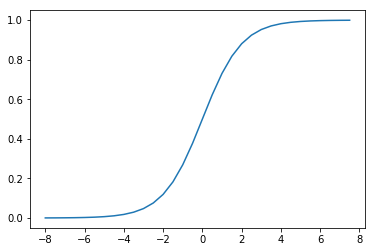
它的函数形状如下:
t=np.arange(-8,8,0.5)

d_t=1/(1+np.exp(-t))

plt.plot(t,d_t)
[<matplotlib.lines.Line2D at 0x233d3c47a58>]
而将\(t\)替换为线性回归模型\(w^Tx^*\)(这里\(x^*=[x^T,1]^T\))即可得到逻辑回归模型:
\]
我们可以发现:\(Sigmoid\)函数决定了模型的输出在\((0,1)\)区间,所以逻辑回归模型可以用作区间在\((0,1)\)的回归任务,也可以用作\(\{0,1\}\)的二分类任务;同样,由于模型的输出在\((0,1)\)区间,所以逻辑回归模型的输出也可以看作这样的“概率”模型:
P(y=0\mid x)=1-f(x)
\]
所以,逻辑回归的学习目标可以通过极大似然估计求解:\(\prod_{j=1}^n f(x_j)^{y_j}(1-f(x_j))^{(1-y_j)}\),即使得观测到的当前所有样本的所属类别概率尽可能大;通过对该函数取负对数,即可得到交叉熵损失函数:
\]
这里\(n\)表示样本量,\(x_j\in R^m\),\(m\)表示特征量,\(y_j\in \{0,1\}\),接下来的与之前推导一样,通过梯度下降求解\(w\)的更新公式即可:
\]
所以\(w\)的更新公式:
\]
二.代码实现
同LinearRegression类似,这里也将\(L1,L2\)的正则化功能加入
class LogisticRegression(object):

    def __init__(self, fit_intercept=True, solver='sgd', if_standard=True, l1_ratio=None, l2_ratio=None, epochs=10,

                 eta=None, batch_size=16):

        self.w = None

        self.fit_intercept = fit_intercept

        self.solver = solver

        self.if_standard = if_standard

        if if_standard:

            self.feature_mean = None

            self.feature_std = None

        self.epochs = epochs

        self.eta = eta

        self.batch_size = batch_size

        self.l1_ratio = l1_ratio

        self.l2_ratio = l2_ratio

        # 注册sign函数

        self.sign_func = np.vectorize(utils.sign)

        # 记录losses

        self.losses = []

    def init_params(self, n_features):

        """

        初始化参数

        :return:

        """

        self.w = np.random.random(size=(n_features, 1))

    def _fit_closed_form_solution(self, x, y):

        """

        直接求闭式解

        :param x:

        :param y:

        :return:

        """

        self._fit_sgd(x, y)

    def _fit_sgd(self, x, y):

        """

        随机梯度下降求解

        :param x:

        :param y:

        :return:

        """

        x_y = np.c_[x, y]

        count = 0

        for _ in range(self.epochs):

            np.random.shuffle(x_y)

            for index in range(x_y.shape[0] // self.batch_size):

                count += 1

                batch_x_y = x_y[self.batch_size * index:self.batch_size * (index + 1)]

                batch_x = batch_x_y[:, :-1]

                batch_y = batch_x_y[:, -1:]

                dw = -1 * (batch_y - utils.sigmoid(batch_x.dot(self.w))).T.dot(batch_x) / self.batch_size

                dw = dw.T

                # 添加l1和l2的部分

                dw_reg = np.zeros(shape=(x.shape[1] - 1, 1))

                if self.l1_ratio is not None:

                    dw_reg += self.l1_ratio * self.sign_func(self.w[:-1]) / self.batch_size

                if self.l2_ratio is not None:

                    dw_reg += 2 * self.l2_ratio * self.w[:-1] / self.batch_size

                dw_reg = np.concatenate([dw_reg, np.asarray([[0]])], axis=0)

                dw += dw_reg

                self.w = self.w - self.eta * dw

            # 计算losses

            cost = -1 * np.sum(

                np.multiply(y, np.log(utils.sigmoid(x.dot(self.w)))) + np.multiply(1 - y, np.log(

                    1 - utils.sigmoid(x.dot(self.w)))))

            self.losses.append(cost)

    def fit(self, x, y):

        """

        :param x: ndarray格式数据: m x n

        :param y: ndarray格式数据: m x 1

        :return:

        """

        y = y.reshape(x.shape[0], 1)

        # 是否归一化feature

        if self.if_standard:

            self.feature_mean = np.mean(x, axis=0)

            self.feature_std = np.std(x, axis=0) + 1e-8

            x = (x - self.feature_mean) / self.feature_std

        # 是否训练bias

        if self.fit_intercept:

            x = np.c_[x, np.ones_like(y)]

        # 初始化参数

        self.init_params(x.shape[1])

        # 更新eta

        if self.eta is None:

            self.eta = self.batch_size / np.sqrt(x.shape[0])

        if self.solver == 'closed_form':

            self._fit_closed_form_solution(x, y)

        elif self.solver == 'sgd':

            self._fit_sgd(x, y)

    def get_params(self):

        """

        输出原始的系数

        :return: w,b

        """

        if self.fit_intercept:

            w = self.w[:-1]

            b = self.w[-1]

        else:

            w = self.w

            b = 0

        if self.if_standard:

            w = w / self.feature_std.reshape(-1, 1)

            b = b - w.T.dot(self.feature_mean.reshape(-1, 1))

        return w.reshape(-1), b

    def predict_proba(self, x):

        """

        预测为y=1的概率

        :param x:ndarray格式数据: m x n

        :return: m x 1

        """

        if self.if_standard:

            x = (x - self.feature_mean) / self.feature_std

        if self.fit_intercept:

            x = np.c_[x, np.ones(x.shape[0])]

        return utils.sigmoid(x.dot(self.w))

    def predict(self, x):

        """

        预测类别,默认大于0.5的为1,小于0.5的为0

        :param x:

        :return:

        """

        proba = self.predict_proba(x)

        return (proba > 0.5).astype(int)

    def plot_decision_boundary(self, x, y):

        """

        绘制前两个维度的决策边界

        :param x:

        :param y:

        :return:

        """

        y = y.reshape(-1)

        weights, bias = self.get_params()

        w1 = weights[0]

        w2 = weights[1]

        bias = bias[0][0]

        x1 = np.arange(np.min(x), np.max(x), 0.1)

        x2 = -w1 / w2 * x1 - bias / w2

        plt.scatter(x[:, 0], x[:, 1], c=y, s=50)

        plt.plot(x1, x2, 'r')

        plt.show()

    def plot_losses(self):

        plt.plot(range(0, len(self.losses)), self.losses)

        plt.show()
三.校验
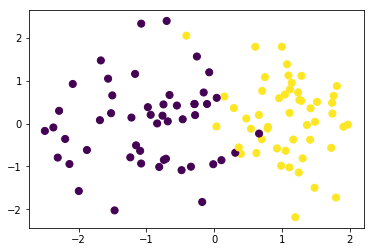
我们构造一批伪分类数据并可视化
from sklearn.datasets import make_classification

data,target=make_classification(n_samples=100, n_features=2,n_classes=2,n_informative=1,n_redundant=0,n_repeated=0,n_clusters_per_class=1)
data.shape,target.shape
((100, 2), (100,))
plt.scatter(data[:, 0], data[:, 1], c=target,s=50)
<matplotlib.collections.PathCollection at 0x233d4c86748>
训练模型
lr = LogisticRegression(l1_ratio=0.01,l2_ratio=0.01)

lr.fit(data, target)
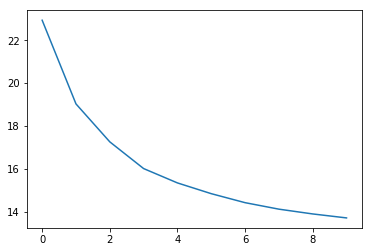
查看loss值变化
交叉熵损失
lr.plot_losses()
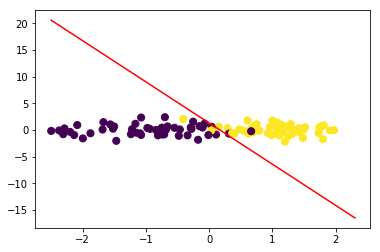
绘制决策边界:
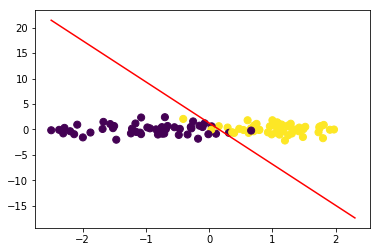
令\(w_1x_1+w_2x_2+b=0\),可得\(x_2=-\frac{w_1}{w_2}x_1-\frac{b}{w_2}\)
lr.plot_decision_boundary(data,target)
#计算F1

from sklearn.metrics import f1_score

f1_score(target,lr.predict(data))
0.96
与sklearn对比
from sklearn.linear_model import LogisticRegression
lr = LogisticRegression()

lr.fit(data, target)
D:\app\Anaconda3\lib\site-packages\sklearn\linear_model\logistic.py:432: FutureWarning: Default solver will be changed to 'lbfgs' in 0.22. Specify a solver to silence this warning.

  FutureWarning)

LogisticRegression(C=1.0, class_weight=None, dual=False, fit_intercept=True,

                   intercept_scaling=1, l1_ratio=None, max_iter=100,

                   multi_class='warn', n_jobs=None, penalty='l2',

                   random_state=None, solver='warn', tol=0.0001, verbose=0,

                   warm_start=False)
w1=lr.coef_[0][0]

w2=lr.coef_[0][1]

bias=lr.intercept_[0]

w1,w2,bias
(3.119650945418208, 0.38515595805512637, -0.478776183999758)
x1=np.arange(np.min(data),np.max(data),0.1)

x2=-w1/w2*x1-bias/w2
plt.scatter(data[:, 0], data[:, 1], c=target,s=50)

plt.plot(x1,x2,'r')
[<matplotlib.lines.Line2D at 0x233d5f84cf8>]
#计算F1

f1_score(target,lr.predict(data))
0.96
四.问题讨论:损失函数为何不用mse?
上面我们基本完成了二分类LogisticRegression代码的封装工作,并将其放到liner_model模块方便后续使用,接下来我们讨论一下模型中损失函数选择的问题;在前面线性回归模型中我们使用了mse作为损失函数,并取得了不错的效果,而逻辑回归中使用的确是交叉熵损失函数;这是因为如果使用mse作为损失函数,梯度下降将会比较困难,在\(f(x^i)\)与\(y^i\)相差较大或者较小时梯度值都会很小,下面推导一下:
我们令:
\]
则有:
\]
我们简单看两个极端的情况:
(1)\(y^i=0,f(x^i)=1\)时,\(\frac{\partial L}{\partial w}=0\);
(2)\(y^i=1,f(x^i)=0\)时,\(\frac{\partial L}{\partial w}=0\)
接下来,我们绘图对比一下两者梯度变化的情况,假设在\(y=1,x\in(-10,10),w=1,b=0\)的情况下
y=1

x0=np.arange(-10,10,0.5)

#交叉熵

x1=np.multiply(utils.sigmoid(x0)-y,x0)
#mse

x2=np.multiply(utils.sigmoid(x0)-y,utils.sigmoid(x0))

x2=np.multiply(x2,1-utils.sigmoid(x0))

x2=np.multiply(x2,x0)
plt.plot(x0,x1)

plt.plot(x0,x2)
[<matplotlib.lines.Line2D at 0x233d6046048>]
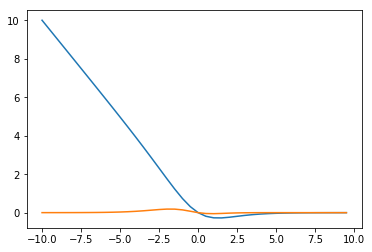
可见在错分的那一部分(x<0),mse的梯度值基本停留在0附近,而交叉熵会让越“错”情况具有越大的梯度值
《机器学习_02_线性模型_Logistic回归》的更多相关文章
- 简单物联网:外网访问内网路由器下树莓派Flask服务器
最近做一个小东西,大概过程就是想在教室,宿舍控制实验室的一些设备. 已经在树莓上搭了一个轻量的flask服务器,在实验室的路由器下,任何设备都是可以访问的:但是有一些限制条件,比如我想在宿舍控制我种花 ...
- 利用ssh反向代理以及autossh实现从外网连接内网服务器
前言 最近遇到这样一个问题,我在实验室架设了一台服务器,给师弟或者小伙伴练习Linux用,然后平时在实验室这边直接连接是没有问题的,都是内网嘛.但是回到宿舍问题出来了,使用校园网的童鞋还是能连接上,使 ...
- 外网访问内网Docker容器
外网访问内网Docker容器 本地安装了Docker容器,只能在局域网内访问,怎样从外网也能访问本地Docker容器? 本文将介绍具体的实现步骤. 1. 准备工作 1.1 安装并启动Docker容器 ...
- 外网访问内网SpringBoot
外网访问内网SpringBoot 本地安装了SpringBoot,只能在局域网内访问,怎样从外网也能访问本地SpringBoot? 本文将介绍具体的实现步骤. 1. 准备工作 1.1 安装Java 1 ...
- 外网访问内网Elasticsearch WEB
外网访问内网Elasticsearch WEB 本地安装了Elasticsearch,只能在局域网内访问其WEB,怎样从外网也能访问本地Elasticsearch? 本文将介绍具体的实现步骤. 1. ...
- 怎样从外网访问内网Rails
外网访问内网Rails 本地安装了Rails,只能在局域网内访问,怎样从外网也能访问本地Rails? 本文将介绍具体的实现步骤. 1. 准备工作 1.1 安装并启动Rails 默认安装的Rails端口 ...
- 怎样从外网访问内网Memcached数据库
外网访问内网Memcached数据库 本地安装了Memcached数据库,只能在局域网内访问,怎样从外网也能访问本地Memcached数据库? 本文将介绍具体的实现步骤. 1. 准备工作 1.1 安装 ...
- 怎样从外网访问内网CouchDB数据库
外网访问内网CouchDB数据库 本地安装了CouchDB数据库,只能在局域网内访问,怎样从外网也能访问本地CouchDB数据库? 本文将介绍具体的实现步骤. 1. 准备工作 1.1 安装并启动Cou ...
- 怎样从外网访问内网DB2数据库
外网访问内网DB2数据库 本地安装了DB2数据库,只能在局域网内访问,怎样从外网也能访问本地DB2数据库? 本文将介绍具体的实现步骤. 1. 准备工作 1.1 安装并启动DB2数据库 默认安装的DB2 ...
- 怎样从外网访问内网OpenLDAP数据库
外网访问内网OpenLDAP数据库 本地安装了OpenLDAP数据库,只能在局域网内访问,怎样从外网也能访问本地OpenLDAP数据库? 本文将介绍具体的实现步骤. 1. 准备工作 1.1 安装并启动 ...
随机推荐
- python学习06循环
'''while''''''while 布尔表达式:冒号不能省略''''''1+2+3+...+10'''i=1sum1=0while i<=10: sum1+=i i+=1print(sum1 ...
- 虚拟机 VMware Workstation Pro 15.5.0 及永久激活密钥
虚拟机 VMware Workstation Pro 15.5.0 及永久激活密钥 虚拟机下载地址:https://download3.vmware.com/software/wkst/file/VM ...
- TCP链接的三次握手与四次断开
一直总觉得三次握手和四次断开,之前老师讲的有问题,经过自己再次琢磨,发现是的,老师讲的没毛病,这次也把自己的理解总结一下,让对这个知识模糊的小伙伴再换种思路去理解 首先看一下TCP三次握手发生了哪些: ...
- Codeforce 1255 Round #601 (Div. 2) A. Changing Volume (贪心)
Bob watches TV every day. He always sets the volume of his TV to bb. However, today he is angry to f ...
- unittest 管理接口用例(数据分离-读取excel)
1.公共模块 ---> login.xls """ common (package) ---> ReadFile.py """ ...
- 别了,JavaScript;你好,Blazor
Web开发与JavaScript开发向来是同义词.直到WebAssembly的横空出世,WebAssembly (Wasm)是一种在浏览器中可以执行的二进制指令. WebAssembly 的 官方工具 ...
- Https双向验证与Springboot整合测试-人来人往我只认你
1 简介 不知不觉Https相关的文章已经写了6篇了,本文将是这个专题的最后一篇,起码近期是最后一篇.前面6篇讲的全都是单向的Https验证,本文将重点介绍一下双向验证.有兴趣的同学可以了解一下之前的 ...
- C# 基础知识系列- 16 开发工具篇
0. 前言 这是C# 基础知识系列的最后一个内容讲解篇,下一篇是基础知识-实战篇.这一篇主要讲解一下C#程序的结构和主要编程工具. 1. 工具 工欲善其事必先利其器,在实际动手之前我们先来看看想要编写 ...
- css的属性选择器
语法说明: 属性选择器需要将对应属性放入到 方括号中 [ ] ,其中包含属性名,标识符(* $ ~ ^ |) 使用说明: [attribute] 例如 [target] 表示 选择带有 targe ...
- js怎么删除数组元素,有哪些删除元素方法
JavaScript删除元素方法 1.根据索引删除数组元素 delete 数组[索引] *注意delete 后面是空格 var arr1=["aa","bb" ...