
通过HTTP向kafka发送数据
在大数据整个处理流程过程中,数据的流向是一个很重要的问题,本篇博客主要记录数据是怎么从http发送到kafka的。
使用技术点:
1. java的Vert.x框架
(关于java框架Vert.x的使用示例请移步:http://www.programcreek.com/java-api-examples/index.php?api=io.vertx.core.Vertx)
2. KafkaProducer 的使用
(使用示例移步:http://www.programcreek.com/java-api-examples/index.php?api=org.apache.kafka.clients.producer.KafkaProducer)
在导数据的过程中需要实现的功能:
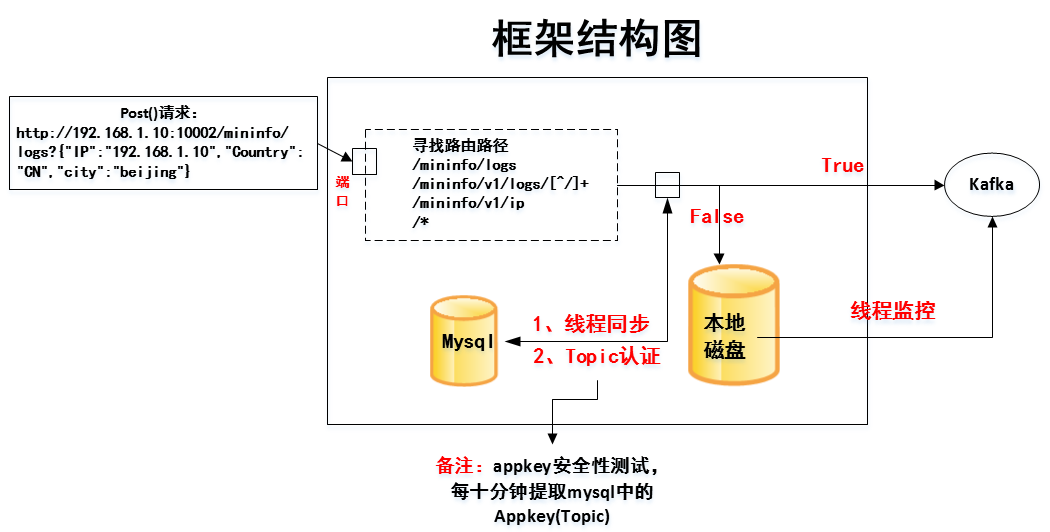
1. 解析路径,将路径的最后一个字符串作为appkey;
2. 数据缓存,当kafka无法正常访问时在本地cache目录缓存数据;
3. 安全验证,对请求的appkey进行合法性验证;
4. 自动更新appkey列表,每间隔一段时间获取一次最新的appkey列表;
5. 增加ip字段,给每份数据增加ip字段;
6. 记录日志,记录基本的统计信息日志,及异常错误信息。
框架结构图如下所示:
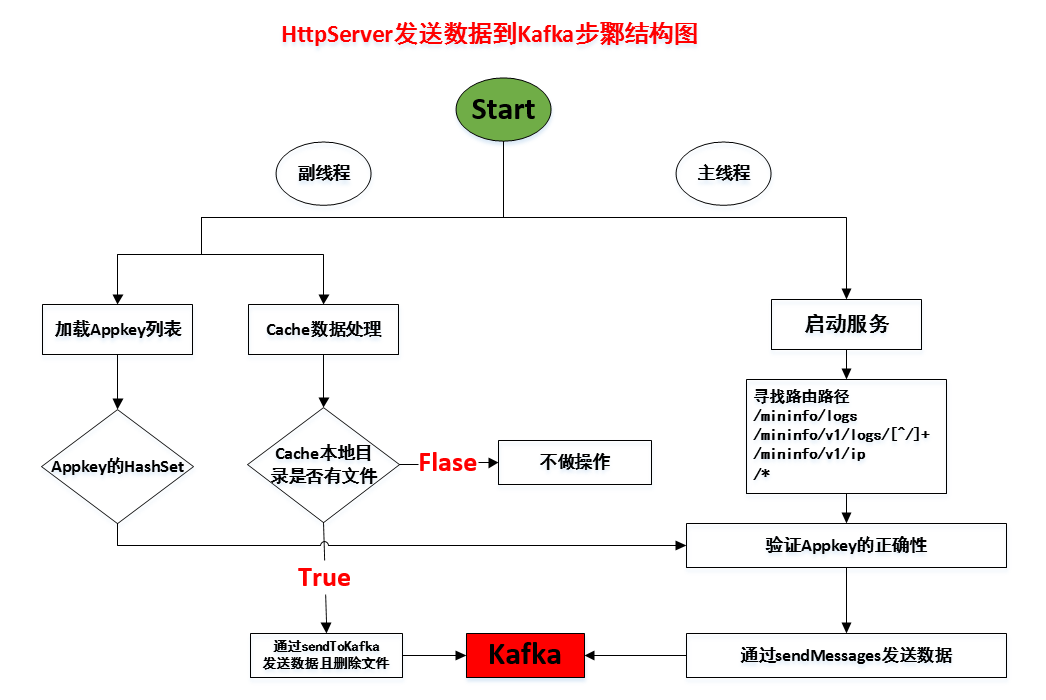
数据整体计算图如下所示:
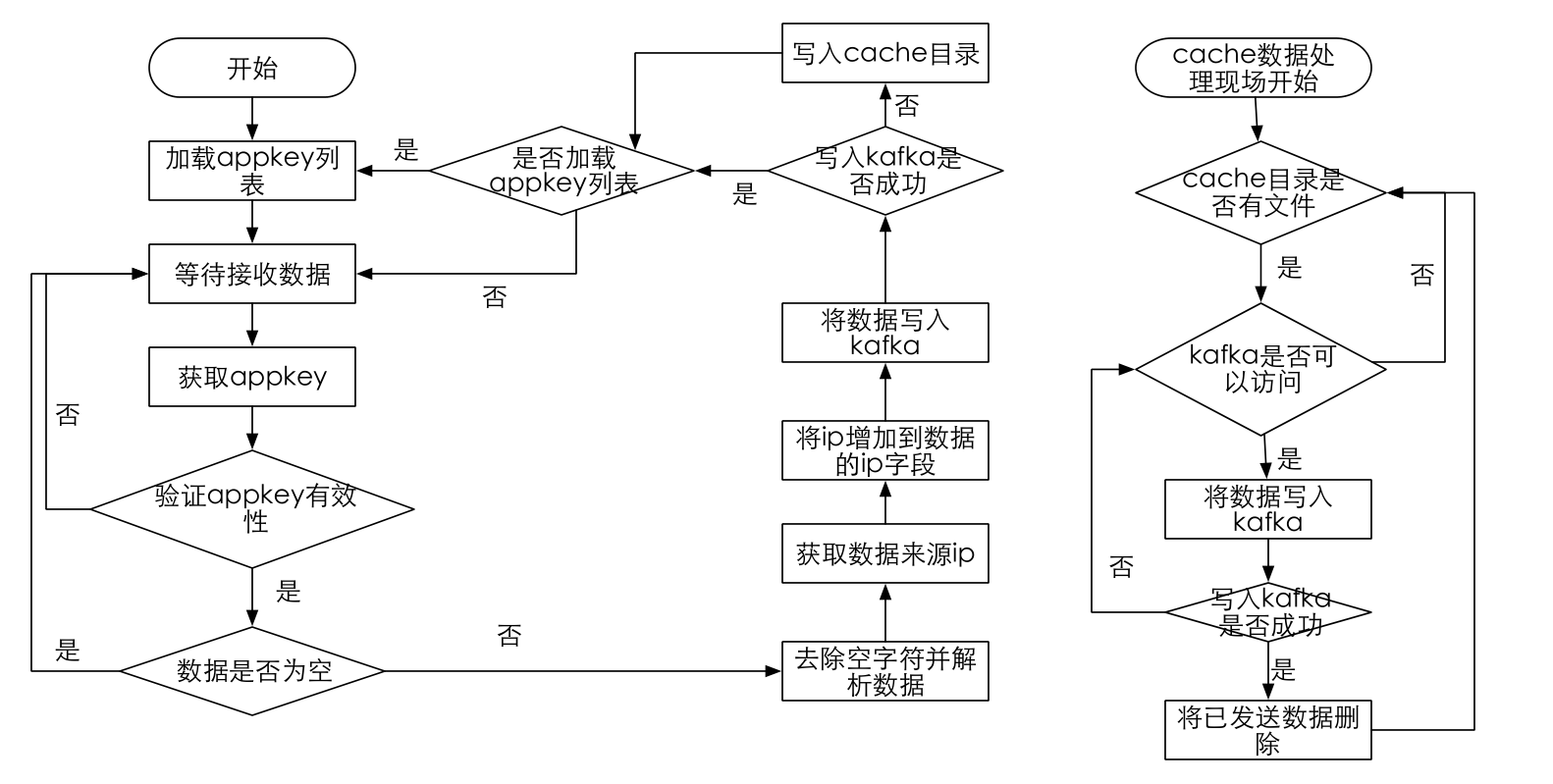
计算流程图如下所示:
在IDEA中的代码结构为:

主要代码如下:
Configuration.java
package com.donews.data;

import com.typesafe.config.Config;

import com.typesafe.config.ConfigFactory;

/**

 * Created by reynold on 16-6-23.

 *

 */

public class Configuration {

   public static  final Config conf= ConfigFactory.load();

}
Counter.java
package com.donews.data;

import io.vertx.core.Vertx;

import io.vertx.core.logging.Logger;

import io.vertx.core.logging.LoggerFactory;

import java.util.concurrent.TimeUnit;

import java.util.concurrent.atomic.AtomicLong;

/**

 * Created by reynold on 16-6-22.

 *

 */

public class Counter {

    private Logger LOG = LoggerFactory.getLogger(Counter.class);

    AtomicLong messages = new AtomicLong(0L);

    AtomicLong bytes = new AtomicLong(0L);

    private long start = System.currentTimeMillis();

    private void reset() {

        messages.set(0L);

        bytes.set(0L);

        start = System.currentTimeMillis();

    }

    public void start(Vertx vertx) {

        LOG.info("start Counter");

        long delay = Configuration.conf.getDuration("server.counter.delay", TimeUnit.MILLISECONDS);

        vertx.setPeriodic(delay, h -> {

            long time = System.currentTimeMillis() - start;

            double rps = messages.get() * 1000.0 / time;

            double mbps = (bytes.get() * 1000.0 / 1024.0 / 1024.0) / time;

            Runtime runtime = Runtime.getRuntime();

            double totalMem = runtime.totalMemory() * 1.0 / 1024 / 1024;

            double maxMem = runtime.maxMemory() * 1.0 / 1024 / 1024;

            double freeMem = runtime.freeMemory() * 1.0 / 1024 / 1024;

            LOG.info("{0}:Message/S, {1}:MBytes/S", rps, mbps);

            LOG.info("totalMem:{0}MB maxMem:{1}MB freeMem:{2}MB", totalMem, maxMem, freeMem);

            reset();

        });

    }

}
KafkaHttpServer.java
package com.donews.data;

import com.alibaba.fastjson.JSON;

import com.alibaba.fastjson.JSONObject;

import io.vertx.core.Vertx;

import io.vertx.core.http.HttpServer;

import io.vertx.core.http.HttpServerResponse;

import io.vertx.core.json.JsonArray;

import io.vertx.core.json.JsonObject;

import io.vertx.core.logging.Logger;

import io.vertx.core.logging.LoggerFactory;

import io.vertx.ext.web.Router;

import io.vertx.ext.web.RoutingContext;

import io.vertx.ext.web.handler.BodyHandler;

import java.io.*;

import java.sql.*;

import java.time.Instant;

import java.util.HashSet;

import java.util.Set;

import java.util.Timer;

import java.util.TimerTask;

import java.util.concurrent.atomic.AtomicInteger;

/**

 * Created by reynold on 16-6-22.

 *

 */

public class KafkaHttpServer {

    private static final Logger LOG = LoggerFactory.getLogger(KafkaHttpServer.class);

    private final Counter statistic = new Counter();

    private static final String DBDRIVER = "com.mysql.jdbc.Driver";

    private static final String URL = Configuration.conf.getString("mysql.url");

    private static final String USER = Configuration.conf.getString("mysql.user");

    private static final String PASSWORD = Configuration.conf.getString("mysql.password");

    private static HashSet<String> appkeys = new HashSet<>();

    private static boolean deleteFile = true;

    private void error(HttpServerResponse response, String message) {

        response.setStatusCode(500).end(new JsonObject()

                .put("code", 3)

                .put("msg", message)

                .encode());

    }

    private void ok(HttpServerResponse response, String message) {

        response.putHeader("Access-Control-Allow-Origin", "*");

        response.setStatusCode(200).end(new JsonObject()

                .put("code", 0)

                .put("msg", message)

                .encode());

    }

    private void startService(int port) {

        KafkaProducerWrapper sender = new KafkaProducerWrapper();

        Vertx vertx = Vertx.vertx();

        HttpServer server = vertx.createHttpServer();

        Router router = Router.router(vertx);

        router.route().handler(BodyHandler.create());

        router.route("/mininfo/logs").handler(ctx -> {

            try {

                JsonArray array = ctx.getBodyAsJsonArray();

                String[] messages = new String[array.size()];

                for (int i = 0; i < array.size(); i++) {

                    JsonObject message = array.getJsonObject(i);

                    message.put("ip", ctx.request().remoteAddress().host());

                    if (!message.containsKey("timestamp")) {

                        message.put("timestamp", Instant.now().toString());

                    }

                    messages[i] = array.getJsonObject(i).encode();

                }

                sendMessages(sender, ctx, "appstatistic_production", messages);

            } catch (Exception e) {

                error(ctx.response(), e.getMessage());

            }

        });

        router.routeWithRegex("/mininfo/v1/logs/[^/]+").handler(routingContext -> {

            String path = routingContext.request().path();

            String topic = path.substring(path.lastIndexOf("/") + 1);

            LOG.info("现在处理的topic(appkey)为:" + topic);

            if (appkeys.contains(topic)) {

                LOG.info("经过验证,该topic(appkey)有效");

                String[] messages = routingContext.getBodyAsString().split("\n");

                //用于执行阻塞任务(有序执行和无序执行),默认顺序执行提交的阻塞任务

                vertx.executeBlocking(future -> {

                    sendMessages(sender, routingContext, topic, messages);

                    future.complete();

                }, result -> {

                });

            } else {

                LOG.info("您的topic(appkey)还没有配置,请在mysql中配置先");

                error(routingContext.response(), "please configurate " + topic + "(appkey) in Mysql first! After 10mins it`ll take action");

            }

        });

        router.route("/mininfo/v1/ip").handler(ctx -> {

            LOG.info("x-real-for" + ctx.request().getHeader("x-real-for"));

            LOG.info("x-forwarded-for" + ctx.request().getHeader("x-forwarded-for"));

            ok(ctx.response(), ctx.request().getHeader("x-forwarded-for"));

        });

        router.route("/*").handler(ctx -> error(ctx.response(), "wrong! check your path..."));

        server.requestHandler(router::accept).listen(port, result -> {

            if (result.succeeded()) {

                LOG.info("listen on port:{0}", String.valueOf(port));

                this.statistic.start(vertx);

            } else {

                LOG.error(result.cause());

                vertx.close();

            }

        });

        //如果你需要在你的程序关闭前采取什么措施,那么关闭钩子(shutdown hook)是很有用的,类似finally

        Runtime.getRuntime().addShutdownHook(new Thread(sender::close));

    }

    private void sendMessages(KafkaProducerWrapper sender, RoutingContext ctx, String topic, String[] messages) {

        AtomicInteger counter = new AtomicInteger(0);

        for (String message : messages) {

            if (message == null || "".equals(message)) {

                ok(ctx.response(), "Success");

                continue;

            }

            //将ip增加到数据的ip字段

            JSONObject jsonObject = JSON.parseObject(message);

            if (jsonObject.get("ip") == null) {

                LOG.info("正在增加ip字段");

                String ip;

                String header = ctx.request().getHeader("x-forwarded-for");

                if (!(header == null || header.trim().length() == 0 || header.trim().equals("null"))) {

                    ip = header.split(",")[0];

                } else {

                    ip = ctx.request().remoteAddress().host();

                }

                jsonObject.put("ip", ip);

                LOG.info("ip增加成功");

            }

            //topic, message, callback,以匿名函数的形式实现接口中的onCompletion函数

            sender.send(topic, jsonObject.toString(), (metadata, exception) -> {

                if (exception != null) {

                    LOG.warn(exception);

                    String msg = new JsonObject()

                            .put("error", exception.getMessage())

                            .put("commit", counter.get())

                            .encode();

                    error(ctx.response(), msg);

                    cacheLocal(jsonObject.toString(), "/home/yuhui/httpkafka/data_bak/" + topic + ".txt");

                    LOG.info("连接kafka失败,写入cache缓存目录以备份数据");

                } else {

                    statistic.messages.incrementAndGet();  // Counter

                    statistic.bytes.addAndGet(message.length());

                    if (counter.incrementAndGet() == messages.length) {

                        ok(ctx.response(), "Success");

                    }

                }

            });

        }

    }

    /**

     * 将发送到kafka失败的消息缓存到本地

     *

     * @param message   message

     * @param cachePath cachePath

     */

    private void cacheLocal(String message, String cachePath) {

        try {

            FileWriter fileWriter = new FileWriter(cachePath, true);

            BufferedWriter bw = new BufferedWriter(fileWriter);

            bw.write(message);

            bw.newLine();

            bw.flush();

            bw.close();

        } catch (IOException e) {

            e.printStackTrace();

        }

    }

    /**

     * 发送缓存数据到kafka,发送成功,删除缓存数据,失败过10分钟重试

     *

     * @param path 保存缓存数据的[目录]

     */

    private static void sendToKafka(String path) {

        String message;

        KafkaProducerWrapper sender = new KafkaProducerWrapper();

        File file = new File(path);

        if (file.isDirectory()) {

            String[] fileList = file.list();

            if (fileList != null && fileList.length != 0) {

                LOG.info("正在将缓存目录中的备份数据发送到kafka中...");

                for (String str : fileList) {

                    String topic = str.split("\\.")[0];

                    try {

                        BufferedReader reader = new BufferedReader(new FileReader(path + str));

                        while ((message = reader.readLine()) != null) {

                            sender.send(topic, message, (metadata, exception) -> {

                                if (metadata != null) {

                                    LOG.info("缓存的备份数据正在一条一条的插入kafka中");

                                } else {

                                    //程序错误重新运行

//                                    exception.printStackTrace();

                                    LOG.error("kafka连接异常为:===> 10分钟后会自动重试," + exception.getMessage(), exception);

                                    deleteFile = false;

                                }

                            });

                        }

                        if (deleteFile) {

                            LOG.info("开始删除已经插入到kafka中的缓存备份数据");

                            deleteFile(path, topic);

                            LOG.info("删除完毕!");

                        }

                        reader.close();

                    } catch (IOException e) {

                        e.printStackTrace();

                    }

                }

            } else {

                LOG.info("缓存目录中没有备份文件");

            }

        }

    }

    private static void deleteFile(String path, String appkey) {

        String appkeyPath = path + "/" + appkey + ".txt";

        File file = new File(appkeyPath);

        file.delete();

        LOG.info("成功删除appkey为" + appkey + "的缓存数据");

    }

    private static Set<String> getAppkeys() {

        Set<String> appkeys = new HashSet<>();

        String sql = "select appkey from config_table";

        try {

            Class.forName(DBDRIVER);

            Connection conn = DriverManager.getConnection(URL, USER, PASSWORD);

            PreparedStatement ps = conn.prepareStatement(sql);

            ResultSet rs = ps.executeQuery();

            while (rs.next()) {

                appkeys.add(rs.getString(1));

            }

            rs.close();

            conn.close();

        } catch (ClassNotFoundException | SQLException e) {

            e.printStackTrace();

        }

        return appkeys;

    }

    public static void main(String[] args) throws Exception {

        Timer timer = new Timer();

        timer.schedule(new TimerTask() {

            @Override

            public void run() {

                appkeys.addAll(getAppkeys());

                LOG.info("同步完数据库中的appkey(每隔十分钟)");

                sendToKafka("/home/leixingzhi7/httpkafka/data_bak/");

//                sendToKafka("C:\\Dell\\UpdatePackage\\log");

            }

        }, 0L, 10 * 60 * 1000L);

        try {

            int port = Configuration.conf.getInt("server.port");

            KafkaHttpServer front = new KafkaHttpServer();

            front.startService(port);

        } catch (Exception e) {

            e.printStackTrace();

        }

    }

}
KafkaProducerWrapper.java
package com.donews.data;

import com.typesafe.config.Config;

import io.vertx.core.logging.Logger;

import io.vertx.core.logging.LoggerFactory;

import org.apache.kafka.clients.producer.Callback;

import org.apache.kafka.clients.producer.KafkaProducer;

import org.apache.kafka.clients.producer.ProducerRecord;

import java.util.Properties;

/**

 * Created by reynold on 16-6-22.

 *

 */

public class KafkaProducerWrapper {

    private Logger LOG = LoggerFactory.getLogger(KafkaProducerWrapper.class);

    private KafkaProducer<String, String> producer = init();

    private KafkaProducer<String, String> init() {

        Config conf = Configuration.conf.getConfig("kafka");

        Properties props = new Properties();

        props.put("bootstrap.servers", conf.getString("bootstrap.servers"));

        props.put("acks", conf.getString("acks"));

        props.put("retries", conf.getInt("retries"));

        props.put("batch.size", conf.getInt("batch.size"));

        props.put("linger.ms", conf.getInt("linger.ms"));

        props.put("buffer.memory", conf.getLong("buffer.memory"));

        props.put("key.serializer", conf.getString("key.serializer"));

        props.put("value.serializer", conf.getString("value.serializer"));

        LOG.info("KafkaProducer Properties: {0}", props.toString());

        return new KafkaProducer<>(props);

    }

    public void send(String topic, String message, Callback callback) {

        producer.send(new ProducerRecord<>(topic, message), callback);

    }

    public void close() {

        producer.close();

        LOG.info("Kafka Producer Closed");

    }

    public static void main(String[] args) {

        //KafkaProducerWrapper sender=new KafkaProducerWrapper();

        //sender.producer.partitionsFor("xxxxx").forEach(System.out::println);

    }

}
application.conf
server {

  port = 20000

  counter.delay = 30s

}

kafka {

  bootstrap.servers = "XXX"

  acks = all

  retries = 1

  batch.size = 1048576

  linger.ms = 1

  buffer.memory = 33554432

  key.serializer = "org.apache.kafka.common.serialization.StringSerializer"

  value.serializer = "org.apache.kafka.common.serialization.StringSerializer"

}

mysql {

  url = "jdbc:mysql://XXX/user_privileges"

  user = "XXX"

  password = "XXX"

}
pom.xml
<?xml version="1.0" encoding="UTF-8"?>

<project xmlns="http://maven.apache.org/POM/4.0.0"

         xmlns:xsi="http://www.w3.org/2001/XMLSchema-instance"

         xsi:schemaLocation="http://maven.apache.org/POM/4.0.0 http://maven.apache.org/xsd/maven-4.0.0.xsd">

    <modelVersion>4.0.0</modelVersion>

    <groupId>com.donews.data</groupId>

    <artifactId>kafkahttp</artifactId>

    <version>1.0-SNAPSHOT</version>

    <dependencies>

        <!-- https://mvnrepository.com/artifact/com.typesafe/config -->

        <dependency>

            <groupId>com.typesafe</groupId>

            <artifactId>config</artifactId>

            <version>1.3.0</version>

        </dependency>

        <dependency>

            <groupId>io.vertx</groupId>

            <artifactId>vertx-web</artifactId>

            <version>3.2.1</version>

        </dependency>

        <dependency>

            <groupId>org.apache.kafka</groupId>

            <artifactId>kafka-clients</artifactId>

            <version>0.9.0.1</version>

        </dependency>

        <dependency>

            <groupId>mysql</groupId>

            <artifactId>mysql-connector-java</artifactId>

            <version>5.1.38</version>

        </dependency>

        <dependency>

            <groupId>com.alibaba</groupId>

            <artifactId>fastjson</artifactId>

            <version>1.2.11</version>

        </dependency>

    </dependencies>

    <build>

        <plugins>

            <plugin>

                <groupId>org.apache.maven.plugins</groupId>

                <artifactId>maven-compiler-plugin</artifactId>

                <version>3.5.1</version>

                <configuration>

                    <source>1.8</source>

                    <target>1.8</target>

                </configuration>

            </plugin>

            <plugin>

                <groupId>org.apache.maven.plugins</groupId>

                <artifactId>maven-shade-plugin</artifactId>

                <version>2.4</version>

                <configuration>

                    <filters>

                        <filter>

                            <artifact>*:*</artifact>

                            <excludes>

                                <exclude>META-INF/*.SF</exclude>

                                <exclude>META-INF/*.DSA</exclude>

                                <exclude>META-INF/*.RSA</exclude>

                            </excludes>

                        </filter>

                    </filters>

                    <!-- put your configurations here -->

                </configuration>

                <executions>

                    <execution>

                        <phase>package</phase>

                        <goals>

                            <goal>shade</goal>

                        </goals>

                        <configuration>

                            <transformers>

                                <transformer implementation="org.apache.maven.plugins.shade.resource.ServicesResourceTransformer"/>

                                <transformer implementation="org.apache.maven.plugins.shade.resource.ManifestResourceTransformer">

                                    <mainClass>com.donews.data.KafkaHttpServer</mainClass>

                                </transformer>

                            </transformers>

                            <outputFile>${project.build.directory}/${project.artifactId}-fat.jar</outputFile>

                        </configuration>

                    </execution>

                </executions>

            </plugin>

        </plugins>

    </build>

</project>
通过HTTP向kafka发送数据的更多相关文章
- 第1节 kafka消息队列:11、kafka的数据不丢失机制,以及kafka-manager监控工具的使用;12、课程总结
12.kafka如何保证数据的不丢失 12.1生产者如何保证数据的不丢失 kafka的ack机制:在kafka发送数据的时候,每次发送消息都会有一个确认反馈机制,确保消息正常的能够被收到 如果是同步模 ...
- 【转】解决Maxwell发送Kafka消息数据倾斜问题
最近用Maxwell解析MySQL的Binlog,发送到Kafka进行处理,测试的时候发现一个问题,就是Kafka的Offset严重倾斜,三个partition,其中一个的offset已经快200万了 ...
- kafka + spark Streaming + Tranquility Server发送数据到druid
花了很长时间尝试druid官网上说的Tranquility嵌入代码进行实时发送数据到druid,结果失败了,各种各样的原因造成了失败,现在还没有找到原因,在IDEA中可以跑起,放到线上就死活不行,有成 ...
- 【原创】开发Kafka通用数据平台中间件
开发Kafka通用数据平台中间件 (含本次项目全部代码及资源) 目录: 一. Kafka概述 二. Kafka启动命令 三.我们为什么使用Kafka 四. Kafka数据平台中间件设计及代码解析 五. ...
- Kafka消费者-从Kafka读取数据
(1)Customer和Customer Group (1)两种常用的消息模型 队列模型(queuing)和发布-订阅模型(publish-subscribe). 队列的处理方式是一组消费者从服务器读 ...
- Kafka权威指南 读书笔记之(四)Kafka 消费者一一从 Kafka读取数据
KafkaConsumer概念 消费者和消费者群组 Kafka 消费者从属于消费者群组.一个群组里的消费者订阅的是同一个主题,每个消费者接收主题一部分分区的消息. 往群组里增加消费者是横向伸缩消费能力 ...
- Kafka权威指南 读书笔记之(三)Kafka 生产者一一向 Kafka 写入数据
不管是把 Kafka 作为消息队列.消息总线还是数据存储平台来使用 ,总是需要有一个可以往 Kafka 写入数据的生产者和一个从 Kafka 读取数据的消费者,或者一个兼具两种角色的应用程序. 开发者 ...
- 物联网架构成长之路(8)-EMQ-Hook了解、连接Kafka发送消息
1. 前言 按照我自己设计的物联网框架,对于MQTT集群中的所有消息,是要持久化到磁盘的,这里采用一个消息队列中间件Kafka作为数据缓冲,缓冲结果存到数据仓库中,以供后续作为数据分析.由于MQTT集 ...
- kafka重复数据问题排查记录
问题 向kafka写数据,然后读kafka数据,生产的数据量和消费的数据量对不上. 开始怀疑人生,以前奠定的基础受到挑战... 原来的测试为什么没有覆盖生产量和消费量的对比? 消费者写的有问题?反复检 ...
随机推荐
- mysql分组和排序操作
分组.排序操作 sele ...
- C#——发送邮件
需要2个引用 using System.Net;using System.Net.Mail; using (MailMessage mailMessige=new MailMessage()) usi ...
- 超级顽固的流方式读取doc,docx乱码问题
因为工作中需要一个把doc或者docx的office文档内容,需要读取出来,并且也没展示功能.代码中第一考虑可能就是通过读取流方式,结果写了以后,各种乱码,百科的解决方案也是千奇百怪,第一点:可能是文 ...
- CSS中的 position与Grid Layout
[1]CSS之Position(定位布局): 现css常用的属性有5种: 1.static 2.absolute 3.fixed 4.relative 5.sticky. 1.static 表示元素的 ...
- MyBatis 懒加载
懒加载的概念 MyBatis中的延迟加载,也称为懒加载,是指进行关联查询时,按需执行子查询. 当程序需要获取|使用关联对象时,mybatis再执行子查询,这样可以减轻数据库的压力,在一定程度上可以降低 ...
- 第2章 ZooKeeper安装与启动
第2章 ZooKeeper安装 2-1 JDK的安装 需要先在Linux系统下安装JDK1.8 tar -zxvf jdk-8u231-linux-x64.tar.gz rm -f jdk-8u231 ...
- Ubuntu---gedit 打开windows 下 .txt 文件乱码的解决方法
问题出现情况:在windows 下编辑的 .txt 文件复制到 Ubuntu 下打开,默认打开方式为 gedit 软件打开,出现如下乱码: 出现原因:在 windows 系统下,.txt 文件默认编码 ...
- java的io字符流关闭和刷新.flush();
因为内置缓冲区的原因,如果不关闭输出流,无法写出字符到文件中. 但是关闭的流对象,是无法继续写出数据 的.如果我们既想写出数据,又想继续使用流,就需要 flush 方法了. flush :刷新缓冲区, ...
- gff文件提取cds
#!/usr/bin/perl use strict; use warnings; ########input######## ];my $cut = &cut($gff);my %cut = ...
- ZJNU 2135 - 小智的宝可梦
因为成环 所以可以枚举第1只与第n只喂的次数 然后第1只和第2只的次数就固定了,以此类推,则所有宝可梦喂的次数都固定了 最后处理完检查是否全为0,不是则进行下一次枚举,是则直接输出Yes 如果所有枚举 ...