
onAttachedToWindow()在整个Activity生命周期的位置及使用
- onAttachedToWindow在整个Activity的生命周期中占据什么位置?
- 为什么要在onAttachedToWindow中修改窗口尺寸?
一、onAttachedToWindow在Activity生命周期中的位置
根据之前分析API的套路,看onAttachedToWindow在Android文档中怎样介绍。
首先看Window.Callback中关于onAttachedToWindow的介绍。
public abstract void onAttachedToWindow ()
Called when the window has been attached to the window manager. See View.onAttachedToWindow() for more information.
好吧,官方把我引导到了View中,那么恭敬不如从命,看View中怎么说。
protected void onAttachedToWindow ()
This is called when the view is attached to a window. At this point it has a Surface and will start drawing. Note that this function is guaranteed to be called beforeonDraw(android.graphics.Canvas), however it may be called any time before the first onDraw -- including before or after onMeasure(int, int).
从API说明我们可以定 位当View附加到窗体时,也就是View和Window绑定时就会调用这个函数,此时将会有一个Surface进行绘图之类的逻辑。并且发现 Window.CallBack是一个接口类,而且官方引导到了View中,那么可以大胆判断View实现了Window.CallBack的回调方法, 那么View和Window之间的关系便可以有个初步猜测。下篇博客再具体讨论DecorView和Window之间的关系。
接下来通过实验判断onAttachedToWindow在Activity整个生命周期中的位置。
实验很简单,将Activity各个生命周期打上log,然后看LogCat中的结果

看来我们最终要找的生命周期为onCreate->onStart->onResume->onAttachedToWindow
然后通过Google找到了一张比较详细的Activity生命周期图,也印证了我们的实验结论。
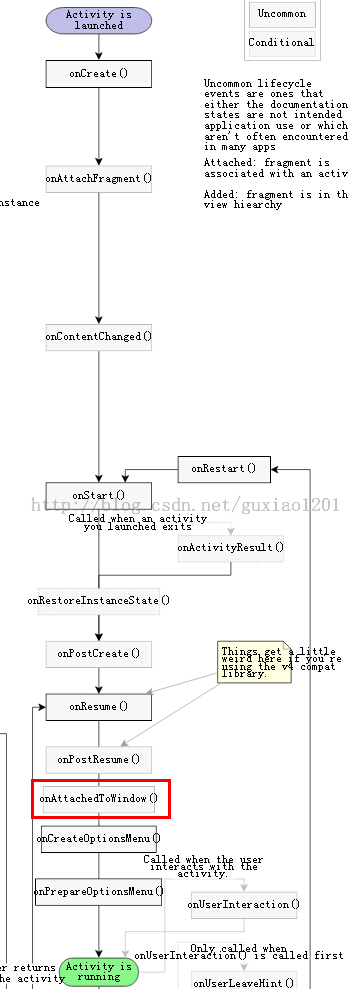
二、为什么要在onAttachedToWindow中修改窗口尺寸
为什么网上很多教程一定要在onAttachedToWindow()里修改高宽而不在onCreate中?这个问题没人解答,那么我就将代码
    View view = getWindow().getDecorView();

    WindowManager.LayoutParams lp = (WindowManager.LayoutParams)view.getLayoutParams();

    lp.gravity = Gravity.CENTER;

    lp.width = (dm.widthPixels * 4) / 5;

    lp.height = (dm.widthPixels * 4) / 5;

    getWindowManager().updateViewLayout(view,lp);
放到onCreate中 进行测试,结果在lp.gravity = Gravity.CENTER;这行报了空指针异常,所以view.getLayoutParams()获取的LayoutParams是空,那么问题来 了!为什么onCreate()中DecorView的LayoutParams是空而onAttachedToWindow()中就不为空?要高清这个 问题就要看DecorView在什么时候设置的LayoutParam。
从博客Android应用窗口的视图对象的创建过程分析中发现源码
    public final class ActivityThread {

        ......

        final void handleResumeActivity(IBinder token, boolean clearHide, boolean isForward) {

            ......

            ActivityClientRecord r = performResumeActivity(token, clearHide);

            if (r != null) {

                final Activity a = r.activity;

                ......

                // If the window hasn't yet been added to the window manager,

                // and this guy didn't finish itself or start another activity,

                // then go ahead and add the window.

                boolean willBeVisible = !a.mStartedActivity;

                if (!willBeVisible) {

                    try {

                        willBeVisible = ActivityManagerNative.getDefault().willActivityBeVisible(

                                a.getActivityToken());

                    } catch (RemoteException e) {

                    }

                }

                if (r.window == null && !a.mFinished && willBeVisible) {

                    r.window = r.activity.getWindow();

                    View decor = r.window.getDecorView();

                    decor.setVisibility(View.INVISIBLE);

                    ViewManager wm = a.getWindowManager();

                    WindowManager.LayoutParams l = r.window.getAttributes();

                    a.mDecor = decor;

                    l.type = WindowManager.LayoutParams.TYPE_BASE_APPLICATION;

                    ......

                    if (a.mVisibleFromClient) {

                        a.mWindowAdded = true;

                        wm.addView(decor, l);

                    }

                }

                ......

            }

            ......

        }

        ......

    }
原来在 ActivityThread执行handleResumeActivity时就会为 PhoneWindow(r.activity.getWindow)中的DecorView设置LayoutParam,并且通过源码发现 handleResumeActivity函数首先会执行performResumeActivity,此时会调用Activity的 onResume()生命周期函数,这时问题就比较清晰了,看来只要在Activity的onResume生命周期后就能获取DecorView的 LayoutParam,进而可以设置高度和宽度了。根据上面贴出的生命周期图,onResume()后面是onAttachedToWindow(), 并且onAttachedToWindow只会调用一次,不会受用户操作行为影响。所以在onAttachedToWindow中进行窗口尺寸的修改再合 适不过了。
总结:
- onAttachedToWindow运行在onResume之后;
- DecorView的LayoutParams是在ActivityThread的handleResumeActivity中设置的,并且该函数会调用Activity的onResume生命周期,所以在onResume之后可以设置窗体尺寸;
onAttachedToWindow()在整个Activity生命周期的位置及使用的更多相关文章
- 【转】onAttachedToWindow()在整个Activity生命周期的位置及使用
上篇博客实现圆角对话框样式的Activity中提到,若需实现圆角对话框Activity,需要在Activity的onAttachedToWindow()函数中做文章,那么就想问: onAttached ...
- Android Activity生命周期详讲
管理 Activity 生命周期 通过实现回调方法管理 Activity 的生命周期对开发强大而又灵活的应用至关重要. Activity 的生命周期会直接受到 Activity 与其他 Activit ...
- android Activity生命周期(设备旋转、数据恢复等)与启动模式
1.Activity生命周期 接下来将介绍 Android Activity(四大组件之一) 的生命周期, 包含运行.暂停和停止三种状态,onCreate.onStart.onResume.o ...
- Android体系结构及activity生命周期
Android的系统架构采用了分层架构的思想,如图1所示.从上层到底层共包括四层,分别是应用程序程序层.应用框架层.系统库和Android运行时和Linux内核 Android的系统架构图 每层 ...
- Activity生命周期解说
前言: 一直想着写一些Android基础知识分享给大家.可是有时候又认为怕写不好误导了大家学习Android.思前想后认为还是去Android官网看看,发如今Android官网上事实上就能学习到非常多 ...
- 异常情况下的Activity生命周期分析
情况1:资源相关的系统配置发生改变 资源相关的系统配置发生改变,举个栗子.当前Activity处于竖屏状态的时候突然转成横屏,系统配置发生了改变,Activity就会销毁并且重建,其onPause, ...
- Android之Activity生命周期简介
概述 有图有真相,所以先上图: 上图是从Android官网截下的Activity的生命周期流程图,结构非常清晰,它描述了Activity在其生命周期中所有可能发生的情况以及发生的先后顺序,下面就将结合 ...
- Activity生命周期的学习以及Logcat的使用
http://android.blog.51cto.com/268543/322518/ Activities是由Activity stack管理的.当一个新的Activity被启动,它就会处于st ...
- Android-管理Activity生命周期 -重新创建Activity
按照正常的app行为,很少情况下activity会销毁,只有当用户点击了返回按钮或者activity通过调用finish()发出销毁信号.系统也有可能销毁activity如果它是停止状态并且很久没有使 ...
随机推荐
- 【AStar】初赛第一场
1. All X1.1 基本思路k和c的范围都不大,因此可以考虑迭代找循环节,然后求余数,判定是否相等.这题还是挺简单的.1.2 代码 /* 5690 */ #include <iostream ...
- POJ 2774 (后缀数组 最长公共字串) Long Long Message
用一个特殊字符将两个字符串连接起来,然后找最大的height,而且要求这两个相邻的后缀的第一个字符不能在同一个字符串中. #include <cstdio> #include <cs ...
- 51nod1125 交换机器的最小代价
跟做过的bzoj一道置换群的题几乎一样,只是数据范围大了点,那么就用map就好了... #include<cstdio> #include<cstring> #include& ...
- BZOJ 4269 再见Xor
线性基. 求次大值就是再异或一个线性基好了. #include<iostream> #include<cstdio> #include<cstring> #defi ...
- web前端调试工具
1.firebug入门指南 http://www.ruanyifeng.com/blog/2008/06/firebug_tutorial.html 2. Console命令详解,让调试js代码变得更 ...
- Dom文档模型
文档对象模型 通过 JavaScript,您可以重构整个 HTML 文档.您可以添加.移除.改变或重排页面上的项目.要改变页面的某个东西,JavaScript 就需要获得对 HTML 文档中所 ...
- 【英语】Bingo口语笔记(13) - Call系列
call off - call it off 取消它 call it a day / call it a night 今天到此结束吧/今晚到此结束吧
- 2015-10-09 Fri 晴 加快进度看书
最近老感觉每天不够用,每天7点起来,吃饭完了8点开始看书,不知道是我看书太慢了还是时间过得真的很快,不知不觉中午就到了.而这个时候我才看2章的内容,下午能多看3章内容.一本书也就一天的时候,而我现在还 ...
- js实现密码加密
http://www.cnblogs.com/mofish/archive/2012/02/25/2367858.html 1.base64加密 在页面中引入base64.js文件,调用方法为: &l ...
- C#操作Excel,对Sheet插入次序的控制 (有待完善)
C#对Excel文件的操作,插入工作表(Worksheet)的方法是 Workbook.Worksheets.Add().通常情况下,我们在EXCEL的工作薄中,使用菜单操作:插入一个新的工作表,那么 ...