
炫酷CSS3垂直时间轴特效
<!DOCTYPE html>

<html lang="en">

<head>

    <meta charset="UTF-8">

    <meta name="viewport" content="width=device-width, initial-scale=1.0">

    <meta http-equiv="X-UA-Compatible" content="ie=edge">

    <link href="https://cdn.bootcss.com/bootstrap/3.3.7/css/bootstrap.min.css" rel="stylesheet">

    <title>Document</title>

    <style>

        .main-timeline {

            overflow: hidden;

            position: relative;

        }

        .main-timeline .timeline {

            position: relative;

            margin-top: -79px;

        }

        .main-timeline .timeline:first-child {

            margin-top: 0;

        }

        .main-timeline .timeline:before,

        .main-timeline .timeline:after {

            content: "";

            display: block;

            width: 100%;

            clear: both;

        }

        .main-timeline .timeline:before {

            content: "";

            width: 100%;

            height: 100%;

            box-shadow: -8px 0 5px -5px rgba(0, 0, 0, 0.5) inset;

            position: absolute;

            top: 0;

            right: 0;

            z-index: 2;

        }

        .main-timeline .timeline-icon {

            width: 210px;

            height: 210px;

            border-radius: 50%;

            border: 25px solid transparent;

            border-top-color: #f44556;

            border-right-color: #f44556;

            margin: auto;

            position: absolute;

            top: 0;

            left: 0;

            bottom: 0;

            right: 0;

            z-index: 1;

            transform: rotate(45deg);

        }

        .main-timeline .year {

            display: block;

            width: 110px;

            height: 110px;

            line-height: 110px;

            border-radius: 50%;

            background: #fff;

            box-shadow: 0 0 20px rgba(0, 0, 0, 0.4);

            margin: auto;

            font-size: 30px;

            font-weight: bold;

            color: #f44556;

            text-align: center;

            position: absolute;

            top: 0;

            left: 0;

            bottom: 0;

            right: 0;

            transform: rotate(-45deg);

        }

        .main-timeline .timeline-content {

            width: 35%;

            float: right;

            background: #f44556;

            padding: 30px 20px;

            margin: 50px 0;

            z-index: 1;

            position: relative;

        }

        .main-timeline .timeline-content:before {

            content: "";

            width: 20%;

            height: 15px;

            background: #f44556;

            position: absolute;

            top: 50%;

            left: -20%;

            z-index: -1;

            transform: translateY(-50%);

        }

        .main-timeline .title {

            font-size: 20px;

            font-weight: bold;

            color: #fff;

            margin: 0 0 10px 0;

        }

        .main-timeline .description {

            font-size: 16px;

            color: #fff;

            line-height: 24px;

            margin: 0;

        }

        .main-timeline .timeline:nth-child(2n):before {

            box-shadow: 8px 0 5px -5px rgba(0, 0, 0, 0.5) inset;

        }

        .main-timeline .timeline:nth-child(2n) .timeline-icon {

            transform: rotate(-135deg);

        }

        .main-timeline .timeline:nth-child(2n) .year {

            transform: rotate(135deg);

        }

        .main-timeline .timeline:nth-child(2n) .timeline-content {

            float: left;

        }

        .main-timeline .timeline:nth-child(2n) .timeline-content:before {

            left: auto;

            right: -20%;

        }

        .main-timeline .timeline:nth-child(2n) .timeline-icon {

            border-top-color: #e97e2e;

            border-right-color: #e97e2e;

        }

        .main-timeline .timeline:nth-child(2n) .year {

            color: #e97e2e;

        }

        .main-timeline .timeline:nth-child(2n) .timeline-content,

        .main-timeline .timeline:nth-child(2n) .timeline-content:before {

            background: #e97e2e;

        }

        .main-timeline .timeline:nth-child(3n) .timeline-icon {

            border-top-color: #13afae;

            border-right-color: #13afae;

        }

        .main-timeline .timeline:nth-child(3n) .year {

            color: #13afae;

        }

        .main-timeline .timeline:nth-child(3n) .timeline-content,

        .main-timeline .timeline:nth-child(3n) .timeline-content:before {

            background: #13afae;

        }

        .main-timeline .timeline:nth-child(4n) .timeline-icon {

            border-top-color: #105572;

            border-right-color: #105572;

        }

        .main-timeline .timeline:nth-child(4n) .year {

            color: #105572;

        }

        .main-timeline .timeline:nth-child(4n) .timeline-content,

        .main-timeline .timeline:nth-child(4n) .timeline-content:before {

            background: #105572;

        }

        @media only screen and (max-width: 1199px) {

            .main-timeline .timeline {

                margin-top: -103px;

            }

            .main-timeline .timeline-content:before {

                left: -18%;

            }

            .main-timeline .timeline:nth-child(2n) .timeline-content:before {

                right: -18%;

            }

        }

        @media only screen and (max-width: 990px) {

            .main-timeline .timeline {

                margin-top: -127px;

            }

            .main-timeline .timeline-content:before {

                left: -2%;

            }

            .main-timeline .timeline:nth-child(2n) .timeline-content:before {

                right: -2%;

            }

        }

        @media only screen and (max-width: 767px) {

            .main-timeline .timeline {

                margin-top: 0;

                overflow: hidden;

            }

            .main-timeline .timeline:before,

            .main-timeline .timeline:nth-child(2n):before {

                box-shadow: none;

            }

            .main-timeline .timeline-icon,

            .main-timeline .timeline:nth-child(2n) .timeline-icon {

                margin-top: -30px;

                margin-bottom: 20px;

                position: relative;

                transform: rotate(135deg);

            }

            .main-timeline .year,

            .main-timeline .timeline:nth-child(2n) .year {

                transform: rotate(-135deg);

            }

            .main-timeline .timeline-content,

            .main-timeline .timeline:nth-child(2n) .timeline-content {

                width: 100%;

                float: none;

                border-radius: 0 0 20px 20px;

                text-align: center;

                padding: 25px 20px;

                margin: 0 auto;

            }

            .main-timeline .timeline-content:before,

            .main-timeline .timeline:nth-child(2n) .timeline-content:before {

                width: 15px;

                height: 25px;

                position: absolute;

                top: -22px;

                left: 50%;

                z-index: -1;

                transform: translate(-50%, 0);

            }

        }

    </style>

</head>

<body>

    <div class="demo">

        <div class="container">

            <div class="row">

                <div class="col-md-12">

                    <div class="main-timeline">

                        <div class="timeline">

                            <div class="timeline-icon"><span class="year">2018</span></div>

                            <div class="timeline-content">

                                <h3 class="title">Web Desginer</h3>

                                <p class="description">

                                    Lorem ipsum dolor sit amet, consectetur adipiscing elit. Donec lacinia mi ultrices,

                                    luctus nunc ut, commodo enim. Vivamus sem erat.

                                </p>

                            </div>

                        </div>

                        <div class="timeline">

                            <div class="timeline-icon"><span class="year">2017</span></div>

                            <div class="timeline-content">

                                <h3 class="title">Web Developer</h3>

                                <p class="description">

                                    Lorem ipsum dolor sit amet, consectetur adipiscing elit. Donec lacinia mi ultrices,

                                    luctus nunc ut, commodo enim. Vivamus sem erat.

                                </p>

                            </div>

                        </div>

                        <div class="timeline">

                            <div class="timeline-icon"><span class="year">2016</span></div>

                            <div class="timeline-content">

                                <h3 class="title">Web Desginer</h3>

                                <p class="description">

                                    Lorem ipsum dolor sit amet, consectetur adipiscing elit. Donec lacinia mi ultrices,

                                    luctus nunc ut, commodo enim. Vivamus sem erat.

                                </p>

                            </div>

                        </div>

                        <div class="timeline">

                            <div class="timeline-icon"><span class="year">2015</span></div>

                            <div class="timeline-content">

                                <h3 class="title">Web Developer</h3>

                                <p class="description">

                                    Lorem ipsum dolor sit amet, consectetur adipiscing elit. Donec lacinia mi ultrices,

                                    luctus nunc ut, commodo enim. Vivamus sem erat.

                                </p>

                            </div>

                        </div>

                    </div>

                </div>

            </div>

        </div>

    </div>

</body>

</html>
效果:移动和PC端
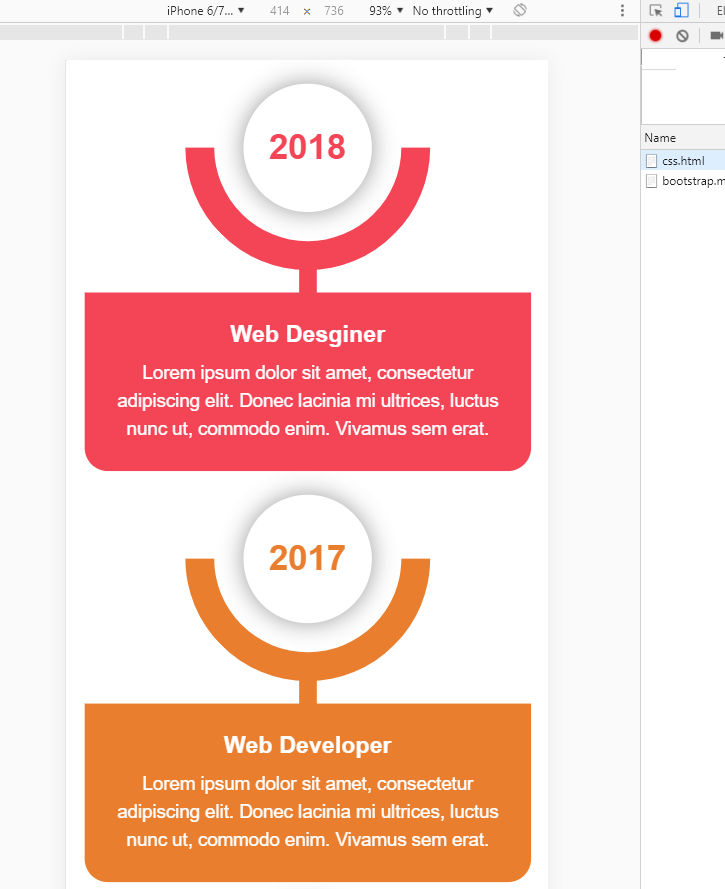
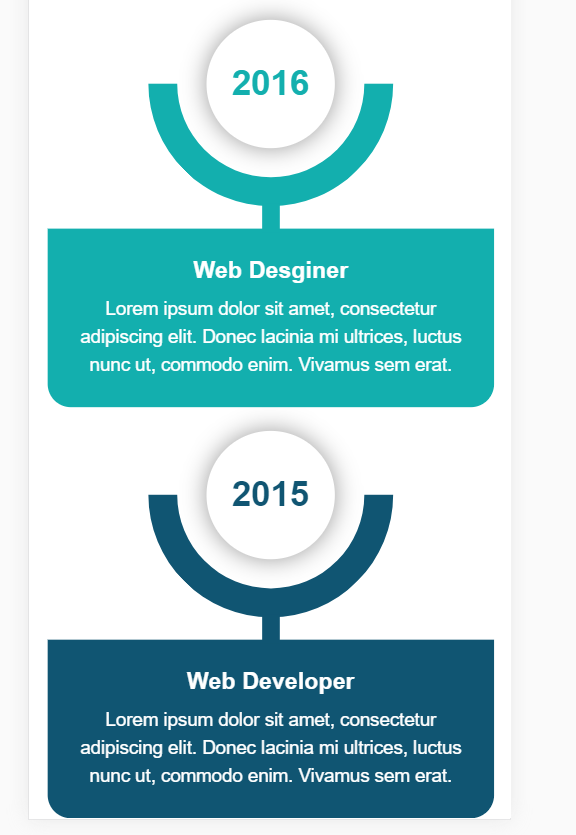

内容来源于链接https://www.toutiao.com/i6738373341314286088/
炫酷CSS3垂直时间轴特效的更多相关文章
- HTML5+CSS3实现的响应式垂直时间轴
<!DOCTYPE HTML><html><head><meta charset="utf-8"><meta name=&qu ...
- Jquery实现超酷的时间轴特效
Timeline时间轴Jquery特效是一款现在互联网上非常流行的一种布局结构,结合了瀑布流布局,最近很多网友问到这种特效,网站上有网友们分享过一款,功能虽然实现,但样式不太好看,今天就把它整理出来分 ...
- 10大炫酷的HTML5文字动画特效欣赏
文字是网页中最基本的元素,在CSS2.0时代,我们只能在网页上展示静态的文字,只能改变他的大小和颜色,显得枯燥无味.随着HTML5的发展,现在网页中的文字样式变得越来越丰富了,甚至出现了文字动画,HT ...
- html5跟随鼠标炫酷网站引导页动画特效
html5跟随鼠标炫酷网站引导页动画特效一款非常不错的引导页,文字效果渐变,鼠标跟随出绚丽的条纹.html5炫酷网站引导页,鼠标跟随出特效. 体验效果:http://hovertree.com/tex ...
- CSS3实现时间轴效果
原文:CSS3实现时间轴效果 最近打开电脑就能看到极客学院什么新用户vip免费一个月,就进去看看咯,这里就不说它的课程怎么滴了,里面实战路径图页面看到了这个效果: 有点像时间轴的赶脚,而且每一块鼠标悬 ...
- 基于jQuery发展历程时间轴特效代码
分享一款基于jQuery发展历程时间轴特效代码,带左右箭头,数字时间轴选项卡切换特效下载.效果图如下: 在线预览 源码下载 实现的代码. html代码: <div id="time ...
- 发展简史jQuery时间轴特效
发展简史jQuery时间轴特效.这是一款鼠标滚动到一定的高度动画显示企业发展时间轴特效.效果图如下: 在线预览 源码下载 实现的代码. html代码: <div class="wr ...
- 基于jQuery和CSS3炫酷图片3D旋转幻灯片特效
在线预览 源码下载 iPresenter是一款效果非常炫酷的jQuery和CSS3 3D旋转幻灯片特效插件.你可以使用它来制作产品展示.图片画廊或者各种幻灯片和轮播图特效.这款幻灯片插件的特点有: ...
- 基于HTML5 SVG和CSS3炫酷蹦床式图片切换特效
今天给大家分享一款效果非常炫酷的HTML5 SVG和CSS3蹦床式图片切换特效插件.该图片切换插件在进行图片切换时,整个屏幕就像一张大蹦床一样,将图片弹射出去,切换到另一张图片,效果非常有创意.效果图 ...
随机推荐
- 剑指offer9:青蛙变态跳台阶,1,2,3……,n。
1. 题目描述 一只青蛙一次可以跳上1级台阶,也可以跳上2级……它也可以跳上n级.求该青蛙跳上一个n级的台阶总共有多少种跳法. 2. 思路和方法 每个台阶都有跳与不跳两种情况(除了最后一个台阶),最后 ...
- 老贾的幸福生活day3 之markdown常用语法简要
1.markdown常用语法 标题 一级到六级 用#+空格实现 2.代码块 3个 `实现 python is a ...... 单行代码,用"``" 3.列表 有序列表 跟内容 数 ...
- k8s-kubectl命令大全
Kubectl命令行管理对象 类型 命令 描述 基础命令 create 通过文件名或标准输入创建资源. expose 将一个资源公开为一个新的Kubernetes服务. run 创建并运行一个特定的镜 ...
- Python 最常见的 170 道面试题解析:2019 最新
Python 最常见的 170 道面试题解析:2019 最新 2019年06月03日 23:30:10 GitChat的博客 阅读数 21329 文章标签: PythonPython入门Python面 ...
- 一致性算法—Paxos、Raft、ZAB
一致性算法—Paxos.Raft.ZAB 2019年04月21日 20:35:09 bulingma 阅读数 64更多 分类专栏: 分布式概念 版权声明:本文为博主原创文章,遵循CC 4.0 BY ...
- 服务端相关知识学习(三)Zookeeper的配置
前面两篇文章介绍了Zookeeper是什么和可以干什么,那么接下来我们就实际的接触一下Zookeeper这个东西,看看具体如何使用,有个大体的感受,后面再描述某些地方的时候也能在大脑中有具体的印象.本 ...
- Linux系统介绍及部署
Linux系统介绍及部署1.常见操作系统 windows.Linux(类unix系统).Android.iOS.unix(HP UNIX)2.操作系统构成 外壳(shell)+驱动+内核3.常见Lin ...
- day09 并发编程
一. 目录 1.进程的概念和两种创建方式 2.多进程爬虫 3.守护进程 4.进程队列 5.进程队列简单应用(实现数据共享) 6.线程的两种创建方式 7.线程和进程的效率对比 8.线程共享统一进程的数据 ...
- js小功能1:全选全不选
<form> 请选择你爱好:<br> <input type="checkbox" name="hobby" id="h ...
- python 利用pyttsx3文字转语音
# -*- coding: utf-8 -*- import pyttsx3 f = open("all.txt",'r') line = f.readline() engine ...