
Linux上安装postgres 10.5
由于接触了华为的elk大数据平台,里面封装的是postgres ,就想着安装一下,熟悉一下postgres数据。
安装包下载:https://www.postgresql.org/ftp/source/
可以选择自己想下载的版本。这里我们下载v10.5
随后开始安装:
1.把包上传到虚拟机中postgresql-10.5.tar.gz
2.解压缩:
gunzip postgresql-10.5.tar.gz
tar -xvf postgresql-10.5.tar
3.进行编辑安装:
./configure --预编辑
make
su --进root用户
make install --安装
adduser postgres --创建postgres
mkdir /usr/local/pgsql/data --创建目录
chown postgres /usr/local/pgsql/data
su - postgres
/usr/local/pgsql/bin/initdb -D /usr/local/pgsql/data --初始化数据库
/usr/local/pgsql/bin/postgres -D /usr/local/pgsql/data >logfile 2>&1 & --启动数据库
遇到错误:

[postgres@master ~]$ more logfile

2018-12-20 15:47:11.867 CST [28074] LOG:  listening on IPv6 address "::1", port 5432

2018-12-20 15:47:11.867 CST [28074] LOG:  listening on IPv4 address "127.0.0.1", port 5432

2018-12-20 15:47:11.868 CST [28074] FATAL:  could not remove old lock file "/tmp/.s.PGSQL.5432.lock": 不允许的操作

2018-12-20 15:47:11.868 CST [28074] HINT:  The file seems accidentally left over, but it could not be removed. Please remove the file by hand and try again.

2018-12-20 15:47:11.868 CST [28074] LOG:  database system is shut down
解决方法:
chown -R postgres:postgres /tmp --root用户
/usr/local/pgsql/bin/createdb test --创建test数据库
/usr/local/pgsql/bin/psql test --进入test数据库
[postgres@master bin]$ /usr/local/pgsql/bin/psql test

psql (10.5)

Type "help" for help.

test=#
启动或重启server
先确保是切换到了/pgsql/bin目录下,并且切换Linux用户postgres
cd /usr/local/pgsql/bin/
su – postgres
启动server:
./pg_ctl start -D /usr/local/pgsql/data
重启:
./pg_ctl restart -D /usr/local/pgsql/data
waiting for server to shut down....2018-12-20 16:34:51.304 CST [] LOG:  received fast shutdown request

2018-12-20 16:34:51.305 CST [] LOG:  aborting any active transactions

2018-12-20 16:34:51.306 CST [] FATAL:  terminating connection due to administrator command

2018-12-20 16:34:51.307 CST [] FATAL:  terminating connection due to administrator command

2018-12-20 16:34:51.307 CST [] FATAL:  terminating connection due to administrator command

2018-12-20 16:34:51.308 CST [] FATAL:  terminating connection due to administrator command

2018-12-20 16:34:51.310 CST [] LOG:  worker process: logical replication launcher (PID 28755) exited with exit code 1

2018-12-20 16:34:51.312 CST [] LOG:  shutting down

2018-12-20 16:34:51.327 CST [] LOG:  database system is shut down

 done

server stopped

waiting for server to start....2018-12-20 16:34:51.413 CST [] LOG:  listening on IPv4 address "0.0.0.0", port 5432

2018-12-20 16:34:51.413 CST [] LOG:  listening on IPv6 address "::", port 5432

2018-12-20 16:34:51.415 CST [] LOG:  listening on Unix socket "/tmp/.s.PGSQL.5432"

2018-12-20 16:34:51.438 CST [] LOG:  database system was shut down at 2018-12-20 16:34:51 CST

2018-12-20 16:34:51.442 CST [] LOG:  database system is ready to accept connections

 done

server started
新建数据库和可以登录数据库的用户密码
确保是在/usr/local/pgsql/bin/目录下
./createdb mydb
创建用户(如用户名为lin,密码为LinBug)有两种方式:
第一种:
CREATE USER或CREATE ROLE:CREATE USER是CREATE ROLE的一个别名。
唯一的区别是CREATE USER命令缺省是LOGIN,而CREATE ROLE命令缺省是NOLOGIN。
先进入默认的postgres数据库:
./psql
然后执行:
CREATE USER zhang WITH PASSWORD 'zhang';
创建成功提示如下
[postgres@master bin]$ ./psql
psql (10.5)
Type "help" for help.
postgres=# CREATE USER zhang WITH PASSWORD 'zhang';
CREATE ROLE
postgres=#
第二种:
pg封装的命令方式:
[postgres@master bin]$ ./createuser -P zhang
Enter password for new role:
Enter it again:
2018-12-20 16:04:01.792 CST [28674] ERROR: role "zhang" already exists
2018-12-20 16:04:01.792 CST [28674] STATEMENT: CREATE ROLE zhang PASSWORD 'md578d7c325e6ea326d9c1a5c5b1172a59d' NOSUPERUSER NOCREATEDB NOCREATEROLE INHERIT LOGIN;
createuser: creation of new role failed: ERROR: role "zhang" already exists
访问数据库
* 确保在/usr/local/pgsql/bin/目录下,
以默认用户名访问默认数据库(默认的用户名和数据库名都是postgres):
./psql
于是进入PG的交互终端psql
[postgres@master bin]$ ./psql
psql (10.5)
Type "help" for help.
postgres=#
以名为zhang的角色登录名为mydb的数据库:
./psql mydb -U zhang
可以看出,当psql终端的提示符为=#时,表示当前登录的是超级用户,而当提示符为=>时则为普通用户
[postgres@master bin]$ ./psql mydb -U zhang
psql (10.5)
Type "help" for help.
mydb=>
远程访问数据库设置
* 远程访问数据库的认证方式主要有很多方式,我只设置基于TCP/IP连接的trust认证方式
需设置两个配置文件,
1)修改配置文件postgresql.conf,
vim /usr/local/pgsql/data/postgresql.conf
修改监听地址:
#listen_addresses=’localhost’
#将上面这行改成如下
listen_addresses=’*’
修改配置文件/pgsql/data/pg_hba.conf:
vim /usr/local/pgsql/data/pg_hba.conf
添加一条IP授权记录(如192.168.2.23),可以对一个网段授权
# 这是在/pgsql/data/pg_hba.conf文件里加
# IPv4 local connections:
host all all 127.0.0.1/32 trust
host all all 0.0.0.0/0 trust
设置完需要重启数据库才能生效。
远程客户端连接
使用的软件为:Dbeaver
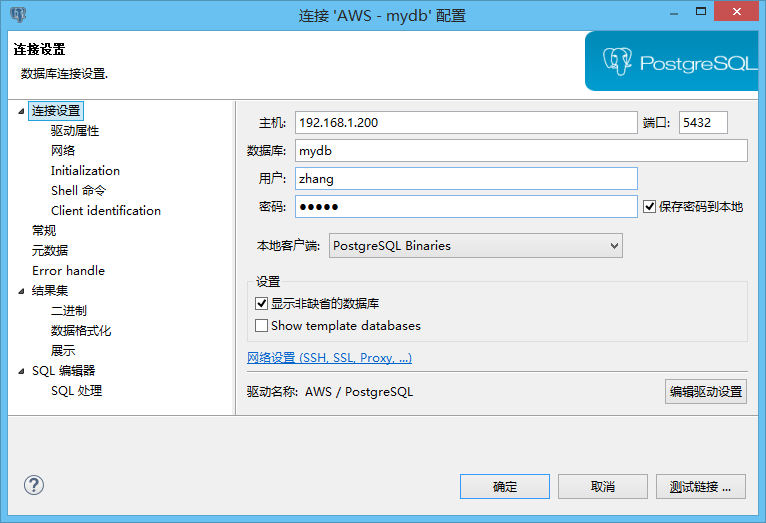

主要的就是以上配置。
现在可以在客户端操作数据库了。
<<完>>
Linux上安装postgres 10.5的更多相关文章
- 通过xshell在linux上安装solr4.10.3
通过xshell在linux上安装solr4.10.3 0)下载linux下的安装包 1)通过xftp6上传到linux上 3)在xshell下依次执行 解压命令:tar xvfz solr.tgz( ...
- RAC分解步骤之一,在oracle linux 4u4上安装oracle 10.2.0.1.0操作日志
练习oracle的rac组建过程,第一步,先练习4u4上安装oracle 10.2.0.1.0.直接安装rac,有些难度.从简单的做起.总RAC步骤,参照小布老师的RAC组建. 1. 启动vc,登陆v ...
- Linux上安装ZooKeeper并设置开机启动(CentOS7+ZooKeeper3.4.10)
1下载Zookeeper 2安装启动测试 2.1上载压缩文件并解压 2.2新建 zookeeper配置文件 2.3安装JDK 2.4启动zookeeper 2.5查看zookeeper的状态 3将Zo ...
- 在Windows和Linux上安装paramiko模块
一.paramiko模块有什么用? paramiko是用python语言写的一个模块,遵循SSH2协议,支持以加密和认证的方式,进行远程服务器的连接.由于使用的是python这样的能够跨平台运行的语言 ...
- 如何在Linux上安装Storm
Storm是开源的分布式实时计算系统,能够让数据流处理变得简单.可靠,也因此在大数据领域有广泛的实际 应用.下面介绍一下如何在Linux系统上安装Storm.根据Storm官网介绍,安装Storm软件 ...
- linux上安装配置samba服务器
linux上安装配置samba服务器 在linux上安装配置samba服务器 在这给大家介绍一个不错的家伙,samba服务.如果您正在犯愁,如何在Windows和Linux之间实现资源共享,就请看看这 ...
- ghmm在 Linux 上安装
ghmm在 Linux 上安装 http://ghmm.sourceforge.net/documentation.html http://www.ghmm.org http://www.comp.l ...
- Linux上安装Zookeeper以及一些注意事项
最近打算出一个系列,介绍Dubbo的使用. 分布式应用现在已经越来越广泛,Spring Could也是一个不错的一站式解决方案,不过据我了解国内目前貌似使用阿里Dubbo的公司比较多,一方面这个框架也 ...
- Redis之在Linux上安装和简单的使用
我只是一个搬运工 Redis之在Linux上安装和简单的使用https://blog.csdn.net/qq_20989105/article/details/76390367 一.安装gcc 1.R ...
随机推荐
- Linux性能分析之上下文切换
而在每个任务运行前,CPU 都需要知道任务从哪里加载.又从哪里开始运行,也就是说,需要系统事先帮它设置好 CPU 寄存器和程序计数器 CPU 寄存器,是 CPU 内置的容量小.但速度极快的内存.而程序 ...
- 如何在Github下载jackson的jar包
-------------------------这是jackson-annotations的,往下拉找到Downloads就有jar包下载了 https://github.com/FasterXML ...
- 网络编程介绍,C/S 架构,网络通讯协议,osi七层
网络编程: 什么是网络编程: 网络通常指的是计算机中的互联网,是由多台计算机通过网线或其他媒介相互链接组成的 编写基于网络的应用程序的过程序称之为网络编程 为什么要学习网络编程: 我们已经知道计算机, ...
- random、json、pickle、hashlib、hmac、shutil、shevle模块
今日内容: 1. random 模块 2. json模块 3. pickle 模块 4.hashlib 模块 5. hmac 模块 6. shutil 模块 7. shelve 模块 1. rando ...
- Python知识点面试题
一. DB类 索引相关: 1. mysql索引种类 2. 什么是覆盖索引? MySQL目前主要有以下几种索引类型:1.普通索引2.唯一索引3.主键索引4.组合索引:遵循最左前缀规则5.全文索引 其他: ...
- 维特比算法及python实现
先放一张找到的算法流程图: 上图解释: A:状态转移概率矩阵,Aij表示状态i到状态j转换的概率,即P(state=j | state=i).下面代码中以P表示. B:观测矩阵,Bij表示给定状态i, ...
- __str__,__repr__,__add__
class School: def __init__(self,name,addr,type): self.name=name self.addr=addr self.type=type def __ ...
- 【机器学习】Learning to Rank入门小结 + 漫谈
Learning to Rank入门小结 + 漫谈 Learning to Rank入门小结 Table of Contents 1 前言 2 LTR流程 3 训练数据的获取4 特征抽取 3.1 人工 ...
- C# 重写WndProc
重写WndProc方法来处理 Windows 消息 处理 Windows 消息. 在开发winForm时,常常要处理Windows消息,可以重写WndProc来实现.常见代码如下: using Sys ...
- DiskSim
1.使用笔记 http://feifei432.blog.163.com/blog/static/140253361201022211949152/ http://feifei432.blog.163 ...