
jQuery模拟键盘打字逐字逐句显示文本
jQuery模拟键盘打字逐字逐句显示文本
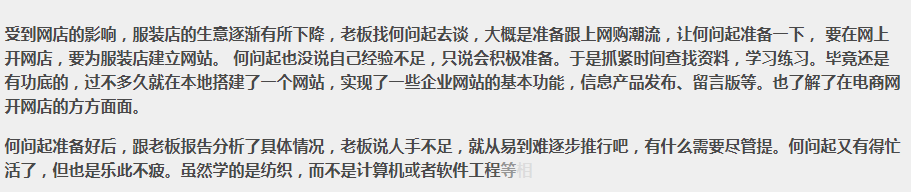
html代码
    <!doctype html>

    <html lang="zh">

     <head>

     <meta charset="UTF-8">

     <meta http-equiv="X-UA-Compatible" content="IE=edge,chrome=1">

     <meta name="viewport" content="width=device-width, initial-scale=1.0">

     <title>jQuery键盘打出逐字逐句显示特效</title><base target="_blank" />

     <style>

     body {

     background-color: #F9F6EF;

     color: #494949;

     }

     .hovertree-content {

     width: 95%;

     max-width:900px;

     height: auto;

     margin-left: auto;

     margin-right: auto;

     padding: 10px;

     border: 1px solid #D0D0D0;

     background-color: #EFEFEF;

     margin-top: 10px;

     font-weight: bold;

     line-height: 24px;

     }

     .hovertreeinfo{

     text-align:center;margin:10px 0; font:normal 14px/24px 'MicroSoft YaHei';

     }

     .hovertreeinfo a{color:blue;}

     </style>

     <!--[if IE]>

     <script src="http://hovertree.com/texiao/html5/4/html5shiv.min.js"></script>

     <![endif]-->

     </head>

     <body>

     <script type="text/javascript" src="/themes/sy/gggg336x280a.js"></script>

     </div>

     <div class="hovertree-content bgcolor-3">

     <p class="word1"></p>

     <p class="word2"></p>

     </div>

     <script src="http://down.hovertree.com/jquery/jquery-1.12.3.min.js" type="text/javascript"></script>

     <script>window.jQuery || document.write('<script src="js/jquery-1.11.0.min.js"><\/script>')</script>

     <script src="js/l-by-l.min.js"></script>

     <!--<script src="http://hovertree.com/texiao/jquery/70/js/l-by-l.min.js"></script>-->

     <script>

     jQuery(document).ready(function($){

     $(".word1").lbyl({

     content: "受到网店的影响,服装店的生意逐渐有所下降,老板找何问起去谈,大概是准备跟上网购潮流,让何问起准备一下, 要在网上开网店,要为服装店建立网站。 何问起也没说自己经验不足,只说会积极准备。于是抓紧时间查找资料,学习练习。毕竟还是有功底的,过不多久就在本地搭建了一个网站,实现了一些企业网站的基本功能,信息产品发布、留言版等。也了解了在电商网开网店的方方面面。",

     speed: 100,

     type: 'show',

     finished: function(){

     $('.word2').lbyl({

     content: "何问起准备好后,跟老板报告分析了具体情况,老板说人手不足,就从易到难逐步推行吧,有什么需要尽管提。何问起又有得忙活了,但也是乐此不疲。虽然学的是纺织,而不是计算机或者软件工程等相关专业,但自从接触编程以后,兴趣就一直有增无减,也熟悉了不少网站架设,Web前端,后端程序,数据库等等的知识,开了网站 hovertree.com ,有向全栈工程师发展的趋势。接受了老板的这个任务后更是开心,整天精力充沛,战斗力十足。",

     speed: 150,

     type: 'fade',

     fadeSpeed: 500

     })

     } // Finished Callback

     });

     });

     </script>

     </body>

     </html>
!function(e){e.fn.lbyl=function(n){{var t=e.extend({content:"",speed:10,type:"fade",fadeSpeed:500,finished:function(){}},n),d=e(this),s=[],i=t.content;e(this).length}d.empty(),d.attr("data-time",i.length*t.speed);for(var p=0;p<i.length;p++)s.push(i[p]);e.each(s,function(e,n){d.append('<span style="display: none;">'+n+"</span>"),setTimeout(function(){"show"==t.type?d.find("span:eq("+e+")").show():"fade"==t.type&&d.find("span:eq("+e+")").fadeIn(t.fadeSpeed)},e*t.speed)}),setTimeout(function(){t.finished()},i.length*t.speed)}}(jQuery);
彩色字体
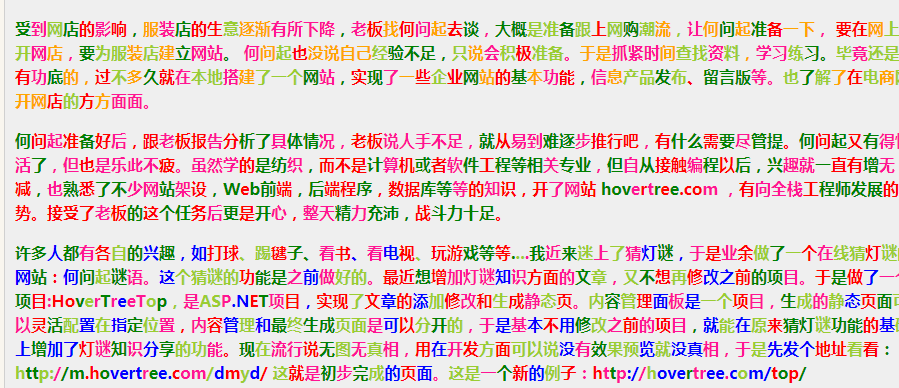
代码
     <html lang="zh">

     <head>

     <meta charset="UTF-8">

     <meta http-equiv="X-UA-Compatible" content="IE=edge,chrome=1">

     <meta name="viewport" content="width=device-width, initial-scale=1.0">

     <title>jQuery键盘打出逐字逐句彩色显示特效 </title>

     <base target="_blank" />

     <style>

     body {

     background-color: #F9F6EF;

     color: #494949;

     }

     .hovertree-content {

     width: 95%;

     max-width: 900px;

     height: auto;

     margin-left: auto;

     margin-right: auto;

     padding: 10px;

     border: 1px solid #D0D0D0;

     background-color: #EFEFEF;

     margin-top: 10px;

     font-weight: bold;

     line-height: 24px;

     }

     .hovertreeinfo {

     text-align: center;

     margin: 10px 0;

     font: normal 14px/24px 'MicroSoft YaHei';

     }

     .hovertreeinfo a {

     color: blue;

     }

     </style>

     <!--[if IE]>

     <script src="http://hovertree.com/texiao/html5/4/html5shiv.min.js"></script>

     <![endif]-->

     </head>

     <body>

     <div class="hovertreeinfo">

     <h2>jQuery模拟键盘打字逐字逐句显示随机彩色文本</h2>

     </div>

     <div class="hovertree-content bgcolor-3">

     <p class="word1"></p>

     <p class="word2"></p>

     <p class="word3"></p>

     </div>

     <script src="http://down.hovertree.com/jquery/jquery-1.12.3.min.js" type="text/javascript"></script>

     <script>window.jQuery || document.write('<script src="js/jquery-1.11.0.min.js"><\/script>')</script>

     <script src="http://hovertree.com/texiao/jquery/70/js/lbyl.min.js"></script>

     <script>

     jQuery(document).ready(function($){

     $(".word1").lbyl({

     content: "受到网店的影响,服装店的生意逐渐有所下降,老板找何问起去谈,大概是准备跟上网购潮流,让何问起准备一下, 要在网上开网店,要为服装店建立网站。 何问起也没说自己经验不足,只说会积极准备。于是抓紧时间查找资料,学习练习。毕竟还是有功底的,过不多久就在本地搭建了一个网站,实现了一些企业网站的基本功能,信息产品发布、留言版等。也了解了在电商网开网店的方方面面。",

     speed: 100,

     type: 'show',

     hovertreeColors:['red','orange','deeppink','yellowgreen','green'],

     finished: function(){

     $('.word2').lbyl({

     content: "何问起准备好后,跟老板报告分析了具体情况,老板说人手不足,就从易到难逐步推行吧,有什么需要尽管提。何问起又有得忙活了,但也是乐此不疲。虽然学的是纺织,而不是计算机或者软件工程等相关专业,但自从接触编程以后,兴趣就一直有增无减,也熟悉了不少网站架设,Web前端,后端程序,数据库等等的知识,开了网站 hovertree.com ,有向全栈工程师发展的趋势。接受了老板的这个任务后更是开心,整天精力充沛,战斗力十足。",

     speed: 150,

     type: 'fade',

     fadeSpeed: 500,

     hovertreeColors:['red','green','deeppink']

     })

     } // Finished Callback

     });

     });

     setTimeout( function () {

     $(".word3").lbyl({

     content: "许多人都有各自的兴趣,如打球、踢毽子、看书、看电视、玩游戏等等....我近来迷上了猜灯谜,于是业余做了一个在线猜灯谜的网站:何问起谜语。这个猜谜的功能是之前做好的。最近想增加灯谜知识方面的文章,又不想再修改之前的项目。于是做了一个项目:HoverTreeTop,是ASP.NET项目,实现了文章的添加修改和生成静态页。内容管理面板是一个项目,生成的静态页面可以灵活配置在指定位置,内容管理和最终生成页面是可以分开的,于是基本不用修改之前的项目,就能在原来猜灯谜功能的基础上增加了灯谜知识分享的功能。现在流行说无图无真相,用在开发方面可以说没有效果预览就没真相,于是先发个地址看看:http://m.hovertree.com/dmyd/ 这就是初步完成的页面。这是一个新的例子:http://hovertree.com/top/",

     speed: 100,

     type: 'show',

     hovertreeColors: ['red', 'deeppink', 'blue', 'yellowgreen', 'green'],

     finished: function () {

     } // Finished Callback

     });

     },3000)

     </script>

     </body>

     </html>
lbyl.min.js
/* by 何问起 hovertree.com */

!function (e) { e.fn.lbyl = function (n) { var t = e.extend({ content: "", speed: 10, type: "fade", fadeSpeed: 500, finished: function () { }, hovertreeColors: ["deeppink", "red", "green"] }, n), d = e(this), s = [], i = t.content; e(this).length; d.empty(), d.attr("data-time", i.length * t.speed); var htlength = t.hovertreeColors.length; for (var p = 0; p < i.length; p++) { s.push(i[p]) } e.each(s, function (e, n) { d.append('<span style="display: none;color:' + t.hovertreeColors[Math.floor(Math.random() * htlength)] + '">' + n + "</span>"), setTimeout(function () { "show" == t.type ? d.find("span:eq(" + e + ")").show() : "fade" == t.type && d.find("span:eq(" + e + ")").fadeIn(t.fadeSpeed) }, e * t.speed) }), setTimeout(function () { t.finished() }, i.length * t.speed) } }(jQuery);
jQuery模拟键盘打字逐字逐句显示文本的更多相关文章
- C语言:读TXT 模拟键盘打字输出
//#include<ctype.h> #include<stdio.h> #include <windows.h> //#include "string ...
- 使用jquery模拟键盘事件,但window系统并不会真的响应事件,只是浏览器当前页面会响应而已
<!DOCTYPE html> <html> <head> <title>Demo</title> <meta http-equiv= ...
- jQuery模拟打字逐字输出代码
效果查看:http://hovertree.com/texiao/jquery/70/ jQuery键盘打出逐字逐句显示特效,逐字逐句显示文字 还可以设置每个文字随机颜色: http://hovert ...
- 使用C#模拟键盘输入、鼠标移动和点击、设置光标位置及控制应用程序的显示
1.模拟键盘输入(SendKeys) 功能:将一个或多个按键消息发送到活动窗口,就如同在键盘上进行输入一样. 语法:SendKeys.Send(string keys);SendKeys.SendWa ...
- 初识 jquery.simulate.js 模拟键盘事件
用jquery 和 jquery.simulate.js 实现模拟键盘事件,点击上下左右div相当于点击键盘的上下左右键 <!DOCTYPE html> <html> < ...
- SendInput模拟键盘输入的问题
SendInput模拟键盘输入的问题 http://www.cnblogs.com/yedaoq/archive/2010/12/30/1922305.html 最近接触到这个函数,因此了解了一下, ...
- C# 模拟键盘操作--SendKey(),SendKeys()
模拟键盘输入就是使用以下2个语法实现的.SendKeys.Send(string keys); //模拟汉字(文本)输入SendKeys.SendWait(string keys); //模拟按键输 ...
- C# 模拟键盘操作SendKey(),SendKeys()
模拟键盘输入就是使用以下2个语法实现的. SendKeys.Send(string keys); //模拟汉字(文本)输入SendKeys.SendWait(string keys); //模拟按键 ...
- jQuery 选择器 筛选器 样式操作 文本操作 属性操作 文档处理 事件 动画效果 插件 each、data、Ajax
jQuery jQuery介绍 1.jQuery是一个轻量级的.兼容多浏览器的JavaScript库. 2.jQuery使用户能够更方便地处理HTML Document.Events.实现动画效果.方 ...
随机推荐
- 给定a、b两个文件,各存放50亿个url,每个url各占64字节,内存限制是4G,让你找出a、b文件共同的url?
package com.hadoop.hdfs; import org.apache.hadoop.yarn.webapp.hamlet.Hamlet; import org.junit.Test; ...
- PAT(B) 1054 求平均值(Java)
题目链接:1054 求平均值 (20 point(s)) 题目描述 本题的基本要求非常简单:给定 N 个实数,计算它们的平均值.但复杂的是有些输入数据可能是非法的.一个"合法"的输 ...
- AVR单片机教程——EasyElectronics Library v1.0手册
更新:EasyElectronics Library v1.1手册 索引: bit.h delay.h pin.h tone.h pwm.h uart.h adc.h led.h rgbw.h seg ...
- Nginx 配置反向代理ip
参考文档: https://blog.csdn.net/stevenprime/article/details/7918094
- wannafly 挑战赛10 小H和密码
题意:中文题就不解释了 题解: dp[i][j]表示前i 个轮盘 和一个字符串前j 个字符的匹配情况 ,具体的状态转移解释见代码 #include <cstdio> #include &l ...
- kafka的生产者配置以及发送信息的三种方式
1.Fire-and-forget 这种方式是不管发送成功与否,客户端都会返回成功.尽管大多数的时候Kafka 在发送失败后,会自己重新自动再一次发送消息,但是也会存在丢失消息的风险 Producer ...
- iis 经典模式和集成模式
IIS7.0中的Web应用程序有两种配置模式:经典模式和集成模式.两者区别大家可以参考下,根据实际情况选用. 经典模式是为了与之前的版本兼容,使用ISAPI扩展来调用ASP.NET运行库,原先运行于 ...
- Java 之 字符缓冲流
一.字符缓冲输出流 java.io.BufferedWriter extends Writer BufferedWriter:字符缓冲输出流. 继承自父类的共性成员方法: void write(int ...
- Spring之AOP原理、代码、使用详解(XML配置方式)
Spring 的两大核心,一是IOC,另一个是AOP,本博客从原理.AOP代码以及AOP使用三个方向来讲AOP.先给出一张AOP相关的结构图,可以放大查看. 一.Spring AOP 接口设计 1.P ...
- c# 字段成员