
jQuery模拟键盘打字逐字逐句显示文本
jQuery模拟键盘打字逐字逐句显示文本
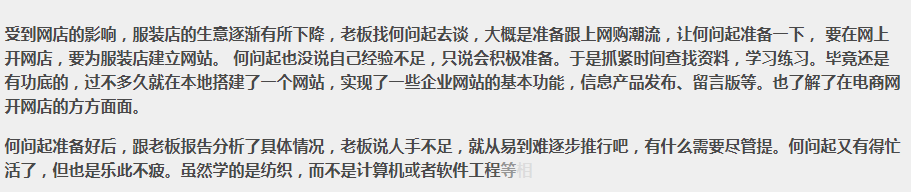
html代码
    <!doctype html>

    <html lang="zh">

     <head>

     <meta charset="UTF-8">

     <meta http-equiv="X-UA-Compatible" content="IE=edge,chrome=1">

     <meta name="viewport" content="width=device-width, initial-scale=1.0">

     <title>jQuery键盘打出逐字逐句显示特效</title><base target="_blank" />

     <style>

     body {

     background-color: #F9F6EF;

     color: #494949;

     }

     .hovertree-content {

     width: 95%;

     max-width:900px;

     height: auto;

     margin-left: auto;

     margin-right: auto;

     padding: 10px;

     border: 1px solid #D0D0D0;

     background-color: #EFEFEF;

     margin-top: 10px;

     font-weight: bold;

     line-height: 24px;

     }

     .hovertreeinfo{

     text-align:center;margin:10px 0; font:normal 14px/24px 'MicroSoft YaHei';

     }

     .hovertreeinfo a{color:blue;}

     </style>

     <!--[if IE]>

     <script src="http://hovertree.com/texiao/html5/4/html5shiv.min.js"></script>

     <![endif]-->

     </head>

     <body>

     <script type="text/javascript" src="/themes/sy/gggg336x280a.js"></script>

     </div>

     <div class="hovertree-content bgcolor-3">

     <p class="word1"></p>

     <p class="word2"></p>

     </div>

     <script src="http://down.hovertree.com/jquery/jquery-1.12.3.min.js" type="text/javascript"></script>

     <script>window.jQuery || document.write('<script src="js/jquery-1.11.0.min.js"><\/script>')</script>

     <script src="js/l-by-l.min.js"></script>

     <!--<script src="http://hovertree.com/texiao/jquery/70/js/l-by-l.min.js"></script>-->

     <script>

     jQuery(document).ready(function($){

     $(".word1").lbyl({

     content: "受到网店的影响,服装店的生意逐渐有所下降,老板找何问起去谈,大概是准备跟上网购潮流,让何问起准备一下, 要在网上开网店,要为服装店建立网站。 何问起也没说自己经验不足,只说会积极准备。于是抓紧时间查找资料,学习练习。毕竟还是有功底的,过不多久就在本地搭建了一个网站,实现了一些企业网站的基本功能,信息产品发布、留言版等。也了解了在电商网开网店的方方面面。",

     speed: 100,

     type: 'show',

     finished: function(){

     $('.word2').lbyl({

     content: "何问起准备好后,跟老板报告分析了具体情况,老板说人手不足,就从易到难逐步推行吧,有什么需要尽管提。何问起又有得忙活了,但也是乐此不疲。虽然学的是纺织,而不是计算机或者软件工程等相关专业,但自从接触编程以后,兴趣就一直有增无减,也熟悉了不少网站架设,Web前端,后端程序,数据库等等的知识,开了网站 hovertree.com ,有向全栈工程师发展的趋势。接受了老板的这个任务后更是开心,整天精力充沛,战斗力十足。",

     speed: 150,

     type: 'fade',

     fadeSpeed: 500

     })

     } // Finished Callback

     });

     });

     </script>

     </body>

     </html>
!function(e){e.fn.lbyl=function(n){{var t=e.extend({content:"",speed:10,type:"fade",fadeSpeed:500,finished:function(){}},n),d=e(this),s=[],i=t.content;e(this).length}d.empty(),d.attr("data-time",i.length*t.speed);for(var p=0;p<i.length;p++)s.push(i[p]);e.each(s,function(e,n){d.append('<span style="display: none;">'+n+"</span>"),setTimeout(function(){"show"==t.type?d.find("span:eq("+e+")").show():"fade"==t.type&&d.find("span:eq("+e+")").fadeIn(t.fadeSpeed)},e*t.speed)}),setTimeout(function(){t.finished()},i.length*t.speed)}}(jQuery);
彩色字体
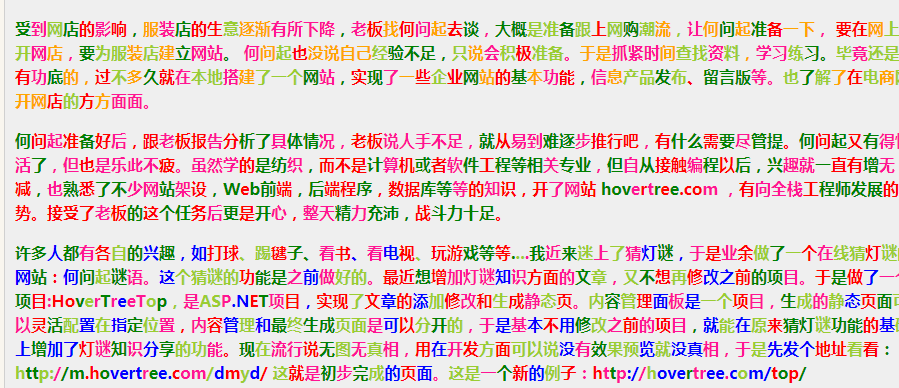
代码
     <html lang="zh">

     <head>

     <meta charset="UTF-8">

     <meta http-equiv="X-UA-Compatible" content="IE=edge,chrome=1">

     <meta name="viewport" content="width=device-width, initial-scale=1.0">

     <title>jQuery键盘打出逐字逐句彩色显示特效 </title>

     <base target="_blank" />

     <style>

     body {

     background-color: #F9F6EF;

     color: #494949;

     }

     .hovertree-content {

     width: 95%;

     max-width: 900px;

     height: auto;

     margin-left: auto;

     margin-right: auto;

     padding: 10px;

     border: 1px solid #D0D0D0;

     background-color: #EFEFEF;

     margin-top: 10px;

     font-weight: bold;

     line-height: 24px;

     }

     .hovertreeinfo {

     text-align: center;

     margin: 10px 0;

     font: normal 14px/24px 'MicroSoft YaHei';

     }

     .hovertreeinfo a {

     color: blue;

     }

     </style>

     <!--[if IE]>

     <script src="http://hovertree.com/texiao/html5/4/html5shiv.min.js"></script>

     <![endif]-->

     </head>

     <body>

     <div class="hovertreeinfo">

     <h2>jQuery模拟键盘打字逐字逐句显示随机彩色文本</h2>

     </div>

     <div class="hovertree-content bgcolor-3">

     <p class="word1"></p>

     <p class="word2"></p>

     <p class="word3"></p>

     </div>

     <script src="http://down.hovertree.com/jquery/jquery-1.12.3.min.js" type="text/javascript"></script>

     <script>window.jQuery || document.write('<script src="js/jquery-1.11.0.min.js"><\/script>')</script>

     <script src="http://hovertree.com/texiao/jquery/70/js/lbyl.min.js"></script>

     <script>

     jQuery(document).ready(function($){

     $(".word1").lbyl({

     content: "受到网店的影响,服装店的生意逐渐有所下降,老板找何问起去谈,大概是准备跟上网购潮流,让何问起准备一下, 要在网上开网店,要为服装店建立网站。 何问起也没说自己经验不足,只说会积极准备。于是抓紧时间查找资料,学习练习。毕竟还是有功底的,过不多久就在本地搭建了一个网站,实现了一些企业网站的基本功能,信息产品发布、留言版等。也了解了在电商网开网店的方方面面。",

     speed: 100,

     type: 'show',

     hovertreeColors:['red','orange','deeppink','yellowgreen','green'],

     finished: function(){

     $('.word2').lbyl({

     content: "何问起准备好后,跟老板报告分析了具体情况,老板说人手不足,就从易到难逐步推行吧,有什么需要尽管提。何问起又有得忙活了,但也是乐此不疲。虽然学的是纺织,而不是计算机或者软件工程等相关专业,但自从接触编程以后,兴趣就一直有增无减,也熟悉了不少网站架设,Web前端,后端程序,数据库等等的知识,开了网站 hovertree.com ,有向全栈工程师发展的趋势。接受了老板的这个任务后更是开心,整天精力充沛,战斗力十足。",

     speed: 150,

     type: 'fade',

     fadeSpeed: 500,

     hovertreeColors:['red','green','deeppink']

     })

     } // Finished Callback

     });

     });

     setTimeout( function () {

     $(".word3").lbyl({

     content: "许多人都有各自的兴趣,如打球、踢毽子、看书、看电视、玩游戏等等....我近来迷上了猜灯谜,于是业余做了一个在线猜灯谜的网站:何问起谜语。这个猜谜的功能是之前做好的。最近想增加灯谜知识方面的文章,又不想再修改之前的项目。于是做了一个项目:HoverTreeTop,是ASP.NET项目,实现了文章的添加修改和生成静态页。内容管理面板是一个项目,生成的静态页面可以灵活配置在指定位置,内容管理和最终生成页面是可以分开的,于是基本不用修改之前的项目,就能在原来猜灯谜功能的基础上增加了灯谜知识分享的功能。现在流行说无图无真相,用在开发方面可以说没有效果预览就没真相,于是先发个地址看看:http://m.hovertree.com/dmyd/ 这就是初步完成的页面。这是一个新的例子:http://hovertree.com/top/",

     speed: 100,

     type: 'show',

     hovertreeColors: ['red', 'deeppink', 'blue', 'yellowgreen', 'green'],

     finished: function () {

     } // Finished Callback

     });

     },3000)

     </script>

     </body>

     </html>
lbyl.min.js
/* by 何问起 hovertree.com */

!function (e) { e.fn.lbyl = function (n) { var t = e.extend({ content: "", speed: 10, type: "fade", fadeSpeed: 500, finished: function () { }, hovertreeColors: ["deeppink", "red", "green"] }, n), d = e(this), s = [], i = t.content; e(this).length; d.empty(), d.attr("data-time", i.length * t.speed); var htlength = t.hovertreeColors.length; for (var p = 0; p < i.length; p++) { s.push(i[p]) } e.each(s, function (e, n) { d.append('<span style="display: none;color:' + t.hovertreeColors[Math.floor(Math.random() * htlength)] + '">' + n + "</span>"), setTimeout(function () { "show" == t.type ? d.find("span:eq(" + e + ")").show() : "fade" == t.type && d.find("span:eq(" + e + ")").fadeIn(t.fadeSpeed) }, e * t.speed) }), setTimeout(function () { t.finished() }, i.length * t.speed) } }(jQuery);
jQuery模拟键盘打字逐字逐句显示文本的更多相关文章
- C语言:读TXT 模拟键盘打字输出
//#include<ctype.h> #include<stdio.h> #include <windows.h> //#include "string ...
- 使用jquery模拟键盘事件,但window系统并不会真的响应事件,只是浏览器当前页面会响应而已
<!DOCTYPE html> <html> <head> <title>Demo</title> <meta http-equiv= ...
- jQuery模拟打字逐字输出代码
效果查看:http://hovertree.com/texiao/jquery/70/ jQuery键盘打出逐字逐句显示特效,逐字逐句显示文字 还可以设置每个文字随机颜色: http://hovert ...
- 使用C#模拟键盘输入、鼠标移动和点击、设置光标位置及控制应用程序的显示
1.模拟键盘输入(SendKeys) 功能:将一个或多个按键消息发送到活动窗口,就如同在键盘上进行输入一样. 语法:SendKeys.Send(string keys);SendKeys.SendWa ...
- 初识 jquery.simulate.js 模拟键盘事件
用jquery 和 jquery.simulate.js 实现模拟键盘事件,点击上下左右div相当于点击键盘的上下左右键 <!DOCTYPE html> <html> < ...
- SendInput模拟键盘输入的问题
SendInput模拟键盘输入的问题 http://www.cnblogs.com/yedaoq/archive/2010/12/30/1922305.html 最近接触到这个函数,因此了解了一下, ...
- C# 模拟键盘操作--SendKey(),SendKeys()
模拟键盘输入就是使用以下2个语法实现的.SendKeys.Send(string keys); //模拟汉字(文本)输入SendKeys.SendWait(string keys); //模拟按键输 ...
- C# 模拟键盘操作SendKey(),SendKeys()
模拟键盘输入就是使用以下2个语法实现的. SendKeys.Send(string keys); //模拟汉字(文本)输入SendKeys.SendWait(string keys); //模拟按键 ...
- jQuery 选择器 筛选器 样式操作 文本操作 属性操作 文档处理 事件 动画效果 插件 each、data、Ajax
jQuery jQuery介绍 1.jQuery是一个轻量级的.兼容多浏览器的JavaScript库. 2.jQuery使用户能够更方便地处理HTML Document.Events.实现动画效果.方 ...
随机推荐
- 在做爬虫或者自动化测试时新打开一个新标签页,必须使用windows切换
在做爬虫或者自动化测试时,有时会打开一个新的标签页或者新的窗口,直接使用xpath定位元素会发现找不到元素,在firefox中定位了元素还是找不到, 经过多次发现,在眼睛视野内看到这个窗口是在最前面, ...
- python 之 数据库(字段的约束条件,表之间的关系)
10.6 约束条件 10.61 not null .default create table t15( id int, name ) not null, sex enum('male','female ...
- Python之(matplotlib、numpy、pandas)数据分析
一.Matplotlib 是一个 Python 的 2D绘图库,它以各种硬拷贝格式和跨平台的交互式环境生成出版质量级别的图形. 它主要用来回事图形,用来展现一些数据,更加直观的展示,让你第一眼就只要数 ...
- pymysql操作mysql数据库
1.建库 import pymysql # 建库 try: conn=pymysql.connect( host='127.0.0.1', port=3306, user='root', passwd ...
- ABAP-会计凭证替代字段GB01设置
1.GB01表字段设置 SM30:VWTYGB01 找到需要替代的字段,设置bexclude勾选为空 2.运行程序 RGUGBR00 激活
- Fortify漏洞之XML External Entity Injection(XML实体注入)
继续对Fortify的漏洞进行总结,本篇主要针对 XML External Entity Injection(XML实体注入) 的漏洞进行总结,如下: 1.1.产生原因: XML External ...
- OpenStack kilo版(7) 部署dashboard
安装dashboard root@controller:~# apt-get install openstack-dashboard 配置 /etc/openstack-dashboard/loc ...
- Mycat学习-单独启动mycat
Mycat下载地址:http://mycat.io/ Mycat安装:解压缩即可. Mycat作为一个中间件,实现mysql协议,是可以不依赖数据库单独运行的. 对前端应用连接来说就是一个数据库, ...
- Powershell-获取Hyper-V复制状态
Get-VM | Select-Object name,ReplicationHealth
- shiro系列五、shiro密码MD5加密
Shiro-密码的MD5加密 1.密码的加密 在数据表中存的密码不应该是123456,而应该是123456加密之后的字符串,而且还要求这个加密算法是不可逆的,即由加密后的字符串不能反推回来原来的密 ...