
SpringBoot实现登陆
1、依赖
<?xml version="1.0" encoding="UTF-8"?>

<project xmlns="http://maven.apache.org/POM/4.0.0" xmlns:xsi="http://www.w3.org/2001/XMLSchema-instance"

         xsi:schemaLocation="http://maven.apache.org/POM/4.0.0 https://maven.apache.org/xsd/maven-4.0.0.xsd">

    <modelVersion>4.0.0</modelVersion>

    <parent>

        <groupId>org.springframework.boot</groupId>

        <artifactId>spring-boot-starter-parent</artifactId>

        <version>2.2.1.RELEASE</version>

        <relativePath/> <!-- lookup parent from repository -->

    </parent>

    <groupId>com.zn</groupId>

    <artifactId>springboot_invoicing</artifactId>

    <version>0.0.1-SNAPSHOT</version>

    <name>springboot_invoicing</name>

    <description>Demo project for Spring Boot</description>

    <properties>

        <java.version>1.8</java.version>

    </properties>

    <dependencies>

        <dependency>

            <groupId>org.springframework.boot</groupId>

            <artifactId>spring-boot-starter-web</artifactId>

        </dependency>

        <dependency>

            <groupId>org.springframework.boot</groupId>

            <artifactId>spring-boot-starter-test</artifactId>

            <scope>test</scope>

            <exclusions>

                <exclusion>

                    <groupId>org.junit.vintage</groupId>

                    <artifactId>junit-vintage-engine</artifactId>

                </exclusion>

            </exclusions>

        </dependency>

        <dependency>

            <groupId>org.springframework.boot</groupId>

            <artifactId>spring-boot-starter</artifactId>

        </dependency>

        <dependency>

            <groupId>org.springframework.boot</groupId>

            <artifactId>spring-boot-starter-logging</artifactId>

        </dependency>

        <!-- 核心依赖 -->

        <dependency>

            <groupId>org.springframework.boot</groupId>

            <artifactId>spring-boot-starter-web</artifactId>

        </dependency>

        <!-- 可以实现热部署,在IDEA上实现热部署还需一些额外的配置,请查阅资料 -->

        <dependency>

            <groupId>org.springframework.boot</groupId>

            <artifactId>spring-boot-devtools</artifactId>

            <optional>true</optional>

            <scope>runtime</scope>

        </dependency>

        <!-- JDBC for mysql -->

        <dependency>

            <groupId>mysql</groupId>

            <artifactId>mysql-connector-java</artifactId>

            <scope>runtime</scope>

        </dependency>

        <dependency>

            <groupId>mysql</groupId>

            <artifactId>mysql-connector-java</artifactId>

            <version>5.1.32</version>

        </dependency>

        <!-- mybatis -->

        <!--mybatis-->

        <!-- https://mvnrepository.com/artifact/org.mybatis.spring.boot/mybatis-spring-boot-starter -->

        <dependency>

            <groupId>org.mybatis.spring.boot</groupId>

            <artifactId>mybatis-spring-boot-starter</artifactId>

            <version>1.3.1</version>

        </dependency>

        <!--fastJson-->

        <dependency>

            <groupId>com.alibaba</groupId>

            <artifactId>fastjson</artifactId>

            <version>1.2.12</version>

        </dependency>

        <!--druid-->

        <dependency>

            <groupId>com.alibaba</groupId>

            <artifactId>druid</artifactId>

            <version>1.0.18</version>

        </dependency>

        <dependency>

            <groupId>org.mybatis</groupId>

            <artifactId>mybatis</artifactId>

            <version>3.4.1</version>

        </dependency>

        <!--thymeleaf  新的模板引擎,比jsp要出色-->

        <dependency>

            <groupId>org.springframework.boot</groupId>

            <artifactId>spring-boot-starter-thymeleaf</artifactId>

        </dependency>

        <!--jdbc-->

        <dependency>

            <groupId>org.springframework.boot</groupId>

            <artifactId>spring-boot-starter-jdbc</artifactId>

        </dependency>

        <!-- 分页插件 -->

        <dependency>

            <groupId>com.github.pagehelper</groupId>

            <artifactId>pagehelper-spring-boot-starter</artifactId>

            <version>1.2.3</version>

        </dependency>

    </dependencies>

    <build>

        <plugins>

            <plugin>

                <groupId>org.springframework.boot</groupId>

                <artifactId>spring-boot-maven-plugin</artifactId>

            </plugin>

        </plugins>

        <!--xml配置,此是为了将来整合Hibernate或者mybatis 默认没有需要配置-->

        <resources>

            <resource>

                <directory>src/main/java</directory>

                <includes>

                    <include>**/*.properties</include>

                    <include>**/*.xml</include>

                </includes>

            </resource>

        </resources>

    </build>

</project>
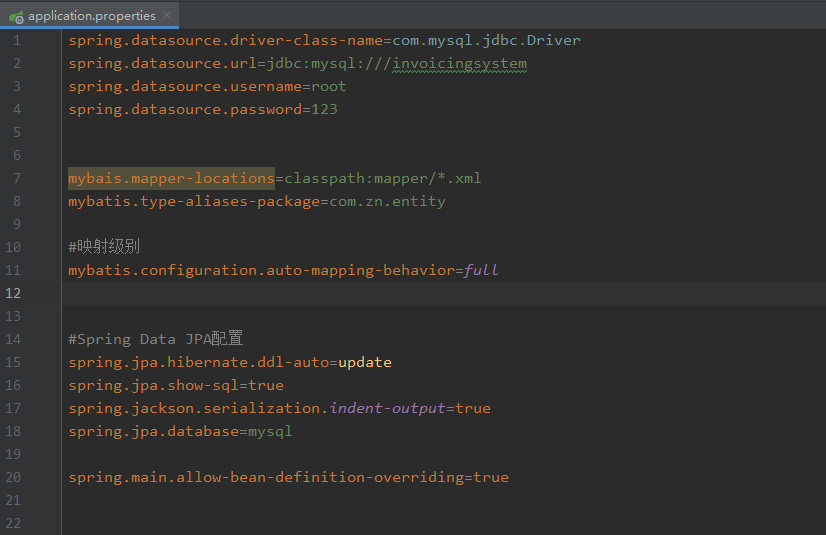
2、配置application.properties
3、登陆页面 login.html
<!DOCTYPE html>

<html>

<head lang="en">

    <meta charset="UTF-8">

    <title>系统登录 - 小型进销存系统</title>

   <!-- <link rel="stylesheet" href="css/style.css"/>-->

    <style>

        #parent{

            width:500px;

            height:200px;

            margin-top:20%;

            margin-left:50%;

            transform:translate(-50%,-50%) ;

            background:#009688;

        }

        .password,.subBtn{

            margin-top: 2%;

            margin-left: 3%;

        }

        .loginHeader{

            padding-top: 1%;

        }

    </style>

</head>

<body class="login_bg">

<div id="parent">

    <section class="loginBox">

        <header class="loginHeader" style="text-align:center; ">

            <h1>小型进销存系统</h1>

        </header>

        <section class="loginCont">

            <form class="loginForm" action="/user/login" method="post" onsubmit="return check()" >

                <div class="inputbox"  style="text-align:center; ">

                    <label for="user">用户名:</label>

                    <input id="user" type="text" name="userName" placeholder="请输入用户名" required="required" />

                </div>

                <div class="password"  style="text-align:center; " >

                    <label for="mima">密码:</label>

                    <input id="mima" type="password" name="password" placeholder="请输入密码" required="required" />

                </div>

                <div class="subBtn"  style="text-align:center; ">

                    <input type="submit" value="登录" />

                    <input type="reset" value="重置"/>

                </div>

            </form>

        </section>

    </section>

</div>

</body>

</html>
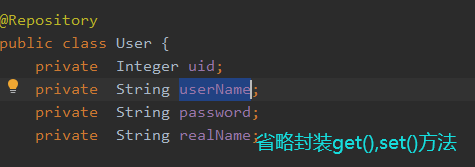
4、实体类
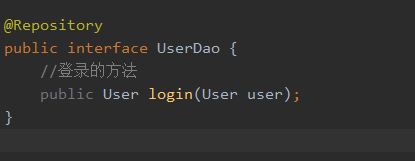
5、dao层UserDao
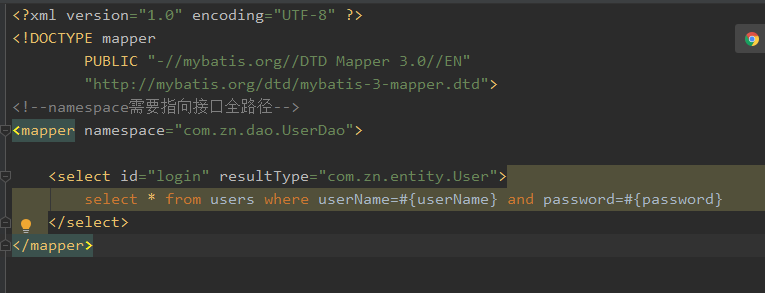
6、UserDao.xml
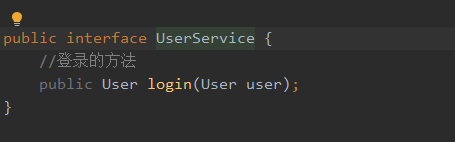
7、UserService
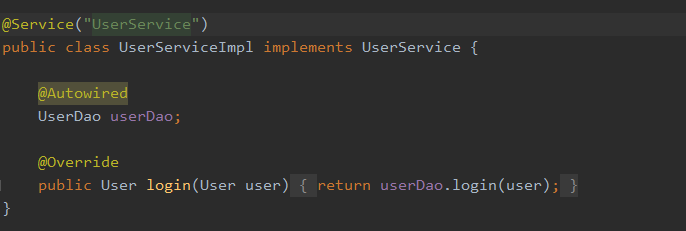
8、UserServiceImpl
9、controller

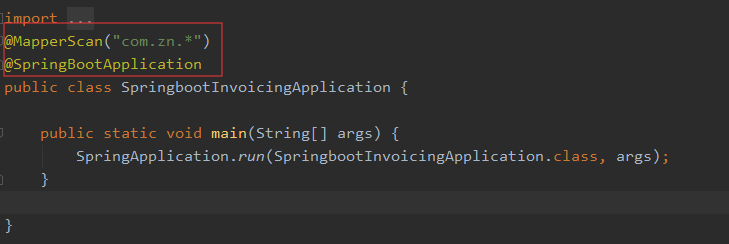
10、SpringbootInvoicingApplication
SpringBoot实现登陆的更多相关文章
- SpringBoot实现登陆拦截
一.创建interceptor包,在interceptor中创建一个拦截器并实现HandlerInterceptor 代码: @Componentpublic class LoginHandlerIn ...
- springboot用户登陆密码两次md5加密
1.用户端:PASS = MD5(明文 + 固定salt) 2.服务端:PASS = MD5(用户输入 + 随机salt) 引入依赖包 <dependency> <groupId&g ...
- springboot的第一节课
快速开始spring boot应用 官方向导搭建boot应用 地址:http://start.spring.io/ 设置项目属性: 3.解压,拷贝到工作空间,导入maven项目 4.写Controll ...
- spring boot配置druid数据连接池
Druid是阿里巴巴开源项目中一个数据库连接池. Druid是一个jdbc组合,包含三个部分, 1.DruidDriver代理Driver,能够提供基于Filter-Chain模式得插件体系2.Dru ...
- 【现学现卖】th:href标签动态路径设置,thymeleaf获取session中的属性值
update:2020-02-28:按道理来说这个功能在前后端分离的时候应该不怎么用的上,基本到现在我还是没遇到过有这样的需求,不过也是一种方法就是.th:href="@{/{role}/l ...
- SpringBoot的简单登陆开发例子
1:这个例子用spirngboot整合mybatis,jdbc等技术开发的 2:步骤 2.1:新建一个工程 主要的两个步骤已经贴图了,第二张图是直接在pom.xml文件中加入依赖 2.2:新建完项目, ...
- springboot项目配置拦截器,进行登陆等拦截
新建拦截类: public class LoginInterceptor implements HandlerInterceptor{ private static Log logger = LogF ...
- 18.Shiro与Springboot整合下登陆验证UserService未注入的问题
Shiro与Springboot整合下登陆验证UserService未注入的问题 前言: 刚开始整合的情况下,UserService一执行,就会报空指针异常. 看了网上各位大神的讲解,什么不能用ser ...
- 分享知识-快乐自己:SpringBoot结合使用拦截器(判断是否用户是否已登陆)
所有的开发之中拦截器一定是一个必须要使用的功能,利用拦截器可以更加有效的实现数据的验证处理,而且最为幸运的是在SpringBoot之中所使用的拦截器与Spring中的拦截器完全一样. 基础拦截器操作: ...
随机推荐
- 12C新功能:在线移动分区 (Doc ID 1584032.1)
12C New Feature: Online Move Partition (Doc ID 1584032.1) APPLIES TO: Oracle Database - Enterprise E ...
- Mysql增量备份之Mysqldump&Mylvmbackup
简单介绍 备份类型 备份方式 热备份:备份期间不需要服务停机,业务不受影响: 温备份:备份期间仅允许读的请求: 冷备份:备份期间需要关闭Mysql服务或读写请求都不受影响: 完全备份:full bac ...
- 【转载】Vue.js 安装及其环境搭建
注:最近在学习Vue,以下是环境搭配方法: ****************************************************************************** ...
- avd manger创建的虚拟机启动不起来,或者启动起来后黑屏
最近鼓捣安卓虚拟机,整的都差点重装系统,刚开始下载了genymotion_vbox,装完以后要在vbox中导入一个虚拟机,结果我导入完,虚拟机怎么也启动不了,然后各种找办法无果,最后重启电脑发现电脑也 ...
- (转)Ioc控制反转和依赖注入
转载地址:https://zhuanlan.zhihu.com/p/95869440 控制反转控制反转(Inversion of Control,简称IoC),是面向对象编程中的一种设计思想,其作用是 ...
- pytorch 中改变tensor维度的几种操作
具体示例如下,注意观察维度的变化 #coding=utf-8 import torch """改变tensor的形状的四种不同变化形式""" ...
- 14. Go 语言编译与工具
Go 语言编译与工具 Go 语言的工具链非常丰富,从获取源码.编译.文档.测试.性能分析,到源码格式化.源码提示.重构工具等应有尽有. 在 Go 语言中可以使用测试框架编写单元测试,使用统一的命令行即 ...
- js 运算的内置函数
// 一.Math.round()作用:四舍五入返回整数.(返回参数+0.5后,向下取整) // Math.round(5.57) //返回6 // Math.round(2.4) //返回2 // ...
- AJAX-CORS 跨域
1.CORS就是一套AJAX跨域问题的解决方案. 2.CORS的原理: CORS定义一种跨域访问的机制,可以让AJAX实现跨域访问. 3.CORS浏览器支持情况: Chrome 3+ Firefox ...
- JS调用MD5加密
为了系统的安全,前端一般需要对密码进行MD5加密,然后传输给后台处理.MD5的英文是Message Digest Algorithm(信息摘要算法),是不可逆的算法,只能通过暴力破解,所以较为安全. ...