
Spring Boot (三): ORM 框架 JPA 与连接池 Hikari
前面两篇文章我们介绍了如何快速创建一个 Spring Boot 工程《Spring Boot(一):快速开始》和在 Spring Boot 中如何使用模版引擎 Thymeleaf 渲染一个Web页面《Spring Boot (二):模版引擎 Thymeleaf 渲染 Web 页面》,本篇文章我们继续介绍在 Spring Boot 中如何使用数据库。
1. 概述
数据库方面我们选用 Mysql , Spring Boot 提供了直接使用 JDBC 的方式连接数据库,毕竟使用 JDBC 并不是很方便,需要我们自己写更多的代码才能使用,一般而言在 Spring Boot 中我们常用的 ORM 框架有 JPA 和 Mybaties ,本篇文章我们要介绍的就是 JPA 的使用姿势。
说道使用 ORM 框架,就不得不顺便聊一下连接池,市面上很多成熟的数据库连接池,如 C3P0 、 Tomcat 连接池、 BoneCP 等等很多产品,但是我们为什么要介绍 Hikari ?这个要从 BoneCP 说起。
因为,传说中 BoneCP 在快速这个特点上做到了极致,官方数据是C3P0等的25倍左右。不相信?其实我也不怎么信。可是,有图有真相啊,传说图片来源于官网,然而笔者在官网并没有找到,大家看一下:
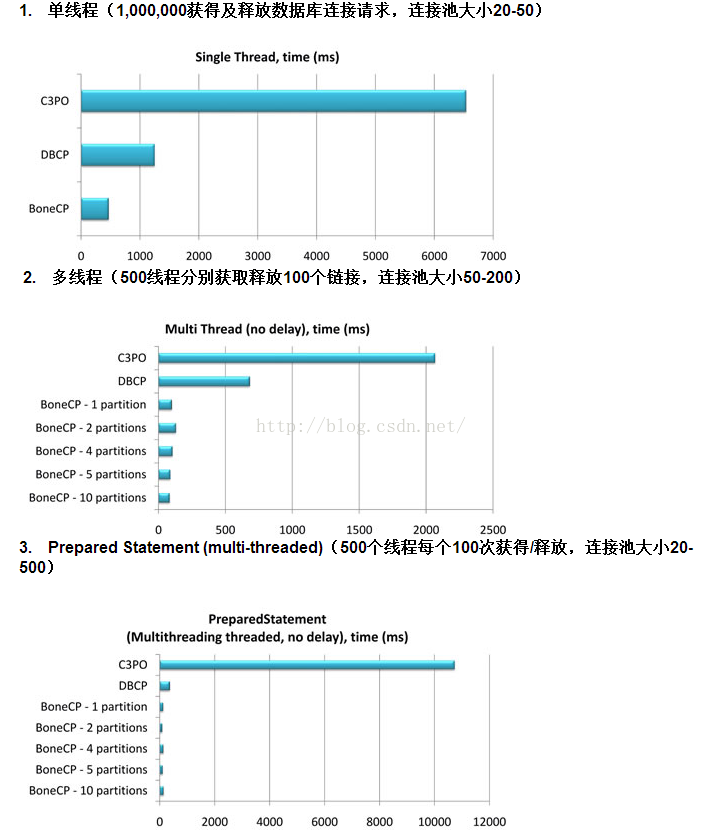
看起来是不是完全吊打,但是当 HikariCP 横空出世以后,这个局面就被完全改写了, BoneCP 被 HikariCP 完全吊打,看了一下 BoneCP Github 上面的版本更新,发现在2013年10月23日以后就再也没有更新过了,包括在仓库介绍上面都写着建议大家使用 HikariCP ,看来作者已经完全心灰意冷了。
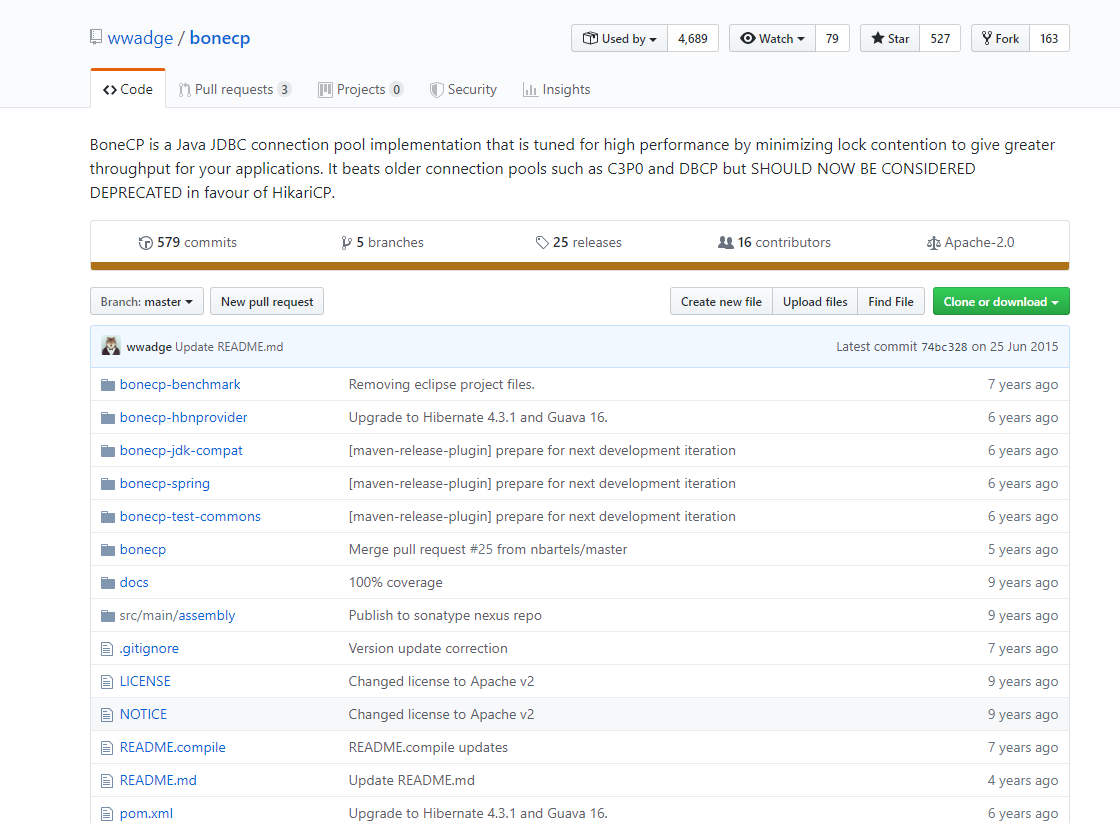
Hikari 这个词来源于日文,是“光”的意思,估计作者的意思是这个连接池将会和光一样快,不知道作者是不是日本人。
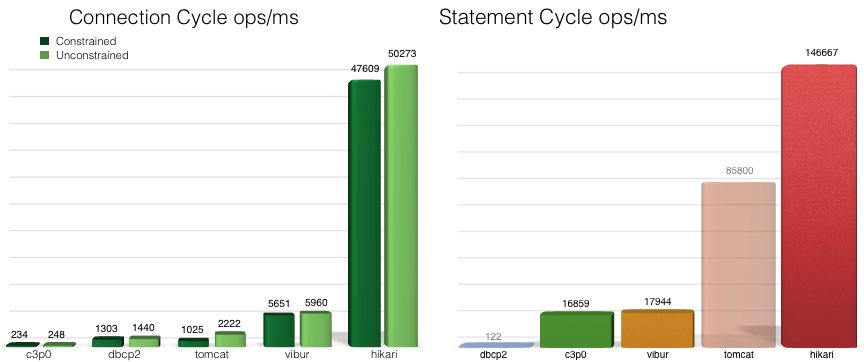
HikariCP 的口号是快速,简单,可靠。不知道是否真的如它自己宣传的一样,官方又提供了一张图,大家感受一下,这张图来源于:https://github.com/brettwooldridge/HikariCP 。
更多有关 HikariCP 的信息,大家可以访问官方的 Github 仓库了解:https://github.com/brettwooldridge/HikariCP ,笔者这里不多做介绍,毕竟我们更关注的如何使用。
2. JPA 介绍
JPA (Java Persistence API) 是 Sun 官方提出的 Java 持久化规范。它为 Java 开发人员提供了一种对象/关联映射工具来管理 Java 应用中的关系数据。它的出现主要是为了简化现有的持久化开发工作和整合 ORM 技术,结束现在 Hibernate,TopLink,JDO 等 ORM 框架各自为营的局面。
值得注意的是,JPA 是在充分吸收了现有 Hibernate,TopLink,JDO 等 ORM 框架的基础上发展而来的,具有易于使用,伸缩性强等优点。从目前的开发社区的反应上看, JPA 受到了极大的支持和赞扬,其中就包括了 Spring 与 EJB3. 0的开发团队。
注意: JPA 是一套规范,不是一套产品,那么像 Hibernate,TopLink,JDO 他们是一套产品,如果说这些产品实现了这个 JPA 规范,那么我们就可以叫他们为 JPA 的实现产品。
Spring Boot JPA 是 Spring 基于 ORM 框架、 JPA 规范的基础上封装的一套 JPA 应用框架,可使开发者用极简的代码即可实现对数据的访问和操作。它提供了包括增删改查等在内的常用功能,且易于扩展!学习并使用 Spring Data JPA 可以极大提高开发效率!
Spring Boot JPA 让我们解脱了 DAO 层的操作,基本上所有 CRUD 都可以依赖于它来实现。
Spring Boot JPA 帮我们定义了很多自定义的简单查询,并且可以根据方法名来自动生成 SQL ,主要的语法是 findXXBy , readAXXBy , queryXXBy , countXXBy , getXXBy 后面跟属性名称:
public interface UserRepository extends JpaRepository<UserModel, Long> {

    UserModel getByIdIs(Long id);

    UserModel findByNickName(String nickName);

    int countByAge(int age);

    List<UserModel> findByNickNameLike(String nickName);

}
具体的关键字,使用方法和生产成SQL如下表所示:
| Keyword | Sample | JPQL snippet |
|---|---|---|
| And | findByLastnameAndFirstname | … where x.lastname = ?1 and x.firstname = ?2 |
| Or | findByLastnameOrFirstname | … where x.lastname = ?1 or x.firstname = ?2 |
| Is,Equals | findByFirstname,findByFirstnameIs,findByFirstnameEquals | … where x.firstname = 1? |
| Between | findByStartDateBetween | … where x.startDate between 1? and ?2 |
| LessThan | findByAgeLessThan | … where x.age < ?1 |
| LessThanEqual | findByAgeLessThanEqual | … where x.age <= ?1 |
| GreaterThan | findByAgeGreaterThan | … where x.age > ?1 |
| GreaterThanEqual | findByAgeGreaterThanEqual | … where x.age >= ?1 |
| After | findByStartDateAfter | … where x.startDate > ?1 |
| Before | findByStartDateBefore | … where x.startDate < ?1 |
| IsNull | findByAgeIsNull | … where x.age is null |
| IsNotNull,NotNull | findByAge(Is)NotNull | … where x.age not null |
| Like | findByFirstnameLike | … where x.firstname like ?1 |
| NotLike | findByFirstnameNotLike | … where x.firstname not like ?1 |
| StartingWith | findByFirstnameStartingWith | … where x.firstname like ?1 (parameter bound with appended %) |
| EndingWith | findByFirstnameEndingWith | … where x.firstname like ?1 (parameter bound with prepended %) |
| Containing | findByFirstnameContaining | … where x.firstname like ?1 (parameter bound wrapped in %) |
| OrderBy | findByAgeOrderByLastnameDesc | … where x.age = ?1 order by x.lastname desc |
| Not | findByLastnameNot | … where x.lastname <> ?1 |
| In | findByAgeIn(Collection ages) | … where x.age in ?1 |
| NotIn | findByAgeNotIn(Collection age) | … where x.age not in ?1 |
| True | findByActiveTrue() | … where x.active = true |
| False | findByActiveFalse() | … where x.active = false |
| IgnoreCase | findByFirstnameIgnoreCase | … where UPPER(x.firstame) = UPPER(?1) |
3. 工程实战
这里我们创建工程 spring-boot-jpa-hikari 。
3.1 工程依赖 pom.xml
代码清单:spring-boot-jpa-hikari/pom.xml
<?xml version="1.0" encoding="UTF-8"?>

<project xmlns="http://maven.apache.org/POM/4.0.0" xmlns:xsi="http://www.w3.org/2001/XMLSchema-instance"

         xsi:schemaLocation="http://maven.apache.org/POM/4.0.0 https://maven.apache.org/xsd/maven-4.0.0.xsd">

    <modelVersion>4.0.0</modelVersion>

    <parent>

        <groupId>org.springframework.boot</groupId>

        <artifactId>spring-boot-starter-parent</artifactId>

        <version>2.1.8.RELEASE</version>

        <relativePath/> <!-- lookup parent from repository -->

    </parent>

    <groupId>com.springboot</groupId>

    <artifactId>spring-boot-jpa-hikari</artifactId>

    <version>0.0.1-SNAPSHOT</version>

    <name>spring-boot-jpa-hikari</name>

    <description>spring-boot-jpa-hikari</description>

    <properties>

        <java.version>1.8</java.version>

    </properties>

    <dependencies>

        <dependency>

            <groupId>org.springframework.boot</groupId>

            <artifactId>spring-boot-starter-data-jpa</artifactId>

        </dependency>

        <dependency>

            <groupId>org.springframework.boot</groupId>

            <artifactId>spring-boot-starter-web</artifactId>

        </dependency>

        <dependency>

            <groupId>mysql</groupId>

            <artifactId>mysql-connector-java</artifactId>

            <scope>runtime</scope>

        </dependency>

        <dependency>

            <groupId>org.projectlombok</groupId>

            <artifactId>lombok</artifactId>

            <optional>true</optional>

        </dependency>

        <dependency>

            <groupId>org.springframework.boot</groupId>

            <artifactId>spring-boot-starter-test</artifactId>

            <scope>test</scope>

        </dependency>

    </dependencies>

    <build>

        <plugins>

            <plugin>

                <groupId>org.springframework.boot</groupId>

                <artifactId>spring-boot-maven-plugin</artifactId>

            </plugin>

        </plugins>

    </build>

</project>
- mysql-connector-java:mysql连接驱动
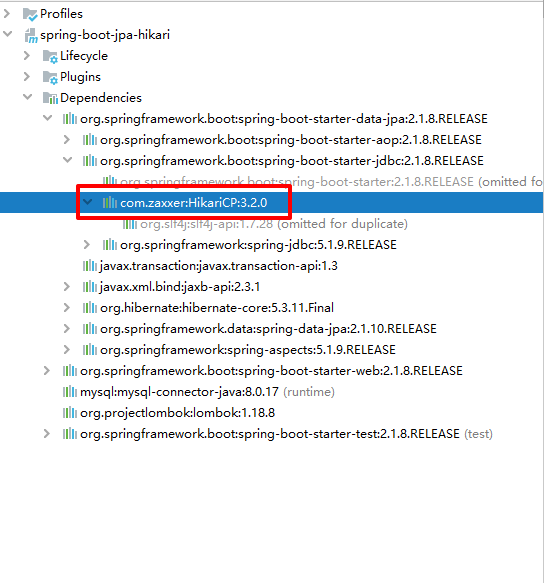
- spring-boot-starter-data-jpa:jpa相关的依赖包,这个包里包含了很多内容,包括我们使用的连接池 HikariCP ,从 Spring Boot 2.x 开始, Spring Boot 默认的连接池更换成为 HikariCP ,在当前的 Spring Boot 2.1.8 RELEASE 版本中,所使用的 HikariCP 版本为 3.2.0 ,如图:
3.2 配置文件 application.yml
代码清单:spring-boot-jpa-hikari/src/main/resources/application.yml
server:

  port: 8080

spring:

  application:

    name: spring-boot-jpa-hikari

  jpa:

    database: mysql

    show-sql: true

    generate-ddl: true

    database-platform: org.hibernate.dialect.MySQL5InnoDBDialect

    hibernate:

      ddl-auto: update

  datasource:

    url: jdbc:mysql://192.168.0.128:3306/test?serverTimezone=Asia/Shanghai&useUnicode=true&characterEncoding=UTF-8&useSSL=false

    username: root

    password: 123456

    driver-class-name: com.mysql.cj.jdbc.Driver

    type: com.zaxxer.hikari.HikariDataSource

    hikari:

      auto-commit: true

      minimum-idle: 2

      idle-timeout: 60000

      connection-timeout: 30000

      max-lifetime: 1800000

      pool-name: DatebookHikariCP

      maximum-pool-size: 5
注意:
有关 JPA 的配置有一点需要的,
spring.jpa.hibernate.ddl-auto,这个属性需谨慎配置,它的几个值的含义对数据库来讲都是高危操作,笔者这里方便起见配置了update,各位读者请根据具体使用场景配置。- create :每次加载hibernate时都会删除上一次的生成的表,然后根据你的model类再重新来生成新表,哪怕两次没有任何改变也要这样执行,这就是导致数据库表数据丢失的一个重要原因。
- create-drop :每次加载hibernate时根据model类生成表,但是sessionFactory一关闭,表就自动删除。
- update :最常用的属性,第一次加载hibernate时根据model类会自动建立起表的结构(前提是先建立好数据库),以后加载hibernate时根据 model类自动更新表结构,即使表结构改变了但表中的行仍然存在不会删除以前的行。要注意的是当部署到服务器后,表结构是不会被马上建立起来的,是要等 应用第一次运行起来后才会。
- validate :每次加载hibernate时,验证创建数据库表结构,只会和数据库中的表进行比较,不会创建新表,但是会插入新值。
- none :不做任何操作
有关 HikariCP 更多的配置可以参考源码类
com.zaxxer.hikari.HikariConfig,笔者这里仅简单配置了自动提交、超时时间、最大最小连接数等配置。
3.3 映射实体类 UserModel.java
代码清单:spring-boot-jpa-hikari/src/main/java/com/springboot/springbootjpahikari/model/UserModel.java
@Entity

@Data

@Table(name = "user")

public class UserModel {

    @Id

    @GeneratedValue(generator = "paymentableGenerator")

    @GenericGenerator(name = "paymentableGenerator", strategy = "uuid")

    @Column(name ="ID",nullable=false,length=36)

    private String id;

    @Column(nullable = true, unique = true)

    private String nickName;

    @Column(nullable = false)

    private int age;

}
unique : 唯一约束
主键生成策略为uuid
3.4 资源类 UserRepository.java
代码清单:spring-boot-jpa-hikari/src/main/java/com/springboot/springbootjpahikari/repository/UserRepository.java
public interface UserRepository extends JpaRepository<UserModel, Long> {

    UserModel getByIdIs(Long id);

    UserModel findByNickName(String nickName);

    int countByAge(int age);

    List<UserModel> findByNickNameLike(String nickName);

}
3.5 接口测试类 UserController.java
代码清单:spring-boot-jpa-hikari/src/main/java/com/springboot/springbootjpahikari/controller/UserController.java
@RestController

public class UserController {

    @Autowired

    UserRepository userRepository;

    /**

     * 查询用户列表

     * @return

     */

    @GetMapping("/user")

    public List<UserModel> user() {

        return userRepository.findAll(Sort.by("id").descending());

    }

    /**

     * 新增或更新用户信息

     * @param user

     * @return

     */

    @PostMapping("/user")

    public UserModel user(UserModel user) {

        return userRepository.save(user);

    }

    /**

     * 根据id删除用户

     * @param id

     * @return

     */

    @DeleteMapping("/user")

    public String deleteUserById(Long id) {

        userRepository.deleteById(id);

        return "success";

    }

}
4. 测试
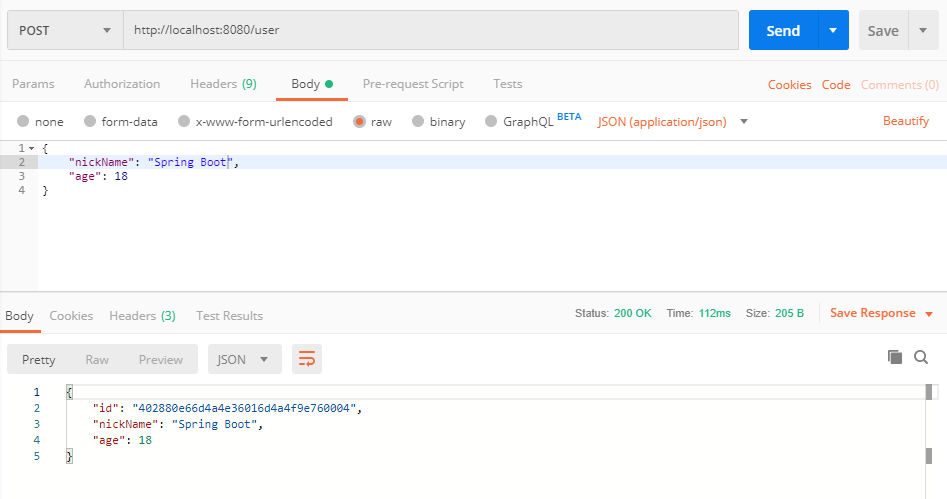
测试我们借助工具 PostMan ,启动工程,首先我们新增一个用户信息,如图:
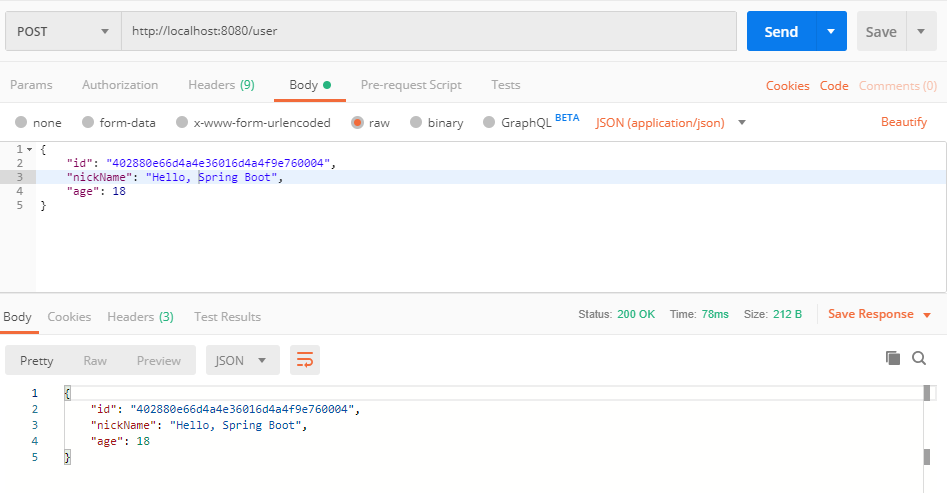
如果我们参数中加入 id ,并且 id 的值和数据库中的 id 维持一致,这是会更新当前 id 的数据,如图:
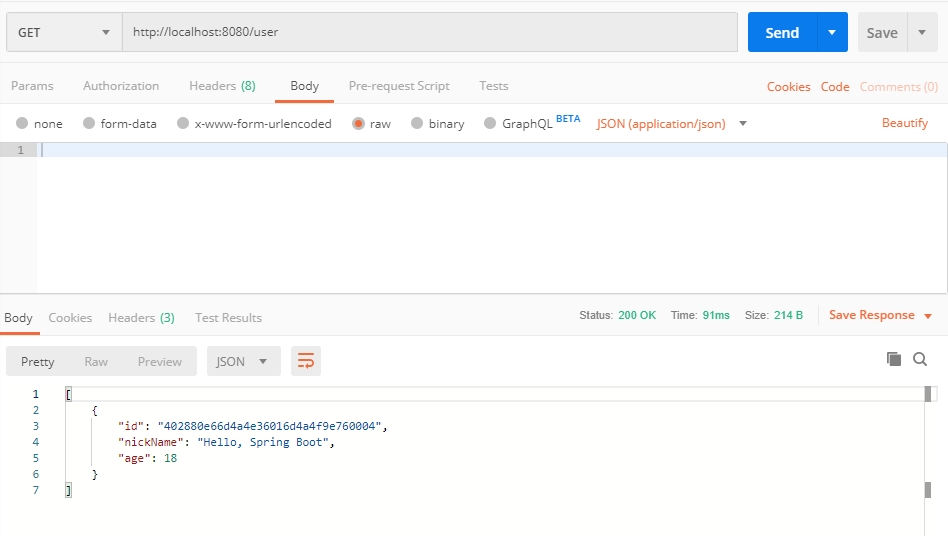
我们执行查询操作,如图:
执行删除操作,如图:
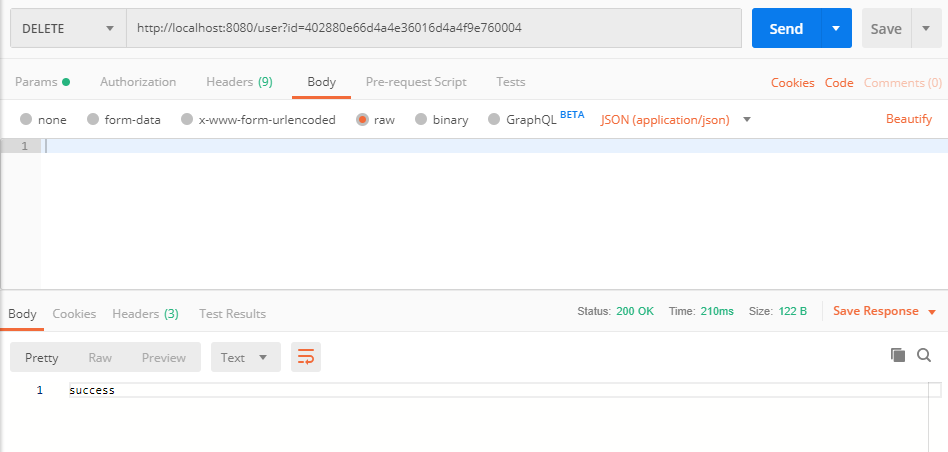
至此,测试完成。
5. 示例代码
6. 参考
https://github.com/brettwooldridge/HikariCP
https://docs.spring.io/spring-data/jpa/docs/current/reference/html/
http://www.ityouknow.com/springboot/2016/08/20/spring-boot-jpa.html
Spring Boot (三): ORM 框架 JPA 与连接池 Hikari的更多相关文章
- Spring Boot (四): Druid 连接池密码加密与监控
在上一篇文章<Spring Boot (三): ORM 框架 JPA 与连接池 Hikari> 我们介绍了 JPA 与连接池 Hikari 的整合使用,在国内使用比较多的连接池还有一个是阿 ...
- spring boot 2.0之后默认的连接池 HIkariCP介绍
HIkariCP链接池比之传统的Tomcat JDBC datasource .c3p0 datasource 等传统链接池优势太大,在获取链接释放链接,执行效率上面高出很多,这个产品的口号是“快速. ...
- spring boot 集成 Mybatis,JPA
相对应MyBatis, JPA可能大家会比较陌生,它并不是一个框架,而是一组规范,其使用跟Hibernate 差不多,原理层面的东西就不多讲了,主要的是应用. Mybatis就不多说了,SSM这三个框 ...
- 【spring boot】8.spring boot的日志框架logback使用
在继续上一篇的Debug调试之后,把spring boot的日志框架使用情况逐步蚕食. 参考:http://tengj.top/2017/04/05/springbo 开篇之前,贴上完整applica ...
- ASP.NET MVC 使用 Petapoco 微型ORM框架+NpgSql驱动连接 PostgreSQL数据库
前段时间在园子里看到了小蝶惊鸿 发布的有关绿色版的Linux.NET——“Jws.Mono”.由于我对.Net程序跑在Linux上非常感兴趣,自己也看了一些有关mono的资料,但是一直没有时间抽出时间 ...
- 视频教程--ASP.NET MVC 使用 Petapoco 微型ORM框架+NpgSql驱动连接 PostgreSQL数据库
说好的给园子里的朋友们录制与<ASP.NET MVC 使用 Petapoco 微型ORM框架+NpgSql驱动连接 PostgreSQL数据库> 这篇博客相对应的视频,由于一个月一来没有时 ...
- Laravel 和 Spring Boot 两个框架比较创业篇(二:人工成本)
前面从开发效率比较了 Laravel 和 Spring Boot两个框架,见:Laravel 和 Spring Boot 两个框架比较创业篇(一:开发效率) ,这一篇打算比较一下人工成本. 本文说的人 ...
- Java框架Spring Boot & 服务治理框架Dubbo & 应用容器引擎Docker 实现微服务发布
微服务系统架构实践 开发语言Java 8 框架使用Spring boot 服务治理框架Dubbo 容器部署Docker 持续集成Gitlab CI 持续部署Piplin 注册中心Zookeeper 服 ...
- Spring Boot 2.x 使用 jpa 连接 mysql
在spring boot网站上生成一个项目,如图: 我使用的是Maven项目,java使用是jdk8(spring boot 2.x必须要jdk8及以上),dependencies分别输入选择 web ...
随机推荐
- 前端利器躬行记(1)——npm
npm(Node Package Manager)是Node.js的包管理工具,相当于一个在线仓库.它提供了一个公共的平台,将分散在世界各地的包集中起来,能轻松的安装.分享和管理相关的包,不用再为搜索 ...
- Netty基础系列(5) --零拷贝彻底分析
前言 上一节(堆外内存与零拷贝)当中我们从jvm堆内存的视角解释了一波零拷贝原理,但是仅仅这样还是不够的. 为了彻底搞懂零拷贝,我们趁热打铁,接着上一节来继续讲解零拷贝的底层原理. 感受一下NIO的速 ...
- centos7.x 安装系统/配置网络/设置主机名
1.安装系统 系统的安装就不多说了,自行查找百度,如:https://www.cnblogs.com/wcwen1990/p/7630545.html 2.配置网络(局域网上网) 修改配置 ...
- cf 1102 B
题意:求字符串中任意相邻两位是否可以可以由前一个加上任意个x或y屏蔽十位与后一位相等,如果可以需要添加的最少数字是多少,x值为0-9,y值也为0-9,求出任意x,y对应情形下字符串需要添加的最少数字, ...
- Linux下串口配置初步探寻
一.在struct termios结构体中,对串口进行基本配置(如波特率设置,校验位和停止位设置 等). (一): struct termios //串口的设置主要是设置struct termio ...
- React生命周期函数理解
一.组件挂载阶段 1. componentWillMount() 该方法在首次渲染之前调用,在一个组件挂载到卸载的过程中,仅仅执行这一次.该函数内可以state初始化的工作,与constructor的 ...
- SqlServer关于“无法删除数据库 "XXXX",因为该数据库当前正在使用”问题的解决方案
引言 在项目中,通过使用SQL语句“DROP DATABASE [数据库名]”删除数据时,一直出现“无法删除数据库 "XXXX",因为该数据库当前正在使用”的错误信息,经测试在Sq ...
- 前端项目升级到React-router5中遇到的问题解决方案以及思路
我胡汉三有日子没回来写写文章了,最近一直再忙着将老项目升级,所以没时间来搞文章,今天突然感觉开了挂一样,爱因斯坦附体,把之前的bug都搞定了,在这里特意把升级中遇到的问题,记录下来,算是把这个坑填上. ...
- Keras(二)Application中五款已训练模型、VGG16框架解读
Application的五款已训练模型 + H5py简述 Keras的应用模块Application提供了带有预训练权重的Keras模型,这些模型可以用来进行预测.特征提取和finetune. 后续还 ...
- redis desktop manager安装及连接方式
1.下载安装包 官网下载地址:https://redisdesktop.com/pricing 官网下载需要付费使用 再此附上一个免费的破解版本,绿色安全可用 链接:https://pan.baidu ...