
如何让 FFmpeg 支持异步并行转码、截图等等操作?
直接贴代码了:
ffmpegTest02.cs
    public partial class ffmpegTest02 : FormBase

    {

        private static readonly string TaskffmpegNETExeFullPath = ConfigurationManager.AppSettings["TaskffmpegNETExeFullPath"];

        string _videoFileFullPath = @"D:\Workspace\TestVideo.mp4";

        string _othereVideoFileFullPath = @"D:\Workspace\TestVideo{0}.mp4";

        string snapshotParentDir = @"D:\Workspace\TestVideoSnapshot";

        int exeMoreCrawlSnapshotCount = ;

        public ffmpegTest02()

        {

            base.InitForm();

            InitializeComponent();

            base.InitControls(this.listInfoLog);

        }

        private void OnProgress(object sender, ConversionProgressEventArgs e)

        {

            ShowAndLog(string.Format("[{0} => {1}]", e.Input.FileInfo.Name, e.Output?.FileInfo.Name), false, null);

            ShowAndLog(string.Format("Bitrate: {0}", e.Bitrate), false, null);

            ShowAndLog(string.Format("Fps: {0}", e.Fps), false, null);

            ShowAndLog(string.Format("Frame: {0}", e.Frame), false, null);

            ShowAndLog(string.Format("ProcessedDuration: {0}", e.ProcessedDuration), false, null);

            ShowAndLog(string.Format("Size: {0} kb", e.SizeKb), false, null);

            ShowAndLog(string.Format("TotalDuration: {0}\n", e.TotalDuration), false, null);

        }

        /// <summary>

        /// 此事件短时间(比如:1秒以内)会调用多次

        /// </summary>

        /// <param name="sender"></param>

        /// <param name="e"></param>

        private void OnData(object sender, ConversionDataEventArgs e)

        {

            ShowAndLog(string.Format("[从源文件 {0} 到目标文件 {1}],数据 {2}", e.Input.FileInfo.Name, e.Output?.FileInfo.Name, e.Data),

                false,

                null);

        }

        /// <summary>

        /// 此事件短时间(比如:1秒以内)会调用多次

        /// </summary>

        /// <param name="sender"></param>

        /// <param name="e"></param>

        private void OnDataSimpleShow(object sender, ConversionDataEventArgs e)

        {

            ShowAndLog(string.Format("[从源文件 {0} 到目标文件 {1}]。", e.Input.FileInfo.Name, e.Output?.FileInfo.Name),

                false,

                null);

        }

        private void OnComplete(object sender, ConversionCompleteEventArgs e)

        {

            ShowAndLog(string.Format("从 {0} 到 {1} 处理完成。 ", e.Input.FileInfo.FullName, e.Output?.FileInfo.FullName),

                false,

                null);

        }

        private void OnError(object sender, ConversionErrorEventArgs e)

        {

            ShowAndLog(string.Format("[{0} => {1}]: 错误: {2}\n{3}", e.Input.FileInfo.Name, e.Output?.FileInfo.Name, e.Exception.ExitCode, e.Exception.InnerException),

                false,

                null);

        }

        private IEnumerable<TimeSpan> CreateTimeSpanArray()

        {

            for (int i = ; i < ; i++)

            {

                yield return new TimeSpan(, i, );

            }

        }

        private ConversionOptions GetConversionOptions(TimeSpan tsItem)

        {

            return new ConversionOptions

            {

                Seek = tsItem,

                //下面表示3行代码表示需要自定义截图的尺寸

                VideoSize = VideoSize.Custom,

                CustomWidth = , // 截图的宽度

                CustomHeight = , // 截图的高度

                FFmpegDrawTextArgs = string.Format("borderw=10:bordercolor=white:fontcolor=#A9A9A8:fontsize=100:fontfile=FreeSerif.ttf:text='{0}\\:{1}\\:{2}':x =(w-text_w-50):y=(h-text_h-50)",

                        tsItem.Hours.ToString().PadLeft(, ''),

                        tsItem.Minutes.ToString().PadLeft(, ''),

                        tsItem.Seconds.ToString().PadLeft(, '')

                    ),

                ExtraFFmpegArgs = " -y "  // -y 表示目标文件已经存在,则覆盖输出文件

            };

        }

        private async void btnStartConvertAndSnapshot_Click(object sender, EventArgs e)

        {

            string mkvOutputFileFullPath = string.Format(@"D:\Workspace\TestVideo-{0}.mkv", DateTime.Now.ToString("yyyy-MM-dd_HH-mm-ss"));

            string mkvThumbOutputFileFullPath = string.Format(@"{0}\TestVideo-mkv-thumb-{1}.png", snapshotParentDir, DateTime.Now.ToString("yyyy-MM-dd_HH-mm-ss"));

            try

            {

                var inputFile = new MediaFile(_videoFileFullPath);

                var outputFile = new MediaFile(mkvOutputFileFullPath);

                var thumbNailFile = new MediaFile(mkvThumbOutputFileFullPath);

                var ffmpeg = new Engine(TaskffmpegNETExeFullPath);

                //ffmpeg.Progress += OnProgress;

                //ffmpeg.Data += OnDataSimpleShow;

                ffmpeg.Error += OnError;

                ffmpeg.Complete += OnComplete;

                var output = await ffmpeg.ConvertAsync(inputFile, outputFile);

                var thumbNail = await ffmpeg.GetThumbnailAsync(output, thumbNailFile, GetConversionOptions(TimeSpan.FromSeconds()));

                var metadata = await ffmpeg.GetMetaDataAsync(output);

                Console.WriteLine(metadata.FileInfo.FullName);

                Console.WriteLine(metadata);

            }

            catch (Exception exc)

            {

                Console.WriteLine(exc);

            }

        }

        private async void btnGetVideoInfo_Click(object sender, EventArgs e)

        {

            ShowAndLog("ffmpeg 准备开始获取,请稍后...", false, null);

            Stopwatch globalWatch = Stopwatch.StartNew();

            var ffmpeg = new Engine(TaskffmpegNETExeFullPath);

            //ffmpeg.Progress += OnProgress;

            //ffmpeg.Data += OnDataSimpleShow;

            ffmpeg.Error += OnError;

            ffmpeg.Complete += OnComplete;

            var inputFile = new MediaFile(_videoFileFullPath);

            MetaData md = await ffmpeg.GetMetaDataAsync(inputFile);

            ShowAndLog(string.Format("Duration:{0}", md.Duration), false, null);

            ShowAndLog(string.Format("VideoData:{0}", JsonHelper.SerializeToJson(md.VideoData)), false, null);

            ShowAndLog(string.Format("AudioData:{0}", JsonHelper.SerializeToJson(md.AudioData)), false, null);

            globalWatch.Stop();

            ShowAndLog(string.Format("运行结束!共耗时 {0} 毫秒。", globalWatch.ElapsedMilliseconds), false, null);

        }

        private async void btnStartSingleSnapshot_Click(object sender, EventArgs e)

        {

            ShowAndLog("ffmpeg 准备开始转换,请稍后...", false, null);

            Stopwatch globalWatch = Stopwatch.StartNew();

            IEnumerable<TimeSpan> timeSpanArray = CreateTimeSpanArray();

            var ffmpeg = new Engine(TaskffmpegNETExeFullPath);

            //ffmpeg.Progress += OnProgress;

            //ffmpeg.Data += OnDataSimpleShow;

            ffmpeg.Error += OnError;

            ffmpeg.Complete += OnComplete;

            var inputFile = new MediaFile(_videoFileFullPath);

            int i = ;

            string mkvThumbOutputFileFullPath;

            List<string> allThumbFullName = new List<string>();

            foreach (TimeSpan tsItem in timeSpanArray)

            {

                i++;

                mkvThumbOutputFileFullPath = string.Format(@"{0}\TestVideo-mp4-thumb-{1}-{2}.jpg", snapshotParentDir, DateTime.Now.ToString("yyyy-MM-dd_HH-mm-ss.fff"), i);

                allThumbFullName.Add(mkvThumbOutputFileFullPath);

                var thumbNailFile = new MediaFile(mkvThumbOutputFileFullPath);

                await ffmpeg.GetThumbnailAsync(inputFile, thumbNailFile, GetConversionOptions(tsItem) );

            }

            ShowAndLog("ffmpeg 转换完成。结果如下:", false, null);

            globalWatch.Stop();

            ShowAndLog(string.Format("运行结束!共耗时 {0} 毫秒。", globalWatch.ElapsedMilliseconds), false, null);

        }

        private async void btnParelleSyncStartMoreCrawlSnapshot_ClickAsync(object sender, EventArgs e)

        {

            ShowAndLog("准备开始同步多个 TestVideo{n}.mp4 上截图,请稍后...", false, null);

            Stopwatch globalWatch = Stopwatch.StartNew();

            for (int i = ; i < exeMoreCrawlSnapshotCount; i++)

            {

                await CreateSnapshotCoreAsync(i + );

            }

            ShowAndLog("同步多个 TestVideo{n}.mp4 上截图完成。结果如下:", false, null);

            globalWatch.Stop();

            ShowAndLog(string.Format("运行结束!共耗时 {0} 毫秒。", globalWatch.ElapsedMilliseconds), false, null);

        }

        private async Task CreateSnapshotCoreAsync(int fileId)

        {

            IEnumerable<TimeSpan> timeSpanArray = CreateTimeSpanArray();

            var ffmpeg = new Engine(TaskffmpegNETExeFullPath);

            //ffmpeg.Progress += OnProgress;

            //ffmpeg.Data += OnDataSimpleShow;

            ffmpeg.Error += OnError;

            ffmpeg.Complete += OnComplete;

            var inputFile = new MediaFile(string.Format(_othereVideoFileFullPath, fileId)); //_videoFileFullPath

            int i = ;

            string mkvThumbOutputFileFullPath;

            List<string> allThumbFullName = new List<string>();

            foreach (TimeSpan tsItem in timeSpanArray)

            {

                i++;

                mkvThumbOutputFileFullPath = string.Format(@"{0}\TestVideo{1}-mp4-thumb-{2}-{3}.jpg", snapshotParentDir, fileId, DateTime.Now.ToString("yyyy-MM-dd_HH-mm-ss.fff"), i);

                allThumbFullName.Add(mkvThumbOutputFileFullPath);

                var thumbNailFile = new MediaFile(mkvThumbOutputFileFullPath);

                await ffmpeg.GetThumbnailAsync(inputFile, thumbNailFile, GetConversionOptions(tsItem));

            }

        }

        private async void btnParelleAsyncStartMoreCrawlSnapshot_ClickAsync(object sender, EventArgs e)

        {

            ShowAndLog("准备开始异步并行多个 TestVideo{n}.mp4 上截图,请稍后...", false, null);

            Stopwatch globalWatch = Stopwatch.StartNew();

            var tasks = Enumerable.Range(, exeMoreCrawlSnapshotCount).Select(i =>

            {

                return Task.Run(async () =>

                {

                    await CreateSnapshotCoreAsync(i + );

                });

            });

            await Task.WhenAll(tasks);

            ShowAndLog("异步并行多个 TestVideo{n}.mp4 上截图完成。结果如下:", false, null);

            globalWatch.Stop();

            ShowAndLog(string.Format("运行结束!共耗时 {0} 毫秒。", globalWatch.ElapsedMilliseconds), false, null);

        }

        private async void btnParelleAsyncStartMoreCrawlSnapshotLimitMaxDop_Click(object sender, EventArgs e)

        {

            ShowAndLog("准备开始异步并行多个 TestVideo{n}.mp4 上截图(限制最大异步处理单元),请稍后...", false, null);

            Stopwatch globalWatch = Stopwatch.StartNew();

            var tasks = Enumerable.Range(, exeMoreCrawlSnapshotCount).ParallelForEachAsync(i =>

            {

                return Task.Run(async () =>

                {

                    await CreateSnapshotCoreAsync(i + );

                });

            }, Environment.ProcessorCount);

            await Task.WhenAll(tasks);

            ShowAndLog("异步并行多个 TestVideo{n}.mp4 上截图(限制最大异步处理单元)完成。结果如下:", false, null);

            globalWatch.Stop();

            ShowAndLog(string.Format("运行结束!共耗时 {0} 毫秒。", globalWatch.ElapsedMilliseconds), false, null);

        }

    }
ffmpegTest02.Designer.cs
    partial class ffmpegTest02

    {

        /// <summary>

        /// Required designer variable.

        /// </summary>

        private System.ComponentModel.IContainer components = null;

        /// <summary>

        /// Clean up any resources being used.

        /// </summary>

        /// <param name="disposing">true if managed resources should be disposed; otherwise, false.</param>

        protected override void Dispose(bool disposing)

        {

            if (disposing && (components != null))

            {

                components.Dispose();

            }

            base.Dispose(disposing);

        }

        #region Windows Form Designer generated code

        /// <summary>

        /// Required method for Designer support - do not modify

        /// the contents of this method with the code editor.

        /// </summary>

        private void InitializeComponent()

        {

            this.btnStartConvertAndSnapshot = new System.Windows.Forms.Button();

            this.listInfoLog = new System.Windows.Forms.ListBox();

            this.btnStartSingleSnapshot = new System.Windows.Forms.Button();

            this.btnGetVideoInfo = new System.Windows.Forms.Button();

            this.btnParelleSyncStartMoreCrawlSnapshot = new System.Windows.Forms.Button();

            this.btnParelleAsyncStartMoreCrawlSnapshot = new System.Windows.Forms.Button();

            this.btnParelleAsyncStartMoreCrawlSnapshotLimitMaxDop = new System.Windows.Forms.Button();

            this.SuspendLayout();

            //

            // btnStartConvertAndSnapshot

            //

            this.btnStartConvertAndSnapshot.Location = new System.Drawing.Point(, );

            this.btnStartConvertAndSnapshot.Name = "btnStartConvertAndSnapshot";

            this.btnStartConvertAndSnapshot.Size = new System.Drawing.Size(, );

            this.btnStartConvertAndSnapshot.TabIndex = ;

            this.btnStartConvertAndSnapshot.Text = "1. 开始先把 TestVideo.mp4 转换 mkv,再在第 1 分钟的时候截图";

            this.btnStartConvertAndSnapshot.UseVisualStyleBackColor = true;

            this.btnStartConvertAndSnapshot.Click += new System.EventHandler(this.btnStartConvertAndSnapshot_Click);

            //

            // listInfoLog

            //

            this.listInfoLog.Anchor = ((System.Windows.Forms.AnchorStyles)((((System.Windows.Forms.AnchorStyles.Top | System.Windows.Forms.AnchorStyles.Bottom)

            | System.Windows.Forms.AnchorStyles.Left)

            | System.Windows.Forms.AnchorStyles.Right)));

            this.listInfoLog.Font = new System.Drawing.Font("宋体", 10F, System.Drawing.FontStyle.Regular, System.Drawing.GraphicsUnit.Point, ((byte)()));

            this.listInfoLog.FormattingEnabled = true;

            this.listInfoLog.HorizontalScrollbar = true;

            this.listInfoLog.Location = new System.Drawing.Point(, );

            this.listInfoLog.Name = "listInfoLog";

            this.listInfoLog.ScrollAlwaysVisible = true;

            this.listInfoLog.Size = new System.Drawing.Size(, );

            this.listInfoLog.TabIndex = ;

            //

            // btnStartSingleSnapshot

            //

            this.btnStartSingleSnapshot.Location = new System.Drawing.Point(, );

            this.btnStartSingleSnapshot.Name = "btnStartSingleSnapshot";

            this.btnStartSingleSnapshot.Size = new System.Drawing.Size(, );

            this.btnStartSingleSnapshot.TabIndex = ;

            this.btnStartSingleSnapshot.Text = "2. 不转码,直接在第 1分钟的时候从 TestVideo.mp4 上截图";

            this.btnStartSingleSnapshot.UseVisualStyleBackColor = true;

            this.btnStartSingleSnapshot.Click += new System.EventHandler(this.btnStartSingleSnapshot_Click);

            //

            // btnGetVideoInfo

            //

            this.btnGetVideoInfo.Location = new System.Drawing.Point(, );

            this.btnGetVideoInfo.Name = "btnGetVideoInfo";

            this.btnGetVideoInfo.Size = new System.Drawing.Size(, );

            this.btnGetVideoInfo.TabIndex = ;

            this.btnGetVideoInfo.Text = "3. 仅仅获取 TestVideo.mp4 视频的信息";

            this.btnGetVideoInfo.UseVisualStyleBackColor = true;

            this.btnGetVideoInfo.Click += new System.EventHandler(this.btnGetVideoInfo_Click);

            //

            // btnParelleSyncStartMoreCrawlSnapshot

            //

            this.btnParelleSyncStartMoreCrawlSnapshot.Location = new System.Drawing.Point(, );

            this.btnParelleSyncStartMoreCrawlSnapshot.Name = "btnParelleSyncStartMoreCrawlSnapshot";

            this.btnParelleSyncStartMoreCrawlSnapshot.Size = new System.Drawing.Size(, );

            this.btnParelleSyncStartMoreCrawlSnapshot.TabIndex = ;

            this.btnParelleSyncStartMoreCrawlSnapshot.Text = "4. 同步多个 TestVideo{n}.mp4 上截图";

            this.btnParelleSyncStartMoreCrawlSnapshot.UseVisualStyleBackColor = true;

            this.btnParelleSyncStartMoreCrawlSnapshot.Click += new System.EventHandler(this.btnParelleSyncStartMoreCrawlSnapshot_ClickAsync);

            //

            // btnParelleAsyncStartMoreCrawlSnapshot

            //

            this.btnParelleAsyncStartMoreCrawlSnapshot.Location = new System.Drawing.Point(, );

            this.btnParelleAsyncStartMoreCrawlSnapshot.Name = "btnParelleAsyncStartMoreCrawlSnapshot";

            this.btnParelleAsyncStartMoreCrawlSnapshot.Size = new System.Drawing.Size(, );

            this.btnParelleAsyncStartMoreCrawlSnapshot.TabIndex = ;

            this.btnParelleAsyncStartMoreCrawlSnapshot.Text = "5. 异步并行多个 TestVideo{n}.mp4 上截图";

            this.btnParelleAsyncStartMoreCrawlSnapshot.UseVisualStyleBackColor = true;

            this.btnParelleAsyncStartMoreCrawlSnapshot.Click += new System.EventHandler(this.btnParelleAsyncStartMoreCrawlSnapshot_ClickAsync);

            //

            // btnParelleAsyncStartMoreCrawlSnapshotLimitMaxDop

            //

            this.btnParelleAsyncStartMoreCrawlSnapshotLimitMaxDop.Location = new System.Drawing.Point(, );

            this.btnParelleAsyncStartMoreCrawlSnapshotLimitMaxDop.Name = "btnParelleAsyncStartMoreCrawlSnapshotLimitMaxDop";

            this.btnParelleAsyncStartMoreCrawlSnapshotLimitMaxDop.Size = new System.Drawing.Size(, );

            this.btnParelleAsyncStartMoreCrawlSnapshotLimitMaxDop.TabIndex = ;

            this.btnParelleAsyncStartMoreCrawlSnapshotLimitMaxDop.Text = "6. 异步并行多个 TestVideo{n}.mp4 上截图(限制最大异步处理单元)";

            this.btnParelleAsyncStartMoreCrawlSnapshotLimitMaxDop.UseVisualStyleBackColor = true;

            this.btnParelleAsyncStartMoreCrawlSnapshotLimitMaxDop.Click += new System.EventHandler(this.btnParelleAsyncStartMoreCrawlSnapshotLimitMaxDop_Click);

            //

            // ffmpegTest02

            //

            this.AutoScaleDimensions = new System.Drawing.SizeF(6F, 12F);

            this.AutoScaleMode = System.Windows.Forms.AutoScaleMode.Font;

            this.ClientSize = new System.Drawing.Size(, );

            this.Controls.Add(this.btnParelleAsyncStartMoreCrawlSnapshotLimitMaxDop);

            this.Controls.Add(this.btnParelleAsyncStartMoreCrawlSnapshot);

            this.Controls.Add(this.btnParelleSyncStartMoreCrawlSnapshot);

            this.Controls.Add(this.btnGetVideoInfo);

            this.Controls.Add(this.btnStartSingleSnapshot);

            this.Controls.Add(this.listInfoLog);

            this.Controls.Add(this.btnStartConvertAndSnapshot);

            this.Name = "ffmpegTest02";

            this.Text = "ffmpegTest02";

            this.ResumeLayout(false);

        }

        #endregion

        private System.Windows.Forms.Button btnStartConvertAndSnapshot;

        private System.Windows.Forms.ListBox listInfoLog;

        private System.Windows.Forms.Button btnStartSingleSnapshot;

        private System.Windows.Forms.Button btnGetVideoInfo;

        private System.Windows.Forms.Button btnParelleSyncStartMoreCrawlSnapshot;

        private System.Windows.Forms.Button btnParelleAsyncStartMoreCrawlSnapshot;

        private System.Windows.Forms.Button btnParelleAsyncStartMoreCrawlSnapshotLimitMaxDop;

    }
运行结果
图 01
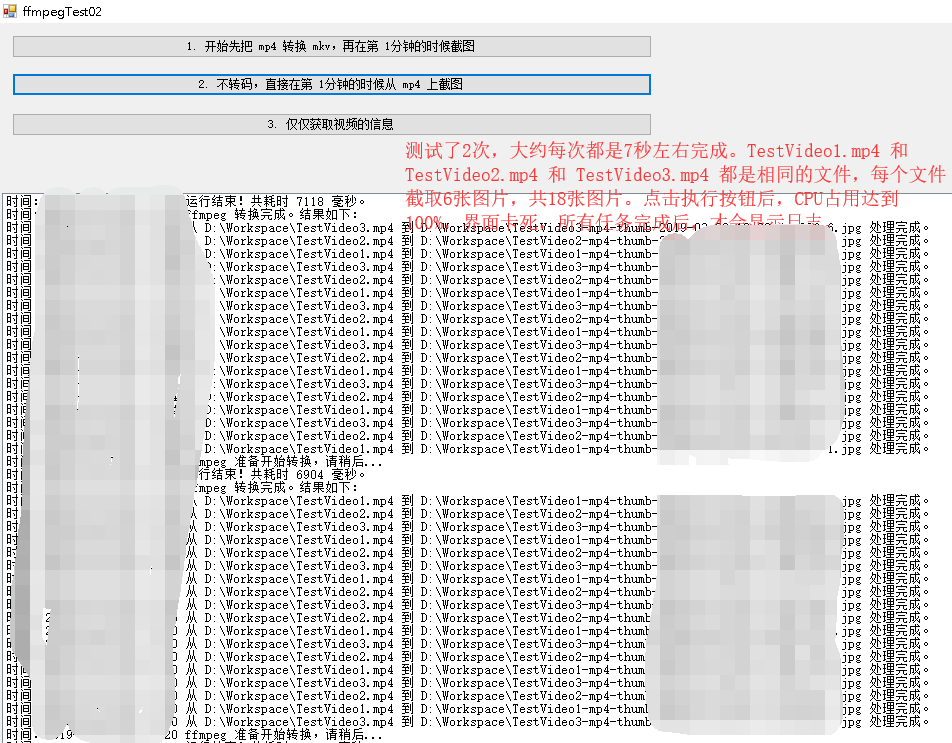
图 02

图 03
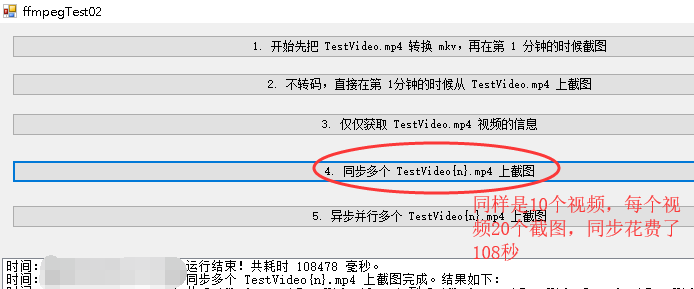
图 04
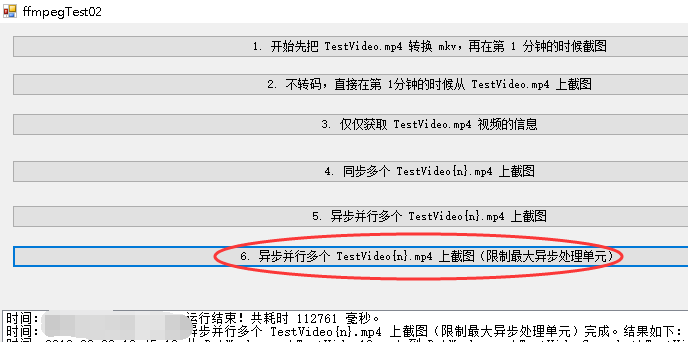
图 05

图 06

图 07

图 08

谢谢浏览!
如何让 FFmpeg 支持异步并行转码、截图等等操作?的更多相关文章
- Java Web 中使用ffmpeg实现视频转码、视频截图
Java Web 中使用ffmpeg实现视频转码.视频截图 转载自:[ http://www.cnblogs.com/dennisit/archive/2013/02/16/2913287.html ...
- windows下使用ffmpeg进行视频转换和截图。
author:fanfq(xiaoban) Email:fangqing.fan#gmail.comlink:http://fanfq.iteye.com/admin/blogs/655569chan ...
- C# 使用 ffmpeg 进行音频转码
先放一下 ffmpeg 的官方文档以及下载地址: 官方文档:http://ffmpeg.org/ffmpeg.html 下载地址:http://ffmpeg.org/download.html 用 f ...
- FFmpeg:视频转码、剪切、合并、播放速调整
原文:https://fzheng.me/2016/01/08/ffmpeg/ FFmpeg:视频转码.剪切.合并.播放速调整 2016-01-08 前阵子帮导师处理项目 ppt,因为插入视频的格式问 ...
- 使用ffmpeg.exe进行转码参数说明
使用ffmpeg.exe进行转码参数说明 摘自:https://blog.csdn.net/coloriy/article/details/47337641 2015年08月07日 13:04:32 ...
- ubuntu系统下安装gstreamer的ffmpeg支持
当您在安装gstreamer到您的ubuntu系统中时,为了更好地进行流媒体开发,需要安装ffmpeg支持,但一般情况下,直接使用 sudo apt-get install gstreamer0.10 ...
- [IBM][CLI Driver] SQL0270N 函数不受支持(原因码:"75")。 SQLSTATE=42997
db2 update dbm cfg using FEDERATED yes 与 自动维护 (AUTO_MAINT) = ON 自动数据库备份 (AUTO_DB_BACKUP) = OFF 自动表 ...
- Python3选择支持非ASCII码标识符的缘由
原文在: PEP 3131 -- Supporting Non-ASCII Identifiers. Python2并不支持非ASCII码标识符. PEP的全称是Python Enhancement ...
- API Studio 5.1.2 版本更新:加入全局搜索、支持批量测试API测试用例、读取代码注解生成文档支持Github与码云等
最近在EOLINKER的开发任务繁重,许久在博客园没有更新产品动态了,经过这些日子,EOLINKER又有了长足的进步,增加了更多易用的功能,比如加入全局搜索.支持批量测试API测试用例.读取代码注解生 ...
随机推荐
- mysql中的ifnull()函数判断空值
我们知道,在不同的数据库引擎中,内置函数的实现.命名都是存在差异的,如果经常切换使用这几个数据库引擎的话,很容易会将这些函数弄混淆. 比如说判断空值的函数,在Oracle中是NVL()函数.NVL2( ...
- 通过SSH通道来访问MySQL
许多时候当要使用Mysql时,会遇到如下情况: 1. 信息比较重要,希望通信被加密.2. 一些端口,比如3306端口,被路由器禁用. 对第一个问题的一个比较直接的解决办法就是更改mysql的代码,或 ...
- DevExpress的下拉框控件ComboBoxEdit控件的使用
场景 Winform控件-DevExpress18下载安装注册以及在VS中使用: https://blog.csdn.net/BADAO_LIUMANG_QIZHI/article/details/1 ...
- 科技风商务项目管理PPT模板
模板来源:http://ppt.dede58.com/peixunyanjiang/26267.html
- 本地Yum源配置
一.网络源 yum list 软件名称 查找源里的软件,可以使用通配符 二.配置源 源配置文件路径 /etc/yum.repos.d/ 配置项 [名称] 源标识(不能和其他的源重复) name=名称 ...
- 【XML】XML基本结构以及XML-Schema约束
XML 简介 1998年2月,W3C正式批准了可扩展标记语言的标准定义,可扩展标记语言可以对文档和数据进行结构化处理,从而能够在部门.客户和供应商之间进行交换,实现动态内容生成,企业集成和应用开发.可 ...
- 数据库报ORA-12514
Listener refused the connection with the following error: ORA-12514, TNS:listener does not currently ...
- Odoo12 之主题创建或扩展
初次使用 Odoo 来制作网站,因Odoo自带代码块效果单一,无法满足当前网站展示效果,需要对当前代码块进行添加或扩展.而这个代码块是属于网站中的布局设计这一块,Odoo 将所有的布局以及逻辑行为,都 ...
- SQL server 2012 各个版本比较
有关不同版本的 SQL Server 2012 所支持的功能的详细信息. 功能名称 Enterprise 商业智能 Standard Web Express with Advanced Service ...
- Java实现单词自定义排序|集合类、工具类排序、comparable、comparator接口
课题 针对单词进行排序,先按字母的长度排序,长者在前: 在长度相等的情况下,按字典降序排序. 例如,有单词序列"apple banana grape orange",排序后输出结果 ...