
SparkStreaming wordCountDemo基础案例
体现sparkStreaming的秒级准实时性,所以我们需要一个能够持续输入数据的东东
1.CentOS上下载nc
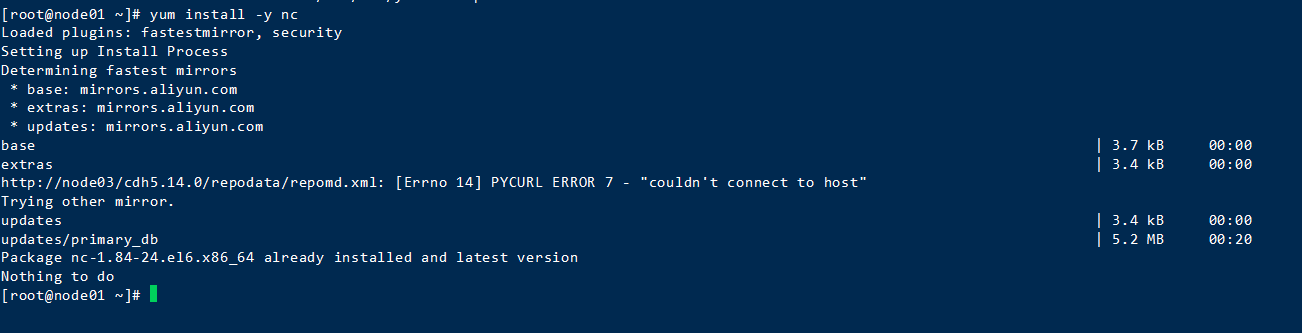
创建一个scala工程,导入相关pom依赖
<?xml version="1.0" encoding="UTF-8"?>

<project xmlns="http://maven.apache.org/POM/4.0.0"

         xmlns:xsi="http://www.w3.org/2001/XMLSchema-instance"

         xsi:schemaLocation="http://maven.apache.org/POM/4.0.0 http://maven.apache.org/xsd/maven-4.0.0.xsd">

    <modelVersion>4.0.0</modelVersion>

    <groupId>com.shiao</groupId>

    <artifactId>spark-01</artifactId>

    <version>1.0</version>

    <packaging>jar</packaging>

    <properties>

        <scala.version>2.11.8</scala.version>

        <hadoop.version>2.7.4</hadoop.version>

        <spark.version>2.0.2</spark.version>

    </properties>

    <dependencies>

        <!--scala依赖-->

        <dependency>

            <groupId>org.scala-lang</groupId>

            <artifactId>scala-library</artifactId>

            <version>${scala.version}</version>

        </dependency>

        <!--spark依赖-->

        <dependency>

            <groupId>org.apache.spark</groupId>

            <artifactId>spark-core_2.11</artifactId>

            <version>${spark.version}</version>

        </dependency>

        <!--hadoop依赖-->

        <dependency>

            <groupId>org.apache.hadoop</groupId>

            <artifactId>hadoop-client</artifactId>

            <version>${hadoop.version}</version>

        </dependency>

        <dependency>

            <groupId>mysql</groupId>

            <artifactId>mysql-connector-java</artifactId>

            <version>5.1.30</version>

        </dependency>

        <!--引入spark-streaming依赖-->

        <dependency>

            <groupId>org.apache.spark</groupId>

            <artifactId>spark-streaming_2.11</artifactId>

            <version>2.0.2</version>

        </dependency>

    </dependencies>

    <!--配置插件-->

    <build>

        <plugins>

            <!--scala编译插件-->

            <plugin>

                <groupId>org.scala-tools</groupId>

                <artifactId>maven-scala-plugin</artifactId>

                <version>2.15.2</version>

                <executions>

                    <execution>

                        <goals>

                            <goal>compile</goal>

                        </goals>

                    </execution>

                </executions>

            </plugin>

            <!--项目打包插件-->

            <plugin>

                <artifactId>maven-assembly-plugin</artifactId>

                <configuration>

                    <archive>

                        <manifest>

                            <mainClass>WordCount</mainClass>

                        </manifest>

                    </archive>

                    <descriptorRefs>

                        <descriptorRef>jar-with-dependencies</descriptorRef>

                    </descriptorRefs>

                </configuration>

            </plugin>

        </plugins>

    </build>

</project>
创建一个object
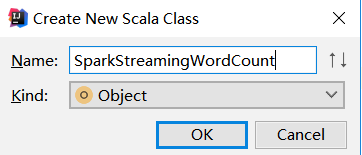
编写代码
import org.apache.spark.streaming.dstream.{DStream, ReceiverInputDStream}

import org.apache.spark.streaming.{Seconds, StreamingContext}

import org.apache.spark.{SparkConf, SparkContext}

object SparkStreamingWordCount {

  def main(args: Array[String]): Unit = {

    //创建sparkContext

    val configStr = new SparkConf().setAppName("SparkStreamingWordCount").setMaster("local[2]")

    val sc = new SparkContext(configStr)

    //创建streamingContext

    val scc = new StreamingContext(sc, Seconds(5))

    //去掉多余的日志,影响观看

    sc.setLogLevel("WARN")

    //创建receive获取socket数据

    val lines: ReceiverInputDStream[String] = scc.socketTextStream("192.168.52.110", 9999)

    //计数处理,以逗号划分,分成一个个字符串;对每个字符串进行处理成值为1的元组;对相同单词进行相加;进行打印

    val value: DStream[(String, Int)] = lines.flatMap(_.split("\\,")).map((_, 1)).reduceByKey(_ + _)

    value.print()

    //开启并阻塞线程,以保持不断获取

    scc.start()

    scc.awaitTermination()

  }

}
跑起来
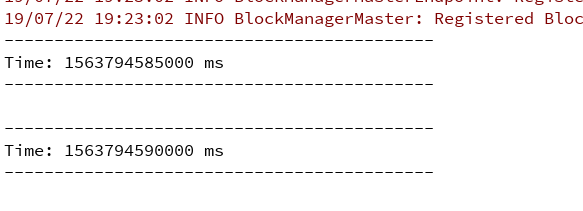
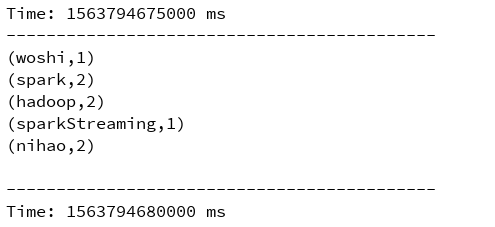
使用scoket nc打开9999端口发送数据

测试

SparkStreaming wordCountDemo基础案例的更多相关文章
- 第六节,TensorFlow编程基础案例-保存和恢复模型(中)
在我们使用TensorFlow的时候,有时候需要训练一个比较复杂的网络,比如后面的AlexNet,ResNet,GoogleNet等等,由于训练这些网络花费的时间比较长,因此我们需要保存模型的参数. ...
- SpringBoot2.0 基础案例(12):基于转账案例,演示事务管理操作
本文源码 GitHub地址:知了一笑 https://github.com/cicadasmile/spring-boot-base 一.事务管理简介 1.事务基本概念 一组业务操作ABCD,要么全部 ...
- _00017 Kafka的体系结构介绍以及Kafka入门案例(0基础案例+Java API的使用)
博文作者:妳那伊抹微笑 itdog8 地址链接 : http://www.itdog8.com(个人链接) 博客地址:http://blog.csdn.net/u012185296 博文标题:_000 ...
- Spring Boot 2.x 基础案例:整合Dubbo 2.7.3+Nacos1.1.3(配置中心)
本文原创首发于公众号:Java技术干货 1.概述 本文将Nacos作为配置中心,实现配置外部化,动态更新.这样做的优点:不需要重启应用,便可以动态更新应用里的配置信息.在如今流行的微服务应用下,将应用 ...
- Spark-Streaming kafka count 案例
Streaming 统计来自 kafka 的数据,这里涉及到的比较,kafka 的数据是使用从 flume 获取到的,这里相当于一个小的案例. 1. 启动 kafka Spark-Streaming ...
- 【7】了解Bootstrap栅格系统基础案例(2)
ps.这一次要说的是“Responsive column resets”,但是不知道为什么中文官网没有给出翻译,但是在看到案例的时候,感觉这就像一个bug,我自己姑且叫这个是一个高度bug吧,方便自己 ...
- 第七节,TensorFlow编程基础案例-TensorBoard以及常用函数、共享变量、图操作(下)
这一节主要来介绍TesorFlow的可视化工具TensorBoard,以及TensorFlow基础类型定义.函数操作,后面又介绍到了共享变量和图操作. 一 TesnorBoard可视化操作 Tenso ...
- 第五节,TensorFlow编程基础案例-session使用(上)
在第一节中我们已经介绍了一些TensorFlow的编程技巧;第一节,TensorFlow基本用法,但是内容过于偏少,对于TensorFlow的讲解并不多,这一节对之前的内容进行补充,并更加深入了解讲解 ...
- SpringBoot2.0 基础案例(14):基于Yml配置方式,实现文件上传逻辑
本文源码 GitHub地址:知了一笑 https://github.com/cicadasmile/spring-boot-base 一.文件上传 文件上传是项目开发中一个很常用的功能,常见的如头像上 ...
随机推荐
- CAD转DXF怎么转换?教你三种转换方法
CAD图纸在我们日常生活中都是可见到的,因为CAD图纸文件的格式是多样的,在工作中就需要经常将CAD的格式进行转换.那CAD转DXF怎么转换呢?这个问题很多的小伙伴们都遇到过,下面小编就来教大家三种转 ...
- 转战物联网·基础篇03-从JSON数据到短指令谈思维的转变
了解了物联网项目的大体结构之后,我们先从物联网的联网相关部分说起,这也是物联网项目中的关键环节.在联网环节中,不仅要考虑如何连接上,还要考虑连接后如何传输数据.换句话说数据是以什么格式进行传输,对 ...
- RDIFramework.NET敏捷开发框架 ━ 工作流程组件Web业务平台
接前两篇: RDIFramework.NET敏捷开发框架 ━ 工作流程组件介绍 RDIFramework.NET敏捷开发框架 ━ 工作流程组件WinForm业务平台 1.RDIFramework.NE ...
- 激活windows操作系统的命令行指令
1.开始菜单中搜索命令提示符,右键管理员运行 2.为了避免激活的失败,首先卸载已经过期的密钥 输入以下命令:slmgr.vbs /upk 回车确认之后会弹出提示“已成功卸载了产品密钥” 3.下一步是将 ...
- window2012安装oracle报INS-13001 环境不满足最低要求
在windows server 2012R2安装Oracle客户端或者服务端时,会弹窗报错INS-13001 环境不满足最低要求此时可以进行以下操作进行解决 在解压后的Oracle安装文件目录中,找到 ...
- Linux 内核虚拟地址到物理地址转换讨论【转】
转自:https://blog.csdn.net/sunlei0625/article/details/59476987 版权声明:本文为博主原创文章,遵循 CC 4.0 BY-SA 版权协议,转载请 ...
- Fiddler安装
1.在网上搜一下fiddler的安装包,下载.下载完成能看到一个exe文件. 2.点击文件安装,同意,选择一个目录进行安装即可. 3.安装完成,打开应用是一个这样的界面. 需要安装包的下面评论.... ...
- Mybatis整合Redis实现二级缓存
Mybatis集成ehcache . 为什么需要缓存 拉高程序的性能 . 什么样的数据需要缓存 很少被修改或根本不改的数据 业务场景比如:耗时较高的统计分析sql.电话账单查询sql等 . ehcac ...
- 安装pymssql
直接安装失败 https://www.lfd.uci.edu/~gohlke/pythonlibs/#pymssql 去下载对应的 pymssql whl版本 之后 pip install whe ...
- WPF 精修篇 DataGrid 筛选
原文:WPF 精修篇 DataGrid 筛选 DataGrid也可以分组 但是用的地方不多 就没写 筛选还是可以的 比如Datagrid数据量比较大 要做数据筛选 贴码 <DataGrid x: ...