
UIScrollView,UICollectionView 和UITableView的属性和方法
UIScrollView,UICollectionView 和UITableView
三者之间的关系:UIScrollView是 UICollectionView 和 UITableView 的父类.
UIScrollView
一个可以滚动的视图控件,可以用来查看比屏幕大很多的视图内容.
常用属性:
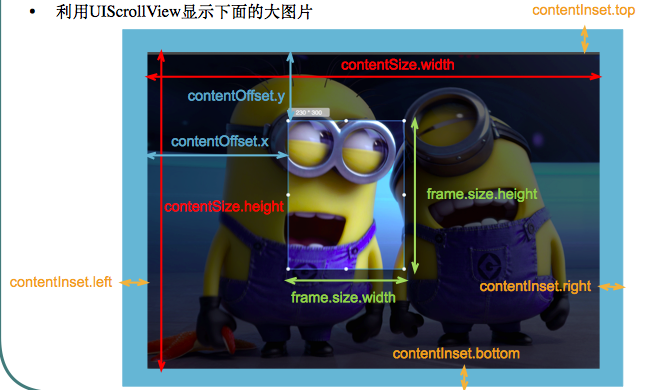
contentOffset:当前显示的区域相对于frame顶点的区域
contentSize:屏幕能滚动到的最大区域(画布)
contentInset:scrollview的contentview的顶点相对于scrollview的位置
directionalLockEnabled:是否禁止在某一方向的滚动
bounces:是否有弹框效果
alwaysBounceVertical:是否在垂直方向有反弹效果
alwaysBounceHorizontal:是否在水平方向上有反弹效果
pagingEnabled:是否有分页效果
scrollEnabled:是否能滚动
showsHorizontalScrollIndicator:是否显示水平滚动条
showsVerticalScrollIndicator:是否显示垂直滚动条
scrollIndicatorInsets:滚动指示器从封闭滚动视图中被嵌入的距离
indicatorStyle:滚动控制器的风格
decelerationRate:用户离开屏幕后滚动的减速速率
indexDisplayMode://数据显示方式
tracking:用户是否触摸内容并初始化滚动
dragging:是否开始滚动
decelerating:手指在离开屏幕后,屏幕是否继续滚动
delaysContentTouches:滚动视图是否延迟处理触摸下压事件
canCancelContentTouches:触摸内容视图是否总是跟踪
minimumZoomScale:最小缩放比例
maximumZoomScale:最大缩放比例
zoomScale:缩放比例
bouncesZoom:规定滚动视图是否在缩放超出最大值和最小值动画时播放内容缩放动画
zooming:是否缩放
zoomBouncing:缩放超出缩放限制
scrollsToTop:是否滚动到顶部
panGestureRecognizer:当前用于滑动手势的手势识别器
pinchGestureRecognizer:当前用于扩张/收缩手势的手势识别器
directionalPressGestureRecognizer:按压手势移动方向
keyboardDismissMode:键盘消失方式
refreshControl:更新控制
常用方法
- (void)setContentOffset:(CGPoint)contentOffset animated:(BOOL)animated;//设定当前显示的区域相对于frame顶点的区域
- (void)scrollRectToVisible:(CGRect)rect animated:(BOOL)animated;//滚动内容的指定区域以便使内容在屏幕中可见
- (void)flashScrollIndicators; //短暂地显示滚动指示器
- (BOOL)touchesShouldBegin:(NSSet<UITouch *> *)touches withEvent:(nullable UIEvent *)event inContentView:(UIView *)view;//(方法被滚动视图调用)以调整滚动视图处理滚动手势的方式
- (BOOL)touchesShouldCancelInContentView:(UIView *)view;//触摸是否可以取消
- (void)setZoomScale:(CGFloat)scale animated:(BOOL)animated ;//设置缩放比例
- (void)zoomToRect:(CGRect)rect animated:(BOOL)animated;//将内容视图缩放到指定的Rect中
UICollectionView
常用属性:
collectionViewLayout:布局
prefetchingEnabled:是否预加载
backgroundView:背景视图
allowsSelection:是否允许 item可以点击
allowsMultipleSelection:是否允许多选
indexPathsForSelectedItems:选中的 item
numberOfSections:显示多少 item
visibleCells:界面上显示的 cell
indexPathsForVisibleItems:当前可视界面上显示的 item 的 indexPath
remembersLastFocusedIndexPath:是否记住最后操作的 indexPath
常用方法:
- (instancetype)initWithFrame:(CGRect)frame collectionViewLayout:(UICollectionViewLayout *)layout;//用layout来初始化布局
- (instancetype)initWithCoder:(NSCoder *)aDecoder://通过 xib 文件来初始化
- (void)registerClass:(nullable Class)cellClass forCellWithReuseIdentifier:(NSString *)identifier;//通过类来注册
- (void)registerNib:(nullable UINib *)nib forCellWithReuseIdentifier:(NSString *)identifier;//通过 xib 来注册
- (void)registerClass:(nullable Class)viewClass forSupplementaryViewOfKind:(NSString *)elementKind withReuseIdentifier:(NSString *)identifier;//用 class来注册一个带补充视图的类
- (void)registerNib:(nullable UINib *)nib forSupplementaryViewOfKind:(NSString *)kind withReuseIdentifier:(NSString *)identifier;//通过 xib 来注册一个带补充视图的类
- (UICollectionViewCell *)dequeueReusableCellWithReuseIdentifier:(NSString *)identifier forIndexPath:(NSIndexPath *)indexPath;//通过identifier来复用 cell
- (UICollectionReusableView *)dequeueReusableSupplementaryViewOfKind:(NSString *)elementKind withReuseIdentifier:(NSString *)identifier forIndexPath:(NSIndexPath *)indexPath;//通过 Identifier 获取复用 ReusableView
- (NSArray<NSIndexPath *> *)indexPathsForSelectedItems;//选中的 items 的 indexPath
- (void)selectItemAtIndexPath:(nullable NSIndexPath *)indexPath animated:(BOOL)animated scrollPosition:(UICollectionViewScrollPosition)scrollPosition;//指定选中的 item 的动画和位置
- (void)deselectItemAtIndexPath:(NSIndexPath *)indexPath animated:(BOOL)animated;//取消选中的 item
- (void)reloadData; //刷新数据
- (void)setCollectionViewLayout:(UICollectionViewLayout *)layout animated:(BOOL)animated; //是否动态设置布局
- (void)setCollectionViewLayout:(UICollectionViewLayout *)layout animated:(BOOL)animated completion:(void (^ __nullable)(BOOL finished))completion ;//是否动态设置布局并回调
- (UICollectionViewTransitionLayout *)startInteractiveTransitionToCollectionViewLayout:(UICollectionViewLayout *)layout completion:(nullable UICollectionViewLayoutInteractiveTransitionCompletion)completion;//切换 layout
- (void)finishInteractiveTransition;//layout 切换完成
- (void)cancelInteractiveTransition;//取消切换 layout
- (NSInteger)numberOfSections;//组
- (NSInteger)numberOfItemsInSection:(NSInteger)section;//每组有多少 items
- (UICollectionViewLayoutAttributes *)layoutAttributesForItemAtIndexPath:(NSIndexPath *)indexPath;//返回 item 的布局属性
- (UICollectionViewLayoutAttributes *)layoutAttributesForSupplementaryElementOfKind:(NSString *)kind atIndexPath:(NSIndexPath *)indexPath;//返回重用视图的布局属性
- (NSIndexPath *)indexPathForItemAtPoint:(CGPoint)point;//点击的 item 的 indexpath
- (NSIndexPath *)indexPathForCell:(UICollectionViewCell *)cell;//cell 的 indexPath
- (UICollectionViewCell *)cellForItemAtIndexPath:(NSIndexPath *)indexPath;//indexPath 对应的 cell
- (NSArray<__kindof UICollectionViewCell *> *)visibleCells;//当前可见视图 celsl 的数组
- (NSArray<NSIndexPath *> *)indexPathsForVisibleItems;//当前可见视图的 items 的 indexPath 的数组
- (UICollectionReusableView *)supplementaryViewForElementKind:(NSString *)elementKind atIndexPath:(NSIndexPath *)indexPath;//indexPath 对应的重用视图
- (NSArray<UICollectionReusableView *> *)visibleSupplementaryViewsOfKind:(NSString *)elementKind;//当前可见的重用视图数组
- (NSArray<NSIndexPath *> *)indexPathsForVisibleSupplementaryElementsOfKind:(NSString *)elementKind;//当前可见辅助视图的 indexPath 的数组
- (void)scrollToItemAtIndexPath:(NSIndexPath *)indexPath atScrollPosition:(UICollectionViewScrollPosition)scrollPosition animated:(BOOL)animated//滚动到 indexPath 的 item;
- (void)insertSections:(NSIndexSet *)sections;//插入组
- (void)deleteSections:(NSIndexSet *)sections;//删除组
- (void)reloadSections:(NSIndexSet *)sections;//刷新某一组
- (void)moveSection:(NSInteger)section toSection:(NSInteger)newSection;//移动组
- (void)insertItemsAtIndexPaths:(NSArray<NSIndexPath *> *)indexPaths;//插入 items
- (void)deleteItemsAtIndexPaths:(NSArray<NSIndexPath *> *)indexPaths;//删除 items
- (void)reloadItemsAtIndexPaths:(NSArray<NSIndexPath *> *)indexPaths;//刷新 items
- (void)moveItemAtIndexPath:(NSIndexPath *)indexPath toIndexPath:(NSIndexPath *)newIndexPath;//移动 item
- (void)performBatchUpdates:(void (^ __nullable)(void))updates completion:(void (^ __nullable)(BOOL finished))completion;//一次性完成插入/删除等操作
- (BOOL)beginInteractiveMovementForItemAtIndexPath:(NSIndexPath *)indexPath ;//是否允许排序
- (void)updateInteractiveMovementTargetPosition:(CGPoint)targetPosition;//更新 item 的位置
- (void)endInteractiveMovement;//移动完成后
- (void)cancelInteractiveMovement;//取消更新(恢复到原始的位置)
UITableView
常用属性:
style:tableview 的样式
rowHeight:cell行高
sectionHeaderHeight:组头行高
sectionFooterHeight:组尾行高
estimatedRowHeight:预定义行高
estimatedSectionHeaderHeight:预定义组头高
estimatedSectionFooterHeight:预定义组尾高
separatorInset:分割线的偏移量
backgroundView:背景视图
numberOfSections:组数
visibleCells:当前可见的 cell
indexPathsForVisibleRows:可见 cell 的 indexPath
editing:编辑
allowsSelection:非编译状态下是否允许选中
allowsSelectionDuringEditing//编译状态下允许某行可以选中
allowsMultipleSelection:是否允许多选
allowsMultipleSelectionDuringEditing:在编译状态下是否允许多选
indexPathForSelectedRow:选中的 cell 的 indexPath
indexPathsForSelectedRows:选中的多个的 cell 的 indexPath
sectionIndexMinimumDisplayRowCount;显示 rowcount 的时候的最小 sectionIndex
sectionIndexColor:改变某一行的颜色
sectionIndexBackgroundColor:改变某一行的背景色
sectionIndexTrackingBackgroundColor:选中某部分的背景色
separatorColor:选中 cell 分割线的颜色
separatorEffect:毛玻璃效果
tableHeaderView:头视图
tableFooterView:尾视图
remembersLastFocusedIndexPath:记录最后一个焦点的 indexPath
常用方法:
- (instancetype)initWithFrame:(CGRect)frame style:(UITableViewStyle)style;带 frame 的初始化方法
- (instancetype)initWithCoder:(NSCoder *)aDecoder;//通过 IB 初始化
- (void)reloadData;//刷新数据
- (void)reloadSectionIndexTitles;//刷新索引栏
- (NSInteger)numberOfRowsInSection:(NSInteger)section;//每组有多少行
- (CGRect)rectForSection:(NSInteger)section; //获取某个组的位置和大小
- (CGRect)rectForHeaderInSection:(NSInteger)section;//获取某个组的组头的位置和大小
- (CGRect)rectForFooterInSection:(NSInteger)section;//获取某个组的组尾的位置和大小
- (CGRect)rectForRowAtIndexPath:(NSIndexPath *)indexPath;//获取某一行的位置和大小
- (NSIndexPath *)indexPathForRowAtPoint:(CGPoint)point; //由点确定在该行的 indexPath
- (NSIndexPath *)indexPathForCell:(UITableViewCell *)cell;//获取 cell 的 indexPath
- (NSArray<NSIndexPath *> *)indexPathsForRowsInRect:(CGRect)rect; //获取多行的 indexPath 数组
- (__kindof UITableViewCell *)cellForRowAtIndexPath:(NSIndexPath *)indexPath; //设置 cell
- (UITableViewHeaderFooterView *)headerViewForSection:(NSInteger)section;//设置组头
- (UITableViewHeaderFooterView *)footerViewForSection:(NSInteger)section;//设置组尾
- (void)scrollToRowAtIndexPath:(NSIndexPath *)indexPath atScrollPosition:(UITableViewScrollPosition)scrollPosition animated:(BOOL)animated;//将某行滚动到特点位置
- (void)scrollToNearestSelectedRowAtScrollPosition:(UITableViewScrollPosition)scrollPosition animated:(BOOL)animated;//将选中的行滚动到特定位置
- (void)beginUpdates;//和下面方法成对使用,表示开始动态改变某一行
- (void)endUpdates;//和上面的方法成对使用,表示动态改变某行结束
- (void)insertSections:(NSIndexSet *)sections withRowAnimation:(UITableViewRowAnimation)animation;//动态插入一行
- (void)deleteSections:(NSIndexSet *)sections withRowAnimation:(UITableViewRowAnimation)animation;//动态删除一组
- (void)reloadSections:(NSIndexSet *)sections withRowAnimation:(UITableViewRowAnimation)animation;//刷新一组
- (void)moveSection:(NSInteger)section toSection:(NSInteger)newSection;//移动某一组
- (void)insertRowsAtIndexPaths:(NSArray<NSIndexPath *> *)indexPaths withRowAnimation:(UITableViewRowAnimation)animation;//插入多行
- (void)deleteRowsAtIndexPaths:(NSArray<NSIndexPath *> *)indexPaths withRowAnimation:(UITableViewRowAnimation)animation;//删除多行
- (void)reloadRowsAtIndexPaths:(NSArray<NSIndexPath *> *)indexPaths withRowAnimation:(UITableViewRowAnimation)animation;//刷新多行
- (void)moveRowAtIndexPath:(NSIndexPath *)indexPath toIndexPath:(NSIndexPath *)newIndexPath;//移动某一行
- (void)selectRowAtIndexPath:(nullable NSIndexPath *)indexPath animated:(BOOL)animated scrollPosition:(UITableViewScrollPosition)scrollPosition;//选中行滚动到特定位置
- (void)deselectRowAtIndexPath:(NSIndexPath *)indexPath animated:(BOOL)animated;//取消选中
- (UITableViewCell *)dequeueReusableCellWithIdentifier:(NSString *)identifier;//设置 cell 的重用标识符
- (UITableViewCell *)dequeueReusableCellWithIdentifier:(NSString *)identifier forIndexPath:(NSIndexPath *)indexPath;//设置某些 cell 的重用标识符
- (UITableViewHeaderFooterView *)dequeueReusableHeaderFooterViewWithIdentifier:(NSString *)identifier;//设置头尾视图的重用标识符
- (void)registerNib:(nullable UINib *)nib forCellReuseIdentifier:(NSString *)identifier;//通过 xib注册带重用标识符的 cell
- (void)registerClass:(nullable Class)cellClass forCellReuseIdentifier:(NSString *)identifier;//通过类注册带重用标识符的 cell
- (void)registerNib:(nullable UINib *)nib forHeaderFooterViewReuseIdentifier:(NSString *)identifier;通过 xib 注册重用的cell头尾视图
- (void)registerClass:(nullable Class)aClass forHeaderFooterViewReuseIdentifier:(NSString *)identifier;通过类注册重用的 cell 的头尾视图
附件:
UIScrollView,UICollectionView 和UITableView的属性和方法的更多相关文章
- UITableView常用属性和方法 - 永不退缩的小白菜
UITableView常用属性和方法 - 永不退缩的小白菜 时间 2014-05-27 01:21:00 博客园精华区原文 http://www.cnblogs.com/zhaofucheng11 ...
- 12-27 UITableView常用属性及方法
UITableView也有自己的代理协议,它本身继承自UIScrollView 一:代理要遵守代理协议<UITableViewDelegate>,代理协议中的代理方法: 1.改变某一行的行 ...
- 在UIScrollView、UICollectionView和UITableView中添加UIRefreshControl实现下拉刷新
Apple在iOS 6中添加了UIRefreshControl,但只能在UITableViewController中使用,不能在UIScrollView和UICollectionView中使用. 从i ...
- UITableView的全部属性、方法以及代理方法执行顺序,看过之后肯定有收获---董鑫
UITableView-------表视图--继承UIScrollView并遵守NSCoding协议 属性 frame-------------设置控件的位置和大小 backgroundColor-- ...
- [OC][转]UITableView属性及方法大全
Tip: UITableView属性及方法大全 (摘录地址) p.p1 { margin: 0.0px 0.0px 0.0px 0.0px; line-height: 14.0px; font: 1 ...
- 一、UITableView的属性
一.UITableView的属性 NSIndexPath类型是用来获取用户选择的indexPath,在别的函数里面,若需要知道用户选择了哪个cell,用上它可以省事很多.不必再去建全局变量sectio ...
- UIKit的外观属性及方法汇总
本文授权转载,作者:楚天舒(简书) 开发中经常会碰到要设置UI的某个生僻的外观属性,虽然在头文件中都能查到,但一是每个控件的头文件比较分散繁杂,二是每个头文件里有太多不用到的方法和属性,所以这里将UI ...
- IOS开发UI基础UITableView的属性
UITableView UITableView内置了两种样式:UITableViewStylePlain,UITableViewStyleGrouped <UITableViewDataSour ...
- IOS UITableView NSIndexPath属性讲解
IOS UITableView NSIndexPath属性讲解 查看UITableView的帮助文档我们会注意到UITableView有两个Delegate分别为:dataSource和deleg ...
随机推荐
- IntelliJ IDEA自动部署项目至远程服务器与传统部署项目至远程服务器的区别
每次开发Java项目时,对于所有Java开发人员来说,最枯燥的不是修改代码,而是实时将自己的代码上传至远程服务器,进行测试或者部署,本人最初开发也是这样,通过使用Xshell 5,WinSCP等工具对 ...
- Docker 学习 | 基础命令
基本概念定义 基本组成 客户端/守护进程 C/S架构 本地/服务器 镜像 容器基石 只读文件系统 联合加载(union mount) 容器 通过镜像启动 执行 写时复制 仓库 公有 docker hu ...
- PHP路径指定web路径的方法
PHP路径指定web路径的方法直接在/前面加.就是代表web路径了 不是按照文件路径来算了 <pre>./Public/uploads/suolutu/' . $suijishu . '_ ...
- C++程序员学Python
目录 C++程序员学Python 第二章.变量和数据类型 1.注释语句前用#: 2.常用于大小写函数: 第三章.列表 1.列表简述 2.修改,增加,插入,删除列表元素 第四章操作列表 1.遍历 2.创 ...
- [Office] 显示Office 2013中的Developer Tab和启用Macro
显示Developer Tab是对Office 2013进行开发的前提条件. 在Excel 2013中,打开Excel Option: 只要勾选对应的Developer选项即可显示该tab. 随着Of ...
- Laravel框架安装RabbitMQ消息中间件步骤
Laravel5.6 整合 RabbitMQ 消息队列 简介: Laravel 队列为不同的后台队列服务提供了统一的 API,例如 Beanstalk,Amazon SQS,Redis,甚至其他基于关 ...
- .NET Core 获取数据库上下文实例的方法和配置连接字符串
目录 .NET Core 获取数据库上下文实例的方法和配置连接字符串 ASP.NET Core 注入 .NET Core 注入 无签名上下文 OnConfigure 配置 有签名上下文构造函数和自己n ...
- Java描述设计模式(21):状态模式
本文源码:GitHub·点这里 || GitEE·点这里 一.生活场景 1.场景描述 变色龙是爬行动物,是非常奇特的动物,它有适于树栖生活的种种特征和行为,身体也会随着环境的变化而变化出适应环境的颜色 ...
- 精通awk系列(8):awk划分字段的3种方式
回到: Linux系列文章 Shell系列文章 Awk系列文章 详细分析awk字段分割 awk读取每一条记录之后,会将其赋值给$0,同时还会对这条记录按照预定义变量FS划分字段,将划分好的各个字段分别 ...
- java常用简略语含义
首先这些对象都应用都是一些单词的简称,也是一种应用思想,故其他语言也可以使用,在Java里比较常见这些对象吧.下面来一一解释. 一.POJO(Plain Ordinary Java Object). ...