
JS之clientWidth、offsetWidth等属性介绍
一、clientXXX 属性
代码演示
// css 部分

<style>

  .test{

     width:100px;

     height:100px;

     border:1px solid red;

     padding:20px;
}

    </style>

// body 和 js 部分

<div class="test">

        hello

</div>

<script>

   var div = document.getElementsByTagName('div')[0];

   console.log(div.clientWidth);

   console.log(div.clientHeight)

   console.log(div.clientTop)

   console.log(div.clientLeft)
  // 注意不含有以下两个属性

   // console.log(div.clientRight)

   // console.log(div.clientBottom)

</script>
控制台打印输出(结果)
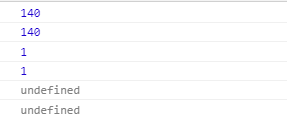
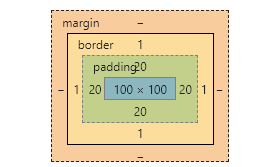
根据答应结果和div盒子模型比较可得:
clientWidth = padding值*2(左右padding值) + width 值;
clientHeight = padding值*2(上下padding值) + height 值;
clientTop = border值(上边框值)
clientLeft = border值(左边框值)
二、offsetXXX 属性
js代码
<script>

    var div = document.getElementsByTagName('div')[0];

    console.log(div.offsetWidth);

    console.log(div.offsetHeight)

    console.log(div.offsetTop)

    console.log(div.offsetLeft)
  //注意: 以下两个属性不存在

    console.log(div.offsetRight)

    console.log(div.offsetBottom)

</script>
打印结果分析
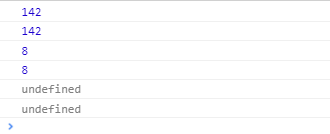
div盒子模型

body 盒子模型
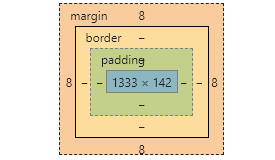
由以上两个模型分析得出
offsetWidth = 左右padding值+width值+左右border值
offsetHeight = 上下padding值+height值+上下border值
offsetTop 表示该元素的边框上边缘与它最近父元素的上边框内边缘的距离,如果没有父元素则把body当做它的父元素,由此知(默认情况下body有个margin值8px)
offsetTop = 8
offsetLeft = 8
JS之clientWidth、offsetWidth等属性介绍的更多相关文章
- js中clientWidth, scrollWidth, innerWidth, outerWidth,offsetWidth的区别
js中clientWidth, scrollWidth, innerWidth, outerWidth,offsetWidth的属性汇总,测试浏览器:ie7~ie11.chrome 和 firefox ...
- JS中关于clientWidth offsetWidth scrollWidth 的区别及意义
网页可见区域宽: document.body.clientWidth;网页可见区域高: document.body.clientHeight;网页可见区域宽: document.body.offset ...
- HTML精确定位:scrollLeft,scrollWidth,clientWidth,offsetWidth
HTML精确定位:scrollLeft,scrollWidth,clientWidth,offsetWidth scrollHeight: 获取对象的滚动高度. scrollLeft:设置或获取位于对 ...
- HTML精确定位:scrollLeft,scrollWidth,clientWidth,offsetWidth之完全详解
HTML:scrollLeft,scrollWidth,clientWidth,offsetWidth到底指的哪到哪的距离之完全详解 scrollHeight: 获取对象的滚动高度. scrollLe ...
- scrollLeft,scrollWidth,clientWidth,offsetWidth 可实现导航栏固定不动(冻结)的效果
HTML精确定位:scrollLeft,scrollWidth,clientWidth,offsetWidth scrollHeight: 获取对象的滚动高度. scrollLeft:设置或获取位 ...
- HTML精确定位:scrollLeft,scrollWidth,clientWidth,offsetWidth之全然具体解释
HTML:scrollLeft,scrollWidth,clientWidth,offsetWidth究竟指的哪到哪的距离之全然具体解释scrollHeight: 获取对象的滚动高度. scrol ...
- clientWidth,offsetWidth,scrollWidth区别
<html> <head> <title>clientWidth,offsetWidth,scrollWidth区别</title> </head ...
- H5,PC网页屏幕尺寸相关整理(scrollLeft,scrollWidth,clientWidth,offsetWidth)
HTML:scrollLeft,scrollWidth,clientWidth,offsetWidth到底指的哪到哪的距离之完全详解scrollHeight: 获取对象的滚动高度. scrollLef ...
- HTML精确定位:scrollLeft,scrollWidth,clientWidth,offsetWidth完全详细的说明
HTML:scrollLeft,scrollWidth,clientWidth,offsetWidth具体指完全解释究竟哪里的距离scrollHeight: 获取对象的高度滚动. scrollLe ...
- 转 HTML精确定位:scrollLeft,scrollWidth,clientWidth,offsetWidth之完全详解
HTML:scrollLeft,scrollWidth,clientWidth,offsetWidth到底指的哪到哪的距离之完全详解 scrollHeight: 获取对象的滚动高度. scrollLe ...
随机推荐
- Python基础总结之第五天开始【认识简单的条件语句,也可以叫判断语句】(新手可相互督促)
周五更新很累... 坚持,年薪20万又进了一步~~ python中的条件语句以[ if ]开头,条件语句成立时,运行该代码块,如果条件不成立,则跳过该代码块,执行后面的代码块. 简单的小示例: 输入性 ...
- 技术派-不用sqrt手工计算平方根
题目:任意长度数串,不使用sqrt函数,手工计算平方根? 要求只准用加/减/乘/除四则运算,不准使用power/sqrt等函数. 算法如下: 1.以小数点为中心往两边每2位分隔为一组: 2.然 ...
- grafana 4 升级到 grafana 5错误处理
遇到2个错误: 1. UNIQUE KEY 问题 INFO[07-16|15:34:36] Executing migration logger=migrator id="Remove un ...
- vue中el-upload上传多图片且携带参数,批量而不是一张一张的解决方案
现在前端基本不是vue技术栈就是react技术栈. vue技术栈最常用的就是element-ui的ui框架了. 在项目中,我们经常会碰到这种需求:批量上传文件 element-ui 确实也为我们提供了 ...
- RabbitMQ搭建单机及集群
1,基本环境配置 hosts 文件 免密登录 2,访问官网 https://www.rabbitmq.com/download.html 3, 4,安装依赖 yum -y install make g ...
- SQL Server 插入数据时自增长列如何指定数值
SQL Server 表在导入数据时,有时需要将自增长列指定数值,来保证导入前后的数据完全一致,如何实现? SQL Server 提供了方法: SET IDENTITY_INSERT,允许将显式值插入 ...
- 林大妈的JavaScript基础知识(三):JavaScript编程(3)原型
在一般的编程语言中,我们使用继承来复用代码,做成良好的数据结构.而在JavaScript中,我们使用原型来实现以上的需求.由于JavaScript专注于对象而摒弃了类,我们要明白原型和继承的确是有差异 ...
- JAVA基础——Switch条件语句
JAVA基础——switch 条件语句 switch语句结构: switch(表达式){ case值1: 语句体1: break: case值2: 语句体2: break: case值3: 语句体3: ...
- Docker启用TLS进行安全配置
之前开启了docker的2375 Remote API,接到公司安全部门的要求,需要启用授权,翻了下官方文档 Protect the Docker daemon socket 启用TLS 在docke ...
- 牛客多校训练第八场C.CDMA(思维+构造)
题目传送门 题意: 输入整数m( m∈2k ∣ k=1,2,⋯,10),构造一个由1和-1组成的m×m矩阵,要求对于任意两个不同的行的内积为0. 题解: Code: #include<bits/ ...