
python自动化测试三部曲之request+django实现接口测试
国庆期间准备写三篇博客,介绍和总结下接口测试,由于国庆期间带娃,没有按照计划完成,今天才完成第二篇,惭愧惭愧。
这里我第一篇博客的地址:https://www.cnblogs.com/bainianminguo/p/11616526.html,主要是介绍unittest框架,有兴趣的同学们可以移步去查阅
这里废话少说,进入正题
我的思路是这样的
1、先用django实现登陆、增加、删除、查看4个接口
2、在excel定义好测试案例、然后读取excel中的案例,然后把案例用unittest框架组装和封装
3、启动django,执行测试案例
一、先跑通unittest到django的流程
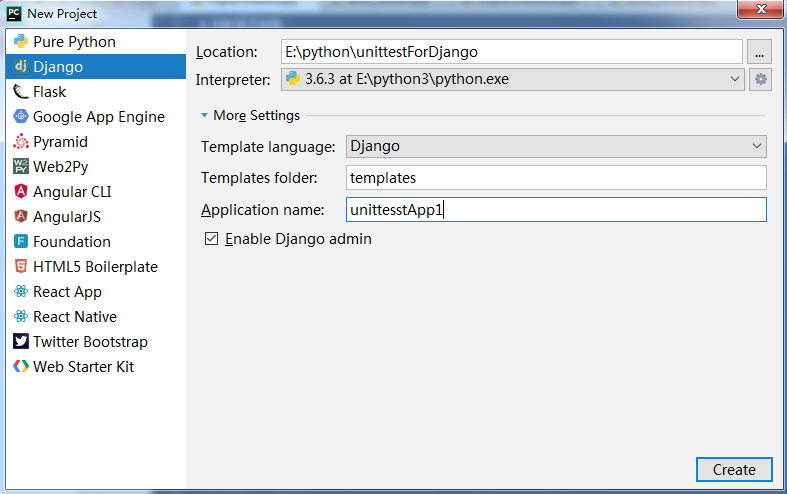
1、先创建一个Django的项目
2、创建路由,这里我们使用二级路由
a、先复制工程目录下的urls.py文件到app目录下
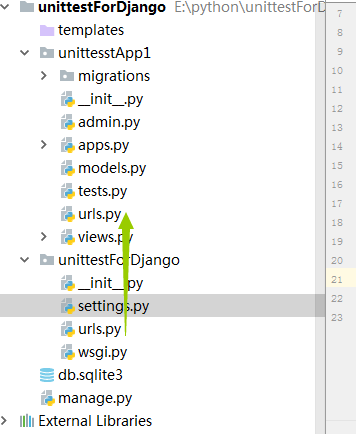
b、修改工程目录下的urls.py文件,定义一级路由

c、修改app目录下的urls.py文件,设置二级路由,这里切记务必要删除默认的admin这条路由

d、定义这条路由指向的视图的函数

e、启动django,这里我们使用9090端口启动,因为我们的Jenkins端口用的是8080
E:\python\unittestForDjango>python manage.py runserver 9090
f、这里的是启动成功的样式,我圈住的告警可以忽略,因为这里Django的admin需要的,我们这里不会用到django的admin
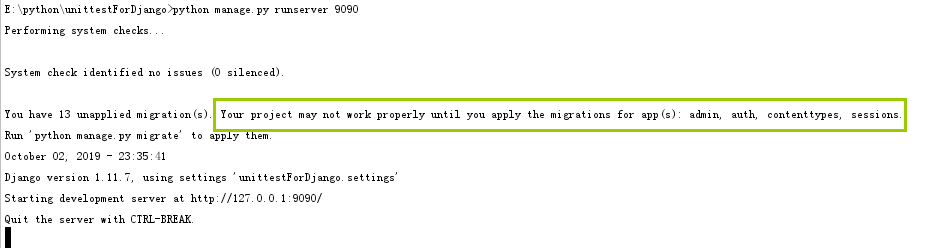
g、打开浏览器访问django,我们的一个简单的Django项目已经跑通

3、在视图函数中定义一个方法,这个方法分别处理GET请求和POST请求
a、定义视图函数
这里通过这个参数告诉浏览器,我们返回的是JSON数据
return HttpResponse(result, content_type="application/json;charset=utf-8")
def test_login(request):

    method = request.method.upper()

    if method == "GET":

        result = {}

        name = request.GET.get("username",None)

        pwd = request.GET.get("pwd",None)

        result["name"] = name

        result["pwd"] = pwd

        result = json.dumps(result)

        # return HttpResponse(result)

        return HttpResponse(result, content_type="application/json;charset=utf-8")

    else:

        result = {}

        name = request.POST.get("username",None)

        pwd = request.POST.get("pwd",None)

        result["name"] = name

        result["pwd"] = pwd

        result = json.dumps(result)

        return HttpResponse(result,content_type="application/json;charset=utf-8")
b、使用request模块发起POST和GET请求
#Auther Bob

#--*--conding:utf-8 --*--

import requests

import json

class TestCase(object):

    def __init__(self,username,pwd,url):

        self.username = username

        self.pwd = pwd

        self.url = url

    def get(self):

        # 发送get请求

        url = self.url + "?username=" + str(self.username) + "&" + "pwd=" + str(self.pwd)

        res = requests.get(url=url)

        print(res.text,type(res.text))

    def post(self):

        # 发送post请求

        data = {

            "username" : self.username,

            "pwd" : self.pwd

        }

        res = requests.post(url=self.url,data=data)

        print(res.text)

if __name__ == '__main__':

    url = "http://127.0.0.1:9090/web/login/"

    username = "zhangsan"

    pwd = ""

    t = TestCase(username,pwd,url)

    t.get()

    t.post()
c、这里我们引入unittest框架,测试案例可以这么写
import unittest

from test3 import test_request

class TestDjango(unittest.TestCase):

    def setUp(self):

        print("unittest框架的前置条件")

    def tearDown(self):

        print("unittest框架的后置条件")

    def test_01(self):

        url = "http://127.0.0.1:9090/web/login/"

        username = "zhangsan"

        pwd = ""

        t = test_request.TestCase(url=url,username=username,pwd=pwd)

    def test_02(self):

        url = "http://127.0.0.1:9090/web/login/"

        username = "zhangsan"

        pwd = ""

        t = test_request.TestCase(url=url,username=username,pwd=pwd)

        t.post()

if __name__ == '__main__':

    unittest.main(verbosity=2)
d、这里有重复代码,我们可以利用unittest框架中的classmethod来解决,因为实例化一个测试类可以放在前置条件中
import unittest

from test3 import test_request

class TestDjango(unittest.TestCase):

    @classmethod

    def setUpClass(cls):

        url = "http://127.0.0.1:9090/web/login/"

        username = "zhangsan"

        pwd = ""

        # 这里的t虽然是类变量,但是python的中的实例是可以用引用类变量的

        cls.t = test_request.TestCase(url=url,username=username,pwd=pwd)

    def setUp(self):

        print("unittest框架的前置条件")

    def tearDown(self):

        print("unittest框架的后置条件")

    def test_01(self):

        self.t.get()

    def test_02(self):

        self.t.post()

if __name__ == '__main__':

    unittest.main(verbosity=2)
e、在testcase中加入断言
import unittest

from test3 import test_request

class TestDjango(unittest.TestCase):

    @classmethod

    def setUpClass(cls):

        url = "http://127.0.0.1:9090/web/login/"

        username = "zhangsan"

        pwd = ""

        # 这里的t虽然是类变量,但是python的中的实例是可以用引用类变量的

        cls.t = test_request.TestCase(url=url,username=username,pwd=pwd)

    def setUp(self):

        print("unittest框架的前置条件")

    def tearDown(self):

        print("unittest框架的后置条件")

    def test_01(self):

        res = self.t.get()

        self.assertEqual(200,res.status_code)

    def test_02(self):

        res = self.t.post()

        self.assertEqual(200, res.status_code)

if __name__ == '__main__':

    unittest.main(verbosity=2)
f、引入testsuite
import unittest

from unittest import TestLoader

from test3 import test_unittest

if __name__ == '__main__':

    suite = unittest.TestSuite()

    loader = TestLoader()

    test_cases1 = unittest.TestLoader().loadTestsFromModule(test_unittest)

    # 参数是一个模块,会把这个模块里的所有case加载进来

    suite.addTests(test_cases1)

    runner = unittest.TextTestRunner(verbosity=2)

    runner.run(suite)
二、在django中设计接口
这里我们写一个简单的例子,设计一个用户表,设计4个接口
接口1:登陆
接口2:增加用户,需要用户登陆
接口3:删除用户,需要用户登陆
接口4:查询用户,不需要用户登陆
1、先看登陆接口
a、登录接口对应的url
下面是一级路由
url(r'^web/', include('unittesstApp1.urls'))
下面是二级路由
url(r'^login/', views.test_login),
b、登录接口的视图函数
def test_login(request):

    method = request.method.upper()

    if method == "GET":

        returndict = {"code": 200, "error": None}

        username = request.GET.get("username",None)

        password = request.GET.get("password",None)

        if username == "admin" and password == "admin123.":

            request.session["username"] = username

            request.session["password"] = password

            result = json.dumps(returndict)

        else:

            returndict["code"] = 201

            returndict["error"] = "用户名或者密码错误"

            result = json.dumps(returndict)

        return HttpResponse(result,content_type="application/json;charset=utf-8")
这里我们用到了session来代替cookies
2、增加用户接口
a、增加用户对应的url
一级路由同登陆接口,下面是二级路由
url(r'^add/', views.test_add),
b、增加用户接口对应的视图函数,这里我们做了各种异常处理,且判断了用户是否登陆,也就是通过是否携带cookies来判断
def test_add(request):

    method = request.method.upper()

    if method == "POST":

        returndict = {"code": 200, "error": None}

        username = request.session.get("username",None)

        password = request.session.get("password",None)

        if username == "admin" and password == "admin123.":

            newusername = request.POST.get("username",None)

            age = request.POST.get("age",None)

            sex = request.POST.get("sex",None)

            pwd = request.POST.get("pwd",None)

            userinfo = [newusername,age,sex,pwd]

            print(userinfo)

            if not "None" in userinfo and all(userinfo):

                if models.userInfo.objects.filter(username = userinfo[0]).exists():

                    returndict["error"] = "{username} is exists,please add a new username".format(username = username)

                    returndict["code"] = 201

                    result = json.dumps(returndict)

                    return HttpResponse(result, content_type="application/json;charset=utf-8")

                else:

                    models.userInfo.objects.create(

                        username = newusername,

                        age = age,

                        sex = sex,

                        pwd = pwd

                    )

                    if models.userInfo.objects.filter(username=userinfo[0]).exists():

                        result = json.dumps(returndict)

                        return HttpResponse(result, content_type="application/json;charset=utf-8")

                    else:

                        returndict["error"] = "{username} is error,please retry add".format(username=username)

                        returndict["code"] = 201

                        result = json.dumps(returndict)

                        return HttpResponse(result, content_type="application/json;charset=utf-8")

            else:

                returndict["error"] = "must input username,age,sex,pwd"

                returndict["code"] = 201

                result = json.dumps(returndict)

                return HttpResponse(result, content_type="application/json;charset=utf-8")

        else:

            returndict = {"code": 201, "error": "用户名或者密码错误"}

            result = json.dumps(returndict)

            return HttpResponse(result, content_type="application/json;charset=utf-8")
3、删除接口
a、删除用户对应的url
一级路由同登陆接口,这里只看二级路由
url(r'^del/', views.del_user),
b、删除接口对应的视图函数,这里我做了各种异常处理,也做了用户是否登陆的检测,也是通过检测cookies来实现
def del_user(request):

    method = request.method.upper()

    if method == "POST":

        returndict = {"code": 200, "error": None}

        username = request.session.get("username",None)

        password = request.session.get("password",None)

        if username == "admin" and password == "admin123.":

            delusername = request.POST.get("username",None)

            print(delusername)

            if delusername != None:

                if models.userInfo.objects.filter(username=delusername).exists():

                    delid = models.userInfo.objects.get(username=delusername).id

                    print(delid)

                    try:

                        models.userInfo.objects.get(id=delid).delete()

                    except Exception as e:

                        returndict = {"code": 201, "error": e}

                        result = json.dumps(returndict)

                        return HttpResponse(result, content_type="application/json;charset=utf-8")

                    else:

                        result = json.dumps(returndict)

                        return HttpResponse(result, content_type="application/json;charset=utf-8")

                else:

                    returndict = {"code": 201, "error": "{username} is not exists".format(username = delusername)}

                    result = json.dumps(returndict)

                    return HttpResponse(result, content_type="application/json;charset=utf-8")

            else:

                returndict = {"code": 201, "error": "you must input a username"}

                result = json.dumps(returndict)

                return HttpResponse(result, content_type="application/json;charset=utf-8")

        else:

            returndict = {"code": 201, "error": "username or password is error"}

            result = json.dumps(returndict)

            return HttpResponse(result, content_type="application/json;charset=utf-8")
4、查看接口
a、查看接口对应的url
一级路由同登陆接口url,下面是二级路由
url(r'^scan/', views.get_user),
b、查看接口对应的url,这里我们不检测用户是否登陆,直接把查到的数据返回给客户,如果查询报错,才返回错误的信息
def get_user(request):

    method = request.method.upper()

    returndict = {"code": 200, "userinfo": None}

    if method == "GET":

        try:

            alluser = models.userInfo.objects.all().values_list("username")

            alluserlist = []

            for i in alluser:

                alluserlist.append(i)

            returndict["userinfo"] = alluserlist

        except Exception as e:

            returndict["code"] = ""

            returndict["error"] = e

        finally:

            result = json.dumps(returndict)

            return HttpResponse(result, content_type="application/json;charset=utf-8")
5、设计删除数据库中所有的接口,用来做后置条件
def del_alluser(request):

    method = request.method.upper()

    if method == "POST":

        returndict = {"code": 200, "error": None}

        username = request.session.get("username", None)

        password = request.session.get("password", None)

        if username == "admin" and password == "admin123.":

            if models.userInfo.objects.all().count() > 0:

                models.userInfo.objects.all().delete()

            result = json.dumps(returndict)

            return HttpResponse(result, content_type="application/json;charset=utf-8")
三、案例准备
1、在excel中写好接口测试案例
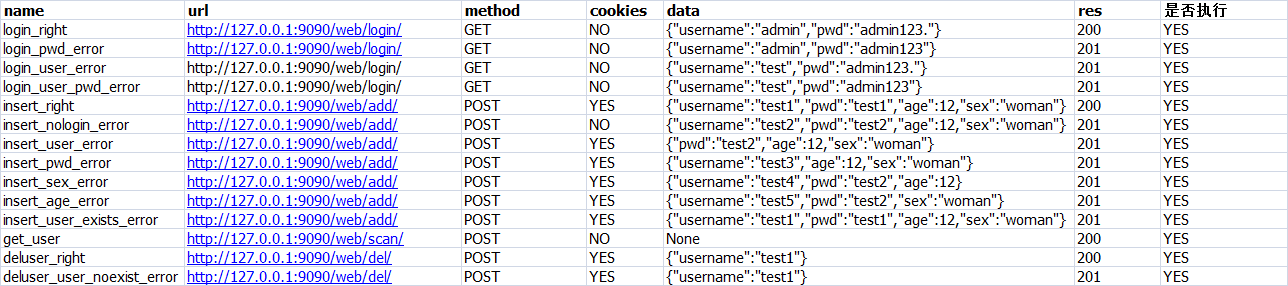
2、定义常量,也就是每列对应的值
class TestConfig(object):

    def __init__(self):

        self.name = 0

        self.url = 1

        self.method = 2

        self.cookies = 3

        self.data = 4

        self.res = 5

        self.exec = 6

    def getname(self):

        return self.name

    def geturl(self):

        return self.url

    def getmethod(self):

        return self.method

    def getcookies(self):

        return self.cookies

    def getdata(self):

        return self.data

    def getres(self):

        return self.res

    def getexec(self):

        return self.exec
3、定义读取excel的类,因为我要从excel中读取案例
import xlrd

import os

class testexcel(object):

    casepath = os.path.join(os.path.dirname(os.path.dirname(os.path.abspath(__file__))), "case", "testcase.xlsx")

    def __init__(self):

        self.casepath = testexcel.casepath

        self.execlobj = xlrd.open_workbook(self.casepath)

        self.sheetobj = self.execlobj.sheet_by_index(0)

    def get_excel_data(self,row,col):

        max_row = self.get_excel_max_row()

        max_col = self.get_excel_max_col()

        if row > max_row -1 or col > max_col - 1:

            return False

        else:

            data = self.sheetobj.cell_value(row,col)

            return data

    def get_excel_max_row(self):

        r_num = self.sheetobj.nrows

        return r_num

    def get_excel_max_col(self):

        c_num = self.sheetobj.ncols

        return c_num
4、定义我们的接口函数
import requests

import json

class TestLogin(object):

    def __init__(self,username,pwd,url):

        self.username = username

        self.pwd = pwd

        self.url = url

    def get(self):

        # 发送get请求

        url = self.url + "?username=" + str(self.username) + "&" + "password=" + str(self.pwd)

        res = requests.get(url=url,

                           headers={

                      "user-agent": "Mozilla/5.0 (Windows NT 6.1) AppleWebKit/537.36 (KHTML, like Gecko) Chrome/57.0.2987.133 Safari/537.36"

                  })

        # print(json.loads(res.text))

        return res

    def post(self):

        # 发送post请求

        data = {

            "username" : self.username,

            "pwd" : self.pwd

        }

        res = requests.post(url=self.url,

                            data=data,

                            headers={

                                "user-agent": "Mozilla/5.0 (Windows NT 6.1) AppleWebKit/537.36 (KHTML, like Gecko) Chrome/57.0.2987.133 Safari/537.36"

                            },

                            )

        # print(res.text)

        return res

class TestAdd(object):

    def __init__(self,username,age,sex,pwd,cookies,url):

        self.username = username

        self.age = age

        self.sex = sex

        self.pwd = pwd

        self.url = url

        self.cookies = cookies

    def post(self):

        # 发送post请求

        data = {

            "username" : self.username,

            "pwd" : self.pwd,

            "age" : self.age,

            "sex" : self.sex

        }

        res = requests.post(url=self.url,

                            data=data,

                            headers={

                                "user-agent": "Mozilla/5.0 (Windows NT 6.1) AppleWebKit/537.36 (KHTML, like Gecko) Chrome/57.0.2987.133 Safari/537.36"

                            },

                            cookies=self.cookies,

                            )

        # print(res.text)

        return res

class Testdel(object):

    def __init__(self, username,cookies,url):

        self.username = username

        self.cookies = cookies

        self.url = url

    def post(self):

        # 发送post请求

        data = {

            "username": self.username,

        }

        res = requests.post(url=self.url,

                            data=data,

                            headers={

                                "user-agent": "Mozilla/5.0 (Windows NT 6.1) AppleWebKit/537.36 (KHTML, like Gecko) Chrome/57.0.2987.133 Safari/537.36"

                            },

                            cookies=self.cookies,

                            )

        # print(res.text)

        return res

class Testscan(object):

    def __init__(self,url):

        self.url = url

    def get(self):

        res = requests.get(url=self.url,

                            headers={

                                "user-agent": "Mozilla/5.0 (Windows NT 6.1) AppleWebKit/537.36 (KHTML, like Gecko) Chrome/57.0.2987.133 Safari/537.36"

                            },

                            cookies=None,

                            )

        return res
5、定义测试案例
import unittest

from test3 import test_request

import json

from util import test_json

from util import test_excel

from case import testconfig

import requests

class TestDjango(unittest.TestCase):

    @classmethod

    def setUpClass(cls):

        cls.alldata = test_json.testjson()

    @classmethod

    def tearDownClass(cls):

        url = "http://127.0.0.1:9090/web/login/" + "?username=" + "admin" + "&" + "password=" + "admin123."

        res = requests.get(url=url,

                           headers={

                      "user-agent": "Mozilla/5.0 (Windows NT 6.1) AppleWebKit/537.36 (KHTML, like Gecko) Chrome/57.0.2987.133 Safari/537.36"

                  })

        url = "http://127.0.0.1:9090/web/delall/"

        requests.post(url=url,

                      headers={

                          "user-agent": "Mozilla/5.0 (Windows NT 6.1) AppleWebKit/537.36 (KHTML, like Gecko) Chrome/57.0.2987.133 Safari/537.36"

                      },

                      cookies = res.cookies

                      )

    def get_cookies(self):

        url = "http://127.0.0.1:9090/web/login/" + "?username=" + "admin" + "&" + "password=" + "admin123."

        res = requests.get(url=url,

                           headers={

                      "user-agent": "Mozilla/5.0 (Windows NT 6.1) AppleWebKit/537.36 (KHTML, like Gecko) Chrome/57.0.2987.133 Safari/537.36"

                  })

        # print(json.loads(res.text))

        return res.cookies

    @unittest.skip('noexec')

    def test_login_ok(self):

        row = 1

        configobj = testconfig.TestConfig()

        excelobj = test_excel.testexcel()

        execstatus = excelobj.get_excel_data(row,configobj.getexec())

        if execstatus == "YES":

            cookiesstatus = excelobj.get_excel_data(row, configobj.getcookies())

            if cookiesstatus == "YES":

                cookies = self.get_cookies()

            else:

                cookies = None

            data = excelobj.get_excel_data(row, configobj.getdata())

            data = json.loads(data)

            url = excelobj.get_excel_data(row, configobj.geturl())

            res = excelobj.get_excel_data(row, configobj.getres())

            method = excelobj.get_excel_data(row, configobj.getmethod())

            if method == "GET":

                testobj = test_request.TestLogin(data["username"],data["pwd"],url)

                resobj = testobj.get()

                self.assertEqual(int(res),json.loads(resobj.text)["code"])

    @unittest.skip('noexec')

    def test_login_pwd_error(self):

        row = 2

        configobj = testconfig.TestConfig()

        excelobj = test_excel.testexcel()

        execstatus = excelobj.get_excel_data(row,configobj.getexec())

        if execstatus == "YES":

            cookiesstatus = excelobj.get_excel_data(row, configobj.getcookies())

            if cookiesstatus == "YES":

                cookies = self.get_cookies()

            else:

                cookies = None

            data = excelobj.get_excel_data(row, configobj.getdata())

            data = json.loads(data)

            url = excelobj.get_excel_data(row, configobj.geturl())

            res = excelobj.get_excel_data(row, configobj.getres())

            method = excelobj.get_excel_data(row, configobj.getmethod())

            if method == "GET":

                testobj = test_request.TestLogin(data["username"],data["pwd"],url)

                resobj = testobj.get()

                self.assertEqual(int(res),json.loads(resobj.text)["code"])

    @unittest.skip('noexec')

    def test_login_user_error(self):

        row = 3

        configobj = testconfig.TestConfig()

        excelobj = test_excel.testexcel()

        execstatus = excelobj.get_excel_data(row,configobj.getexec())

        if execstatus == "YES":

            cookiesstatus = excelobj.get_excel_data(row, configobj.getcookies())

            if cookiesstatus == "YES":

                cookies = self.get_cookies()

            else:

                cookies = None

            data = excelobj.get_excel_data(row, configobj.getdata())

            data = json.loads(data)

            url = excelobj.get_excel_data(row, configobj.geturl())

            res = excelobj.get_excel_data(row, configobj.getres())

            method = excelobj.get_excel_data(row, configobj.getmethod())

            if method == "GET":

                testobj = test_request.TestLogin(data["username"],data["pwd"],url)

                resobj = testobj.get()

                self.assertEqual(int(res),json.loads(resobj.text)["code"])

    @unittest.skip('noexec')

    def test_user_pwd_error(self):

        row = 4

        configobj = testconfig.TestConfig()

        excelobj = test_excel.testexcel()

        execstatus = excelobj.get_excel_data(row,configobj.getexec())

        if execstatus == "YES":

            cookiesstatus = excelobj.get_excel_data(row, configobj.getcookies())

            if cookiesstatus == "YES":

                cookies = self.get_cookies()

            else:

                cookies = None

            data = excelobj.get_excel_data(row, configobj.getdata())

            data = json.loads(data)

            url = excelobj.get_excel_data(row, configobj.geturl())

            res = excelobj.get_excel_data(row, configobj.getres())

            method = excelobj.get_excel_data(row, configobj.getmethod())

            if method == "GET":

                testobj = test_request.TestLogin(data["username"],data["pwd"],url)

                resobj = testobj.get()

                self.assertEqual(int(res),json.loads(resobj.text)["code"])

    @unittest.skip('noexec')

    def test_insert_ok(self):

        row = 5

        configobj = testconfig.TestConfig()

        excelobj = test_excel.testexcel()

        execstatus = excelobj.get_excel_data(row, configobj.getexec())

        if execstatus == "YES":

            cookiesstatus = excelobj.get_excel_data(row, configobj.getcookies())

            if cookiesstatus == "YES":

                cookies = self.get_cookies()

            else:

                cookies = None

            data = excelobj.get_excel_data(row, configobj.getdata())

            data = json.loads(data)

            url = excelobj.get_excel_data(row, configobj.geturl())

            res = excelobj.get_excel_data(row, configobj.getres())

            method = excelobj.get_excel_data(row, configobj.getmethod())

            if method == "POST":

                testobj = test_request.TestAdd(data["username"], data["age"],data["sex"], data["pwd"],cookies,url)

                resobj = testobj.post()

                print(json.loads(resobj.text))

                self.assertEqual(int(res), json.loads(resobj.text)["code"])

    @unittest.skip('noexec')

    def test_insert_nologin(self):

        row = 6

        configobj = testconfig.TestConfig()

        excelobj = test_excel.testexcel()

        execstatus = excelobj.get_excel_data(row, configobj.getexec())

        if execstatus == "YES":

            cookiesstatus = excelobj.get_excel_data(row, configobj.getcookies())

            if cookiesstatus == "YES":

                cookies = self.get_cookies()

            else:

                cookies = None

            data = excelobj.get_excel_data(row, configobj.getdata())

            data = json.loads(data)

            url = excelobj.get_excel_data(row, configobj.geturl())

            res = excelobj.get_excel_data(row, configobj.getres())

            method = excelobj.get_excel_data(row, configobj.getmethod())

            if method == "POST":

                testobj = test_request.TestAdd(data["username"], data["age"],data["sex"], data["pwd"],cookies,url)

                resobj = testobj.post()

                print(json.loads(resobj.text))

                self.assertEqual(int(res), json.loads(resobj.text)["code"])

    @unittest.skip("noexec")

    def test_insert_user_error(self):

        row = 7

        configobj = testconfig.TestConfig()

        excelobj = test_excel.testexcel()

        execstatus = excelobj.get_excel_data(row, configobj.getexec())

        if execstatus == "YES":

            cookiesstatus = excelobj.get_excel_data(row, configobj.getcookies())

            if cookiesstatus == "YES":

                cookies = self.get_cookies()

            else:

                cookies = None

            data = excelobj.get_excel_data(row, configobj.getdata())

            data = json.loads(data)

            url = excelobj.get_excel_data(row, configobj.geturl())

            res = excelobj.get_excel_data(row, configobj.getres())

            method = excelobj.get_excel_data(row, configobj.getmethod())

            if method == "POST":

                testobj = test_request.TestAdd(data.get("username",None), data.get("age",None), data.get("sex",None), data.get("pwd",None), cookies, url)

                resobj = testobj.post()

                print(json.loads(resobj.text))

                self.assertEqual(int(res), json.loads(resobj.text)["code"])

    @unittest.skip('no exec')

    def test_insert_pwd_error(self):

        row = 8

        configobj = testconfig.TestConfig()

        excelobj = test_excel.testexcel()

        execstatus = excelobj.get_excel_data(row, configobj.getexec())

        if execstatus == "YES":

            cookiesstatus = excelobj.get_excel_data(row, configobj.getcookies())

            if cookiesstatus == "YES":

                cookies = self.get_cookies()

            else:

                cookies = None

            data = excelobj.get_excel_data(row, configobj.getdata())

            data = json.loads(data)

            url = excelobj.get_excel_data(row, configobj.geturl())

            res = excelobj.get_excel_data(row, configobj.getres())

            method = excelobj.get_excel_data(row, configobj.getmethod())

            if method == "POST":

                testobj = test_request.TestAdd(data.get("username",None), data.get("age",None), data.get("sex",None), data.get("pwd",None), cookies, url)

                resobj = testobj.post()

                print(json.loads(resobj.text))

                self.assertEqual(int(res), json.loads(resobj.text)["code"])

    @unittest.skip("no exec")

    def test_insert_sex_error(self):

        row = 9

        configobj = testconfig.TestConfig()

        excelobj = test_excel.testexcel()

        execstatus = excelobj.get_excel_data(row, configobj.getexec())

        if execstatus == "YES":

            cookiesstatus = excelobj.get_excel_data(row, configobj.getcookies())

            if cookiesstatus == "YES":

                cookies = self.get_cookies()

            else:

                cookies = None

            data = excelobj.get_excel_data(row, configobj.getdata())

            print(data)

            data = json.loads(data)

            print(data)

            url = excelobj.get_excel_data(row, configobj.geturl())

            res = excelobj.get_excel_data(row, configobj.getres())

            method = excelobj.get_excel_data(row, configobj.getmethod())

            if method == "POST":

                testobj = test_request.TestAdd(data.get("username",None), data.get("age",None), data.get("sex",None), data.get("pwd",None), cookies, url)

                resobj = testobj.post()

                print(json.loads(resobj.text))

                self.assertEqual(int(res), json.loads(resobj.text)["code"])

    @unittest.skip('no exec')

    def test_insert_age_error(self):

        row = 10

        configobj = testconfig.TestConfig()

        excelobj = test_excel.testexcel()

        execstatus = excelobj.get_excel_data(row, configobj.getexec())

        if execstatus == "YES":

            cookiesstatus = excelobj.get_excel_data(row, configobj.getcookies())

            if cookiesstatus == "YES":

                cookies = self.get_cookies()

            else:

                cookies = None

            data = excelobj.get_excel_data(row, configobj.getdata())

            print(data)

            data = json.loads(data)

            print(data)

            url = excelobj.get_excel_data(row, configobj.geturl())

            res = excelobj.get_excel_data(row, configobj.getres())

            method = excelobj.get_excel_data(row, configobj.getmethod())

            if method == "POST":

                testobj = test_request.TestAdd(data.get("username",None), data.get("age",None), data.get("sex",None), data.get("pwd",None), cookies, url)

                resobj = testobj.post()

                print(resobj.text)

                print(json.loads(resobj.text))

                self.assertEqual(int(res), json.loads(resobj.text)["code"])

    @unittest.skip('no exec')

    def test_insert_user_exist(self):

        row = 11

        configobj = testconfig.TestConfig()

        excelobj = test_excel.testexcel()

        execstatus = excelobj.get_excel_data(row, configobj.getexec())

        if execstatus == "YES":

            cookiesstatus = excelobj.get_excel_data(row, configobj.getcookies())

            if cookiesstatus == "YES":

                cookies = self.get_cookies()

            else:

                cookies = None

            data = excelobj.get_excel_data(row, configobj.getdata())

            print(data)

            data = json.loads(data)

            print(data)

            url = excelobj.get_excel_data(row, configobj.geturl())

            res = excelobj.get_excel_data(row, configobj.getres())

            method = excelobj.get_excel_data(row, configobj.getmethod())

            if method == "POST":

                testobj = test_request.TestAdd(data.get("username", None), data.get("age", None), data.get("sex", None),

                                               data.get("pwd", None), cookies, url)

                resobj = testobj.post()

                print(resobj.text)

                print(json.loads(resobj.text))

                self.assertEqual(int(res), json.loads(resobj.text)["code"])

    def test_get_user(self):

        row = 12

        configobj = testconfig.TestConfig()

        excelobj = test_excel.testexcel()

        execstatus = excelobj.get_excel_data(row, configobj.getexec())

        if execstatus == "YES":

            cookiesstatus = excelobj.get_excel_data(row, configobj.getcookies())

            if cookiesstatus == "YES":

                cookies = self.get_cookies()

            else:

                cookies = None

            url = excelobj.get_excel_data(row, configobj.geturl())

            res = excelobj.get_excel_data(row, configobj.getres())

            method = excelobj.get_excel_data(row, configobj.getmethod())

            if method == "POST":

                testobj = test_request.Testscan(url)

                resobj = testobj.get()

                # print(resobj.text

                print(json.loads(resobj.text))

                self.assertEqual(int(res), json.loads(resobj.text)["code"])

    @unittest.skip('no exec')

    def test_del_user(self):

        row = 13

        configobj = testconfig.TestConfig()

        excelobj = test_excel.testexcel()

        execstatus = excelobj.get_excel_data(row, configobj.getexec())

        if execstatus == "YES":

            cookiesstatus = excelobj.get_excel_data(row, configobj.getcookies())

            if cookiesstatus == "YES":

                cookies = self.get_cookies()

            else:

                cookies = None

            data = excelobj.get_excel_data(row, configobj.getdata())

            print(data)

            data = json.loads(data)

            print(data)

            url = excelobj.get_excel_data(row, configobj.geturl())

            res = excelobj.get_excel_data(row, configobj.getres())

            method = excelobj.get_excel_data(row, configobj.getmethod())

            if method == "POST":

                testobj = test_request.Testdel(data.get("username", None),cookies, url)

                resobj = testobj.post()

                print(resobj.text)

                print(json.loads(resobj.text))

                self.assertEqual(int(res), json.loads(resobj.text)["code"])

    def test_del_noexistuser(self):

        row = 14

        configobj = testconfig.TestConfig()

        excelobj = test_excel.testexcel()

        execstatus = excelobj.get_excel_data(row, configobj.getexec())

        if execstatus == "YES":

            cookiesstatus = excelobj.get_excel_data(row, configobj.getcookies())

            if cookiesstatus == "YES":

                cookies = self.get_cookies()

            else:

                cookies = None

            data = excelobj.get_excel_data(row, configobj.getdata())

            print(data)

            data = json.loads(data)

            print(data)

            url = excelobj.get_excel_data(row, configobj.geturl())

            res = excelobj.get_excel_data(row, configobj.getres())

            method = excelobj.get_excel_data(row, configobj.getmethod())

            if method == "POST":

                testobj = test_request.Testdel(data.get("username", None),cookies, url)

                resobj = testobj.post()

                print(resobj.text)

                print(json.loads(resobj.text))

                self.assertEqual(int(res), json.loads(resobj.text)["code"])
6、引入unittest的suit,组织案例
import unittest

from unittest import TestLoader

from test3 import test_unittest

if __name__ == '__main__':

    suite = unittest.TestSuite()

    loader = TestLoader()

    test_cases1 = unittest.TestLoader().loadTestsFromModule(test_unittest)

    # 参数是一个模块,会把这个模块里的所有case加载进来

    suite.addTests(test_cases1)

    runner = unittest.TextTestRunner(verbosity=2)

    runner.run(suite)
四、执行案例
1、启动django
E:\python\unittestForDjango>python manage.py runserver 9090

Performing system checks...

System check identified no issues (0 silenced).

October 19, 2019 - 22:46:42

Django version 1.11.7, using settings 'unittestForDjango.settings'

Starting development server at http://127.0.0.1:9090/

Quit the server with CTRL-BREAK
2、执行测试套件
test_del_noexistuser (test3.test_unittest.TestDjango) ... {"username":"test1"}

{'username': 'test1'}

ok

test_del_user (test3.test_unittest.TestDjango) ... skipped 'no exec'

test_get_user (test3.test_unittest.TestDjango) ... {"code": 201, "error": "test1 is not exists"}

{'code': 201, 'error': 'test1 is not exists'}

{'code': 200, 'userinfo': []}

ok

test_insert_age_error (test3.test_unittest.TestDjango) ... skipped 'no exec'

test_insert_nologin (test3.test_unittest.TestDjango) ... skipped 'noexec'

test_insert_ok (test3.test_unittest.TestDjango) ... skipped 'noexec'

test_insert_pwd_error (test3.test_unittest.TestDjango) ... skipped 'no exec'

test_insert_sex_error (test3.test_unittest.TestDjango) ... skipped 'no exec'

test_insert_user_error (test3.test_unittest.TestDjango) ... skipped 'noexec'

test_insert_user_exist (test3.test_unittest.TestDjango) ... skipped 'no exec'

test_login_ok (test3.test_unittest.TestDjango) ... skipped 'noexec'

test_login_pwd_error (test3.test_unittest.TestDjango) ... skipped 'noexec'

test_login_user_error (test3.test_unittest.TestDjango) ... skipped 'noexec'

test_user_pwd_error (test3.test_unittest.TestDjango) ... skipped 'noexec'

----------------------------------------------------------------------

Ran 14 tests in 1.466s

OK (skipped=12)
python自动化测试三部曲之request+django实现接口测试的更多相关文章
- python自动化测试三部曲之untitest框架
终于等到十一,有时间写博客了,准备利用十一这几天的假期把这个系列的博客写完 该系列文章本人准备写三篇博客 第一篇:介绍python自动化测试框架unittest 第二篇:介绍django框架+requ ...
- python自动化测试(2)-自动化基本技术原理
python自动化测试(2) 自动化基本技术原理 1 概述 在之前的文章里面提到过:做自动化的首要本领就是要会 透过现象看本质 ,落实到实际的IT工作中就是 透过界面看数据. 掌握上面的这样的本领 ...
- python自动化测试(4)-使用第三方python库技术实现
python自动化测试(4)-使用第三方python库技术实现 1 概述 关于测试的方法论,都是建立在之前的文章里面提到的观点: 功能测试不建议做自动化 接口测试性价比最高 接口测试可以做自动化 ...
- python自动化测试(3)- 自动化框架及工具
python自动化测试(3) 自动化框架及工具 1 概述 手续的关于测试的方法论,都是建立在之前的文章里面提到的观点: 功能测试不建议做自动化 接口测试性价比最高 接口测试可以做自动化 后面所谈到 ...
- python 学习笔记十五 django基础
Python的WEB框架有Django.Tornado.Flask 等多种,Django相较与其他WEB框架其优势为:大而全,框架本身集成了ORM.模型绑定.模板引擎.缓存.Session等诸多功能. ...
- python自动化测试
python自动化测试 欢迎光临 python自动化测试 小站! 小站基于IT行业,重点关注python,软件自动化测试,测试等. 联系方式 飞信 372818219 相关的群:python开发自动化 ...
- Python Web框架篇:Django templates(模板)
为什么用templates? views.py视图函数是用来写Python代码的,HTML可以被直接硬编码在views.py之中.如下: import datetime def current_tim ...
- Python的Web应用框架--Django
一:简介 python的web框架有很多,个人查了一下,有Django.Pylons. Tornado.Bottle和Flask等,其中使用人数最多的是Django,而我学习Django也是因为ope ...
- Python中使用rrdtool结合Django进行带宽监控
我们有个网关需要做下带宽监控,能获取这个数据的唯一方法就是登录到管理界面查看.然后咱就写了个模拟登录的爬虫,定时抓取数据用rrdtool存储,最后通过Django来展示.这里就涉及了python的rr ...
随机推荐
- zookeeper集群部署问题排查记录
今天在三台虚拟机搭建zookeeper集群,一直连不通,然后进行了几个小时的斗争,做个记录. 具体部署方式网上有很多, 不在赘述.产生连接不同的问题主要有以下几个方面: 1.仔细检查配置文件. 是否有 ...
- Java多线程(十三):线程池
线程池类结构 1.Executor是顶级接口,有一个execute方法. 2.ExecutorService接口提供了管理线程的方法. 3.AbstractExecutorService管理普通线程, ...
- mybatis if判断两个值是否相等存在的坑啊
1.使用“==”比较 字符类型 的值 用“==”比较的使用场景: 不管你用的什么类型的变量,只要变量的值是字符类型就用“==” 产生原因: 在mybatis中如果<if>标签用一个“=”判 ...
- 基于ViewPager与TabLayout建立三类图表
延续昨天,今天使用ViewPager和TabLayout来实战一下,顺便补充一下新知识: 1.线形图,显示一周的温度情况. 2.饼状图,2017年互联网教育细分领域投资情况. 3.柱状 ...
- 007:CSS字体图标
目录 理论 一:字体图标 图片是有诸多优点的,但是缺点很明显,比如图片不但增加了总文件的大小,还增加了很多额外的"http请求",这都会大大降低网页的性能的.更重要的是图片不能很好 ...
- Spring Cloud 负载均衡初体验
目录 服务搭建 1.注册中心--Eureka Server 2.服务提供方--Service Provider 3.服务消费方--Service Consumer 服务消费 Feign 与断路器 Hy ...
- [Code] 变态之人键合一
目的也比较单纯,选一门语言,走向人键合一. 选了两本书作为操练场:<精通Python设计模式>.<Data Structure and Algorithm in Python> ...
- jquery让form表单异步提交
1.监听表单提交事件,并阻止表单提交 $("form").submit(function(e) { return false;//阻止表单提交 }) 2.拿到表单内容 let da ...
- Django+MySQL Dashboard 网页端数据库可视化
1. Overview Python+MySQL+Django, 有些数据托管在 MySQL 的数据库,然后我们希望进行可视化,通过 web 的方式对数据库的信息去进行展示/检索/维护/.. 这个项目 ...
- DataFrame 转换为Dataset
写在前面: A DataFrame is a Dataset organized into named columns. A Dataset is a distributed collection o ...