
easyui增删改查
easyui的crud(dialog,datagrid、form讲解)
1、datagrid布局
2、dialog布局
3、form布局
4、通用的JsonBaseDao增删改方法
5、dao层
6、web层
7、功能完善
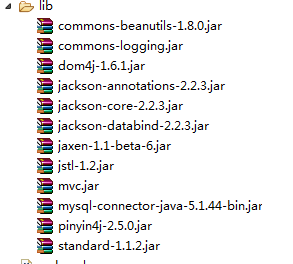
导入jar包
MVC_Book_dao
package com.hmc.dao;

import java.util.List;

import java.util.Map;

import com.hmc.util.JsonBaseDao;

import com.hmc.util.JsonUtils;

import com.hmc.util.PageBean;

import com.hmc.util.StringUtils;

public class MVC_Book_dao extends JsonBaseDao{

	/**

	 * 查询分页

	 * @param paMap

	 * @param pageBean

	 * @return

	 * @throws Exception

	 */

	 public  List<Map<String, Object>> list(Map<String, String[]> paMap,PageBean pageBean) throws Exception{

		//String sql="SELECT * FROM t_book";

		 String sql="SELECT * FROM t_mvc_book where true ";

		  String bname=JsonUtils.getParamVal(paMap, "bname");

		  System.out.println(bname);

		//  String bid=JsonUtils.getParamVal(paMap, "bid");

		  if(StringUtils.isNotBlank(bname)) {

			  sql+=" and bname like '%"+bname+"%'";

		  }

//		  if(bid!=null) {

//			  sql+=" and bid="+bid;

//		  }

		return super.executeQuery(sql, pageBean);

	  }

	 /**

	  * 修改

	  * @param paMap

	  * @param pageBean

	  * @return

	  * @throws NoSuchFieldException

	  * @throws Exception

	  */

	 public   int upde(Map<String, String[]> paMap,PageBean pageBean) throws NoSuchFieldException, Exception {

		  String sql="update t_mvc_book set bname=?,price=? where bid=?";

		return super.executeUpdate(sql, new String[] {"bname","price","bid"}, paMap);

	  }

	 /**

	  * 新增

	  * @param paMap

	  * @param pageBean

	  * @return

	  * @throws NoSuchFieldException

	  * @throws Exception

	  */

	 public  int add(Map<String, String[]> paMap,PageBean pageBean) throws NoSuchFieldException, Exception {

		 String sql="insert into  t_mvc_book values(?,?,?)";

		return super.executeUpdate(sql, new String[] {"bid","bname","price"}, paMap);

	  }

	 /**

	  * 删除

	  * @param paMap

	  * @param pageBean

	  * @return

	  * @throws NoSuchFieldException

	  * @throws Exception

	  */

	 public  int dele(Map<String, String[]> paMap,PageBean pageBean) throws NoSuchFieldException, Exception {

		  String sql="delete from t_mvc_book  where bid=?";

		return super.executeUpdate(sql, new String[] {"bid"}, paMap);

	  }

}
MVC_Book_Action
package com.hmc.action;

import java.util.HashMap;

import java.util.List;

import java.util.Map;

import javax.servlet.http.HttpServletRequest;

import javax.servlet.http.HttpServletResponse;

import com.fasterxml.jackson.databind.ObjectMapper;

import com.hmc.dao.MVC_Book_dao;

import com.hmc.dao.ModuleDao;

import com.hmc.util.PageBean;

import com.zking.framework.ActionSupport;

public class MVC_Book_Action extends ActionSupport{

    private  MVC_Book_dao book_dao=new MVC_Book_dao();

	private ObjectMapper mapper=new ObjectMapper();

	/**

	 * 书籍查询所有加分页

	 * @param request

	 * @param response

	 * @return

	 * @throws Exception

	 */

	public  String list(HttpServletRequest request,HttpServletResponse response) throws Exception {

		PageBean pageBean=new PageBean();

		pageBean.setRequest(request);

		List<Map<String, Object>> list = this.book_dao.list(request.getParameterMap(), pageBean);

		Map<String, Object> map=new HashMap<>();

         map.put("total", pageBean.getTotal());

         map.put("rows", list);

		 mapper.writeValue(response.getOutputStream(),map);

		 return null;

	    }

	/**

	 * 新增书籍

	 * @param request

	 * @param response

	 * @return

	 * @throws Exception

	 */

	public  String add(HttpServletRequest request,HttpServletResponse response) throws Exception {

		 this.book_dao.add(request.getParameterMap(), null);

		 Map<String, Object> map=new HashMap<>();

		 map.put("success", true);

         map.put("message", "新增书籍成功");

         mapper.writeValue(response.getOutputStream(),map);

         return null;

	    }

	/**

	 * 修改书籍

	 * @param request

	 * @param response

	 * @return

	 * @throws Exception

	 */

	public  String upde(HttpServletRequest request,HttpServletResponse response) throws Exception {

         int add = this.book_dao.upde(request.getParameterMap(), null);

         Map<String, Object> map=new HashMap<>();

         map.put("success", true);

         map.put("message", "修改书籍成功");

         mapper.writeValue(response.getOutputStream(),map);

         return null;

	    }

	/**

	 * 删除书籍

	 * @param request

	 * @param response

	 * @return

	 * @throws Exception

	 */

	public  String dele(HttpServletRequest request,HttpServletResponse response) throws Exception {

         int add = this.book_dao.dele(request.getParameterMap(), null);

         Map<String, Object> map=new HashMap<>();

         map.put("success", true);

         map.put("message", "删除书籍成功");

         mapper.writeValue(response.getOutputStream(),map);

         return null;

	    }

}
mvc.xml
<?xml version="1.0" encoding="UTF-8"?>

<config>

	<!-- <action path="/regAction" type="test.RegAction">

		<forward name="failed" path="/reg.jsp" redirect="false" />

		<forward name="success" path="/login.jsp" redirect="true" />

	</action> -->

	<action path="/menuAction" type="com.hmc.web.MenuAction">

	</action>

	<action path="/userAction" type="com.hmc.web.UserAction">

		<forward name="index" path="/index.jsp" redirect="false" />

	    <forward name="login" path="/login.jsp" redirect="false" />

	</action>

	<action path="/moduleAction" type="com.hmc.action.ModuleAction">

	</action>

	<action path="/bookAction" type="com.hmc.action.MVC_Book_Action">

	   <forward name="a" path="/index.jsp" redirect="false" />

	</action>

</config>
index.jsp
<%@page import="com.fasterxml.jackson.annotation.JsonInclude.Include"%>

<%@ page language="java" contentType="text/html; charset=UTF-8"

    pageEncoding="UTF-8"%>

<!DOCTYPE html PUBLIC "-//W3C//DTD HTML 4.01 Transitional//EN" "http://www.w3.org/TR/html4/loose.dtd">

<html>

<head>

<%@include file="head.jsp" %>

<meta http-equiv="Content-Type" content="text/html; charset=UTF-8">

<title>EasyUI</title>

<script type="text/javascript" src="static/js/index.js"></script>

</head>

<body class="easyui-layout">

    <div data-options="region:'north',split:true" style="height:60px; overflow-y: hidden;">

    <h3 style="font-size: 20px;">网上书店后台管理系统</h3>

    </div>

    <div data-options="region:'south',split:true" style="height:40px;">

    </div>

   <!--  <div data-options="region:'east',iconCls:'icon-reload',title:'East',split:true" style="width:100px;"></div>    -->

    <div data-options="region:'west',title:'导航菜单',split:true," style="width: 200px;">

    <div id="menu" class="easyui-accordion" data-options="fit:true,border:false">

    </div>

    </div>

    <div data-options="region:'center'" style="padding:5px;background:#eee;">

     <div id="tabs" class="easyui-tabs"  data-options="fit:true,border:false">

    <div title="首页" style="padding:20px;display:none;">

            首页

        </div>

      </div>

    </div>

</body>

</html>
index.js
var rootPath;

$(function(){

	rootPath=$('#absolutePath').val();

	createAccordion();

	createTree();

});

//1.绑定分类组件Accordion

function createAccordion(){

	$.ajax({

		url:rootPath+'moduleAction.action',

		data:{'pid':'-1','methodName':'queryModulelst'},

		dataType:'json',

		type:'post',

		success:function(data){

			for(var i=0;i<data.length;i++){

				var item=data[i];

				$('#menu').accordion('add',{

					title:item.text,

					content:'<ul id="'+item.id+'" alt="'+item.text+'" class="easyui-tree">',

					selected:false

				});

			}

		}

	})

}

//2选择分类组件Accordion时加载子模块

function createTree(){

	$("#menu").accordion({

		onSelect:function(title,index){

		var pid=$('ul[alt='+title+']').attr('id');

		//判断Tree是否有节点

		var nodes=$('ul[alt='+title+']').tree('getRoots');

		if(nodes.length>0){

			return;

		}

		$('ul[alt='+title+']').tree({

			url:rootPath+'moduleAction.action?pid='+pid+'&&methodName=queryModulelst',

	        //加载同时把子节点绑定上去

			onSelect:function(node){

				createTabs(node.text,node.url);

	        }

		});

		}

	});

}

//3.点击子模块,动态加载tabs选项卡,并打开url路径的页面

function createTabs(title,url){

	var isExists=$('#tabs').tabs('exists',title);

	if(isExists){

		$('#tabs').tabs('select',title);

	}

	else{

	var iframe="<iframe frameborder='0' src='"+url+"' scrolling='auto' style='width:100%;height:100%;'></iframe>";

	$('#tabs').tabs('add',{

	    title:title,

	    content:iframe,

	   // href:rootPath+'jsp/'+url,

	     closable:true,

	});

	}

}
bookList.jsp
<%@ page language="java" contentType="text/html; charset=UTF-8"

    pageEncoding="UTF-8"%>

<!DOCTYPE html PUBLIC "-//W3C//DTD HTML 4.01 Transitional//EN" "http://www.w3.org/TR/html4/loose.dtd">

<html>

<head>

<%@include file="../head.jsp" %>

<script type="text/javascript" src="static/js/bookList.js"></script>

<title>书本管理 </title>

</head>

<body class="easyui-layout">

    <div data-options="region:'north',split:true,border:false" style="height:70px;line-height:60px;padding-left: 10px;">

    <label>书本名称</label>

    <input class="easyui-textbox" style="width:200px" id="bookname">

    <a id="btn_search" href="javascript:void(0);" class="easyui-linkbutton" data-options="iconCls:'icon-search'">查询</a>

    </div>

    <!-- 数据 -->

    <div data-options="region:'center',border:false" style="background:#eee;">

    <table id="tb" class="easyui-datagrid">    </table>

    </div>

    <div id="toolbar">

    <a href="javascript:void(0);" onclick="add()" class="easyui-linkbutton" data-options="iconCls:'icon-add',plain:true">新增</a>

    <a href="javascript:void(0);" onclick="edit()" class="easyui-linkbutton" data-options="iconCls:'icon-edit',plain:true">修改</a>

    <a href="javascript:void(0);" onclick="del()" class="easyui-linkbutton" data-options="iconCls:'icon-remove',plain:true">删除</a>

    </div>

       <!--对话框 -->

       <div id="dd"></div>

       <!--对话框保存和关闭按钮  -->

       <div id="dlg-buttons">

	<a href="javascript:void(0);" class="easyui-linkbutton" iconCls="icon-save" onclick="dialogSave();">保存</a>

	<a href="javascript:void(0);" class="easyui-linkbutton" iconCls="icon-cancel" onclick="dialogClose();">关闭</a>

       </div>

</body>

</html>
bookList.js
var rootPath;

$(function(){

	rootPath=$('#absolutePath').val();

	initDataGrid();

	query();

	$('#btn_search').click(function(){

		query();

	});

})

//1初始化DateGrid

function initDataGrid(){

	$("#tb").datagrid({

		  url : '', 		// 初始化请求路径

		  fitColumns:true,

	      singleSelect : true, 	// 是否选中单行

	      checkOnSelect : true, 	// 点击行选中时该checkbox选中或取消选中

	      rownumbers:true,	        // 行号

	      fit : true, 		// 高宽自适应

	      border : false, 	        // 是否显示边框

	      title : '书本列表', 	// datagrid标题

	      striped : true, 	        // 显示斑马线效果

	      pagination:true,	// 是否分页

	      pageNumber:1,	    // 初始化页码

	      pageSize:10,		// 初始化每页显示条数

	      columns:[[

	    	  {field:'',checkbox:true},

	          {field:'bid',title:'书本编号',width:100,align:'center'},

	          {field:'bname',title:'书本名称',width:100,align:'center'},

	          {field:'price',title:'书本作者',width:100,align:'center',

	        	  //case when行列转化

	        	  formatter:function(value,row,index){

	        		  return "¥"+value

	        	  },

	              styler:function(value,row,index){

	        	  if(value>50){

	        		  return 'background-color:#ffee00;color:red'

	        	  }

	          }

	          },

	          ]],

	    //给行加事件

	      onDblClickRow:function(index,row){

	    	  $.messager.alert('提示',JSON.stringify(row));

	      },

          toolbar:'#toolbar'

	});

}

//2.点击查询将数据绑定到DateGrid

function query(){

	//获取datagrid的属性对象

	var options=$('#tb').datagrid('options');

	//设置请求路径

	options.url=rootPath+"bookAction.action";

	//获取请求参数

	var params={

			'methodName':'list',

			'bname':$('#bookname').val()

	};

  //刷新

   $('#tb').datagrid('load',params);

}

//3.实现DateGrid分页效果

//4.设置DateGrid的toolbar属性,实现增删改

//Dialog,Messager,form,LinkedButton,TextBox,ComboBox

function add(){

	$('#dd').dialog({

		width : 400,

		height : 292,

		modal : true,

		draggable : true,

		collapsible : false,

		minimizable : false,

		maximizable : false,

		title : '新增书本信息',

		buttons:"#dlg-buttons",

		href:'jsp/bookDetail.jsp',

		onLoad:function(){

			$('#ff').form('reset');

		}

	})

}

//修改

function edit(){

	//判断datagrid行是否被选中

	var row=$('#tb').datagrid('getSelected');

	if(null==row){

		 $.messager.alert('警告','请选中行');

		 return false;

	}

	$('#dd').dialog({

		width : 400,

		height : 292,

		modal : true,

		draggable : true,

		collapsible : false,

		minimizable : false,

		maximizable : false,

		title : '修改书本信息',

		buttons:"#dlg-buttons",

		href:'jsp/bookDetail.jsp',

		//绑值

		onLoad:function(){

			$('#ff').form('load',row);

		}

	})

}

function del(){

	var row=$('#tb').datagrid('getSelected');

	if(null==row){

		 $.messager.alert('警告','请选中行');

		 return false;

	}

	$.messager.confirm('确认','您确认想要删除记录吗?',function(r){

	    if (r){

	       $.ajax({

	    	   url:rootPath+'bookAction.action',

	    	   data:{'methodName':'dele','bid':row.bid},

	    	   dataType:'json',

	    	   type:'post',

	    	   success:function(data){

	    		   if(data.success){

	    			   $.messager.alert('消息',data.message);

	    			   query();

	    		   }

	    	   }

	       })

	    }

	});

}

//新增或修改

function dialogSave(){

	var options=$('#dd').dialog('options');

	var url="bookAction.action?methodName=add"

	if(options.title=="修改书本信息"){

		url="bookAction.action?methodName=upde"

	}

	//表单提交

	$('#ff').form('submit',{

	    url:rootPath+url,

	    onSubmit: function(){

	    	//表单验证

	        return $(this).form("validate");

	    },

	    success:function(data){

	     var result=JSON.parse(data);

	     if(!result.success){

	    	 $.messager.alert('警告',result.message);

	    	 return false;

	     }

	    	 dialogClose();

	    	 query();

	    }

	});

}

//关闭按钮

function   dialogClose(){

	$('#dd').dialog('close');

}
bookDetail,jsp
<%@ page language="java" contentType="text/html; charset=UTF-8"

    pageEncoding="UTF-8"%>

<!DOCTYPE html PUBLIC "-//W3C//DTD HTML 4.01 Transitional//EN" "http://www.w3.org/TR/html4/loose.dtd">

<html>

<head>

<%@ include file="../head.jsp" %>

<meta http-equiv="Content-Type" content="text/html; charset=UTF-8">

<title>Insert title here</title>

</head>

<body>

<form id="ff" method="post">

<div style="height: 50px;line-height: 45px;padding-left: 20px;">

<label>书本编号:</label>

<input name="bid" class="easyui-textbox" style="width:200px" required="true">

</div>

<div style="height: 50px;line-height: 45px;padding-left: 20px;">

<label>书本名称:</label>

<input name="bname" class="easyui-textbox" style="width:200px" required="true">

</div>

<div style="height: 50px;line-height: 45px;padding-left: 20px;">

<label>书本价格:</label>

<input name="price" class="easyui-textbox" style="width:200px" required="true">

</div>

<div style="height: 50px;line-height: 45px;padding-left: 20px;">

<label>书本类型:</label>

<select  class="easyui-combobox" name="booktype" style="width:200px;">

    <option value="">--请选择--</option>

    <option>神话</option>

    <option>历时</option>

    <option>玄幻</option>

    <option>爱情</option>

</select>

</div>

</form>

</body>

</html>
head.jsp
<%@ page language="java" contentType="text/html; charset=UTF-8"

    pageEncoding="UTF-8"%>

<base href="${pageContext.request.contextPath}/">

<!--页面缓存  -->

<meta http-equiv="pragma" content="no-cache">

<meta http-equiv="cache-control" content="no-cache">

<meta http-equiv="expires" content="0">

<link rel="stylesheet" type="text/css" href="static/js/public/easyui5/themes/default/easyui.css">

<link rel="stylesheet" type="text/css" href="static/js/public/easyui5/themes/icon.css">

<script type="text/javascript" src="static/js/public/easyui5/jquery.min.js"></script>

<script type="text/javascript" src="static/js/public/easyui5/jquery.easyui.min.js"></script>

<input type="hidden" id="absolutePath" value="${pageContext.request.contextPath}/">
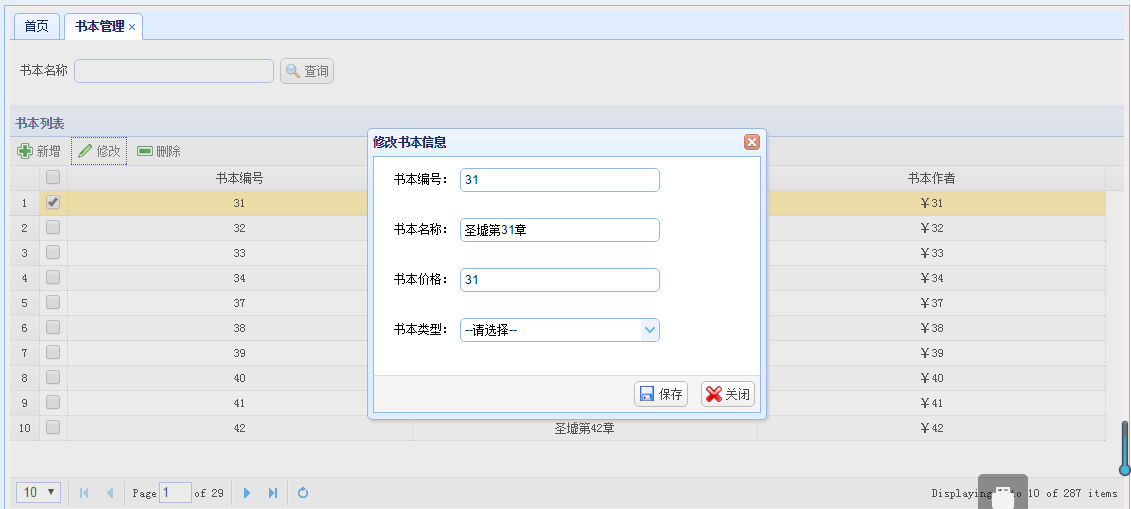
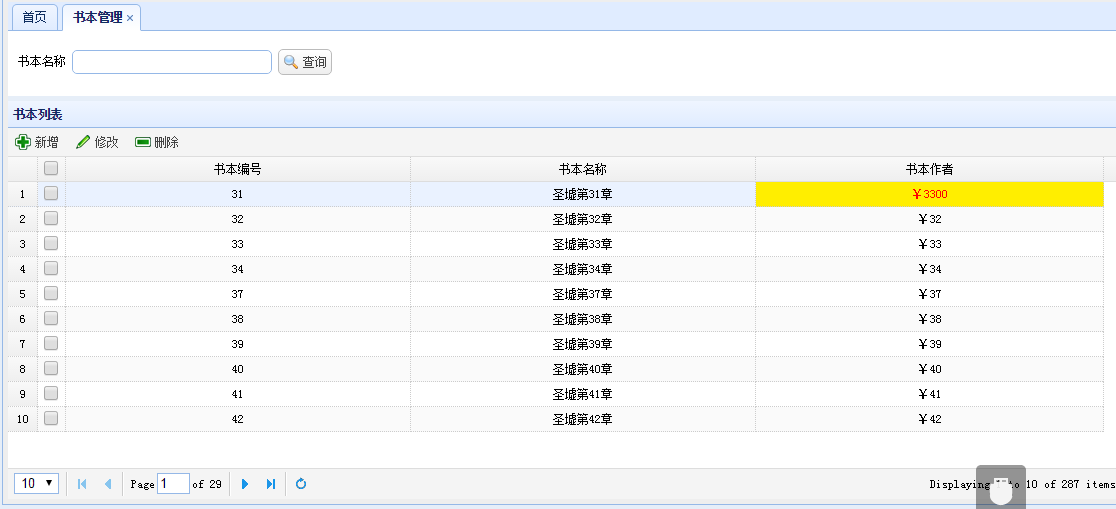
效果
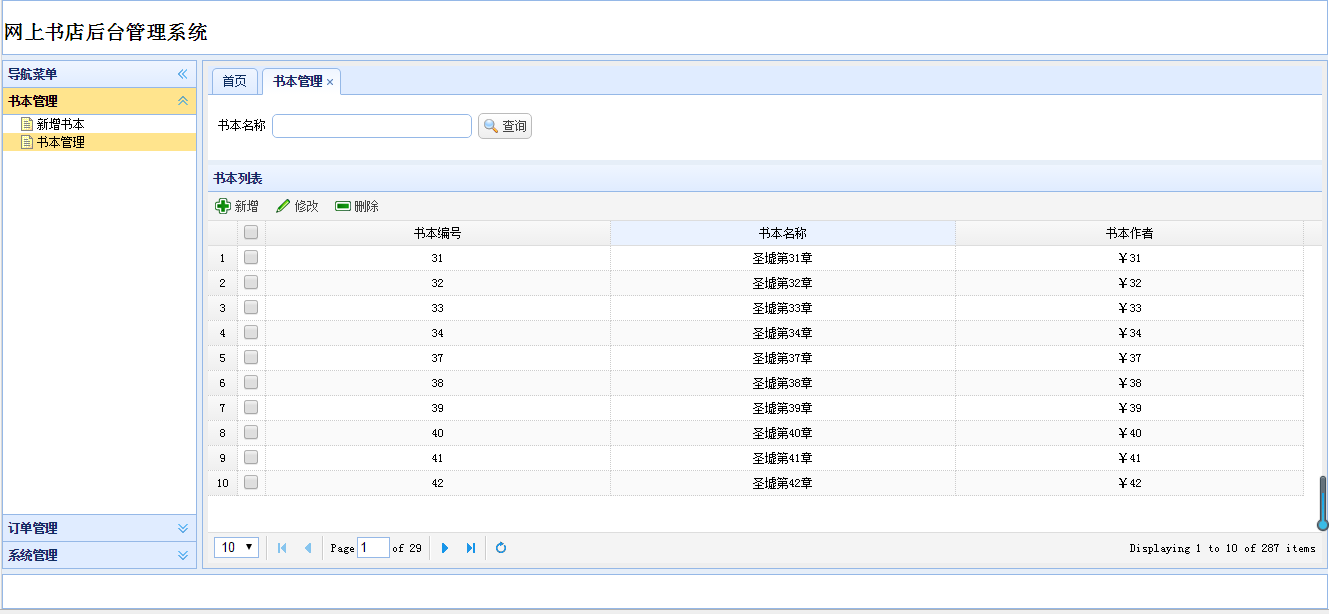
新增


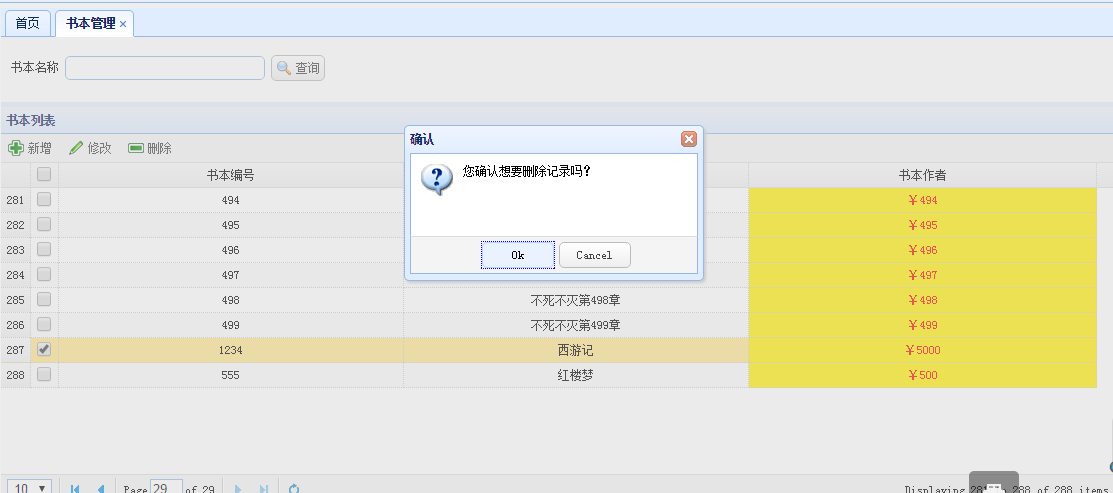
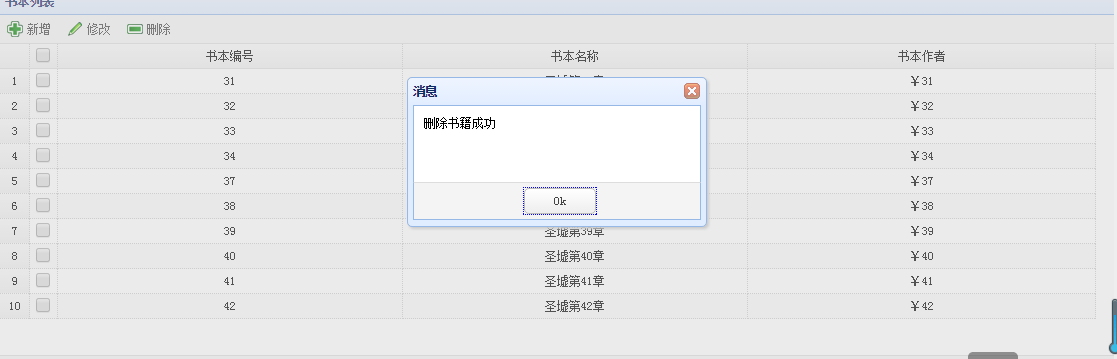
删除
修改
修改价格为3300
easyui增删改查的更多相关文章
- SpringMVC+SpringJdbc+SQLServer+EasyUI增删改查
前言 前天用SpringJdbc连接了一把SQLServer,早上起来用SpringMVC+SpringJdbc+EasUI写了个增删改查的demo,主要是熟悉下SpringMVC相关知识点,如vie ...
- easyui增删改查前段代码
<script> var url; //添加用户窗体 function newUser() { $('#dlg').dialog('open').dialog('setTitle', '学 ...
- 构建ASP.NET MVC4+EF5+EasyUI+Unity2.x注入的后台管理系统(9)-MVC与EasyUI结合增删改查
系列目录 文章于2016-12-17日重写 在第八讲中,我们已经做到了怎么样分页.这一讲主要讲增删改查.第六讲的代码已经给出,里面包含了增删改,大家可以下载下来看下. 这讲主要是,制作漂亮的工具栏,虽 ...
- Node.js、express、mongodb 入门(基于easyui datagrid增删改查)
前言 从在本机(win8.1)环境安装相关环境到做完这个demo大概不到两周时间,刚开始只是在本机安装环境并没有敲个Demo,从周末开始断断续续的想写一个,按照惯性思维就写一个增删改查吧,一方面是体验 ...
- golang学习之beego框架配合easyui实现增删改查及图片上传
golang学习之beego框架配合easyui实现增删改查及图片上传 demo目录: upload文件夹主要放置上传的头像文件,main是主文件,所有效果如下: 主页面: 具体代码: <!DO ...
- EasyUI + Spring MVC + hibernate实现增删改查导入导出
(这是一个故事--) 前言 作为一个JAVA开发工程师,我觉得最基本是需要懂前端.后台以及数据库. 练习的内容很基础,包括:基本增删改查.模糊查询.分页查询.树菜单.上传下载.tab页 主管发我一个已 ...
- 详谈easyui datagrid增删改查操作
转自:http://blog.csdn.net/abauch_d/article/details/7734395 前几天我把easyui dadtagrid的增删改查的实现代码贴了出来,发现访问量达到 ...
- 构建ASP.NET MVC4+EF5+EasyUI+Unity2.x注入的后台管理系统(5)-EF增删改查by糟糕的代码
原文:构建ASP.NET MVC4+EF5+EasyUI+Unity2.x注入的后台管理系统(5)-EF增删改查by糟糕的代码 上一讲我们创建了一系列的解决方案,我们通过一个例子来看看层与层之间的关系 ...
- MVC与EasyUI结合增删改查
构建ASP.NET MVC4+EF5+EasyUI+Unity2.x注入的后台管理系统(9)-MVC与EasyUI结合增删改查 在第八讲中,我们已经做到了怎么样分页.这一讲主要讲增删改查.第六讲的 ...
随机推荐
- springboot 配置elasticsearch Java High Rest Client
前提声明 在新版本的spring boot中逐渐放弃了对Spring Data Elasticsearch的支持,所以不推荐使用,使用ES官方推出的Java High Rest Client. 引入依 ...
- python 多进程和协程配合使用
一.需求分析 有一批key已经写入到3个txt文件中,每一个txt文件有30万行记录.现在需要读取这些txt文件,判断key是否在数据仓库中.(redis或者mysql) 为空的记录,需要写入到日志文 ...
- go 学习笔记(4) import
package main import ( f "fmt" ) const NAME string = "imooc" var a string = " ...
- redis GEO的使用
一.概念 redis的GEO特性在Redis3.2版本发布,这个功能可以将用户给定的地理位置信息储存起来,并对这些信息进行操作. GEO常用语LBS(Location Based Service),基 ...
- CSS3 @font-face 规则
指定名为"myFirstFont"的字体,并指定在哪里可以找到它的URL: @font-face { font-family: myFirstFont; src: url('San ...
- TeX 家族(TeX, pdfTeX, XeTeX, LuaTeX, LaTeX, pdfLaTeX, XeLaTeX …)
TeX 家族 带有 TeX 的词,仅仅是本文就已经提到了 TeX, LaTeX, XeLaTeX.通常中国学生面对不了解意思的一群形近单词,都会有一种「本能的恐惧」(笑~).因此,「大神们」在为新手介 ...
- MySQL-5.7.26解压版安装教程
1.下载地址:https://cdn.mysql.com//Downloads/MySQL-5.7/mysql-5.7.26-winx64.zip 2.在解压目录中添加 data文件夹 和 my.in ...
- oracle 触发器的实例(转)
触发器使用教程和命名规范 目 录 目录 触发器使用教程和命名规范 1 1,触发器简介 1 2,触发器示例 2 3,触发器语法和功能 3 4,例一:行级触发器之一 4 5,例二:行级触发器之二 4 6 ...
- iOS自动签名网站
node.js作为服务端,调用shell脚本进行iOS包重签名. 需要安装:nodejs ,forever 安装环境: 安装nodejs 安装forever: npm install forever ...
- python多进程并发插入mysql数据
import pymysql import traceback from multiprocessing import Pool,Manager,cpu_count from multiprocess ...