
bootstrap-table中使用bootstrap-switch开关按钮
先上图
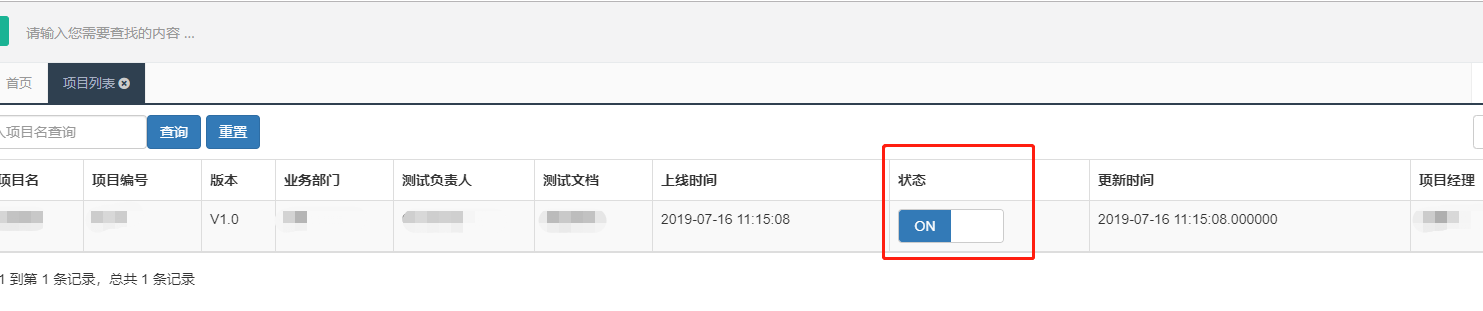
准备工作:
添加css和js文件
#bootstrap开关按钮#}

<link href="https://cdn.bootcss.com/bootstrap-switch/3.3.4/css/bootstrap3/bootstrap-switch.min.css" rel="stylesheet"><script src="https://cdn.bootcss.com/jquery/1.11.1/jquery.min.js"></script>

<script src="https://cdn.bootcss.com/bootstrap-switch/3.3.4/js/bootstrap-switch.min.js"></script>
1、首先需要格式化状态栏,加上input框
给状态栏加上 formatter: project_status,
 columns: [

                            {

                                checkbox:true  //第一列显示复选框

                            },

                         ... ...

                            {

                                field: 'status',

                                title: '状态',

                                formatter: project_status,

                            },
]
            {#状态栏格式化#}

                    function project_status(value, row, index) {

                        {#var result="";#}

                        {#result += "<input type='checkbox' id='project_status'>"#}

                        {#return "<div class='switch' id='mySwitch'><input type='checkbox' checked id='project_status_switch' name='mycheck'></div>";#}

                        return "<input type='checkbox' checked id='project_status_switch' name='mycheck'>";

                    }
2、写一个初始化开关的函数:initSwitch()
function initSwitch(){

  $('#project_status_switch').bootstrapSwitch({

    onText : "启用",      // 设置ON文本

    offText : "禁用",    // 设置OFF文本

    onColor : "success",// 设置ON文本颜色(info/success/warning/danger/primary)

    offColor : "warning",  // 设置OFF文本颜色 (info/success/warning/danger/primary)

    size : "small",    // 设置控件大小,从小到大  (mini/small/normal/large)

                    // 当开关状态改变时触发

    onSwitchChange : function(event, state) {

      if (state == true) {

        alert("ON");

      } else {

        alert("OFF");

      }

    }

  })

}
3、bootstrap-table中加上参数onLoadSuccess,初始化表格时直接初始化switch,要不然无法显示开关
onLoadSuccess: function(){

  {#初始化switch开关按钮#}

  initSwitch();

},
完整代码:
{% load staticfiles %}
<!DOCTYPE html>
<html lang="en">
<head>
<meta charset="UTF-8" />
<title>项目列表</title>
<script src="https://cdn.bootcss.com/jquery/3.2.1/jquery.min.js"></script>
<link href="https://cdn.bootcss.com/bootstrap/3.3.7/css/bootstrap.min.css" rel="stylesheet">
<script src="https://cdn.bootcss.com/bootstrap/3.3.7/js/bootstrap.min.js"></script>
<link href="https://cdn.bootcss.com/bootstrap-table/1.11.1/bootstrap-table.min.css" rel="stylesheet">
<script src="https://cdn.bootcss.com/bootstrap-table/1.11.1/bootstrap-table.min.js"></script>
<script src="https://cdn.bootcss.com/bootstrap-table/1.11.1/locale/bootstrap-table-zh-CN.min.js"></script>
{# bootstrap开关按钮#}
<link href="https://cdn.bootcss.com/bootstrap-switch/3.3.4/css/bootstrap3/bootstrap-switch.min.css" rel="stylesheet">
{#<script src="https://cdn.bootcss.com/jquery/1.11.1/jquery.min.js"></script> #}
<script src="https://cdn.bootcss.com/bootstrap-switch/3.3.4/js/bootstrap-switch.min.js"></script>
</head>
<body>
{# 自定义搜索条件区域#}
<div class="fixed-table-toolbar">
<div class="pull-left search">
<input id="search-keyword" class="form-control" placeholder="请输入项目名查询">
</div>
<div class="columns columns-left btn-group pull-left">
<button id="search-button" type="button" class="btn btn-primary">查询</button>
</div>
<div class="columns columns-left btn-group pull-left">
<button id="reset-button" type="button" class="btn btn-primary" onclick="clean()">重置</button>
</div>
<!-- 按钮触发模态框 -->
<div class="columns columns-right btn-group pull-right">
<button type="button" class="btn btn-primary" data-toggle="modal" data-target="#myModal">新增项目</button>
</div>
<!-- 模态框(Modal) -->
<form action="/addProject/" method="post" class="form-horizontal" role="form">
<div class="modal fade" id="myModal" tabindex="-1" role="dialog" aria-labelledby="myModalLabel" aria-hidden="true">
<div class="modal-dialog">
<div class="modal-content">
<div class="modal-header">
<button type="button" class="close" data-dismiss="modal" aria-hidden="true">
×
</button>
<h4 class="modal-title" id="myModalLabel">
新增项目
</h4>
</div>
{# 模态框body #}
<div class="modal-body" style="height: 100%;">
<div class="form-group">
<label for="firstname" class="col-sm-3 control-label">项目名</label>
<div class="col-sm-7">
<input type="text" class="form-control" name="project-name"
placeholder="请输入项目名">
</div>
</div>
<div class="form-group">
<label for="firstname" class="col-sm-3 control-label">项目编号</label>
<div class="col-sm-7">
<input type="text" class="form-control" name="project-code"
placeholder="请输入项目名">
</div>
</div>
<div class="form-group">
<label for="firstname" class="col-sm-3 control-label">版本</label>
<div class="col-sm-7">
<input type="text" class="form-control" name="version"
placeholder="请输入项目名">
</div>
</div>
<div class="form-group">
<label for="firstname" class="col-sm-3 control-label">业务部门</label>
<div class="col-sm-7">
<input type="text" class="form-control" name="department"
placeholder="请输入项目名">
</div>
</div>
<div class="form-group">
<label for="firstname" class="col-sm-3 control-label">测试负责人</label>
<div class="col-sm-7">
<input type="text" class="form-control" name="tester"
placeholder="请输入项目名">
</div>
</div>
<div class="form-group">
<label for="firstname" class="col-sm-3 control-label">测试文档</label>
<div class="col-sm-7">
<input type="text" class="form-control" name="document"
placeholder="请输入项目名">
</div>
</div>
<div class="form-group">
<label for="firstname" class="col-sm-3 control-label">上线时间</label>
<div class="col-sm-7">
<input type="text" class="form-control" name="release-time"
placeholder="请输入项目名">
</div>
</div>
<div class="form-group">
<label for="firstname" class="col-sm-3 control-label">状态</label>
<div class="col-sm-7">
<input type="text" class="form-control" name="project-status"
placeholder="请输入项目名">
</div>
</div>
<div class="form-group">
<label for="firstname" class="col-sm-3 control-label">更新时间</label>
<div class="col-sm-7">
<input type="text" class="form-control" name="project-code"
placeholder="请输入项目名">
</div>
</div>
<div class="form-group">
<label for="firstname" class="col-sm-3 control-label">项目经理</label>
<div class="col-sm-7">
<input type="text" class="form-control" name="project-manager"
placeholder="请输入项目经理名">
</div>
</div>
</div>
{# 模态框底部#}
<div class="modal-footer">
<button type="button" class="btn btn-default" data-dismiss="modal">关闭</button>
<input type="button" class="btn btn-primary"value="提交"/>
</div>
</div><!-- /.modal-content -->
</div><!-- /.modal -->
</div>
{##}
</form>
</div>
{# bootstrap table自动渲染区域#}
<table id="mytab" class="table table-hover"></table>
</body>
<script type="text/javascript">
$('#mytab').bootstrapTable({
{#全部参数#}
{#url: "{% static 'guchen_obj.json' %}", //请求后台的URL(*)或者外部json文件,json内容若为json数组[{"id": 0,"name": "Item 0","price": "$0"},{"id": 1,"name": "Item 1","price": "$1"}],#}
//且键的名字必须与下方columns的field值一样,同时sidePagination需要设置为client或者直接注释掉,这样前台才能读取到数据,且分页正常。
//当json文件内容为json对象时:{"total": 2,"rows": [{"id": 0,"name": "Item 0","price": "$0"},{"id": 1,"name": "Item 1","price": "$1"}]},
//分页要写为server,但是server如果没有处理的话,会在第一页显示所有的数据,分页插件不会起作用
url:"/getdata", //从后台获取数据时,可以是json数组,也可以是json对象
dataType: "json",
method: 'get', //请求方式(*)
toolbar: '#toolbar', //工具按钮用哪个容器
striped: true, //是否显示行间隔色
cache: false, //是否使用缓存,默认为true,所以一般情况下需要设置一下这个属性(*)
pagination: true, //是否显示分页(*)
sortable: true, //是否启用排序
sortOrder: "asc", //排序方式
{#queryParams: oTableInit.queryParams,//传递参数(*)#}
{#sidePagination: "server", //分页方式:client客户端分页,server服务端分页(*),数据为json数组时写client,json对象时(有total和rows时)这里要为server方式,写client列表无数据#}
pageNumber: 1, //初始化加载第一页,默认第一页
pageSize: 5, //每页的记录行数(*)
pageList: [10, 25, 50, 100], //可供选择的每页的行数(*)
{#search: true, //是否显示表格搜索,此搜索是客户端搜索,不会进服务端,所以,个人感觉意义不大#}
strictSearch: true,
showColumns: true, //是否显示所有的列
showRefresh: true, //是否显示刷新按钮
minimumCountColumns: 2, //最少允许的列数
clickToSelect: true, //是否启用点击选中行
{#height: 500, //行高,如果没有设置height属性,表格自动根据记录条数觉得表格高度#}
uniqueId: "ID", //每一行的唯一标识,一般为主键列
showToggle: false, //是否显示详细视图和列表视图的切换按钮
cardView: false, //是否显示详细视图
detailView: false, //是否显示父子表
//得到查询的参数
queryParams: function (params) {
//这里的键的名字和控制器的变量名必须一直,这边改动,控制器也需要改成一样的
var query_params = {
rows: params.limit, //页面大小
page: (params.offset / params.limit) + 1, //页码
sort: params.sort, //排序列名
sortOrder: params.order, //排位命令(desc,asc)
//查询框中的参数传递给后台
search_kw: $('#search-keyword').val(), // 请求时向服务端传递的参数
};
return query_params;
},
columns: [
{
checkbox:true //第一列显示复选框
},
{
field: 'project_name', //返回数据rows数组中的每个字典的键名与此处的field值要保持一致
title: '项目名'
},
{
field: 'project_code',
title: '项目编号'
},
{
field: 'version',
title: '版本'
},
{
field: 'department',
title: '业务部门'
},
{
field: 'tester',
title: '测试负责人'
},
{
field: 'document',
title: '测试文档'
},
{
field: 'release_time',
title: '上线时间'
},
{
field: 'status',
title: '状态',
formatter: project_status,
},
{
field: 'update_time',
title: '更新时间'
},
{
field: 'manager',
title: '项目经理'
},
{
field: 'operate',
title: '操作',
width: 120,
align: 'center',
valign: 'middle',
formatter: actionFormatter,
},
],
onLoadSuccess: function(){
{# 初始化switch开关按钮#}
initSwitch();
},
});
function initSwitch(){
$('#project_status_switch').bootstrapSwitch({
onText : "启用", // 设置ON文本
offText : "禁用", // 设置OFF文本
onColor : "success",// 设置ON文本颜色(info/success/warning/danger/primary)
offColor : "warning", // 设置OFF文本颜色 (info/success/warning/danger/primary)
size : "small", // 设置控件大小,从小到大 (mini/small/normal/large)
// 当开关状态改变时触发
onSwitchChange : function(event, state) {
if (state == true) {
alert("ON");
} else {
alert("OFF");
}
}
})
}
{#状态栏格式化#}
function project_status(value, row, index) {
{#var result="";#}
{#result += "<input type='checkbox' id='project_status'>"#}
{#return "<div class='switch' id='mySwitch'><input type='checkbox' checked id='project_status_switch' name='mycheck'></div>";#}
return "<input type='checkbox' checked id='project_status_switch' name='mycheck'>";
}
//操作栏的格式化
function actionFormatter(value, row, index) {
var id = value;
var result = "";
result += "<a href='javascript:;' class='btn btn-xs green' onclick=\"EditViewById('" + id + "', view='view')\" title='查看'><span class='glyphicon glyphicon-search'></span></a>";
result += "<a href='javascript:;' class='btn btn-xs blue' onclick=\"EditViewById('" + id + "')\" title='编辑'><span class='glyphicon glyphicon-pencil'></span></a>";
result += "<a href='javascript:;' class='btn btn-xs red' onclick=\"DeleteByIds('" + id + "')\" title='删除'><span class='glyphicon glyphicon-remove'></span></a>";
return result;
}
// 搜索查询按钮触发事件
$(function() {
$("#search-button").click(function () {
$('#mytab').bootstrapTable(('refresh')); // 很重要的一步,刷新url!
$('#search-keyword').val()
})
})
//重置搜索条件
function clean(){
//先清空
$('#search-keyword').val('');
//清空后查询条件为空了,再次刷新页面,就是全部数据了
$('#mytab').bootstrapTable(('refresh')); // 很重要的一步,刷新url!
}
</script>
</html>
bootstrap-table中使用bootstrap-switch开关按钮的更多相关文章
- bootstrap Table 中给某一特定值设置table选中
bootstrap Table 中给某一特定值设置table选中 需求: 如图所示:左边地图人员选定,右边表格相应选中. 功能代码: //表格和图标联动 function changeTableSel ...
- 如何去掉bootstrap table中表格样式中横线竖线
修改之前,表格看上去比较拥挤,因为bootstrap table插件中自带斑马线表格样式,有横线和竖线分栏,现在我们不需要这些. 应UI设计的要求,要去掉中间的横线和竖线,使用了修改需求中一种简单粗暴 ...
- Bootstrap table方法,Bootstrap table事件,配置
调用 BootStrap Table 方法的语法: $('#table').bootstrapTable('method', parameter); 例如: $('#my_table').bootst ...
- Bootstrap Table 中文文档(完整翻译版)
表格参数: 名称 标签 类型 默认 描述 - data-toggle String ‘table’ 不用写 JavaScript 直接启用表格. classes data-classes String ...
- [前端插件]Bootstrap Table服务器分页与在线编辑应用总结
先看Bootstrap Table应用效果: 表格用来显示数据库中的数据,数据通过AJAX从服务器加载,同时分页功能有服务器实现,避免客户端分页,在加载大量数据时造成的用户体验不好.还可以设置查询数据 ...
- 新的表格展示利器 Bootstrap Table Ⅱ
上一篇文章介绍了Bootstrap Table的基本知识点和应用,本文针对上一篇文章中未解决的文件导出问题进行分析,同时介绍BootStrap Table的扩展功能,当行表格数据修改. 1.B ...
- Bootstrap Table急速完美搭建后台管理系统
Bootstrap Table是基于 Bootstrap 的 jQuery 表格插件,通过简单的设置,就可以拥有强大的单选.多选.排序.分页,以及编辑.导出.过滤(扩展)等等的功能:http://bo ...
- bootstrap table 分页序号递增问题 (转)
原文地址:https://segmentfault.com/q/1010000011040346 如题,怎么在bootstrap table中显示序号,序号递增,并且分页有效,等于是每页10条,第2页 ...
- BootStrap Table将时间戳更改为日期格式
一.使用BootStrap Table遇到的问题: 1.MyBatis从数据库中取出的时间格式如下:2017-12-04 21:43:19.0,时间后面多了一个点零. 2.从BootStrap Tab ...
- Bootstrap table 跨页全选
此代码是针对于bootstrap table中分页的跨页全选. 以下是整个bootstrap的定义 <script type="text/javascript" src=&q ...
随机推荐
- QSetting介绍
简介 QSettings类提供了持久的跨平台应用程序设置. 用户通常期望应用程序记住它的设置(窗口大小.位置等)所有会话.这些信息通常存储在Windows系统注册表,OS X和iOS的属性列表文件中. ...
- AtCoder Grand Contest 017题解
传送门 \(A\) 直接转移就是了 typedef long long ll; const int N=55; ll f[N][2];int a[N],n,p; int main(){ scanf(& ...
- 《挑战30天C++入门极限》新手入门:C++中的函数重载
新手入门:C++中的函数重载 函数重载是用来iostream> using namespace std; int test(int a,int b); float test(flo ...
- Pytest权威教程12-跳过(Skip)及预期失败(xFail): 处理不能成功的测试用例
目录 跳过(Skip)及预期失败(xFail): 处理不能成功的测试用例 Skip跳过用例 xFail:将测试函数标记为预期失败 Skip/xFail参数设置 返回: Pytest权威教程 跳过(Sk ...
- shell history 命令
1.history命令可以显示历史执行过的命令: 2.使用!+序号执行该序号对应的命令: 例子 $ history sed 's/haha/hello/g' test cat test cat tes ...
- C# 百度API地址坐标互相转换
通过C#代码将地址字符串转为经纬度坐标,或者将经纬度转为具体的地址字符串,在不通外网的项目中是有需求的. 具体步骤: 一.创建BaiduMapHelper,用于定义地址信息和请求. public st ...
- 理解 ES6 语法中 yield* 关键字的作用
在 ES6 中新增了生成器函数的语法,本文解释了与生成器函数有关的 yield* 关键字,及其使用场景. 描述 根据语法规范,yield* 的作用是代理 yield 表达式,将需要函数本身产生(yie ...
- 两个int类型的数据相加,有可能会出现超出int的表示范围。
两个int类型的数据相加,有可能会出现超出int的表示范围. /* 移位运算符: <<(左移) 规律:一个操作数进行左移运算的时候,结果就是等于操作数乘以2的n次方,n就是左移 的位数. ...
- 登录注册页面模板汇总WEB前端(50套)
土地指标管理系统入口登录页面 土地指标管理系统入口登录页面.zip: https://u18740809.pipipan.com/fs/18740809-382374353 紫色响应式登录页面模板 紫 ...
- Thingsboard开发环境搭建及编译项目
第一部分:JDK 1,下载JDK, JDK地址:https://www.oracle.com/technetwork/java/javase/downloads/jdk8-downloads-2133 ...