
Arm-Linux 移植 Nginx
有关博客:
《Windows 编译安装 nginx 服务器 + rtmp 模块》、《Ubuntu 编译安装 nginx》、《Arm-Linux 移植 Nginx》
前言:
基本思路:由于nginx在嵌入式下的支持不是很好,所以在配置编译之前,需要手动修改工程中的某些项目。
注意:这个和以往的交叉编译不一样,nginx的交叉编译依赖的库都是源码包,而不是最终的结果。
主机要做的事情:
##
#    Copyright By Schips, All Rights Reserved
#    https://gitee.com/schips/

#    File Name:  make.sh
#    Created  :  Fri  Nov  :: AM CST

##
#!/bin/sh
BASE=`pwd`
BUILD_HOST=arm-hisiv500-linux
ZLIB=zlib-
OPENSSL=openssl-1.0.2t
PCRE=pcre-8.30
NGINX=nginx-
FIN_INSTALL=/usr/${NGINX}

make_dirs() {
    cd ${BASE}
    mkdir  compressed  install  source -p

}

download_package () {
    cd ${BASE}/compressed
    #下载包
    wget -c https://www.zlib.net/${ZLIB}.tar.gz
    wget    https://www.openssl.org/source/${OPENSSL}.tar.gz
    # 注意地址
    wget -c https://jaist.dl.sourceforge.net/project/pcre/pcre/8.30/${PCRE}.tar.bz2
    wget -c http://mirrors.sohu.com/nginx/${NGINX}.tar.gz
}
tar_package () {
    cd ${BASE}/compressed
    ls * > /tmp/list.txt
    for TAR in `cat /tmp/list.txt`
    do
        tar -xf $TAR -C  ../source
    done
    rm -rf /tmp/list.txt
}

pre_configure_nginx () {
    cd ${BASE}/source/${NGINX}
    # auto/cc/name
    sed -r -i "/ngx_feature_run=yes/ s/.*/\tngx_feature_run=no/g" auto/cc/name
    sed -r -i "/exit 1/ s/.*//1" auto/cc/name

    # auto/types/sizeof
    sed -r -i "/ngx_size=`$NGX_AUTOTEST`/ s/.*/\tngx_size=4/g" auto/types/sizeof
    #
    sed -r -i "/PCRE_CONF_OPT=/ s/.*/PCRE_CONF_OPT=--host=${BUILD_HOST}/g" auto/options
}

configure_nginx () {
    cd ${BASE}/source/${NGINX}
    BUILD=`pwd`
    ./configure \
    --builddir=${BUILD} \
    --prefix=${FIN_INSTALL} \
    --with-http_mp4_module \
    --with-http_ssl_module \
    --without-http_upstream_zone_module \
    --with-openssl-opt=os/compiler:${BUILD_HOST}-gcc \
    --with-cc=${BUILD_HOST}-gcc \
    --with-cpp=${BUILD_HOST}-g++ \
    --with-ld-opt=-lpthread \
    --with-cc-opt='-D_FILE_OFFSET_BITS=64 -D__USE_FILE_OFFSET64' \
    --with-pcre=${BASE}/source/${PCRE} \
    --with-openssl=${BASE}/source/${OPENSSL} \
    --with-zlib=${BASE}/source/${ZLIB} \
    --with-http_v2_module && echo "${FIN_INSTALL} with ${BUILD_HOST}" > ccinfo
}

pre_make_nginx () {
    cd ${BASE}/source/${NGINX}
    HEAD_FILE=`find . -name "ngx_auto_config.h"`
    DEL_LINE=`sed -n "/NGX_CONFIGURE/="  ${HEAD_FILE}`
        sed -i "${DEL_LINE}d" ${HEAD_FILE}
    echo "#undef NGX_CONFIGURE " >> ${HEAD_FILE}
    echo "#define NGX_CONFIGURE \"./configure\"" >> ${HEAD_FILE}
    echo "#ifndef NGX_SYS_NERR" >> ${HEAD_FILE}
    echo "#define NGX_SYS_NERR 132" >> ${HEAD_FILE}
    echo "#endif" >> ${HEAD_FILE}

    echo "#ifndef NGX_HAVE_SYSVSHM" >> ${HEAD_FILE}
    echo "#define NGX_HAVE_SYSVSHM 1" >> ${HEAD_FILE}
    echo "#endif" >> ${HEAD_FILE}

    # 删除makefile 多余的几行

        DEL_LINE=`sed -n "/build\:/="  Makefile  | awk 'END {print}'`
    # 因为是有  行,删除以后文件会发生变化
        sed -i "${DEL_LINE}d" Makefile
        sed -i "${DEL_LINE}d" Makefile

        DEL_LINE=`sed -n "/install\:/="  Makefile  | awk 'END {print}'`
        sed -i "${DEL_LINE}d" Makefile
        sed -i "${DEL_LINE}d" Makefile

        DEL_LINE=`sed -n "/modules\:/="  Makefile  | awk 'END {print}'`
        sed -i "${DEL_LINE}d" Makefile
        sed -i "${DEL_LINE}d" Makefile

}

make_nginx () {
    cd ${BASE}/source/${NGINX}
    make -j4 && sudo make install && sudo mv ccinfo ${FIN_INSTALL}/ccinfo
}
sudo ls
make_dirs
#download_package
tar_package
pre_configure_nginx
configure_nginx
pre_make_nginx
make_nginx
这样应该就没有什么问题了。
arm板子:
/usr/nginx/sbin/nginx -c /usr/nginx/conf/nginx.conf -p usr/nginx #启动nginx
编译nginx时指定外部模块
第三方模块下载地址:https://www.nginx.com/resources/wiki/modules/index.html
使第三方模块的生效方法: /configure --add-module=模块的路径
例如:
/configure --prefix=/usr/local/nginx-1.4.1 \
 --with-http_stub_status_module \
 --with-http_ssl_module --with-http_realip_module \
 --with-http_image_filter_module \
 --add-module=../ngx_pagespeed-master
正文到此结束,但为了让读者能够搞清楚脚本中的非常规指令的意义,本人保留了下文,以作为手动修改的参考依据。
nginx根目录下, 执行此脚本,再一步步排查错误。
    cd ${BASE}/source/${NGINX}
    echo ${BASE}/source/${NGINX}
    BUILD=`pwd`
    ./configure \
    --builddir=${BUILD} \
    --prefix=${BASE}/install/nginx \
    --with-http_mp4_module \
    --with-http_ssl_module \
    --without-http_upstream_zone_module \
    --with-openssl-opt=os/compiler:${BUILD_HOST}-gcc \
    --with-cc=${BUILD_HOST}-gcc \
    --with-cpp=${BUILD_HOST}-g++ \
    --with-ld-opt=-lpthread \
    --with-cc-opt='-D_FILE_OFFSET_BITS=64 -D__USE_FILE_OFFSET64' \
    --with-pcre=${BASE}/source/${PCRE} \
    --with-openssl=${BASE}/source/${OPENSSL} \
    --with-zlib=${BASE}/source/${ZLIB} \
    --with-http_v2_module
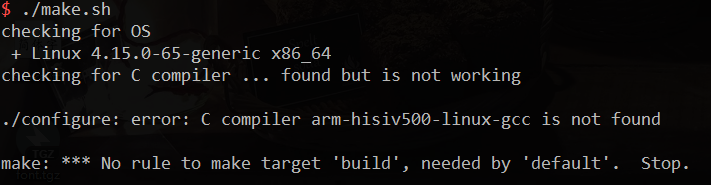
提示
checking for OS
 + Linux --generic x86_64
checking for C compiler ... found but is not working

./configure: error: C compiler arm-hisiv500-linux-gcc is not found

make: *** No rule to make target 'build', needed by 'default'.  Stop.
解决方法:
修改 auto/cc/name ngx_feature_run=yesArm-Linux 移植 Nginx的更多相关文章
- arm linux 移植 x265
背景 本来想着把 x265编译到ffmpeg里面,搞定了x265的编译:但是一直报ERROR: x265 not found using pkg-config这个错误,我按照网上的资料,查看了ffbu ...
- Linux 安装 go 以及 arm linux 移植 go
背景 Go是一门全新的静态类型开发语言,具有自动垃圾回收,丰富的内置类型,函数多返回值,错误处理,匿名函数,并发编程,反射等特性. 从Go1.4之后Go语言的编译器完全由Go语言编写,所以为了从源代码 ...
- arm linux 移植 MQTT (paho、mosquitto)
前言 我们在这里做2件事情: 1)编译 paho.mqtt.mosquitto 2个开源项目的c版本库(mosquitto库没有用上) 2)编译好 依赖 paho.mqtt的库编写例程 + mosqu ...
- arm linux 移植 PHP
背景: PHP 是世界上最好的语言. host平台 :Ubuntu 16.04 arm平台 : 3531d arm-gcc :4.9.4 php :7.1.30 zlib :1.2.11 libxml ...
- arm linux 移植 ffmpeg 库 + x264
背景 Ffmpeg 中带有h264的解码,没有编码,需要添加x264.libx264是一个自由的H.264编码库,是x264项目的一部分,使用广泛,ffmpeg的H.264实现就是用的libx264. ...
- arm linux 移植支持 HP打印机
背景 由于业务需要,需要hi3531d主板上加入对于HP打印机的支持. 通过与产品经理,技术主管的沟通:通用支持是不现实的,只要求彩色打印,先不考虑打印机的价格,只要支持一款打印机即可. 注意: Li ...
- arm linux 移植 gdb/gdbserver
背景 调试工具gdb的使用对于嵌入式Linux开发人员来说是一项不可少的技能. 目前,嵌入式 Linux系统中,主要有三种远程调试方法,分别适用于不同场合的调试工作:用ROM Monitor调试目标机 ...
- arm linux 移植 udhcp 与 使用
背景 在一些网络环境下,需要静态IP不够现实,需要使用DHCP进行自动获取IP地址. udhcpc是一个面向嵌入式系统的非常小的DHCP客户端,字母的缩写微μ- DHCP -客户端client(μDH ...
- arm linux 移植 rsync
背景: 在产品开发中可以使用rsync进行大文件的拷贝,断点续传. host平台 :Ubuntu 16.04 arm平台 : 3531d rsync :3.1.3 arm-gcc :4.9.4 ...
- arm linux 移植 jpeg
背景: host平台 :Ubuntu 16.04 arm平台 : S5P6818 jpeg :v9c arm-gcc :4.8.1 主机准备: 运行以下脚本: ## # Copyright By Sc ...
随机推荐
- Codevs 2800 送外卖(状压DP)
2800 送外卖 时间限制: 2 s 空间限制: 256000 KB 题目等级 : 钻石 Diamond 题目描述 Description 有一个送外卖的,他手上有n份订单,他要把n份东西,分别送达n ...
- C Primer Plus AND 菜鸟教程
C语言概述 首先,windows 环境下安装 GCC编译环境 下载 MinGW 下载地址:http://sourceforge.net/projects/mingw/files/ 根据系统环境下载对应 ...
- C博客作业01--分支,顺序结构1
0.展示PTA总分 1.本章学习总结 1.1 学习内容总结 1.学习了if--else,else--if的分支嵌套结构 if (判断条件) { 执行语句1: } else { 执行语句2: }//用来 ...
- vuejs cli3 env配置文件实践指南
env文件 配置四个环境名字分别 VUE_APP_ENV=dev 只支持:VUE_APP_ 开头,比如设置其它变量 VUE_APP_NAME=stark package.json 配置 方式 &quo ...
- Linux系统学习(二)一Linux基本操作
一.Linux的目录结构 1.1 Linux的目录结构图 1.2 目录内容 /:这就是根目录.对你的电脑来说,有且只有一个根目录.所有的东西,我是说所有的东西都是从这里开始.举个例子:当你在终端里输入 ...
- Nova官方资料入口处
Nova官方资料地址: https://www.openstack.org/software/releases/queens/components/nova --> https://wiki.o ...
- elastic stack安装运行(docker)
https://www.docker.elastic.co 注:目前阿里云为7.4 elasticsearch 参考https://www.elastic.co/guide/en/elasticsea ...
- js - 总结一下条件语句优化
[笔记] // 简单的语句用三目运算符也可以的(除了需要return的) 1 == 1 ? console.log('执行了...1') : console.log(); 1 == 2 ? conso ...
- IntelliJ IDEA Check out from git
点击check out from vesion control 填写git地址,test,clone
- 自己搭建gitlab服务,组员不能上传代码
原因是因为 没有拉分支 直接在master 上开撸代码 ,master 分支 默认是受保护的,具体操作如下