
tengine负载均衡高可用配置
环境
Tengine-master:192.168.109.100
Tengine-slave:192.168.109.101
tomcat01:192.168.109.102
tomcat02:192.168.109.104
[Tengine部署]
# yum install -y gcc gcc-c++ make
#mkdir /opt/tengine-packages
#cd /opt/tengine-packages
# for tar in *.tar.gz;do tar xvf $tar;done
# cd /opt/tengine-packages/tengine-2.2.3
# ./configure --prefix=/opt/tengine --with-http_ssl_module --with-openssl=../openssl-1.1.1 --with-pcre=../pcre-8.42 --with-zlib=../zlib-1.2.11 --sbin-path=/opt/tengine/sbin/nginx --conf-path=/opt/tengine/conf/nginx.conf --pid-path=/opt/tengine/logs/nginx.pid
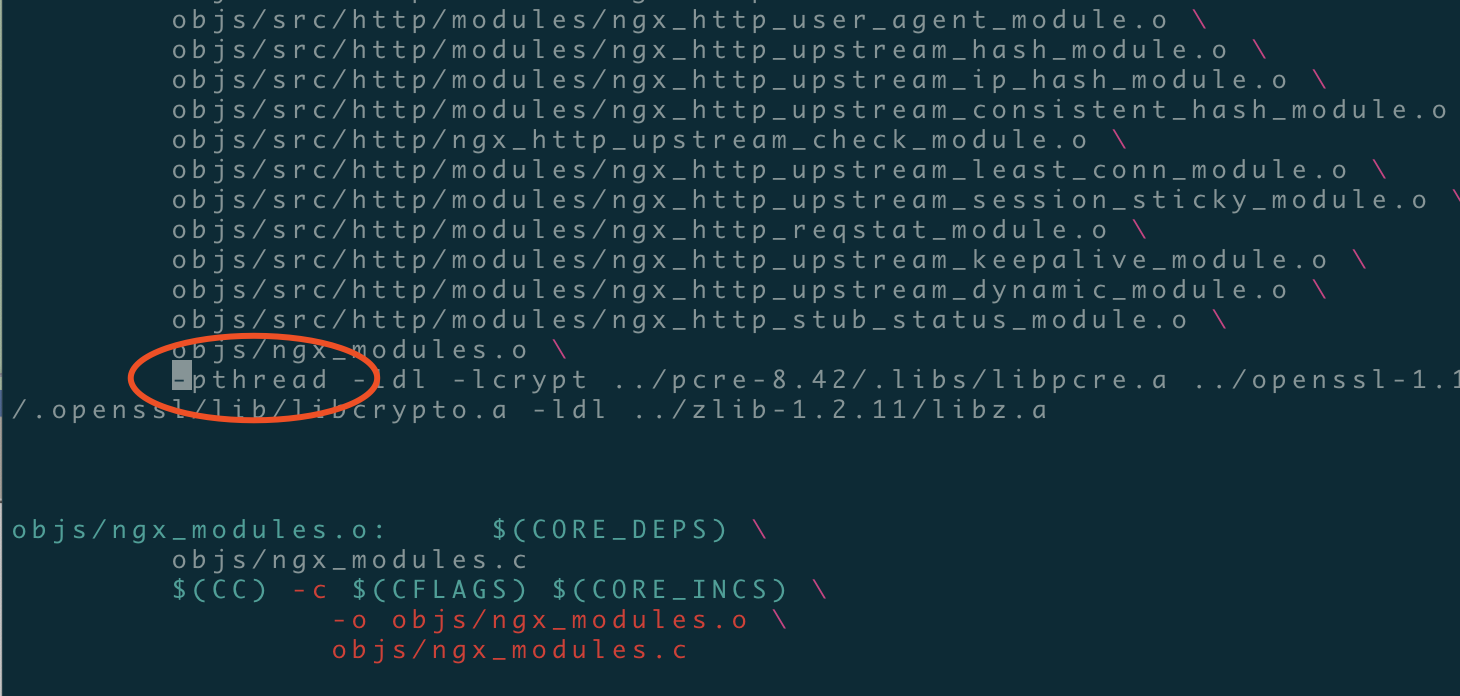
# make #编译的时候出现这个错误不要慌张,

# vim ./objs/Makefile #进入makefile编译makefile文件中将-lpthread修改为-pthread重新编译即可,如下图所示
root@hostname-109102 tengine-2.2.3]#make
root@hostname-109102 tengine-2.2.3]#make install
[root@hostname-109101 conf]# ln -s /opt/tengine/sbin/nginx /usr/local/sbin/
worker_processes  ;

events {

    worker_connections  ;

}

http {

    include       mime.types;

    default_type  application/octet-stream;

    sendfile        on;

    keepalive_timeout  ;

    upstream tomcat_web {

    server 192.168.109.102: weight= max_fails= fail_timeout=30s;

    server 192.168.109.104: weight= max_fails= fail_timeout=30s;

}

    server {

        listen       ;

        server_name  localhost;

        location / {

            root   html;

            index  index.html index.htm;

       proxy_next_upstream http_502 http_504 error timeout invalid_header;

       proxy_set_header Host $host;

       proxy_set_header X-Real-IP $remote_addr;

       proxy_set_header X-Forwarded-For $proxy_add_x_forwarded_for;

       proxy_pass http://tomcat_web;

       expires 3d;

              }

        error_page        /50x.html;

        location = /50x.html {

            root   html;

        }

    }

}
[root@hostname-109101 conf]# nginx -t
nginx: the configuration file /opt/tengine/conf/nginx.conf syntax is ok
nginx: configuration file /opt/tengine/conf/nginx.conf test is successful
[tomcat后端]
[root@tomcat- ~]# mv /usr/src/jdk1..0_75/ /usr/local/java

[root@tomcat- ~]# ln -s /usr/local/java/bin/* /usr/bin/

[root@tomcat-109103 ~]# vim /etc/profile.d/java.sh

export JAVA_HOME=/usr/local/java

export PATH=$PATH:$JAVA_HOME/bin

[root@tomcat-109103 ~]# source  /etc/profile.d/java.sh

[root@tomcat-109103 ~]# java -version

java version "1.7.0_75"

Java(TM) SE Runtime Environment (build 1.7.0_75-b13)

Java HotSpot(TM) 64-Bit Server VM (build 24.75-b04, mixed mode)

[root@tomcat-109103 ~]# cp -r apache-tomcat-7.0.65/ /usr/local/tomcat01

[root@tomcat-109103 ~]# cp -r apache-tomcat-7.0.65/ /usr/local/tomcat02

[root@hostname-109103 ~]# mkdir /www/{web01,web02}

[root@hostname-109103 ~]# vim /usr/local/tomcat01/conf/server.xml

<Context path="/" docBase="/www/web01"  reloadable="true"/>
[root@hostname-109103 ~]# vim /usr/local/tomcat02/conf/server.xml
     <Context path="/" docBase="/www/web02"  reloadable="true"/>
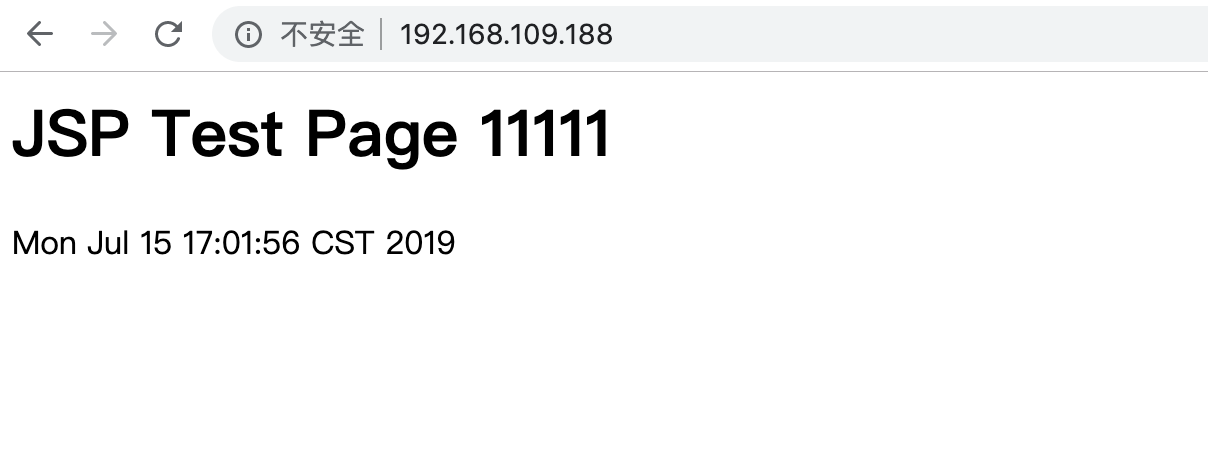
[root@hostname-109102 ~]# cat /www/web01/index.jsp #ps:这里是109.102机器的tomcat访问测试页面
<html>
<body>
<h1>JSP Test Page 11111</h1>
<%=new java.util.Date()%>
</body>
</html>
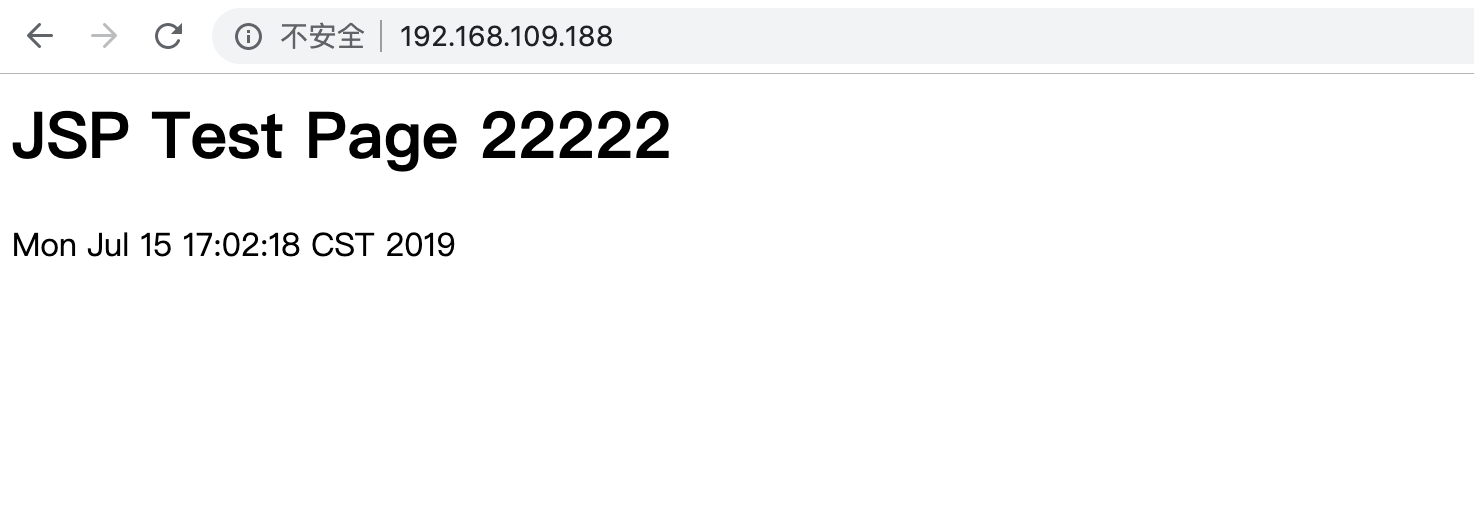
[root@hostname-109104 ~]# cat /www/web02/index.jsp #ps:这里是109.104访问测试页面
<html>
<body>
<h1>JSP Test Page 22222</h1>
<%=new java.util.Date()%>
</body>
</html>
[keepalived]
yum install -y ipvsadm keepalived
! Configuration File for keepalived

global_defs {

   notification_email {

     acassen@firewall.loc

   }

   notification_email_from Alexandre.Cassen@firewall.loc

   smtp_server 127.0.0.1

   smtp_connect_timeout 30

   router_id LVS_HOST

}

vrrp_instance VI_1 {

    state MASTER/BACKUP

    interface eth0

    virtual_router_id 51

    priority 100/50

    advert_int 1

    authentication {

        auth_type PASS

        auth_pass 1111

    }

    virtual_ipaddress {

        192.168.109.188

    }

}

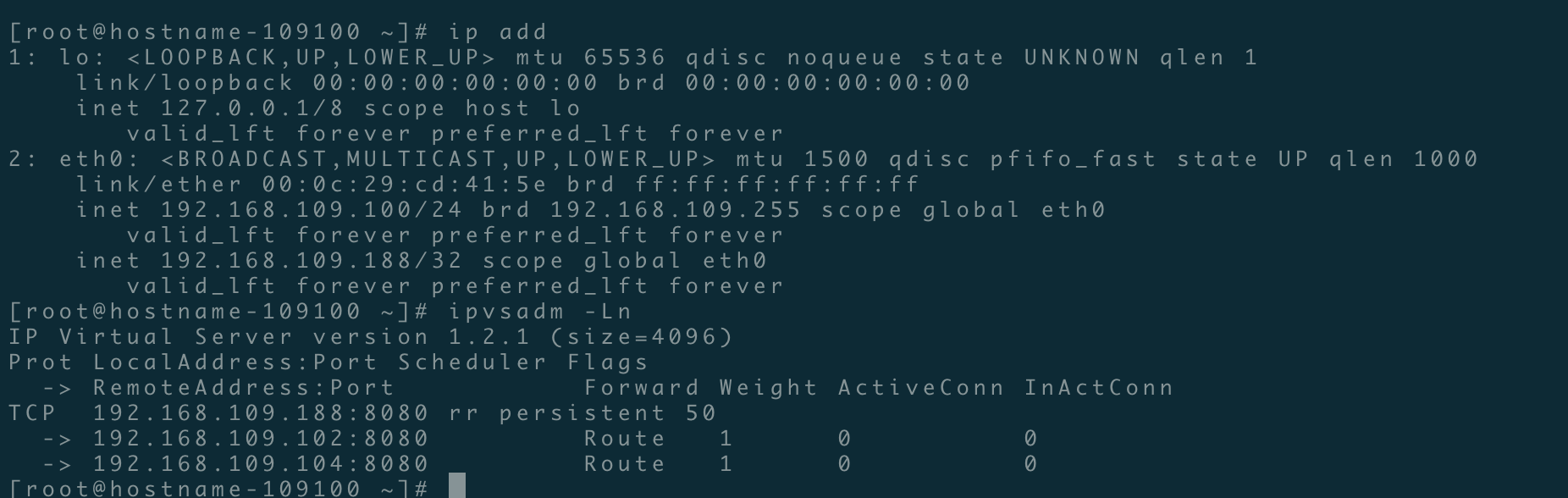
virtual_server 192.168.109.188 8080 {

    delay_loop 6

    lb_algo rr

    lb_kind DR

    persistence_timeout 50

    protocol TCP

      real_server 192.168.109.102 8080 {

        weight 1

        TCP_CHECK {

            connect_timeout 3

            nb_get_retry 3

            delay_before_retry 3

            connect_port 8080

        }

    }

      real_server 192.168.109.104 8080 {

        weight 1

        TCP_CHECK {

            connect_timeout 3

            nb_get_retry 3

            delay_before_retry 3

            connect_port 8080

        }

    }

}
tengine负载均衡高可用配置的更多相关文章
- Nginx+keepalived实现负载均衡高可用配置
1. 什么是负载均衡高可用 nginx作为负载均衡器,所有请求都到了nginx,可见nginx处于非常重点的位置,如果nginx服务器宕机后端web服务将无法提供服务,影响严重. 为了屏蔽负载均衡服务 ...
- nginx负载均衡高可用部署和代理配置
nginx负载均衡高可用配置 服务器A:172.16.100.2 服务器B:172.16.100.3 首先先在两台服务器上分别安装好nginx和keepalived后,再进行下面的操作 配置keepa ...
- linux系统下对网站实施负载均衡+高可用集群需要考虑的几点
随着linux系统的成熟和广泛普及,linux运维技术越来越受到企业的关注和追捧.在一些中小企业,尤其是牵涉到电子商务和电子广告类的网站,通常会要求作负载均衡和高可用的Linux集群方案. 那么如何实 ...
- 实现基于Haproxy+Keepalived负载均衡高可用架构
1.项目介绍: 上上期我们实现了keepalived主从高可用集群网站架构,随着公司业务的发展,公司负载均衡服务已经实现四层负载均衡,但业务的复杂程度提升,公司要求把mobile手机站点作为单独的服务 ...
- Lvs+keepAlived实现负载均衡高可用集群(DR实现)
第1章 LVS 简介 1.1 LVS介绍 LVS是Linux Virtual Server的简写,意为Linux虚拟服务器,是虚拟的服务器集群系统,可在UNIX/LINUX平台下实现负载均衡集群功能. ...
- Nginx+Keepalived负载均衡高可用
Nginx+Keepalived负载均衡高可用方案: Nginx 使用平台:unix.linux.windows. 功能: A.www web服务 http 80 b.负载均衡(方向代理proxy) ...
- Linux下"负载均衡+高可用"集群的考虑点 以及 高可用方案说明(Keepalive/Heartbeat)
当下Linux运维技术越来越受到企业的关注和追捧, 在某些企业, 尤其是牵涉到电子商务和电子广告类的网站,通常会要求作负载均衡和高可用的Linux集群方案.那么如何实施Llinux集群架构,才能既有效 ...
- JAVAEE——宜立方商城03:Nginx负载均衡高可用、Keepalived+Nginx实现主备
1 nginx负载均衡高可用 1.1 什么是负载均衡高可用 nginx作为负载均衡器,所有请求都到了nginx,可见nginx处于非常重点的位置,如果nginx服务器宕机后端web服务将无法提供服务, ...
- Nginx负载均衡高可用
1. Nginx负载均衡高可用 首先介绍一下Keepalived,它是一个高性能的服务器高可用或热备解决方案,Keepalived主要来防止服务器单点故障的发生问题,可以通过其与Nginx的配合实 ...
随机推荐
- Navicat 导出 表结构
Navicat 导出 表结构 转自:https://www.cnblogs.com/xianxiaobo/p/10254737.html 1. 首先点击新建查询,然后输入下面的语句 SELECT CO ...
- custom drawer
import 'package:flutter/material.dart'; main() => runApp(MaterialApp( home: HomePage(), )); class ...
- 原生js 定义分页控件,类似于百度搜索
实现一个类似于百度搜索结果的分页样式,样式可以自定义,接近于原生,少部分Jquery . 1.实现效果截图(默认无任何样式) 2.主要程序代码 define(function (require, e ...
- 模仿jquery--offset方法。原生JS获取任意元素到文档document顶部的距离
1.通过遍历目标节点.目标节点的父节点,依次溯源. 然后累加这些节点到其最近可定位的祖先节点的距离.向上直到document. 其中,需要使用到节点的offsetTop/offsetLeft属性,来获 ...
- koa2--nodemailer实现邮箱验证
依赖包安装: /** * koa-bodyparser用于把formData数据解析到ctx.request.body * 通过ctx.request.body访问请求的参数 * koa-redis用 ...
- tp5中在where中使用in
$where = array(); $where['id'] = array('in', $uid_str); $res = $this->db2->name('user')->wh ...
- Django-模型层(单表操作)
目录 1.ORM简介 2.单表操作 2.1创建表 2.2添加表纪录 2.3查询表纪录 2.4删除表纪录 2.5修改表纪录 1.ORM简介 MVC或者MVC框架中包括一个重要的部分,就是ORM,它实现了 ...
- Cloudera Manager 5.15.1忘记密码怎么破?
Cloudera Manager 5.15.1忘记密码怎么破? 作者:尹正杰 版权声明:原创作品,谢绝转载!否则将追究法律责任. 一.登陆CM修改默认密码 1>.使用默认密码登陆CM界面 2&g ...
- tensorflow tfrecoder read write
# write in tfrecord import tensorflow as tf import os os.environ[' FLAGS = tf.app.flags.FLAGS tf.app ...
- storm整合kafka storm-kafka-client
pom.xml-注意jar-log4j---------------------<dependencies> <dependency> <groupId>org.a ...