
MySQL8.0.16 单机 Linux安装以及使用
安装
先去下载 https://dev.mysql.com/downloads/mysql/
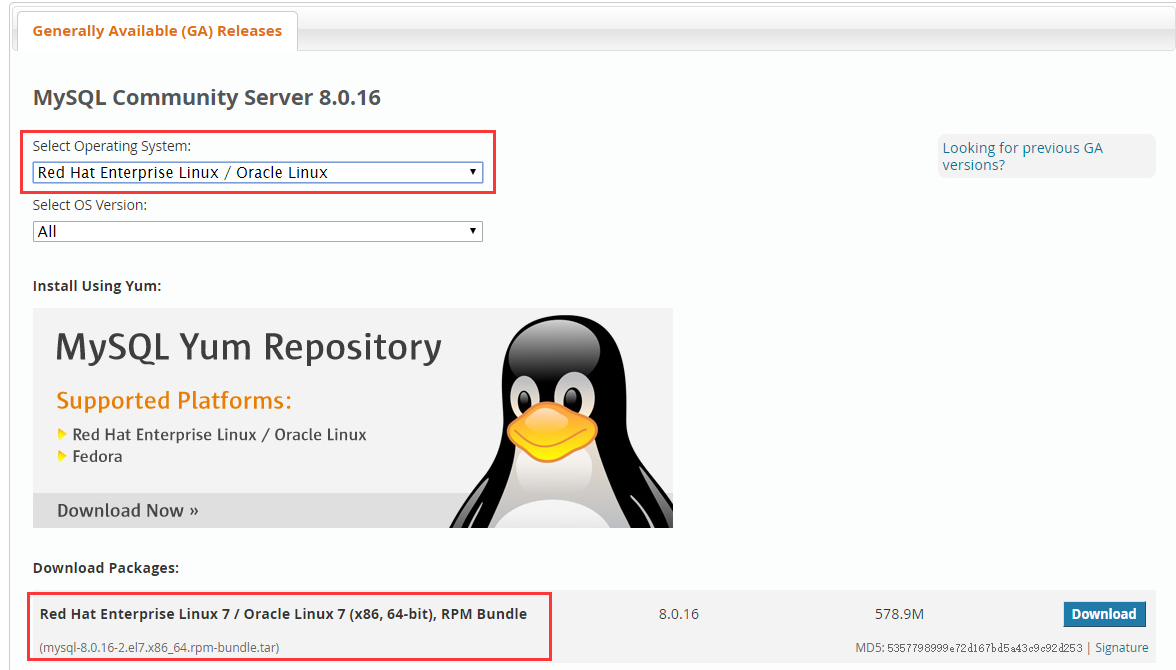
然后上传到Linux
进入存放目录,解压到指定目录【我这里是/soft/mysql8】
[root@localhost ~]# cd /soft/

[root@localhost soft]# mkdir mysql8

[root@localhost soft]# tar -xvf mysql-8.0.-.el7.x86_64.rpm-bundle.tar -C mysql8/

mysql-community-libs-8.0.-.el7.x86_64.rpm

mysql-community-embedded-compat-8.0.-.el7.x86_64.rpm

mysql-community-devel-8.0.-.el7.x86_64.rpm

mysql-community-server-8.0.-.el7.x86_64.rpm

mysql-community-libs-compat-8.0.-.el7.x86_64.rpm

mysql-community-client-8.0.-.el7.x86_64.rpm

mysql-community-common-8.0.-.el7.x86_64.rpm

mysql-community-test-8.0.-.el7.x86_64.rpm
进入解压后的目录,安装
[root@localhost soft]# cd mysql8/

[root@localhost mysql8]# yum install mysql-community-{server,client,common,libs}-*

Loaded plugins: fastestmirror, langpacks

Examining mysql-community-server-8.0.-.el7.x86_64.rpm: mysql-community-server-8.0.-.el7.x86_64

Marking mysql-community-server-8.0.-.el7.x86_64.rpm to be installed

Examining mysql-community-client-8.0.-.el7.x86_64.rpm: mysql-community-client-8.0.-.el7.x86_64

Marking mysql-community-client-8.0.-.el7.x86_64.rpm to be installed

Examining mysql-community-common-8.0.-.el7.x86_64.rpm: mysql-community-common-8.0.-.el7.x86_64

Marking mysql-community-common-8.0.-.el7.x86_64.rpm to be installed

Examining mysql-community-libs-8.0.-.el7.x86_64.rpm: mysql-community-libs-8.0.-.el7.x86_64

Marking mysql-community-libs-8.0.-.el7.x86_64.rpm to be installed

Examining mysql-community-libs-compat-8.0.-.el7.x86_64.rpm: mysql-community-libs-compat-8.0.-.el7.x86_64

Marking mysql-community-libs-compat-8.0.-.el7.x86_64.rpm to be installed

Resolving Dependencies

--> Running transaction check

---> Package mariadb-libs.x86_64 :5.5.-.el7_5 will be obsoleted

---> Package mysql-community-client.x86_64 :8.0.-.el7 will be installed

---> Package mysql-community-common.x86_64 :8.0.-.el7 will be installed

---> Package mysql-community-libs.x86_64 :8.0.-.el7 will be obsoleting

---> Package mysql-community-libs-compat.x86_64 :8.0.-.el7 will be obsoleting

---> Package mysql-community-server.x86_64 :8.0.-.el7 will be installed

--> Finished Dependency Resolution

base//x86_64                                                                                                                                                                                                             | 3.6 kB  ::

extras//x86_64                                                                                                                                                                                                           | 3.4 kB  ::

updates//x86_64                                                                                                                                                                                                          | 3.4 kB  ::

Dependencies Resolved

=================================================================================================================================================================================================================================================

 Package                                                       Arch                                     Version                                         Repository                                                                          Size

=================================================================================================================================================================================================================================================

Installing:

 mysql-community-client                                        x86_64                                   8.0.-.el7                                    /mysql-community-client-8.0.-.el7.x86_64                                         M

 mysql-community-common                                        x86_64                                   8.0.-.el7                                    /mysql-community-common-8.0.-.el7.x86_64                                        8.0 M

 mysql-community-libs                                          x86_64                                   8.0.-.el7                                    /mysql-community-libs-8.0.-.el7.x86_64                                            M

     replacing  mariadb-libs.x86_64 :5.5.-.el7_5

 mysql-community-libs-compat                                   x86_64                                   8.0.-.el7                                    /mysql-community-libs-compat-8.0.-.el7.x86_64                                   9.5 M

     replacing  mariadb-libs.x86_64 :5.5.-.el7_5

 mysql-community-server                                        x86_64                                   8.0.-.el7                                    /mysql-community-server-8.0.-.el7.x86_64                                        1.8 G

Transaction Summary

=================================================================================================================================================================================================================================================

Install   Packages

Total size: 1.9 G

Is this ok [y/d/N]: y

Downloading packages:

Running transaction check

Running transaction test

Transaction test succeeded

Running transaction

  Installing : mysql-community-common-8.0.-.el7.x86_64                                                                                                                                                                                    /

  Installing : mysql-community-libs-8.0.-.el7.x86_64                                                                                                                                                                                      /

  Installing : mysql-community-client-8.0.-.el7.x86_64                                                                                                                                                                                    /

  Installing : mysql-community-server-8.0.-.el7.x86_64                                                                                                                                                                                    /

  Installing : mysql-community-libs-compat-8.0.-.el7.x86_64                                                                                                                                                                               /

  Erasing    : :mariadb-libs-5.5.-.el7_5.x86_64                                                                                                                                                                                          /

  Verifying  : mysql-community-libs-8.0.-.el7.x86_64                                                                                                                                                                                      /

  Verifying  : mysql-community-libs-compat-8.0.-.el7.x86_64                                                                                                                                                                               /

  Verifying  : mysql-community-client-8.0.-.el7.x86_64                                                                                                                                                                                    /

  Verifying  : mysql-community-common-8.0.-.el7.x86_64                                                                                                                                                                                    /

  Verifying  : mysql-community-server-8.0.-.el7.x86_64                                                                                                                                                                                    /

  Verifying  : :mariadb-libs-5.5.-.el7_5.x86_64                                                                                                                                                                                          /

Installed:

  mysql-community-client.x86_64 :8.0.-.el7   mysql-community-common.x86_64 :8.0.-.el7   mysql-community-libs.x86_64 :8.0.-.el7   mysql-community-libs-compat.x86_64 :8.0.-.el7   mysql-community-server.x86_64 :8.0.-.el7

Replaced:

  mariadb-libs.x86_64 :5.5.-.el7_5

Complete!
到此就安装结束,下面开启防火墙端口3306并启动。开启防火墙端口是希望外界可以访问。
[root@localhost mysql8]# firewall-cmd --zone=public --add-port=/tcp --permanent

success

[root@localhost mysql8]# systemctl restart firewalld

[root@localhost mysql8]# systemctl start mysqld

[root@localhost mysql8]# systemctl status mysqld

● mysqld.service - MySQL Server

   Loaded: loaded (/usr/lib/systemd/system/mysqld.service; enabled; vendor preset: disabled)

   Active: active (running) since Fri -- :: CST; 5s ago

     Docs: man:mysqld()

           http://dev.mysql.com/doc/refman/en/using-systemd.html

  Process:  ExecStartPre=/usr/bin/mysqld_pre_systemd (code=exited, status=/SUCCESS)

 Main PID:  (mysqld)

   Status: "SERVER_OPERATING"

    Tasks:

   CGroup: /system.slice/mysqld.service

           └─ /usr/sbin/mysqld

May  :: localhost.localdomain systemd[]: Starting MySQL Server...

May  :: localhost.localdomain systemd[]: Started MySQL Server.
下面因为第一次启动,需要修改密码。
[root@localhost mysql8]# cat /var/log/mysqld.log | grep password

--23T21::.393815Z  [Note] [MY-] [Server] A temporary password is generated for root@localhost: U3ZlzC>KAAc<

[root@localhost mysql8]# mysql -u root -p

Enter password:

Welcome to the MySQL monitor.  Commands end with ; or \g.

Your MySQL connection id is

Server version: 8.0.

Copyright (c) , , Oracle and/or its affiliates. All rights reserved.

Oracle is a registered trademark of Oracle Corporation and/or its

affiliates. Other names may be trademarks of their respective

owners.

Type 'help;' or '\h' for help. Type '\c' to clear the current input statement.

mysql> ALTER USER USER() IDENTIFIED BY 'Abc123-S';

Query OK,  rows affected (0.02 sec)
到此安装以及初始化完毕,你可以在此执行一些SQL语句。
用Navicat连接
你要创建一个新用户并授权。
mysql> CREATE USER 'tom'@'%' IDENTIFIED BY 'Abc123-S';

Query OK,  rows affected (0.02 sec)

mysql> GRANT ALL ON *.* TO 'tom'@'%';

Query OK,  rows affected (0.02 sec)
连接的时候会出现
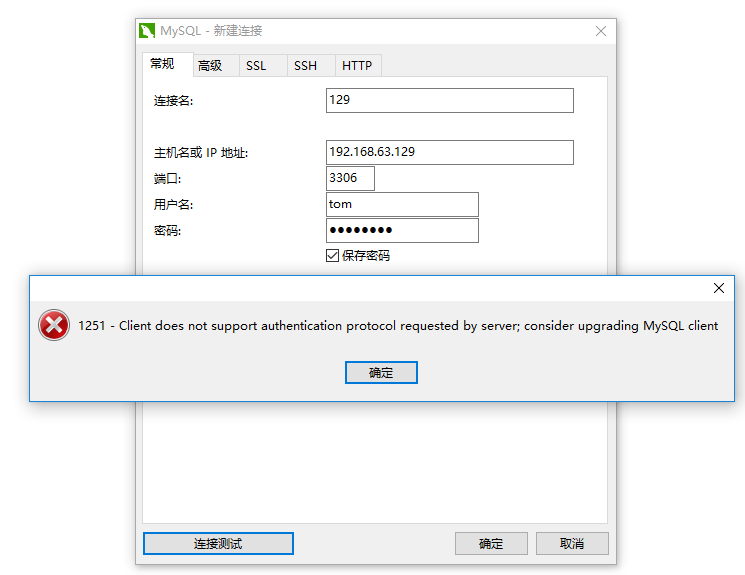
这是因为不支持当前的加密协议。MySQL8 创建用户默认使用caching_sha2_password,所以我们可以更改为MySQL5.7的mysql_native_password。
mysql> ALTER USER 'tom'@'%' IDENTIFIED WITH mysql_native_password BY 'Abc123-S';

Query OK,  rows affected (0.00 sec)
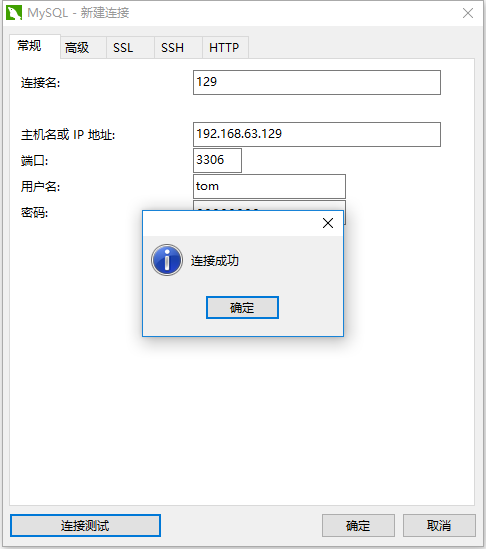
好了这次可以了
MySQL8.0.16 单机 Linux安装以及使用的更多相关文章
- MySql-8.0.16版本部分安装问题修正
本帖参考网站<https://blog.csdn.net/lx318/article/details/82686925>的安装步骤,并对8.0.16版本的部分安装问题进行修正 在MySQL ...
- Linux(CentOS7)下rpm安装MySQL8.0.16
记录一下自己在 CentOS7 下 rpm 安装 MySQL8.0.16 的过程. 一.准备工作 1. 下载MySQL所需要的安装包 从 MySQL官网 下载,上传至 CentOS 系统 /usr/l ...
- centos7编译安装LNMP(nginx-1.16.0,mysql8.0.16,php-7.3.6)常见问题报错及解决方法
LNMP的安装与配置 nginx-1.16.0安装及配置: 第一步:前往官网下载nignx源码包 下载完毕后上传至服务器(先安装lrzsz) yum -y install lrzsz 安装完毕后执行: ...
- Win10下免安装版MySQL8.0.16的安装和配置
1.MySQL8.0.16解压 其中dada文件夹和my.ini配置文件是解压后手动加入的,如下图所示 2.新建配置文件my.ini放在D:\Free\mysql-8.0.16-winx64目录下 [ ...
- mysql8.0.16二进制安装
mysql8.0.16二进制安装 环境简介操作系统:Centos 6.10 64位 目前版本:8.0.16 MySQL Community Server 二进制 安装目录:/data/mysql/my ...
- win10,64位操作系统安装mysql-8.0.16经验总结(图文详细,保证一次安装成功)
文章目录 1.mysql下载 2.解压及配置文件 3.启动MySQL数据库 4.登录 MySQL 5.配置系统环境变量 6.mysql-8.0.16修改初始密码 机器配置: win10,64位: my ...
- MySQL-8.0.16 的安装与配置
最近老是安装mysql, 但是由于各个环境下文件不互通,所以感觉笔记还是记录在这里比较方便.以下内容,是对网络上大家的笔记的搜集和整理,并经过自己的实践,记录下来.以便,让大家更好.更快的配置mysq ...
- Mysql8.0.16 only_full_group_by
[1]Mysql8.0.16 关于only_full_group_by问题 应公司业务的需求,安装了Mysql8.0.16版本,原来在Mysql5.6版本执行无恙的SQL语句: SELECT prod ...
- mysql8.0.16操作记录
mysql8.0.16操作记录 2.1.登录 -uroot -p'AnvcTMagdLarwNV3CKaC' mysql: [Warning] Using a password on the comm ...
随机推荐
- modbus-poll和modbus-slave工具的学习使用——环境搭建
在modbus的学习工具中,非modbus-poll和modbus-slave莫属了,在电脑上模拟的过程中,两者缺一不可 ,当然还需要虚拟串口工具:Configure Virtual Serial P ...
- 按键精灵PC端脚本
定义变量的时候不需要定义类型 ,由于是易语言,变量名可以是中文 文本路径 = "C:\Users\Administrator\Desktop\1.txt"//改成自己的文本路径 T ...
- vue之组件通信
vue组件通信一般分为以下几种情况: 1.父子组件通信: 2.兄弟组件通信: 3.跨多层级组件通信: 一.父子通信 父组件通过props传递数据给子组件,子组件通过emit发送事件传递数 ...
- Partition HDU - 4602 (不知道为什么被放在了FFT的题单里)
题目链接:Vjudge 传送门 相当于把nnn个点分隔为若干块,求所有方案中大小为kkk的块数量 我们把大小为kkk的块,即使在同一种分隔方案中的块 单独考虑,它可能出现的位置是在nnn个点的首.尾. ...
- Python爬虫 | IP池的使用
一.简介 - 爬虫中为什么需要使用代理 一些网站会有相应的反爬虫措施,例如很多网站会检测某一段时间某个IP的访问次数,如果访问频率太快以至于看起来不像正常访客,它可能就会禁止这个IP的访问.所以我们需 ...
- 【后缀数组】【LuoguP4051】 [JSOI2007]字符加密
题目链接 题目描述 喜欢钻研问题的JS 同学,最近又迷上了对加密方法的思考.一天,他突然想出了一种他认为是终极的加密办法:把需要加密的信息排成一圈,显然,它们有很多种不同的读法. 例如'JSOI07' ...
- 前端微信小程序资讯类仿今日头条微信小程序
需求描述及交互分析设计思路和相关知识点新闻频道滑动效果设计首页新闻内容设计首页新闻详情页设计我的界面列表式导航设计系统设置二级界面设计 设计思路(1)设计底部标签导航,准备好底部标签导航的图标和建立相 ...
- 下载根目录下的pdf文件, 浏览器下载
public void outPut(HttpServletRequest request, HttpServletResponse response, Integer type) { ClassPa ...
- java如何实现批量删除pdf指定的页数
依赖: <dependency> <groupId>org.apache.pdfbox</groupId> <artifactId>pdfbox-app ...
- git远程版本回退
本文为博主原创,未经允许不得转载: 之前在git提交版本时,发现将新开发的代码提交到了另一个分支上,为了不影响提交分支代码的 功能,需要回退到之前的版本. 在使用命令回退的时候,一直没有回退成功,有个 ...