
unity 之 背包系统
此方法只是用于学习和实验所以细节不必要求
一、Ui设置。
画布配置如下:
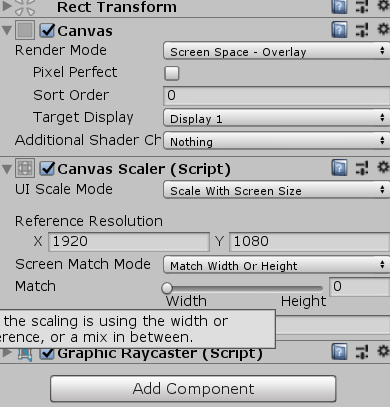
布局:
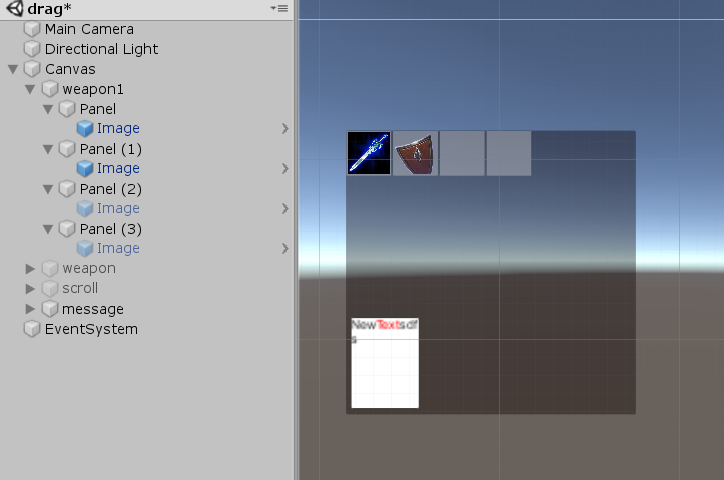
说明:
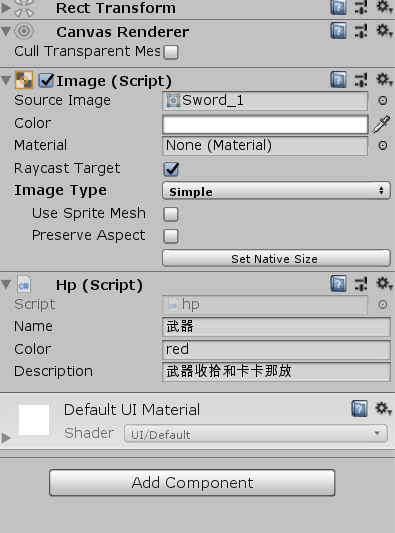
画布里面首先建立一个panel命名为weapon1,在其内部再建立4个panel用于装备的卡槽,装备以image来显示,并且添加自定义hp脚本(hp脚本主要配置物品的名称、稀有度、说明)。message主要用来显示武器信息。image配置如下:
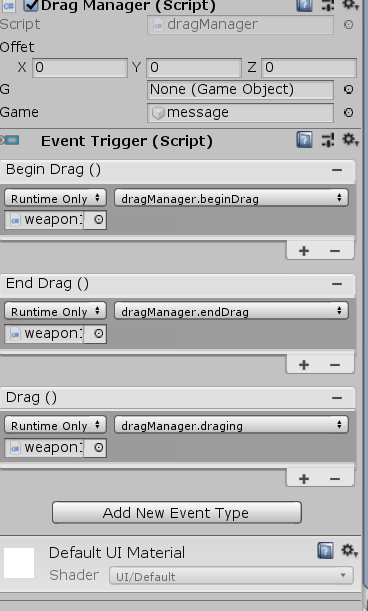
weapon1配置此处使用两种方法来检测鼠标事件(1.直接添加event trigger组建绑定函数 2.在dragManager代码中监听):
二、代码。
dragManager
//继承接口实现鼠标进入和移除事件

public class dragManager : MonoBehaviour,IPointerEnterHandler,IPointerExitHandler

{

//定义偏移量,用来记录鼠标和装备图片的偏移

public Vector3 offet;

//提示武器信息即message

public GameObject g;

//是否拖放成功

private bool massger;

public Action a;

public Action b;

//拖拽武器

public GameObject game;

// Start is called before the first frame update

void Start()

{

}

// Update is called once per frame

void Update()

{

if (a != null)

a();

// print(game.activeSelf);

}

//开始拖拽确定物体

public void beginDrag()

{

for (int i = ; i < transform.childCount; i++)

{

RectTransform rect =(RectTransform) transform.GetChild(i);

if (rect.rect.Contains(Input.mousePosition - rect.position) && rect.GetChild().gameObject.activeSelf)

{

offet = Input.mousePosition - rect.position;

g = rect.GetChild().gameObject;

return;

}

}

}

//释放

public void endDrag()

{

massger = false;

for (int i = ; i < transform.childCount; i++)

{

RectTransform rect = (RectTransform)transform.GetChild(i);

if (rect.rect.Contains(Input.mousePosition - rect.position) && !rect.GetChild().gameObject.activeSelf && g!=null)

{

rect.GetChild().GetComponent<Image>().sprite=g.GetComponent<Image>().sprite;

g.GetComponent<UnityEngine.UI.Image>().sprite = null;

g.gameObject.SetActive(false);

rect.GetChild().gameObject.SetActive(true);

massger = true;

g.GetComponent<RectTransform>().localPosition = Vector3.zero;

g = null;offet = Vector3.zero;

return;

}

}

if (!massger && g!=null)

{

g.GetComponent<RectTransform>().localPosition = Vector3.zero;

g = null; offet = Vector3.zero;

}

}

//拖拽中

public void draging()

{

if (g != null)

{

g.GetComponent<RectTransform>().position = Input.mousePosition - offet;

}

}

//鼠标进入

public void OnPointerEnter(PointerEventData eventData)

{

a += NewMethod;

}

private void NewMethod()

{

for (int i = ; i < transform.childCount; i++)

{

RectTransform rect = (RectTransform)transform.GetChild(i);

if (rect.rect.Contains(Input.mousePosition - rect.position) && rect.GetChild().gameObject.activeSelf)

{

Text t = game.transform.GetChild().GetComponent<Text>();

hp h= rect.GetChild().GetComponent<hp>();

string s= "<color=" + h.color + ">"+ h.name +"</color>\n"+h.description;

t.text =s.ToString();

break;

}

}

game.transform.position = new Vector3(Input.mousePosition.x + game.GetComponent<RectTransform>().rect.width / ,

Input.mousePosition.y - game.GetComponent<RectTransform>().rect.height / , );

if(!game.activeSelf)game.SetActive(true);

}

//鼠标移出

public void OnPointerExit(PointerEventData eventData)

{

b += NewMethod2;

b();

}

private void NewMethod2()

{

game.SetActive(false);

b = null;

a = null;

}

}
三、运行结果有点丑,但只是实验用。
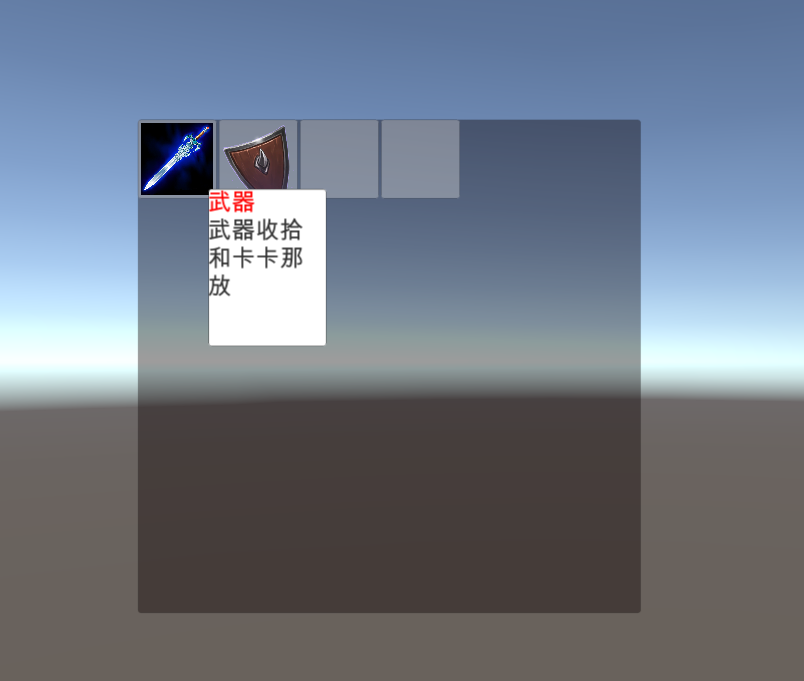
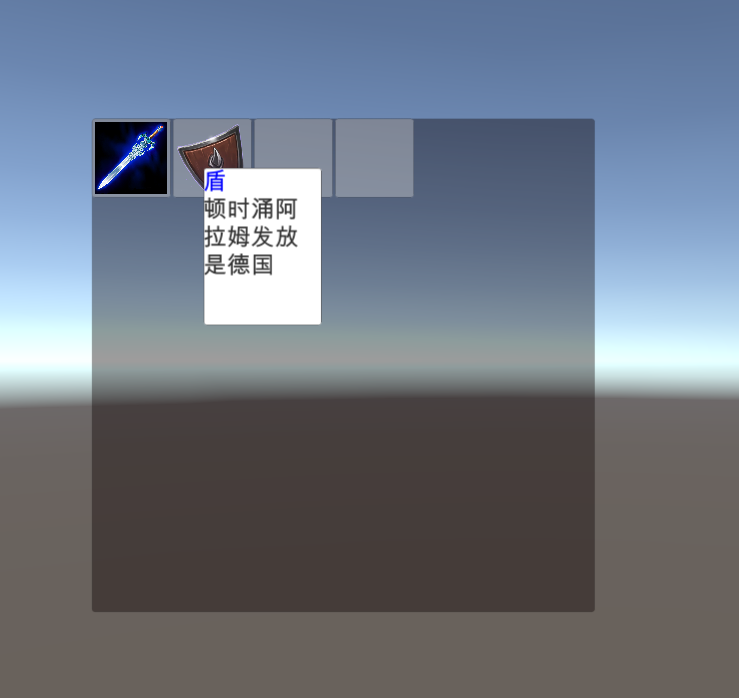
四、解决个别问题。屏幕放大图片信息一直闪烁。
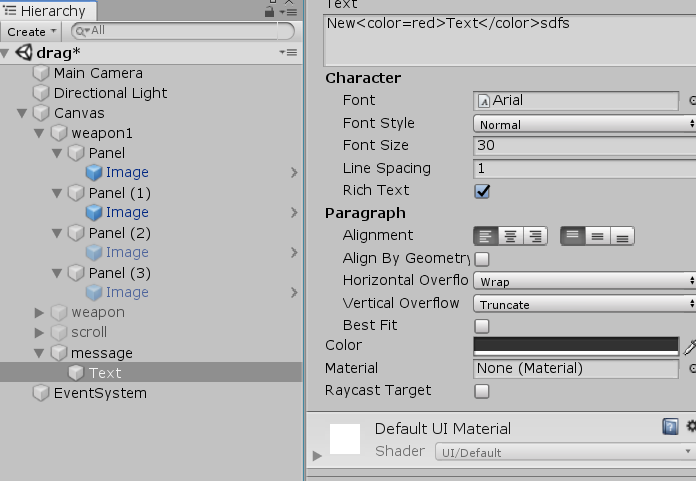
将text的Raycast Target取消勾选。
unity 之 背包系统的更多相关文章
- Siki_Unity_3-3_背包系统
Unity 3-3 背包系统(基于UGUI) 任务1&2&3:演示.介绍.类图分析 背包面板.箱子面板.锻造合成面板.装备佩戴面板.商店面板等 面板的显示和隐藏.保存和加载.拾起物品. ...
- unity游戏设计之背包系统
这次任务是模仿上图的样子,制作一个类似的背包系统. 上面的链接为:http://www.tasharen.com/ngui/exampleX.html 我们的目标是: 1.实现背包系统的UI界面 2. ...
- Unity 背包系统的完整实现(基于MVC框架思想)
前言: 项目源码上传GitHub:Unity-knapsack 背包系统: 背包系统是游戏中非常重要的元素,几乎每一款游戏都有背包系统,我们使用背包系统可以完成装备栏的数据管理,商店物体的数据管理等等 ...
- 【Unity】基于MVC模式的背包系统 UGUI实现
前言 本文基于MVC模式,用UGUI初步实现了背包系统. Control层包括了点击和拖拽两种逻辑. 博文首发:http://blog.csdn.net/duzixi 下载地址:https://git ...
- [Unity3D]Unity资料大全免费分享
都是网上找的连七八糟的资料了,整理好分享的,有学习资料,视频,源码,插件……等等 东西比较多,不是所有的都是你需要的,可以按 ctrl+F 来搜索你要的东西,如果有广告,不用理会,关掉就可以了,如 ...
- NGUI简单背包系统的实现
一.利用txt文件存储游戏物品信息 首先在asset下创建一个txt文件,这里我们命名为objectsInfoList.txt,并将其拖放到unity Project视图中. 其中txt中我们先存放一 ...
- 【UGUI】 (三)------- 背包系统(上)之简易单页背包系统及检索功能的实现
背包系统,无论是游戏还是应用,都是常常见到的功能,其作用及重要性不用我多说,玩过游戏的朋友都应该明白. 在Unity中实现一个简易的背包系统其实并不是太过复杂的事.本文要实现的是一个带检索功能的背包系 ...
- 一些值得学习的Unity教程 (很实用的包括源码)
***********************项目源码******************************** 1. 降临 2. 沉睡缤纷乐 3. 千炮捕鱼 4. Photon官方FSP示例 ...
- Unity从实践中学习(1)
首先在实际中unity的开发之中快捷键应该是相当重要的一个部分,这里先引用csdn的一个博客,https://blog.csdn.net/qq_34552886/article/details/697 ...
随机推荐
- OpenGL基础汇总
OpenGL(应用程序接口 即API)——用于访问图形硬件的可编程特性 1. 各种矩阵: 世界矩阵(World Matrix):世界矩阵确定一个统一的世界坐标,用于组织独立的物体形成一个完整的场景; ...
- RAID磁盘阵列结构
RAID磁盘阵列结构原理其实很简单,就是每块硬盘不插在主板的硬盘接口上了,而是全插在RAID卡上,然后RAID卡再插到主板上,由RAID卡统一管理硬盘,做各种RAID磁盘策略(RAID0,RAID1, ...
- 【Tools】HP/惠普v285w 量产工具
前段时间朋友说自己u盘坏了,让帮忙看看.看下图是这个u盘. 坏的问题:往里面复制东西,提示:请去掉写保护或使用另一张磁盘.但是能正常从里面读取出来数据. 无论更换电脑,还是使用网上的修改注册表等方式皆 ...
- Altera PLL Locked 失锁的原因
Altera PLL 有时可能会出现失锁的情况,查找了官网资料,有总结到有几个情况下会出现失锁. 官网中的网页如下,是英文的: https://www.altera.com.cn/support/su ...
- Java线程 : 线程同步与锁
一.同步问题提出 线程的同步是为了防止多个线程访问一个数据对象时,对数据造成的破坏. 例如:两个线程ThreadA.ThreadB都操作同一个对象Foo对象,并修改Foo对象上的数据. public ...
- SQL查询优化思维即SQL子查询
一. 什么叫子查询 定义及分类 子查询又称内部查询,而包含子查询的语句称之外部查询(又称主查询).所有的子查询可以分为两类,即相关子查询和非相关子查询. 非相关子查询是独立于外部查询的子查询,子查询总 ...
- spring security实现记住我下次自动登录功能
目录 spring security实现记住我下次自动登录功能 一.原理分析 二.实现方式 2.1 简单实现方式 2.2 数据库实现方式 三.区分是密码登录还是rememberme登录 spring ...
- Windows常用命令的使用
3.Tracert Tracert命令用来显示数据包到达目标主机所经过的路径,并显示到达每个节点的时间.该诊断实用程序将包含不同生存时间 (TTL) 值的 Internet 控制消息协议 (ICMP) ...
- 深度解析qml引擎---(2)绑定(binding)
强烈的希望是人生中比任何欢乐更大的兴奋剂.--尼采 上一篇文章讲了QML引擎加载qml文件的过程,大体过程是,解析qml文件,然后为文件中的每个元素创建对应的c++对象.例如,qml文件中如果使用了T ...
- Connection: close和Connection: keep-alive有什么区别
转自:https://www.cnblogs.com/TinyMing/p/4597136.html 看到有人问Connection: close和Connection: keep-alive有什么区 ...