
odoo action
动作的加载:
刷新视图页面执行load_views方法
/web/dataset/call_kw/model_name/load_views
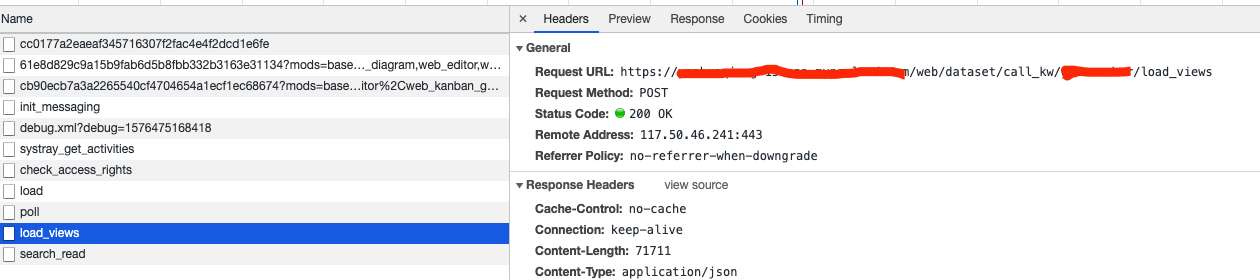
在odoo/models.py的BaseModel中有一个load_views方法
@api.model

    def load_views(self, views, options=None):

        """ Returns the fields_views of given views, along with the fields of

            the current model, and optionally its filters for the given action.

        :param views: list of [view_id, view_type]

        :param options['toolbar']: True to include contextual actions when loading fields_views

        :param options['load_filters']: True to return the model's filters

        :param options['action_id']: id of the action to get the filters

        :return: dictionary with fields_views, fields and optionally filters

        """

        options = options or {}

        result = {}

        toolbar = options.get('toolbar')

        result['fields_views'] = {

            v_type: self.fields_view_get(v_id, v_type if v_type != 'list' else 'tree',

                                         toolbar=toolbar if v_type != 'search' else False)

            for [v_id, v_type] in views

        }

        result['fields'] = self.fields_get()

        if options.get('load_filters'):

            result['filters'] = self.env['ir.filters'].get_filters(self._name, options.get('action_id'))

        return result
odoo/models.py
@api.model

    def fields_view_get(self, view_id=None, view_type='form', toolbar=False, submenu=False):

        """ fields_view_get([view_id | view_type='form'])

        Get the detailed composition of the requested view like fields, model, view architecture

        :param view_id: id of the view or None

        :param view_type: type of the view to return if view_id is None ('form', 'tree', ...)

        :param toolbar: true to include contextual actions

        :param submenu: deprecated

        :return: dictionary describing the composition of the requested view (including inherited views and extensions)

        :raise AttributeError:

                            * if the inherited view has unknown position to work with other than 'before', 'after', 'inside', 'replace'

                            * if some tag other than 'position' is found in parent view

        :raise Invalid ArchitectureError: if there is view type other than form, tree, calendar, search etc defined on the structure

        """

        View = self.env['ir.ui.view']

        # Get the view arch and all other attributes describing the composition of the view

        result = self._fields_view_get(view_id=view_id, view_type=view_type, toolbar=toolbar, submenu=submenu)

        # Override context for postprocessing

        if view_id and result.get('base_model', self._name) != self._name:

            View = View.with_context(base_model_name=result['base_model'])

        # Apply post processing, groups and modifiers etc...

        xarch, xfields = View.postprocess_and_fields(self._name, etree.fromstring(result['arch']), view_id)

        result['arch'] = xarch

        result['fields'] = xfields

        # Add related action information if aksed

        if toolbar:

            bindings = self.env['ir.actions.actions'].get_bindings(self._name)

            resreport = [action

                         for action in bindings['report']

                         if view_type == 'tree' or not action.get('multi')]

            resaction = [action

                         for action in bindings['action']

                         if view_type == 'tree' or not action.get('multi')]

            resrelate = []

            if view_type == 'form':

                resrelate = bindings['action_form_only']

            for res in itertools.chain(resreport, resaction):

                res['string'] = res['name']

            result['toolbar'] = {

                'print': resreport,

                'action': resaction,

                'relate': resrelate,

            }

        return result
addons/base/models/ir_actions.py
@api.model

    @tools.ormcache('frozenset(self.env.user.groups_id.ids)', 'model_name')

    def get_bindings(self, model_name):

        """ Retrieve the list of actions bound to the given model.

           :return: a dict mapping binding types to a list of dict describing

                    actions, where the latter is given by calling the method

                    ``read`` on the action record.

        """

        cr = self.env.cr

        query = """ SELECT a.id, a.type, a.binding_type

                    FROM ir_actions a, ir_model m

                    WHERE a.binding_model_id=m.id AND m.model=%s

                    ORDER BY a.id """

        cr.execute(query, [model_name])

        # discard unauthorized actions, and read action definitions

        result = defaultdict(list)

        user_groups = self.env.user.groups_id

        for action_id, action_model, binding_type in cr.fetchall():

            try:

                action = self.env[action_model].browse(action_id)

                action_groups = getattr(action, 'groups_id', ())

                if action_groups and not action_groups & user_groups:

                    # the user may not perform this action

                    continue

                result[binding_type].append(action.read()[0])

            except (AccessError, MissingError):

                continue

        return result
能否通过修改ir.actions.server的表结构,增加binding_view_id字段,动作定义时设置binding_view_id字段,实现相同模型不同视图显示不通的动作内容。
1、在ir.actions.server中增加字段
<record id="action_XXX_audit_server" model="ir.actions.server" >

        <field name="name">Audit</field>

        <field name="model_id" ref="model_gl_voucher"/>

        <field name="type">ir.actions.server</field>

        <field name="state">code</field>

        <field name="code">

            action = records.action_server_run()

        </field>

        <field name="binding_model_id" ref="model_XXX" />

        <field name="binding_view_id">66666666666</field>

    </record>
3、查看数据库

已经写到数据库了,所以在 get_bindings中加载动作时增加一层过滤就OK,这样就可以实现相同model,相同视图类型,不同视图,显示不同action。
动作的执行:
addons/web/controllers/main.py
@http.route('/web/action/run', type='json', auth="user")

    def run(self, action_id):

        result = request.env['ir.actions.server'].browse([action_id]).run()

        return clean_action(result) if result else False
addons/base/models/ir_actions.py
@api.multi

    def run(self):

        """ Runs the server action. For each server action, the

        run_action_<STATE> method is called. This allows easy overriding

        of the server actions.

        :param dict context: context should contain following keys

                             - active_id: id of the current object (single mode)

                             - active_model: current model that should equal the action's model

                             The following keys are optional:

                             - active_ids: ids of the current records (mass mode). If active_ids

                               and active_id are present, active_ids is given precedence.

        :return: an action_id to be executed, or False is finished correctly without

                 return action

        """

        res = False

        for action in self:

            eval_context = self._get_eval_context(action)

            if hasattr(self, 'run_action_%s_multi' % action.state):

                # call the multi method

                run_self = self.with_context(eval_context['env'].context)

                func = getattr(run_self, 'run_action_%s_multi' % action.state)

                res = func(action, eval_context=eval_context)

            elif hasattr(self, 'run_action_%s' % action.state):

                active_id = self._context.get('active_id')

                if not active_id and self._context.get('onchange_self'):

                    active_id = self._context['onchange_self']._origin.id

                    if not active_id:  # onchange on new record

                        func = getattr(self, 'run_action_%s' % action.state)

                        res = func(action, eval_context=eval_context)

                active_ids = self._context.get('active_ids', [active_id] if active_id else [])

                for active_id in active_ids:

                    # run context dedicated to a particular active_id

                    run_self = self.with_context(active_ids=[active_id], active_id=active_id)

                    eval_context["env"].context = run_self._context

                    # call the single method related to the action: run_action_<STATE>

                    func = getattr(run_self, 'run_action_%s' % action.state)

                    res = func(action, eval_context=eval_context)

        return res
odoo action的更多相关文章
- odoo action方法
二.动作按钮里面也可以由字段判断: def action_select_sale_order_line(self,cr,uid,ids,date_begin,date_end,context=None ...
- (20)odoo中的action
---------更新时间18:06 2016-09-18 星期日15:05 2016-03-14 星期一18:07 2016-02-19 星期五---------* 窗口动作 <?xml ...
- odoo开发笔记:Server+Action服务器动作自动触发执行
Odoo的市场定位是SME(中小型企业),这个市场的ERP产品,多如牛毛,产品各具特色.不过,Odoo的自动化处理机制,可以睥睨天下,无人能及.包括一些大型国产软件,如用友.金蝶也不具备 ...
- Odoo中的五种Action详解
转载请注明原文地址:https://www.cnblogs.com/ygj0930/p/10826232.html Odoo中的五种action都是继承自ir.actions.actions模型实现的 ...
- odoo view field option, action flage 参数
options JSON object specifying configuration option for the field's widget (including default widget ...
- odoo开发笔记--自定义server action页面跳转注意
场景描述: 在添加自定义服务器动作 “复制全部”后发现直接创建了新的记录,并且直接进入到form保存完的状态. 如何解决: if yourself_obj_copy: return { 'type': ...
- Odoo 14 Action URL 生成
from werkzeug.urls import url_encode url = '/web#%s' % url_encode({ 'action': 'hr.plan_wizard_action ...
- Odoo 二次开发教程(三)-第一个Model及Form、Tree视图
创建完我们的模块,接下来我们就要为我们的模块添加一些对象.今天我们将要创建一个学生对象(tech.student)和一些基本的属性,并将用form和tree视图将其展示出来: 一. 创建tech.st ...
- Defining custom settings in Odoo
Unfortunately Odoo documentation doesn’t seem to include any information about adding new configurat ...
随机推荐
- C#编辑xml文件
string path = @"C:\Users\Administrator\Desktop\无人智能便利店\install\收银端\XMLRFI.xml"; XmlDocumen ...
- Python - 时间相关与计划任务
Python - 时间处理与定时任务 1.计算明天和昨天的日期 # 获取今天.昨天和明天的日期 # 引入datetime模块 import datetime #计算今天的时间 today = date ...
- SocketServer模块与简单并发服务器
思维导图文件:https://files-cdn.cnblogs.com/files/benjieming/SocketServer%E6%A8%A1%E5%9D%97%E4%B8%8E%E7%AE% ...
- JavaScript BOM Cookie 的用法
JavaScript Cookie Cookie是计算机上存储在小文本文件中的数据.当Web服务器将网页发送到浏览器时,连接将关闭,服务器将忘记用户的所有内容.发明Cookie是为了解决“如何记住用户 ...
- 【转载】Visual Studio2017中如何设置解决方案中的某个项目为启动项目
在C#的应用程序开发过程中,一个完成的解决方案可能包含多个子项目,有时候需要设置某一个子项目为启动项目,在Visual Studio 2017集成开发工具中,设置解决方案中的某个项目为启动项目的操作方 ...
- electron——ipcMain模块、ipcRenderer模块
ipcMain 从 主进程 到 渲染进程 的异步通信. ipcMain模块是EventEmitter类的一个实例. 当在主进程中使用时,它处理从渲染器进程(网页)发送出来的异步和同步信息. 从渲染器进 ...
- 基础系列(2)--- css1
css组成 css语法组成 选择器 和 声明 (多个声明用分号隔开) 声明包括 属性和属性值(多个属性值用空格隔开) 语法: 选择器{ 属性: 属性值; 属性: 属性值1 属性值2; } css样式表 ...
- Object_C 集成环信时,中文环境下不显示中文
因为本app只有中文,没有做中英文判断,但是环信是默认英文环境的,所以,此时,需要在info.plist 文件中修改它的语言环境.如下
- JavaScript函数式编程究竟是什么?
摘要: 理解函数式编程. 作者:前端小智 原文:JS中函数式编程基本原理简介 Fundebug经授权转载,版权归原作者所有. 在长时间学习和使用面向对象编程之后,咱们退一步来考虑系统复杂性. 在做了一 ...
- 一不小心把windows资源管理器给结束任务了 电脑黑屏了 怎么处理
按键盘上的三个键,Ctrl+Shift+Esc来启动任务管理器: 在任务管理器界面的左上角,有一个“文件”按钮,点击它会出现下拉的“新建任务(运行)...”按钮 鼠标点了“新建任务(运行)...”会弹 ...