
Spring boot2X集成zuul与consul实现负载均衡和反向代理
zuul 是netflix开源的一个API Gateway 服务器
所有从设备或网站来的请求都会经过Zuul到达后端的Netflix应用程序。
作为一个边界性质的应用程序,Zuul提供了动态路由、监控、弹性负载和安全功能。
实现反向代理
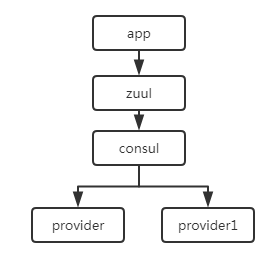
1.服务注册发现中心Consul
启动
consul agent -dev
2.服务端
provider和provider1
spring boot 版本 2.2.1.RELEASE
(1)添加依赖
<properties>

        <java.version>1.8</java.version>

        <spring-cloud.version>Greenwich.SR3</spring-cloud.version>

    </properties>

    <dependencies>

        <dependency>

            <groupId>org.springframework.boot</groupId>

            <artifactId>spring-boot-starter-web</artifactId>

        </dependency>

        <dependency>

            <groupId>org.springframework.cloud</groupId>

            <artifactId>spring-cloud-starter-consul-discovery</artifactId>

        </dependency>

    </dependencies>

    <dependencyManagement>

        <dependencies>

            <dependency>

                <groupId>org.springframework.cloud</groupId>

                <artifactId>spring-cloud-dependencies</artifactId>

                <version>${spring-cloud.version}</version>

                <type>pom</type>

                <scope>import</scope>

            </dependency>

        </dependencies>

    </dependencyManagement>
(2)配置
server.port=8010

spring.application.name=service-provider

spring.cloud.consul.host=localhost

spring.cloud.consul.port=8500

spring.cloud.consul.discovery.health-check-path=/actuator/health

spring.cloud.consul.discovery.service-name=${spring.application.name}

spring.cloud.consul.discovery.heartbeat.enabled=true

management.endpoints.web.exposure.include=*

management.endpoint.health.show-details=always
(3)测试方法
package com.xyz.provider.controller;

import org.springframework.web.bind.annotation.RequestMapping;

import org.springframework.web.bind.annotation.RestController;

@RestController

public class demoController {

    @RequestMapping("/hello")

    public String Hello(){

        return "hello,provider";

    }

}
(4)启动类
package com.xyz.provider;

import org.springframework.boot.SpringApplication;

import org.springframework.boot.autoconfigure.SpringBootApplication;

import org.springframework.cloud.client.discovery.EnableDiscoveryClient;

@EnableDiscoveryClient

@SpringBootApplication

public class ProviderApplication {

    public static void main(String[] args) {

        SpringApplication.run(ProviderApplication.class, args);

    }

}
provide1的
server.port=8011
测试方法
package com.xyz.provider1.controller;

import org.springframework.web.bind.annotation.RequestMapping;

import org.springframework.web.bind.annotation.RestController;

@RestController

public class demoController {

    @RequestMapping("/hello")

    public String Hello(){

        return "hello,another provider";

    }

}
3.网关
zuul
Spring boot版本 2.1.8.RELEASE
上面用的Spring boot版本为 2.2.1.RELEASE
但是启动时遇到了报错,因此改成了这个版本(报错问题)
(1)添加依赖
<properties>

        <java.version>1.8</java.version>

        <spring-cloud.version>Greenwich.SR2</spring-cloud.version>

    </properties>

    <dependencies>

        <dependency>

            <groupId>org.springframework.cloud</groupId>

            <artifactId>spring-cloud-starter-netflix-zuul</artifactId>

        </dependency>

        <dependency>

            <groupId>org.springframework.cloud</groupId>

            <artifactId>spring-cloud-starter-consul-discovery</artifactId>

        </dependency>

    </dependencies>

    <dependencyManagement>

        <dependencies>

            <dependency>

                <groupId>org.springframework.cloud</groupId>

                <artifactId>spring-cloud-dependencies</artifactId>

                <version>${spring-cloud.version}</version>

                <type>pom</type>

                <scope>import</scope>

            </dependency>

        </dependencies>

    </dependencyManagement>
(2)添加配置
server.port=8090

spring.application.name=service-zuul

spring.cloud.consul.host=localhost

spring.cloud.consul.port=8500

spring.cloud.consul.discovery.service-name=${spring.application.name}

spring.cloud.consul.discovery.instance-id=${spring.application.name}:${server.port}

management.endpoints.web.exposure.include=*

management.endpoint.health.show-details=always

zuul.routes.api.path=/api/**

zuul.routes.api.serviceId=service-provider
(3)启动类
package com.xyz.zuul;

import org.springframework.boot.SpringApplication;

import org.springframework.boot.autoconfigure.SpringBootApplication;

import org.springframework.cloud.client.discovery.EnableDiscoveryClient;

import org.springframework.cloud.netflix.zuul.EnableZuulProxy;

@EnableZuulProxy

@SpringBootApplication

public class ZuulApplication {

    public static void main(String[] args) {

        SpringApplication.run(ZuulApplication.class, args);

    }

}
启动Consul
启动provider、provider1
启动 zuul
访问http://127.0.0.1:8090/api/hello
结果输出:
hello,provider和hello,another provider
结果交替出现的,负载均衡器采用的是轮询的方式
示例 https://gitee.com/babybeibeili/zuul_consul.git
Spring boot2X集成zuul与consul实现负载均衡和反向代理的更多相关文章
- 【架构师之路】Nginx负载均衡与反向代理—《亿级流量网站架构核心技术》
本篇摘自<亿级流量网站架构核心技术>第二章 Nginx负载均衡与反向代理 部分内容. 当我们的应用单实例不能支撑用户请求时,此时就需要扩容,从一台服务器扩容到两台.几十台.几百台.然而,用 ...
- (转)ubuntu apache2 的负载均衡和反向代理
apache功能其实很是强大,最近一段时间研究了下apache的反向代理和负载均衡,反向代理网协的外网出口和我的博客出口就是通过apache的反向代理实现的,总结一下,重点说说负载均衡的配置. 首先说 ...
- 查找“CDN、负载均衡、反向代理”等大型网络真实IP地址的方法
首先,CDN.负载均衡.反向代理还分为很多层,有时查出来的是最外层的 CDN 服务器群,真实的机器是不对外开放的,类似这样的: 用户 → CDN 网络 → 一台或多台真实机器 ↗ CDN Server ...
- CentOS中实现Nginx负载均衡和反向代理
一.安装必要软件 负载均衡服务器:IP设置为192.168.1.10 Web服务器1:安装Apache或者Nginx,IP设置为192.168.1.11: Web服务器2:安装Apache或者Ngin ...
- nginx负载均衡和反向代理有什么区别
近在研究nginx的负载均衡和反向代理,先看下这两个简单的配置吧! 负载均衡 worker_processes 1; events { worker_connections 1024; } http{ ...
- Nginx 负载均衡和反向代理实践
nginx 以哪个配置文件启动 Nginx 负载均衡和反向代理实践 环境介绍 192.168.1.50 在这台主机上配置Nginx 的反向代理,负载均衡,和web1,web1使用的81号端口 1 ...
- Nginx(六):Nginx HTTP负载均衡和反向代理的配置与优化
一.什么是负载均衡和反向代理 随着网站访问量的快速增长,单台服务器已经无法承担大量用户的并发访问,必须釆用多台服务器协同工作,以提高计算机系统的处理能力和计算强度,满足当前业务量的需求.而如何在完成同 ...
- Nginx可以说是标配组件,但是主要场景还是负载均衡、反向代理、代理缓存、限流等场景;而把Nginx作为一个Web容器使用的还不是那么广泛。
Nginx可以说是标配组件,但是主要场景还是负载均衡.反向代理.代理缓存.限流等场景:而把Nginx作为一个Web容器使用的还不是那么广泛. 用Nginx+Lua(OpenResty)开发高性能Web ...
- Nginx 之负载均衡与反向代理
负载均衡服务器策略: 1.轮循 每个请求逐个分发到后端服务器 2.加权轮循 按照分配的权重将请求分发到后端服务器 3.ip hash 轮询的基础上,保持一个客户端多次请求分发到一台后端服务器上 一 ...
随机推荐
- centos7设置时间
1.查看时间时区 date 2.修改时区 timedatectl set-timezone Asia/Shanghai # 设置系统时区为上海 3.安装ntp 联网校准时间 yum install n ...
- java--static与代码块
static与代码块: static class Student{ static String school; // 随着类的加载而执行 可以由类进行调用 static { // 静态代码块 加载类时 ...
- Sharding-Jdbc源码探究-读写分离
1. Sharding-Jdbc源码探究-读写分离 1.1. 主入口 找到源码入口 这一个类围绕了springboot配置属性的加载,加载了spring.shardingsphere.datasour ...
- 高德地图的JSAPI学习笔记【一】
高德地图的项目要做 学习笔记记录下来 一.注册账号并申请Key 二.准备页面写好 1.在页面添加 JS API 的入口脚本标签,并将其中「您申请的key值」替换为您刚刚申请的 key: <sc ...
- Qt TCP通信
工程文件 QT += network 服务端 #ifndef WIDGET_H #define WIDGET_H #include <QWidget> #include <QTcpS ...
- python-job
- The 2019 Asia Nanchang First Round Online Programming Contest E. Magic Master
题目链接:https://nanti.jisuanke.com/t/41352 题目意思还是好理解的,看过的人不多,感觉是被通过量吓到了.其实就是个水题,反向模拟就好了, 用队列模拟,反向模拟,它要放 ...
- asp.net Server.Transfer
页面跳转传参. 如果不是通用的跳转可以通过,在原始页面定义对象保存数据 跳转的目标页面可以: SourcePage page=(SourcePage)Context.Handler; //获取源页面的 ...
- WebVTT字幕格式
[时间:2019-05] [状态:Open] [关键词:字幕,vtt,webvtt, 文件格式,cue,css] 0 引言 WebVTT(Web Video Text Tracks),通过HTML5中 ...
- python测试开发django-70.自定义过滤器filter
前言 django的模板有很多内置的过滤器,可以满足一些常见的需求,如果有些需求内置过滤器无法满足,那么我们需要自己写一些过滤器了. 自定义过滤器 先在app下新建一个 templatetags 目录 ...