
TensorFlow.js入门:一维向量的学习
转载自:https://blog.csdn.net/weixin_34061042/article/details/89700664
一维向量及其运算
tensor 是 TensorFlow.js 的数据中心单元:由一组数值组成的一维或多维数组。在 TensorFlow.js中,一维向量的构造函数主要为:tf.tensor()和tf.tensor1d()
可以用set()和get()函数分别获取和设置向量中的元素值。
一维向量的运算函数有很多,说明如下:
- tf.add() 两个向量的对应元素的和
- tf.sub() 两个向量的对应元素的差
- tf.mul() 两个向量的对应元素的乘积
- tf.div() 两个向量的对应元素的商
- tf.maximum() 两个向量的对应元素的最大值
- tf.minimum() 两个向量的对应元素的最小值
- tf.pow() 两个向量的对应元素的幂
以上只是一部分,还有更多的函数如: tf.abs(), tf.sin(), tf.cos(), tf.tan(), tf.tan()等。
简单例子
我们通过一个小小的例子,来说明在TensorFlow.js中一维向量的使用方法。
<html>

<head>

    <!-- Load TensorFlow.js -->

    <script src="https://cdn.jsdelivr.net/npm/@tensorflow/tfjs@0.12.0"> </script>

    <!-- Place your code in the script tag below.-->

    <script>

        a = [1,2,3,4,5];

        b = [2,3,4,5,6];

        function show(){

            const vector1 = tf.tensor(a);

            const vector2 = tf.tensor(b);

            const res = vector2.add(vector1);

            document.getElementById("first_element").innerHTML = "第一个元素为" + res.get(0)+ ".";

            document.getElementById("whole_array").innerHTML = "向量:"+res;

        }

    </script>

</head>

<body>

  <script type="text/javascript">

      function printa()

      {

          document.write("a: " + a + "<br>");

      }

      function printb()

      {

          document.write("b: " + b + "<br>");

      }

      printa();

      printb();

  </script>

  <p id="first_element"></p>

  <p id="whole_array"></p>

  <button onclick="show()" id="show" value="show">show</button>

</body>

</html>
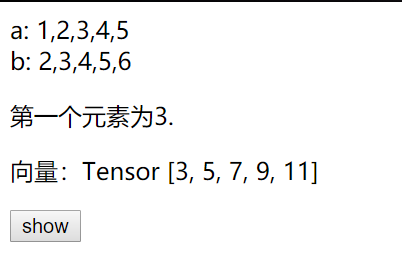
接下来,我们实现稍微复杂的功能,进行张量的其他运算
<html>

  <head>

    <!-- Load TensorFlow.js -->

    <script src="https://cdn.jsdelivr.net/npm/@tensorflow/tfjs@0.12.0"> </script>

    <link href="https://maxcdn.bootstrapcdn.com/bootstrap/3.3.7/css/bootstrap.min.css" rel="stylesheet">

    <script src="https://cdn.bootcss.com/jquery/3.3.1/jquery.min.js"></script>

    <script src="calculate.js"></script>

  </head>

<body>

    <center>

    <h2>TensorFlow向量(一维)学习</h2>

    <br><br>

    <div style="width:600px">

        <div>

            <label class="col-sm-2 control-label">向量运算</label>

            <div class="col-sm-10">

                <label class="radio-inline">

                <input type="radio" name="optionsRadiosinline" value="add" checked="checked"> 加

                </label>

                <label class="radio-inline">

                <input type="radio" name="optionsRadiosinline"  value="sub"> 减

                </label>

                <label class="radio-inline">

                <input type="radio" name="optionsRadiosinline" value="mul"> 乘

                </label>

                <label class="radio-inline">

                <input type="radio" name="optionsRadiosinline" value="div"> 除

                </label>

                <label class="radio-inline">

                <input type="radio" name="optionsRadiosinline" value="max"> max

                </label>

                <label class="radio-inline">

                <input type="radio" name="optionsRadiosinline" value="min"> min

                </label>

                <label class="radio-inline">

                <input type="radio" name="optionsRadiosinline" value="abs"> abs

                </label>

                <label class="radio-inline">

                <input type="radio" name="optionsRadiosinline" value="sin"> sin

                </label>

                <label class="radio-inline">

                <input type="radio" name="optionsRadiosinline" value="cos"> cos

                </label>

                <label class="radio-inline">

                <input type="radio" name="optionsRadiosinline" value="tan"> tan

                </label>

                <label class="radio-inline">

                <input type="radio" name="optionsRadiosinline" value="exp"> exp

                </label>

                <label class="radio-inline">

                <input type="radio" name="optionsRadiosinline" value="log"> log

                </label>

                <label class="radio-inline">

                <input type="radio" name="optionsRadiosinline" value="sqrt"> sqrt

                </label>

                <label class="radio-inline">

                <input type="radio" name="optionsRadiosinline" value="square"> square

                </label>

                <label class="radio-inline">

                <input type="radio" name="optionsRadiosinline" value="cubic"> cubic

                </label>

                <br><br>

            </div>

        </div>

        <div>

            <label for="vector1" class="col-sm-2 control-label">向量1</label>

            <div class="col-sm-10">

            <input type="text" class="form-control" id="vector1" placeholder="向量1">

            <br>

            </div>

        </div>

        <div>

            <label for="vector2" class="col-sm-2 control-label">向量2</label>

            <div class="col-sm-10">

            <input type="text" class="form-control" id="vector2" placeholder="向量2">

            <br>

            </div>

        </div>

        <div >

            <div class="col-sm-offset-2 col-sm-10">

            <button class="btn btn-default" id="result">显示结果</button>

            <button class="btn btn-default" id="clc">清空</button>

            </div>

        </div>

    </div>

    <table class="table" style="width:600px">

        <caption id="tf">运行结果</caption>

        <tbody>

            <tr class="success" id="table">

            </tr>

        </tbody>

    </table>

    </center>

</body>

</html>
一维向量运算演示.html
$(document).ready(function(){

    var flag;

    /*

    flag = 1表示一元运算

    flag = 2表示二元运算

    */

    // 清空两个输入框的输入

    $("#clc").click(function(){

        $("#vector1").val("");

        $("#vector2").val("");

    });

    // 是否允许"向量2"输入框有输入

    $("#vector1").click(function(){

        var op = $("input[name='optionsRadiosinline']:checked").val();

        var ops = ["add", "sub", "mul", "div", "max", "min"];

        if (ops.indexOf(op) == -1)

            flag = 1;

        else

            flag = 2;

        //文本框"向量2"禁用

        if(flag == 1){

            $("#vector2").val("");

            $("input[type='text']").each(function () {

              $("#vector2").attr("disabled", true);

            });

        }

        //文本框"向量2"启用

        if(flag == 2){

            $("input[type='text']").each(function () {

              $("#vector2").attr("disabled", false);

            });

        }

    });

    // 利用tensorflow.js的运算函数,输出计算结果

    $("#result").click(function(){

        if(flag == 1){

            var vector1 = $("#vector1").val().split(',').map(Number);

        }

        if(flag == 2){

            var vector1 = $("#vector1").val().toString().split(',').map(Number);

            var vector2 = $("#vector2").val().toString().split(',').map(Number);

            if(vector1.length != vector2.length)

                alert("输入的两个向量长度不一样");

        }

        // 利用tensorflow.js的运算函数

        if( flag == 1 || ((flag == 2) && (vector1.length == vector2.length))){

            var op = $("input[name='optionsRadiosinline']:checked").val();

            const pow2 = tf.tensor(2).toInt(); // 计算平方

            const pow3 = tf.tensor(3).toInt(); // 计算三次方

            switch (op) // JavaScript的switch结构

            {

                case "add":  // 加法

                    res = tf.tensor(vector1).add(tf.tensor(vector2));

                    break;

                case "sub":  // 减法

                    res = tf.tensor(vector1).sub(tf.tensor(vector2));

                    break;

                case "mul":  // 乘法

                    res = tf.tensor(vector1).mul(tf.tensor(vector2));

                    break;

                case "div":  // 除法

                    res = tf.tensor(vector1).div(tf.tensor(vector2));

                    break;

                case "max":  // 两个向量中的最大值,element-wise

                    res = tf.tensor(vector1).maximum(tf.tensor(vector2));

                    break;

                case "min":  // 两个向量中的最小值,element-wise

                    res = tf.tensor(vector1).minimum(tf.tensor(vector2));

                    break;

                case "abs":  // 绝对值

                    res = tf.tensor(vector1).abs();

                    break;

                case "sin":  // 正弦函数

                    res = tf.tensor(vector1).sin();

                    break;

                case "cos":  // 余弦函数

                    res = tf.tensor(vector1).cos();

                    break;

                case "tan":  // 正切函数

                    res = tf.tensor(vector1).tan();

                    break;

                case "exp":  // 指数函数,以e为底

                    res = tf.tensor(vector1).exp();

                    break;

                case "log":  // 对数函数,以e为底

                    res = tf.tensor(vector1).log();

                    break;

                case "sqrt":  // 平方根

                    res = tf.tensor(vector1).sqrt();

                    break;

                case "square":  // 平方

                    res = tf.tensor(vector1).pow(pow2);

                    break;

                case "cubic":  // 三次方

                    res = tf.tensor(vector1).pow(pow3);

                    break;

                default:

                    res = tf.tensor([]);

            }

            $("#table").html(""); // 清空原有表格中的数据

            // 输入计算结果

            for(var i=0; i< res.shape; i++){

                $("tr").append("<td>"+res.get(i)+"</td>;");

            }

        }

    });

});
calculate.js
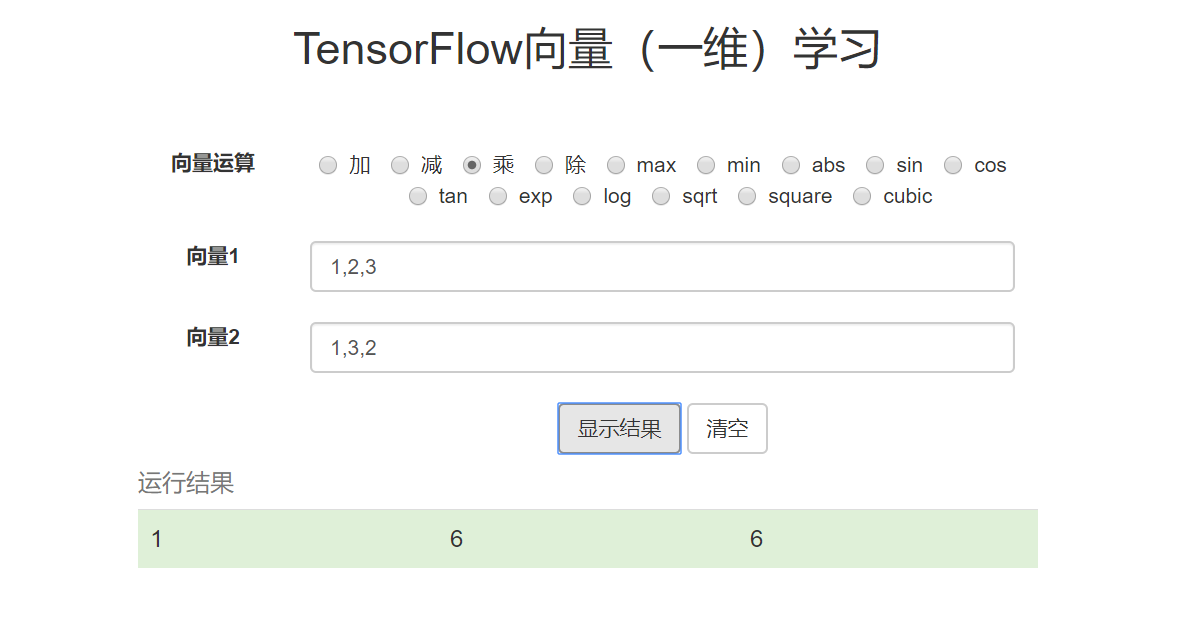
效果如下:
全部的代码可见:github
TensorFlow.js入门:一维向量的学习的更多相关文章
- TensorFlow.js入门(一)一维向量的学习
TensorFlow的介绍 TensorFlow是谷歌基于DistBelief进行研发的第二代人工智能学习系统,其命名来源于本身的运行原理.Tensor(张量)意味着N维数组,Flow(流)意味着 ...
- 【一统江湖的大前端(9)】TensorFlow.js 开箱即用的深度学习工具
示例代码托管在:http://www.github.com/dashnowords/blogs 博客园地址:<大史住在大前端>原创博文目录 目录 一. 上手TensorFlow.js 二. ...
- 【特别推荐】Node.js 入门教程和学习资源汇总
这篇文章与大家分享一批很有用的 Node.js 入门教程和学习资源.Node 是一个服务器端的 JavaScript 解释器,它将改变服务器应该如何工作的概念.它的目标是帮助程序员构建高度可伸缩的应用 ...
- Node.js 入门教程和学习资源汇总
这篇文章与大家分享一批很有用的 Node.js 入门教程和学习资源.Node 是一个服务器端的 JavaScript 解释器,它将改变服务器应该如何工作的概念.它的目标是帮助程序员构建高度可伸缩的应用 ...
- 让我们一起学习《Node.js入门》一书吧!
Node.js入门 读完本书之后,你将完成一个完整的web应用,该应用允许用户浏览页面以及上传文件. 里面对一些知识的讲解,让你略窥Node.js的门径.最好一段代码一段代码的写下来,我的习惯是手里拿 ...
- Tensorflow从入门到精通之——Tensorflow基本操作
前边的章节介绍了什么是Tensorflow,本节将带大家真正走进Tensorflow的世界,学习Tensorflow一些基本的操作及使用方法.同时也欢迎大家关注我们的网站和系列教程:http://ww ...
- TensorFlow.js之安装与核心概念
TensorFlow.js是通过WebGL加速.基于浏览器的机器学习js框架.通过tensorflow.js,我们可以在浏览器中开发机器学习.运行现有的模型或者重新训练现有的模型. 一.安装 ...
- Tensorflow高速入门2--实现手写数字识别
Tensorflow高速入门2–实现手写数字识别 环境: 虚拟机ubuntun16.0.4 Tensorflow 版本号:0.12.0(仅使用cpu下) Tensorflow安装见: http://b ...
- 1. web前端开发分享-css,js入门篇
关注前端这么多年,没有大的成就,就入门期间积累了不少技巧与心得,跟大家分享一下,不一定都适合每个人,毕竟人与人的教育背景与成长环境心理活动都有差别,但就别人的心得再结合自己的特点,然后探索适合自己的学 ...
随机推荐
- Paper | MobileNets: Efficient Convolutional Neural Networks for Mobile Vision Applications
目录 1. 故事 2. MobileNet 2.1 深度可分离卷积 2.2 网络结构 2.3 引入两个超参数 3. 实验 本文提出了一种轻量级结构MobileNets.其基础是深度可分离卷积操作. M ...
- Istio Routing极简教程
官网文档: https://istio.io/docs/reference/config/networking/#VirtualService 在学习像Istio这样的新技术时,看一下示例应用程序总是 ...
- .NET Core 中间件之压缩、缓存
前言 今天给大家介绍一下在 ASP.NET Core 日常开发中用的比较多的两个中间件,它们都是出自于微软的 ASP.NET 团队,他们分别是Microsoft.AspNetCore.Response ...
- Python连载33-共享变量加锁、释放
一.共享变量 共享变量:当多个线程访问同一个变量的时候.会产生共享变量的问题. 例子: import threading sum = 0 loopSum = 1000000 def myAdd(): ...
- 解决MybatisPlus修改时空字段不修改问题
今天遇到了一个问题,在更新数据时,MybatisPlus不会进行修改属性为空的数据表字段. 解决办法: 只需要在实体类的属性上加一行注释即可 /** * 姓名 */ @TableField(fill ...
- centos ftp服务器搭建 vsftpd 匿名访问配置方法 ftp 550 Failed to open file 错误处理
vsftpd是linux下常用的ftp服务软件,配置起来其实不复杂,只是网上很多文章,配置后都无法成功.我使用它是用于局域网内部分享文件的,所以使用匿名的方式. ftp本身密码是明文传输的,如果需要安 ...
- ConsoleColor原来有16种, enumData.GetValue(i)
Console.WriteLine("Name:{0},Value:{0:D}", enumData.GetValue(i)); Name:Black,Value:0Name:Da ...
- MySql数据库中正则表达式
命令 说明 ^ 在字符的开启处进行匹配 $ 在字符的末尾处进行匹配 . 匹配任何字符(包括回车和新行) [-.] 匹配括号内的任意单个字符 [m-n] 匹配m到n之间的任意单个字符,例如[0-9],[ ...
- Java生鲜电商平台-积分,优惠券,会员折扣,签到、预售、拼团、砍价、秒杀及抽奖等促销模块架构设计
Java生鲜电商平台-积分,优惠券,会员折扣,签到.预售.拼团.砍价.秒杀及抽奖等促销模块架构设计 说明:本标题列举了所有目前社会上常见的促销方案,目前贴出实际的业务运营手段以及架构设计,包括业务说明 ...
- python如何通过windows命令行运行一个python程序文件?
python如何通过windows命令行运行一个python程序文件? cmd 进入到py文件对应目录下或者直接在上面的文件地址栏输入cmd,敲入回车 定位到对应的目录下 输入python xxx.p ...