
TensorFlow.js入门:一维向量的学习
转载自:https://blog.csdn.net/weixin_34061042/article/details/89700664
一维向量及其运算
tensor 是 TensorFlow.js 的数据中心单元:由一组数值组成的一维或多维数组。在 TensorFlow.js中,一维向量的构造函数主要为:tf.tensor()和tf.tensor1d()
可以用set()和get()函数分别获取和设置向量中的元素值。
一维向量的运算函数有很多,说明如下:
- tf.add() 两个向量的对应元素的和
- tf.sub() 两个向量的对应元素的差
- tf.mul() 两个向量的对应元素的乘积
- tf.div() 两个向量的对应元素的商
- tf.maximum() 两个向量的对应元素的最大值
- tf.minimum() 两个向量的对应元素的最小值
- tf.pow() 两个向量的对应元素的幂
以上只是一部分,还有更多的函数如: tf.abs(), tf.sin(), tf.cos(), tf.tan(), tf.tan()等。
简单例子
我们通过一个小小的例子,来说明在TensorFlow.js中一维向量的使用方法。
<html>

<head>

    <!-- Load TensorFlow.js -->

    <script src="https://cdn.jsdelivr.net/npm/@tensorflow/tfjs@0.12.0"> </script>

    <!-- Place your code in the script tag below.-->

    <script>

        a = [1,2,3,4,5];

        b = [2,3,4,5,6];

        function show(){

            const vector1 = tf.tensor(a);

            const vector2 = tf.tensor(b);

            const res = vector2.add(vector1);

            document.getElementById("first_element").innerHTML = "第一个元素为" + res.get(0)+ ".";

            document.getElementById("whole_array").innerHTML = "向量:"+res;

        }

    </script>

</head>

<body>

  <script type="text/javascript">

      function printa()

      {

          document.write("a: " + a + "<br>");

      }

      function printb()

      {

          document.write("b: " + b + "<br>");

      }

      printa();

      printb();

  </script>

  <p id="first_element"></p>

  <p id="whole_array"></p>

  <button onclick="show()" id="show" value="show">show</button>

</body>

</html>
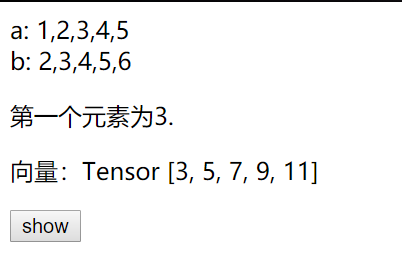
接下来,我们实现稍微复杂的功能,进行张量的其他运算
<html>

  <head>

    <!-- Load TensorFlow.js -->

    <script src="https://cdn.jsdelivr.net/npm/@tensorflow/tfjs@0.12.0"> </script>

    <link href="https://maxcdn.bootstrapcdn.com/bootstrap/3.3.7/css/bootstrap.min.css" rel="stylesheet">

    <script src="https://cdn.bootcss.com/jquery/3.3.1/jquery.min.js"></script>

    <script src="calculate.js"></script>

  </head>

<body>

    <center>

    <h2>TensorFlow向量(一维)学习</h2>

    <br><br>

    <div style="width:600px">

        <div>

            <label class="col-sm-2 control-label">向量运算</label>

            <div class="col-sm-10">

                <label class="radio-inline">

                <input type="radio" name="optionsRadiosinline" value="add" checked="checked"> 加

                </label>

                <label class="radio-inline">

                <input type="radio" name="optionsRadiosinline"  value="sub"> 减

                </label>

                <label class="radio-inline">

                <input type="radio" name="optionsRadiosinline" value="mul"> 乘

                </label>

                <label class="radio-inline">

                <input type="radio" name="optionsRadiosinline" value="div"> 除

                </label>

                <label class="radio-inline">

                <input type="radio" name="optionsRadiosinline" value="max"> max

                </label>

                <label class="radio-inline">

                <input type="radio" name="optionsRadiosinline" value="min"> min

                </label>

                <label class="radio-inline">

                <input type="radio" name="optionsRadiosinline" value="abs"> abs

                </label>

                <label class="radio-inline">

                <input type="radio" name="optionsRadiosinline" value="sin"> sin

                </label>

                <label class="radio-inline">

                <input type="radio" name="optionsRadiosinline" value="cos"> cos

                </label>

                <label class="radio-inline">

                <input type="radio" name="optionsRadiosinline" value="tan"> tan

                </label>

                <label class="radio-inline">

                <input type="radio" name="optionsRadiosinline" value="exp"> exp

                </label>

                <label class="radio-inline">

                <input type="radio" name="optionsRadiosinline" value="log"> log

                </label>

                <label class="radio-inline">

                <input type="radio" name="optionsRadiosinline" value="sqrt"> sqrt

                </label>

                <label class="radio-inline">

                <input type="radio" name="optionsRadiosinline" value="square"> square

                </label>

                <label class="radio-inline">

                <input type="radio" name="optionsRadiosinline" value="cubic"> cubic

                </label>

                <br><br>

            </div>

        </div>

        <div>

            <label for="vector1" class="col-sm-2 control-label">向量1</label>

            <div class="col-sm-10">

            <input type="text" class="form-control" id="vector1" placeholder="向量1">

            <br>

            </div>

        </div>

        <div>

            <label for="vector2" class="col-sm-2 control-label">向量2</label>

            <div class="col-sm-10">

            <input type="text" class="form-control" id="vector2" placeholder="向量2">

            <br>

            </div>

        </div>

        <div >

            <div class="col-sm-offset-2 col-sm-10">

            <button class="btn btn-default" id="result">显示结果</button>

            <button class="btn btn-default" id="clc">清空</button>

            </div>

        </div>

    </div>

    <table class="table" style="width:600px">

        <caption id="tf">运行结果</caption>

        <tbody>

            <tr class="success" id="table">

            </tr>

        </tbody>

    </table>

    </center>

</body>

</html>
一维向量运算演示.html
$(document).ready(function(){

    var flag;

    /*

    flag = 1表示一元运算

    flag = 2表示二元运算

    */

    // 清空两个输入框的输入

    $("#clc").click(function(){

        $("#vector1").val("");

        $("#vector2").val("");

    });

    // 是否允许"向量2"输入框有输入

    $("#vector1").click(function(){

        var op = $("input[name='optionsRadiosinline']:checked").val();

        var ops = ["add", "sub", "mul", "div", "max", "min"];

        if (ops.indexOf(op) == -1)

            flag = 1;

        else

            flag = 2;

        //文本框"向量2"禁用

        if(flag == 1){

            $("#vector2").val("");

            $("input[type='text']").each(function () {

              $("#vector2").attr("disabled", true);

            });

        }

        //文本框"向量2"启用

        if(flag == 2){

            $("input[type='text']").each(function () {

              $("#vector2").attr("disabled", false);

            });

        }

    });

    // 利用tensorflow.js的运算函数,输出计算结果

    $("#result").click(function(){

        if(flag == 1){

            var vector1 = $("#vector1").val().split(',').map(Number);

        }

        if(flag == 2){

            var vector1 = $("#vector1").val().toString().split(',').map(Number);

            var vector2 = $("#vector2").val().toString().split(',').map(Number);

            if(vector1.length != vector2.length)

                alert("输入的两个向量长度不一样");

        }

        // 利用tensorflow.js的运算函数

        if( flag == 1 || ((flag == 2) && (vector1.length == vector2.length))){

            var op = $("input[name='optionsRadiosinline']:checked").val();

            const pow2 = tf.tensor(2).toInt(); // 计算平方

            const pow3 = tf.tensor(3).toInt(); // 计算三次方

            switch (op) // JavaScript的switch结构

            {

                case "add":  // 加法

                    res = tf.tensor(vector1).add(tf.tensor(vector2));

                    break;

                case "sub":  // 减法

                    res = tf.tensor(vector1).sub(tf.tensor(vector2));

                    break;

                case "mul":  // 乘法

                    res = tf.tensor(vector1).mul(tf.tensor(vector2));

                    break;

                case "div":  // 除法

                    res = tf.tensor(vector1).div(tf.tensor(vector2));

                    break;

                case "max":  // 两个向量中的最大值,element-wise

                    res = tf.tensor(vector1).maximum(tf.tensor(vector2));

                    break;

                case "min":  // 两个向量中的最小值,element-wise

                    res = tf.tensor(vector1).minimum(tf.tensor(vector2));

                    break;

                case "abs":  // 绝对值

                    res = tf.tensor(vector1).abs();

                    break;

                case "sin":  // 正弦函数

                    res = tf.tensor(vector1).sin();

                    break;

                case "cos":  // 余弦函数

                    res = tf.tensor(vector1).cos();

                    break;

                case "tan":  // 正切函数

                    res = tf.tensor(vector1).tan();

                    break;

                case "exp":  // 指数函数,以e为底

                    res = tf.tensor(vector1).exp();

                    break;

                case "log":  // 对数函数,以e为底

                    res = tf.tensor(vector1).log();

                    break;

                case "sqrt":  // 平方根

                    res = tf.tensor(vector1).sqrt();

                    break;

                case "square":  // 平方

                    res = tf.tensor(vector1).pow(pow2);

                    break;

                case "cubic":  // 三次方

                    res = tf.tensor(vector1).pow(pow3);

                    break;

                default:

                    res = tf.tensor([]);

            }

            $("#table").html(""); // 清空原有表格中的数据

            // 输入计算结果

            for(var i=0; i< res.shape; i++){

                $("tr").append("<td>"+res.get(i)+"</td>;");

            }

        }

    });

});
calculate.js
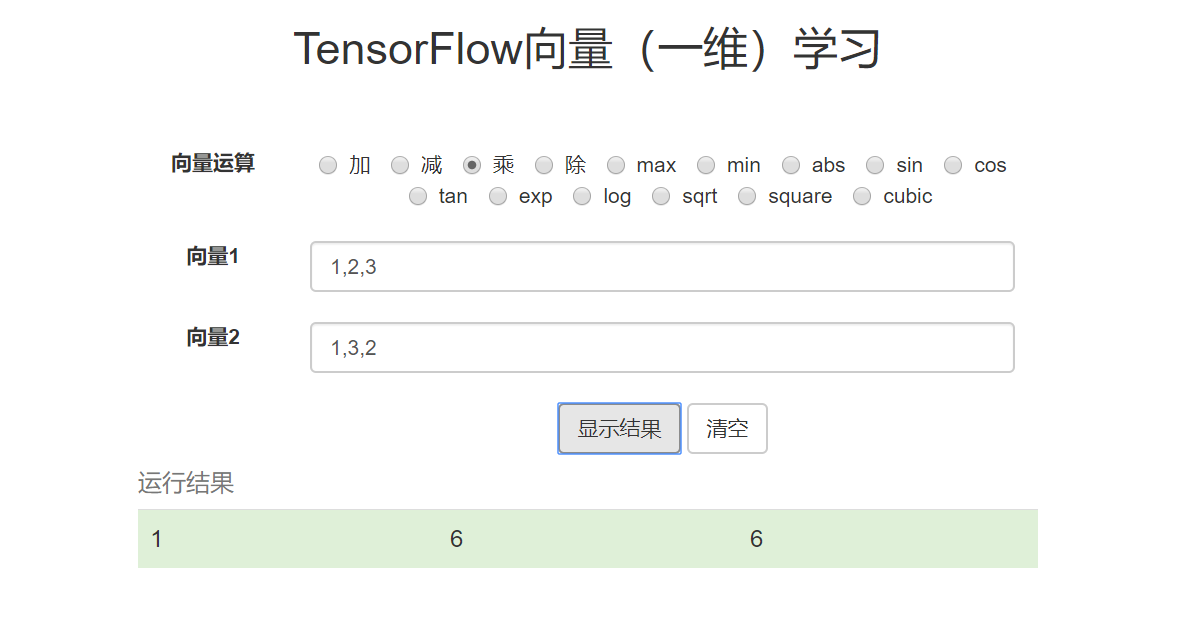
效果如下:
全部的代码可见:github
TensorFlow.js入门:一维向量的学习的更多相关文章
- TensorFlow.js入门(一)一维向量的学习
TensorFlow的介绍 TensorFlow是谷歌基于DistBelief进行研发的第二代人工智能学习系统,其命名来源于本身的运行原理.Tensor(张量)意味着N维数组,Flow(流)意味着 ...
- 【一统江湖的大前端(9)】TensorFlow.js 开箱即用的深度学习工具
示例代码托管在:http://www.github.com/dashnowords/blogs 博客园地址:<大史住在大前端>原创博文目录 目录 一. 上手TensorFlow.js 二. ...
- 【特别推荐】Node.js 入门教程和学习资源汇总
这篇文章与大家分享一批很有用的 Node.js 入门教程和学习资源.Node 是一个服务器端的 JavaScript 解释器,它将改变服务器应该如何工作的概念.它的目标是帮助程序员构建高度可伸缩的应用 ...
- Node.js 入门教程和学习资源汇总
这篇文章与大家分享一批很有用的 Node.js 入门教程和学习资源.Node 是一个服务器端的 JavaScript 解释器,它将改变服务器应该如何工作的概念.它的目标是帮助程序员构建高度可伸缩的应用 ...
- 让我们一起学习《Node.js入门》一书吧!
Node.js入门 读完本书之后,你将完成一个完整的web应用,该应用允许用户浏览页面以及上传文件. 里面对一些知识的讲解,让你略窥Node.js的门径.最好一段代码一段代码的写下来,我的习惯是手里拿 ...
- Tensorflow从入门到精通之——Tensorflow基本操作
前边的章节介绍了什么是Tensorflow,本节将带大家真正走进Tensorflow的世界,学习Tensorflow一些基本的操作及使用方法.同时也欢迎大家关注我们的网站和系列教程:http://ww ...
- TensorFlow.js之安装与核心概念
TensorFlow.js是通过WebGL加速.基于浏览器的机器学习js框架.通过tensorflow.js,我们可以在浏览器中开发机器学习.运行现有的模型或者重新训练现有的模型. 一.安装 ...
- Tensorflow高速入门2--实现手写数字识别
Tensorflow高速入门2–实现手写数字识别 环境: 虚拟机ubuntun16.0.4 Tensorflow 版本号:0.12.0(仅使用cpu下) Tensorflow安装见: http://b ...
- 1. web前端开发分享-css,js入门篇
关注前端这么多年,没有大的成就,就入门期间积累了不少技巧与心得,跟大家分享一下,不一定都适合每个人,毕竟人与人的教育背景与成长环境心理活动都有差别,但就别人的心得再结合自己的特点,然后探索适合自己的学 ...
随机推荐
- 第04组 Alpha冲刺(1/4)
队名:斗地组 组长博客:地址 作业博客:Alpha冲刺(1/4) 各组员情况 林涛(组长) 过去两天完成了哪些任务: 1.安排好各个组员的任务 2.收集各个组员的进度 3.写页面 4.写博客 展示Gi ...
- (十八)golang--defer关键字
在函数中,程序员经常需要创建资源(比如,数据库连接,文件句柄,锁等),为了在函数执行完毕后,及时释放资源,go设计者提供defer(延时机制) 用defer申明的语句不会立即执行,而是被存入到defe ...
- ICP 匹配定位算法学习记录
icp 算法原理是: 选取目标点云P和源点云Q,按照一定的约束条件,找到最邻近点(pi,qi),然后计算出最优R和t(旋转和平移), 使得误差函数最小,误差函数E(R,t): 基本算法流程: 1.在目 ...
- Debug 路漫漫-14:Python: AttributeError: module 'tensorflow' has no attribute 'sub'
在调试 <Neural Factorization Machines for Sparse Predictive Analytics>论文的源码(https://github.com/he ...
- Vue.js 源码分析(二十三) 指令篇 v-show指令详解
v-show的作用是将表达式值转换为布尔值,根据该布尔值的真假来显示/隐藏切换元素,它是通过切换元素的display这个css属性值来实现的,例如: <!DOCTYPE html> < ...
- 搜索旋转排序数组II
题目 假设按照升序排序的数组在预先未知的某个点上进行了旋转. ( 例如,数组 [,,,,,,] 可能变为 [,,,,,,] ). 编写一个函数来判断给定的目标值是否存在于数组中.若存在返回 true, ...
- C++回调,函数指针
想要理解回调机制,先要理解函数指针 函数指针 函数指针指向的是函数而非对象,和其他指针一样,函数指针指向某种特定的类型 函数的类型由他的返回类型和参数类型共同决定,与函数名无关,如: bool len ...
- C#中窗口关闭时没有取消事件订阅导致事件重复执行的解决方法
场景 C#中委托与事件的使用-以Winform中跨窗体传值为例: https://blog.csdn.net/BADAO_LIUMANG_QIZHI/article/details/100150700 ...
- Python进阶(二)
1.模块和包的概念 python的解决方案是把同名的模块放到不同的包中 1.1,导入模块 要使用一个模块,我们必须首先导入该模块.Python使用import语句导入一个模块.例如,导入系统自带的模块 ...
- codeforces #592(Div.2)
codeforces #592(Div.2) A Pens and Pencils Tomorrow is a difficult day for Polycarp: he has to attend ...