
<Parquet><Physical Properties><Best practice><With impala>
Parquet
- Parquet is a columnar storage format for Hadoop.
- Parquet is designed to make the advantages of compressed, efficient colunmar data representation available to any project in the Hadoop ecosystem.
Physical Properties
- Some table storage formats provide parameters for enabling or disabling features and adjusting physical parameters.
- Now, parquet file provides the following physical properties.
- parquet.block.size: The block size is the size of a row group being buffered in memory. This limits the memory usage when writing. Larger values will improve the I/O when reading but consume more memory when writing. Default size is 134217728 bytes (= 128 * 1024 * 1024).
- parquet.page.size: The page size if for compression. When reading, each page is the smallest unit that must be read fully to access a single record. If the value is too small, the compression will deteriorate. Default size is 1048576 bytes (= 1 * 1024 * 1024).
- parquet.compression: The compression algorithm used to compress pages. It should be one of uncompressed, snappy, gzip, lzo. Default is uncompressed.
- parquet.enable.dictionary: The boolean value is to enable/disable dictionary encoding. It should be one of either true or false. Default is true.
Parquet Row Group Size
Row Group
- Even though Parquet is a column-orientied format, the largest sections of data are groups of row data rows.
- Records are organized into row groups so that the file is splittable and each split contains complete records.
- Here’s a simple picture of how data is stored for a simple schema with columns A, in green, and B, in blue:
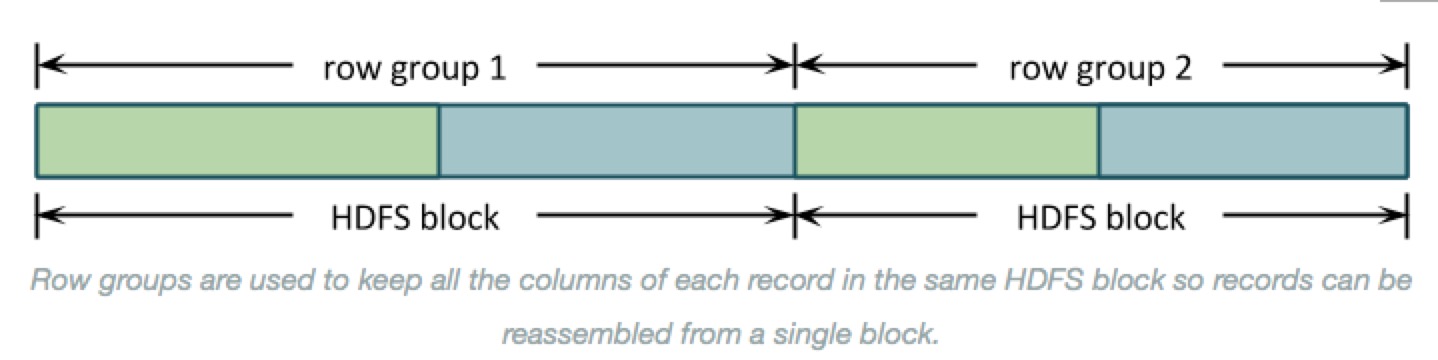
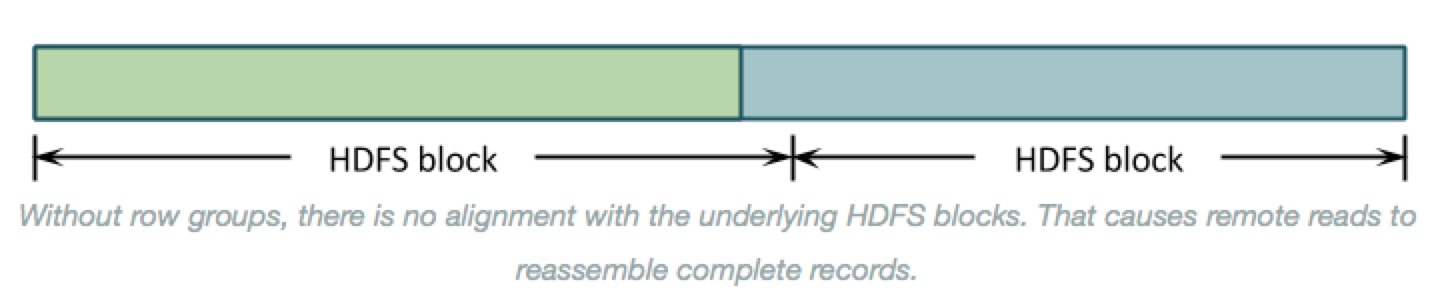
- Why row groups? --> If the entire file were organized by columns then the underlying HDFS blocks would contain just a column or two of each record. Reassembling those records to process them would require shuffling almost all of the data around to the right place. As below:
- There is another benefit to organizing data into row groups: memory consumption. Before Parquet can write the first data value in column B, it needs to write the last value of column A. All column-oriented formas need to buffer record data in memory until those records are written all at once.
- You can control row group size by setting parquet.block.size, in bytes(default: 128MB). Parquet buffers data in its final encoded and compressed form, which uses less memory and means that the amount of buffered data is the same sa the row group size on disk.
- That makes the row group size the most important setting. It controls both:
- The amount of memory consumed for each open Parquet file, and
- The layout of column data on disk.
The row group setting is a trade-off between these two. It is generally better to organize data into larger contiguous column chunks to get better I/O performance, but this comes at the cost of using more memory.
Column Chunks
- That leads to next level down in the Parquet file: column chunks.
- Row groups are divided into column chunkds. The benefits of Parquet come from this organization
- Stroing data by column lets Parquet use type-specific encodings and then compression to get more values in fewer bytes when writing, and skip data for columns u don's need when reading.
pics here - The total row group size is divided between the column chuhnks. Column chunk sizes also vary widely depending on how densely Parquet can store the values, so the portion used for each column is ususlly skewed.
Recommendations
- There’s no magic answer for setting the row group size, but this does all lead to a few best practices:
Know ur memory limits
- Total memory for writes is approximately the row group size times the number of open files. If this is too high, then processes die with OutOfMemoryExceptions.
- On the read side, memory consumption can be less by ingoring some columns, but this will usually still require half, a third, or some other constant times ur row group size.
Test with ur data
- Write a file or two using the defaults and use parquet-tools to see the size distributions for columns in ur data. Then, try to pick a value that puts the majority of those columns at a few megabytes in each row group.
Align with Hdfs Blocks
- Make sure some whole number of row groups make apprioxmately one Hdfs block. Each row group must be processed by a single task, so row groups larger than the HDFS block size will read a lot of data remotely. Row groups that spill over into adjacent blocks will have the same problem.
Using Parquet Tables in Impala
- Impala can create tables that use parquet data files, insert data into those tables, convert the data into Parquet format, and query Parquet data files produced by Impala or other components.
- The only syntax required is the STORED AS PARQUET clause on the CREATE TABLE statement. After that, all SELECT, INSERT, and other statements recognize the Parquet format automatically.
Insert
- Avoiding using the INSERT ... VALUES syntax, or partitioning the table at too granular a level, if that would produce a large number of small files that cannot use Parquet optimizations for large data chunks.
- Inserting data into a partitioned Impala table can be a memory-intensive operation, because each data file requires a memory buffer to hold the data before it is written.
- Such inserts can also exceed HDFS limits on simultaneous open files, because each node could potentially write to a separate data file for each partition, all at the same time.
- If capacity problems still occur, consider splitting insert operations into one INSERT statement per partition.
Query
- Impala can query Parquet files that use the PLAIN, PLAIN_DICTIONARY, BIT_PACKED, and RLE encodings. Currently, Impala does not support RLE_DICTIONARY encoding.
FYI
<Parquet><Physical Properties><Best practice><With impala>的更多相关文章
- 简单物联网:外网访问内网路由器下树莓派Flask服务器
最近做一个小东西,大概过程就是想在教室,宿舍控制实验室的一些设备. 已经在树莓上搭了一个轻量的flask服务器,在实验室的路由器下,任何设备都是可以访问的:但是有一些限制条件,比如我想在宿舍控制我种花 ...
- 利用ssh反向代理以及autossh实现从外网连接内网服务器
前言 最近遇到这样一个问题,我在实验室架设了一台服务器,给师弟或者小伙伴练习Linux用,然后平时在实验室这边直接连接是没有问题的,都是内网嘛.但是回到宿舍问题出来了,使用校园网的童鞋还是能连接上,使 ...
- 外网访问内网Docker容器
外网访问内网Docker容器 本地安装了Docker容器,只能在局域网内访问,怎样从外网也能访问本地Docker容器? 本文将介绍具体的实现步骤. 1. 准备工作 1.1 安装并启动Docker容器 ...
- 外网访问内网SpringBoot
外网访问内网SpringBoot 本地安装了SpringBoot,只能在局域网内访问,怎样从外网也能访问本地SpringBoot? 本文将介绍具体的实现步骤. 1. 准备工作 1.1 安装Java 1 ...
- 外网访问内网Elasticsearch WEB
外网访问内网Elasticsearch WEB 本地安装了Elasticsearch,只能在局域网内访问其WEB,怎样从外网也能访问本地Elasticsearch? 本文将介绍具体的实现步骤. 1. ...
- 怎样从外网访问内网Rails
外网访问内网Rails 本地安装了Rails,只能在局域网内访问,怎样从外网也能访问本地Rails? 本文将介绍具体的实现步骤. 1. 准备工作 1.1 安装并启动Rails 默认安装的Rails端口 ...
- 怎样从外网访问内网Memcached数据库
外网访问内网Memcached数据库 本地安装了Memcached数据库,只能在局域网内访问,怎样从外网也能访问本地Memcached数据库? 本文将介绍具体的实现步骤. 1. 准备工作 1.1 安装 ...
- 怎样从外网访问内网CouchDB数据库
外网访问内网CouchDB数据库 本地安装了CouchDB数据库,只能在局域网内访问,怎样从外网也能访问本地CouchDB数据库? 本文将介绍具体的实现步骤. 1. 准备工作 1.1 安装并启动Cou ...
- 怎样从外网访问内网DB2数据库
外网访问内网DB2数据库 本地安装了DB2数据库,只能在局域网内访问,怎样从外网也能访问本地DB2数据库? 本文将介绍具体的实现步骤. 1. 准备工作 1.1 安装并启动DB2数据库 默认安装的DB2 ...
- 怎样从外网访问内网OpenLDAP数据库
外网访问内网OpenLDAP数据库 本地安装了OpenLDAP数据库,只能在局域网内访问,怎样从外网也能访问本地OpenLDAP数据库? 本文将介绍具体的实现步骤. 1. 准备工作 1.1 安装并启动 ...
随机推荐
- 01Flask基础
简介 Flask诞生于2010年,是Armin ronacher(人名)用 Python 语言基于 Werkzeug 工具箱编写的轻量级Web开发框架. Flask 本身相当于一个内核,其他几乎所有的 ...
- 并查集 牛客练习赛41 C抓捕盗窃犯
题目链接 :https://ac.nowcoder.com/acm/contest/373/C 题意,初始每一个城市都有一伙盗贼,没过一个时刻盗贼就会逃窜到另一个城市,你可以在m个城市设置监察站,会逮 ...
- 『计算机视觉』Mask-RCNN_推断网络其一:总览
在我们学习的这个项目中,模型主要分为两种状态,即进行推断用的inference模式和进行训练用的training模式.所谓推断模式就是已经训练好的的模型,我们传入一张图片,网络将其分析结果计算出来的模 ...
- hdu5992 kdt
题意:n个旅馆,每个有花费,m个查询,查询在某个点在c花费范围内的距离最小的旅馆 题解:kdt,建成四维,坐标两维,花费一维,id一维,实际上建树只用前两维,正常的查询,如果满足条件在更新答案即可 / ...
- functional program language(what,include,why popular)
函数式语言(functional language)一类程序设计语言.是一种非冯·诺伊曼式的程序设计语言.函数式语言主要成分是原始函数.定义函数和函数型.这种语言具有较强的组织数据结构的能力,可以把某 ...
- Cassandra的commitLog、memtable、 SStable
和关系数据库一样,Cassandra在写数据之前,也需要先记录日志,称之为commitlog,然后数据才会写入到Column Family对应的Memtable中,并且Memtable中的内容是按照k ...
- Space Ant
Space Ant The most exciting space discovery occurred at the end of the 20th century. In 1999, scient ...
- 十八、Spring框架(AOP)
一.AOP(基于XML方式配置AOP) AOP(Aspect Oriented Program):面向切面编程.思想是:把功能分为核心业务功能和周边功能. 所谓核心业务功能:比如登录,增删改数据都叫做 ...
- C++ leetcode Longest Substring Without Repeating Characters
要开学了,不开森.键盘声音有点大,担心会吵到舍友.今年要当个可爱的技术宅呀~ 题目:Given a string, find the length of the longest substring w ...
- ElasticSearch的matchQuery与termQuery区别
matchQuery:会将搜索词分词,再与目标查询字段进行匹配,若分词中的任意一个词与目标字段匹配上,则可查询到. termQuery:不会对搜索词进行分词处理,而是作为一个整体与目标字段进行匹配,若 ...