
<Parquet><Physical Properties><Best practice><With impala>
Parquet
- Parquet is a columnar storage format for Hadoop.
- Parquet is designed to make the advantages of compressed, efficient colunmar data representation available to any project in the Hadoop ecosystem.
Physical Properties
- Some table storage formats provide parameters for enabling or disabling features and adjusting physical parameters.
- Now, parquet file provides the following physical properties.
- parquet.block.size: The block size is the size of a row group being buffered in memory. This limits the memory usage when writing. Larger values will improve the I/O when reading but consume more memory when writing. Default size is 134217728 bytes (= 128 * 1024 * 1024).
- parquet.page.size: The page size if for compression. When reading, each page is the smallest unit that must be read fully to access a single record. If the value is too small, the compression will deteriorate. Default size is 1048576 bytes (= 1 * 1024 * 1024).
- parquet.compression: The compression algorithm used to compress pages. It should be one of uncompressed, snappy, gzip, lzo. Default is uncompressed.
- parquet.enable.dictionary: The boolean value is to enable/disable dictionary encoding. It should be one of either true or false. Default is true.
Parquet Row Group Size
Row Group
- Even though Parquet is a column-orientied format, the largest sections of data are groups of row data rows.
- Records are organized into row groups so that the file is splittable and each split contains complete records.
- Here’s a simple picture of how data is stored for a simple schema with columns A, in green, and B, in blue:
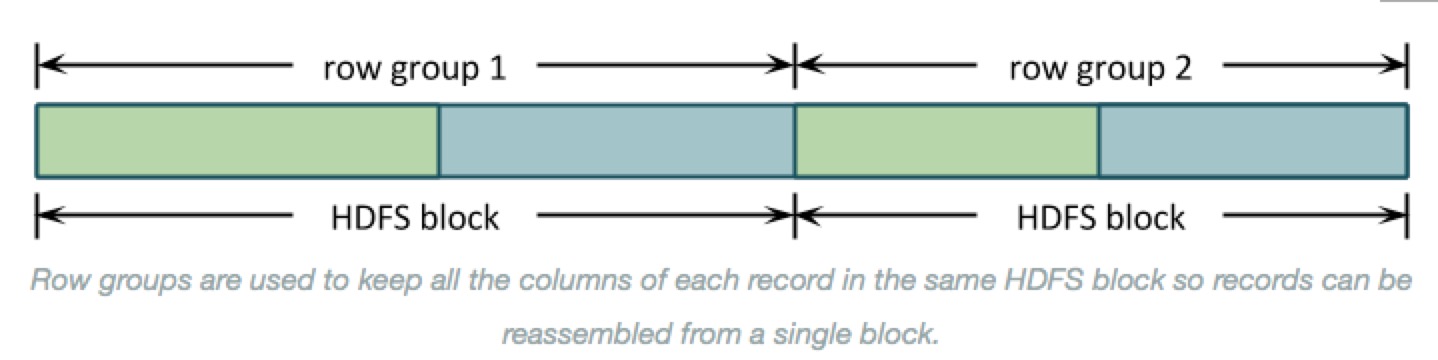
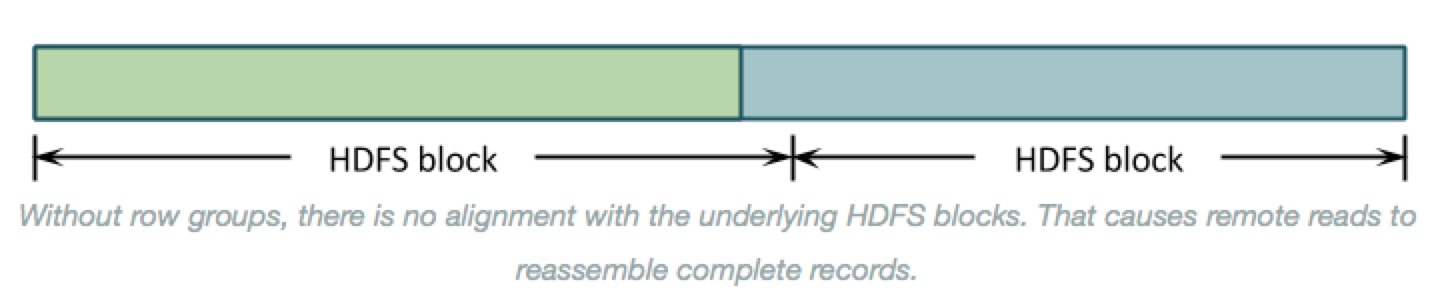
- Why row groups? --> If the entire file were organized by columns then the underlying HDFS blocks would contain just a column or two of each record. Reassembling those records to process them would require shuffling almost all of the data around to the right place. As below:
- There is another benefit to organizing data into row groups: memory consumption. Before Parquet can write the first data value in column B, it needs to write the last value of column A. All column-oriented formas need to buffer record data in memory until those records are written all at once.
- You can control row group size by setting parquet.block.size, in bytes(default: 128MB). Parquet buffers data in its final encoded and compressed form, which uses less memory and means that the amount of buffered data is the same sa the row group size on disk.
- That makes the row group size the most important setting. It controls both:
- The amount of memory consumed for each open Parquet file, and
- The layout of column data on disk.
The row group setting is a trade-off between these two. It is generally better to organize data into larger contiguous column chunks to get better I/O performance, but this comes at the cost of using more memory.
Column Chunks
- That leads to next level down in the Parquet file: column chunks.
- Row groups are divided into column chunkds. The benefits of Parquet come from this organization
- Stroing data by column lets Parquet use type-specific encodings and then compression to get more values in fewer bytes when writing, and skip data for columns u don's need when reading.
pics here - The total row group size is divided between the column chuhnks. Column chunk sizes also vary widely depending on how densely Parquet can store the values, so the portion used for each column is ususlly skewed.
Recommendations
- There’s no magic answer for setting the row group size, but this does all lead to a few best practices:
Know ur memory limits
- Total memory for writes is approximately the row group size times the number of open files. If this is too high, then processes die with OutOfMemoryExceptions.
- On the read side, memory consumption can be less by ingoring some columns, but this will usually still require half, a third, or some other constant times ur row group size.
Test with ur data
- Write a file or two using the defaults and use parquet-tools to see the size distributions for columns in ur data. Then, try to pick a value that puts the majority of those columns at a few megabytes in each row group.
Align with Hdfs Blocks
- Make sure some whole number of row groups make apprioxmately one Hdfs block. Each row group must be processed by a single task, so row groups larger than the HDFS block size will read a lot of data remotely. Row groups that spill over into adjacent blocks will have the same problem.
Using Parquet Tables in Impala
- Impala can create tables that use parquet data files, insert data into those tables, convert the data into Parquet format, and query Parquet data files produced by Impala or other components.
- The only syntax required is the STORED AS PARQUET clause on the CREATE TABLE statement. After that, all SELECT, INSERT, and other statements recognize the Parquet format automatically.
Insert
- Avoiding using the INSERT ... VALUES syntax, or partitioning the table at too granular a level, if that would produce a large number of small files that cannot use Parquet optimizations for large data chunks.
- Inserting data into a partitioned Impala table can be a memory-intensive operation, because each data file requires a memory buffer to hold the data before it is written.
- Such inserts can also exceed HDFS limits on simultaneous open files, because each node could potentially write to a separate data file for each partition, all at the same time.
- If capacity problems still occur, consider splitting insert operations into one INSERT statement per partition.
Query
- Impala can query Parquet files that use the PLAIN, PLAIN_DICTIONARY, BIT_PACKED, and RLE encodings. Currently, Impala does not support RLE_DICTIONARY encoding.
FYI
<Parquet><Physical Properties><Best practice><With impala>的更多相关文章
- 简单物联网:外网访问内网路由器下树莓派Flask服务器
最近做一个小东西,大概过程就是想在教室,宿舍控制实验室的一些设备. 已经在树莓上搭了一个轻量的flask服务器,在实验室的路由器下,任何设备都是可以访问的:但是有一些限制条件,比如我想在宿舍控制我种花 ...
- 利用ssh反向代理以及autossh实现从外网连接内网服务器
前言 最近遇到这样一个问题,我在实验室架设了一台服务器,给师弟或者小伙伴练习Linux用,然后平时在实验室这边直接连接是没有问题的,都是内网嘛.但是回到宿舍问题出来了,使用校园网的童鞋还是能连接上,使 ...
- 外网访问内网Docker容器
外网访问内网Docker容器 本地安装了Docker容器,只能在局域网内访问,怎样从外网也能访问本地Docker容器? 本文将介绍具体的实现步骤. 1. 准备工作 1.1 安装并启动Docker容器 ...
- 外网访问内网SpringBoot
外网访问内网SpringBoot 本地安装了SpringBoot,只能在局域网内访问,怎样从外网也能访问本地SpringBoot? 本文将介绍具体的实现步骤. 1. 准备工作 1.1 安装Java 1 ...
- 外网访问内网Elasticsearch WEB
外网访问内网Elasticsearch WEB 本地安装了Elasticsearch,只能在局域网内访问其WEB,怎样从外网也能访问本地Elasticsearch? 本文将介绍具体的实现步骤. 1. ...
- 怎样从外网访问内网Rails
外网访问内网Rails 本地安装了Rails,只能在局域网内访问,怎样从外网也能访问本地Rails? 本文将介绍具体的实现步骤. 1. 准备工作 1.1 安装并启动Rails 默认安装的Rails端口 ...
- 怎样从外网访问内网Memcached数据库
外网访问内网Memcached数据库 本地安装了Memcached数据库,只能在局域网内访问,怎样从外网也能访问本地Memcached数据库? 本文将介绍具体的实现步骤. 1. 准备工作 1.1 安装 ...
- 怎样从外网访问内网CouchDB数据库
外网访问内网CouchDB数据库 本地安装了CouchDB数据库,只能在局域网内访问,怎样从外网也能访问本地CouchDB数据库? 本文将介绍具体的实现步骤. 1. 准备工作 1.1 安装并启动Cou ...
- 怎样从外网访问内网DB2数据库
外网访问内网DB2数据库 本地安装了DB2数据库,只能在局域网内访问,怎样从外网也能访问本地DB2数据库? 本文将介绍具体的实现步骤. 1. 准备工作 1.1 安装并启动DB2数据库 默认安装的DB2 ...
- 怎样从外网访问内网OpenLDAP数据库
外网访问内网OpenLDAP数据库 本地安装了OpenLDAP数据库,只能在局域网内访问,怎样从外网也能访问本地OpenLDAP数据库? 本文将介绍具体的实现步骤. 1. 准备工作 1.1 安装并启动 ...
随机推荐
- 关于OkHttp同步请求的小错误
今天进行OkHttp的同步请求 写的都是按照官方的去写的 但是返回的东西却不是我想要的 原因是我直接拿到Response后,直接Response.toString,想要拿到返回值 但是这样是错误的,正 ...
- n!的位数 斯特林公式
#include<iostream> #include<cstring> #include<string> #include<cstdio> #incl ...
- Luffy之登录认证以及JWT
1.用户认证 在前面我们已经完成了,前端登录页面的搭建,以及路由分配,现在我们作关于登录认证部分的东西 Django提供了认证系统.认证系统包含: 用户 权限:二元(是/否)标志指示一个用户是否可以做 ...
- python基础之 反射,md5加密 以及isinstance, type, issubclass内置方法的运用
内容梗概: 1. isinstance, type, issubclass 2. 区分函数和方法 3. 反射(重点) 4. md5加密 1. isinstance, type, issubclass1 ...
- MyBatis中mybatis-generator代码生成的一般过程
MyBatis框架的使用,可以参考我的文章: https://blog.csdn.net/JayInnn/article/details/81746571(基于Mybatis实现一个查库的接口) ht ...
- prometheus远程连接m3db实现存储
如果是prometheus server配置文件添加如下: remote_read: - url: "http://m3coordinator.m3db.svc.cluster.local: ...
- python之命令行参数解析模块argparse
"""argparse模块使得写用户友好性命令行接口很容易,程序定义所需要的参数,argparse会从ays.argv中提取出这些参数.argparse模块也能自动的产生 ...
- 【转】[总结]vue开发常见知识点及问题资料整理(持续更新)
1.(webpack)vue-cli构建的项目如何设置每个页面的title 2.vue项目中使用axios上传图片等文件 3.qs.stringify() 和JSON.stringify()的区别以及 ...
- dynamic load jar and init spring
public class SpringLoader { private Map<String, Class<?>> classMap = new HashMap<> ...
- Qt与JS(三)
Qt不错的学习网址: http://www.cnblogs.com/findumars/p/5529526.html ----------------------------------------- ...