
[原]openstack-kilo--issue(十三)Unauthorized: The request you have made requires authentication. (HTTP 401) (Request
在运行nova-list 的时候发现报错401:如下面
========>>>>>>>>> 正常显示

[root@controller ~]# nova --debug list

DEBUG (session:) REQ: curl -g -i -X GET http://controller:35357/v3 -H "Accept: app" -H "User-Agent: python-keystoneclient"

INFO (connectionpool:) Starting new HTTP connection (): controller

DEBUG (connectionpool:) "GET /v3 HTTP/1.1"

DEBUG (session:) RESP: [] content-length:  vary: X-Auth-Token keep-alive: ti100 server: Apache/2.4. (CentOS) OpenSSL/1.0.1e-fips mod_fcgid/2.3. mod_wsgi/3.4 Pynnection: Keep-Alive date: Tue,  Jan  :: GMT content-type: application/jsk-request-id: req-9f10a8db-4c05-408a-934b-0b1d96f07146

RESP BODY: {"version": {"status": "stable", "updated": "2015-03-30T00:00:00Z", "mediaase": "application/json", "type": "application/vnd.openstack.identity-v3+json"}], "idinks": [{"href": "http://controller:35357/v3/", "rel": "self"}]}}

DEBUG (base:) Making authentication request to http://controller:35357/v3/auth/tok

DEBUG (connectionpool:) "POST /v3/auth/tokens HTTP/1.1"

DEBUG (iso8601:) Parsed --17T08::.247506Z into {'tz_sign': None, 'second'', 'hour': u'', 'daydash': u'', 'tz_hour': None, 'month': None, 'timezone'nd': u'', 'tz_minute': None, 'year': u'', 'separator': u'T', 'monthdash': u'', 'minute': u''} with default timezone <iso8601.iso8601.Utc object at 0x232a210>

DEBUG (iso8601:) Got u'' for 'year' with default None

DEBUG (iso8601:) Got u'' for 'monthdash' with default

DEBUG (iso8601:) Got  for 'month' with default

DEBUG (iso8601:) Got u'' for 'daydash' with default

DEBUG (iso8601:) Got  for 'day' with default

DEBUG (iso8601:) Got u'' for 'hour' with default None

DEBUG (iso8601:) Got u'' for 'minute' with default None

DEBUG (iso8601:) Got u'' for 'second' with default None

DEBUG (session:) REQ: curl -g -i -X GET http://controller:8774/v2/f57b892b5c50426b7f3/servers/detail -H "User-Agent: python-novaclient" -H "Accept: application/json" -en: {SHA1}b1929005e567f4546937326d942b91a4fad47deb"

INFO (connectionpool:) Starting new HTTP connection (): controller

DEBUG (connectionpool:) "GET /v2/f57b892b5c50426bb90414d31f0e77f3/servers/detail H15

DEBUG (session:) RESP: [] date: Tue,  Jan  :: GMT connection: keep--type: application/json content-length:  x-compute-request-id: req-632a635e-269a-4bfa0c261

RESP BODY: {"servers": []}

+----+------+--------+------------+-------------+----------+

| ID | Name | Status | Task State | Power State | Networks |

+----+------+--------+------------+-------------+----------+

+----+------+--------+------------+-------------+----------+

====>>>>>>再查看nova list 开始报错

[root@controller ~]# nova --debug list

DEBUG (session:) REQ: curl -g -i -X GET http://controller:35357/v3 -H "Accept: application/json" -H "User-Agent: python-keystoneclient"

INFO (connectionpool:) Starting new HTTP connection (): controller

DEBUG (connectionpool:) "GET /v3 HTTP/1.1"

DEBUG (session:) RESP: [] content-length:  vary: X-Auth-Token keep-alive: timeout=, max= server: Apache/2.4. (CentOS) OpenSSL/1.0.1e-fips mod_fcgid/2.3. mod_wsgi/3.4 Python/2.7. connection: Keep-Alive date: Tue,  Jan  :: GMT content-type: application/json x-openstack-request-id: req-5a6ebad3-30d7-4ab7-b75d-bcd07dac35c6

RESP BODY: {"version": {"status": "stable", "updated": "2015-03-30T00:00:00Z", "media-types": [{"base": "application/json", "type": "application/vnd.openstack.identity-v3+json"}], "id": "v3.4", "links": [{"href": "http://controller:35357/v3/", "rel": "self"}]}}

DEBUG (base:) Making authentication request to http://controller:35357/v3/auth/tokens

DEBUG (connectionpool:) "POST /v3/auth/tokens HTTP/1.1"

DEBUG (session:) Request returned failure status:

DEBUG (shell:) The request you have made requires authentication. (HTTP ) (Request-ID: req-1e2bdba2-c76d-4afd-bf3c-0cfdb2413025)

Traceback (most recent call last):

  File "/usr/lib/python2.7/site-packages/novaclient/shell.py", line , in main

    OpenStackComputeShell().main(argv)

  File "/usr/lib/python2.7/site-packages/novaclient/shell.py", line , in main

    args.func(self.cs, args)

  File "/usr/lib/python2.7/site-packages/novaclient/v2/shell.py", line , in do_list

    sort_dirs=sort_dirs)

  File "/usr/lib/python2.7/site-packages/novaclient/v2/servers.py", line , in list

    return self._list("/servers%s%s" % (detail, query_string), "servers")

  File "/usr/lib/python2.7/site-packages/novaclient/base.py", line , in _list

    _resp, body = self.api.client.get(url)

  File "/usr/lib/python2.7/site-packages/keystoneclient/adapter.py", line , in get

    return self.request(url, 'GET', **kwargs)

  File "/usr/lib/python2.7/site-packages/novaclient/client.py", line , in request

    **kwargs)

  File "/usr/lib/python2.7/site-packages/keystoneclient/adapter.py", line , in request

    resp = super(LegacyJsonAdapter, self).request(*args, **kwargs)

  File "/usr/lib/python2.7/site-packages/keystoneclient/adapter.py", line , in request

    return self.session.request(url, method, **kwargs)

  File "/usr/lib/python2.7/site-packages/keystoneclient/utils.py", line , in inner

    return func(*args, **kwargs)

  File "/usr/lib/python2.7/site-packages/keystoneclient/session.py", line , in request

    auth_headers = self.get_auth_headers(auth)

  File "/usr/lib/python2.7/site-packages/keystoneclient/session.py", line , in get_auth_headers

    return auth.get_headers(self, **kwargs)

  File "/usr/lib/python2.7/site-packages/keystoneclient/auth/base.py", line , in get_headers

    token = self.get_token(session)

  File "/usr/lib/python2.7/site-packages/keystoneclient/auth/identity/base.py", line , in get_token

    return self.get_access(session).auth_token

  File "/usr/lib/python2.7/site-packages/keystoneclient/auth/identity/base.py", line , in get_access

    self.auth_ref = self.get_auth_ref(session)

  File "/usr/lib/python2.7/site-packages/keystoneclient/auth/identity/generic/base.py", line , in get_auth_ref

    return self._plugin.get_auth_ref(session, **kwargs)

  File "/usr/lib/python2.7/site-packages/keystoneclient/auth/identity/v3/base.py", line , in get_auth_ref

    authenticated=False, log=False, **rkwargs)

  File "/usr/lib/python2.7/site-packages/keystoneclient/session.py", line , in post

    return self.request(url, 'POST', **kwargs)

  File "/usr/lib/python2.7/site-packages/keystoneclient/utils.py", line , in inner

    return func(*args, **kwargs)

  File "/usr/lib/python2.7/site-packages/keystoneclient/session.py", line , in request

    raise exceptions.from_response(resp, method, url)

Unauthorized: The request you have made requires authentication. (HTTP ) (Request-ID: req-1e2bdba2-c76d-4afd-bf3c-0cfdb2413025)

ERROR (Unauthorized): The request you have made requires authentication. (HTTP 401) (Request-ID: req-1e2bdba2-c76d-4afd-bf3c-0cfdb2413025)
问题点回想:在两次查看中间操作了什么?? 回想起更改了GUI界面admin用户的密码
即下图:
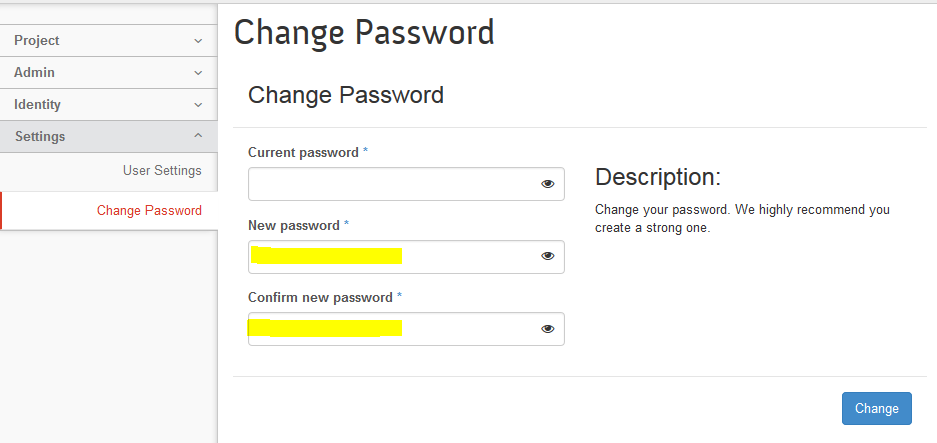
如果此时没有更改admin用户环境,就会导致401错误:
所以解决办法是:更改admin用户环境admin-openrc.sh
[root@controller ~]# cat admin-openrc.sh

export OS_PROJECT_DOMAIN_ID=default

export OS_USER_DOMAIN_ID=default

export OS_PROJECT_NAME=admin

export OS_TENANT_NAME=admin

export OS_USERNAME=admin

export OS_PASSWORD=NEW_PASSWORD      -----<此密码就为上图中黄色位置的密码>

export OS_AUTH_URL=http://${HOSTNAME}:35357/v3

export OS_IMAGE_API_VERSION=

export OS_VOLUME_API_VERSION=

#export OS_URL=http://${HOSTNAME}:35357/v2.0

#export ADMIN_TOKEN=118befef8350d34fc931

[root@controller ~]# source admin-openrc.sh     ---------<使更改生效>

========再查看就正常了 不再报401错误
[root@controller ~]# nova list
+----+------+--------+------------+-------------+----------+
| ID | Name | Status | Task State | Power State | Networks |
+----+------+--------+------------+-------------+----------+
+----+------+--------+------------+-------------+----------+
[原]openstack-kilo--issue(十三)Unauthorized: The request you have made requires authentication. (HTTP 401) (Request的更多相关文章
- 在安装Openstack的keystone认证服务时,出现The request you have made requires authentication. (HTTP 401) (Request-ID: req-f94bebba-f0c5-4a92-85问题的处理
创建openstack的keystone认证服务器报错: The request you have made requires authentication. (HTTP 401) (Reques ...
- devstack 使用openstack命令报错 The request you have made requires authentication. (HTTP 401) Missing value auth-url required for auth plugin password
关联错误: The request you have made requires authentication. (HTTP 401) (Request-ID: req-88ad2cba-0f2d-4 ...
- openstack kilo部署-基础环境
公司也想搞个私有云玩玩,于是展开了一系列的调研,部署测试,openstack 有几个版本真是坑爹!!,如果喜欢被虐有兄弟,你就试试 openstack 的 juno , icehouse等版本,用不了 ...
- Openstack(Kilo)安装系列之Keystone(五)
Create OpenStack client environment scripts To create the scripts Create client environment scripts ...
- [译] OpenStack Kilo 版本中 Neutron 的新变化
OpenStack Kilo 版本,OpenStack 这个开源项目的第11个版本,已经于2015年4月正式发布了.现在是个合适的时间来看看这个版本中Neutron到底发生了哪些变化了,以及引入了哪些 ...
- OpenStack Kilo版加CEPH部署手册
OpenStack Kilo版加CEPH部署手册 作者: yz联系方式: QQ: 949587200日期: 2015-7-13版本: Kilo 转载地址: http://mp.weixin.qq.co ...
- (转)OpenStack Kilo 版本中 Neutron 的新变化
OpenStack Kilo 版本,OpenStack 这个开源项目的第11个版本,已经于2015年4月正式发布了.现在是个合适的时间来看看这个版本中Neutron到底发生了哪些变化了,以及引入了哪些 ...
- scrapy-yield scrapy.Request()不执行、失效、Filtered offsite request to错误 [转]
scrapy错误:yield scrapy.Request()不执行.失效.Filtered offsite request to错误.首先我们在Request()方法里面添加这么一个东东: yiel ...
- 此时servlet中的request和我们在页面jsp中的request 是同一个request.
在tomcat容器启动的时候,jsp页面的内置对象request,response,同样是依赖于tomcat容器中的servlet-api.jar包,这个jar包和我们在web项目中的jar包是一样的 ...
随机推荐
- [Android] 关于Android的问号?和@符号的用法
@表示引用资源,声明这是一个资源引用-随后的文本是以@[package:]type/name形式提供的资源名.@android:string表明引用的系统的(android.*)资源@string表示 ...
- ubuntu16 64位 编译64位程序和32位程序
安装了ubuntu16 64位的系统,想在该环境下用gcc编译64位和32位的程序 默认已经安装了64位环境的gcc 1. 首先确认安装的环境是不是64位的 cocoa@cocoaUKlyn:~/De ...
- jsp使用c:forEach报错 javax.servlet.jsp.PageContext.getELContext()Ljavax/el/ELContext的问题
今天发现了一个折磨我一天的问题: 在jsp文件中使用 <c:forEach items="${checkResult}" var="item"> & ...
- Kafka的安装和设置
Kafka是一种分布式发布订阅消息系统. Kafka有三种模式: (1)单节点单Broker,在一台机器上运行一个Kafka实例: (2)单节点多Broker,在一台机器上运行多个Kafka实例: ( ...
- 基于Centos体验自然语言处理 by PHP SDK
系统要求:CentOS 7.2 64 位操作系统 准备工作 获取 SecretId 和 SecretKey1 前往 密钥管理 页面获取你的 SecretId 和 SecretKey 信息,这些信息将会 ...
- CSS3 选择器 基本选择器介绍
CSS是一种用于屏幕上渲染html,xml等一种语言,CSS主要是在相应的元素中应用样式,来渲染相对应用的元素,那么这样我们选择相应的元素就很重要了,如何选择对应的元素,此时就需要我们所说的选择器.选 ...
- Effective Java 第三版——45. 明智审慎地使用Stream
Tips <Effective Java, Third Edition>一书英文版已经出版,这本书的第二版想必很多人都读过,号称Java四大名著之一,不过第二版2009年出版,到现在已经将 ...
- python列表中元素插入位置总结
要完成的操作是把一个列表里的元素通过for循环添加到另外一个列表里,但是通过insert()方法添加到另外一个列表后却发现元素的位置与原始列表的颠倒了.如以下实例: li1 = ['] li2 = [ ...
- Android Launcher分析和修改12——Widget列表信息收集
很久没写Launcher分析的文章,最近实在太忙.今天七夕本来是想陪女朋友逛街 ,碰巧打台风呆在家里,就继续写一篇文章.今天主要是讲一下Launcher里面的Widget列表,这方面信息比较多,今天重 ...
- 【iCore1S 双核心板_FPGA】例程八:触发器实验——触发器的使用
实验现象: 在本实验中,将工程中的D触发器.JK触发器实例化,对应其真值表,用signal对其进行 检验,利用SignaTap II观察分析波形. 核心代码: module D( input CLK, ...