
AI 学习
极简状态机:

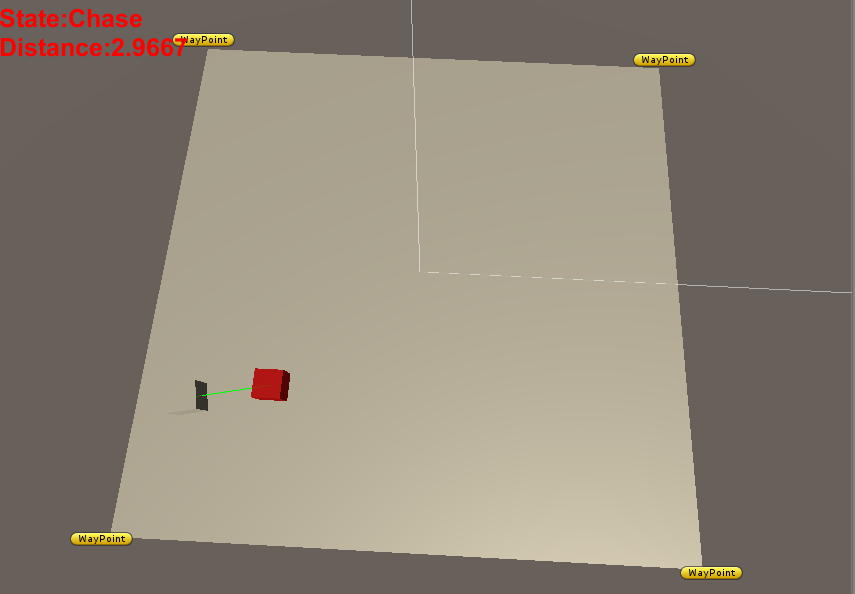
 /*

 脚本名称:

 脚本作者:

 建立时间:

 脚本功能:

 版本号:

 */

 using UnityEngine;

 using System.Collections;

 namespace VoidGame {

     public class Player : MonoBehaviour {

         /// <summary>

         /// 移动速度

         /// </summary>

         public float m_moveSpeed = 10.0f;

         private void Update() {

             Move();

         }

         private void Move() {

             Vector3 direction = Vector3.zero;

             if(Input.GetKey(KeyCode.W)) {

                 direction = transform.forward;

             }

             if(Input.GetKey(KeyCode.S)) {

                 direction = -transform.forward;

             }

             if(Input.GetKey(KeyCode.A)) {

                 direction = -transform.right;

             }

             if(Input.GetKey(KeyCode.D)) {

                 direction = transform.right;

             }

             transform.Translate(direction * Time.deltaTime * m_moveSpeed,Space.World);

         }

     }

 }
Player
 /*

 脚本名称:

 脚本作者:

 建立时间:

 脚本功能:

 版本号:

 */

 using UnityEngine;

 using UnityEngine.UI;

 using System.Collections;

 namespace VoidGame {

     /// <summary>

     /// 状态

     /// </summary>

     public enum FSMState {

         /// <summary>

         /// 巡逻

         /// </summary>

         Patrol,

         /// <summary>

         /// 追逐

         /// </summary>

         Chase,

         /// <summary>

         /// 攻击

         /// </summary>

         Attack,

         /// <summary>

         /// 死亡

         /// </summary>

         Dead

     }

     public class Enemy : MonoBehaviour {

         /// <summary>

         /// 玩家

         /// </summary>

         public Transform m_player;

         /// <summary>

         /// 路标列表

         /// </summary>

         public Transform[] m_waypoints;

         /// <summary>

         /// 目标路标索引

         /// </summary>

         private int m_targetWaypointIndex;

         /// <summary>

         /// 移动速度

         /// </summary>

         public float m_moveSpeed = 0.1f;

         /// <summary>

         /// 状态

         /// </summary>

         public FSMState m_fsmState;

         /// <summary>

         /// 和玩家的距离

         /// </summary>

         public float m_distance;

         /// <summary>

         /// 追逐距离

         /// </summary>

         private float m_chaseDistance = 5f;

         /// <summary>

         /// 攻击距离

         /// </summary>

         private float m_attackDistance = 2f;

         [Space()]

         public Text m_text;

         private void Start() {

             //初始状态:巡逻

             m_fsmState = FSMState.Patrol;

             //设置初始目标路标索引

             m_targetWaypointIndex = ;

         }

         private void Update() {

             //根据状态切换

             switch(m_fsmState) {

             case FSMState.Patrol:

                 UpdatePatrolState();

                 break;

             case FSMState.Chase:

                 UpdateChaseState();

                 break;

             case FSMState.Attack:

                 UpdateAttackState();

                 break;

             case FSMState.Dead:

                 break;

             }

             DisplayDistance();

         }

         private void OnDrawGizmos() {

             //画自身的前方向

             iTween.DrawLine(new Vector3[] { transform.position,transform.position + transform.forward },Color.yellow);

             //根据状态画和玩家之间的关联线

             switch(m_fsmState) {

             case FSMState.Patrol:

                 break;

             case FSMState.Chase:

                 DrawLine(Color.green);

                 break;

             case FSMState.Attack:

                 DrawLine(Color.red);

                 break;

             case FSMState.Dead:

                 break;

             }

         }

         /// <summary>

         /// 更新巡逻状态

         /// </summary>

         private void UpdatePatrolState() {

             if(!IsArrived()) {

                 Move(m_waypoints[m_targetWaypointIndex]);

             }

             if(CalculateDistance() <= m_chaseDistance) {

                 m_fsmState = FSMState.Chase;

             }

         }

         /// <summary>

         /// 更新追逐状态

         /// </summary>

         private void UpdateChaseState() {

             Move(m_player);

             //小于等于攻击距离,攻击

             if(CalculateDistance() <= m_attackDistance) {

                 m_fsmState = FSMState.Attack;

             //大于攻击距离并且小于等于追逐距离,追逐

             } else if(CalculateDistance() > m_attackDistance && CalculateDistance() <= m_chaseDistance) {

                 m_fsmState = FSMState.Chase;

             //其余情况也就是大于追逐距离,巡逻

             } else {

                 m_fsmState = FSMState.Patrol;

             }

         }

         /// <summary>

         /// 更新攻击状态

         /// </summary>

         private void UpdateAttackState() {

             //大于攻击距离并且小于等于追逐距离,追逐

             if(CalculateDistance() > m_attackDistance && CalculateDistance() <= m_chaseDistance) {

                 m_fsmState = FSMState.Chase;

             //大于追逐距离,巡逻

             } else if(CalculateDistance() > m_chaseDistance) {

                 m_fsmState = FSMState.Patrol;

             }

         }

         private void UpdateDeadState() {

         }

         /// <summary>

         /// 画和玩家之间的线

         /// </summary>

         private void DrawLine(Color color) {

             iTween.DrawLine(new Transform[] { transform,m_player.transform },color);

         }

         /// <summary>

         /// 显示玩家的距离

         /// </summary>

         private void DisplayDistance() {

             float distance = Vector3.Distance(transform.position,m_player.position);

             m_text.text = "State:"+m_fsmState+"\nDistance:"+ distance.ToString();

         }

         /// <summary>

         /// 计算和玩家的距离

         /// </summary>

         private float CalculateDistance() {

             return Vector3.Distance(transform.position,m_player.position);

         }

         /// <summary>

         /// 是否到达路标

         /// </summary>

         private bool IsArrived() {

             float distance = Vector3.Distance(transform.position,m_waypoints[m_targetWaypointIndex].position);

             if(distance < 0.1f) {

                 m_targetWaypointIndex++;

                 m_targetWaypointIndex = m_targetWaypointIndex % ;

                 return true;

             }

             return false;

         }

         private void Move(Transform target) {

             transform.LookAt(target);

             transform.Translate(transform.forward * Time.deltaTime * m_moveSpeed,Space.World);

         }

     }

 }
Enemy
视频:https://pan.baidu.com/s/1mioIk6c
项目:https://pan.baidu.com/s/1cpc9T8
SlotMachineWeighted
 using UnityEngine;

 using System.Collections;

 public class SlotMachineWeighted : MonoBehaviour {

     public float spinDuration = 2.0f;

     public int numberOfSym = ;

     public GameObject betResult;

     private bool startSpin = false;

     private bool firstReelSpinned = false;

     private bool secondReelSpinned = false;

     private bool thirdReelSpinned = false;

     private int betAmount = ;

     private int creditBalance = ;

     private ArrayList weightedReelPoll = new ArrayList();

     private int zeroProbability = ;

     private int firstReelResult = ;

     private int secondReelResult = ;

     private int thirdReelResult = ;

     private float elapsedTime = 0.0f;

     // Use this for initialization

     void Start () {

         betResult.GetComponent<GUIText>().text = "";

         for (int i = ; i < zeroProbability; i++) {

             weightedReelPoll.Add();

         }

         int remainingValuesProb = ( - zeroProbability)/;

         for (int j = ; j < ; j++) {

             for (int k = ; k < remainingValuesProb; k++) {

                 weightedReelPoll.Add(j);

             }

         }

     }

     void OnGUI() {

         GUI.Label(new Rect(, , , ), "Your bet: ");

         betAmount = int.Parse(GUI.TextField(new Rect(, , , ), betAmount.ToString(), ));

         GUI.Label(new Rect(, , , ), "Credits: " + creditBalance.ToString());

         if (GUI.Button(new Rect(,,,), "Pull Lever")) {

             betResult.GetComponent<GUIText>().text = "";

             startSpin = true;

         }

     }

     void checkBet() {

         if (firstReelResult == secondReelResult && secondReelResult == thirdReelResult) {

             betResult.GetComponent<GUIText>().text = "JACKPOT!";

             creditBalance += betAmount * ;

         }

         else if (firstReelResult ==  && thirdReelResult == ) {

             betResult.GetComponent<GUIText>().text = "YOU WIN " + (betAmount/).ToString();

             creditBalance -= (betAmount/);

         }

         else if (firstReelResult == secondReelResult) {

             betResult.GetComponent<GUIText>().text = "AWW... ALMOST JACKPOT!";

         }

         else if (firstReelResult == thirdReelResult) {

             betResult.GetComponent<GUIText>().text = "YOU WIN " + (betAmount*).ToString();

             creditBalance -= (betAmount*);

         }

         else {

             betResult.GetComponent<GUIText>().text = "YOU LOSE!";

             creditBalance -= betAmount;

         }

     }

     // Update is called once per frame

     void FixedUpdate () {

         if (startSpin) {

             elapsedTime += Time.deltaTime;

             int randomSpinResult = Random.Range(, numberOfSym);

             if (!firstReelSpinned) {

                 GameObject.Find("firstReel").GetComponent<GUIText>().text = randomSpinResult.ToString();

                 if (elapsedTime >= spinDuration) {

                     int weightedRandom = Random.Range(, weightedReelPoll.Count);

                     GameObject.Find("firstReel").GetComponent<GUIText>().text = weightedReelPoll[weightedRandom].ToString();

                     firstReelResult = (int)weightedReelPoll[weightedRandom];

                     firstReelSpinned = true;

                     elapsedTime = ;

                 }

             }

             else if (!secondReelSpinned) {

                 GameObject.Find("secondReel").GetComponent<GUIText>().text = randomSpinResult.ToString();

                 if (elapsedTime >= spinDuration) {

                     secondReelResult = randomSpinResult;

                     secondReelSpinned = true;

                     elapsedTime = ;

                 }

             }

             else if (!thirdReelSpinned) {

                 GameObject.Find("thirdReel").GetComponent<GUIText>().text = randomSpinResult.ToString();

                 if (elapsedTime >= spinDuration) {

                     if ((firstReelResult == secondReelResult) &&

                         randomSpinResult != firstReelResult) {

                         //the first two reels have resulted the same symbol

                         //but unfortunately the third reel missed

                         //so instead of giving a random number we'll return a symbol which is one less than the other 2

                         randomSpinResult = firstReelResult - ;

                         if (randomSpinResult < firstReelResult) randomSpinResult = firstReelResult - ;

                         if (randomSpinResult > firstReelResult) randomSpinResult = firstReelResult + ;

                         if (randomSpinResult < ) randomSpinResult = ;

                         if (randomSpinResult > ) randomSpinResult = ;

                         GameObject.Find("thirdReel").GetComponent<GUIText>().text = randomSpinResult.ToString();

                         thirdReelResult = randomSpinResult;

                     }

                     else {

                         int weightedRandom = Random.Range(, weightedReelPoll.Count);

                         GameObject.Find("thirdReel").GetComponent<GUIText>().text = weightedReelPoll[weightedRandom].ToString();

                         thirdReelResult = (int)weightedReelPoll[weightedRandom];

                     }

                     startSpin = false;

                     elapsedTime = ;

                     firstReelSpinned = false;

                     secondReelSpinned = false;

                     checkBet();

                 }

             }

         }

     }

 }
SlotMachineWeighted
极简感应器:
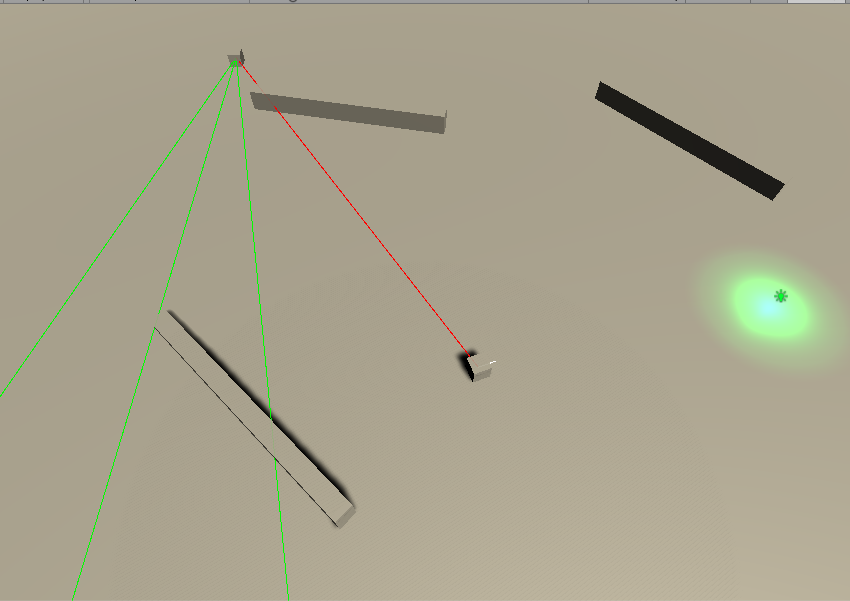
 /*

 脚本名称:

 脚本作者:

 建立时间:

 脚本功能:

 版本号:

 */

 using UnityEngine;

 using System.Collections;

 namespace VoidGame {

     /// <summary>

     /// 玩家

     /// </summary>

     public class Player : MonoBehaviour {

         /// <summary>

         /// 移动目标

         /// </summary>

         public Transform m_target;

         /// <summary>

         /// 移动速度

         /// </summary>

         public float m_moveSpeed = 10f;

         private void Update() {

             Move();

         }

         /// <summary>

         /// 移动

         /// </summary>

         private void Move() {

             if(Vector3.Distance(transform.position,m_target.position) < 1.0f) {

                 return;

             }

             Vector3 position = m_target.position;

             position.y = transform.position.y;

             Quaternion lookQuaternion = Quaternion.LookRotation(position - transform.position);

             transform.rotation = Quaternion.Slerp(transform.rotation,lookQuaternion,0.1f);

             transform.Translate(Vector3.forward * Time.deltaTime * );

         }

         private void OnDrawGizmos() {

             iTween.DrawLine(new Vector3[] { transform.position,transform.position + transform.forward });

         }

     }

 }
Player
 /*

 脚本名称:

 脚本作者:

 建立时间:

 脚本功能:

 版本号:

 */

 using UnityEngine;

 using System.Collections;

 namespace VoidGame {

     /// <summary>

     /// 鼠标点击指示

     /// </summary>

     public class Target : MonoBehaviour {

         private void Update() {

             if(Input.GetMouseButtonDown()) {

                 Ray ray = Camera.main.ScreenPointToRay(Input.mousePosition);

                 RaycastHit hitInfo;

                 if(Physics.Raycast(ray.origin,ray.direction,out hitInfo)) {

                     Vector3 position = hitInfo.point;

                     position.y = ;

                     transform.position = position;

                 }

             }

         }

     }

 }
Target
 /*

 脚本名称:

 脚本作者:

 建立时间:

 脚本功能:

 版本号:

 */

 using UnityEngine;

 using System.Collections;

 namespace VoidGame {

     /// <summary>

     /// 漫游

     /// </summary>

     public class Wander : MonoBehaviour {

         /// <summary>

         /// 目标位置

         /// </summary>

         private Vector3 m_targetPosition;

         /// <summary>

         /// 移动速度

         /// </summary>

         private float m_moveSpeed = 5.0f;

         //private float rotSpeed = 2.0f;

         /// <summary>

         /// 移动范围

         /// </summary>

         private float minX, maxX, minZ, maxZ;

         void Start() {

             minX = -20.0f;

             maxX = 20.0f;

             minZ = -20.0f;

             maxZ = 20.0f;

             GetNextPosition();

         }

         void Update() {

             if(Vector3.Distance(m_targetPosition,transform.position) <= 1.0f)

                 GetNextPosition();

             Vector3 position = transform.position;

             position.y = 0.5f;

             Quaternion targetRotation = Quaternion.LookRotation(m_targetPosition - position);

             transform.rotation = Quaternion.Slerp(transform.rotation,targetRotation,Time.deltaTime);

             transform.Translate(new Vector3(,,m_moveSpeed * Time.deltaTime));

         }

         void GetNextPosition() {

             m_targetPosition = new Vector3(Random.Range(minX,maxX),0.5f,Random.Range(minZ,maxZ));

         }

     }

 }
Wander
 /*

 脚本名称:

 脚本作者:

 建立时间:

 脚本功能:

 版本号:

 */

 using UnityEngine;

 using System.Collections;

 namespace VoidGame {

     /// <summary>

     /// 感观

     /// </summary>

     public class Sense : MonoBehaviour {

         public Aspect.aspect aspectName = Aspect.aspect.Enemy;

         /// <summary>

         /// 检测频率

         /// </summary>

         public float detectionRate = 1.0f;

         /// <summary>

         /// 距上一次检测经过的时间

         /// </summary>

         protected float elapsedTime = 0.0f;

         /// <summary>

         /// 初始化

         /// </summary>

         protected virtual void Initialise() { }

         /// <summary>

         /// 更新感官

         /// </summary>

         protected virtual void UpdateSense() { }

         void Start() {

             elapsedTime = 0.0f;

             Initialise();

         }

         void Update() {

             UpdateSense();

         }

     }

 }
Sense
 /*

 脚本名称:

 脚本作者:

 建立时间:

 脚本功能:

 版本号:

 */

 using UnityEngine;

 using System.Collections;

 namespace VoidGame {

     /// <summary>

     /// 视觉

     /// </summary>

     public class Perspective : Sense {

         /// <summary>

         /// 视场角度

         /// </summary>

         public int FieldOfView = ;

         /// <summary>

         /// 视野距离

         /// </summary>

         public int ViewDistance = ;

         /// <summary>

         /// 玩家

         /// </summary>

         private Transform playerTrans;

         /// <summary>

         /// 射线方向

         /// </summary>

         private Vector3 rayDirection;

         protected override void Initialise() {

             playerTrans = GameObject.FindGameObjectWithTag("Player").transform;

             aspectName = Aspect.aspect.Player;

         }

         protected override void UpdateSense() {

             elapsedTime += Time.deltaTime;

             if(elapsedTime >= detectionRate) {

                 //elapsedTime = 0;

                 DetectAspect();

             }

         }

         /// <summary>

         /// 检测切面

         /// </summary>

         void DetectAspect() {

             RaycastHit hit;

             //射线方向位从自身到玩家的方向

             rayDirection = playerTrans.position - transform.position;

             //如果自身的朝向和从自身到玩家的方向之间的夹角小于视场角度,射线检测

             if((Vector3.Angle(rayDirection,transform.forward)) < FieldOfView) {

                 if(Physics.Raycast(transform.position,rayDirection,out hit,ViewDistance)) {

                     Aspect aspect = hit.collider.GetComponent<Aspect>();

                     if(aspect != null) {

                         if(aspect.aspectName == aspectName) {

                             print("Enemy Detected");

                         }

                     }

                 }

             }

         }

         void OnDrawGizmos() {

             //红线连接自身和玩家

             Debug.DrawLine(transform.position,playerTrans.position,Color.red);

             //正前方射线

             Vector3 frontRayPoint = transform.position + (transform.forward * ViewDistance);

             Debug.DrawLine(transform.position,frontRayPoint,Color.green);

             //左前方射线

             Vector3 leftRayPoint = frontRayPoint;

             leftRayPoint.x += FieldOfView * 0.5f;

             Debug.DrawLine(transform.position,leftRayPoint,Color.green);

             //右前方射线

             Vector3 rightRayPoint = frontRayPoint;

             rightRayPoint.x -= FieldOfView * 0.5f;

             Debug.DrawLine(transform.position,rightRayPoint,Color.green);

         }

     }

 }
Perspective
 /*

 脚本名称:

 脚本作者:

 建立时间:

 脚本功能:

 版本号:

 */

 using UnityEngine;

 using System.Collections;

 namespace VoidGame {

     /// <summary>

     /// 切面

     /// </summary>

     public class Aspect : MonoBehaviour {

         /// <summary>

         /// 角色

         /// </summary>

         public enum aspect {

             Player,

             Enemy

         }

         public aspect aspectName;

     }

 }
Aspect
项目:https://pan.baidu.com/s/1i581isP
路径跟随和引导

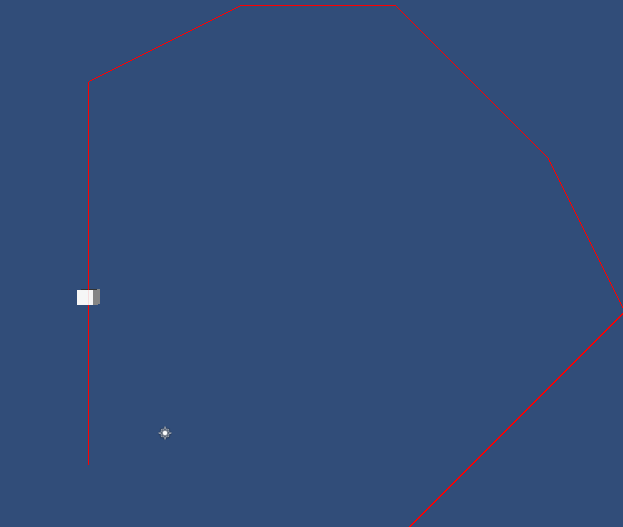
 using UnityEngine;

 using System.Collections;

 /// <summary>

 /// 跟随脚本

 /// </summary>

 public class VehicleFollowing : MonoBehaviour

 {

     /// <summary>

     /// 路径

     /// </summary>

     public Path path;

     /// <summary>

     /// 速度

     /// </summary>

     public float speed = 20.0f;

     /// <summary>

     /// 质量

     /// </summary>

     public float mass = 5.0f;

     /// <summary>

     /// 是否循环

     /// </summary>

     public bool isLooping = true;

     /// <summary>

     /// 当前速度

     /// </summary>

     private float curSpeed;

     /// <summary>

     /// 当前路径索引

     /// </summary>

     private int curPathIndex;

     /// <summary>

     /// 路径长度

     /// </summary>

     private float pathLength;

     /// <summary>

     /// 目标位置

     /// </summary>

     private Vector3 targetPoint;

     Vector3 velocity;

     void Start ()

     {

         pathLength = path.Length;

         curPathIndex = ;

         velocity = transform.forward;

     }

     // Update is called once per frame

     void Update ()

     {

         curSpeed = speed * Time.deltaTime;

         //根据当前路径点索引获取路径的位置

         targetPoint = path.GetPoint(curPathIndex);

         //如果自身位置和目标位置的距离小于路径点的半径,则表示到达位置

         if(Vector3.Distance(transform.position, targetPoint) < path.Radius)

         {

             //如果不是最后一个路径点

             if (curPathIndex < pathLength - )

                 curPathIndex ++;

             //如果是循环模式,重置下一个路标位置为0

             else if (isLooping)

                 curPathIndex = ;

             //停止

             else

                 return;

         }

         if (curPathIndex >= pathLength )

             return;

         if(curPathIndex >= pathLength -  && !isLooping)

             velocity += Steer(targetPoint, true);

         else

             velocity += Steer(targetPoint);

         //应用速度

         transform.position += velocity;

         //应用旋转

         transform.rotation = Quaternion.LookRotation(velocity);

     }

     public Vector3 Steer(Vector3 target, bool bFinalPoint = false)

     {

         //计算自身朝向

         Vector3 desiredVelocity = (target - transform.position);

         //获取距离长度

         float dist = desiredVelocity.magnitude;

         //归一化速度

         desiredVelocity.Normalize();

         if (bFinalPoint && dist < 10.0f)

             desiredVelocity *= (curSpeed * (dist / 10.0f));

         else

             desiredVelocity *= curSpeed;

         Vector3 steeringForce = desiredVelocity - velocity;

         Vector3 acceleration = steeringForce / mass;

         return acceleration;

     }

 }
VehicleFollowing
 using UnityEngine;

 using System.Collections;

 public class Path: MonoBehaviour

 {

     /// <summary>

     /// 路径点半径

     /// </summary>

     public float Radius = 2.0f;

     /// <summary>

     /// 路径点

     /// </summary>

     public Vector3[] pointA;

     /// <summary>

     /// 路径长度

     /// </summary>

     public float Length

     {

         get

         {

             return pointA.Length;

         }

     }

     public Vector3 GetPoint(int index)

     {

         return pointA[index];

     }

     /// <summary>

     /// Show Debug Grids and obstacles inside the editor

     /// </summary>

     void OnDrawGizmos()

     {

         for (int i = ; i < pointA.Length; i++)

         {

             if (i +  < pointA.Length)

             {

                 Debug.DrawLine(pointA[i], pointA[i + ], Color.red);

             }

         }

     }

 }
Path
 using UnityEngine;

 using System.Collections;

 public class VehicleAvoidance : MonoBehaviour

 {

     /// <summary>

     /// 移动速度

     /// </summary>

     public float speed = 20.0f;

     /// <summary>

     /// 质量

     /// </summary>

     public float mass = 5.0f;

     /// <summary>

     /// 力

     /// </summary>

     public float force = 50.0f;

     /// <summary>

     /// 避开障碍的最小距离

     /// </summary>

     public float minimumDistToAvoid = 20.0f;

     /// <summary>

     /// 当前速度

     /// </summary>

     private float curSpeed;

     /// <summary>

     /// 目标位置

     /// </summary>

     private Vector3 targetPoint;

     void Start ()

     {

         mass = 5.0f;

         targetPoint = Vector3.zero;

     }

     void Update ()

     {

         RaycastHit hit;

         var ray = Camera.main.ScreenPointToRay (Input.mousePosition);

         if(Input.GetMouseButtonDown() && Physics.Raycast(ray, out hit, 100.0f))

         {

             targetPoint = hit.point;

         }

         //计算自身朝向

         Vector3 dir = (targetPoint - transform.position);

         //归一化

         dir.Normalize();

         AvoidObstacles(ref dir);

         //判断和目标的距离

         if(Vector3.Distance(targetPoint, transform.position) < 3.0f)

             return;

         curSpeed = speed * Time.deltaTime;

         var rot = Quaternion.LookRotation(dir);

         transform.rotation = Quaternion.Slerp(transform.rotation, rot, 5.0f *  Time.deltaTime);

         transform.position += transform.forward * curSpeed;

     }

     /// <summary>

     /// 避开障碍

     /// </summary>

     public void AvoidObstacles(ref Vector3 dir)

     {

         RaycastHit hit;

         //只检测障碍物层

         int layerMask =  << ;

         if (Physics.Raycast(transform.position, transform.forward, out hit, minimumDistToAvoid, layerMask))

         {

             //获取碰撞点的法向量

             Vector3 hitNormal = hit.normal;

             //不改变y轴

             hitNormal.y = 0.0f;

             //计算新的方向

             dir = transform.forward + hitNormal * force;

         }

     }

     private void OnDrawGizmos() {

         Debug.DrawLine(transform.position,transform.position + transform.forward * minimumDistToAvoid,Color.red);

     }

 }
VehicleAvoidance
项目:https://pan.baidu.com/s/1pL0N6OV
AI 学习的更多相关文章
- DeepLearning.ai学习笔记汇总
第一章 神经网络与深度学习(Neural Network & Deeplearning) DeepLearning.ai学习笔记(一)神经网络和深度学习--Week3浅层神经网络 DeepLe ...
- DeepLearning.ai学习笔记(三)结构化机器学习项目--week2机器学习策略(2)
一.进行误差分析 很多时候我们发现训练出来的模型有误差后,就会一股脑的想着法子去减少误差.想法固然好,但是有点headlong~ 这节视频中吴大大介绍了一个比较科学的方法,具体的看下面的例子 还是以猫 ...
- AI 学习路线
[导读] 本文由知名开源平台,AI技术平台以及领域专家:Datawhale,ApacheCN,AI有道和黄海广博士联合整理贡献,内容涵盖AI入门基础知识.数据分析挖掘.机器学习.深度学习.强化学习.前 ...
- AI - 学习路径(Learning Path)
初见 机器学习图解 错过了这一篇,你学机器学习可能要走很多弯路 这3张脑图,带你清晰人工智能学习路线 一些课程 Andrew Ng的网络课程 HomePage:http://www.deeplearn ...
- AI学习---数据读取&神经网络
AI学习---数据读取&神经网络 fa
- AI学习吧
一:AI学习吧 项目描述 系统使用前后端分离的模式,前端使用vue框架,后端使用restframework实现. 项目需求 公司开发AI学习吧,由于公司需要一款线上学习平台,要开发具有线上视频学习.支 ...
- UE4的AI学习(1)——基本概念
AI学习当中,不学习行为树基本概念就不能明白具体实例中的操作意义,但是没有经过具体实例实验,又觉得基本概念抽象难以理解.建议先泛读(1)(2)后再对具体的细节进行死磕,能较深的理解行为树的具体概念.第 ...
- AI学习经验总结
我的人工智能学习之路-从无到有精进之路 https://blog.csdn.net/sinox2010p1/article/details/80467475 如何自学人工智能路径规划(附资源,百分百亲 ...
- AI学习笔记(02)
AI学习笔记 第一个黑箭头是用于挑选物体和移 动物体.在绘图是选中一个物体,就可以将它自由的移动.和其他的绘图软件相同当你选 中物体的时候物体周围就会出现八个方形的控制点,你可以通过这些控制点对物 ...
- AI学习笔记:特征工程
一.概述 Andrew Ng:Coming up with features is difficult, time-consuming, requires expert knowledge. &quo ...
随机推荐
- DevExpress WPF v18.2新版亮点(五)
买 DevExpress Universal Subscription 免费赠 万元汉化资源包1套! 限量15套!先到先得,送完即止!立即抢购>> 行业领先的.NET界面控件2018年第 ...
- org.apache.httpcomponents httpclient 发起HTTP JSON请求
1. pom.xml <dependency> <groupId>org.apache.httpcomponents</groupId> <artifactI ...
- Linux 虚拟内存机制
每个进程都有自己独立的4G内存空间,各个进程的内存空间具有类似的结构. Linux内存管理采用的是页式管理,使用的是多级页表,动态地址转换机构与主存.辅存共同实现虚拟内存 一个新进程建立的时候,将会建 ...
- [rancher-net]
ip rule命令 rancher网络全解读 arp命令查询 rancher managed network 实践 docker自定义网桥 iptables增删改查 shell脚本调试技术
- 前端小白凭什么杀进 BAT?
七天国庆黄金周转眼即逝,退散的除了出游的热情,还有一波求职热潮...IT 行业的技术者,时常被称为“码农.IT民工” 虽然行业内巨大的人才需求和相对容易得到的高薪,在源源不断的吸引各路人马加入,但它依 ...
- 18-10-15 服务器删除数据的方法【Elasticsearch 数据删除 (delete_by_query 插件安装使用)】方法二没有成功
rpa 都是5.xx ueba 分为2.0 或者5.0 上海吴工删除数据的方法 在许多项目中,用户提供的数据存储盘大小有限,在运行一段时间后,大小不够就需要删除历史的 Elasticsearch 数 ...
- 前端关于列表的基础 day47
<!DOCTYPE html><html lang="zh-CN"><head> <meta charset="utf-8&qu ...
- python day04作业
- 地理空间数据云--TM影像下载
实验要用到遥感影像,,TM,,之前是可以在美国USGS上下载的,但是要FQ了,有点麻烦,, 想到之前本科实在地理空间数据云平台下载的,就试了一下以前的账号,完美!,, TM数据很丰富,到2017年的都 ...
- 如何在Power BI和Tableau之间进行选择?
作者:Mike Gallucci 如今,当谈到商业智能(BI)分析软件时,有两个主要的行业领导者 - 微软的Power BI和Tableau.根据分析和业务平台的2018年Gartner Magic ...