
TP图片上传
//控制器文件

    public function index(){

		if(!empty($_POST)){

			$file = $_FILES["file"];

			if(!isset($file['tmp_name']) || !$file['tmp_name']) {

				$this->ajaxReturn(['code' => 401, 'msg' => '没有文件上传']);

				return false;

			}

			if($file["error"] > 0) {

				$this->ajaxReturn(['code' => 402, 'msg' => $file["error"]]);

				return false;

			}

			$upload_path = $_SERVER['DOCUMENT_ROOT'].".".__ROOT__."/Public/upload/";

			//  D:/wamp/www/1120/Public/upload

			//    /1120/tp/Public/upload/

			$file_path   = __ROOT__."/Public/upload/";

			if(!is_dir($upload_path)){

				$this->ajaxReturn(['code' => 403, 'msg' => '上传目录不存在']);

				return false;

			}

			if(move_uploaded_file($file["tmp_name"], $upload_path.$file['name'])){

				$this->ajaxReturn(['code' => 200, 'src' => $file_path.$file['name']]);

				return false;

			}else{

				$this->ajaxReturn(['code' => 404, 'msg' => '上传失败']);

				return false;

			}

		}

		$this->show();

	}

	public function test(){

		if(!empty($_POST)){

			$upd = new \Think\Upload();

			$upd->rootPath = "./Public/";

			$upd->savePath = "./upload/";

			$info = $upd->upload();

		}else{

			$this->show();

		}

	}
引入文件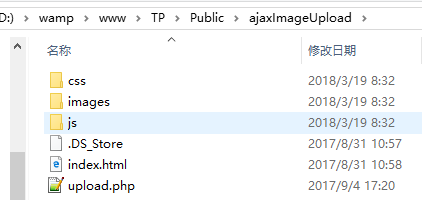
<link href="__PUBLIC__/ajaxImageUpload/css/upload.css" type="text/css" rel="stylesheet" />

<script src="__PUBLIC__/ajaxImageUpload/js/jquery.js"></script>

<script src="__PUBLIC__/ajaxImageUpload/js/upload.js"></script
upload.css样式
/*上传图片插件的样式*/

.upload-box{

    padding: 0 20px;

	margin: 0 auto;

	margin-top: 40px;

}

.upload-box .clear{

	clear: both;

}

.upload-box .clear:after{

	content: '';

	display: block;

	clear: both;

}

.upload-box .upload-tip{

	margin-bottom: 20px;

	font-size: 16px;

	color: #555;

}

.upload-box .image-box{

	padding: 18px;

	border:2px dashed #E7E6E6;

}

.image-box section{

	position: relative;

	width: 190px;

	height: 190px;

	float: left;

}

.image-box .upload-section{

	position: relative;

}

.image-box .image-section{

	margin-right: 20px;

	margin-bottom: 20px;

}

.image-section:hover{

	border: 1px solid #f15134;

}

/*/图片遮罩层样式*/

.image-section .image-shade{

	display: block;

	width: 100%;

	height: 100%;

	visibility: hidden;

	position: absolute;

	top: 0px;

	left: 0px;

	z-index: 9;

	background: rgba(0,0,0,.5);

}

/*鼠标放上去时显示遮罩层*/

.image-section:hover .image-shade{

	visibility: visible;

}

.image-section .image-zoom {

    position: absolute;

    width: 32px;

    height: 32px;

    top: 80px;

    right: 80px;

    display: none;

    z-index: 10;

    background:url(../images/zoom.png) no-repeat center;

}

.image-section .image-delete {

	position: absolute;

	width: 30px;

	height: 30px;

	top: 5px;

	right: 5px;

	display: none;

	z-index: 10;

	background:url(../images/delete.png) no-repeat center;

}

.image-section:hover .image-delete{

	display: block;

	cursor:pointer;

}

.image-section:hover .image-zoom{

    display: block;

    cursor:pointer;

}

.image-box .image-show{

	display: block;

	width: 100%;

	height: 100%;

}

.image-loading{

    border: 1px solid #D1D1D1;

	background:url(../images/loading.gif) no-repeat center;

}

.image-opcity{

	opacity: 0;

}

/*上传域样式*/

.upload-section #upload-input{

	width: 100%;

	height: 100%;

	opacity: 0;

	position: absolute;

	top: 0px;

	left: 0px;

	z-index: 100;

}

/*上传按钮样式*/

.upload-section .upload-btn {

	border:1px dashed #d0d0d0;

	width: 190px;

	height: 190px;

	background:url(../images/upload.png) no-repeat center;

}

/*遮罩层样式*/

.delete-modal{

	z-index: 1000;

	display: none;

	position: fixed;

	top: 0px;

	left: 0px;

	width: 100%;

	height: 100%;

	background: rgba(0,0,0,.4);

}

.delete-modal .modal-content{

	 width: 500px;

	 position: absolute;

	 top: 50%;

	 left: 50%;

	 margin-left: -250px;

	 margin-top: -80px;

	 background: white;

	 height: 160px;

	 text-align: center;

}

.modal-content p{

	margin: 0;

	padding: 0;

}

.modal-content .modal-tip{

	color: #555;

	height: 94px;

	line-height: 94px;

	font-size: 18px;

	border-bottom: 1px solid #D1D1D1;

}

.modal-content .modal-btn{

	height: 66px;

	line-height: 66px;

	position: absolute;

	bottom: 0px;

	left: 0px;

	width: 100%;

}

.modal-content .modal-btn span{

	width: 49.8%;

	display:inline-block;

	text-align: center;

	color:#d4361d ;

	font-size: 18px;

	border-right: 1px solid #D1D1D1;

}

.modal-btn:hover span{

    cursor:pointer;

}

/*图片预览样式*/

#zoom-shade {

    position: absolute;

    top: 0;

    left: 0;

    width: 100%;

	min-height: 800px;

    height: 100%;

    z-index: 1100;

    background-color: rgb(119, 119, 119);

    opacity: 0.7;

    cursor: pointer;

    display: none;

}

#zoom-box {

    position: absolute;

    padding: 20px;

    z-index: 1101;

    outline: none;

    display: none;

    height: auto;

    top: 25%;

    left: 25%;

}

#zoom-content {

    outline: none;

    overflow: hidden;

    z-index: 1102;

    border: 10px solid #fff;

    opacity: 1;

}

#zoom-content img {

    width: 100%;

    height: 100%;

    padding: 0;

    margin: 0 auto;

    border: none;

    outline: none;

    line-height: 0;

    vertical-align: top;

}
upload.js文件
/**

 * author:gouguoyin

 * qq:245629560

 * doc:http://www.gouguoyin.cn/js/141.html

 */

(function($){

    $.fn.ajaxImageUpload = function(options){

        var defaults = {

            data: null,

            url: '',

            zoom: true,

            allowType: ["gif", "jpeg", "jpg", "bmp",'png'],

            maxNum: 10,

            hidenInputName: '', // 上传成功后追加的隐藏input名,注意不要带[],会自动带[],不写默认和上传按钮的name相同

            maxSize: 2, //设置允许上传图片的最大尺寸,单位M

            success: $.noop, //上传成功时的回调函数

            error: $.noop //上传失败时的回调函数

        };

        var thisObj = $(this);

        var config  = $.extend(defaults, options);

        var uploadBox = $(".upload-box");

        var imageBox  = $(".image-box");

        var inputName = thisObj.attr('name');

        // 设置是否在上传中全局变量

        isUploading  = false;

        thisObj.each(function(i){

            thisObj.change(function(){

                handleFileSelect();

            });

        });

        var handleFileSelect = function(){

            if (typeof FileReader == "undefined") {

                return false;

            }

            // 获取最新的section数量

            var imageNum  = $('.image-section').length;

            var postUrl   = config.url;

            var maxNum    = config.maxNum;

            var maxSize   = config.maxSize;

            var allowType = config.allowType;

            if(!postUrl){

                alert('请设置要上传的服务端地址');

                return false;

            }

            if(imageNum + 1 > maxNum ){

                alert("上传图片数目不可以超过"+maxNum+"个");

                return;

            }

            var files    = thisObj[0].files;

            var fileObj  = files[0];

            if(!fileObj){

                return false;

            }

            var fileName = fileObj.name;

            var fileSize = (fileObj.size)/(1024*1024);

            if (!isAllowFile(fileName, allowType)) {

                alert("图片类型必须是" + allowType.join(",") + "中的一种");

                return false;

            }

            if(fileSize > maxSize){

                alert('上传图片不能超过' + maxSize + 'M,当前上传图片的大小为'+fileSize.toFixed(2) + 'M');

                return false;

            }

            if(isUploading == true){

                alert('文件正在上传中,请稍候再试!');

                return false;

            }

            // 将上传状态设为正在上传中

            isUploading = true;

            // 执行前置函数

            var callback = config.before;

            if(callback && callback() === false){

                return false;

            }

            createImageSection();

            ajaxUpload();

        };

        var ajaxUpload = function () {

            // 获取最新的

            var imageSection = $('.image-section:first');

            var imageShow    = $('.image-show:first');

            var formData = new FormData();

            var fileData = thisObj[0].files;

            if(fileData){

                // 目前仅支持单图上传

                formData.append(inputName, fileData[0]);

            }

            var postData = config.data;

            if (postData) {

                for (var i in postData) {

                    formData.append(i, postData[i]);

                }

            }

            // ajax提交表单对象

            $.ajax({

                url: config.url,

                type: "post",

                data: formData,

                processData: false,

                contentType: false,

                dataType: 'json',

                success:function(json){

                    if(json.code == 200 && !json.src){

                        alert('服务器返回的json数据中必须包含src元素');

                        imageSection.remove();

                        return false;

                    }else if(json.code != 200){

                        alert(json.msg);

                        imageSection.remove();

                        return false;

                    }

                    imageSection.removeClass("image-loading");

                    imageShow.removeClass("image-opcity");

                    imageShow.attr('src', json.src);

                    imageShow.siblings('input').val(json.src);

                    // 将上传状态设为非上传中

                    isUploading = false;

                    // 执行成功回调函数

                    var callback = config.success;

                    callback(json);

                },

                error:function(e){

                    imageSection.remove();

                    // 执行失败回调函数

                    var callback = config.error;

                    callback(e);

                }

            });

        };

        var createDeleteModal = function () {

            var deleteModal   = $("<aside class='delete-modal'><div class='modal-content'><p class='modal-tip'>您确定要删除作品图片吗?</p><p class='modal-btn'> <span class='confirm-btn'>确定</span><span class='cancel-btn'>取消</span></p></div></aside>");

            // 创建删除模态框

            deleteModal.appendTo('.image-box');

            // 显示弹框

            imageBox.delegate(".image-delete","click",function(){

                // 声明全局变量

                deleteImageSection = $(this).parent();

                deleteModal.show();

            });

            // 确认删除

            $(".confirm-btn").click(function(){

                deleteImageSection.remove();

                deleteModal.hide();

            });

            // 取消删除

            $(".cancel-btn").click(function(){

                deleteModal.hide();

            });

        };

        var createImageSection = function () {

            var hidenInputName = config.hidenInputName;

            if(!hidenInputName){

                hidenInputName = inputName;

            }

            var imageSection = $("<section class='image-section image-loading'></section>");

            var imageShade   = $("<div class='image-shade'></div>");

            var imageShow    = $("<img class='image-show image-opcity' />");

            var imageInput   = $("<input class='" + inputName + "' name='" + hidenInputName + "[]' value='' type='hidden'>");

            var imageZoom    = $("<div class='image-zoom'></div>");

            var imageDelete  = $("<div class='image-delete'></div>");

            imageBox.prepend(imageSection);

            imageShade.appendTo(imageSection);

            imageDelete.appendTo(imageSection);

            // 判断是否开启缩放功能

            if(config.zoom && config.zoom === true ){

                imageZoom.appendTo(imageSection);

            }

            imageShow.appendTo(imageSection);

            imageInput.appendTo(imageSection);

            return imageSection;

        };

        var createImageZoom = function () {

            var zoomShade   = $("<div id='zoom-shade'></div>");

            var zoomBox = $("<div id='zoom-box'></div>");

            var zoomContent = $("<div id='zoom-content'><img src='http://www.jq22.com/demo/jqueryfancybox201707292345/example/4_b.jpg'></div>");

            uploadBox.append(zoomShade);

            uploadBox.append(zoomBox);

            zoomContent.appendTo(zoomBox);

            // 显示弹框

            imageBox.delegate(".image-zoom","click",function(){

                var src = $(this).siblings('img').attr('src');

                zoomBox.find('img').attr('src', src);

                zoomShade.show();

                zoomBox.show();

            });

            // 关闭弹窗

            uploadBox.delegate("#zoom-shade","click",function(){

                zoomShade.hide();

                zoomBox.hide();

            });

        };

        //获取上传文件的后缀名

        var getFileExt = function(fileName){

            if (!fileName) {

                return '';

            }

            var _index = fileName.lastIndexOf('.');

            if (_index < 1) {

                return '';

            }

            return fileName.substr(_index+1);

        };

        //是否是允许上传文件格式

        var isAllowFile = function(fileName, allowType){

            var fileExt = getFileExt(fileName).toLowerCase();

            if (!allowType) {

                allowType = ['jpg', 'jpeg', 'png', 'gif', 'bmp'];

            }

            if ($.inArray(fileExt, allowType) != -1) {

                return true;

            }

            return false;

        };

        // 判断是否开启缩放功能

        if(config.zoom && config.zoom === true ){

            createImageZoom();

        }

        createDeleteModal();

    };

})(jQuery);
images 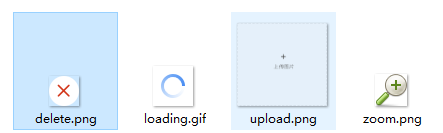
布局html样式
<div class="upload-box">

    <p class="upload-tip">测试上传</p>

    <div class="image-box clear">

        <section class="upload-section">

            <div class="upload-btn"></div>

            <input type="file" name="file" class="upload-input" id='js_uploadBtn' value=""/>

        </section>

    </div>

</div>
js文件
<script type="text/javascript">

$("#js_uploadBtn").ajaxImageUpload({

    url: '__ACTION__', //上传的服务器地址

    data: { name:'测试' },

    maxNum: 2, //允许上传图片数量

    hidenInputName:'', // 上传成功后追加的隐藏input名,注意不要带[],会自动带[],不写默认和上传按钮的name相同

    zoom: true, //允许上传图片点击放大

    allowType: ["gif", "jpeg", "jpg", "bmp",'png'], //允许上传图片的类型

    maxSize :2, //允许上传图片的最大尺寸,单位M

    before: function () {

        alert('上传前回调函数');

    },

    success:function(data){

        alert('上传成功回调函数');

        console.log(data);

    },

    error:function (e) {

        alert('上传失败回调函数');

        console.log(e);

    }

});

</script>
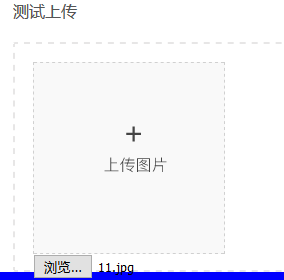 ====
==== ====
====
TP图片上传的更多相关文章
- TP框架配合jquery进行3种方式的多图片上传
用的TP5.1框架+jquery 一 使用form表单方式进行多图片上传 html代码: <form action="../admin/admin/cs" enctype=& ...
- jquery之图片上传
<%@ page language="java" contentType="text/html; charset=UTF-8" pageEncoding= ...
- TP3.2 图片上传及缩略图
基于TP自带的上传文件的类, Think/Upload.class.php 设置表单的enctype属性 下面是上传的具体方法 /** * 图片上传处理 * @param [String] $path ...
- ThinkPHP3.1.3 整合 UEditor百度编辑器 图片上传
第一步.前端模板实例化百度编辑器 <js file='__ROOT__/Data/UEditor/ueditor.config.js' /> <js file='__ROOT__/D ...
- layui加tp5图片上传实例
<div class="layui-fluid"> <div class="layui-row"> <form class=&qu ...
- Asp.Net Mvc 使用WebUploader 多图片上传
来博客园有一个月了,哈哈.在这里学到了很多东西.今天也来试着分享一下学到的东西.希望能和大家做朋友共同进步. 最近由于项目需要上传多张图片,对于我这只菜鸟来说,以前上传图片都是直接拖得控件啊,而且还是 ...
- 06.LoT.UI 前后台通用框架分解系列之——浮夸的图片上传
LOT.UI分解系列汇总:http://www.cnblogs.com/dunitian/p/4822808.html#lotui LoT.UI开源地址如下:https://github.com/du ...
- JS图片上传预览插件制作(兼容到IE6)
其实,图片预览功能非常地常见.很意外,之前遇到上传图片的时候都不需要预览,也一直没有去实现过.现在手上的项目又需要有图片预览功能,所以就动手做了一个小插件.在此分享一下思路. 一.实现图片预览的一些方 ...
- HTML5笔记:跨域通讯、多线程、本地存储和多图片上传技术
最近做项目在前端我使用了很多新技术,这些技术有bootstrap.angularjs,不过最让我兴奋的还是使用了HTML5的技术,今天我想总结一些HTML5的技术,好记性不如烂笔头,写写文章可以很好的 ...
随机推荐
- 于dm-0 dm-1
dm是device mapper的意思,dm-0, dm-1的实体可以通过下面几个命令看出,lvm会把每个lv连接到一个/dev/dm-x的设备档,这个设备档并不是一个真正的磁盘,所以不会有分区表存在 ...
- confd
1.下载安装confd ]# wget https://github.com/kelseyhightower/confd/releases/download/v0.15.0/confd-0.15.0- ...
- iphone及ipad屏幕尺寸参考
初代iPhone 2007年,初代iPhone发布,屏幕的宽高是 320 x 480 像素.下文也是按照宽度,高度的顺序排列.这个分辨率一直到iPhone 3GS也保持不变.那时编写iOS的App(应 ...
- arcgis10.4 server第一次发布地图报错:We were unable to connect to...Error:Proxy server got bad address...
arcgis 10.4发布地图跟10.2不一样.server url里的http要改为https,否则就会连接不上.
- en-zh(科学技术)science and technology
S Korea to roll out 5G韩国正式推5G商用服务 South Korea will become the first country to commercially launch f ...
- Shell脚本交互之:自动输入密码
Shell脚本交互之:自动输入密码 2016年04月09日 19:41:26 zhangjikuan 阅读数:58208 标签: Shell交互自动输入密码expect重定向管道 更多 个人分类: A ...
- 新兴的API(fileReader、geolocation、web计时、web worker)
requestAnimationFrame() 每次浏览器重绘之前会调用这个方法!!! 它接收一个参数,就是回调函数: 它可以保证在最佳的间隔时间调用传入的回调函数,以达到让屏幕产生最流畅的动画效果. ...
- ITouch在xcode下提示‘No such file or directory, at ‘/SourceCache/DVTi...'
版权声明:本文为博主原创文章,转载或又一次发表请先与我联系. https://blog.csdn.net/jonahzheng/article/details/37692733 用一个台老 ...
- 使用Postgres,Nginx和Gunicorn将Django配置到服务器上
先决条件 首先你得先在Digital Ocean上有一台自己的服务器,如果还没有,可参考教程如何在Digital Ocean上申请服务器. 为了方便起见,我将本教程分为两部分.第一部分(步骤1 - 6 ...
- Python3学习之路~5.8 shelve模块
shelve模块是一个简单的k,v将内存数据通过文件持久化的模块,可以持久化任何pickle可支持的python数据格式 import shelve import datetime name = [& ...