
【数据库】jdbc详解
try {

            if(resultSet!=null){

                resultSet.close();

            }

        }catch (SQLException e){

            e.printStackTrace();

        }finally {

            try {

                if(preparedStatement!=null){

                    preparedStatement.close();

                }

            }catch (Exception e){

                e.printStackTrace();

            }

            try {

                if(connection!=null){

                    connection.close();

                }

            }catch (Exception e){

                e.printStackTrace();

            }

        }
转载:https://www.cnblogs.com/erbing/p/5805727.html
一、相关概念
1.什么是JDBC
JDBC(Java Data Base Connectivity,java数据库连接)是一种用于执行SQL语句的Java API,可以为多种关系数据库提供统一访问,它由一组用Java语言编写的类和接口组成。JDBC提供了一种基准,据此可以构建更高级的工具和接口,使数据库开发人员能够编写数据库应用程序。
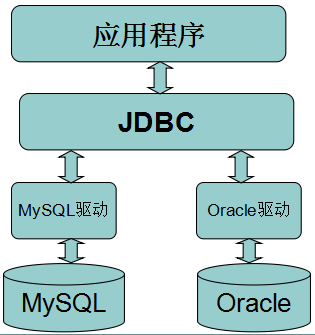
2.数据库驱动
我们安装好数据库之后,我们的应用程序也是不能直接使用数据库的,必须要通过相应的数据库驱动程序,通过驱动程序去和数据库打交道。其实也就是数据库厂商的JDBC接口实现,即对Connection等接口的实现类的jar文件。
二、常用接口
1.Driver接口
Driver接口由数据库厂家提供,作为java开发人员,只需要使用Driver接口就可以了。在编程中要连接数据库,必须先装载特定厂商的数据库驱动程序,不同的数据库有不同的装载方法。如:
装载MySql驱动:Class.forName("com.mysql.jdbc.Driver");
装载Oracle驱动:Class.forName("oracle.jdbc.driver.OracleDriver");
2.Connection接口
Connection与特定数据库的连接(会话),在连接上下文中执行sql语句并返回结果。DriverManager.getConnection(url, user, password)方法建立在JDBC URL中定义的数据库Connection连接上。
连接MySql数据库:Connection conn = DriverManager.getConnection("jdbc:mysql://host:port/database", "user", "password");
连接Oracle数据库:Connection conn = DriverManager.getConnection("jdbc:oracle:thin:@host:port:database", "user", "password");
连接SqlServer数据库:Connection conn = DriverManager.getConnection("jdbc:microsoft:sqlserver://host:port; DatabaseName=database", "user", "password");
常用方法:
- createStatement():创建向数据库发送sql的statement对象。
- prepareStatement(sql) :创建向数据库发送预编译sql的PrepareSatement对象。
- prepareCall(sql):创建执行存储过程的callableStatement对象。
- setAutoCommit(boolean autoCommit):设置事务是否自动提交。
- commit() :在链接上提交事务。
- rollback() :在此链接上回滚事务。
3.Statement接口
用于执行静态SQL语句并返回它所生成结果的对象。
三种Statement类:
- Statement:由createStatement创建,用于发送简单的SQL语句(不带参数)。
- PreparedStatement :继承自Statement接口,由preparedStatement创建,用于发送含有一个或多个参数的SQL语句。PreparedStatement对象比Statement对象的效率更高,并且可以防止SQL注入,所以我们一般都使用PreparedStatement。
- CallableStatement:继承自PreparedStatement接口,由方法prepareCall创建,用于调用存储过程。
常用Statement方法:
- execute(String sql):运行语句,返回是否有结果集
- executeQuery(String sql):运行select语句,返回ResultSet结果集。
- executeUpdate(String sql):运行insert/update/delete操作,返回更新的行数。
- addBatch(String sql) :把多条sql语句放到一个批处理中。
- executeBatch():向数据库发送一批sql语句执行。
4.ResultSet接口
ResultSet提供检索不同类型字段的方法,常用的有:
- getString(int index)、getString(String columnName):获得在数据库里是varchar、char等类型的数据对象。
- getFloat(int index)、getFloat(String columnName):获得在数据库里是Float类型的数据对象。
- getDate(int index)、getDate(String columnName):获得在数据库里是Date类型的数据。
- getBoolean(int index)、getBoolean(String columnName):获得在数据库里是Boolean类型的数据。
- getObject(int index)、getObject(String columnName):获取在数据库里任意类型的数据。
ResultSet还提供了对结果集进行滚动的方法:
- next():移动到下一行
- Previous():移动到前一行
- absolute(int row):移动到指定行
- beforeFirst():移动resultSet的最前面。
- afterLast() :移动到resultSet的最后面。
使用后依次关闭对象及连接:ResultSet → Statement → Connection
三、使用JDBC的步骤
加载JDBC驱动程序 → 建立数据库连接Connection → 创建执行SQL的语句Statement → 处理执行结果ResultSet → 释放资源
1.注册驱动 (只做一次)
方式一:Class.forName(“com.MySQL.jdbc.Driver”);
推荐这种方式,不会对具体的驱动类产生依赖。
方式二:DriverManager.registerDriver(com.mysql.jdbc.Driver);
会造成DriverManager中产生两个一样的驱动,并会对具体的驱动类产生依赖。
2.建立连接
Connection conn = DriverManager.getConnection(url, user, password);
URL用于标识数据库的位置,通过URL地址告诉JDBC程序连接哪个数据库,URL的写法为:
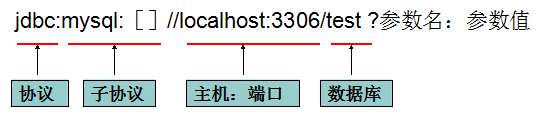
其他参数如:useUnicode=true&characterEncoding=utf8
3.创建执行SQL语句的statement
//存在sql注入风险,statement
public static void main(String[] args) throws SQLException {

        try {

            Class.forName("com.mysql.jdbc.Driver");

        } catch (ClassNotFoundException e) {

            e.printStackTrace();

        }

        testDelete();

    }

    public static void testDelete() throws  SQLException{

        Connection connection=getConnection();

        Statement statement=createStatement(connection);

        String id="2";

        //存在sql注入的危险

        //如果用户传入的id为“5 or 1=1”,那么将删除表中的所有记录

        String sql="delete from t_blog where id="+id;

        statement.execute(sql);

    }

    public static Connection getConnection() throws SQLException {

        return DriverManager.getConnection(jdbcUrl,user,pwd);

    }

    public static Statement createStatement(Connection connection) throws SQLException {

        return connection.createStatement();

    }
//不存在sql诸如风险,PreparedStatement
public static void main(String[] args) throws SQLException {

        try {

            Class.forName("com.mysql.jdbc.Driver");

        } catch (ClassNotFoundException e) {

            e.printStackTrace();

        }

        testPreparedStatement();

    }

    public static void testPreparedStatement() throws SQLException {

        Connection connection = getConnection();

        int id = 1;

        String sql = "delete from t_blog where id=?";

        //PreparedStatement 有效的防止sql注入(SQL语句在程序运行前已经进行了预编译,当运行时动态地把参数传给PreprareStatement时,

        //即使参数里有敏感字符如 or '1=1'也数据库会作为一个参数一个字段的属性值来处理而不会作为一个SQL指令)

        PreparedStatement preparedStatement = createPreparedStatement(connection, sql);

        preparedStatement.setInt(1, id);//占位符顺序从1开始

        int clomSize = preparedStatement.executeUpdate();

        System.out.println("影响的数据库行数=》" + clomSize);

    }

    public static PreparedStatement createPreparedStatement(Connection connection, String sql) throws SQLException {

        return connection.prepareStatement(sql);

    }

    public static Connection getConnection() throws SQLException {

        return DriverManager.getConnection(jdbcUrl, user, pwd);

    }
//处理结果
public static void main(String[] args) throws SQLException {

        try {

            Class.forName("com.mysql.jdbc.Driver");

        } catch (ClassNotFoundException e) {

            e.printStackTrace();

        }

        testResult();

    }

    public static void testResult() throws SQLException{

        Connection connection = getConnection();

        int id=2;

        String sql="select * from t_blog where id>=?";

        PreparedStatement preparedStatement=createPreparedStatement(connection,sql);

        preparedStatement.setInt(1,id);

        ResultSet resultSet=preparedStatement.executeQuery();

        while (resultSet.next()){

            int rid=resultSet.getInt(1);

            String name=resultSet.getString(2);

            String context=resultSet.getString(3);

            Date date=resultSet.getDate(4);

            System.out.println("读取的记录=>"+rid+"-"+name+"-"+context+"-"+ DateFormatUtils.format(date,"yyyy-MM-dd HH:mm:ss"));

        }

    }

    public static PreparedStatement createPreparedStatement(Connection connection, String sql) throws SQLException {

        return connection.prepareStatement(sql);

    }

    public static Connection getConnection() throws SQLException {

        return DriverManager.getConnection(jdbcUrl, user, pwd);

    }
//释放资源
try {

            if(resultSet!=null){

                resultSet.close();

            }

        }catch (SQLException e){

            e.printStackTrace();

        }finally {

            try {

                if(preparedStatement!=null){

                    preparedStatement.close();

                }

            }catch (Exception e){

                e.printStackTrace();

            }

            try {

                if(connection!=null){

                    connection.close();

                }

            }catch (Exception e){

                e.printStackTrace();

            }

        }
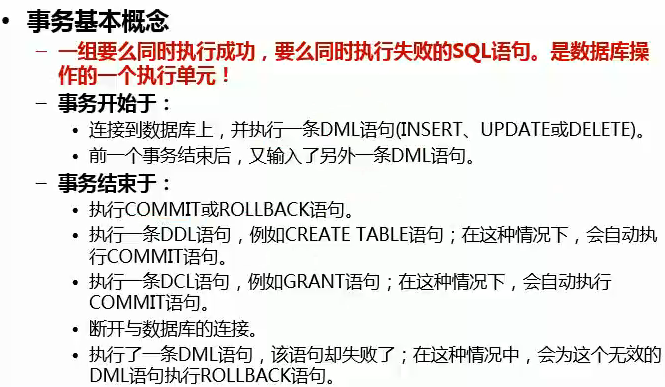
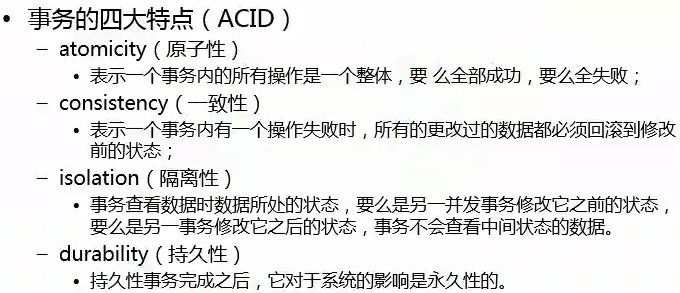
四、事务(ACID特点、隔离级别、提交commit、回滚rollback)
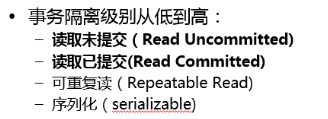
1.批处理Batch
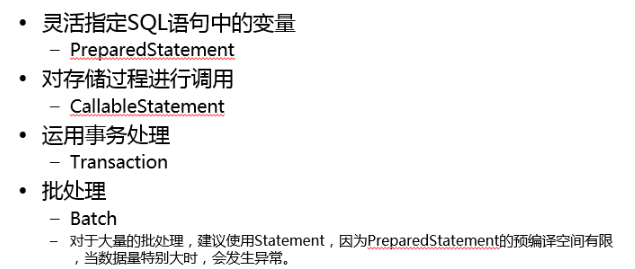
public static void main(String[] args) throws SQLException {

        try {

            Class.forName("com.mysql.jdbc.Driver");

        } catch (ClassNotFoundException e) {

            e.printStackTrace();

        }

        testBatch();

    }

    public static void testBatch() throws SQLException {

        Connection connection = getConnection();

        Statement statement=connection.createStatement();

        for(int i=4;i<104;i++){

            String sql="insert into t_blog (id,name,context,createDateTime) values ('"+i+"','tst3数据库','jdbc学习3','2018-01-01 12:00:00') ";

            statement.addBatch(sql);

        }

        statement.executeBatch();

        statement.close();

        connection.close();

    }
【数据库】jdbc详解的更多相关文章
- SAE上传web应用(包括使用数据库)教程详解及问题解惑
转自:http://blog.csdn.net/baiyuliang2013/article/details/24725995 SAE上传web应用(包括使用数据库)教程详解及问题解惑: 最近由于工作 ...
- Spring4 JDBC详解
Spring4 JDBC详解 在之前的Spring4 IOC详解 的文章中,并没有介绍使用外部属性的知识点.现在利用配置c3p0连接池的契机来一起学习.本章内容主要有两个部分:配置c3p0(重点)和 ...
- JDBC详解系列(二)之加载驱动
---[来自我的CSDN博客](http://blog.csdn.net/weixin_37139197/article/details/78838091)--- 在JDBC详解系列(一)之流程中 ...
- JDBC详解系列(三)之建立连接(DriverManager.getConnection)
在JDBC详解系列(一)之流程中,我将数据库的连接分解成了六个步骤. JDBC流程: 第一步:加载Driver类,注册数据库驱动: 第二步:通过DriverManager,使用url,用户名和密码 ...
- JDBC详解(一)
一.相关概念介绍 1.1.数据库驱动 这里驱动的概念和平时听到的那种驱动的概念是一样的,比如平时购买的声卡,网卡直接插到计算机上面是不能用的,必须要安装相应的驱动程序之后才能够使用声卡和网卡,同样道理 ...
- Java基础-面向接口编程-JDBC详解
Java基础-面向接口编程-JDBC详解 作者:尹正杰 版权声明:原创作品,谢绝转载!否则将追究法律责任. 一.JDBC概念和数据库驱动程序 JDBC(Java Data Base Connectiv ...
- JDBC详解1
JDBC详解1 JDBC整体思维导图 JDBC入门 导jar包:驱动! 加载驱动类:Class.forName("类名"); 给出url.username.password,其中u ...
- windows phone 8.1开发SQlite数据库操作详解
原文出自:http://www.bcmeng.com/windows-phone-sqlite1/ 本文小梦将和大家分享WP8.1中SQlite数据库的基本操作:(最后有整个示例的源码)(希望能通过本 ...
- MySQL数据库优化详解(收藏)
MySQL数据库优化详解 mysql表复制 复制表结构+复制表数据mysql> create table t3 like t1;mysql> insert into t3 select * ...
- 如何查看mysql数据库的引擎/MySQL数据库引擎详解
一般情况下,mysql会默认提供多种存储引擎,你可以通过下面的查看: 看你的mysql现在已提供什么存储引擎:mysql> show engines; 看你的mysql当前默认的存储引擎:mys ...
随机推荐
- pyhton字符串
a = 5 # 1 + 1 = 10 + 1 = 11 + 1 = 100 + 1 = 101print(a.bit_length()) # 计算一个数字的二进制长度. a = 10# print(t ...
- WPF 基于Adorner实现类似Popup效果
1. 什么是Adorner 装饰器是一种特殊类型的FrameworkElement,可用来向用户提供可视提示. 装饰器有很多用途,可用来向元素添加功能句柄,或者提供有关某个控件的状态信息. 2. ...
- python之路 ---计算机硬件基础
计算机(computer)俗称电脑,是现代一种用于高速计算的电子计算机器,可以进行数值计算,又可以进行逻辑计算,还具有存储记忆功能.是能够按照程序运行,自动.高速处理海量数据的现代化智能电子设备.一个 ...
- oracle中的对象创建及删除语句【原创】
oracle对象 1.表 a)创建表1 create table students( id number(10), stuno number(10) , sex varchar2(2), age in ...
- python使用变量
#不建议用加号,建议用.format name = input('name:') age = input('age:') print( name ,age) print('姓名:',name,'年龄: ...
- Linux文件系统中的inode节点详细介绍
这篇文章主要介绍了Linux文件系统中的inode节点,详细讲解了inode是什么.inode包含的信息.inode号码的相关资料等,需要的朋友可以参考下 一.inode是什么? 理解inode,要从 ...
- Comparable和Comparator接口是干什么的?列出它们的区别。
Comparable和Comparator接口是干什么的?列出它们的区别. Java提供了只包含一个compareTo()方法的Comparable接口.这个方法可以个给两个对象排序.具体来说,它返回 ...
- 1.3用socketserver创建服务器
socket服务器代码 # -*- coding: utf-8 -*-import socketserver,time myHost = '' myPort = 50007 def now(): #返 ...
- loadrunner json中文无法识别问题
http://blog.sina.com.cn/s/blog_6ff7a3b50101awmy.html
- C#中三层架构UI、BLL、DAL、Model实际操作
三层架构分为:表现层(UI).业务逻辑层(BLL).数据访问层(DAL)再加上实体类库(Model) 转载请注明出自朱朱家园https://blog.csdn.net/zhgl7688 1.实体类库( ...